
Joined August 2021
- Tweets 19,821
- Following 298
- Followers 17,284
- Likes 42,522
1,222 Photos and videos












Pinned Tweet

Jun 11
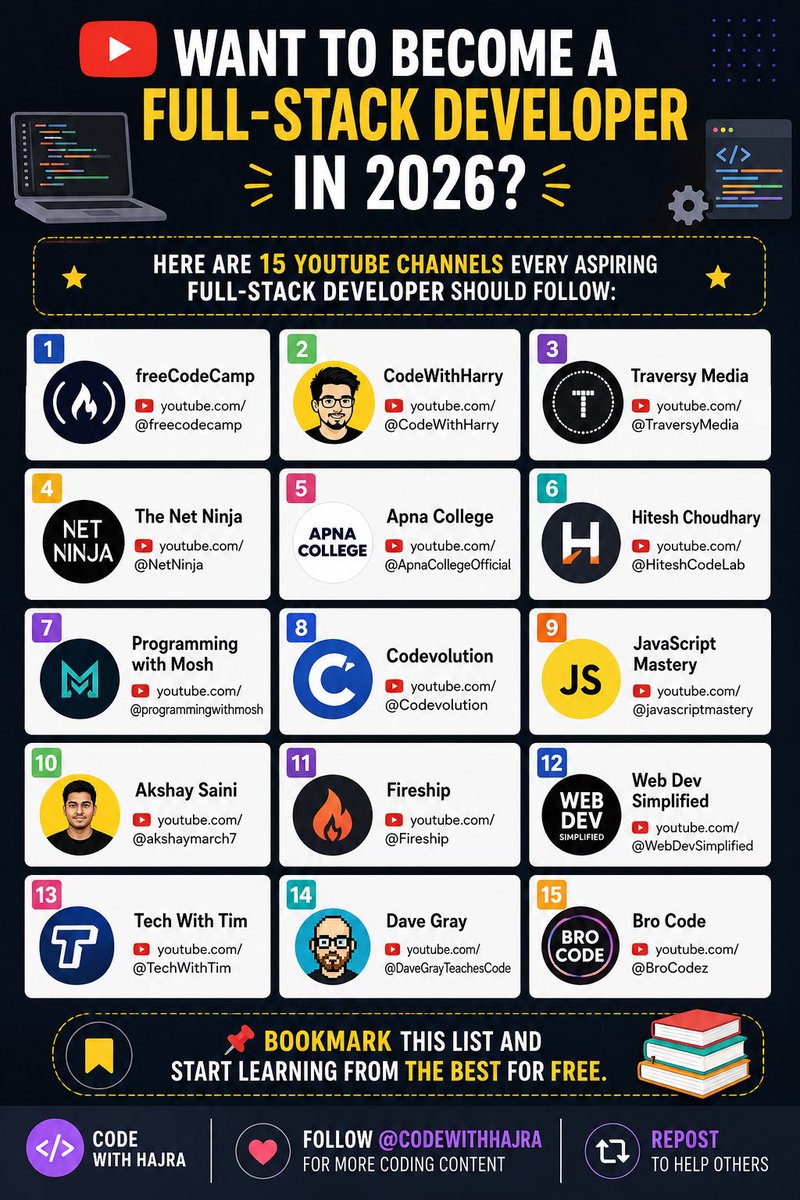
🚀 Want to Become a Full-Stack Developer in 2026?
Here are 15 YouTube channels every aspiring full-stack developer should follow:
1. freeCodeCamp
👉🏻 youtube.com/@freecodecamp
2. CodeWithHarry
👉🏻 youtube.com/@CodeWithHarry
3. Traversy Media
👉🏻 youtube.com/@TraversyMedia
4. The Net Ninja
👉🏻 youtube.com/@NetNinja
5. Apna College
👉🏻 youtube.com/@ApnaCollegeOffi…
6. Hitesh Choudhary
👉🏻 youtube.com/@HiteshCodeLab
7. Programming with Mosh
👉🏻 youtube.com/@programmingwith…
8. Codevolution
👉🏻 youtube.com/@Codevolution
9. JavaScript Mastery
👉🏻 youtube.com/@javascriptmaste…
10. Akshay Saini
👉🏻 youtube.com/@akshaymarch7
11. Fireship
👉🏻 youtube.com/@Fireship
12. Web Dev Simplified
👉🏻 youtube.com/@WebDevSimplifie…
13. Tech With Tim
👉🏻 youtube.com/@TechWithTim
14. Dave Gray
👉🏻 youtube.com/@DaveGrayTeaches…
15. Bro Code
👉🏻 youtube.com/@BroCodez
📌 Bookmark this list and start learning from the best for free.
48
12
106
11,363
H A J R A retweeted

10h
13 YouTube Channels That Can Teach You More Than College
1. Cybersecurity - John Hammond
2. Artificial Intelligence - Andrej Karpathy
3. Web Development - Traversy Media
4. Python - ArjanCodes
5. DevOps - KodeKloud
6. Cloud Computing - Google Cloud Tech
7. Data Analytics - Alex The Analyst
8. Digital Marketing - Ahrefs
9. UI / UX Design - Mizko
10. Blockchain - Patrick Collins
11. React - Web Dev Simplified
12. Java - Java Brains
13. Networking - David Bombal
Happy learning..!!
26
18
120
6,951
H A J R A retweeted
🚨 7 CLAUDE PROMPTS TO LEARN ANYTHING FOR FREE.
Most people don’t lack information, they lack the right prompts.
Save this for Later
24
2
37
1,063
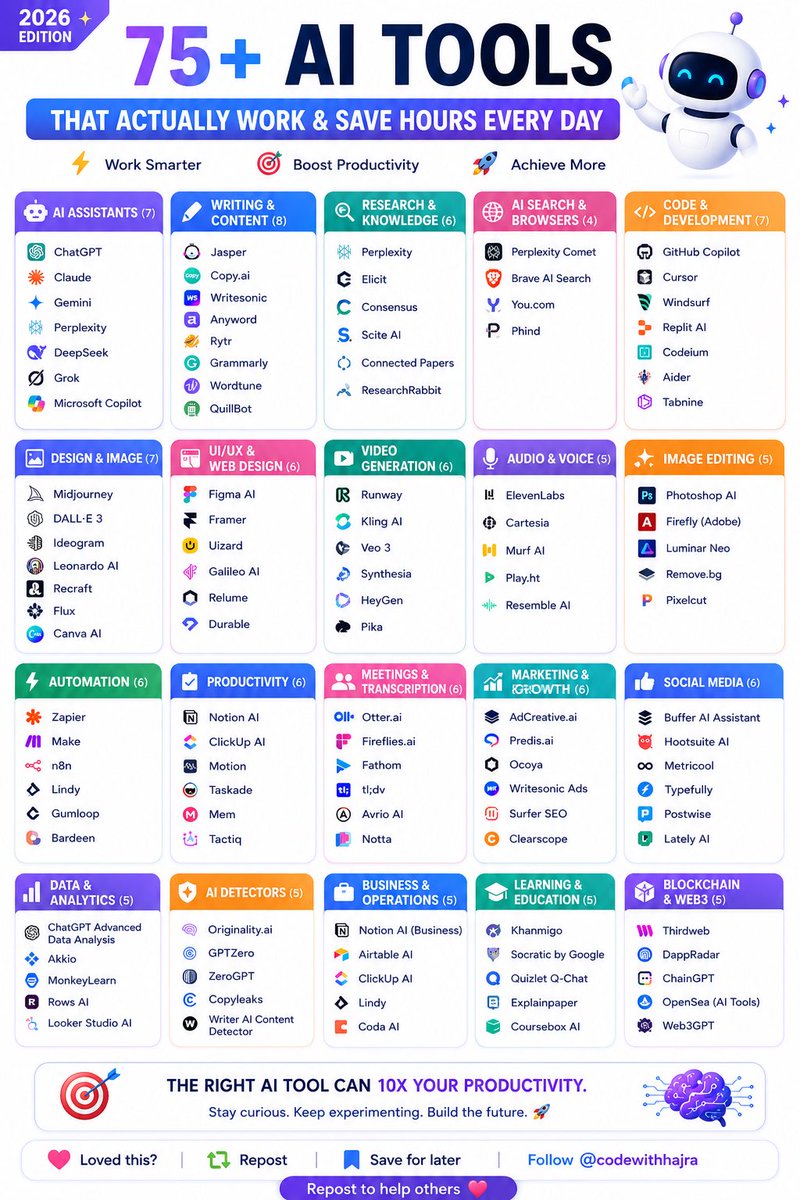
🚀 75 AI TOOLS THAT ACTUALLY WORK IN 2026
💡 AI Assistants
• ChatGPT
• Claude
• Gemini
• Perplexity
• DeepSeek
• Grok
• Microsoft Copilot
✍️ Writing & Content
• Jasper
• Copy .ai
• Writesonic
• Anyword
• Rytr
• Grammarly
• Wordtune
• QuillBot
🔍 Research & Knowledge
• Perplexity
• Elicit
• Consensus
• Scite AI
• Connected Papers
• ResearchRabbit
🌐 AI Search
• Perplexity Comet
• Brave AI Search
• You .com
• Phind
💻 Code & Development
• GitHub Copilot
• Cursor
• Windsurf
• Replit AI
• Codeium
• Aider
• Tabnine
🎨 Design & Image Generation
• Midjourney
• DALL·E
• Ideogram
• Leonardo AI
• Recraft
• Flux
• Canva AI
🖌️ UI/UX & Web Design
• Figma AI
• Framer
• Uizard
• Galileo AI
• Relume
• Durable
🎥 Video Generation
• Runway
• Kling AI
• Veo
• Synthesia
• HeyGen
• Pika
🎙️ Audio & Voice
• ElevenLabs
• Cartesia
• Murf AI
• Play .ht
• Resemble AI
🖼️ Image Editing
• Photoshop AI
• Adobe Firefly
• Luminar Neo
• Remove .bg
• Pixelcut
⚡ Automation
• Zapier
• Make
• n8n
• Lindy
• Gumloop
• Bardeen
📈 Productivity
• Notion AI
• ClickUp AI
• Motion
• Taskade
• Mem
• Tactiq
🎤 Meetings & Transcription
• Otter .ai
• Fireflies .ai
• Fathom
• tl;dv
• Avrio AI
• Notta
📢 Marketing & SEO
• AdCreative .ai
• Predis .ai
• Ocoya
• Writesonic Ads
• Surfer SEO
• Clearscope
📱 Social Media
• Buffer AI Assistant
• Hootsuite AI
• Metricool
• Typefully
• Postwise
• Lately AI
📊 Data & Analytics
• ChatGPT Advanced Data Analysis
• Akkio
• MonkeyLearn
• Rows AI
• Looker Studio AI
🔍 AI Detection
• Originality .ai
• GPTZero
• ZeroGPT
• Copyleaks
• Writer AI Detector
🏢 Business Operations
• Airtable AI
• ClickUp AI
• Notion AI Business
• Lindy
• Coda AI
🎓 Learning
• Khanmigo
• Socratic
• Quizlet Q-Chat
• Explainpaper
• Coursebox AI
⛓️ Web3 & Blockchain
• Thirdweb
• DappRadar
• ChainGPT
• OpenSea AI Tools
• Web3GPT
❤️ Follow @codewithhajra 🔄 Repost to help others discover better AI tools.
11
22
278
🚨 7 CLAUDE PROMPTS TO LEARN ANYTHING FOR FREE.
Most people don’t lack information, they lack the right prompts.
Save this for Later
24
2
37
1,063
Simulate a tutor conversation:
Act as an expert tutor in [subject].
Your teaching style is Socratic - instead of just giving me answers, ask me guiding questions that help me figure things out myself. Start by asking me what I already know about [topic] and what specifically confuses me. Then guide me through understanding it step by step using questions, simple examples, and gentle corrections when I go wrong. If I am stuck for more than two attempts on the same concept, explain it directly and then test me on it again with a slightly different question.
1
4
94
That’s all for the thread. If you find it useful retweet the first one.
Follow @codewithhajra
Happy Learning ✨
4
73
Jun 14
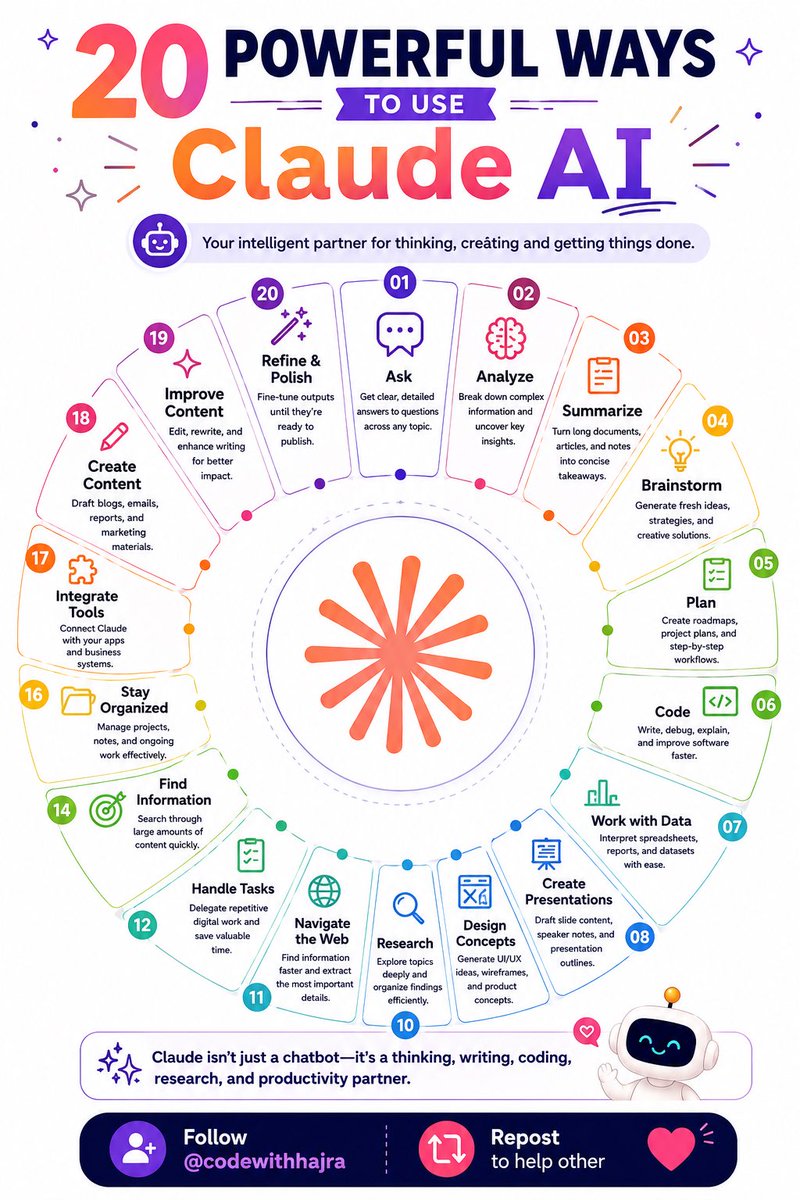
🔥 20 POWERFUL WAYS TO USE Claude AI
Your intelligent partner for thinking, creating and getting things done.
01. Ask
Get clear, detailed answers to questions across any topic.
02. Analyze
Break down complex information and uncover key insights.
03. Summarize
Turn long documents, articles, and notes into concise takeaways.
04. Brainstorm
Generate fresh ideas, strategies, and creative solutions.
05. Plan
Create roadmaps, project plans, and step-by-step workflows.
06. Code
Write, debug, explain, and improve software faster.
07. Work with Data
Interpret spreadsheets, reports, and datasets with ease.
08. Create Presentations
Draft slide content, speaker notes, and presentation outlines.
09. Design Concepts
Generate UI/UX ideas, wireframes, and product concepts.
10. Research
Explore topics deeply and organize findings efficiently.
11. Navigate the Web
Find information faster and extract the most important details.
12. Handle Tasks
Delegate repetitive digital work and save valuable time.
13. Find Information
Search through large amounts of content quickly.
14. Investigate
Compare sources, identify patterns, and uncover insights.
15. Stay Organized
Manage projects, notes, and ongoing work effectively.
16. Automate Workflows
Reduce manual effort with repeatable AI-powered processes.
17. Integrate Tools
Connect Claude with your apps and business systems.
18. Create Content
Draft blogs, emails, reports, and marketing materials.
19. Improve Content
Edit, rewrite, and enhance writing for better impact.
20. Refine & Polish
Fine-tune outputs until they’re ready to publish.
💜 Follow @codewithhajra 🔁 Repost to help others.
36
8
71
3,233
Jun 14
Good morning, and Happy Sunday to all the amazing people! 🌻☕
This video was created using Grok.
Prompt:
A warm, cozy morning kitchen filled with soft natural sunlight streaming through a window. A cute young girl is gently preparing coffee on a wooden counter. She pours freshly roasted coffee beans from a glass jar into a small grinder. The beans are rich, dark, and beautifully textured. A soft ceramic mug sits nearby, gently steaming. The kitchen is minimal, aesthetic, and lived-in, with wooden shelves, a kettle, and small plants. The atmosphere feels peaceful and unhurried, like a calm morning ritual. The girl wears an oversized knitted sweater and relaxed home clothes, with her hair styled in a soft messy bun. A small cat sits quietly on the counter, watching. Steam, sunlight rays, and floating dust particles enhance the cozy feeling. Warm earthy tones, soft cinematic lighting, shallow depth of field, ultra-realistic illustration style, hygge aesthetic, and a peaceful, heartwarming mood.
After brewing the coffee, she gently lifts the mug, takes a slow sip, and her eyes light up with delight. A warm smile appears on her face as she softly says, “This is so good.” ☕✨
40
55
3,461
Jun 13
Bring Claude into your daily workflow and the impact shows up faster than you'd expect.🔥
Here are 12 prompts worth bookmarking:👇🏻
29
1
53
4,743
Jun 13
12. Precision Prompt Builder:
"My goal is: [describe outcome]. Don't write the prompt yet. First work out: what expert persona fits best, what context is essential, what the core objectives are, what constraints apply, what format the output should take, and what quality looks like. Then write the most effective prompt possible and explain the logic behind each design choice."
1
11
358
Jun 13
That’s all for the thread. If you find it useful retweet the first one.
Follow @codewithhajra
Happy Learning ✨
9
289