
レビューみてるとObsidianでええやん思うんやけど。これ機能使いすぎる人用でないの? まあ僕dataviewとテンプレーターくらいしか使ってないしな。パソ修理から帰ってきたらPowerShellでGeminiさんと連携したい。いうて作業領域人とAI巡回で分けてるだけやん? まあそうといえばそう。
1
17


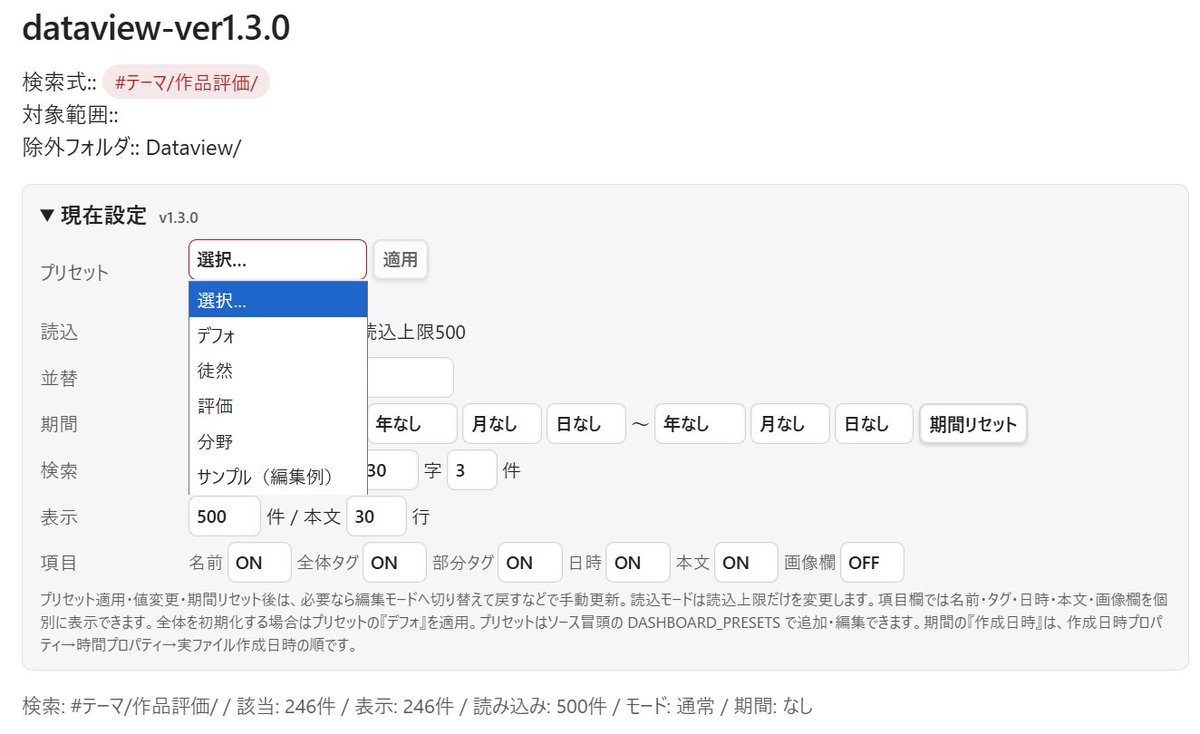
obsidianのdataview、プリセットを導入した
ファイルを複製してよく使うものを用意する方式を考えてたが、この方がいいわ
終わりそうで終わらない。
なにかを改良したら、次なる問題が見えて、さらなる解消をし......以下ループ
1
39


Não uso o Claude mas uso Obsidian pra quase tudo. Me fez largar o Norton. Principalmente com DataView
1,065




Jun 10
“Markdown documentation = the unsexy, proven foundation her “we” already built. It’s the raw, portable, agent-native data/workflow layer that powers or trains such twins without relying on corporate black boxes.
It’s the practical substrate beneath hype around personal AIs: your raw data processes become the training/context layer for an owned agent/twin.
Actual timeline of Markdown for workflow/PKM tracking
Markdown itself dates to 2004 (John Gruber), but its use for structured personal workflows and “second brains” evolved in clear phases:
• Pre-2010s: Markdown used for READMEs, blogs, and basic docs. Early plain-text enthusiasts (e.g., via Vim/emacs) kept life logs in .md or .txt files.
• ~2010–2018: Rise of plain-text productivity. Tools like Notational Velocity, nvALT, and simple Git Markdown setups for notes/tasks. Zettelkasten method (atomic notes) revived in digital form.
• 2018–2020: Explosion of Markdown-based PKM. Roam Research (bi-directional linking) popularized networked thinking; Obsidian launched in beta March 2020 as a local Markdown vault with graph views. Tiago Forte’s PARA method and “Building a Second Brain” concepts spread widely (his book came in 2022, but the framework was online earlier).
• 2021–2023: Mainstream “Second Brain” adoption. Obsidian plugins (Dataview, etc.) became standard for workflows. People documented daily processes, projects (PARA folders), and life data in Markdown. Early LLM experiments used these vaults as context.
• 2024–2025: AI integration boom. With accessible agents (Claude, etc.), people explicitly treat Markdown vaults as agent memory/workflow specs. “Document everything for the agents” becomes common advice. Obsidian Claude Code patterns emerge.
• 2026: Fully normalized. Markdown as “the new source code” for agentic workflows — skill.md files, prose contracts, persistent context logs, etc. Tools like Tolaria or custom setups emphasize Git Markdown as AI-first second brains. This is the exact territory @lilithdatura’s circle occupies.
Her “we” timeline (2–3 years as of mid-2026) → roughly since ~2023–2024 — aligns well with the ramp-up of serious AI-augmented PKM. Many in indie/cybernetics/agent circles were already deep into Obsidian/Git Markdown workflows by then, and the 2024–2025 LLM wave made it obviously foundational for personal agents/twins. M
It wasn’t brand new in 2023, but that’s when it became a deliberate, scaled practice for many forward-looking groups.”
1
1
1
167

#LeanProductivity 💎 Sascha D. Kasper retweeted

💡 Tip: Use Dataview in #Obsidian for dynamic task lists.
✅ Filter tasks by date, priority, or tags, and manage projects like a pro!
🎞️ #LeanProductivity videos with more tips: kspr.me/yt?utm_source=twitte…

1
1
64

Jun 10
dataview Na Temu no brazil, os preços ficam menores usando código de desconto, cupom, código promocional, código promo, voucher e vale desconto 👩🦯🌖👨🔬

26


Jun 9
Obsidian零基础全套教程!双链插件AI功能多设备同步全掌握,搭建完整知识体系
从安装到AI插件全程精讲!双链管理、模板设置、白板思维导图、Dataview数据库逐一拆解。日记月报、会议转稿、智能读书提示词模板直接用,零基础也能独立出片!
学习链接:
链接: pan.baidu.com/s/1wMEvbS-Ldpk… 提取码: sttb

197

Jun 9
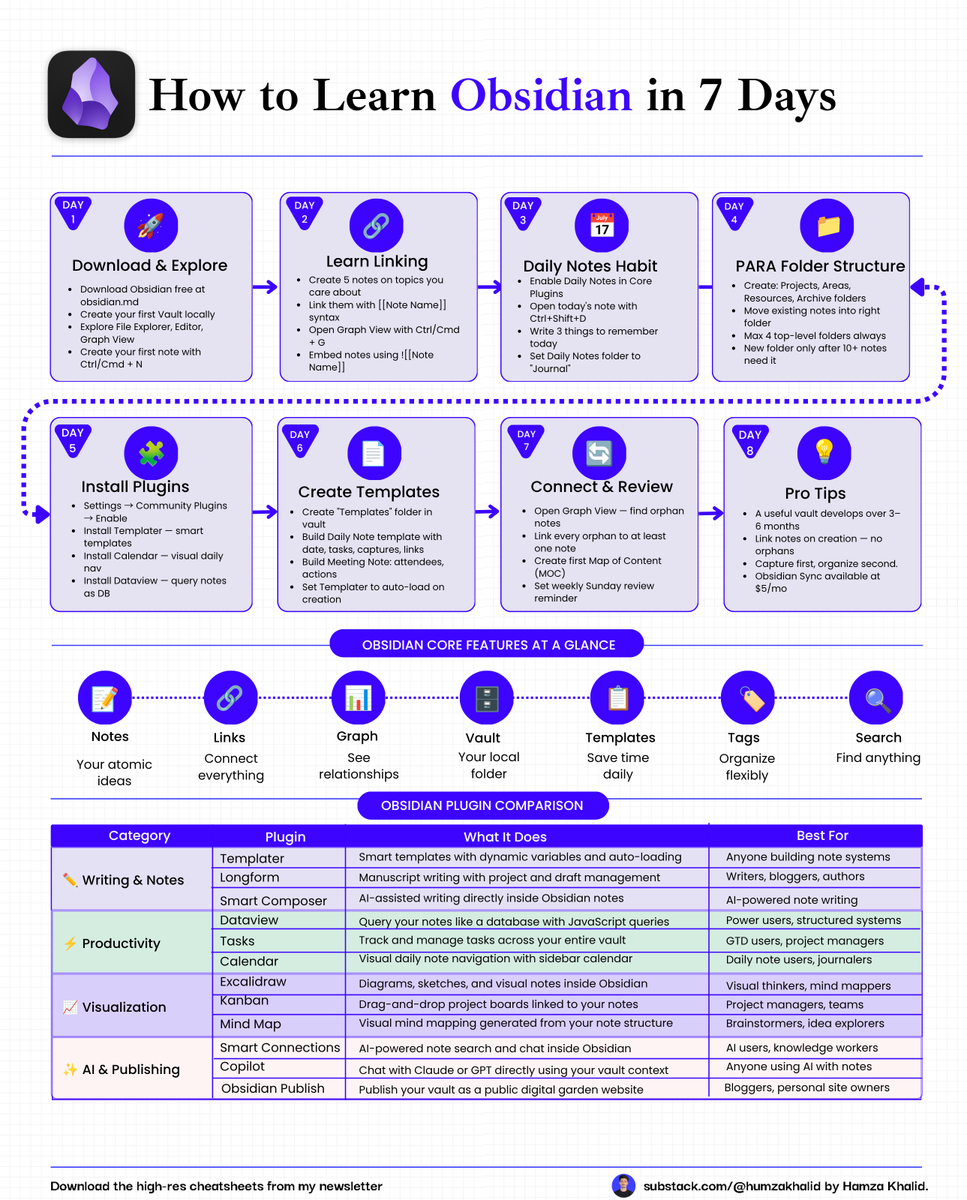
STEP 4: INSTALL ONLY THESE 3 FREE PLUGINS
Start with the core app. Add only these three:
Templater — create a template for every note type so the blank page never stops you again
Calendar — connect your daily notes to a calendar view with one click
Dataview — query your entire vault like a database and surface exactly
What you need
Ignore the other 500 plugins.
Plugin hoarding is not a second brain.
These three are.
1
245

Jun 9
Your notes app is a graveyard.
You save everything, and at the end, you find nothing.
Obsidian fixes that in 7 days. Here is the full plan: 👇
☑️ Day 1: Download and Explore
→ Download Obsidian free at obsidian. md and create your first Vault.
→ Open File Explorer, Editor, and Graph View to get familiar.
→ Create your first note with Ctrl/Cmd N.
☑️ Day 2: Learn Linking
→ Create 5 notes on topics you care about.
→ Link them together using the [[Note Name]] syntax.
→ Open Graph View with Ctrl/Cmd G to see your knowledge map.
☑️ Day 3: Build the Daily Notes Habit
→ Enable Daily Notes in Core Plugins.
→ Open today's note with Ctrl Shift D every morning.
→ Write 3 things to remember. Set your folder to "Journal."
☑️ Day 4: Set Up PARA Folder Structure
→ Create 4 folders: Projects, Areas, Resources, Archive.
→ Move every existing note into the right folder today.
→ Never create a new folder until you have 10 notes that need it.
☑️ Day 5: Install the Right Plugins
→ Go to Settings, enable Community Plugins, and install Templater.
→ Add Calendar for visual daily navigation and Dataview to query notes like a database.
→ These 3 plugins alone will change how you use Obsidian forever.
☑️ Day 6: Create Your Templates
→ Build a Daily Note template with date, tasks, captures, and links.
→ Build a Meeting Note template with attendees, actions, and context.
→ Set Templater to auto-load on every new note you create.
☑️ Day 7: Connect and Review
→ Open Graph View and find every orphan note with no connections.
→ Link every orphan to at least one other note.
→ Create your first Map of Content and set a weekly Sunday review reminder.
----
For more Guides and cheatsheets:
1. Go to substack.com/@humzakhalid
2. Repost this to share ♻️ it with your friend
3. Follow me for more systems and workflows like this.

20
31
166
16,545
