
LEDs are great because they're both cheap and also very focusable. The problem is that retards don't know about reflection vs projection style headlights and will put the wrong bulbs in, and have it look like their high beams are always on.
16


2.0.28 is live
FEATURES
- Sign in with ChatGPT
Use your ChatGPT Plus or Pro subscription instead of an OpenAI API key to route Codex models. xAI Grok OAuth also ships.
- Live Performance Stats In Chats
While streaming, a line shows elapsed time, decode speed, and context usage; an expandable row adds time to first token and token counts.
- Exa Web Search Provider
Exa joins Tavily, Serper, Brave, and LangSearch: neural search returning full page text, 1,000 free searches per month.
- User Profile From Your Memories
Each memory sector's Profile button asks an AI model to summarize its long-term memories into a short paragraph that prefixes every chat there.
- One-Tap Memory Consolidation
A Consolidate button finds near-duplicate long-term memories and merges each cluster into one entry.
- Memory Maintenance In One Tap
Profile and Consolidate first categorize Uncategorized memories and promote short-term notes to long-term.
- Memory Audit History
A new Audit History view lists every add, update, and delete with keyword search.
- On-Device Model Benchmark
A Benchmark button runs a llama-bench style test reporting speed and peak memory, then suggests optimal context, batch, and thread settings.
IMPROVEMENTS
- Text Selection In Fullscreen Chat
Selecting text in the fullscreen chat input no longer slides the main menu open, so editing on iPad stays precise.
- Choose Transcription Language
When converting video or audio to text, pick the spoken language for every speech engine, or leave it on Auto.
- Smoother Transcription Progress
Audio-to-text progress now advances steadily instead of jumping backward.
- Smarter Duplicate Detection
Multiple memories from one turn are evaluated in a single AI call, and near-identical entries are skipped.
- Memory Search Knows Profile From Facts
The cached user profile is sent separately from matching memory rows for a cleaner prompt.
- llama.cpp Engine b9553
Updated from b9279 to b9553 (269 changes), adding DeepSeek-OCR 2, Granite 4 Vision, Gemma 4 vision and audio, and DeepSeek V3.2 sparse attention.
- MLX-Swift LM Engine tag-20260607
Faster, more accurate on-device vision: corrected Qwen2.5-VL attention, SmolVLM2 up to 9x faster, plus audio input and more reliable tool calling.
- Sharper Camera Focus for Documents
View Assistant locks focus more reliably on close-up subjects, and you can tap the live preview to focus.
BUG FIXES
- Soul Greeting Now Appears From the Model View
Starting a chat with a Soul from model settings now shows its configured first message.
- Attaching a Video to Chat
Fixed Video Processing Error: file doesn't exist when attaching a video.
- Empty Transcript From iOS Speech
Fixed the iOS speech recognizer returning nothing on a clear recording.
- Convert to Text Could Hang
Fixed the iOS Speech Analyzer getting stuck at Analyzing audio; it now falls back to the system recognizer.
- Legacy Memories Now Reachable
Memories with an Uncategorized chip were invisible to Consolidate and Profile; all maintenance flows now pick them up.
- Memory AI Calls No Longer Stall On First Event
Fixed Profile, Consolidate, and Categorize calls returning empty when the first AI event was misread as the end.
- Memory List Refreshes After Maintenance
After Profile or Consolidate, Uncategorized chips on just-categorized rows disappear immediately.
- VoiceOver Input Stays Reachable After Sending
Fixed the chat input collapsing after sending; with VoiceOver it stays visible and focusable.
1
391


@A_dmg04 @Destiny2Team hey is Backfang supposed to be focusable at Drifter, it is not there for me but it's there for a few people who did not obtain the original Backfang.
I feel like I'm going CRAZY
2
18


creative coding is often balancing requirements and correctness. for ex, llm wld getComputedStyle to “check btn is visible” cos it fixates on “is visible?” (obvious, correct, but costly).
humans are more likely to acknowledge btns are focusable unless hidden, so call btn.focus() and check doc.activeElement (creative)
2
261

Jun 10
Yeah, that makes sense. I made it focusable so you can arrow the parts over. I also added a lot of other unnecessary enhancements because I can't help myself. Thanks for the feedback!
4
188


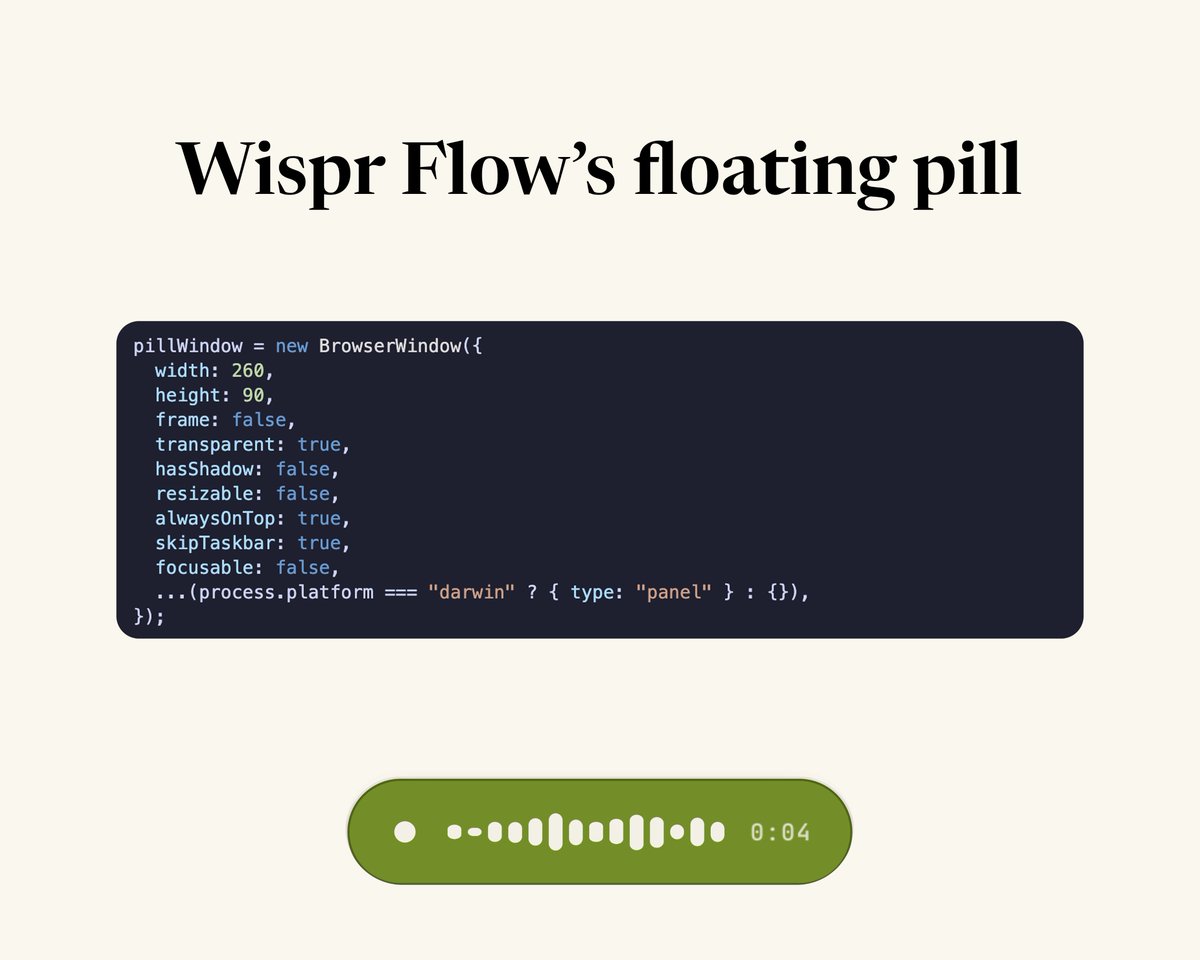
Two weeks into building Freestyle, @MathurAditya7 and I learned a ton about building in voice.
For context, we've been working on an oss alternative to Wispr Flow. Thought it was going to be a cakewalk, but there are some technical things that are really challenging.
I wrote an article on how we built the floating pill thing.
1️⃣ The pill isn't part of the app. It's its own transparent, non-focusable Electron window that floats above everything. That way it doesn't steal your cursor when dictating.
2️⃣ To get the waveform effect, we use getUserMedia API and attach a Web Audio analyser. Split the results of analyzer into 14 bars rendered by frequency intensity.
Check out the article!
freestylevoice.com/blog/floa…
4
2
11
377


May 31
Feeling pretty good about my port of react-ish (hooks, retained diffed tree) & jsx to C .
The crazy thing is that it marries 2026 react conventions with game dev screen stacks (push/pop, i.e. forward & cancel/go back) AND builds an implicit grid of focusable elements on screen for gamepad/keyboard navigation!
Spent almost every free moment I had over the past 3 weeks to this. Many late nights.
Next is to refactor Silencer to use it.
Check it out in a toy app: github.com/Arsia-Mons/ui/blo…
2
925

Bug fixes shipping to Grok Build 0.2.11 (release notes will be available in the TUI and on change-log website)
- Make tab bar arrow-focusable in picker modals (MCPs, plugins, hooks)
- Show "Switched to mode" banner above prompt for `Shift Tab` cycles
- Instant loading indicator on model switch
- Fix broken branch glyph on Windows
- Fix WSL `Ctrl V` image paste
- Fix UX bug where `/context` always showed "Auto-compact at 85%"
- Fix slash command autocomplete and rendering
- Boost terminal video playback to 30fps
- `Left`/`Right` arrows switch tabs in extensions modal
- `Up`/`Down` arrows at list edges focus search input
- Fix terminal resize on multiplexer (zellij/tmux)
- Open buttons for imagine media output
- Render streaming bash tool output
- Increase default retry budget to ~5 min and simplify retry UI
20
16
286
17,370

May 27
🎯visibility: hidden;
If you set an element's visibility property to `hidden`, the element becomes invisible, but it still occupies space in the document.
The element is still in the document flow and maintains its position in the layout, but it is not visible.
It preserves the space it occupies, so other elements around it will still be positioned as though it were visible.
It will take up space as if it were visible, but you cannot interact with it (it’s not clickable or focusable).
This is often used when you want to hide an element but keep its layout space intact (e.g., for showing or hiding content without shifting surrounding elements).
1
3
89

ローニンの恩恵と集中スキル(The Ronin’s benevolences and focusable skills)
.
浪人 • レスラー
#ShadownicRonin #TKD #GhostShinobi #Kickboxing #九戸党


2
163

May 1
🛠️ PredictAI Development Update
— May 1, 2026
Hey $PredictAI Warriors, a quick rundown of what was shipped today before mainnet launch coming on the 30th of this month 🚀
1. 🐛 Critical fix: Demo betting is back online
A handful of you reported that placing bets on live markets was failing with a weird "function" error.
We are sorry about that — it was a real issue and now FIXED 🔨
What was happening: when we wired up direct betting on Polymarket markets, three of the endpoints were written in a different auth library's style than the rest of the platform uses. The moment any logged-in user clicked Yes/No on a live market, the server tripped over a method that didn't exist and bounced back a 500.
The fix: We’ve unified all betting routes onto our standard session middleware so they read the user the same way the internal-markets bet endpoint already does.
Verified end-to-end with a fresh account — register → open a live market → bet $10 → balance correctly drops from $10,000 to $9,990.
Live trading on every market source is fully restored.
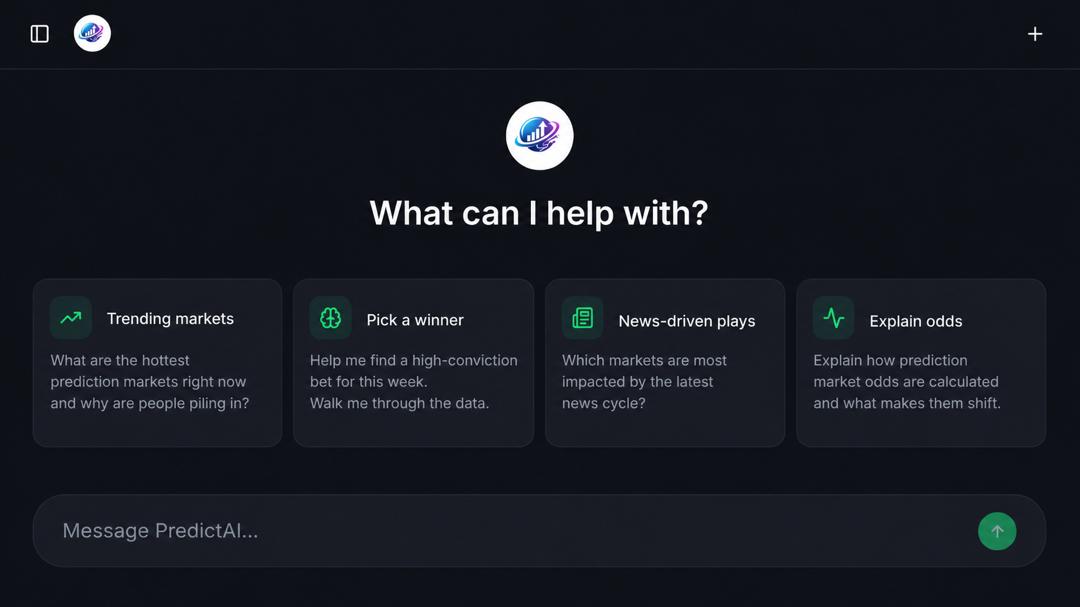
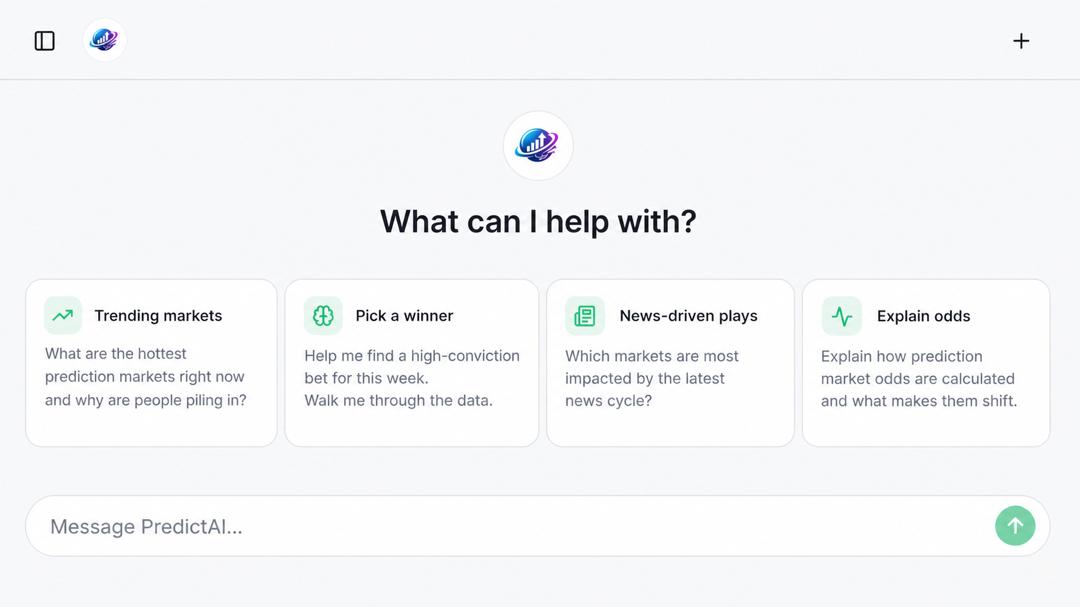
2. 🤖 PredictAI Assistant — full redesign
The old AI Help page was cramped and downright painful on phones(Not mobile-friendly enough)
So we tore it down and rebuilt it to feel like a true conversation tool for devices of any type
What's new:
- Full-screen layout with a clean left sidebar listing your past chats grouped under "Recent"
- Mobile-first: on phones the sidebar tucks behind a hamburger and slides in as a drawer — no more horizontal scrolling, no more cramped buttons
- Empty-state suggestion cards (Trending markets, Pick a winner, News-driven plays, Explain odds) — tap one and it kicks off a chat instantly, no extra clicks
- Familiar message style: your messages as colored bubbles on the right, AI replies as clean readable text on the left — same mental model as GPT 5
- Auto-growing pill-shaped composer with a circular send button — Enter to send, Shift Enter for a new line
- Theme toggle and Sign-out moved into the sidebar so you don't lose those controls
- Race-safe sending: hammering Enter or clicking suggestion cards rapidly will no longer create duplicate conversations
- Keyboard accessible: chat history rows are now real focusable buttons with visible focus rings
Verified live on both desktop and a mobile with full register → chat → mobile-drawer → theme toggle → sign-out flows.
3. 📐 Roomier conversation view (just now)
A community member pointed out the message input was eating screen real estate, especially in screenshots.
We’ve slimmed it down significantly:
~65px more per screenshot
That's roughly half the vertical space the composer used to take.
Same auto-grow behavior when you type long prompts — it just doesn't sit there bulky and empty anymore.
🚀 Already deployed
All three changes are now live
You can go on a ride now at predictai.tech/ai-help?
🗓️ What's queued for the rest of the week
- Wrapping pre-mainnet polish ahead of the $PredictAI mainnet launch on May 30, 2026 🚀
- Continuing whitepaper distribution
- More quality-of-life UX upgrade
keep the feedback coming.
Big thanks to everyone who reported the betting bug fast— that's exactly the loop we want.
Found something janky?
Drop it in the chat and we'll get it on the board.
Sign-up, get a $10,000 virtual funds to test the platform and earn more points ahead of mainnet.
predictai.tech/
Best,
—Technical Team, PredictAI.
12
10
25
1,180