


私はこれに全部当てはまっているので、情シスは天職だと思っている。
なおipconfig/ all よりも gpupdate/ forceの方がよく使う。
May 15

情シスに向いている人
・人に何回同じ質問されても怒らない
・「パスワード忘れました」に無の表情で対応できる
・頼まれ事が増えるほど逆に燃える
・トラブル中ほど冷静になる
・誰も気づかない不具合に1人で気づいて、1人で解決
・説明が苦手な人の話を翻訳できる
・裏方なのにコミュ力が高い
・優しいけど、セキュリティには厳しい
・MBTIタイプはipconfig /all
こんな人、だいたい情シスに吸い込まれていく。
2
4
245


May 17
私もシス管だったので、ほんとその通りかと思います。ある程度悟りを開きますし、聞く相手も居ないネットで調べて英文を読もうが何も前例がないトラブルを1人で解決して自己満足の喜び。
まぁ最後の所はgpupdate /forceを推しときます😁
1
1
12
12,148

Apr 27
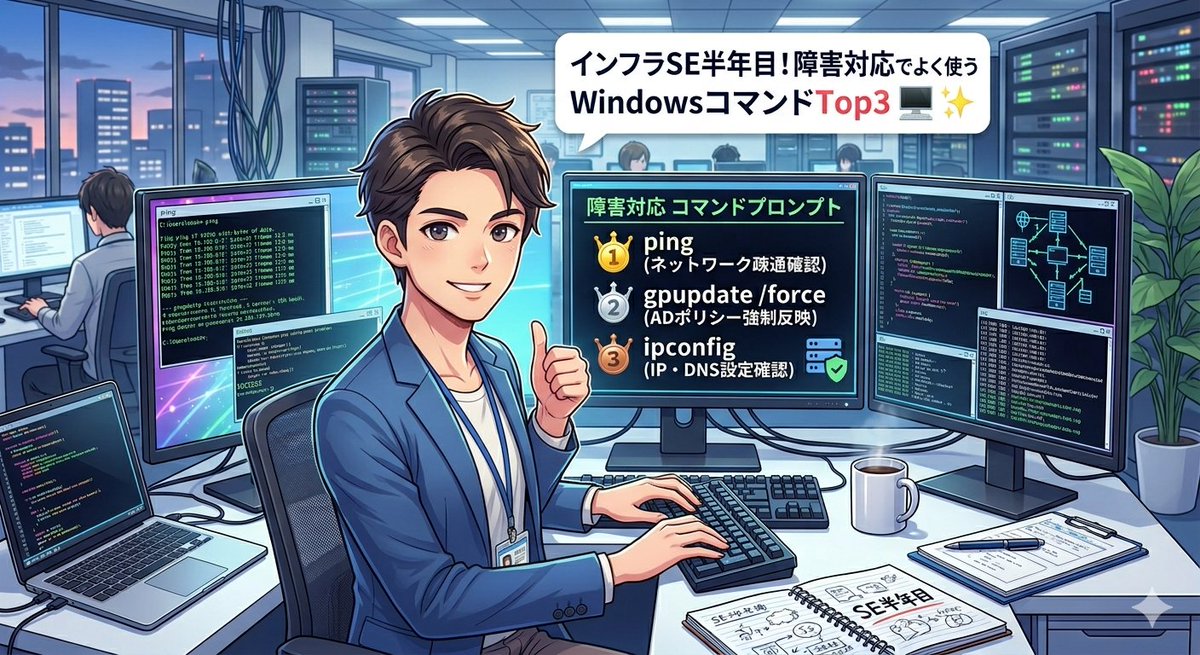
インフラSE半年で気づいた、障害対応でよく使うWindowsコマンドTop3🖥️
🥇 ping → まずネットワーク疎通の確認
🥈 gpupdate /force → ADポリシーの強制反映
🥉 ipconfig → IPアドレス・DNS設定の即確認
これに tracert・eventvwr が続く感じかな。
「コマンドプロンプト、なんとなく怖くて
1
2
241

Apr 25
WindowsのRPC設計に起因する新たな権限昇格手法「PhantomRPC」が公開された。既存のバグではなく構造的欠陥を突くもので、低権限からSYSTEM権限へ到達可能とされ、広範な環境に影響する恐れがある。
この問題はKasperskyの研究者Haidar Kabiboが発表した。WindowsのRPC実装(rpcrt4.dll)は、接続先サーバーが不在の場合でも応答元の正当性を検証しないため、攻撃者が偽RPCサーバーを用意して通信を横取りできる。
攻撃の核心はRpcImpersonateClient APIの悪用で、特権プロセスが接続するとその権限を乗っ取ることが可能となる。gpupdateやEdge起動、診断サービスなど複数の通常動作をトリガーに、ユーザー操作なしでもSYSTEM権限へ昇格できる経路が確認された。
この脆弱性は2025年に報告されたが、Microsoft Security Response Centerは中程度と判断し、CVEは割り当てられていない。修正も提供されていない状況だ。
対策としてはRPC監視の強化や不要サービスの有効化、SeImpersonatePrivilegeの制限などが推奨されている。
cybersecuritynews.com/new-wi…
17
1,990

Apr 24
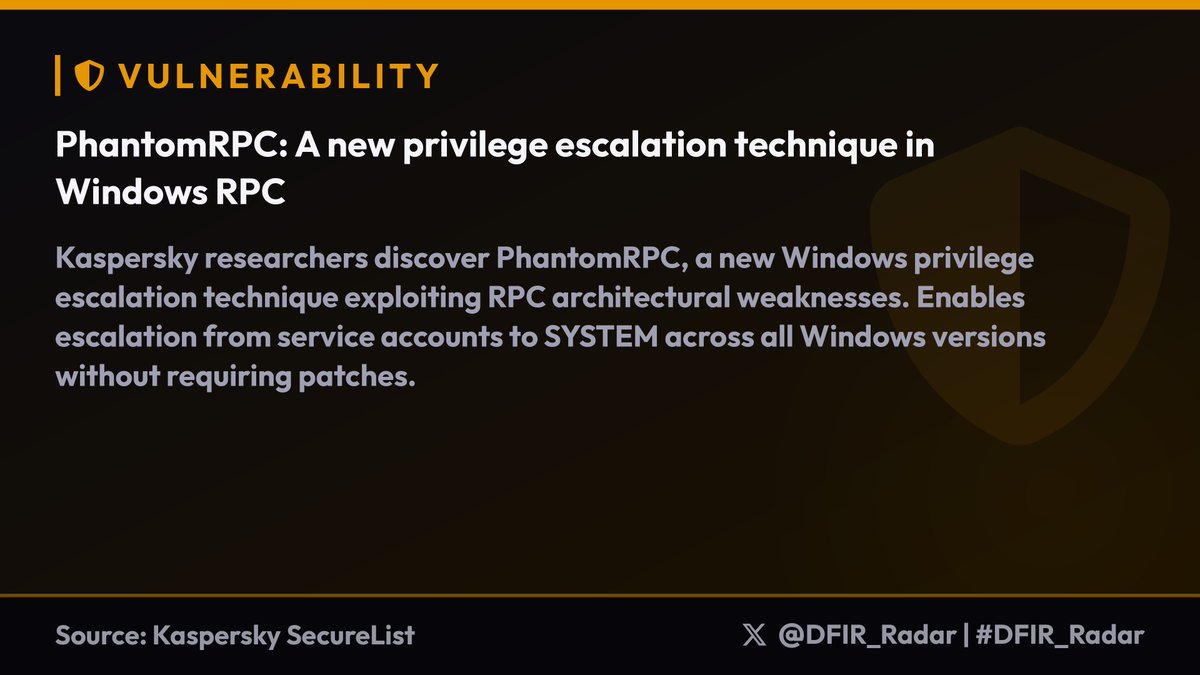
Kaspersky researchers discover PhantomRPC, a new Windows privilege escalation technique exploiting RPC architectural weaknesses. Enables escalation from service accounts to SYSTEM across all Windows versions without requiring patches.
Technical details:
• Targets RPC calls to unavailable servers (TermService, DHCP Client, W32Time) with high impersonation levels
• Attack deploys malicious RPC server mimicking legitimate endpoints like ncalrpc:[TermSrvApi] or \PIPE\W32TIME
• Requires SeImpersonatePrivilege but works from Network Service/Local Service contexts (T1134.001)
• Five exploitation paths identified: gpupdate coercion, Edge startup, WDI background service, ipconfig execution, w32tm.exe timing
Attack methodology:
• Attacker compromises service running under Network/Local Service account
• Deploys fake RPC server with same UUID/endpoint as legitimate disabled service
• Legitimate high-privilege process makes RPC call expecting real server
• Malicious server calls RpcImpersonateClient() to assume SYSTEM/Admin context
• ETW monitoring reveals pattern: Event ID 1 with RPC_S_SERVER_UNAVAILABLE (0x800706BA)
Microsoft classified as moderate severity, no CVE assigned, no immediate patch planned. Monitor RPC failures via ETW Event IDs 1 and 5, reduce SeImpersonatePrivilege usage where possible.
#DFIR_Radar
2
5
756

Apr 18
親からWi-Fi繋がらんと言われ、wpa3-saeに対応してないPCだったので、電車でADのアカウント(AAAでfamily vlanに落ちるアカウント)作ってDCでgpupdateして、既存の802.1x ssidに繋ぐとかいうよくわからんことをした
3
413

たしかに今日この手の問い合わせ多かったわ……。
RDPでシステム繋いでるから
GPでレジストリ追加して
cmd起動して、gpupdate /force
を実行させてなんとか……(´×ω×`)
2
131

Apr 13
97-98/100 #DaysOfCybersecurity
67- Sunday: Rested
68:
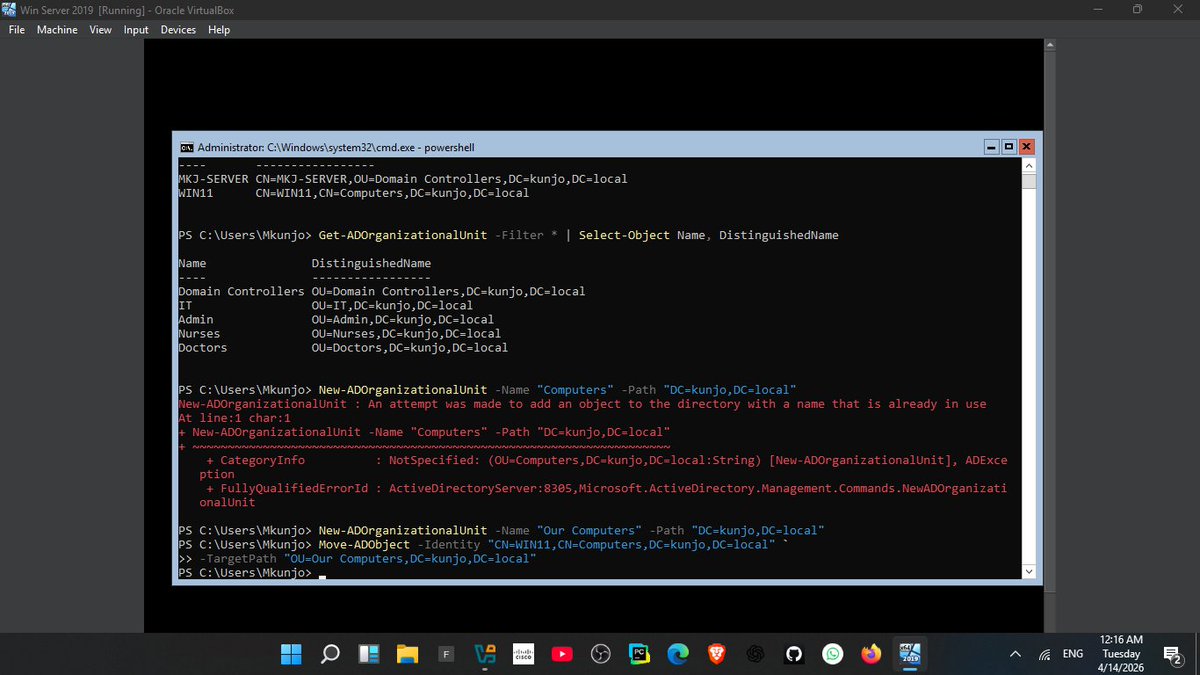
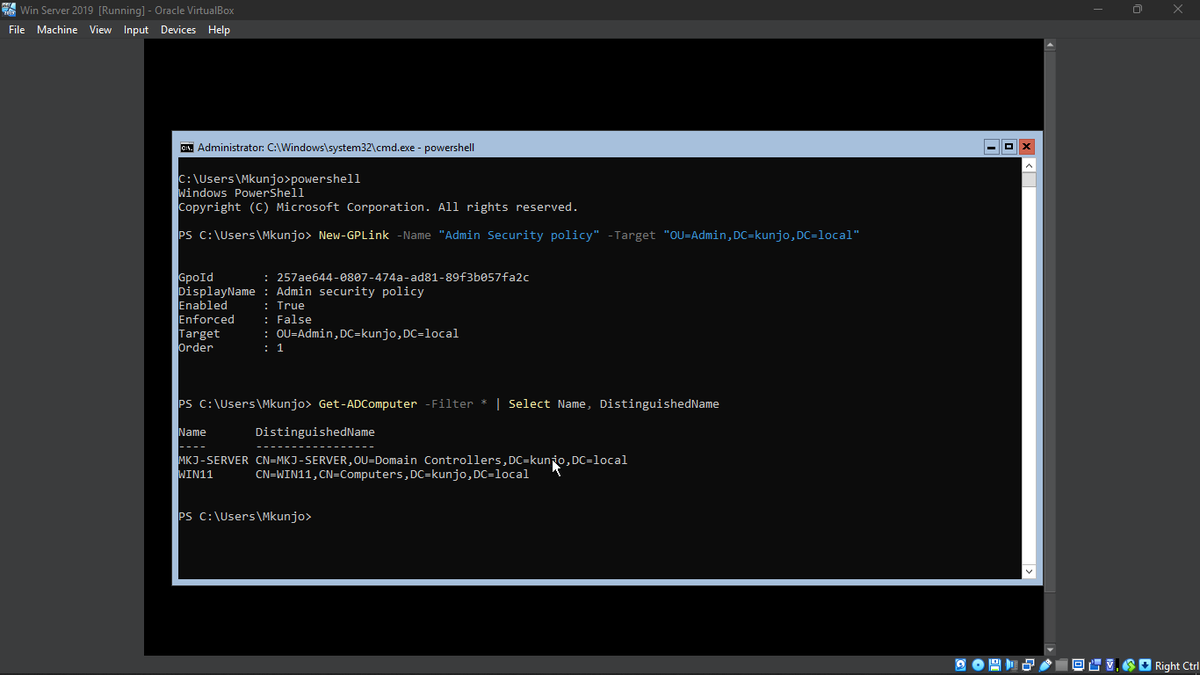
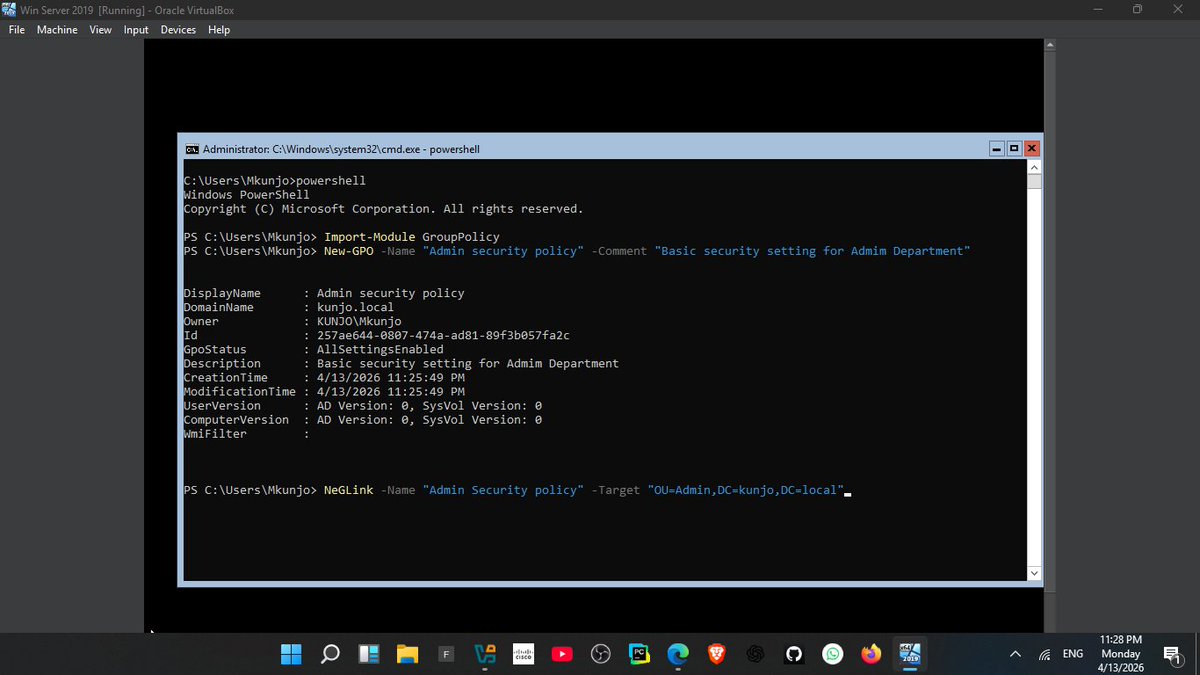
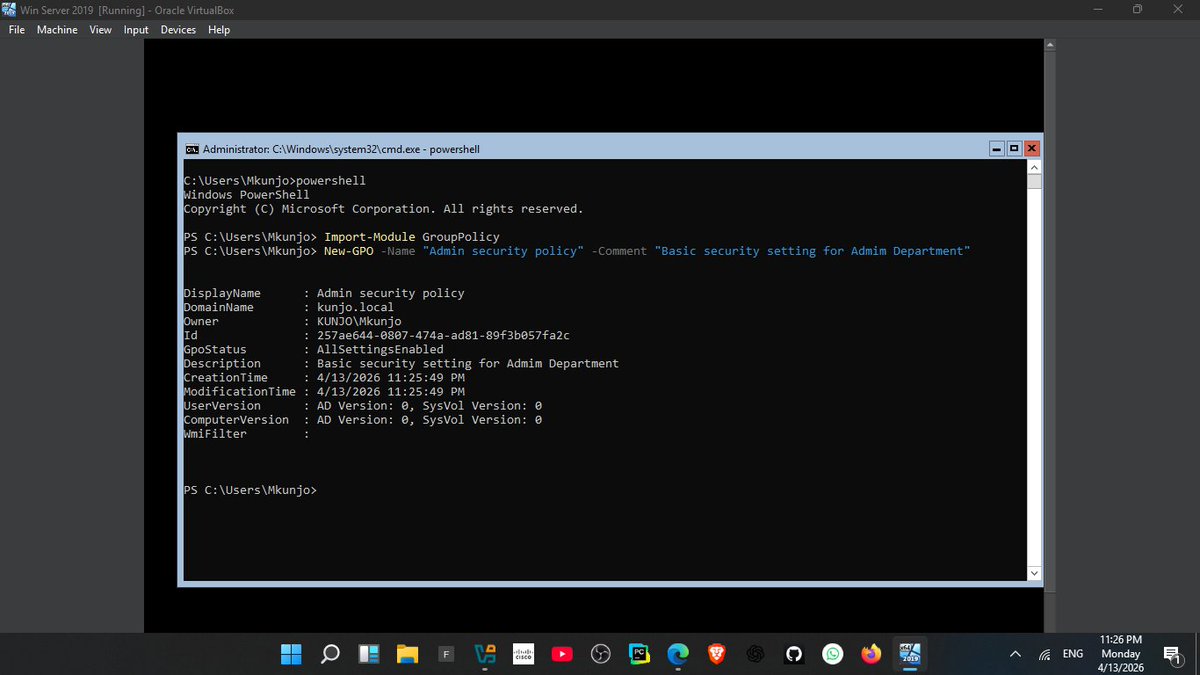
Implemented my first Admin Security GPO in Active Directory!
✔️ Created and linked the policy to an OU
✔️ Added users and computers to the OU
✔️ Applied it instantly with gpupdate /force
Centralized security management in action.
@ireteeh
@segoslavia
@_DeejustDee
@CyberRacheal
@Cyberhijabitech
@jay_hunts
@cyberjeremiah
Apr 12

96/100 #DaysOfCybersecurity
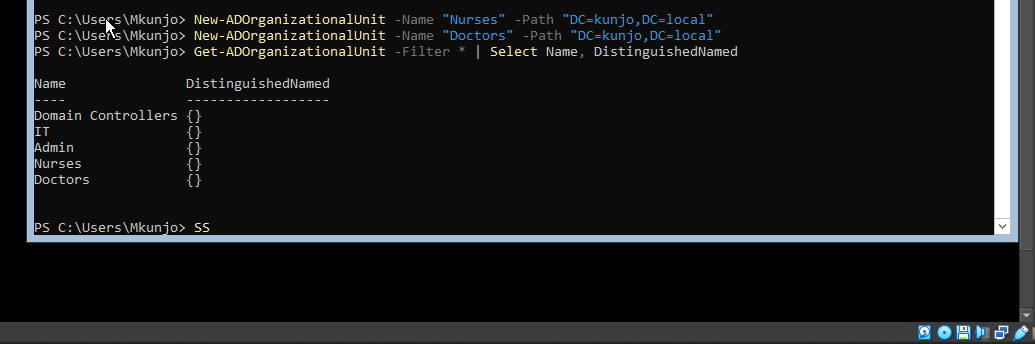
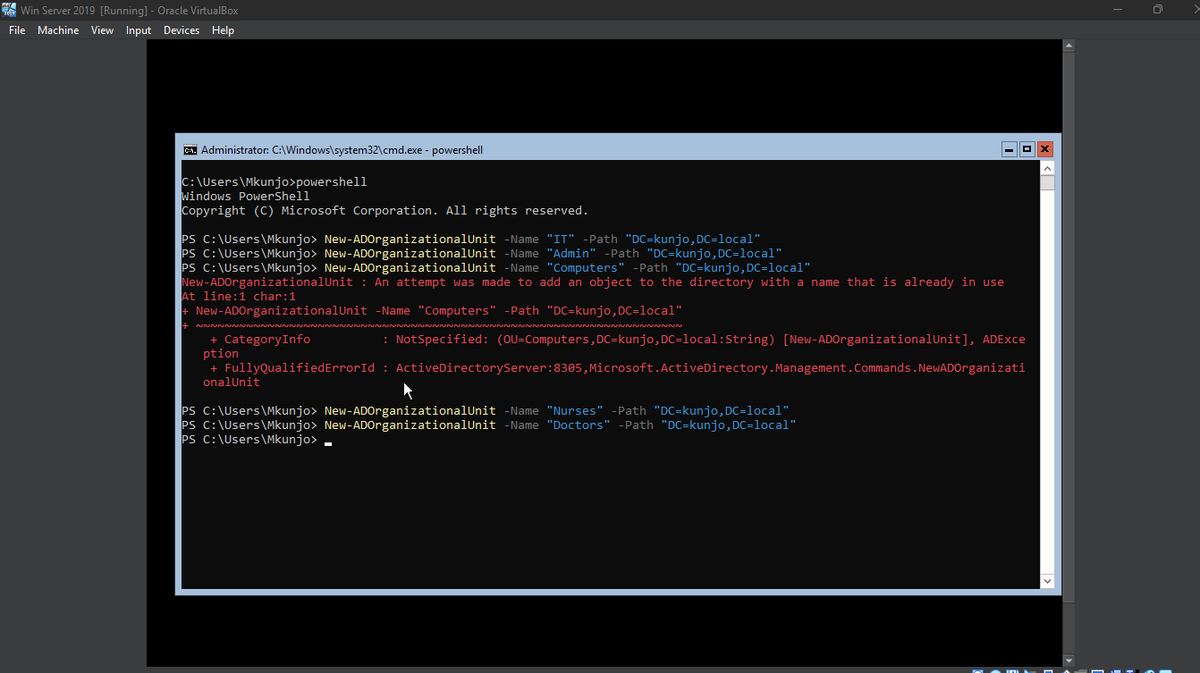
Today I focused on structuring my Active Directory environment to mirror a real enterprise setup.
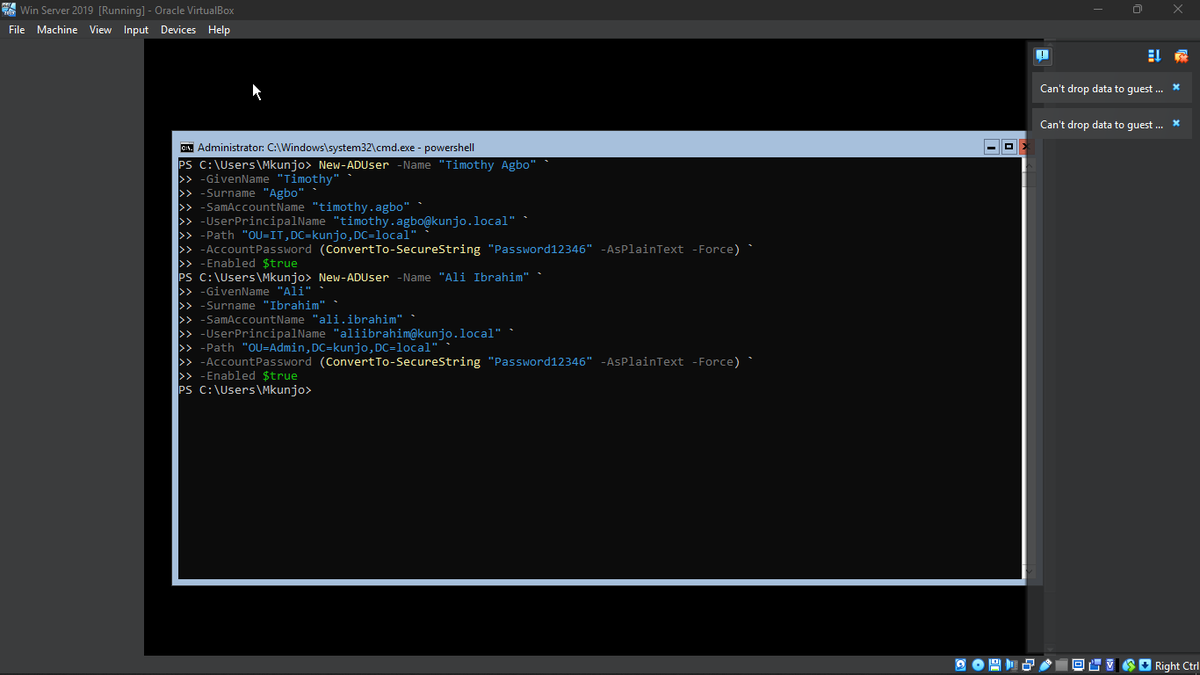
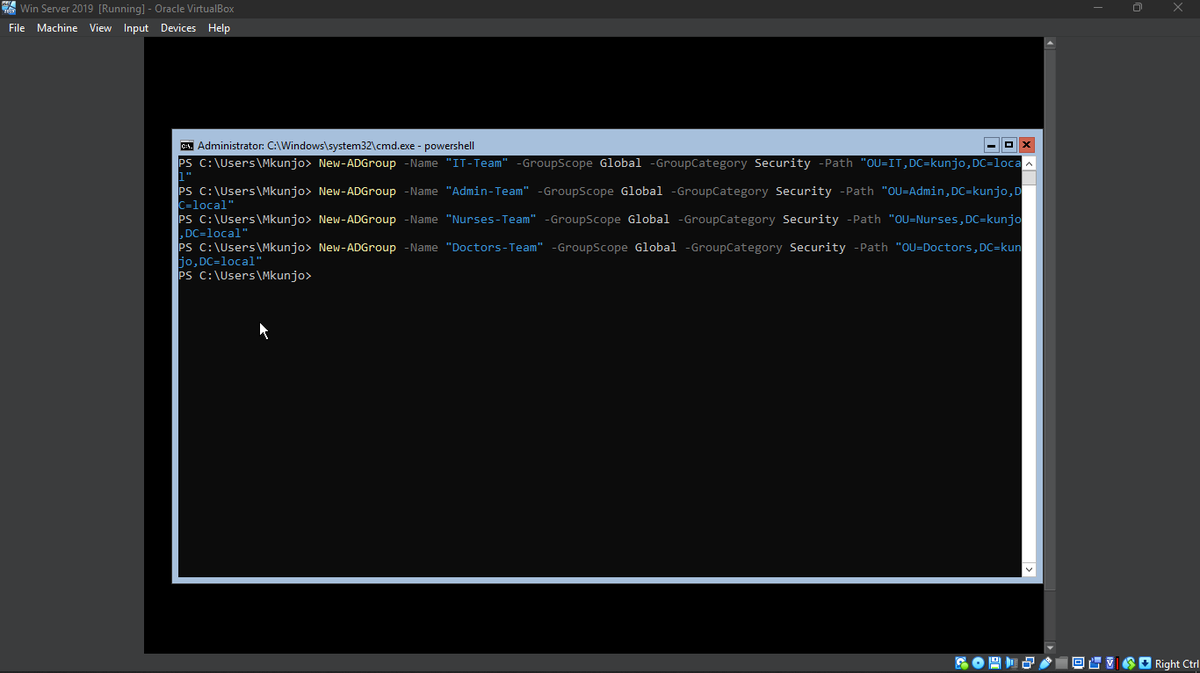
✅ Created Organizational Units (IT, Admin, Computers, Nurses)
✅ Added domain users using PowerShell on Server Core
✅ Assigned users to their respective groups
✅ Verified the entire structure for proper organization and management
This experience reinforced the importance of logical design and role-based access control in Active Directory.
Organizing users and resources into OUs and groups makes administration, delegation,
Building a real-world enterprise lab step by step!
Next: Creating Group Policy management for more efficient.
@ireteeh
@_DeejustDee
@jay_hunts
@cyberjeremiah
@AishaBelloB
@Cyberhijabitech
@segoslavia
@Cyblackorg
1
1
10
1,276

Mar 30
🔒 Secure Bits 💡
𝗡𝗲𝘄 𝗠𝗶𝗰𝗿𝗼𝘀𝗼𝗳𝘁 𝗽𝗿𝗼𝗰𝗲𝗱𝘂𝗿𝗲 𝗳𝗼𝗿 𝗦𝗲𝗰𝘂𝗿𝗲 𝗕𝗼𝗼𝘁 𝗖𝗲𝗿𝘁𝗶𝗳𝗶𝗰𝗮𝘁𝗲 𝗨𝗽𝗱𝗮𝘁𝗲𝘀
I tested the new Microsoft procedure I shared last time (link in comments).
I’ll be honest — I was a bit 𝗼𝘃𝗲𝗿𝘄𝗵𝗲𝗹𝗺𝗲𝗱 at first. There are multiple scripts, and I ran into a few “paper cuts”, so it’s still not as straightforward as the article makes it look.
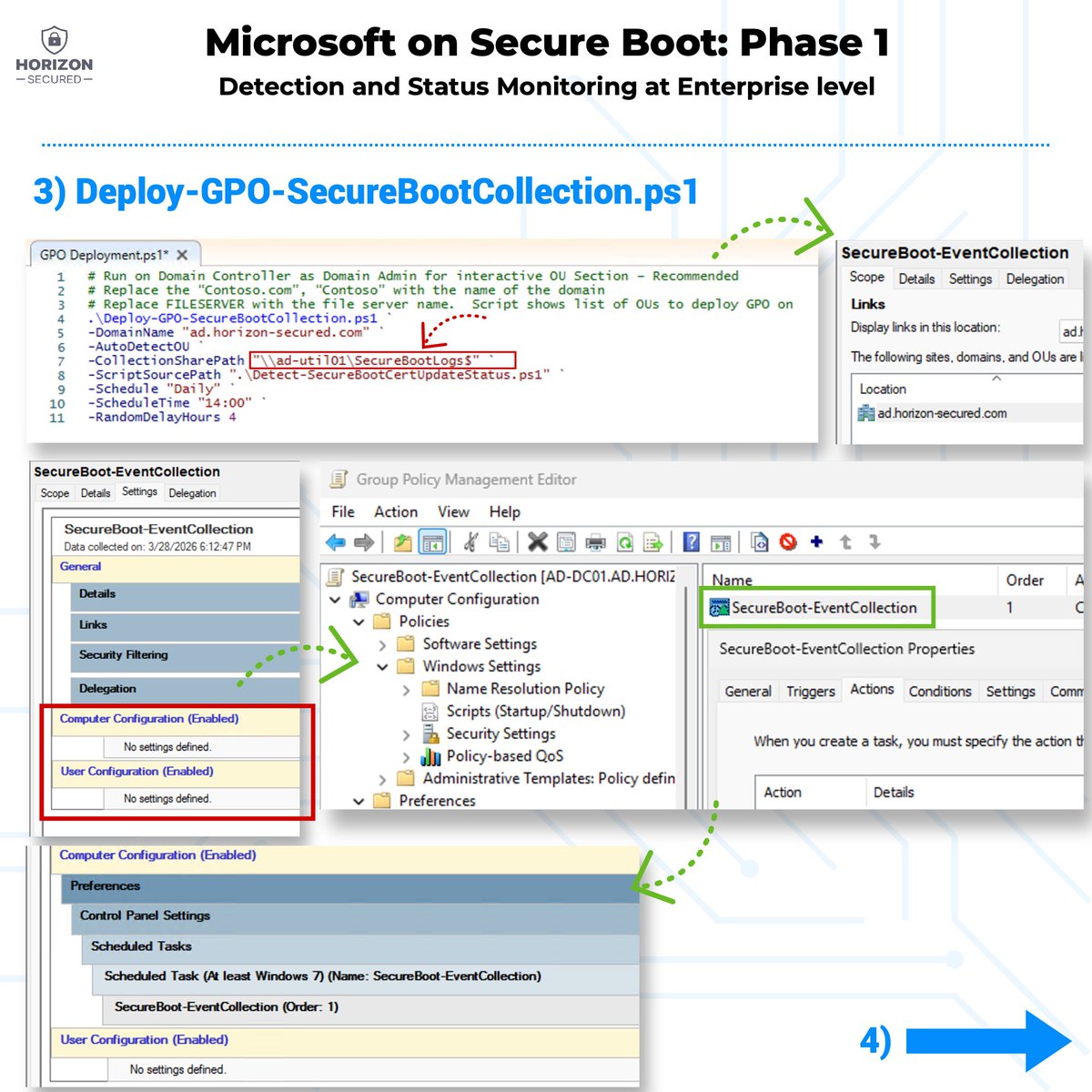
This post covers 𝗣𝗵𝗮𝘀𝗲 𝟭: 𝗗𝗲𝘁𝗲𝗰𝘁𝗶𝗼𝗻 & 𝗦𝘁𝗮𝘁𝘂𝘀 𝗠𝗼𝗻𝗶𝘁𝗼𝗿𝗶𝗻𝗴 (enterprise level) — which, for many orgs, is already the most useful part: enable the process with GPO get recurring monitoring you can trust.
(fifth picture is in the comments)
⸻
✅ 𝗣𝗵𝗮𝘀𝗲 𝟭 — 𝘄𝗵𝗮𝘁 𝗠𝗶𝗰𝗿𝗼𝘀𝗼𝗳𝘁 𝗶𝘀 𝘁𝗿𝘆𝗶𝗻𝗴 𝘁𝗼 𝗮𝗰𝗵𝗶𝗲𝘃𝗲
Central monitoring of where your servers/clients are in the Secure Boot cert update process.
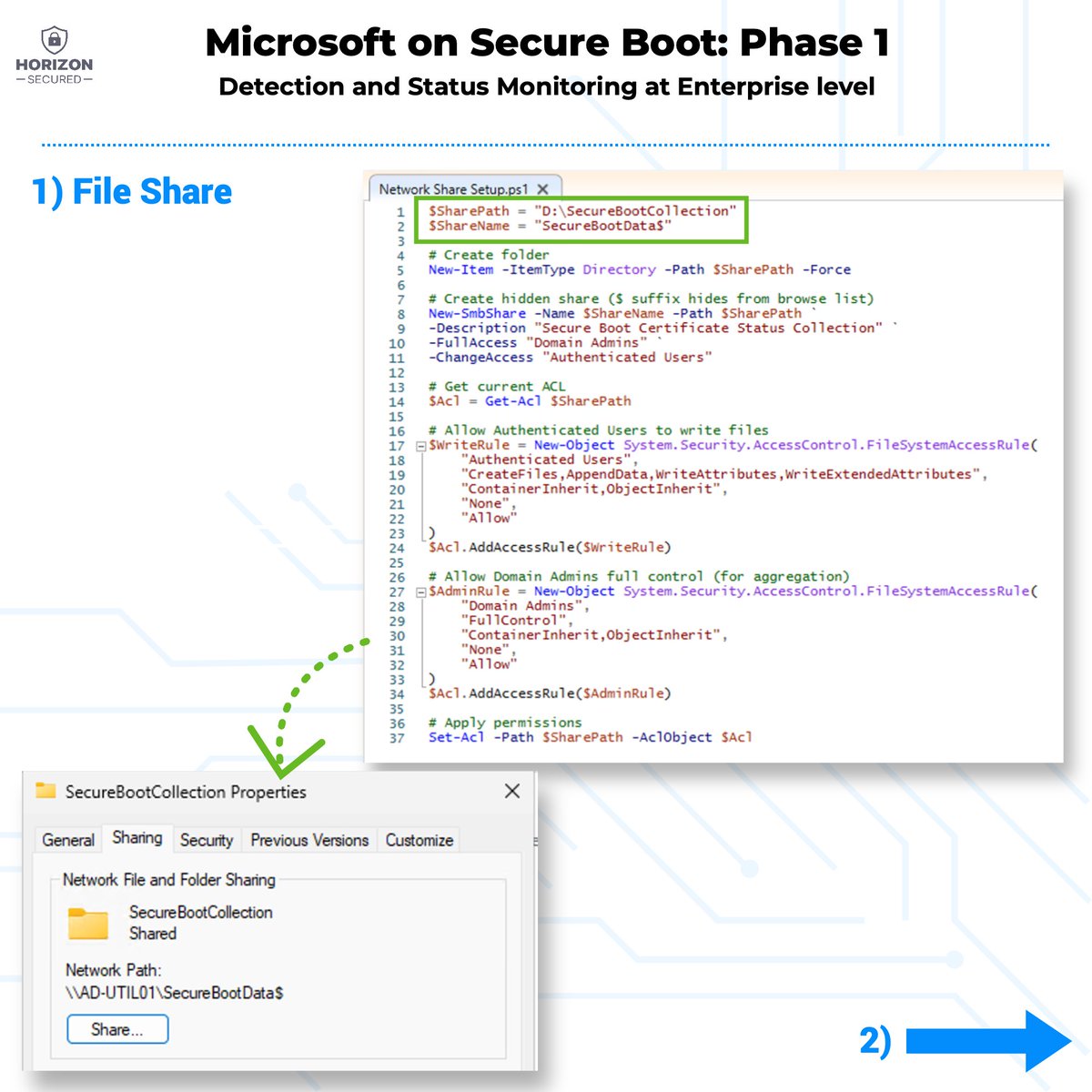
1️⃣ 𝗖𝗿𝗲𝗮𝘁𝗲 𝘁𝗵𝗲 𝗰𝗼𝗹𝗹𝗲𝗰𝘁𝗶𝗼𝗻 𝘀𝗵𝗮𝗿𝗲 𝗽𝗲𝗿𝗺𝗶𝘀𝘀𝗶𝗼𝗻𝘀
Run Microsoft’s script that creates the file share and sets ACLs.
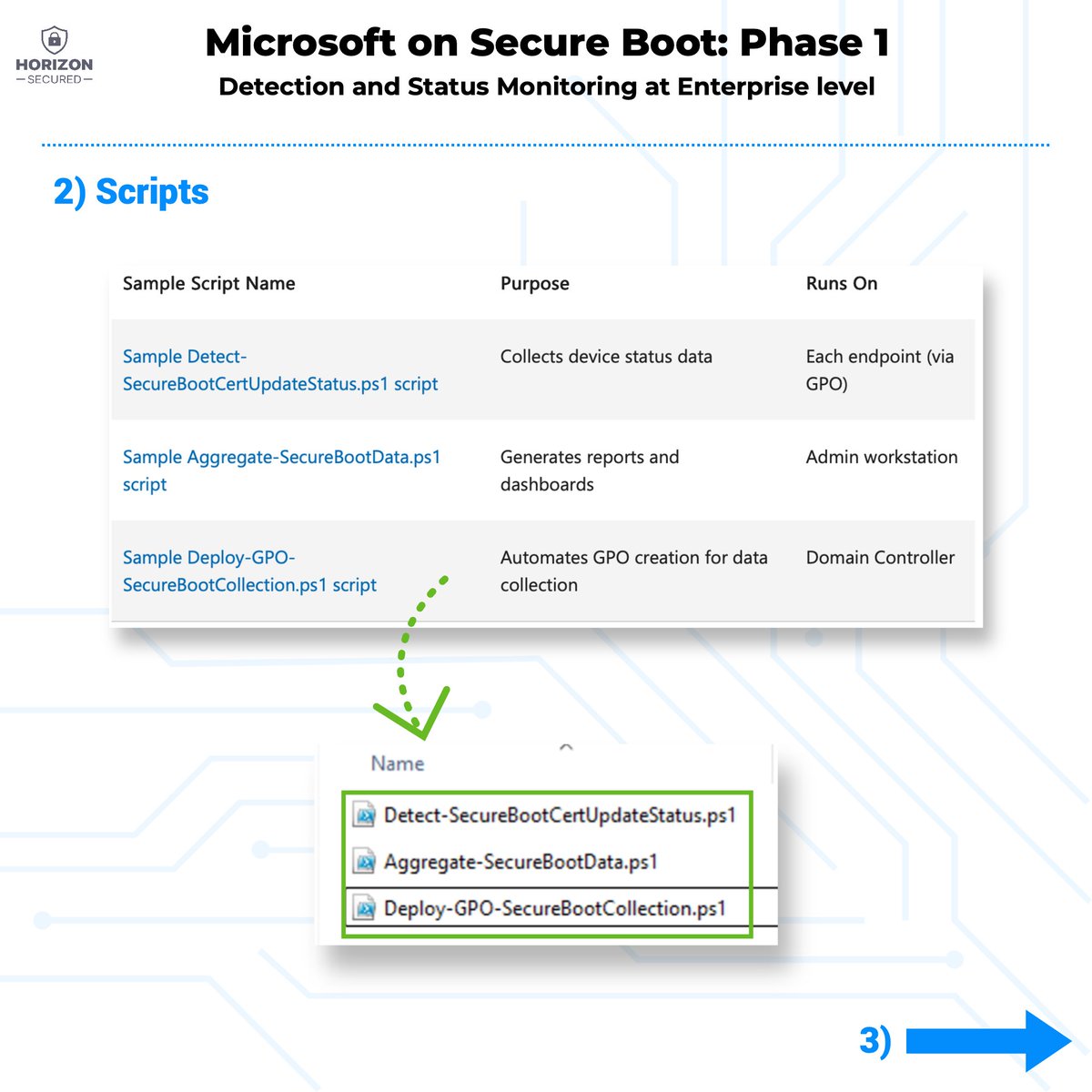
2️⃣ 𝗣𝗿𝗲𝗽𝗮𝗿𝗲 𝘁𝗵𝗲 𝘀𝗰𝗿𝗶𝗽𝘁𝘀 𝗳𝗼𝗹𝗱𝗲𝗿
At minimum you’ll work with:
•Deploy-GPO-SecureBootCollection.ps1
•Detect-SecureBootCertUpdateStatus.ps1
3️⃣ 𝗥𝘂𝗻 𝗗𝗲𝗽𝗹𝗼𝘆-𝗚𝗣𝗢-𝗦𝗲𝗰𝘂𝗿𝗲𝗕𝗼𝗼𝘁𝗖𝗼𝗹𝗹𝗲𝗰𝘁𝗶𝗼𝗻.𝗽𝘀𝟭
I noticed mismatches in names/paths in the article scripts. For example in the top part of the article the share path is referenced as SecureBootLogs, but the script creates SecureBootData.
👉 My recommendation: follow the bottom part of the article — it looked the most consistent/precise during my testing.
After running the script, you’ll be guided through prompts and it will create a new GPO called: SecureBoot-EventCollection
At first glance, it may look empty in GPMC — it’s not. This is what happens when settings are injected into the GPO via PowerShell.
To verify / “make it visible”:
Computer Configuration → Preferences → Control Panel Settings → Scheduled Tasks → SecureBoot-EventCollection
Open the task, click OK, refresh policy view — and you should see the settings appear.
(the script mentions “Complete the scheduled task configuration in GPMC (see instructions above)” — but there are none.
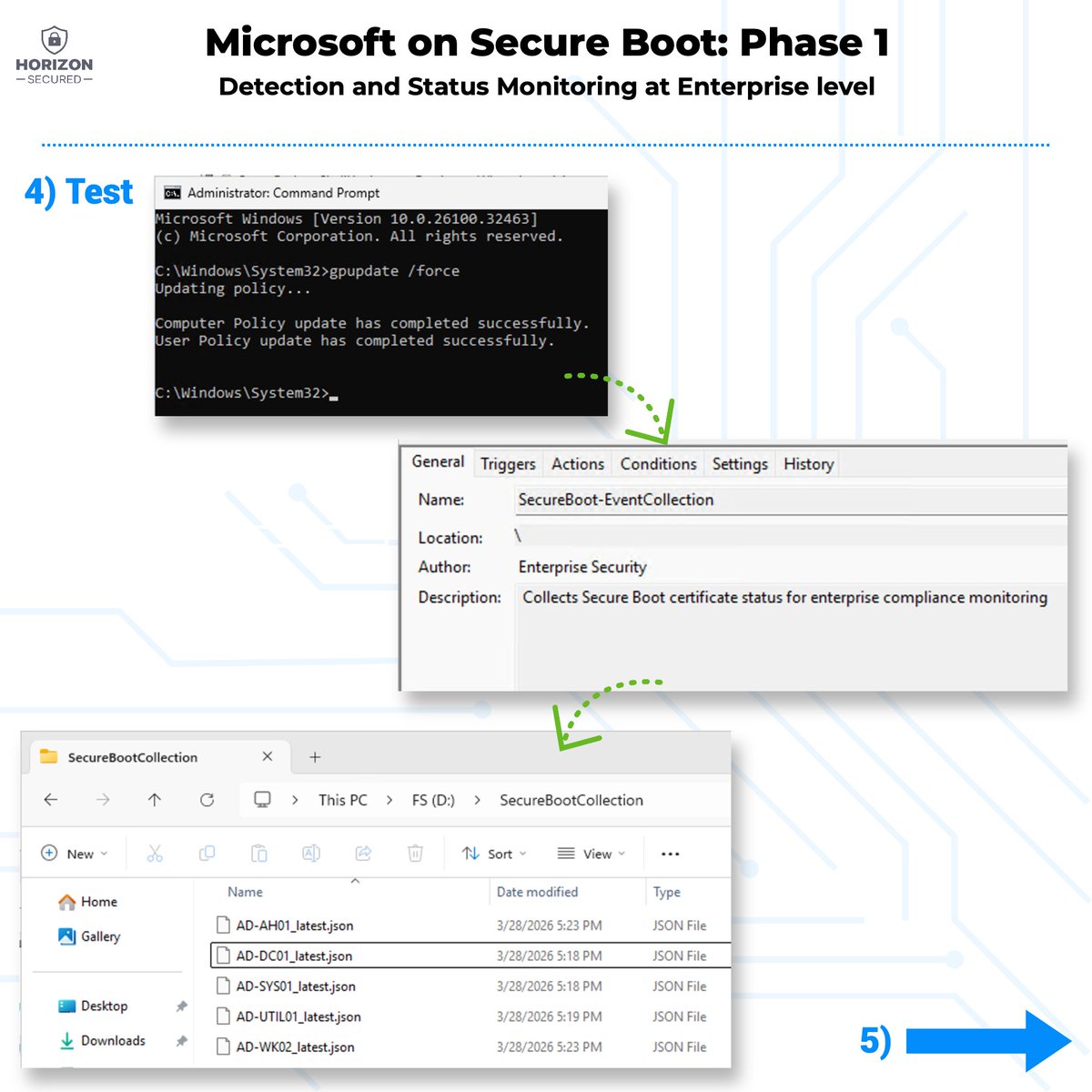
4️⃣ 𝗧𝗲𝘀𝘁 𝗼𝗻 𝗮 𝗳𝗲𝘄 𝗺𝗮𝗰𝗵𝗶𝗻𝗲𝘀
Run gpupdate /force on a few servers/clients and run the scheduled task manually. You should see a new task: SecureBoot-EventCollection
If it runs correctly, you’ll start seeing JSON files created on the file share.
5️⃣ 𝗔𝗴𝗴𝗿𝗲𝗴𝗮𝘁𝗲 𝘁𝗵𝗲 𝗿𝗲𝘀𝘂𝗹𝘁𝘀
Now test:
•Aggregate-SecureBootCertStatus.ps1
You’ll likely need to:
•adjust paths
•modify the Start-Process part (it didn’t work for me as-is)
After that, you should get the report.
⸻
𝗜’𝗹𝗹 𝗮𝗹𝘀𝗼 𝗰𝗼𝘃𝗲𝗿 𝗣𝗵𝗮𝘀𝗲 𝟮 — I already tested it, but I hit an error and I’m contacting Microsoft. Some of the script/path mismatches may be fixed by the time you read this (I’m communicating this in real-time).
Links to the official procedure my field notes are in the comments.
#SecureBoot #SecureBits #HorizonSecured
4
12
76
5,680

Mar 24
gpupdate /force
Mar 24

1日1回何かしら叩くよね。Windows触ってたら。
Win Rからの
cmd
control
appwiz.cpl
sysdm.cpl
ncpa.cpl
regedit
compmgmt.msc
services.msc
perfmon.msc
gpedit.msc
secpol.msc
certmgr.msc
wf.msc
msinfo32
eventvwr.msc
taskschd.msc
更に、Ctrl Shift Enterで管理者実行も。
1
3
275

Command Line Essentials:
• dir, cd, copy, robocopy → file management
• chkdsk, diskpart → disk troubleshooting
• sfc → repair system files
• gpupdate, gpresult → group policy management
• hostname, whoami → system/user info
2
61

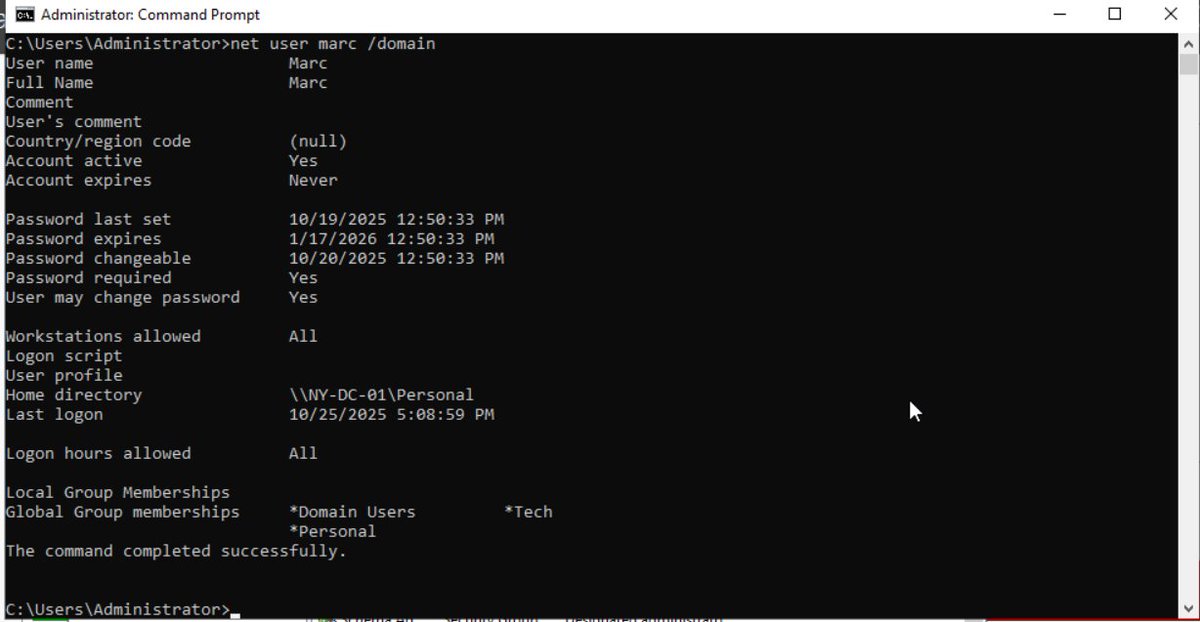
Probably one of my most favorite cmd commands for active directory is net user username /domain
This is one of the first commands I learned while working helpdesk. I love this command because I can check when was the password changed and when does it expired.
I can also see what groups does marc belong too and if he has a home directory.
The real reason why I like this is command is because you can see when a password expires.
During my time working Executive IT Support. I would check the Ceo password and make sure that it doesn't expired while he goes on vacation.
The worst thing that can happen is that the password expires and the customer can't login to their machine or vpn or anything in general.
The only way to login and correct an expired password is if the helpdesk team changes the password. That is the reason why I like this command. Last thing I need is for an executive or a customer password to expired in the middle of vacation or travel.
Other awesome commands are ipconfig, ping, net use, gpupdate /force, gpresult /r.
What are some of your favorite commands working IT Support/Helpdesk?
Happy Wednesday!
#itsupport #itsupportspecialist #helpdesk #systemadmin #cyber #desktopsupport #servicedesk #careers #careeradvice #cmd #commands
4
10
178
9,059

🔒 Secure Bits 💡
𝗨𝗽𝗱𝗮𝘁𝗶𝗻𝗴 𝗦𝗲𝗰𝘂𝗿𝗲 𝗕𝗼𝗼𝘁 𝗰𝗲𝗿𝘁𝗶𝗳𝗶𝗰𝗮𝘁𝗲𝘀 𝗼𝗻 𝗪𝗶𝗻𝗱𝗼𝘄𝘀 𝗦𝗲𝗿𝘃𝗲𝗿 𝗰𝗼𝗻𝘁𝗶𝗻𝘂𝗲𝘀 (𝘱𝘵. 2)
I believe I had to go through the worst-case scenario after all:
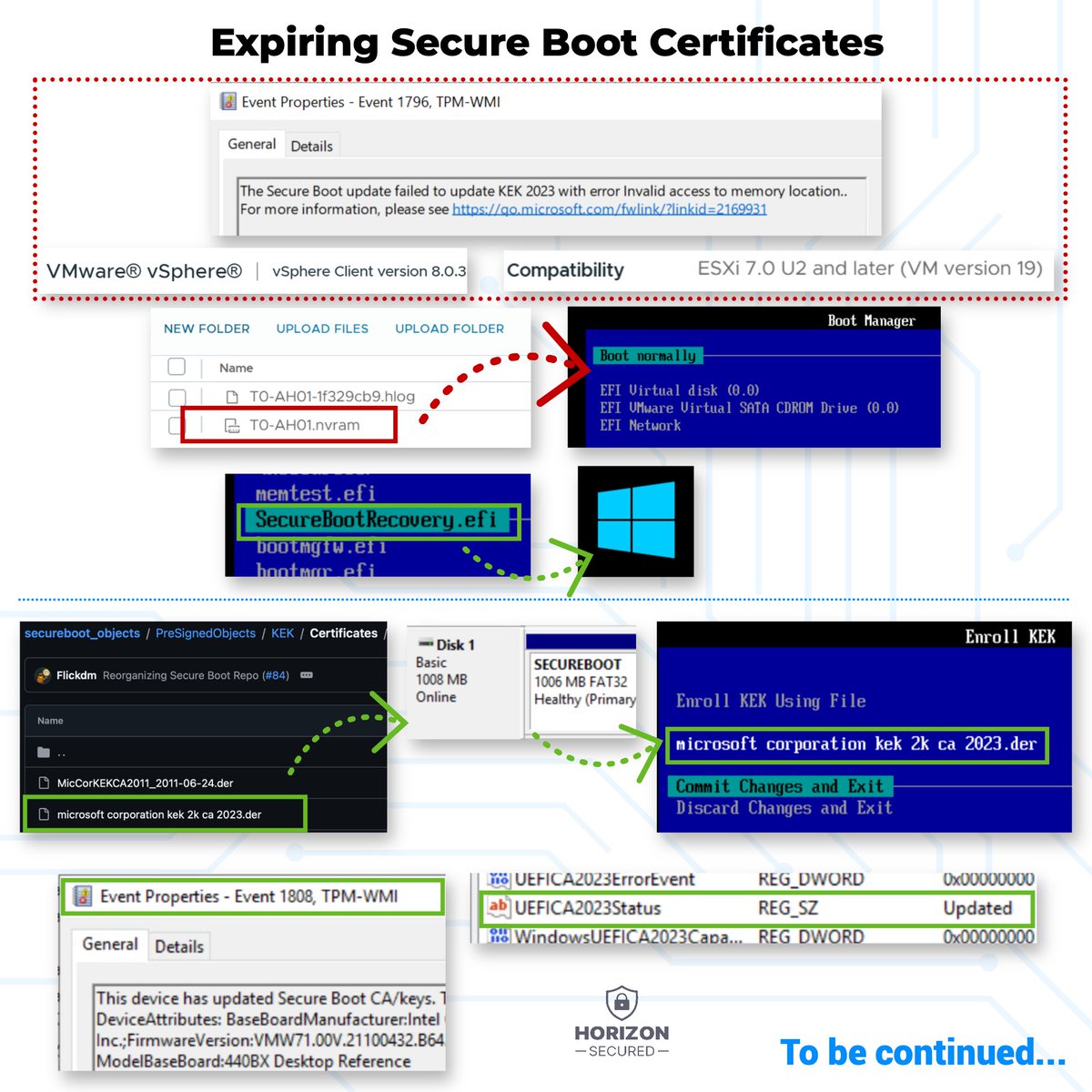
✅ GPO trigger → KEK failure
✅ Broadcom idea (upgrade compatibility delete/rename NVRAM) → VM fails to boot
✅ Fixed the VM → tried again → KEK failure again
✅ Ended up enrolling the missing KEK manually in UEFI
On the other hand I’m glad it went this way, because I can show the “ugly path” too. You might be lucky and stop at part 1. But if you run into VMware KEK trouble, this is what it can look like.
⸻
🧩 𝗪𝗵𝗮𝘁 𝗵𝗮𝗽𝗽𝗲𝗻𝗲𝗱 𝗻𝗲𝘅𝘁
After the KEK error from part 1, I found Broadcom guidance and community comments suggesting that on some older VMs you can solve missing 2023 Secure Boot variables by upgrading VM compatibility and regenerating the VM’s NVRAM (.nvram).
My demo environment is ESXi 8.0.2 and the VM was already at the highest compatible hardware version, but I tried removing the NVRAM anyway. Bad idea: the VM stopped booting.
⚠️ Test everything first (don’t delete but rename) and proceed carefully — versions and VM history matter.
⸻
🛠️ 𝗥𝗲𝗰𝗼𝘃𝗲𝗿𝗶𝗻𝗴 𝘁𝗵𝗲 𝗩𝗠 (𝗯𝗼𝗼𝘁 𝗳𝗶𝘅)
I didn’t give up. I booted into UEFI and used:
UEFI → Boot from a file → (select volume) → EFI → Microsoft → Boot → SecureBootRecovery.efi
That checked and repaired the UEFI boot configuration and let the VM boot again. Once back in Windows, I was basically in the same situation: Secure Boot was enabled, DB updates looked fine, but the KEK step was still failing.
At that point I accepted the reality: manual time.
⸻
🔧 𝗠𝗮𝗻𝘂𝗮𝗹 𝗲𝗻𝗿𝗼𝗹𝗹𝗺𝗲𝗻𝘁
I followed Broadcom’s manual enrollment approach (link in comments), with one important adjustment: their examples focus on PK, but my problem was KEK.
𝗦𝘁𝗲𝗽𝘀 (𝗵𝗶𝗴𝗵 𝗹𝗲𝘃𝗲𝗹):
1️⃣ Download the required Microsoft certificates (DER files)
2️⃣ Attach a small disk to the VM and copy the certs there
3️⃣ Power off the VM and add advanced parameter:
uefi.allowAuthBypass = "TRUE"
4️⃣ Boot into UEFI → Secure Boot Configuration becomes available
5️⃣ Choose what you need to fix (PK / KEK / DB / DBX) and enroll the correct certificate from the attached disk → Save/commit
6️⃣ Remove uefi.allowAuthBypass afterwards and boot back into Windows
7️⃣ Re-run the Secure Boot update task / let Windows finish remaining steps
⸻
😅 𝗥𝗲𝗮𝗹𝗶𝘁𝘆 𝗰𝗵𝗲𝗰𝗸
Honestly, I spent far more time on this than I expected. Too many overlapping guides and “status/error” breadcrumbs that don’t always lead anywhere, especially in virtualized environments.
If this were always simple, it would really be just: patch → gpupdate & maybe reboot.
⸻
𝗜𝗻 𝗽𝗮𝗿𝘁 𝟯 I’ll focus on how to tell you’re fine, how to detect “stuck in progress,” and how to collect the right event IDs / registry status into something you can report on.
To be continued…
#WindowsServer #SecureBoot
3
10
92
4,384

Mar 4
As the problem resides in deeper customization of policies it's very unlikely to happen to normal users. It >CAN< happen but chance is neglectible. And even then, the fix is Win R -> cmd -> "gpupdate /force" and you're good again. Takes a few seconds at max.
3
23

يتواصل الجدل حول تحديثات ويندوز 11 بعد شكاوى جديدة تفيد بأن بعض إصدارات 24H2 و25H2 ما تزال تتسبب في فقدان الاتصال بالإنترنت عبر الشبكة السلكية، نتيجة حذف ملفات أساسية خاصة بخدمة المصادقة على الشبكات.
مستخدمون أكدوا أن الترقية من ويندوز 10 أو من إصدار سنوي إلى آخر داخل ويندوز 11 أدى إلى حذف محتويات مجلد Dot3Svc المسؤول عن إعدادات وسياسات 802.1X، وهي التقنية التي تعتمد عليها الشبكات السلكية في المصادقة. وعند اختفاء هذه الملفات، يتوقف الجهاز عن الاتصال عبر الإيثرنت تمامًا.
التقارير الأولى ظهرت منذ إصدارات 23H2 و24H2، حيث لاحظ المستخدمون أن الترقية "داخل النظام" تتسبب في تعطّل المصادقة الشبكية. ورغم انتشار الشكاوى في منتديات مايكروسوفت ومنصات تقنية، لم تُدرج المشكلة ضمن لوحة صحة ويندوز الرسمية، ولم يصدر اعتراف مباشر من الشركة.
هل هناك حل فعلي؟
• الاتصال مؤقتًا بشبكة لاسلكية تعمل.
• تشغيل أمر gpupdate لإعادة تحميل سياسات المجموعة واستعادة ملفات المصادقة.
ورغم أن تحديثات نوفمبر وديسمبر 2024 عالجت جزءاً من المشكلة، إلا أن تقارير جديدة تشير إلى استمرارها في الإصدارات الأحدث.
المستخدمون الذين يعتمدون على الاتصال السلكي في بيئات العمل قد يواجهون انقطاعًا كاملاً عن الشبكة بعد الترقية، ولا يتوفر حالياً سوى حل يدوي مؤقت. استمرار المشكلة يثير تساؤلات حول جودة اختبارات التحديثات في ويندوز 11، خصوصًا مع إصرار مايكروسوفت على دفع المستخدمين للترقية.
#تقنية

1
7
456