
Jun 11
💡React Tip💡
As a React developer, the one extension that I use every day and become a fan of it is LocatorJS.
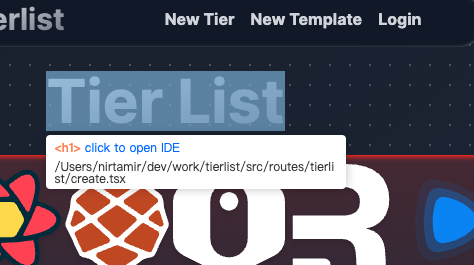
Use 𝗟𝗼𝗰𝗮𝘁𝗼𝗿𝗝𝗦 browser extension to quickly navigate to the source code in your favorite IDE (VS Code) by just clicking on any of the UI elements displayed in the browser.
This extension is really useful when you have a large application and you want to find which file contains the code of the displayed UI.
Also, useful when the code is written by someone else and you want to debug the code.
Use 𝗢𝗽𝘁𝗶𝗼𝗻/𝗔𝗹𝘁 𝗖𝗹𝗶𝗰𝗸 to navigate to source code.
Just give it a try. You will love it.
This extension becomes a lifesaver when you're working with Material UI library code written by others and you want to find out the exact code for any part of the UI.
𝗙𝗼𝗿 𝗺𝗼𝗿𝗲 𝘀𝘂𝗰𝗵 𝘂𝘀𝗲𝗳𝘂𝗹 𝗰𝗼𝗻𝘁𝗲𝗻𝘁, 𝗱𝗼𝗻'𝘁 𝗳𝗼𝗿𝗴𝗲𝘁 𝘁𝗼 𝗳𝗼𝗹𝗹𝗼𝘄 𝗺𝗲.
#javascript #reactjs #nextjs #webdevelopment
1
23

i18nKeyLocator ⚡ is now live.
Inspired by LocatorJS by @_MichaelMusil .
Ctrl Click any text in the UI and jump instantly to the i18next key in VS Code
No more digging through JSON files or guessing keys.
Available now on the Chrome Web Store
1
1
3
61

26 Nov 2025
This is great. I’ve been using LocatorJS for years, but looks like I’m gonna switch! locatorjs.com
2
205

22 Aug 2025
For solid yes, for next no, I mean the function is just a babel transform but it's provided through a vite plugin.
But exactly like locator 🫡
1
3
137

29 Dec 2024
Is there any locatorjs for server components or we need to build it asap? @aidenybai
1
1
1,431

I found an alternative to @LocatorJS that works with Next.js and SolidStart. After LocatorJS stopped working for me, I missed the ease of jumping to components directly from the browser. Now, I'm using code-inspector, and it fills that gap: github.com/zh-lx/code-inspec…
2
44

8 May 2024
💡React Tip💡
As a React developer, the one extension that I use every day and become a fan of it is LocatorJS.
Use 𝗟𝗼𝗰𝗮𝘁𝗼𝗿𝗝𝗦 browser extension to quickly navigate to the source code in your favorite IDE (VS Code) by just clicking on any of the UI elements displayed in the browser.
This extension is really useful when you have a large application and you want to find which file contains the code of the displayed UI.
Also, useful when the code is written by someone else and you want to debug the code.
Use 𝗢𝗽𝘁𝗶𝗼𝗻/𝗔𝗹𝘁 𝗖𝗹𝗶𝗰𝗸 to navigate to source code.
Just give it a try. You will love it.
This extension becomes a lifesaver when you're working with Material UI library code written by others and you want to find out the exact code for any part of the UI.
𝗙𝗼𝗿 𝗺𝗼𝗿𝗲 𝘀𝘂𝗰𝗵 𝘂𝘀𝗲𝗳𝘂𝗹 𝗰𝗼𝗻𝘁𝗲𝗻𝘁, 𝗱𝗼𝗻'𝘁 𝗳𝗼𝗿𝗴𝗲𝘁 𝘁𝗼 𝗳𝗼𝗹𝗹𝗼𝘄 𝗺𝗲.
#javascript #reactjs #webdevelopment
1
4
134

24 Mar 2024
Currently imagining bidirectional code linking in @dagster.
Similar to @LocatorJS, selecting an asset, sensor, schedule, etc from our UI would open your local editor or git repo with the definition.
And selecting the definition in your editor would open the UI at the object.
1
10
840
20 Mar 2024
💡React Tip💡
As a React developer, the one extension that I use every day and become a fan of it is LocatorJS.
Use 𝗟𝗼𝗰𝗮𝘁𝗼𝗿𝗝𝗦 browser extension to quickly navigate to the source code in your favorite IDE (VS Code) by just clicking on any of the UI elements displayed in the browser.
This extension is really useful when you have a large application and you want to find which file contains the code of the displayed UI.
Also, useful when the code is written by someone else and you want to debug the code.
Use 𝗢𝗽𝘁𝗶𝗼𝗻/𝗔𝗹𝘁 𝗖𝗹𝗶𝗰𝗸 to navigate to source code.
Just give it a try. You will love it.
This extension becomes a lifesaver when you're working with Material UI library code written by others and you want to find out the exact code for any part of the UI.
𝗣𝗦: 𝗪𝗮𝗻𝘁 𝘁𝗼 𝗹𝗲𝗮𝗿𝗻 𝗥𝗲𝗮𝗰𝘁 𝗳𝗿𝗼𝗺 𝘀𝗰𝗿𝗮𝘁𝗰𝗵? 𝗖𝗵𝗲𝗰𝗸 𝗼𝘂𝘁 𝗺𝘆 𝗳𝗿𝗲𝗲 𝗥𝗲𝗮𝗰𝘁 𝗰𝗼𝘂𝗿𝘀𝗲 𝗹𝗶𝗻𝗸 𝗶𝗻 𝘁𝗵𝗲 𝗰𝗼𝗺𝗺𝗲𝗻𝘁.
#javascript #reactjs #webdevelopment
1
2
100

I have the same error but I decided to ignore it since the @LocatorJS is awesome. Hi @LocatorJS is it possible to modify the DOM after hydration to avoid this issue?
1
2
121

8 Nov 2023
Very few projects have 10x'd my development experience more than @LocatorJS. Go check it out right now! github.com/infi-pc/locatorjs
1
3
203

1 Sep 2023
I spent a few hours with the Server Components of Next.js in this playground repo and found no difficult elements in the Server Components itself.
Rather, I found the DX to be quite poor as there is no way to open the source code of the UI displayed on the screen like @LocatorJS.
If development support tools such as RSC DevTools are in place, it will be usable without problems.
github.com/vercel/app-playgr…
2
162

18 Jun 2023
🔍React Tip :
As a React developer, the one extension which I use every day is LocatorJS, it is really useful when you have a large application and you want to find which file contains the code of the displayed UI Use Alt Click to jump to code. give it a try. You will love it.
1
152


Just want to share a life-saving extension I find today:
LocatorJS - click on any component to go to code. locatorjs.com/
5
211

26 May 2023
🔗 Ready to take your React development to the next level? Give @LocatorJS a try, and prepare to be amazed. Trust me, you won't want to go back once you experience its magic! ✨ Tag your React-savvy friends and spread the word about this incredible tool! (4/4)
1
4
127
26 May 2023
🎉 And here's the best part: LocatorJS is compatible with React, Preact, Solid, Vue, Svelte, and most modern browsers! 🌐 So, regardless of your tech stack, this extension is a game-changer. (3/4)
1
2
76