Colt Sebastian Taylor retweeted

May 29
REDMAGIC is teaming up with @futcrunch to give away 2 #REDMAGIC11SPro and 2 #REDMAGIC11Air devices! 🔥
Complete all the actions for a chance to win.
Join now:
gleam.io/j7Vqu/redmagic-x-fu…
85
1,303
715
15,463



PCvsPS5がまた論争になってますが普通にPS5もSwitch2もXBOXも全部欲しいです。
なんならSteam DeckもREDMAGIC 11 Proも欲しい
あれも欲しいこれも欲しい
もっと欲しいもっともっと欲しい
あ、おはようございます✨
5
133
Sinner 🪖 retweeted

Jun 13
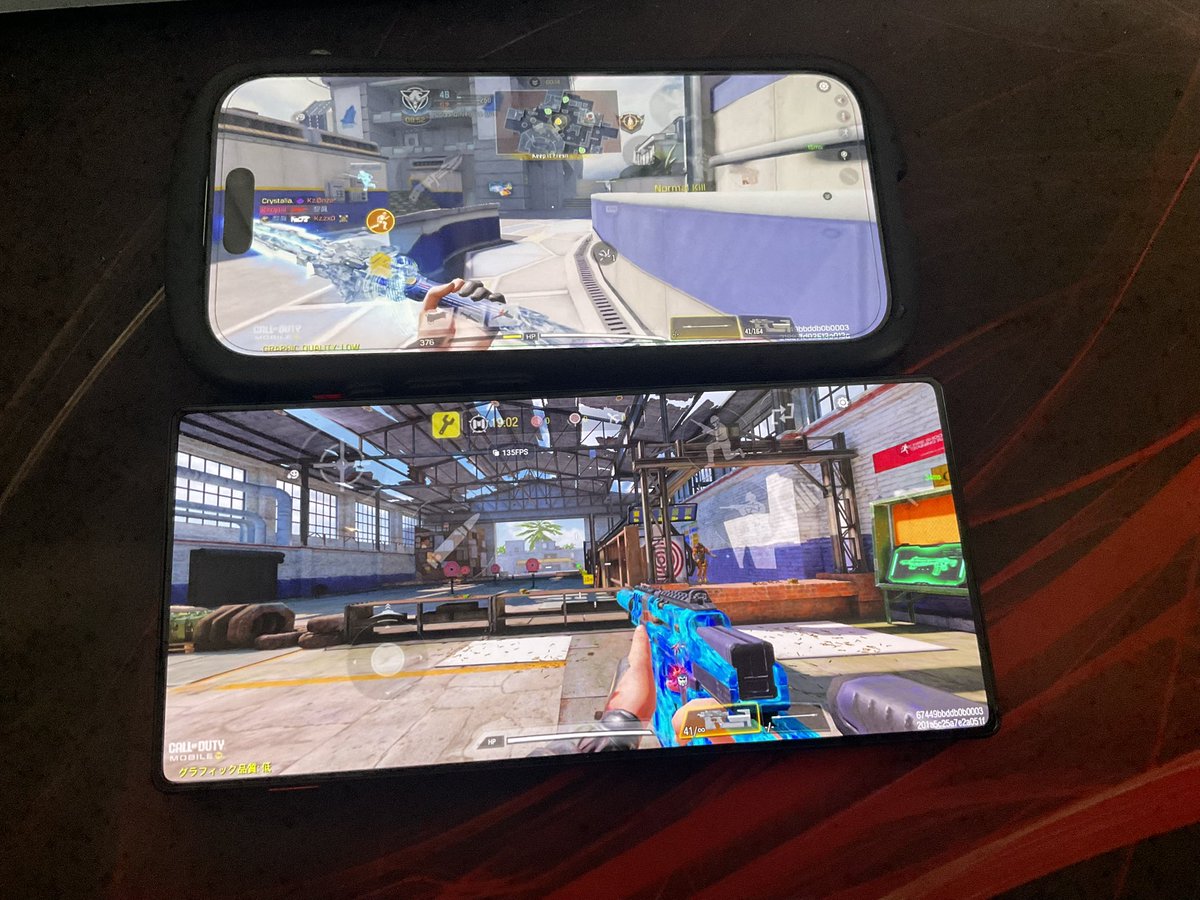
Redmagic 11 Air
良い点:
高fpsの安定
画面がでかくて綺麗
高負荷でも熱くならない
バッテリークソ持つ
充電早い
悪い点:
Android
画面比率が違うから配置作り直し
パラとの相性激悪(これやばい)
ファンちょいうるさい(イヤホンつけたら聞こえない)
慣れないと物理的に角が痛い
5
1
49
8,482

Help me win a REDMAGIC Gaming Smartphone! #REDMAGIC wn.nr/Sm9dthv
19

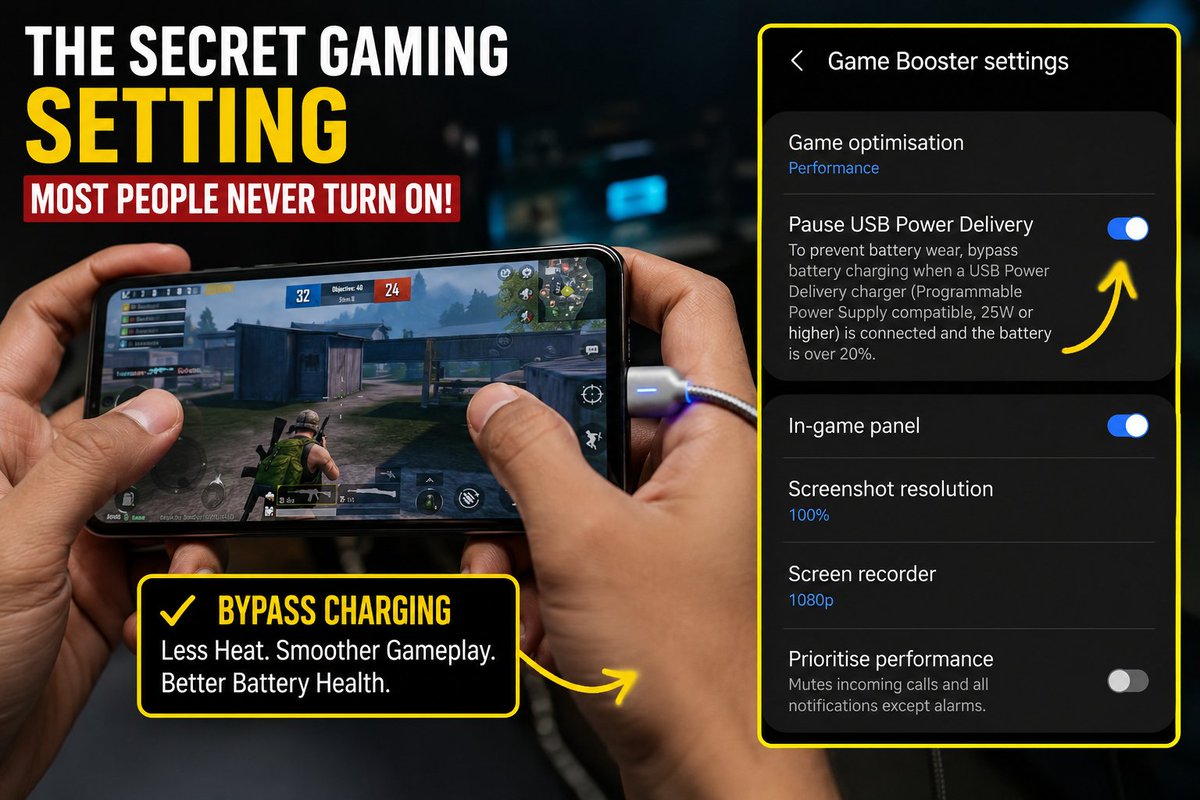
📢 EXPOSÉ: THE "SECRET GAMING SETTING" MOST PEOPLE NEVER TURN ON
If you're the type that plays COD Mobile, PUBG, eFootball, Free Fire, or any heavy game while your phone is charging, this one is for you.
Most people think plugging in a charger while gaming is normal.
The problem?
Your phone is trying to charge the battery and run the game at the same time.
Result:
• More heat
• Faster battery wear
• Reduced gaming performance
• Faster battery degradation over time
Here's the trick many flagship phones now have:
✅ BYPASS CHARGING (also called Pause USB Power Delivery on some SAMSUNG phones)
When enabled, power goes directly from the charger to the phone's processor instead of continuously charging the battery while you play.
Benefits:
• Lower temperatures
• More stable FPS
• Reduced battery stress
• Better long-term battery health
How to check if your phone has it:
Samsung: Settings → Game Booster → Pause USB Power Delivery (while charging)
Some ASUS ROG, RedMagic, Infinix GT, POCO, Xiaomi, and other gaming-focused devices may have similar features under: • Game Mode • Gaming Toolkit • Charging Settings • Battery Settings
⚠️ Important: Not every phone supports bypass charging. If you can't find it, your device may not have the feature.
SKYLARK'S PLACE VERDICT:
Many people spend money replacing batteries because they game for hours while charging without knowing their phone already has a feature designed to reduce the damage.
Before your next gaming session, check your settings.
That "secret gaming feature" might already be sitting inside your phone waiting to be turned on.
1
5
14
578
🐾🌈緋色♪ (ひいろ)🌈🐾513有明 retweeted

最新ゲーミングスマホ「REDMAGIC 11S Pro」
6月9日より日本公式サイトにて先行予約販売スタート❗
🔗jp.redmagic.gg/products/redm…
日本上陸記念キャンペーンも同時開催!
🎯 限定賞品が当たるチャンス!
・REDMAGIC コレクションセット × 3名様
・REDMAGIC
Tシャツ トートバッグ × 4名様
・2,000円分
Amazonギフトカード × 5名様
🚀 応募方法
①@REDMAGIC_JP をフォロー
②この投稿を引用リポスト
(REDMAGICへの期待や魅力を投稿して応募しましょう✨)
⏰ 締切:6月23日(火)11:59まで
#REDMAGIC #REDMAGIC11SPro #ゲーミングスマホ #スマホ


勝負を、クールに決め切る。
最強クラスのパフォーマンス、クールな冷却システム、そして近未来的なデザイン。
REDMAGICゲーミングスマホ最新作「REDMAGIC 11S Pro」、
本日より先行予約販売開始!
🔥先行予約販売期間中は4,000円OFF!
⚡早割クーポン併用で、最大5,000円OFF!
⏰6月16日(火)午前11時59分まで!
▼詳細&先行予約はこちら!
jp.redmagic.gg/products/redm…
#REDMAGIC #REDMAGIC11SPro #ゲーミングスマホ #Android #スマホ #新製品 #ガジェット #スマホゲーム

20
341
379
33,686


Help me win a REDMAGIC Gaming Smartphone! #REDMAGIC wn.nr/qK2p9U3
27