
Jun 12
These units are for an accounting firm.
Their downtime cost per hour is over $450/User.
We keep spares around just for that situation to get them back up and running stat using RemoteApps until we can tune the Temp OS and Apps to current.
"Cheaper" doesn't work in this case.
1
47

May 30
Teams as a RemoteApp in Windows 365 has always had an asterisk. As of this week, that asterisk is gone.
SlimCore-based Teams optimization for RemoteApps and CloudApps in the Windows App is now GA. Full media offload. No quality compromise. #Windows365
4
21
3,330
May 27
Active Directory Hardening Awesomeness!
These are all no-brainers with all of them residing within IT's easy reach with absolutely _no excuses_ for any of them NOT to be done!
List Add: At #1 or #2:
1: Enable UAC for _all_ elevation requests _including administrator_ on the Secure Desktop. No exceptions.
** IT get used to the initial prompt for Server Manager then open a PowerShell window from there.
*** Start CMD
*** Start TaskMgr
*** Start ResMon
NOTE 1: Yes, this includes UserVille. Use LAPS (Local Administrator Password Solution) for the credentials prompt.
NOTE 2: Train users that an out of the blue UAC Prompt is _EVIL_ and should be reported to IT STAT!
NOTE 3: For Remote Desktop Services Session Hosts and RemoteApps hosts all users should be set to DENY elevation requests!
NOTE 4: For all sites we manage UAC prompts on server system desktops also hit a DUO digits MFA request. No exceptions.
Spencer List Highlights for me:
** Train the Human - this is always the weakest link
** Run the Disaster Recovery Plan over and over
** Test restore backups fully - spot file/folder does NOT count
** MFA integration (we use DUO)
May 27

35 ways to harden your Active Directory environment
1. MFA everywhere, without exceptions
2. Create a patch cadence you can stick with, and stick to it
3. You don’t need more domain admins, limit it like anyone who has it is cursed
4. You can’t protect what you don’t know exists, inventory is essential
5. Segment your network like your career depends on it
6. If it absolutely doesn’t need to be on the internet, it shouldn’t be
7. EDR alone will not save you, diversify your threat detection strategy
8. Application control can be one of the hardest controls to defeat, use it
9. Deception technology is essential for today’s modern threats, learn it and use it well
10. Email security tools are great, but don’t forget out of band processes are key especially for money transfers
11. Teach users the basics of social engineering red flags, don’t phish them yourself
12. If you don’t test your backups, you don’t have backups
13. If you don’t test your DR plan you don’t have a plan
14. If you don’t follow the 3-2-1 rule for backups you don’t have backups
15. Backups in Steve’s basement don’t count
16. Rotating passwords regularly for no good reason is counter productive and then less secure option
17. 99% of vulnerabilities don’t matter, spend your time identifying the ones that could hurt you and address those first
18. Vulnerability scanning doesn’t show the whole picture, pentesting is a must
19. Hunting for misconfigurations yourself is a necessary part of good systems engineering
20. The cloud is not more or less secure than on-prem, it’s your strategy that matters most
21. Service accounts should be treated like radioactive material, tightly scoped and constantly monitored
22. Under no circumstances should the built in admin account be a service account
23. Domain admins should not be service accounts either
24. Active Directory permissions drift over time, assume yours already has
25. If you can’t explain why something needs admin rights, it shouldn’t
26. If you can’t explain why someone needs admin rights, they shouldn’t
27. Separate admin work from daily work, identity debt is real
28. Don’t reuse local admin passwords, LAPS is easy, use it
29. Security tools don’t replace good engineering, they amplify it
30. If fixing it later is the plan, it’s not a plan
31. Boring but consistent security beats clever hacks every time
32. If you don’t know if you have misconfigured ADCS, you probably do
33. After every change in ADCS, run invoke-locksmith
34. After every delegation change in AD run Invoke-ADeleginator
35. Use AppLocker Inspector to audit your applocker policies.
🏷️Bookmark this so you can come back to it later.
1
30
195
20,626

Ich habe noch nie verstanden, weshalb Citrix so verbreitet ist und wieso man das nicht mit normalen Windows-Server-Boardmitteln (Terminal Server & RemoteApps) macht. Aber das ist ehrlicherweise auch nicht mein Fachgebiet.
4
8
1,127

Apr 7
Launch Microsoft OneDrive with a RemoteApp in Azure Virtual Desktop 📂 ✨ Built‑in file access during remote sessions
⚡ Seamless file sync while using RemoteApps
🛠️ Enhanced shell experience for productivity
Start here 👉 msft.it/6017QFF35
#Azure #AzureVirtualDesktop #Productivity
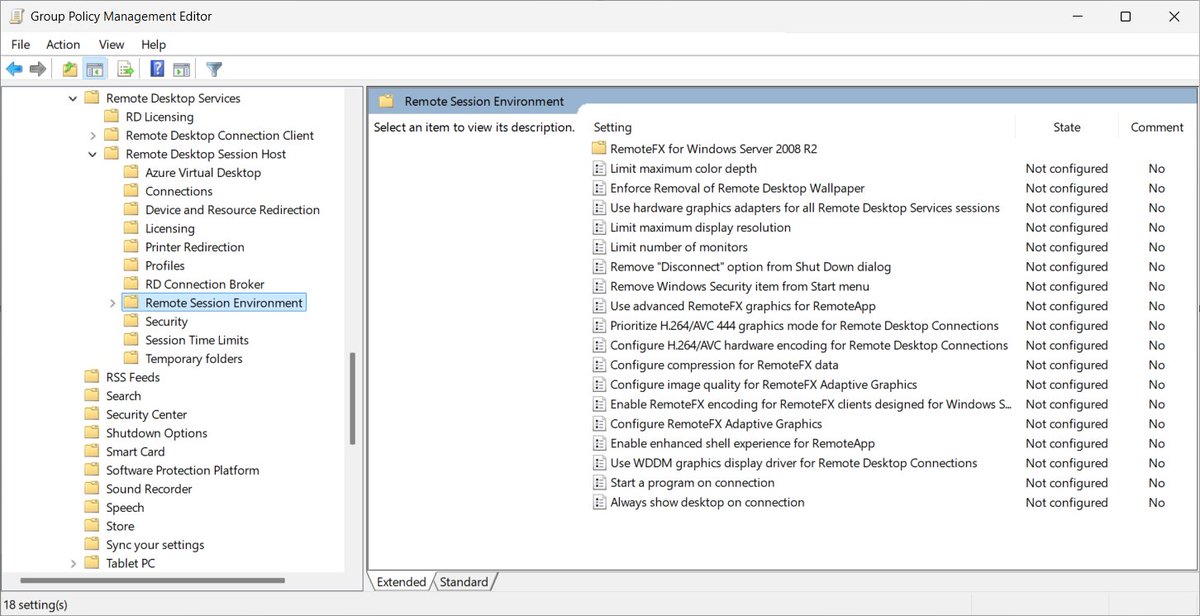
ALT A screenshot showing the remote session environment options in the Group Policy editor.
3
10
62
7,514

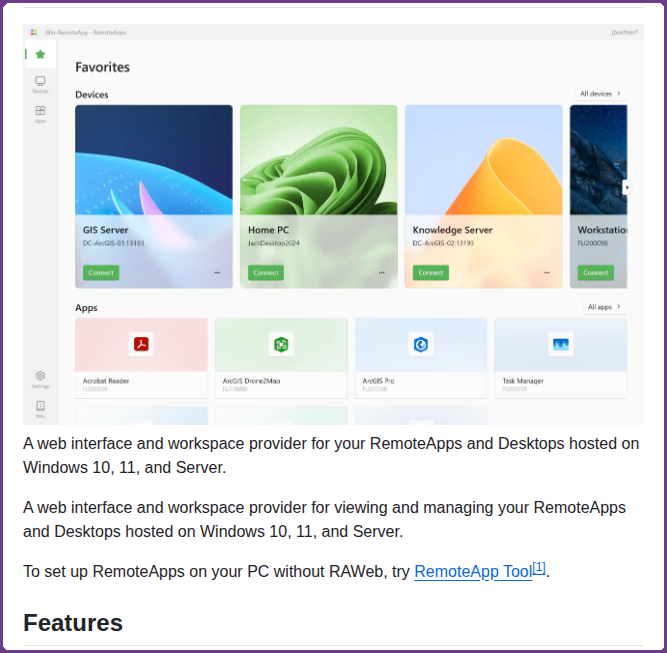

29 Sep 2025
🔒 Secure Bits 💡
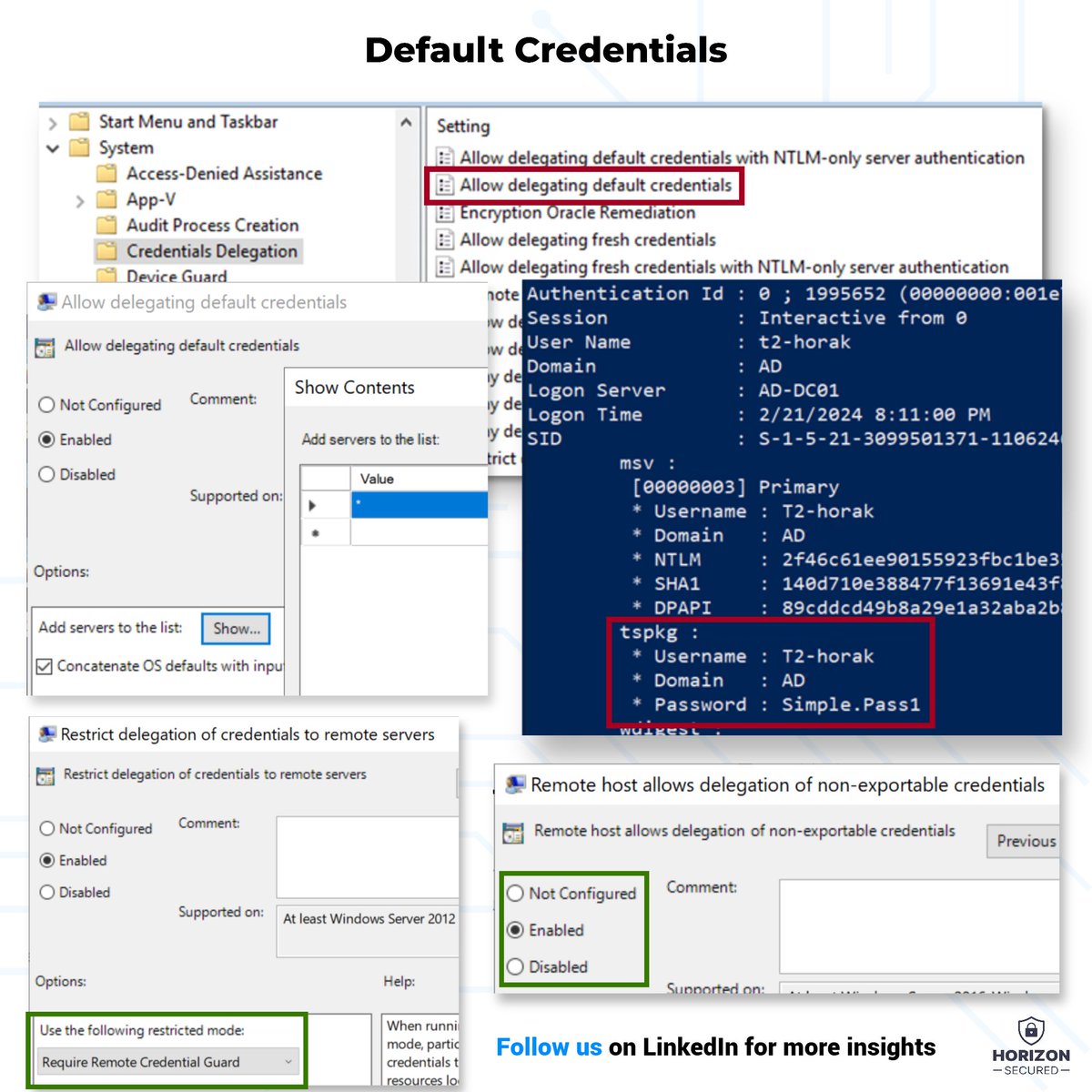
𝗣𝗹𝗮𝗶𝗻𝘁𝗲𝘅𝘁 𝗣𝗮𝘀𝘀𝘄𝗼𝗿𝗱𝘀 𝗶𝗻 𝗟𝗦𝗔𝗦𝗦 — 𝗗𝗲𝗳𝗮𝘂𝗹𝘁 𝗖𝗿𝗲𝗱𝗲𝗻𝘁𝗶𝗮𝗹𝘀
𝗪𝗵𝘆 would you enable something like this?
This has been disabled by default for years, yet I still encounter it during assessments.
𝗪𝗵𝘆❓
Well… there’s a reason. (Not a good one, though.)
👉 IT admins often want 𝗰𝗼𝗻𝘃𝗲𝗻𝗶𝗲𝗻𝗰𝗲 — making it easy for users to log into 𝘁𝗲𝗿𝗺𝗶𝗻𝗮𝗹 𝘀𝗲𝗿𝘃𝗲𝗿𝘀 or launch RemoteApps without entering passwords again.
🛠 𝗦𝗼 𝘁𝗵𝗲𝘆 𝗲𝗻𝗮𝗯𝗹𝗲:
Computer Configuration\Administrative Templates\System\Credentials Delegation\Allow delegating default credentials
And sure, it works. You get SSO for RDP.
𝗕𝘂𝘁 𝗶𝘁 𝗰𝗼𝗺𝗲𝘀 𝘄𝗶𝘁𝗵 𝗮 𝗰𝗼𝘀𝘁:
💥 The password gets cached during login — and it can be extracted from LSASS in plaintext.
You might think: “But I have Credential Guard, right?”
Well... not always. 𝗖𝗿𝗲𝗱𝗲𝗻𝘁𝗶𝗮𝗹 𝗚𝘂𝗮𝗿𝗱 𝗰𝗮𝗻 𝗵𝗲𝗹𝗽 — but it’s not guaranteed to be active across your environment.
𝗪𝗵𝘆 𝗻𝗼𝘁?
☠️ Older operating systems
☠️ Virtual machines without Secure Boot
☠️ And the big trap I see far too often: Windows Professional edition
Did you know 𝗖𝗿𝗲𝗱𝗲𝗻𝘁𝗶𝗮𝗹 𝗚𝘂𝗮𝗿𝗱 𝗶𝘀𝗻’𝘁 𝗮𝘃𝗮𝗶𝗹𝗮𝗯𝗹𝗲 𝗼𝗻 𝗪𝗶𝗻𝗱𝗼𝘄𝘀 𝗣𝗿𝗼?
So even if you think you’re covered, you might not be.
🔐 𝗧𝗵𝗲 𝗕𝗲𝘁𝘁𝗲𝗿 𝗢𝗽𝘁𝗶𝗼𝗻?
If your goal is secure SSO for RDP — this isn’t it. Use 𝗥𝗲𝗺𝗼𝘁𝗲 𝗖𝗿𝗲𝗱𝗲𝗻𝘁𝗶𝗮𝗹 𝗚𝘂𝗮𝗿𝗱 𝗶𝗻𝘀𝘁𝗲𝗮𝗱. It gives you the same SSO experience — but without caching the password in memory.
🛠 𝗘𝗻𝗮𝗯𝗹𝗲 𝘁𝗵𝗲𝘀𝗲 𝗽𝗼𝗹𝗶𝗰𝗶𝗲𝘀:
1️⃣ Computer Configuration\Administrative Templates\System\Credentials Delegation\Remote host allows delegation of nonexportable credentials
2️⃣ Computer Configuration\Administrative Templates\System\Credentials Delegation\Restrict delegation of credentials to remote servers
💬 Still using Default Credential Delegation?
𝗗𝗿𝗼𝗽 𝗮 𝗰𝗼𝗺𝗺𝗲𝗻𝘁 — and tell me if you’ve checked your GPOs lately.
#WindowsSecurity #CredentialGuard #RemoteCredentialGuard #SecureBits #CyberSecurity #LSASS #ActiveDirectory #HorizonSecured @BlueTeamDave
1
60
279
17,746
14 Aug 2025
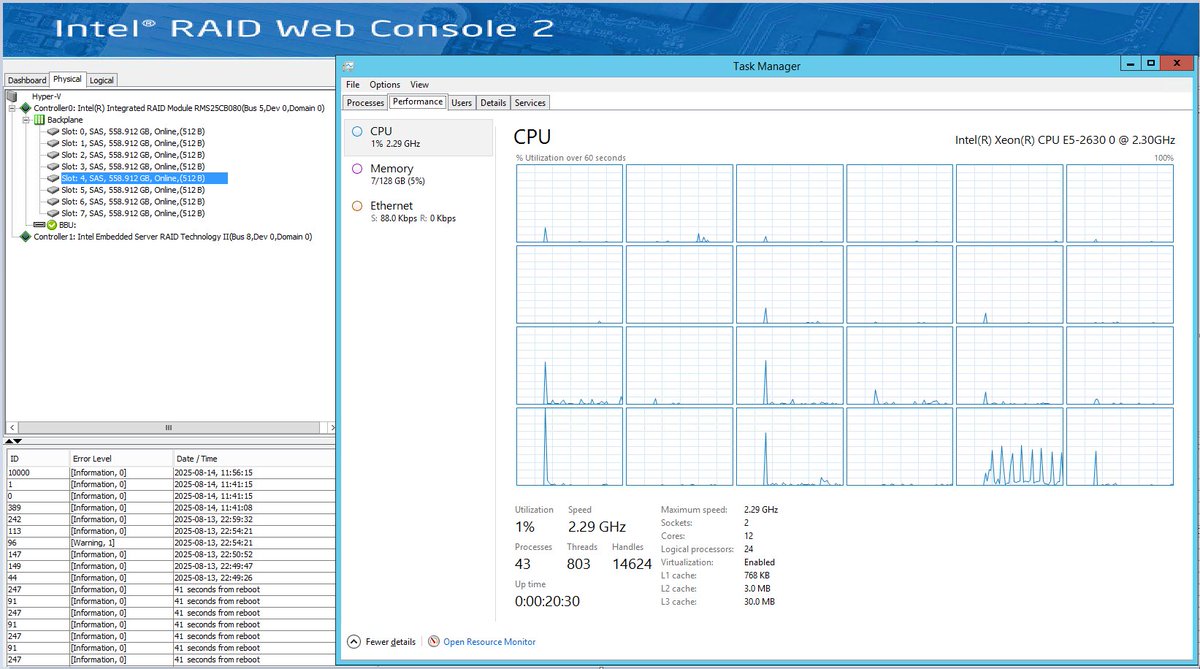
SERVER HARDWARE UPDATE: Retiring an Intel Server System R2208GZ4GC Original Today
Yeah, with a build date of 2012! The box is 13 years old.
The eight 900GB 10K Seagate SAS drives are definitely not original. They started dropping off around year 6 with the frequency of drops per year increasing every year.
This Dual Intel Xeon E5-2630 series server with 128GB of ECC Memory and an Intel RAID Controller with battery backup running the Seagate drives in a RAID 6 array has been stable. Rock solid. Problem free.
With two logical disks, one for the host OS and the other for the virtual machines, we were able to upgrade from Windows Server 2012 RTM to Windows Server R2 when the OS came out then import the VMs into Hyper-V and run with it until today.
This accounting firm got their money's worth!
We migrated them to an AMD EPYC 7313P 16 pCore processor with 256GB ECC memory and a hybrid NVMe and SATA HDD setup utilizing Storage Spaces Mirror-Accelerated Parity for the Virtual Disks.
We have lots of processor, memory, and storage performance for this firm to run over the lifetime of this Hyper-V virtualization platform.
Both virtualization platforms host(ed):
* VM0: ADDS, DNS, DHCP (Server Core)
* VM1: Microsoft Exchange Server (Server Core)
* VM2: RD Gateway/Broker/Web
* VM3: RD Session Host (Desktop/RemoteApps)
* VM4: Microsoft SQL Server
* VM5: File, Print, and LoB backends (Intuit/Sage/Time)
We've started to put Veeam into a VM that we license via SPLA as running it in the Hyper-V host can be problematic if we need a reboot of the OS for Veeam changes or stalls.
This firm:
1: Knows where their data is
2: Knows it's backed up across many layers
3: Can keep working during tax time (no cloud outages)
4: Knows heir data isn't "anonymized" and sold or used to train AI
5: Knows who handles their data
6: Has a real person to talk to if there's a problem
On-Premises is the only way to know for sure where the data is, who has access to it, and that it will be there if something goes wrong like a fire at the main office.
1
9
1,012
8 Aug 2025
TROUBLESHOOTING: IT'S USUALLY THE DISK SUBSYSTEM
It's always DNS? Yup.
But, when it comes to user complaints due to bad experiences with RemoteApps, Session Host desktop slowness, AVD issues on-premises (Azure Local), file access, and more it's usually the disk subsystem.
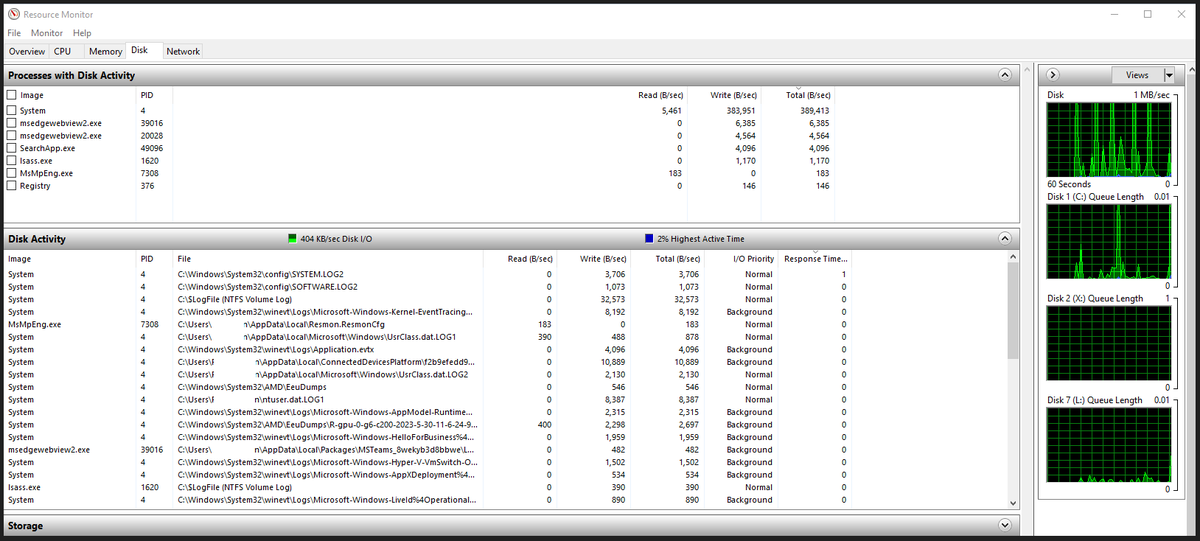
Resource Monitor (ResMon.EXE) to the rescue.
Set up the Disk tab as pictured to have latency up top under the Disk Activity pane.
* 25ms and higher is bad
* 50ms and higher is really bad
* 75ms and higher is catastrophic
If you're seeing the swap file at the top then the virtual machine, or physical host, does not have enough physical memory assigned to it.
If you're seeing certain VM's virtual hard disks at the top then you'll know the source of user's grief experiences.
The secondary source is usually a misconfigured storage fabric switch or network port. In a redundant multichannel environment all it takes is one port between the source and the destination to cause dropped packets.
In today's solid-state world Disk Queue Length is less of a factor _unless_ there's a fabric involved between compute where the VMs reside and storage whether that be SOFS or SAN.
A larger disk queue length, generally # Disks x2, does indeed indicate either a fabric or storage controller problem.
For a longer term monitoring situation Grafana, Telegraf, and InfluxDB are an awesome platform to set up. We get graphs and history all in one that will give us insight into a system's behaviour over time.
For a quick fix we'd use liveoptics.com to gain insight into the short, medium, and even long term performance characteristics of an existing solution as well as the troubleshooting depth it can provide.
Once we've either cleared the storage subsystem of all wrongdoing or indeed we've narrowed things down we will have what we need to move on.
4
19
105
17,196
26 Jul 2025
Application Request Routing with the URLReWrite component allows for one WAN IP for publishing multiple HTTPS services internally.
Exchange Server
SharePoint Server
Remote Desktop Services
Session Host
RemoteApps
WordPress
Mastodon
Custom Web Apps
ETC
The ARR server can be workgroup in a DMZ by itself with Split DNS set up.
DUO to finish and local security policies set up.
26 Jul 2025

I think it’s important, now more than ever, to consider self hosting absolutely everything if you have the skill for it. It’s only going to get worse.
1
7
712

18 Jun 2025
Announcing today #Windows365 CloudApps. Publish RemoteApps from Windows365 also integrated with #Intune. This is currently in private preview for which you can express your interest in this blog post: blogs.windows.com/windowsexp…
1
3
7
884
9 May 2025
Remote Desktop Services RemoteApps RSS: The Seamless and Secure User Experience
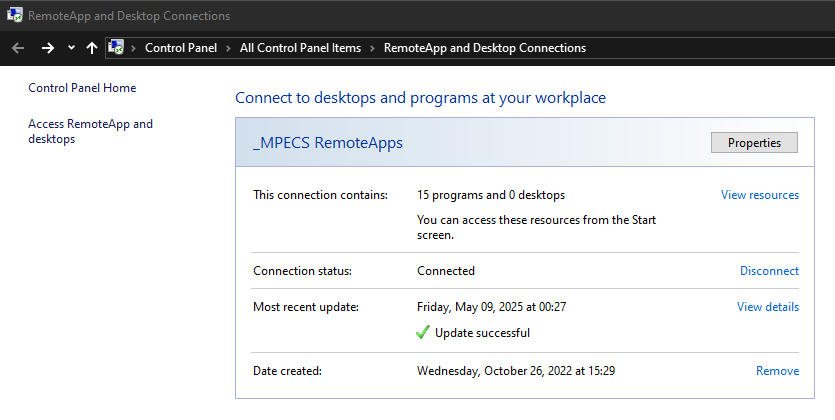
RDS has a RSS Feed built-in (pic 1). That feed is virtually device agnostic meaning _any_ device with a RDS App can hook into them.
The RSS feed gets updated automatically at midnight every day. All app changes are sync'd with subscribers. If there's a need we can have the user manually update the feed for immediate access to the changes.
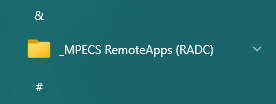
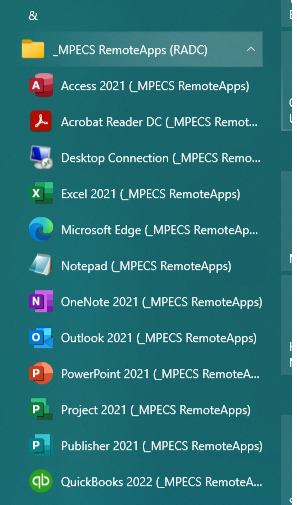
For users on-premises within Active Directory or Windows users who are not connected to AD the apps appear as a folder on the Start Menu (pic 2).
For on-premises subscribers, or Session Host Desktop users, RD Single Sign-On set up in Group Policy means that all the user needs to do is click on the RemoteApp on their Start Menu and the app starts with no prompt. After all, they're already authenticated right? ;-)
For all subscribed users the apps all behave like they are on the _local_ machine. To the user they're looking at a windowed, or maximized, app on their desktop.
Security for this setup is layered as it should be.
1: Active Directory - Delimits access to various RD Collections
2: Group Policy - Single Sign-On configured
3: ARR URLReWrite - HTTPS Layer Protection
4: Router/Firewall - Incoming Rules Delimited
5: Data remains on-premises and backed up
6: Remote user's device loss can be replaced quickly
We've been using essentially dumb Windows Desktop operating system machines for over a decade since RemoteApps got introduced with Windows Server 2008.
All of our clients utilize them extensively especially accounting firms that need to be on-site for on-premises audits at their client sites.
OPINION: Any remote work where sensitive data is involved should be on-premises, not in the cloud, and delivered to remote users via RemoteApp.
1: AD and GPO Secured
2: RD Gateway Protected
3: DUO 2FA for _all_ RD Gateway connections
4: Router/Firewall rules to protect incoming
5: Data remains on-premises
6: Backed up and Disaster Recovery Covered!
And the bonus? No mystery cloud bills. ;-)
ACRONYMS
AD - Active Directory
ARR - Application Request Routing
GPO - Group Policy Object
RD - Remote Desktop
RDS - Remote Desktop Services
RSS - Really Simple Syndication
1
7
713

6 May 2025
What happens when Remote Desktop isn’t so remote or secure? Rohit Nambiar joins us on the Defender’s Advantage podcast to unpack UNC5837’s clever use of RDP for cyber espionage, from RemoteApps to file mapping and more.
Listen now: bit.ly/3RTRfrL
7
18
2,329
25 Apr 2025
SECURITY: VPN IS A LIABILITY USE RD GATEWAY AND RDS
A Remote Desktop Gateway with DUO, or other multi-factor authentication provider, is the most secure way to access internal resources.
It uses already existing Active Directory User Objects and/or Security Groups so there's nothing else to manage ... or forget.
It tunnels that Remote Desktop session within a secure SSL tunnel.
It ties into AD Group Policy Lockout Policies for greater security.
Group Policy Objects and Settings to tune the user environment to a point where users can do what they are supposed to be doing and that's it.
RD RemoteApps is the best way, IMO, to work with internal resources. Nothing is on the remote machine other than a picture window.
RD Session Host gives user desktops on a shared server. It's inexpensive and just works. Why pay a cloud provider for something we're already licensed for?
Remote Desktop Services in use since forever and secure by default when using a RD Gateway/Web setup plus multi-factor authentication.
Oh, and RD Single Sign-On, Group Policy, and RSS Feeds make it bullet simple for users ... they don't have to do anything just click a shortcut on their Start Menu or Desktop.
Remote Desktop Services. Serving user environments securely for decades!
ACRONYMS
AD: Active Directory
RD: Remote Desktop
RDS: Remote Desktop Services
IMO: In My Opinion
10
2
57
7,644

8 Apr 2025
All true, Lots to play with in the RDP landscape. We currently have two labs which involve exploiting RemoteApps in SANS Sec660 sans.org/cyber-security-cour…
7 Apr 2025

1) I didn't know .RDP config files could be signed
2) RDP RemoteApps are crazy
3) I always appreciate a Fuzzy Snuggly Duck
cloud.google.com/blog/topics…
1
3
123

8 Apr 2025
🚨 CERT-UA warns: Military, police, and local governments are targeted by phishing emails dropping two new threats:
🛠️ GIFTEDCROOK stealer (C/C , browser data theft)
⚡ Reverse shell via PowerShell scripts from "PSSW100AVB" GitHub repo
Tools: PyRDP, RemoteApps — silent file theft, clipboard hijack.
👉 Full details: thehackernews.com/2025/04/ua…

1
27
55
11,231

7 Apr 2025
1) I didn't know .RDP config files could be signed
2) RDP RemoteApps are crazy
3) I always appreciate a Fuzzy Snuggly Duck
cloud.google.com/blog/topics…
3
55
206
13,152

7 Apr 2025
Google's Threat Intelligence Group reports a new phishing campaign employing signed .rdp files to exploit RDP functionalities for espionage against European governments, leveraging resource redirection and RemoteApps for file theft and manipulation. #Cyb… ift.tt/khIZ85n
10
3
997