
Most of the time when I tweet I'm a dumb ass. ;) Scratch portals replace with ssids... Love this idea and already found several list git. Is the trick to this the broadcasting power of the bait ssids? Don't you want very low power so it doesn't grab a random passer by?
1
9

Jun 14
you don't even need a portal ;) what you need is the SSIDs a web server which logs all the requests / times and user agents etc.
1
17

Jun 13
Want to keep your business-critical devices separate from guest traffic? With multiple SSIDs, eero for Business segments your network to keep sensitive devices secure. Let's talk! Visit hubs.ly/Q04jvZWZ0 to get started.
13

Jun 13
i meant more about the Play store app viciously tracking users, phoning home constantly with GPS coords, nearby WiFi SSIDs. as for auto installing apps, have you ever looked at the extremely long list of apps that are default built-in on Android? Google doesn't need to hide an autoinstall capability, they can just put whatever their NSA PRISM masters want in there. also, you're really technically naive if you think in terms of "1 app installed = 1 capability." the real spy layer doesn't need an app, it hides inside the Android system itself.
1
1
46


Jun 8
IPv4 with LAN on CGNAT, toss your IoT on its own VLAN separate SSIDs. I don't bother with DPI but I'm playing with the idea. I typically run Mikrotik hardware. Unifi is simple and has improved a lot over the years, just not my preference. Considering Surcata plus a few other tools for hosted services like gVisor, Falco, Socket dev, Cloudflare WARP, and if I'm really paranoid something like 3proxy. For privacy DoH, VPS Proxy with Zerotier or Wireguard.
ZT has been great but I hate the idea of 3rd party reliance and attack vectors, so I've considered self hosted ZT for internal language encryption or WG and throw a TURN VPS or CF Worker out there.
For Enterprise Security you could go crazy with WG, mTLS, Certs per device, Zero Trust, etc etc.
Whatever you do should be standardized, simple, turnkey, multiple architecture friendly.
But 99.9% are covered with a basic FW, 99.999% with a few additional options and layers, maybe an IDS but IDS is usually more false positives than actual positive idents, which means everyone ignores it and a self-learning AI will probably also learn to ignore it after too long.
99

Jun 4
Turning off location services removes GPS access but leaves several other data sources completely intact that apps and platforms can triangulate position from with surprising accuracy without ever touching the GPS hardware.
The first and most reliable alternative is WiFi positioning. Even when you are not connected to any WiFi network, your phone's radio is constantly scanning for nearby networks and collecting their SSIDs and MAC addresses. Google, Apple, and other companies have spent years war-driving and building massive databases that map WiFi router MAC addresses to physical geographic coordinates. When an app sees the list of WiFi networks visible from your device and cross-references them against that database, it can place you within a few meters of your actual location without GPS and without you being connected to any of those networks. Simply being near them is enough.
The second source is cell tower triangulation. Your phone is always connected to at least one cell tower and can see several others simultaneously. Each tower has a known geographic location, and by measuring signal strength from multiple towers simultaneously the network can estimate your position through trilateration. Urban areas with dense tower coverage produce location estimates accurate to within a few hundred meters. Rural areas with sparse coverage are less precise but still place you within a meaningful geographic area.
The third source is IP address geolocation. Every internet connection routes through an IP address that is registered to a specific ISP and associated with a geographic region. Databases mapping IP addresses to approximate locations allow any web service you connect to to place you at city or neighborhood level without any device sensor being involved at all.
The fourth and least obvious source is sensor fusion from other hardware. Barometric pressure sensors reveal your approximate altitude. The accelerometer and gyroscope combined with known movement patterns can deduce whether you are walking, driving, or on a train and in which direction. Bluetooth beacons in retail stores, airports, and public spaces ping your device and report your presence to location databases. The combination of all these passive signals creates a positioning picture that is often accurate enough for commercial targeting purposes even with GPS completely disabled, which is why truly preventing location tracking requires considerably more than toggling a single setting.
Jun 4

Interviewer:
You turned off location services.
How can apps still estimate where you are?
4
641

The trick is:
Hidden SSID
≠
Hidden Wi-Fi
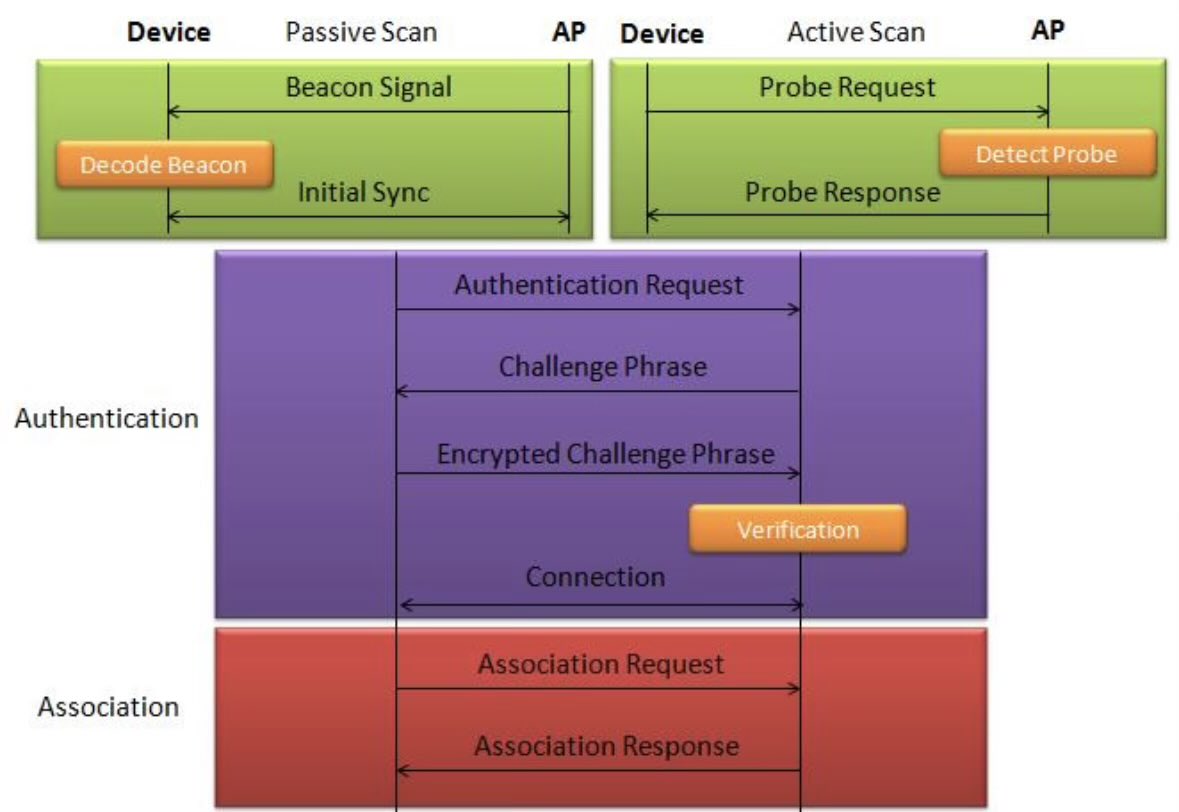
When you hide your network name, the router stops broadcasting it in beacon frames, but the network remains active.
How was it discovered?
Devices that have connected before reveal it when reconnecting by sending:
Probe Requests
effectively asking:
"Is MyHomeWiFi here?"
Anyone nearby can capture these wireless frames.
What the attacker sees
Hidden network
↓
Client reconnects
↓
SSID revealed
No password is needed—just passive listening.
Why can they connect?
If an attacker already knows the:
SSID
Wi-Fi password
the hidden setting adds no protection.
Key lesson
Hidden SSIDs
provide obscurity,
not security.
Real Wi‑Fi security comes from strong WPA2/WPA3 passwords and proper encryption, not from hiding the network name.
2
3
199

Jun 4
Kaspersky GReAT found that while WPA2/WPA3 prevalence is high in Mexico City, Guadalajara, and Monterrey, widespread open/WPS-enabled networks, default SSIDs, BSSID-derived names, and 2.4 GHz congestion still raise security risks ahead of the 2026 World … securelist.com/wardriving-as…
1
4
333

Jun 4
أنا وأنا بكتب credentials الWiFi بتاعي كل تعديل بدل ما أديهم لجميناي وأصبح ألاقيهم بكرة قي rockyou.txt ولا فيtop commonly used SSIDs🙃
1
1
6
271

Around any surveillance device, it's always fun and informative to check for interesting wifi access points (including hidden SSIDs), bluetooth, and bluetooth low-energy (BLE) advertisements.
May 27

I, for one, am overjoyed that the right minds are counter surveilling big brother
7
19
240
8,901


May 22
You can also use emojis in WiFi SSIDs. A thermostat is finally what made me remove mine.
9
1,364

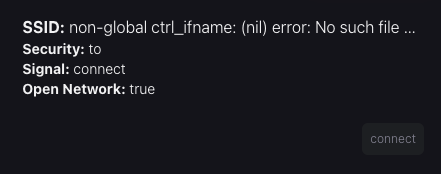
Tunneld WiFi kept failing after restarts, showing garbled SSIDs.
wpa_cli was returning error output before the scan finished. Parse code was eating it as real data. Couldn't reproduce consistently.
Add scan delay BSSID validation. Fixed.
Testing always bringing new challenges
2
31

May 15
project_id: electronic_tripwire_sar
version: 1.2
status: active_development
priority: high
owner: @11B_GWG
meta_context:
domain: SIGINT_Search_and_Rescue
ethos: Hacker_Underground / Technical_Anti-Showmanship
primary_environment: FreeBSD_15-RELEASE / DragonOS
hardware_target: Raspberry_Pi_2_ARMv7 / Patrol_Vehicle_Rig
technical_stack:
os_kernel: FreeBSD_15-RELEASE
chipset_target: MediaTek_MT7612U (Alfa AWUS036ACM)
drivers: rtwn(4) / mt76
sdr_tools:
- Kismet (Core_IDS_and_Monitoring)
- hostapd-mana (Active_Evil_Twin_Bait)
- Wireshark/tshark (Packet_Analysis)
antenna_config:
omni: 360-degree_tripwire_acquisition
directional: Yagi_High-Gain_Directional_Finding (Fox_Hunting)
project_objectives:
- objective: "Detect specific device signatures (MAC/Probes) in a SAR grid."
- objective: "Bypass MAC randomization via active SSID spoofing (Karma Attack)."
- objective: "Establish a Line of Bearing (LOB) using RSSI signal strength mapping."
system_architecture:
layer_1_acquisition:
mode: Monitor_Mode
action: "Passively sniff 802.11 Probe Requests and BLE chirps."
layer_2_active_bait:
mode: AP_Master_Mode
action: "Spoof 'Known' SSIDs to force device association/handshake."
layer_3_alerting:
mechanism: "Kismet 'Alert' trigger on Target_MAC or Target_SSID_Probe."
notification: "Audible/Visual cue for squad lead during patrol."
constraints_and_boundaries:
legal: "Purely passive listening or temporary necessity-based SAR active baiting."
technical: "Avoid cloud-dependency; local-only processing (Network Sovereignty)."
operational: "Must be 'Field Expedient'—operable from a ruggedized laptop or Pi in a tactical vehicle."
rejected_features:
- database_logging: "Rejected in favor of YAML state persistence."
- git_backed_logging: "Too much overhead for field SIGINT."
- cloud_nvr_integration: "Violates local-only privacy protocol."
current_hurdle:
- description: "Handshake refusal on encrypted SSIDs when spoofing as Open."
- solution_path: "Utilize hostapd-mana to acknowledge all encryption attempts to capture the identity-revealing handshake."
field_notes:
- "Inspired by @Cemaxecuter /WarDragon methodologies."
- "Applicable to missing person cases involving high-stress/autistic subjects who may not respond to verbal calls but carry active devices."
3
4
240

May 12
Sovereignty tips #13:
Your phone’s radios are an activity log. Everyone has a phone. And vast majority have surveillance device in their pocket.
Wi‑Fi probes and Bluetooth beacons leak behavior patterns that can be stitched into a movement profile, even with MAC randomization and “hidden” SSIDs.
Do not rely on random public Wi‑Fis; prefer an anonymous eSIM/mobile data and keep Wi‑Fi off by default so you control when the device talks and shrink your MITM attack surface.
#opsec101 #infosec101 #persec101

1
9
756

May 8
One of my neighbors SSIDs is Invoke-Mimikatz. They're lucky I'm old :p
1
21
751

Apr 29
Hi, Sebastian. We're sorry to hear that you are having issues connecting your Nest Thermostat to Wi-Fi or seeing any available SSIDs.
We would like to look into this further. Please DM us, and we will continue this conversation there. x.com/messages/compose?recip…
20

Apr 28
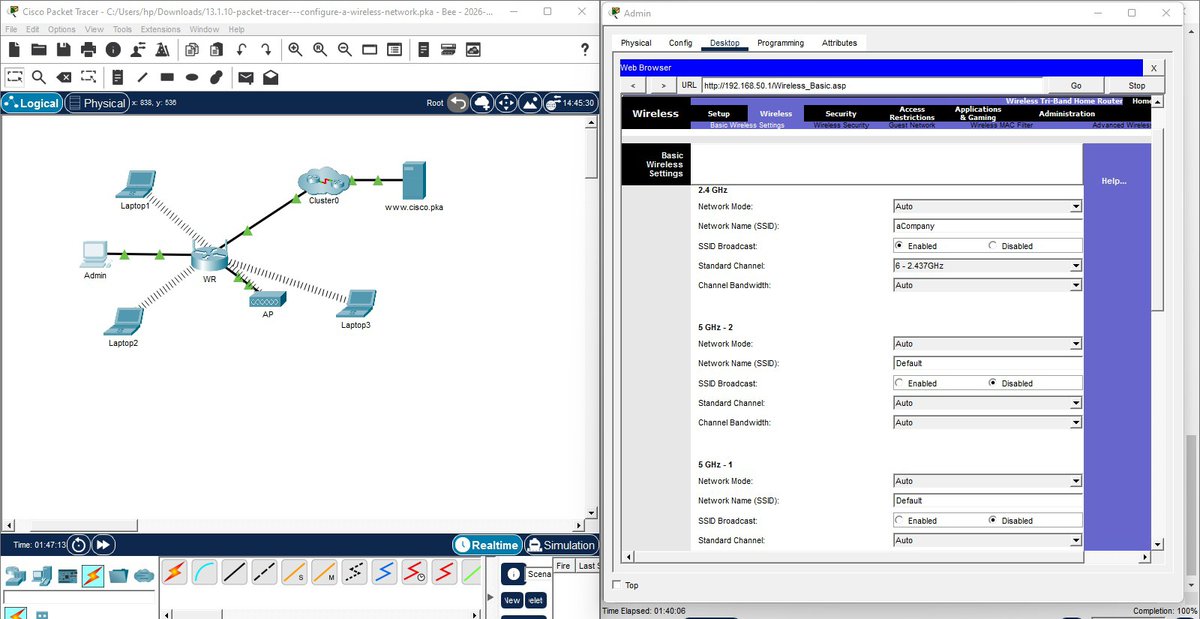
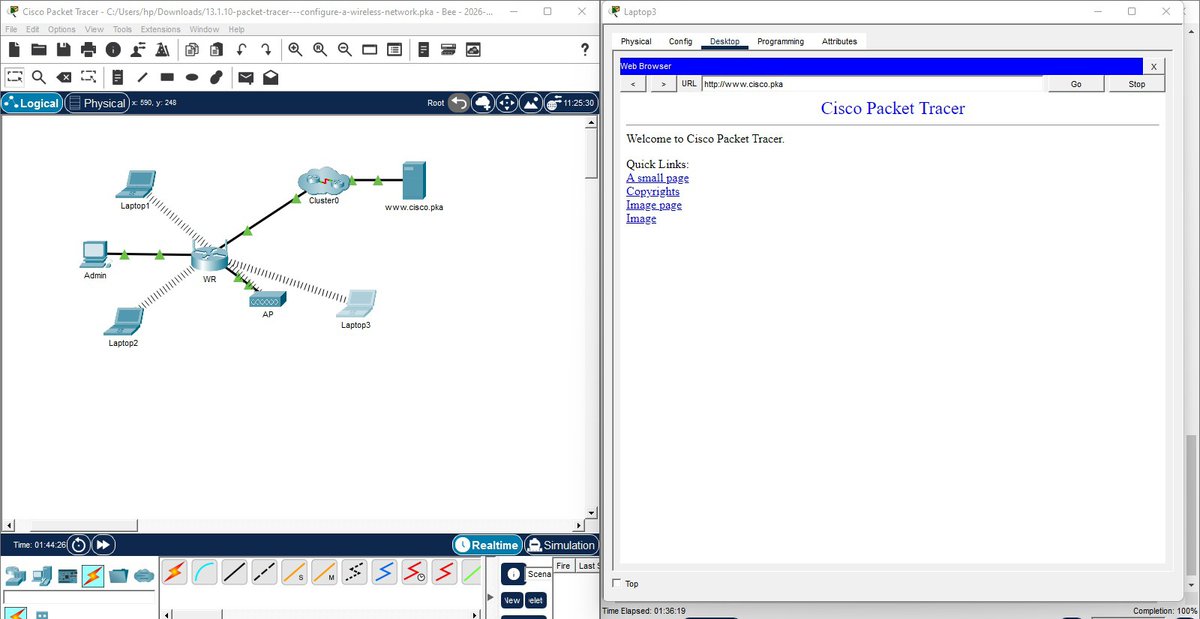
Today I practiced configuring a wireless router and an access point
I set up SSIDs, configured WPA2-PSK security, connected the devices via Ethernet & linked the access point to the wireless router. Then connected the wireless clients & verified connectivity across the network
Apr 25

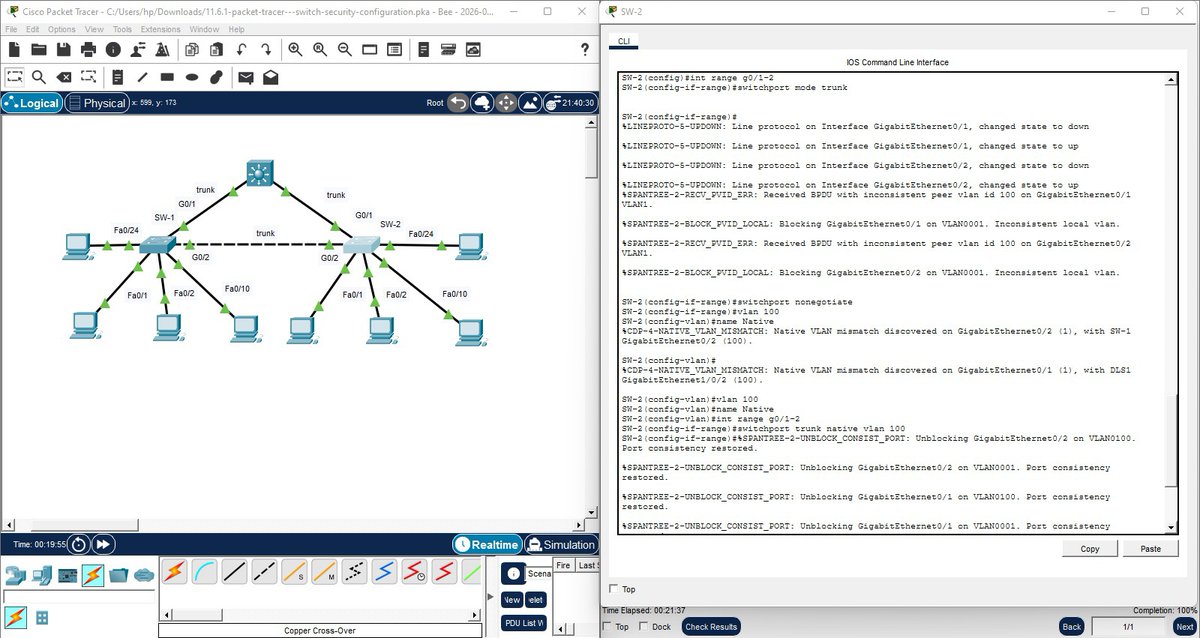
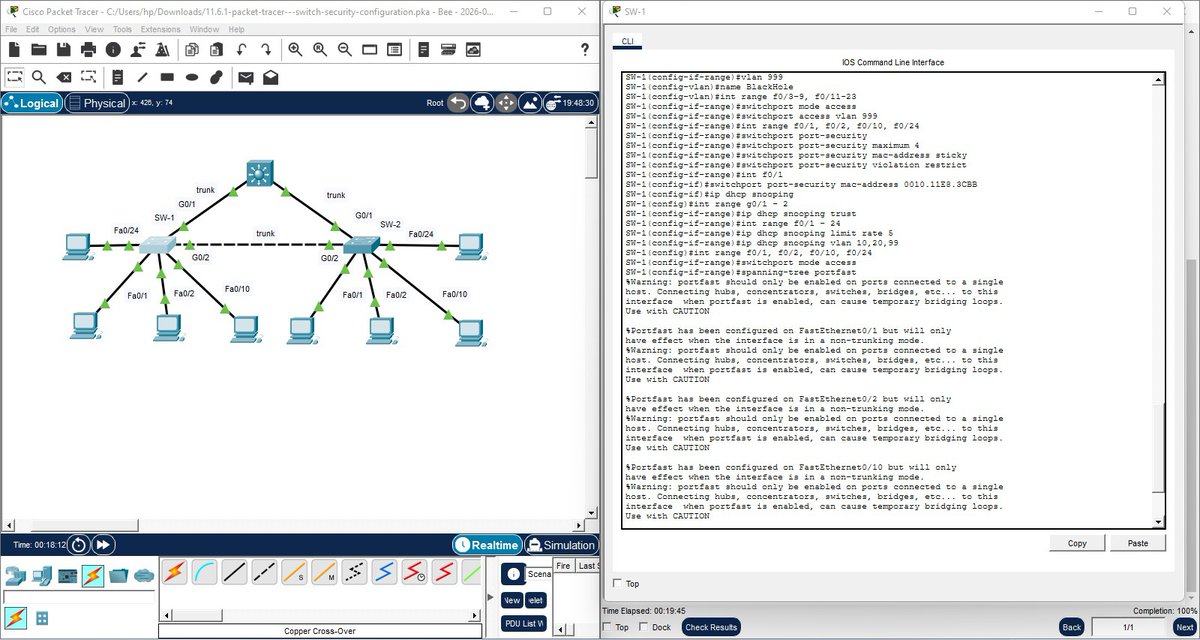
Today I practiced switch security configuration by hardening two access layer switches
I secured unused ports, implemented port security to limit MAC addresses & prevent CAM table overflow, and mitigated VLAN hopping, DHCP, ARP, & STP attacks. Then I verified the configuration👇🏽
8
7
88
12,673