
Apr 3
The agent execution engine is the core of what makes [redacted] more than a chat app it's the runtime that turns an LLM conversation into actions on a real system.
Here's what it does
When a user sends a message like "refactor this function to use async/await," a chat app just passes that to an LLM and streams back text. An execution engine does this instead:
User prompt
→ LLM decides to use tools (Read file, Edit file, Bash, etc.)
→ Engine dispatches tool calls to real system (filesystem, shell, git)
→ Results feed back to LLM
→ LLM decides next action (or responds to user)
→ Loop continues until task is complete
That loop — plan, act, observe, repeat — is the execution engine. It's what you already have in request.js.
The core components
1. Tool Dispatcher
The heart of it. Takes a tool call from the LLM (e.g., {tool: "Edit", params: {file, old_string, new_string}}) and executes it against the real system.
Your dispatcher handles 47 tools across 11 categories:
File I/O — Read, Write, Edit, Glob, Grep
Shell — Bash, PowerShell
Search — WebSearch, WebFetch
Agents — Agent (spawn sub-agent), SendMessage, TeamCreate/Delete
Tasks — TaskCreate, TaskList, TaskGet, TaskUpdate, TaskStop, TaskOutput
Scheduling — CronCreate, CronList, CronDelete, RemoteTrigger
MCP — McpAuth, ListMcpResources, ReadMcpResource
Mode — EnterPlanMode, ExitPlanMode, EnterWorktree, ExitWorktree, EnterREPL, ExitREPL
Code intelligence — LSP (language server)
Memory — persistent memory across sessions
Skills — SkillTool for reusable behaviors
2. Agent Loop
The orchestration layer that manages the LLM conversation cycle:
while (task not complete) {
response = await llm.generate(messages, available_tools)
if (response.has_tool_calls) {
for (tool_call of response.tool_calls) {
result = await dispatcher.execute(tool_call) // ← real side effects
messages.push(result)
}
} else {
return response // done, reply to user
}
}
This is what separates an agent from a chatbot. The loop runs autonomously — the LLM keeps calling tools and acting on results until it decides it's done.
3. Safety Layer
Before a tool executes, the engine checks:
Git safety — blocks destructive ops like git push --force or git reset --hard unless explicitly authorized (git-safety.js)
Permission gating — some tools require user approval before executing
Sandboxing — shell commands run in constrained environments
Plan mode — when active, the agent can only read/search, not write — it proposes changes for user approval
4. Multi-Agent Coordination
The engine can spawn child agents that run independently:
Parent agent ("refactor the auth module")
├── Child agent 1 ("update the login flow")
├── Child agent 2 ("update the session handler")
└── Child agent 3 ("write tests for both")
Each child gets its own agent loop, tools, and context. The parent monitors progress via TaskGet/TaskOutput and coordinates results. The coordinator assigns role-based tool sets to each agent.
5. Workspace Isolation
Each agent session can operate in its own git worktree — a full copy of the repo on a separate branch. This means multiple agents can edit files concurrently without conflicts, and changes can be merged back when done.
6. Background Execution
Not all agent work is synchronous with the user:
Cron triggers — agents that run on a schedule (e.g., "check CI status every 10 minutes")
Remote triggers — agents invoked by external events (webhooks, etc.)
KAIROS — daily logs, memory consolidation, proactive prompts
Background ticks — agents that keep running after the user disconnects
1
4
209


Mar 29
Claude CodeのTeamCreateツールすごいな。アプリの雑なアイディアだけ渡して企画作ってって言ったら、担当分担して進めてくれてるよ。
2
3
31


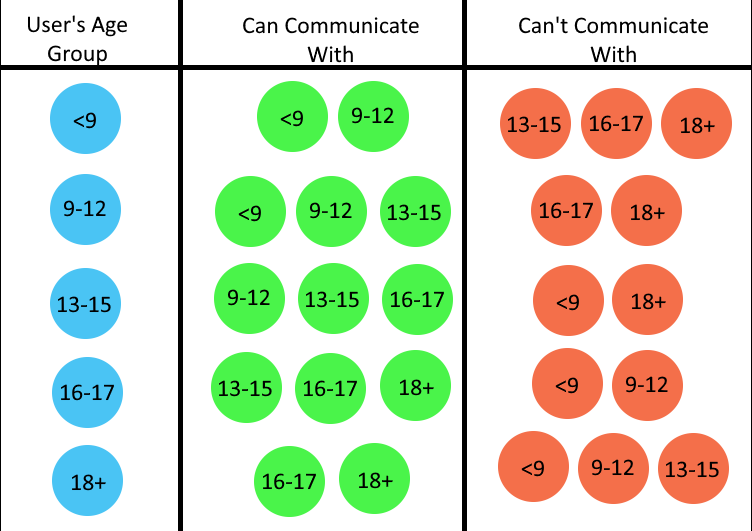
Starting May, age groups will affect who you can collaborate with on TeamCreate.

1
2
5
325

Mar 16
Claude CodeでTeamCreate機能を使う時は
tmuxでセッション作らないと画面分割して表示されない
tmux使わなくてもTeamCreate自体はできるんだけど
画面分割されない。つまり面白くない
#メモ
4
257

Mar 11
How do you get it to reliably trigger though..?
I am facing having this trigger even when i add something like 'use teamcreate tool to create a team and parallelize the work.'
2
1,374


Mar 1
Just shipped my first GitHub repo
swarm-orchestra is a Claude Code plugin that makes agent swarms actually work reliably
Spent a week pushing the limits of the experimental TeamCreate feature. Claude struggles to invoke it correctly and without guardrails your swarm explodes into 20 agents
Encoded everything I learned into one skill so you don't have to
Works for code audits, research, anything parallel
Open to all feedback and contributions
@amorriscode @bcherny
github.com/NuskiBuilds/swarm…
2
1
2
82


Feb 14
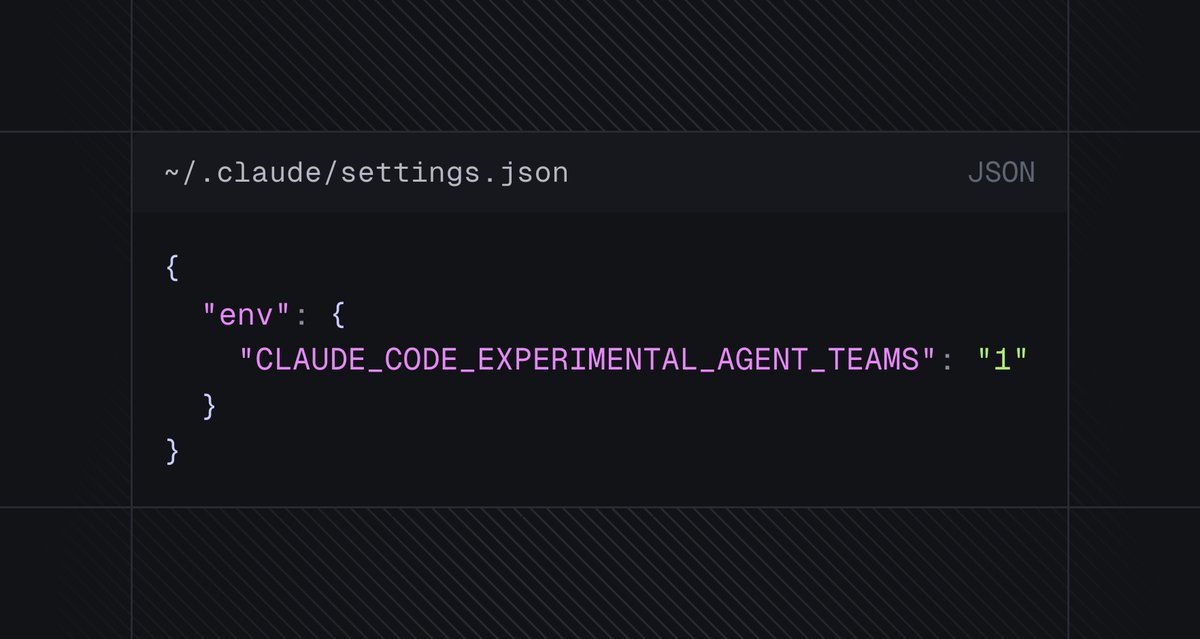
To use the TeamCreate swarm feature in Claude Code just add this to settings.json and ask it to create a team
Pro tip: I asked it to plan out a full build specifically so each could be built in parallel without conflicts - worked perfectly!

15
9
178
24,650
Feb 14
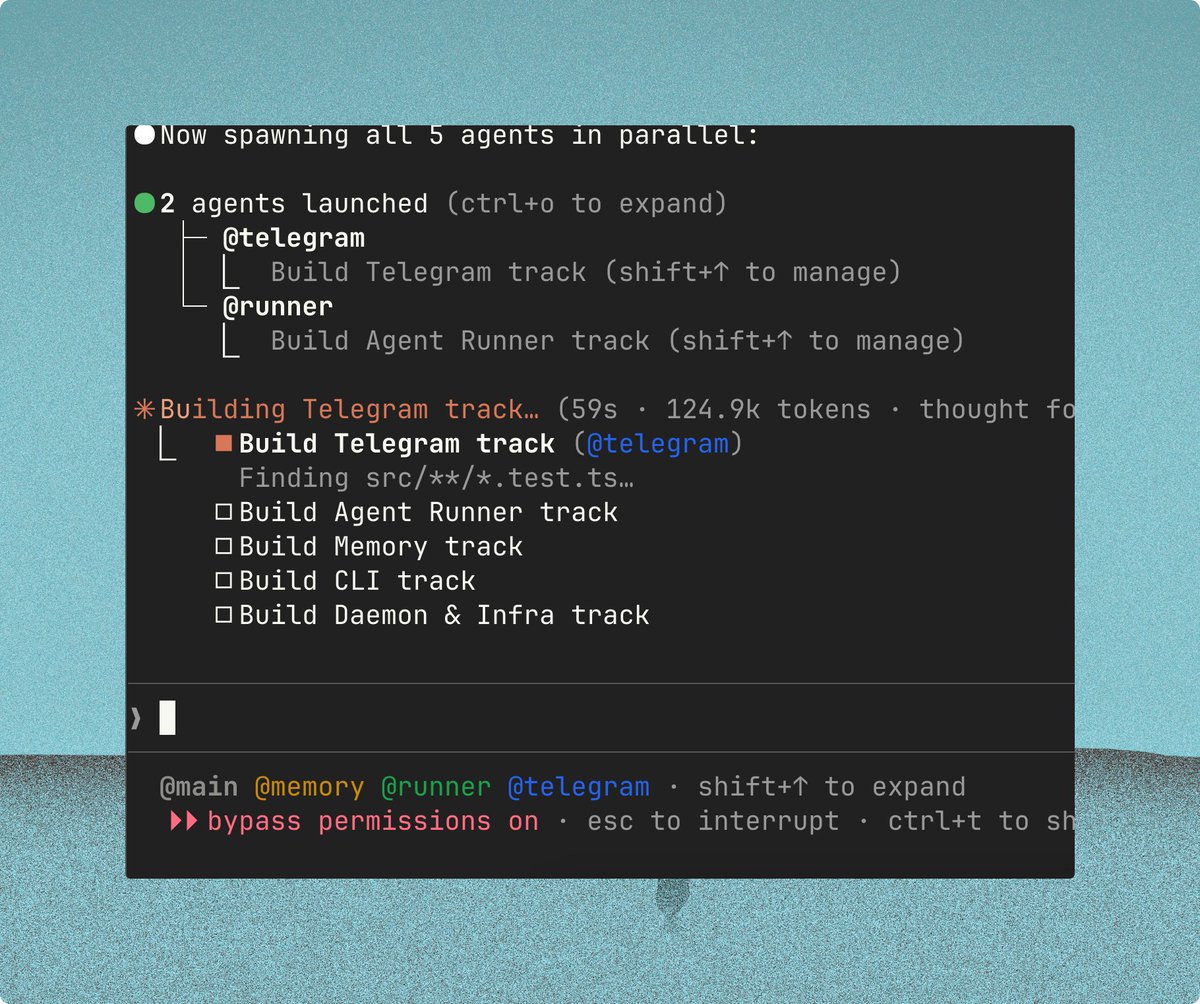
Holy shit, the Claude Code TeamCreate/swarm feature is so good 🤯
37
11
297
45,393


Feb 10
You'll need @repomix_ai and LLM (cli) to make it work and the latest Claude.
This is it.
Default Workflow: Parallel Agent Swarm
All non-trivial work should use the team-based parallel agent swarm pattern. This is the default way to work on any project.
Pattern
1. Decompose the feature into independent sub-tasks
2. TeamCreate with a descriptive name
3. TaskCreate all tasks with dependencies (blockedBy)
4. Wave execution: spawn 2-4 agents per wave for independent tasks
5. Review loop after each wave (see below)
6. Fix findings immediately
7. Commit after each logical milestone
8. Shutdown agents after completion, TeamDelete to clean up
9. Update docs: keep project status, memory, and instructions current
Agent Rules
- Always read existing code before modifying
- Use bypassPermissions mode for background agents
- Every agent must verify the project builds before reporting completion
- Max 4 parallel agents per wave (prevents merge conflicts)
- Shutdown agents immediately after task completion
- Never skip external review — it catches real bugs every time
---
Review Loop (Ralph Loop)
For any significant design or implementation work, use an iterative review loop with an external model. The loop continues until you get consecutive approvals — not just one pass.
Process
1. Design/Implement — create initial design or code
2. Submit for review — flatten with repomix, pipe to external LLM with high reasoning
3. Iterate — address every finding, resubmit
4. Approval gate — continue until receiving N consecutive approvals (recommend 2-3)
5. Rotate perspectives — each review round should use a different review lens:
- Security/Attacker — "Find exploits, injection vectors, race conditions, privilege escalation"
- User/UX — "Find confusing flows, poor error messages, unnecessary friction"
- Correctness — "Find logic bugs, off-by-ones, missed edge cases, broken invariants"
- Equivalence — "Compare against the spec/reference implementation for deviations"
- Performance — "Find N 1 queries, unnecessary allocations, missing indexes"
Review Command
cd path/to/package
repomix --style plain --include "src/relevant/**" . -o repomix-output.txt && \
cat repomix-output.txt | llm -m gpt-5.2 -o reasoning_effort high \
-s "Review this code from a SECURITY perspective. You are an attacker trying to break this system. Find exploits, race conditions, input validation gaps, and privilege escalation paths." \
> code-reviews/review-$(date %Y%m%d-%H%M%S).md && \
rm repomix-output.txt
Swap the -s system prompt each round to rotate perspectives. Replace gpt-5.2 with whatever external model you prefer — the key is using a different model than the one writing the code.
Why Looping Works
- Round 1 catches the obvious bugs
- Round 2 catches bugs introduced by Round 1 fixes
- Round 3 from a different perspective catches what both rounds missed
- Consecutive approvals mean the code is actually stable, not just "fixed the last thing"
- Different perspectives catch different classes of bugs — security reviewers miss UX issues and vice versa
Example Loop
Wave 1: Build auth module (3 agents in parallel)
→ Review round 1 (security lens): Found 2 CRITICAL, 1 HIGH
→ Fix all 3 findings
→ Review round 2 (correctness lens): Found 1 MEDIUM
→ Fix finding
→ Review round 3 (security lens): APPROVED ✓
→ Review round 4 (UX lens): APPROVED ✓
→ 2 consecutive approvals → commit and move to Wave 2
---
Tips
- Put this in your project's CLAUDE.md so Claude Code follows it automatically
- Use MEMORY.md (in .claude/) to persist lessons learned across sessions
- Keep a regression checklist — every bug you hit becomes a checklist item
- The repomix llm CLI combo works because it flattens your codebase into a single file that fits in one prompt
- Document each review round's findings — future sessions learn from past mistakes
---
The two patterns complement each other: swarm handles parallelism and throughput, review loop handles quality and correctness. Together they give you speed without regressions.
1
6
455

Feb 8
use teamcreate is the new ultrathink, but it actually produces great outputs
1
8
1,444
Feb 8
-OpenClaw continuing to go vertical
-Opus 4.6 having massive context window
-Use TeamCreate
-New X API
-Codex 5.3 catching up
all not priced in yet
94
34
674
36,826