
Jun 2
BackgroundTransparency to 0.8 to show composition, not that helpful when it runs spritesheets but you can see how i play my UIGradient tweens with it.
1
3
865

Mar 23
This customizable Minigame Task is 100% AI scripted.
No UI imports, no external assets – just pure code. I’m dropping the full prompt for FREE below! 👇
Want the full script too? > Since I can't upload it here, just reply with "DM" and I’ll send it over to you! 📜
"Create a Roblox "Hit the Target" minigame as a single LocalScript. Place it in StarterPlayer > StarterPlayerScripts. The entire GUI must be built purely via code with Instance.new, no pre-made ScreenGui or assets required. Zero external dependencies. No server scripts needed. Fully standalone.
=== CONCEPT ===
A horizontal rhythm bar sits centered on screen inside a dark glassmorphism panel. A thin white indicator stripe bounces continuously left and right across the bar. Somewhere on the bar is a gray target zone. The player must click or tap exactly when the stripe overlaps the target zone. Each successful hit increases the stripe speed and shrinks the target zone, making it progressively harder. A miss penalizes the player by removing one point of progress and reverting the difficulty by one level. After the required number of successful hits (default 5), the minigame ends and fires a completion callback.
=== CONFIGURATION TABLE (top of script, all values tweakable) ===
BAR_WIDTH = 0.6 (bar takes 60 percent of screen width) BAR_HEIGHT = 0.08 (bar height is 8 percent of screen) GREEN_ZONE_WIDTH = 0.24 (starting target zone width as fraction of bar) GREEN_ZONE_SHRINK = 0.04 (target zone shrinks by this amount per successful hit) MIN_GREEN_ZONE_WIDTH = 0.08 (target zone never gets smaller than this) BASE_STRIPE_SPEED = 0.4 (stripe moves at 0.4 units per second initially) SPEED_INCREASE = 0.2 (speed increases by this per successful hit) REQUIRED_HITS = 5 (number of hits needed to complete the minigame)
=== COLOR PALETTE (define a COLORS table) ===
BACKGROUND: RGB(20, 20, 25) - dark panel background ACCENT: RGB(180, 180, 190) - muted gray accent for text ACCENT_DARK: RGB(100, 100, 110) - darker gray for borders and strokes BAR_BACKGROUND: RGB(30, 30, 35) - rhythm bar background GREEN_ZONE: RGB(140, 140, 150) - target zone color (gray, not green despite the name) STRIPE: RGB(220, 220, 230) - moving indicator stripe color TEXT: RGB(200, 200, 200) - general text color TITLE: RGB(180, 180, 190) - title text color SCORE_GOOD: RGB(150, 200, 150) - muted green for hit feedback SCORE_MISS: RGB(200, 100, 100) - muted red for miss feedback PROGRESS_BG: RGB(30, 30, 35) - progress bar background PROGRESS_FILL: RGB(160, 160, 170) - progress bar fill color
=== GUI STRUCTURE (all built with Instance.new) ===
ScreenGui named "HitMinigameGUI", ResetOnSpawn false, starts Enabled false, parented to PlayerGui.
Overlay Frame: full screen (1,0,1,0), fully transparent (BackgroundTransparency 1), just a click-blocker layer.
MainFrame: centered panel, Size (0.6, 0, 0.6, 0), Position (0.2, 0, 0.2, 0), semi-transparent background (BackgroundTransparency 0.3), no border. Add UICorner with CornerRadius 16px. Add UIStroke with ACCENT_DARK color, thickness 3, transparency 0.3. Add UIGradient going top-to-bottom from RGB(40,45,50) to RGB(25,30,35), rotation 90.
Title TextLabel: inside MainFrame, top area, Size (1,0,0.14,0), Position (0,0,0.02,0), transparent background, font FredokaOne, TextScaled true, color TITLE. Add UIStroke for readability (ACCENT_DARK, thickness 1.5, transparency 0.5). Add UITextSizeConstraint min 28 max 56. Default text is "Task" but gets set dynamically via the API.
GameArea Frame: inside MainFrame, transparent container, Size (1,0,0.5,0), Position (0,0,0.22,0). Holds the rhythm bar and progress elements.
RhythmBar Frame: inside GameArea, Size (BAR_WIDTH, 0, BAR_HEIGHT, 0), centered with AnchorPoint (0.5, 0.5), Position (0.5, 0, 0.35, 0), color BAR_BACKGROUND, border 2px with RGB(60,60,70). Add UICorner with CornerRadius (0.3, 0).
GreenZone Frame (target zone): inside RhythmBar, Size (GREEN_ZONE_WIDTH, 0, 1, 0), Position (0.5, 0, 0, 0), AnchorPoint (0.5, 0), color GREEN_ZONE, no border. Add UICorner (0.3, 0).
MovingStripe Frame: inside RhythmBar, Size (0.04, 0, 1, 0), starts at Position (0, 0, 0, 0), color STRIPE, no border. Add UICorner (0.5, 0). Add a UIStroke glow effect with white color, thickness 2, transparency 0.5.
Progress TextLabel: inside GameArea, Size (0.4, 0, 0.15, 0), Position (0.3, 0, 0.62, 0), transparent background, font FredokaOne, TextScaled, color TEXT. Shows "0 / 5" format. UITextSizeConstraint min 28 max 48.
Progress Bar: inside GameArea, a background Frame (0.2, 0, 0.05, 0) at Position (0.4, 0, 0.82, 0), color PROGRESS_BG, fully rounded UICorner (0.5, 0). Inside it a fill Frame starting at Size (0, 0, 1, 0), color PROGRESS_FILL, same rounded corners. Fill animates via tween as progress increases.
Action TextLabel: inside MainFrame, bottom area, Size (1, 0, 0.12, 0), Position (0, 0, 0.85, 0), transparent background, font FredokaOne, TextScaled, color ACCENT. Text says "CLICK / TAP!". UITextSizeConstraint min 28 max 52.
Close Button (TextButton): inside MainFrame, top-right corner, Size (0, 40, 0, 40), Position (1, -10, 0, 10), AnchorPoint (1, 0), red background RGB(180, 60, 60), transparency 0.1, text "X", font GothamBold, TextSize 24, white text, ZIndex 10. Add UICorner 8px.
=== GAME STATE VARIABLES ===
isGameActive (boolean, false initially) successfulHits (number, starts at 0) stripePosition (number, 0 to 0.96 range, starts at 0 which is left edge) stripeDirection (1 for right, -1 for left, starts at 1) currentSpeed (starts at BASE_STRIPE_SPEED) currentGreenZoneWidth (starts at GREEN_ZONE_WIDTH, shrinks with hits) greenZonePosition (0 to 1 range, center of target zone, starts at 0.5) onGameComplete (callback function, nil initially) disabledPrompts (table storing ProximityPrompts that were disabled)
=== STRIPE MOVEMENT ===
Use RunService BindToRenderStep with a unique name like "HitMinigame_Update" and priority Camera 1. In the callback, receive deltaTime and update stripePosition by adding (stripeDirection times currentSpeed times deltaTime). When stripePosition goes below 0, clamp to 0 and flip direction to 1. When stripePosition goes above 0.96 (which is 1.0 minus the stripe width of 0.04), clamp to 0.96 and flip direction to -1. Update the stripe Frame Position to UDim2.new(stripePosition, 0, 0, 0). This gives smooth frame-independent bouncing.
=== HIT DETECTION ===
When the player clicks, calculate stripeCenter as stripePosition 0.02 (half the stripe width). Calculate greenStart as greenZonePosition minus half of currentGreenZoneWidth. Calculate greenEnd as greenZonePosition plus half of currentGreenZoneWidth. If stripeCenter is between greenStart and greenEnd, it is a hit.
On HIT:
Increment successfulHits by 1
Show green "HIT!" feedback text
Flash the target zone bright green RGB(150, 255, 150) for 0.1 seconds then revert
Update progress display and progress bar
Increase currentSpeed by SPEED_INCREASE
If successfulHits reaches REQUIRED_HITS, wait 0.2 seconds then end the game with success
Otherwise, move the target zone to a new position (see below)
On MISS:
Show red "MISS!" feedback text
If successfulHits is greater than 0, subtract 1 from successfulHits
Revert currentSpeed by subtracting SPEED_INCREASE (clamp to BASE_STRIPE_SPEED minimum)
Revert currentGreenZoneWidth by adding GREEN_ZONE_SHRINK back (clamp to GREEN_ZONE_WIDTH maximum)
Update progress display
Animate the target zone size change with a tween
=== TARGET ZONE REPOSITIONING (after each hit) ===
Shrink currentGreenZoneWidth by GREEN_ZONE_SHRINK (clamp to MIN_GREEN_ZONE_WIDTH). Calculate valid position range ensuring the zone stays within the bar (minPos = half the zone width, maxPos = 1 minus half the zone width). Generate a random new position that is at least 0.2 away from the current position (use a repeat-until loop). Animate the zone to its new position AND new size simultaneously using TweenService with TweenInfo duration 0.3, EasingStyle Back, EasingDirection Out.
=== FEEDBACK ANIMATIONS ===
Create a temporary TextLabel at Position (0.5, 0, 0.45, 0) with AnchorPoint (0.5, 0.5), transparent background, GothamBold font, TextScaled, ZIndex 10. Add UITextSizeConstraint min 24 max 42. Use TweenService to animate TextTransparency to 1 and Position upward to (0.5, 0, 0.35, 0) over 0.6 seconds with Back easing Out. When the tween completes, destroy the label. This is non-blocking so gameplay continues during the animation.
=== INPUT HANDLING ===
Connect to UserInputService.InputBegan. Only process input when isGameActive is true. Skip if gameProcessed is true. Accept MouseButton1 and Touch input types, but ONLY if the input position falls within the MainFrame bounds (check using AbsolutePosition and AbsoluteSize of MainFrame). If input is within bounds, call the hit check function. If the player presses the Q key, force exit the minigame. Also connect the close button MouseButton1Click and TouchTap events to the force exit function.
=== GAME START FUNCTION ===
Accept parameters: callback function, optional requiredHits number, optional title string. If already active, return immediately. If requiredHits is provided, override REQUIRED_HITS. Reset all game state to initial values. Reset all UI elements (progress text, progress bar fill to 0, target zone position and size, stripe position to 0). Enable the ScreenGui. Disable ALL ProximityPrompts in workspace (iterate workspace GetDescendants, find all enabled ProximityPrompt instances, store them in the disabledPrompts table and set Enabled to false). Bind the render step for stripe movement.
=== GAME END FUNCTION ===
Accept a success boolean parameter. Calculate finalScore as 100 if success, 0 if not. Set isGameActive to false. Disable the ScreenGui. Unbind the render step. Re-enable all stored ProximityPrompts (check they still exist and have a parent before re-enabling). Clear the disabledPrompts table. Call the onGameComplete callback with the finalScore.
=== PUBLIC API ===
Create a HitMinigame table with three functions:
StartMiniGame(callback, requiredHits, title) - Sets the title label text if title is provided, then calls the internal start function. The callback receives a score number (100 for success, 0 for exit or fail).
IsActive() - Returns the isGameActive boolean.
ForceExit() - Ends the game with success false.
Store the table in _G.HitMinigame for global access from other scripts. Also return the table from the module.
=== USAGE EXAMPLE (for reference, not part of the script) ===
From any other LocalScript call: _G.HitMinigame.StartMiniGame(function(score) if score >= 100 then -- player completed it, give reward else -- player failed or exited end end, 5, "Pick the Lock")
"
4
565
Mar 21
Day 1 of building a $10k rogue like Roblox game using ONLY AI.
I made my AI agent code a highly optimized, procedural Wave Spawner.
No gatekeeping. Here is the exact Prompt I used:
"# 🎮 Modular Wave Survival System — Complete Build Prompt (Template)
> **Copy-paste this entire prompt into a new AI session with Roblox Studio MCP access to build the full system from scratch. No prior context needed. This is a generic, reusable template — swap enemy names, stats, and numbers to fit any project.**
>
> ⚠️ **Wave advancement = ALL enemies of the current wave must be killed before the next wave begins.**
---
## OBJECTIVE
Build a complete, **modular wave-based survival system** in Roblox Studio. Waves of humanoid **dummy enemies** spawn and walk toward players. When **all enemies of the current wave are killed**, the wave ends and the next wave begins after a short intermission. The system must be **self-contained**, with all scripts, UI, RemoteEvents, folders, and game logic created from scratch. No external assets or Toolbox models required.
---
## DESIGN PHILOSOPHY
This template follows a **modular architecture**. Each system is a separate script with clear responsibilities:
| Module | Responsibility |
|---|---|
| `WaveManager` | Wave lifecycle, spawn logic, wave transitions |
| `EnemySpawner` | Enemy creation, model building, customization |
| `EnemyAI` | Pathfinding, movement, targeting, contact damage |
| `EnemyNameplate` | BillboardGui health bars above enemies |
| `PlayerHUD` | Wave counter enemies remaining display |
| `WaveIntermission` | "Wave Complete" screen countdown between waves |
Each module communicates through **ReplicatedStorage values** and **RemoteEvents** — never through direct references to other scripts.
---
## PREREQUISITES
Before running this prompt, ensure:
1. A **Workspace** with a flat floor part named `ArenaFloor` (recommended: 100×1×100, anchored, at position 0, 0.5, 0, `Material = SmoothPlastic`, `BrickColor = "Medium stone grey"`)
2. A `SpawnLocation` in Workspace (position 0, 3, 0)
3. **Nothing else needed** — enemies are built procedurally from primitive Parts
---
## STEP 1: FOLDER & EVENT SETUP
Create the following structure before any scripts:
### ReplicatedStorage
| Name | Type | Purpose |
|---|---|---|
| `WaveEvents` | Folder | Container for all wave-related remotes |
| `WaveEvents.WaveStarted` | RemoteEvent | Server → Clients: new wave begins |
| `WaveEvents.WaveCompleted` | RemoteEvent | Server → Clients: wave ended, show intermission |
| `WaveEvents.EnemyDied` | RemoteEvent | Server → Clients: an enemy was killed (for HUD fx) |
| `CurrentWave` | IntValue | Tracks current wave number (default: 0) |
| `EnemiesAlive` | IntValue | Tracks remaining enemies in current wave (default: 0) |
| `TotalKillsThisWave` | IntValue | Tracks kills within the current wave (default: 0) |
| `TotalEnemiesThisWave` | IntValue | Total enemies that belong to this wave (default: 0) |
### Workspace
| Name | Type | Purpose |
|---|---|---|
| `Enemies` | Folder | All spawned enemies are parented here |
### ServerStorage
| Name | Type | Purpose |
|---|---|---|
| `WaveConfig` | ModuleScript | Central configuration (see below) |
---
## STEP 2: `WaveConfig` (ModuleScript → ServerStorage)
### Purpose
Single source of truth for ALL tunable wave parameters. Every other script reads from here. To change the game's behavior, you only modify this file.
```lua
local WaveConfig = {}
-- ═══════════════════════════════════════════
-- WAVE RULES
-- ═══════════════════════════════════════════
WaveConfig.IntermissionDuration = 5 -- seconds between waves
WaveConfig.FirstWaveDelay = 3 -- seconds before wave 1 starts
-- ═══════════════════════════════════════════
-- ENEMY SCALING (per wave)
-- ═══════════════════════════════════════════
WaveConfig.BaseEnemyCount = 5 -- enemies in wave 1
WaveConfig.EnemiesPerWave = 2 -- additional enemies per wave
WaveConfig.MaxEnemiesAlive = 20 -- hard cap on simultaneous enemies
WaveConfig.BaseHP = 100 -- enemy HP in wave 1
WaveConfig.HPPerWave = 10 -- additional HP per wave
WaveConfig.BaseSpeed = 12 -- enemy WalkSpeed in wave 1
WaveConfig.SpeedPerWave = 0.5 -- additional speed per wave
WaveConfig.MaxSpeed = 24 -- speed cap
WaveConfig.BaseDamage = 10 -- contact damage per hit in wave 1
WaveConfig.DamagePerWave = 2 -- additional damage per wave
WaveConfig.DamageCooldown = 1.5 -- seconds between contact damage ticks
-- ═══════════════════════════════════════════
-- SPAWN SETTINGS
-- ═══════════════════════════════════════════
WaveConfig.SpawnDelay = 1.0 -- seconds between each enemy spawn
WaveConfig.SpawnDelayReduction = 0.05 -- reduce spawn delay per wave
WaveConfig.MinSpawnDelay = 0.3 -- minimum spawn delay
WaveConfig.ArenaSize = 50 -- half-size of arena (spawn radius)
WaveConfig.SpawnHeight = 5 -- Y position for spawns
-- ═══════════════════════════════════════════
-- SPAWN POINTS (8 positions around arena edge)
-- ═══════════════════════════════════════════
WaveConfig.SpawnPoints = {
Vector3.new( 50, 5, 50), -- corners
Vector3.new(-50, 5, 50),
Vector3.new( 50, 5, -50),
Vector3.new(-50, 5, -50),
Vector3.new( 50, 5, 0), -- edge centers
Vector3.new(-50, 5, 0),
Vector3.new( 0, 5, 50),
Vector3.new( 0, 5, -50),
}
WaveConfig.SpawnJitter = 5 -- ±random offset in X/Z to prevent stacking
-- ═══════════════════════════════════════════
-- ENEMY TYPES (weighted random selection)
-- ═══════════════════════════════════════════
-- weight: chance weight (all weights summed, then pick proportionally)
-- speedMult: multiplier on base speed
-- hpMult: multiplier on base HP
-- damageMult: multiplier on base damage
-- color: BrickColor for the enemy body
-- size: scale multiplier on the dummy model (1 = normal)
WaveConfig.EnemyTypes = {
{
name = "Dummy",
weight = 60,
speedMult = 1.0,
hpMult = 1.0,
damageMult = 1.0,
color = BrickColor.new("Bright red"),
size = 1.0,
},
{
name = "Fast Dummy",
weight = 25,
speedMult = 1.8,
hpMult = 0.6,
damageMult = 0.8,
color = BrickColor.new("Bright yellow"),
size = 0.85,
},
{
name = "Tank Dummy",
weight = 15,
speedMult = 0.7,
hpMult = 2.5,
damageMult = 1.5,
color = BrickColor.new("Really red"),
size = 1.3,
},
}
-- ═══════════════════════════════════════════
-- NAMEPLATE SETTINGS
-- ═══════════════════════════════════════════
WaveConfig.NameplateEnabled = true
WaveConfig.NameplateOffset = Vector3.new(0, 2.5, 0)
WaveConfig.HealthBarSize = UDim2.new(0, 100, 0, 10)
-- ═══════════════════════════════════════════
-- HUD SETTINGS
-- ═══════════════════════════════════════════
WaveConfig.HUD = {
WaveLabelPosition = UDim2.new(0.5, 0, 0.02, 0),
EnemyCountPosition = UDim2.new(0.5, 0, 0.07, 0),
FontFace = "GothamBold",
WaveTextSize = 32,
EnemyTextSize = 20,
TextColor = Color3.fromRGB(255, 255, 255),
StrokeColor = Color3.fromRGB(0, 0, 0),
}
return WaveConfig
```
---
## STEP 3: `EnemySpawner` (ModuleScript → ServerStorage)
### Purpose
Builds humanoid dummy enemies from **primitive Parts only** — no Toolbox models needed. Returns a fully set-up enemy Model ready to parent to Workspace.
### Enemy Model Structure
Each enemy is built procedurally as a `Model` with these parts:
- **HumanoidRootPart**: Invisible, anchored=false, `Part` (2×2×1), serves as PrimaryPart
- **Torso**: `Part` (2×2×1), colored by enemy type
- **Head**: `Part` (1.2×1.2×1.2) or `Ball` shape, colored by enemy type
- **Left Arm** **Right Arm**: `Part` (1×2×1)
- **Left Leg** **Right Leg**: `Part` (1×2×1)
- **Humanoid**: set `MaxHealth`, `Health`, `WalkSpeed`, `DisplayDistanceType = None`
- All parts welded together with `Motor6D` joints (matching R6 rig convention)
### Scaling
If enemy type has `size ≠ 1.0`, scale all part sizes and joint offsets by that factor.
### Collision Group
- Register collision group `"Enemies"` (if not already registered)
- Set `Enemies` vs `Enemies` collidable = **false**
- Apply this group to ALL BaseParts of the enemy model
### Required Function
```lua
function EnemySpawner.Create(enemyType, waveNumber, config) → Model
```
- `enemyType`: one entry from `WaveConfig.EnemyTypes`
- `waveNumber`: current wave (used to calculate scaled HP/speed/damage)
- `config`: reference to `WaveConfig` module
- Returns: complete Model with Humanoid, ready to be parented to `Workspace.Enemies`
### Stat Calculation
```
finalHP = (config.BaseHP config.HPPerWave × waveNumber) × enemyType.hpMult
finalSpeed = min(config.MaxSpeed, (config.BaseSpeed config.SpeedPerWave × waveNumber) × enemyType.speedMult)
finalDamage = (config.BaseDamage config.DamagePerWave × waveNumber) × enemyType.damageMult
```
### Attributes to Set on the Model
- `EnemyType` (string) — the type name
- `Speed` (number) — final calculated speed
- `Damage` (number) — final calculated damage
- `DamageCooldown` (number) — from config
- `WaveNumber` (number) — wave this enemy belongs to
---
## STEP 4: `EnemyAI` (ModuleScript → ServerStorage)
### Purpose
Controls all enemy movement and contact damage. Runs a **single centralized Heartbeat loop** (NOT per-enemy loops) that updates every 0.2 seconds.
### Movement Behavior
For each living enemy in `Workspace.Enemies`:
1. Read `Speed` attribute → set `Humanoid.WalkSpeed`
2. Find the **nearest player character** (via `HumanoidRootPart` magnitude)
3. If no player found → idle (don't move)
4. If distance > `8 studs` → **Chase**: `Humanoid:MoveTo(targetPosition)`
5. If distance ≤ `8 studs` → **Orbit**: Calculate a tangent point ~8 studs from the player at 90° offset. Alternate clockwise vs counter-clockwise per enemy using a hash: `math.floor(rootPart.Position.X × 7 rootPart.Position.Z × 13) % 2`
6. If distance ≤ `5 studs` → **Contact Damage**: Deal damage to the nearest player's Humanoid. Use a per-enemy cooldown timer (stored as attribute `LastHitTime`) respecting `DamageCooldown` attribute.
### API
```lua
function EnemyAI.Start() -- begins the Heartbeat loop
function EnemyAI.Stop() -- disconnects the Heartbeat loop
```
---
## STEP 5: `WaveManager` (Script → ServerScriptService)
### Purpose
**Orchestrates the entire wave lifecycle.** This is the main server script. It does NOT contain enemy building or AI code — it delegates to `EnemySpawner` and `EnemyAI` modules.
### Lifecycle Flow
```
Game Start
→ Wait FirstWaveDelay
→ Start Wave 1
→ Stagger-spawn enemies (one at a time with SpawnDelay)
→ AI loop running
→ On each enemy death:
- Decrement EnemiesAlive
- Increment TotalKillsThisWave
- Fire EnemyDied RemoteEvent
- IF EnemiesAlive == 0 (all enemies of this wave are dead):
✓ Fire WaveCompleted RemoteEvent
✓ Wait IntermissionDuration
✓ Increment wave number
✓ Reset counters
✓ Fire WaveStarted RemoteEvent
✓ Start next wave
```
### Enemy Type Selection (Weighted Random)
```lua
function pickEnemyType(types)
local totalWeight = 0
for _, t in types do totalWeight = t.weight end
local roll = math.random() * totalWeight
local cumulative = 0
for _, t in types do
cumulative = t.weight
if roll <= cumulative then return t end
end
return types[#types]
end
```
### Spawn Position Selection
Pick a random position from `WaveConfig.SpawnPoints` and add `±SpawnJitter` random offset in X and Z.
### Enemy Death Hook
For each spawned enemy, connect to `Humanoid.Died`:
1. `task.wait(0.5)` — brief pause for death animation
2. Destroy the enemy model
3. Decrement `EnemiesAlive` IntValue
4. Increment `TotalKillsThisWave` IntValue
5. Fire `WaveEvents.EnemyDied` to all clients
6. Check if `EnemiesAlive.Value == 0` (all enemies killed)
- If yes → trigger wave transition (see lifecycle)
### Enemy Count Per Wave
```lua
local totalToSpawn = config.BaseEnemyCount config.EnemiesPerWave * (waveNumber - 1)
```
Enemies are spawned **staggered**, one at a time, but the system must respect `MaxEnemiesAlive`. If the cap is reached, pause spawning until an enemy dies.
### Spawn Delay Per Wave
```lua
local delay = math.max(config.MinSpawnDelay, config.SpawnDelay - config.SpawnDelayReduction * (waveNumber - 1))
```
---
## STEP 6: `EnemyNameplate` (ModuleScript → ServerStorage)
### Purpose
Creates a `BillboardGui` health bar above each enemy's head. Called by `EnemySpawner` or `WaveManager` after creating each enemy.
### Structure
```
BillboardGui (AlwaysOnTop=true, StudsOffset=NameplateOffset, Size=(0,120,0,30))
└ Frame "Background" (BackgroundColor3=dark grey, full size)
├ TextLabel "NameLabel" (enemy type name, colored by type, GothamBold, top half)
├ Frame "HPBarBG" (dark red, bottom portion, 90% width centered)
│ └ Frame "HPBarFill" (bright green, anchored left, width = healthPercent)
└ TextLabel "HPText" (shows "85 / 100", overlaid on bar)
```
### Health Update
Connect to `Humanoid.HealthChanged`:
- Update `HPBarFill.Size` = `UDim2.new(health/maxHealth, 0, 1, 0)`
- Color gradient: `> 60%` = green, `30-60%` = orange, `< 30%` = red
- Update `HPText.Text` = `math.floor(health) .. " / " .. math.floor(maxHealth)`
### API
```lua
function EnemyNameplate.Attach(enemyModel, enemyTypeName, typeColor)
```
---
## STEP 7: `PlayerHUD` (LocalScript → StarterPlayerScripts)
### Purpose
Displays **wave counter** and **enemies remaining** in the top-center of the screen.
### UI Structure
```
ScreenGui "WaveHUD" (ResetOnSpawn=false, IgnoreGuiInset=true)
└ Frame "Container" (BackgroundTransparency=1, centered top)
├ TextLabel "WaveLabel"
│ Text: "WAVE 1"
│ Font: GothamBold, Size: 32
│ Position: top-center
│ TextColor3: White, TextStrokeTransparency: 0.3
├ TextLabel "EnemyCount"
│ Text: "Enemies Remaining: 5"
│ Font: GothamBold, Size: 20
│ Position: below WaveLabel
│ TextColor3: White, TextStrokeTransparency: 0.5
└ TextLabel "KillProgress"
Text: "Kills: 0 / 5"
Font: Gotham, Size: 16
Position: below EnemyCount
TextColor3: RGB(200, 200, 200)
```
### Data Binding
- Read `ReplicatedStorage.CurrentWave.Changed` → update WaveLabel text
- Read `ReplicatedStorage.EnemiesAlive.Changed` → update EnemyCount text
- Read `ReplicatedStorage.TotalKillsThisWave.Changed` → update KillProgress text
### Wave Transition Animation
On `WaveEvents.WaveCompleted`:
- Tween WaveLabel scale up 1.3× and back to 1× over 0.5s
- Flash text color gold briefly
On `WaveEvents.WaveStarted`:
- Tween "WAVE X" text in from transparent to opaque over 0.6s
---
## STEP 8: `WaveIntermission` (LocalScript → StarterPlayerScripts)
### Purpose
Shows a fullscreen "Wave Complete!" overlay between waves with a countdown timer.
### UI Structure
```
ScreenGui "IntermissionUI" (ResetOnSpawn=false, IgnoreGuiInset=true, Enabled=false)
└ Frame "Overlay" (BackgroundColor3=black, BackgroundTransparency=0.4, full screen)
├ TextLabel "Title"
│ Text: "⚔️ WAVE 3 COMPLETE!"
│ Font: GothamBlack, Size: 48
│ TextColor3: gold RGB(255, 215, 0)
│ Position: centered vertically at 0.35
├ TextLabel "KillsDisplay"
│ Text: "All Enemies Defeated!"
│ Font: GothamBold, Size: 24
│ TextColor3: white
│ Position: below title
└ TextLabel "Countdown"
Text: "Next wave in 5..."
Font: Gotham, Size: 20
TextColor3: RGB(180, 180, 180)
Position: below kills display
```
### Behavior
- On `WaveEvents.WaveCompleted` → Enable the ScreenGui, populate with wave number & config values
- Count down from `IntermissionDuration` → update countdown text every second
- On `WaveEvents.WaveStarted` → Tween overlay away and disable the ScreenGui
---
## IMPLEMENTATION ORDER
1. **Create all Folders, RemoteEvents, and IntValues** in ReplicatedStorage and Workspace
2. **Create `WaveConfig`** ModuleScript in ServerStorage — paste the config table
3. **Create `EnemySpawner`** ModuleScript in ServerStorage — procedural dummy builder
4. **Create `EnemyNameplate`** ModuleScript in ServerStorage — BillboardGui nameplate
5. **Create `EnemyAI`** ModuleScript in ServerStorage — centralized AI Heartbeat
6. **Create `WaveManager`** Script in ServerScriptService — main wave orchestrator
7. **Create `PlayerHUD`** LocalScript in StarterPlayerScripts — wave/enemy counters
8. **Create `WaveIntermission`** LocalScript in StarterPlayerScripts — between-wave overlay
9. **Playtest** in "Run" mode and verify zero errors in output
---
## CUSTOMIZATION GUIDE
This template is designed so you only need to change `WaveConfig` to reshape the entire game:
| Want to... | Change this in WaveConfig |
|---|---|
| Harder enemies | Increase `BaseHP`, `HPPerWave`, `BaseDamage` |
| Faster pacing | Decrease `IntermissionDuration`, `SpawnDelay` |
| New enemy type | Add entry to `EnemyTypes` table with weight/stats/color |
| Bigger arena | Increase `ArenaSize`, adjust `SpawnPoints` |
| More enemies per wave | Increase `BaseEnemyCount`, `EnemiesPerWave` |
| Cap on enemies at once | Set `MaxEnemiesAlive` |
To add a **Boss Wave** every N rounds, add:
```lua
WaveConfig.BossEveryNWaves = 5
WaveConfig.BossType = {
name = "Boss Dummy", weight = 100, speedMult = 0.5,
hpMult = 10.0, damageMult = 3.0,
color = BrickColor.new("Really black"), size = 2.0,
}
```
Then in `WaveManager`, check `waveNumber % BossEveryNWaves == 0` and spawn the boss type instead.
---
## IMPORTANT TECHNICAL NOTES
- **All enemies are built from primitive Parts** — no external models or Toolbox assets needed
- **R6-style rig** with Motor6D joints — simplest reliable humanoid structure
- **Collision group** `Enemies` prevents enemy-enemy collision but keeps player-enemy collision
- **Single Heartbeat loop** for ALL enemy AI (in `EnemyAI` module) — do NOT create per-enemy loops
- **Use `task.spawn`** for async operations, **`task.wait`** for delays
- **Use `Debris:AddItem`** for auto-cleanup of temporary visual effects
- All UI should use `ResetOnSpawn = false` and `IgnoreGuiInset = true`
- LocalScripts go in **StarterPlayerScripts** (persists across respawns)
- The `WaveManager` server Script in **ServerScriptService** is the only Script — all other server logic is in ModuleScripts
- Enemies are stored as children of `Workspace.Enemies` — never scatter them in Workspace root
- All tunable values live in `WaveConfig` — hardcoded magic numbers in other scripts are forbidden
- Use `TweenService` for all UI animations (scale pops, fades, color transitions)
- The wave advances when `EnemiesAlive == 0` — ALL enemies of the current wave must be killed before the next wave starts
---
## EXTENSION IDEAS (Optional — do NOT build unless asked)
- **Upgrade System**: Show 3 random upgrades between waves (damage, speed, health regen, etc.)
- **Weapon System**: Let players pick a weapon at game start (melee, ranged, AoE)
- **Boss Waves**: Every 5th wave spawns a single large boss with special attacks
- **Shop System**: Earn coins per kill, spend between waves
- **Difficulty Modes**: Easy/Normal/Hard presets that modify WaveConfig values
- **Leaderboard**: Track highest wave reached per player
- **Environmental Hazards**: Arena traps that activate on higher waves
"
3
1,255

Feb 10
❓ BackgroundColor3 and BackgroundTransparency in Roblox GUI!
Join our Roblox UI Discord Community! discord.com/invite/Mdw6F3pqP…
#RobloxDev #GUI #User #Interface
6
503

Really weirded out by catching this in the microprofiler. Seemingly randomly my frame rate dropped to 40. So I paused it and found this. Some unknown script on heart beat just indexing BackgroundTransparency, TextStrokeTransparency and similar UI properties over and over.

2
14
2,582

5 Mar 2024
Set the BackgroundTransparency. More transparent shows through more like you'd expect, so a low transparency will lessen the effect.
1
1
78

3 Mar 2024
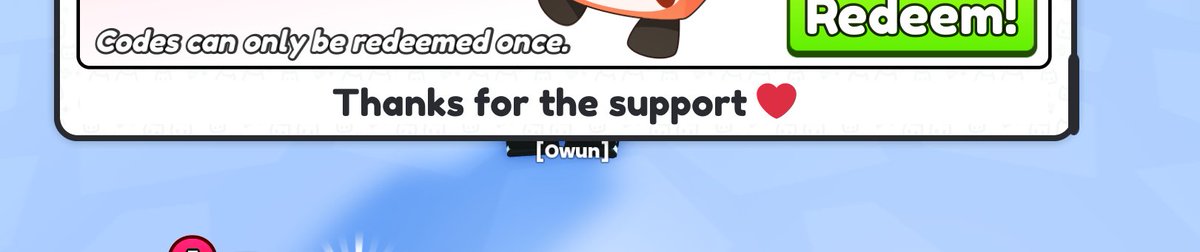
The devs forgot to set BackgroundTransparency to 0 with this textlabel lol
@CoderConner @CoderJoey @prest4n
1
1
14

20 Jan 2024
My guess is instead of a circle image, you use UICorner with a UIGradient to mask it. With the frame BackgroundTransparency being 1, and you change the size of the UIStroke with the size of the circle (bigger circle, smaller UIStroke).
2
3
389

22 Nov 2023
UI life hack: Can't click to select an UIObject that's transparent and gotta go to Explorer every 5 seconds?
Set BackgroundTransparency to .999999 instead of 1.
Looks visually the same but you can still select it with your cursor. Saves me so much time #RobloxDev
7
1
49
6,449

3 Aug 2023
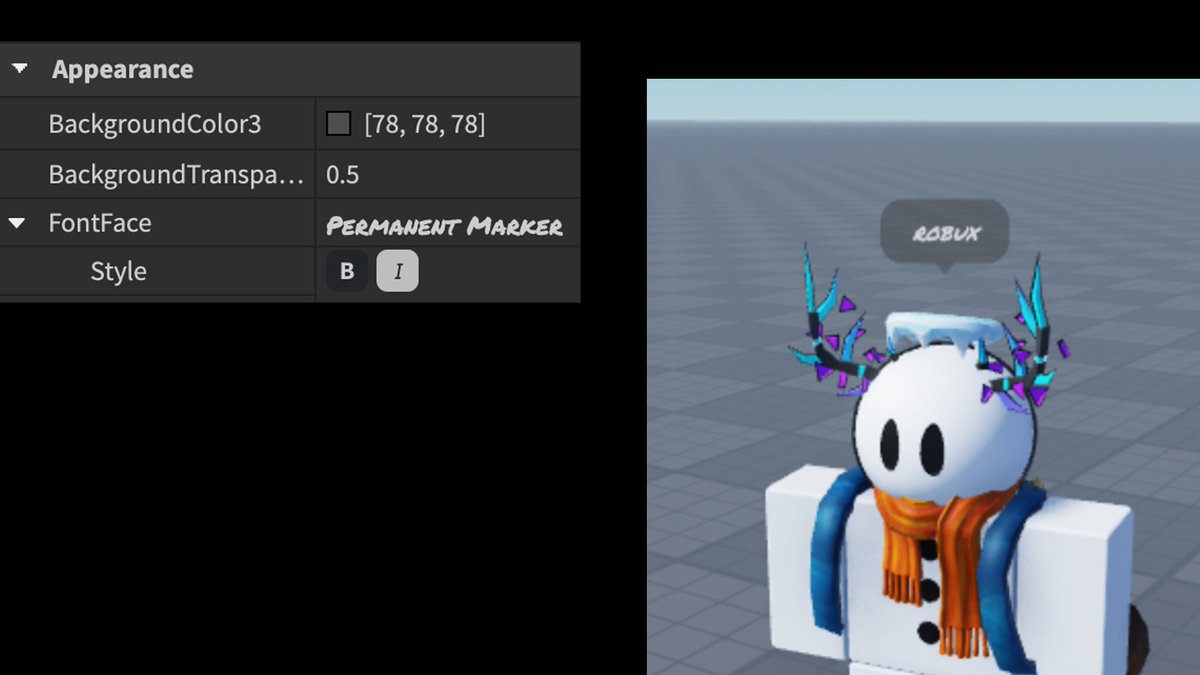
BubbleChatConfiguration -> Appearance 👤 (1️⃣)
BackgroundColor3 (Changes the color of the bubble.)
BackgroundTransparency (Changes the visibility of the bubble.)
FontFace (Changes the font of the bubble’s text.)
FontFace -> Style (You can change the text to Bold or Italic.)
1
2
332