
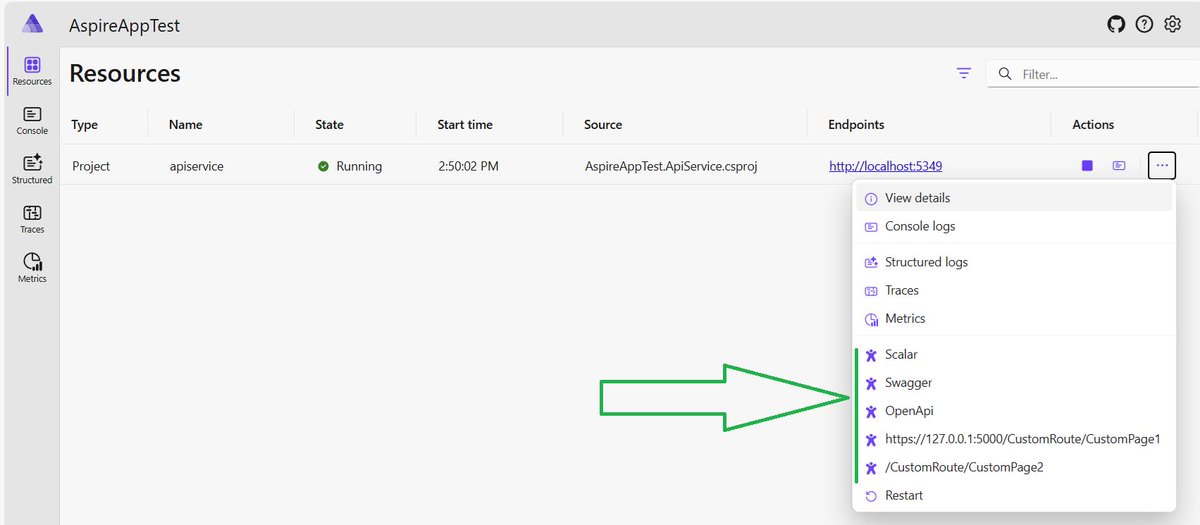
zandiarash/Arshid-Aspire-ApiDocs-Extensions: An extension to add Swagger, OpenApi, Scalar, CustomUrl and CustomRoute to .Net Aspire by @ArashZandi1 github.com/ZandiArash/Arshid… #aspnetcore #aspire
2
9
1,009

8 Oct 2025
pro tip for everyone:
- set up a customURL
- if you get a friend request from someone you thought you already had as a friend, check their customURL
while I'm sure scammers still try nobody will ever doubt which Steam profile is the real quacke

1
2
93

14 Jun 2025
PLEASE REPORT THE SC 4 MMER, MY GOOD FRIEND LAE HAS BEEN SC 4 MMED PLEASE DO YOUR PART.
| steamname: Unknown
| steam3ID: [U:1:1899133450]
| steamID32: STEAM_0:0:949566725
| steamID64: steamcommunity.com/profiles/…
| customURL:
| steamrep: steamrep.com/profiles/765611…
14 Jun 2025

So my entire inventory (around 10k) got scammed by a streamer named Henri_cs2. Not sure if hes real or not, but i need massive help. I already sent a ticket to steam-- does anyone know what i should do? please help..
2
4
10
2,397
14 Jun 2025
Make sure you report this scammer
| steamname: telo1437
| steam3ID: [U:1:311975498]
| steamID32: STEAM_0:0:155987749
| steamID64: steamcommunity.com/profiles/…
| customURL: steamcommunity.com/id/telo21
| steamrep: steamrep.com/profiles/765611…
This tweet is unavailable
1
359
14 Jun 2025
yep here is his steam 64id incase he changes anything
| steamname: telo1437
| steam3ID: [U:1:311975498]
| steamID32: STEAM_0:0:155987749
| steamID64: steamcommunity.com/profiles/…
| customURL: steamcommunity.com/id/telo21
| steamrep: steamrep.com/profiles/765611…
2
104

19 May 2025
no shit retard your account has a id. you can change your customurl and display name? you blowin from stupid town?
2
18
518

13 May 2025
Da se tam zadat customURL na publikovani dat, nemel by to byt problem .. co tak rychle koukame, melo by stacit zadat neco jako api.weathercloud.net/v01/set…*
Vyzkousime to a kdyztak pridame do navodu 🙂
3
39
16 Apr 2025
all his steam info incase he sees this and changes it
| steamname: Sparkles
| steam3ID: [U:1:1429469474]
| steamID32: STEAM_0:0:714734737
| steamID64: steamcommunity.com/profiles/…
| customURL: steamcommunity.com/id/discas…
| steamrep: steamrep.com/profiles/765611…
2
116

19 Mar 2025
Fake account tried to get my skin while trading with @Vancho666_CS please report asap!
My account is safe so no worry about me
| steam3ID: [U:1:1870475002]
| steamID32: STEAM_0:0:935237501
| steamID64: steamcommunity.com/profiles/…
| customURL:
| steamrep: steamrep.com/profiles/765611…
3
14
746
11 Mar 2025
scammers links / id
| steamname: Unknown
| steam3ID: [U:1:1867206361]
| steamID32: STEAM_0:1:933603180
| steamID64: steamcommunity.com/profiles/…
| customURL:
| steamrep: steamrep.com/profiles/765611…
2
7
1,937

Just got scammed by this guy, be careful:
| steamname: MeRo ;X
| steam3ID: [U:1:217779902]
| steamID32: STEAM_0:0:108889951
| steamID64: steamcommunity.com/profiles/…
| customURL: steamcommunity.com/id/-Forsa…
| steamrep: steamrep.com/profiles/765611…

48
1
2
241

| steamname: Twitch.tv/Zachtie
| steam3ID: [U:1:207012332]
| steamID32: STEAM_0:0:103506166
| steamID64: steamcommunity.com/profiles/…
| customURL: steamcommunity.com/id/ZTIE
| steamrep: steamrep.com/profiles/765611…
31

From now on tokens listed on OneDex will have price & MC on explorer,the first one is $ELMO here you can find the steps👇
1. on mx-assets on github (github.com/multiversx/mx-ass…) you'll have to create a new pull-request for your token branding
2. find your token's folder under /tokens/<identifier>
3. inside the folder, you'll find info.json that would look like this:
{
"social": {
"twitter": "x.com/BurnifyApp"
},
"website": "burnify.app",
"description": "The Meme of Burners\nBurn 2 Build",
"extraTokens": [
"BFY-8344ff"
],
"lockedAccounts": {
"erd12z5extcjj34ccpgmcszlegx8eyf8n4t94swhl9r704tam54j0a7q022a0w": "Burnify Discount",
"erd1deaddeaddeaddeaddeaddeaddeaddeaddeaddeaddeaddeaddeaqtv0gag": "Burned"
},
"status": "active"
}
4. You need to add a new section, called "priceSource":
{...,
"priceSource": {
"type": "customUrl",
"url": "api.onedex.app/prices/<tokenIdentifier>",
"path": "0.usdPrice"
}
make sure to change tokenIdentifier placeholder from the URL.
example: github.com/multiversx/mx-ass…
for more details, check the last section from ReadMe: github.com/multiversx/mx-ass…
⚠️: don't forget to sign with the creator's wallet and post as comment in the pull request. Guide:
Step 1: Copy latest commit sha
Step 2: Open: utils.multiversx.com/
Step 3: Log in with your owner address wallet
Step 4: Click the 'Sign Message' feature
Step 5: Paste the commit sha in the first column and hit sign
Step 6: Copy-paste the provided output signature here in a new comment
5
46
120
2,759

25 Aug 2024
Discover how Akitra's Trust Center goes beyond a dashboard—it's a vital part of compliance strategy. With seamless document sharing, #CustomURL integration, and real-time updates, build trust and showcase your security posture with ease.
🚀Book a #Demo at akitra.com/demo

4
25

24 Jul 2024
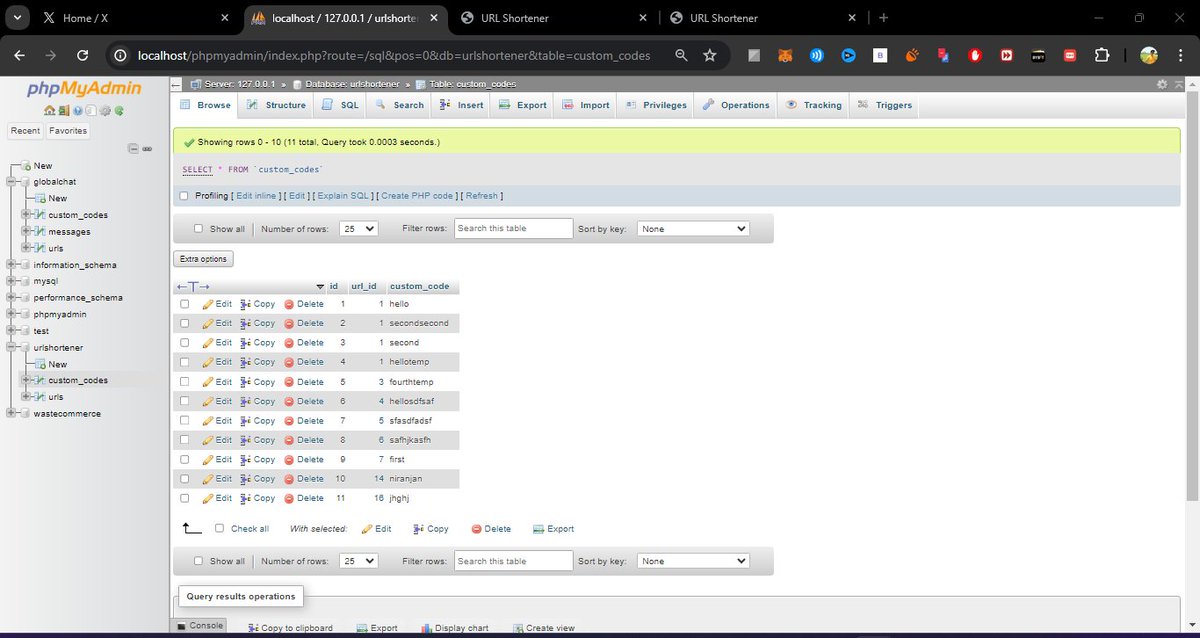
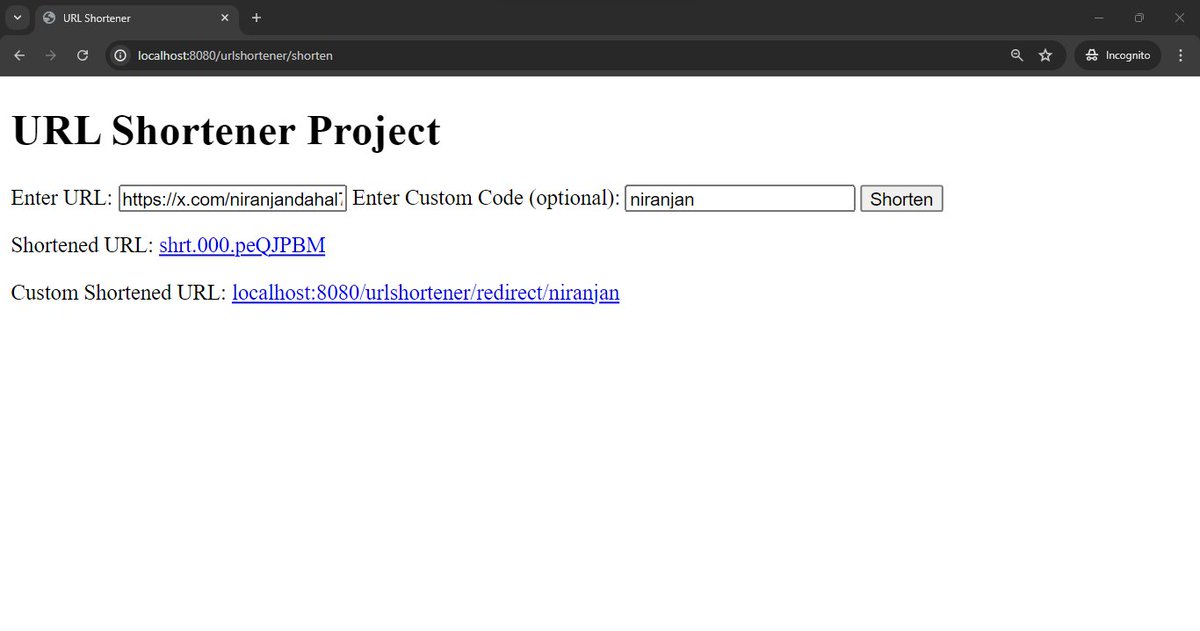
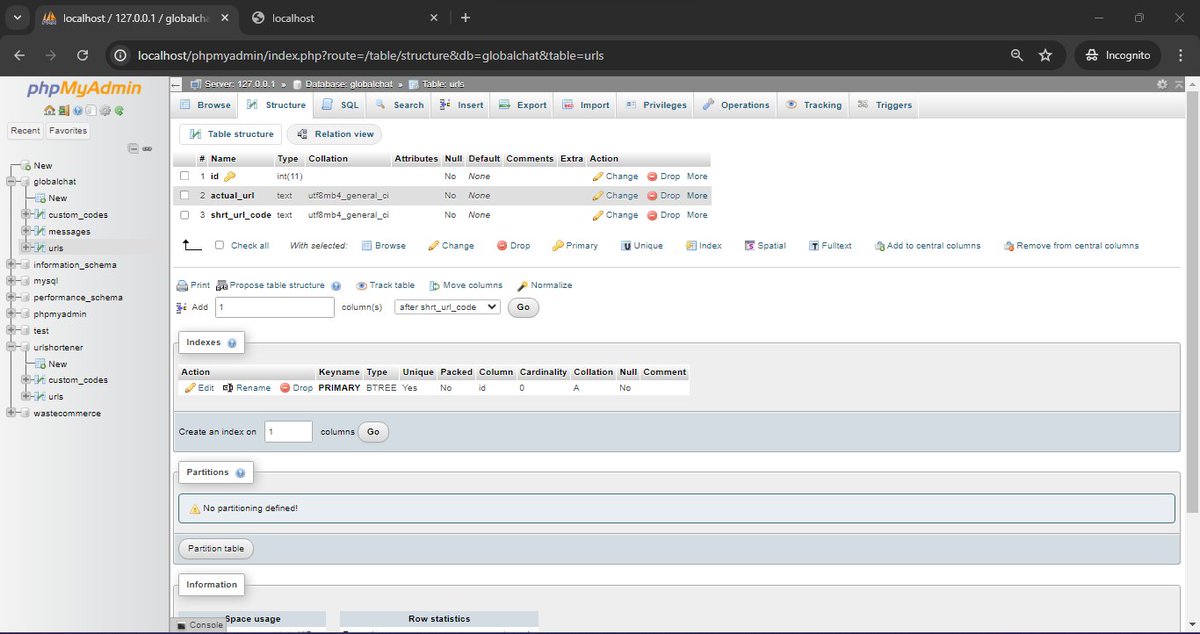
#LSPPDay54
i did some enhancement in customurl project ,solved the frontend state issue and setup short domain for it.
will continue integrating and hosting this golang project in microsoft azure from tommorow
#60DaysOfLearning2024 #LearningWithLeapfrog
@lftechnology
2
64
22 Jul 2024
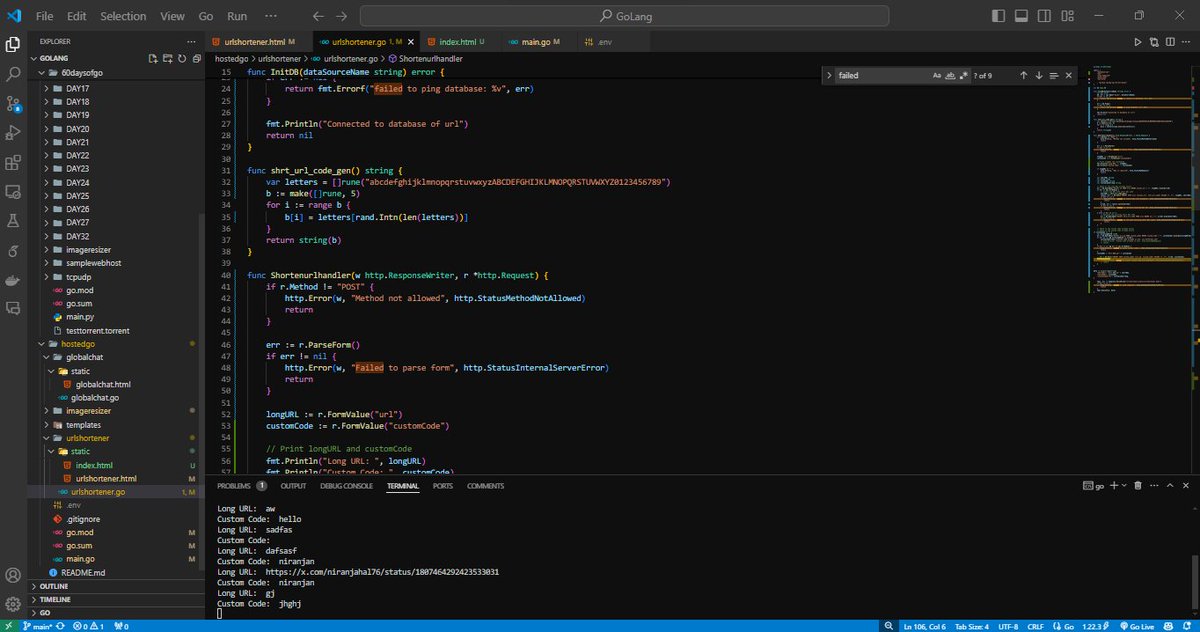
#LSPPDay52
Almost implemented customurl using go in localhost but got some issue interacting with frontend. i want to keep it simple like staic html and problem is there's no state management so will figure it out tommorow
#60DaysOfLearning2024 #LearningWithLeapfrog
@lftechnology
3
42

18 Jun 2024
4 Essential Features of Short Links for Campaign Success
onpassive.com/blog/4-essenti…
Try it now for Free
Register on our Ecosystem for Free
Get 3 other Products Free, O-Net, O-Mail, O-Trim
ONPASSIVE working for you 24/7.
✅Website:
bit.ly/3V6kKZR
#CustomURL #shorturl #Brand

1
4
17 Jun 2024
Scan Smarter, Not Harder with OTRIM's QR Code Generation
Try it now for Free
Register on our Ecosystem for Free
Get 3x Products Free, O-Net, O-Mail, O-Trim
✅Website:
bit.ly/3V6kKZR
#ONPASSIVE #OTrim #linkshortening #CustomURL #shorturl #Brand
youtube.com/shorts/HghQH0maD…
1
10

11 May 2024
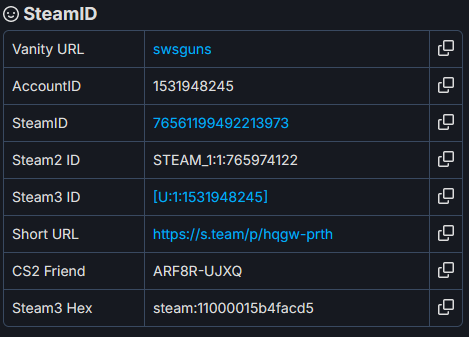
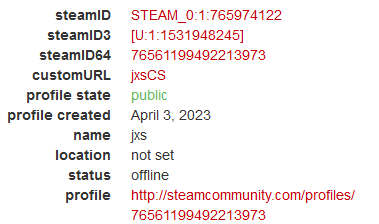
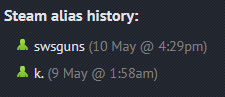
Just to compile everything that this IS JXS - all information aligns, and even has his previous customURL attached to the SteamID

2
17
1,970
7 May 2024
O-Trim – Custom URL Shortner !!!!!
Try it now for Free
Register on our Ecosystem for FREE
Get 3 other Products Free, O-Net, O-Mail, O-Trim
ONPASSIVE working for you 24/7.
✅✅Website:
o-trim.co/completenow
#ONPASSIVE #linkshortening #CustomURL #shorturl #Brand #Branding
1
21