
Jun 9
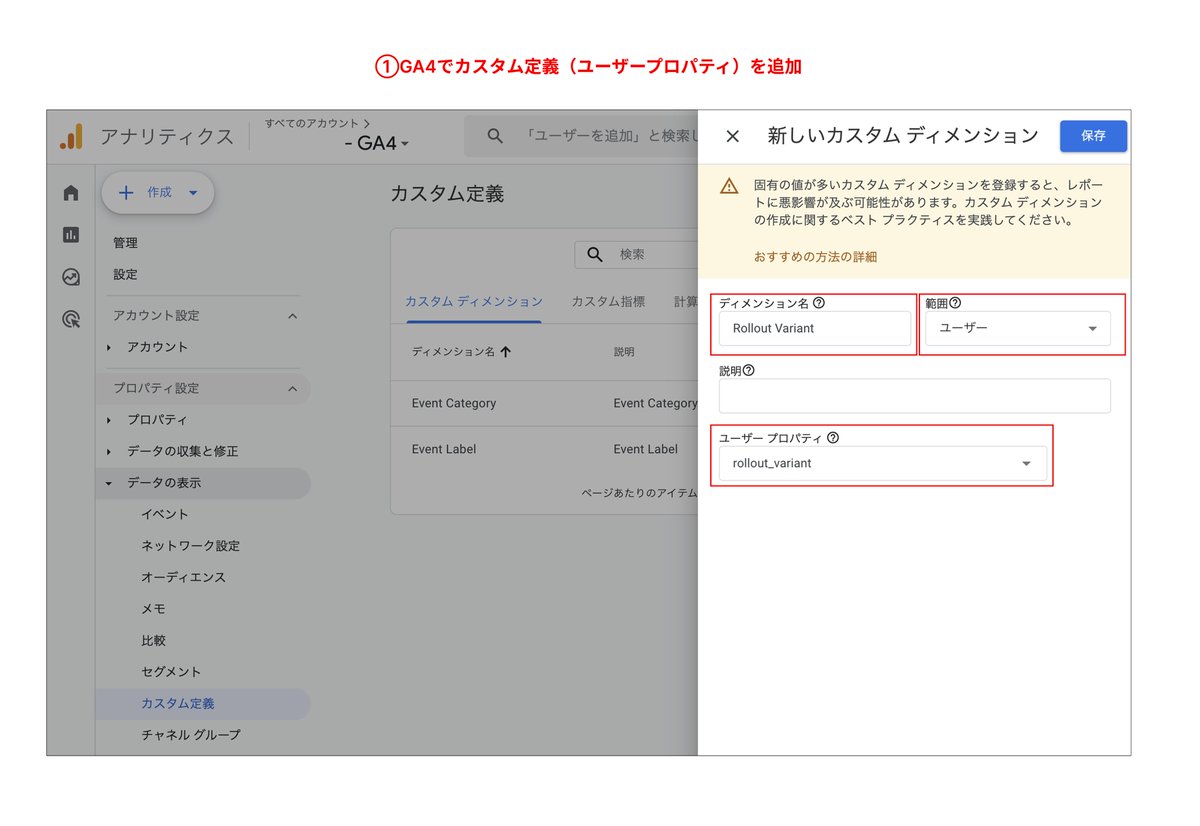
Shopify Rollouts でABテストをする際、標準の分析レポートも便利ですが、GA4で詳細を分析したいケースもあるので、ユーザープロパティを使う方法を試してみました。
① GA4でカスタム定義(ユーザープロパティ)を追加
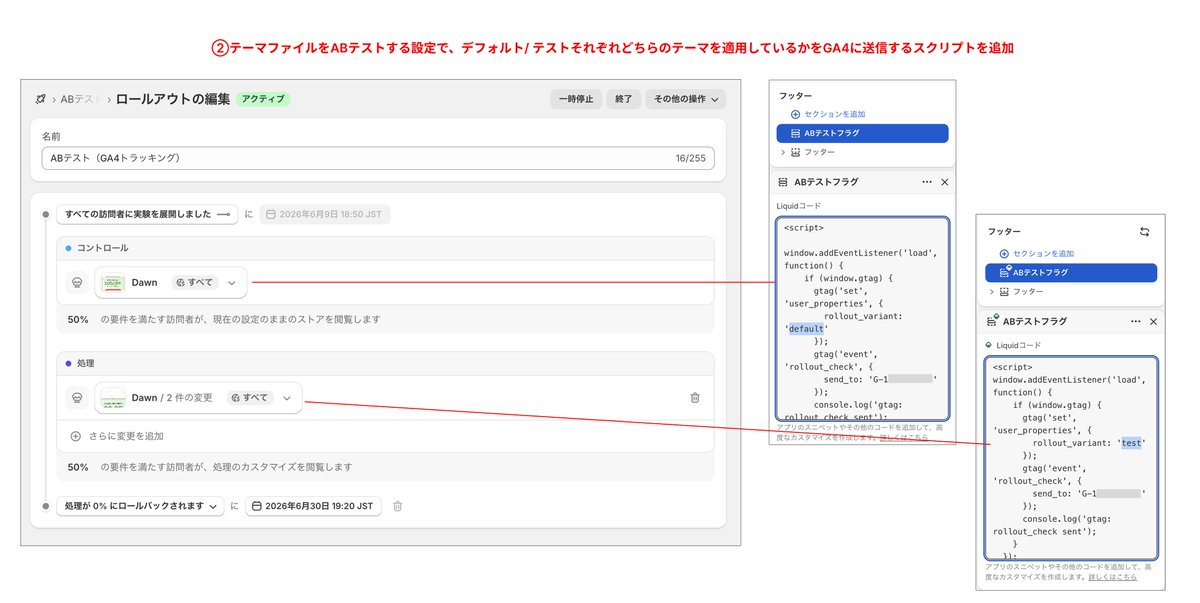
② テーマファイルにGA4にユーザープロパティを送信するスクリプトを追加し、ABテストするテーマごとに値を設定
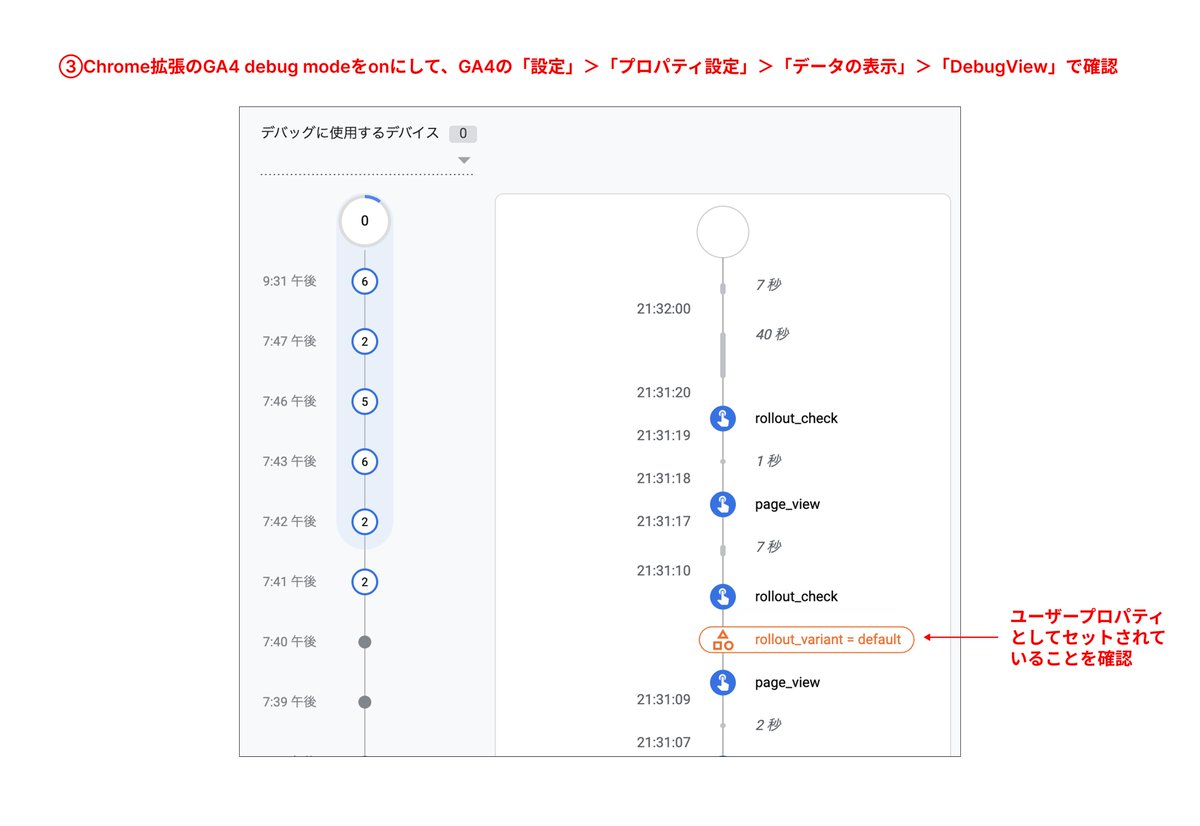
③ DebugViewでセットされていることを確認
※Google&Youtubeアプリで計測しているストアで使える計測コード(ユーザープロパティは次のイベント送信時に付与されるため、ダミーイベントを一緒に発火させます。G-XXXXXXXXXのところに計測プロパティIDをセットします。)
window.addEventListener('load', function() {
if (window.gtag) {
gtag('set', 'user_properties', {
rollout_variant: 'default' // または 'test'
});
gtag('event', 'rollout_check', {
send_to: 'G-XXXXXXXXX'
});
}
});
GA4の探索レポートでABテストするテーマごとにCVRやセッション数を比較できるようになります。
#Shopify
Apr 13

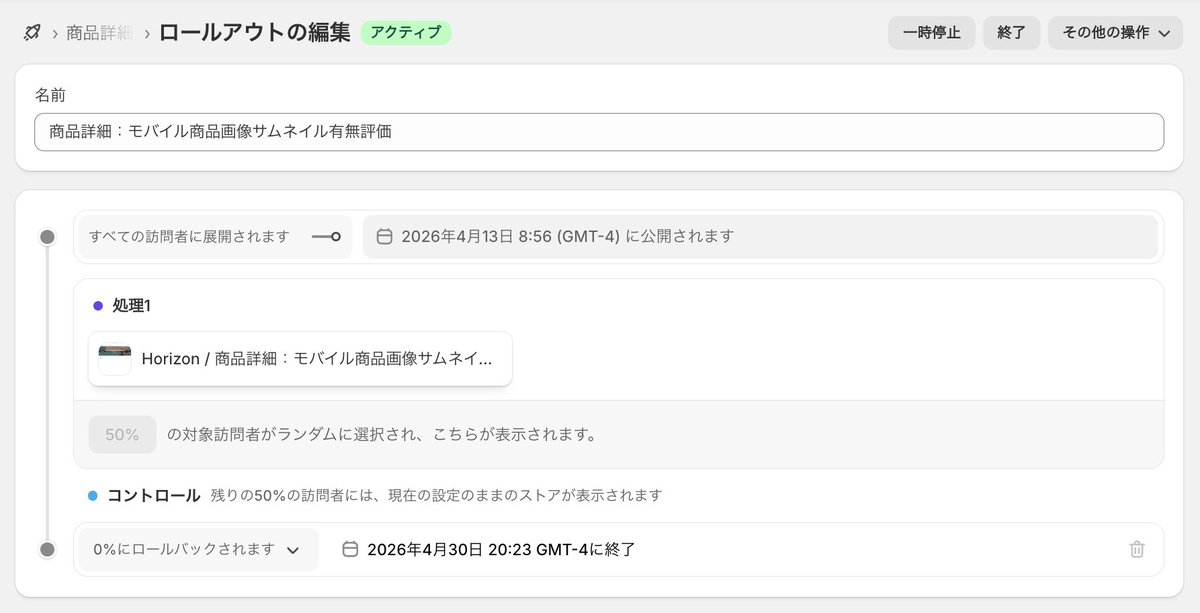
【Shopify Rollouts】
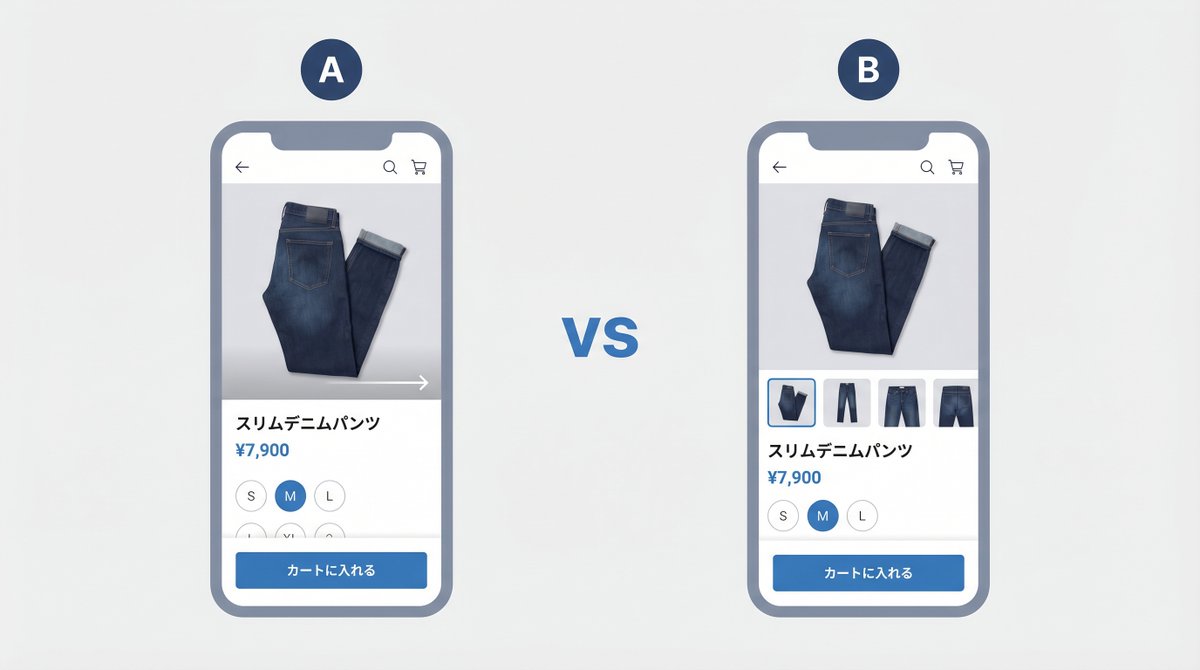
Shopifyのテーマでは、商品詳細ページの画像表示をいくつかのパターンから選択できます。ただ、どれがベストかは商材やコンセプトによって変わってきます。検討時間が長い高額商品と、その場で決める傾向が強い消耗品では最適な見せ方が違いますし、ブランドイメージを伝えたいのか、機能や素材感を具体的に知りたい商品かによっても変わってきます。
Shopifyが先日リリースしたRolloutsを使えば、こういったテーマ設定の違いをコード不要・追加費用なしで実際のトラフィックによるA/Bテストで検証できます。お客様の反応をもとに評価・判断できるのは良いですね。
#Shopify #Rollouts
1
15
1,053

Jun 3
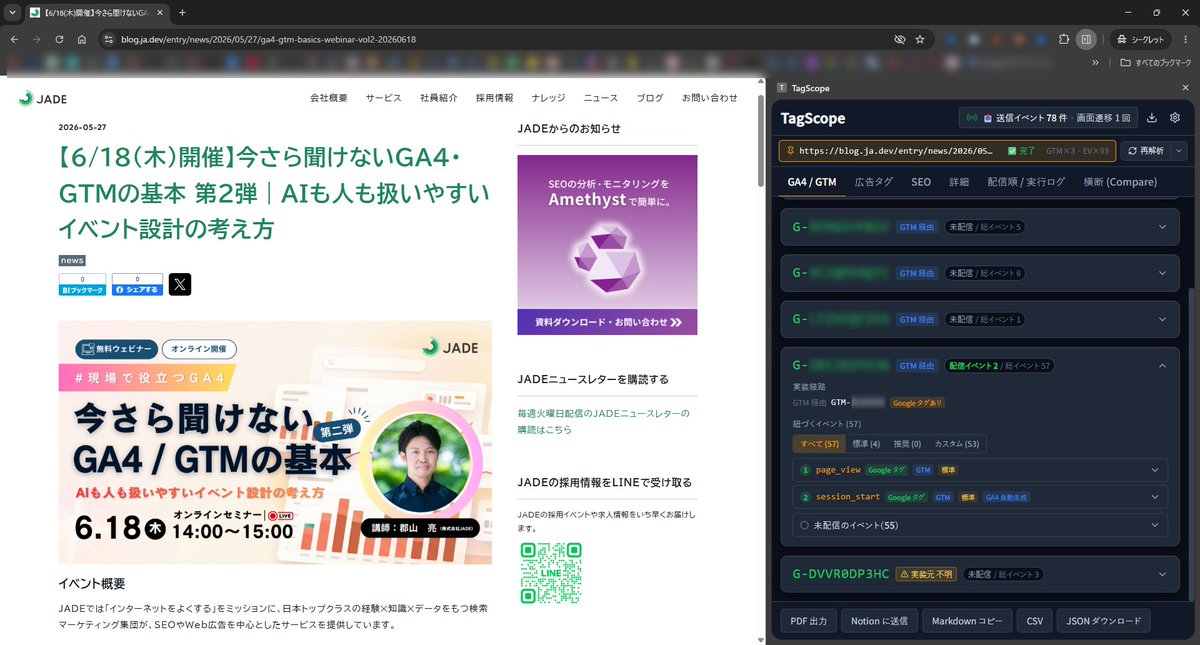
公式のTag Assistantの改良型となるTagScopeを開発し始めた結果、GA4のタグ実装とイベント計測の仕組みを洗いざらい調べ尽くすことになった
Google公式のTag AssistantとGA4管理画面のDebugViewがどんな仕組みで成り立っているのかわかってきた…すごいなこれ
Jun 3

毎週火曜にゆるく配信している弊社の「ふらっとトーク」の代打でまた出させて頂きました。
非エンジニアのバイブコーディングの現場のお話や、添付のような拡張機能の開発のお話をしてます。ご興味がある方はぜひどうぞ😊
悪天候で普段通りにはいかないことも多く、少し慌ただしい朝なので、みなさまご安全に。。
ちょっと一休み、気分転換するときにどうぞ。
JADEふらっとトーク vol.15――素人なりにバイブコーディング事情について郡山が話します youtube.com/live/02oVNdR7Xbg… @YouTubeより
1
14
419

Jun 2
وش هي افضل طريقه التتبع في قوقل ادز للمبتدئين
🟢 Google Analytics 4 Ecommerce measurement
1️⃣ إنشاء GA4
2️⃣ إعداد Web Data Stream
3️⃣ تركيب GA4 داخل الموقع/سلة
4️⃣ تفعيل Ecommerce events (view_item, add_to_cart, purchase)
5️⃣ اختبار الأحداث (Realtime / DebugView)
6️⃣ ربط GA4 مع Google Ads
7️⃣ استيراد تحويل purchase إلى Google Ads
8️⃣ تفعيل Auto-tagging
او
1️⃣ إنشاء GTM (الحاوية)
2️⃣ تركيب GTM داخل سلة
3️⃣ Auto-tagging
4️⃣ Conversion Linker
5️⃣ Data Layer Variables
6️⃣ GA4 Base
7️⃣ GA4 Ecommerce Events
8️⃣ Google Ads Conversion
9️⃣ Google Ads Purchase Tag (داخل GTM)
🔟 Enhanced Conversions
1️⃣1️⃣ DebugView داخل GA4
1️⃣2️⃣ Testing (Preview GTM)
1️⃣3️⃣ Deduplication (منع التكرار)
1️⃣4️⃣ Publish (النشر النهائي
3
20
2,053
May 27
1. GTM
↓
2. ربط GTM بسلة
↓
3. Auto-Tagging (gclid) في Google Ads
↓
4. Conversion Linker داخل GTM
↓
5. Data Layer Variables
↓
6. GA4 Base داخل GTM
↓
7. GA4 Ecommerce Events (view_item / add_to_cart / begin_checkout / purchase)
↓
8. إنشاء Purchase Conversion في Google Ads
↓
9. أخذ Conversion ID Label
↓
10. Google Ads Purchase Tag داخل GTM
↓
11. تفعيل Enhanced Conversions
↓
12. DebugView في GA4
↓
13. Preview GTM اختبار الأحداث
↓
14. Deduplication Publish
هل هذي الطريقه كويسه للتتبع او طويله في قوقل ادز
وهل فيه افضل؟
ماهي الطريقه الي يستخدموها
1
11
1,221

تحديثات جديدة طالت مجموعة Sysinternals من مايكروسوفت، مضيفة مزايا تقنية توسّع قدرات أدوات التشخيص والصيانة التي يعتمد عليها المختصون ومحترفو تقنية المعلومات. التحديثات شملت دعم التطبيقات المعبأة في Autoruns، وإضافة إمكانية تفريغ شجرة العمليات في ProcDump، إلى جانب تحسينات لالتقاط الفيديو في ZoomIt مع دعم تراكب كاميرا الويب وإمكانية دمج المقاطع.
كما حصلت أدوات أخرى على تحسينات مهمة؛ DebugView استعاد دعم ويندوز 10 وأضاف تمييز لمعرفات العمليات، بينما قدّم NotMyFault أنواعا جديدة من الأعطال المخصصة للبيئات الافتراضية. Process Explorer أضاف عمود معرف العملية الأصلية، في حين حسّن Process Monitor تجربة التصفح وأضاف عرضا أدق للوقت في شجرة العمليات.
التحديثات شملت أيضا توسيع دعم توزيعات لينكس، حيث أصبحت أدوات مثل Sysmon for Linux وProcDump for Linux وProcmon for Linux متوافقة رسميا مع RHEL10 وDebian 13 وFedora 43، ما يعزز حضور Sysinternals في بيئات الأنظمة المفتوحة.
هذه التحسينات تعكس استمرار مايكروسوفت في تطوير أدواتها المتقدمة لمراقبة الأنظمة وتحليل الأداء، مع التركيز على دعم سيناريوهات العمل الحديثة عبر ويندوز ولينكس.
#تقنية

5
528
📤We've updated our Linux tools support, and we're releasing Autoruns, ProcDump, ZoomIt, DebugView, NotMyFault, ProcExp, and Procmon with improvements.
Get the tools at sysinternals.com.
See what's new on the Sysinternals Blog: techcommunity.microsoft.com/…
21
57
4,373

Apr 14
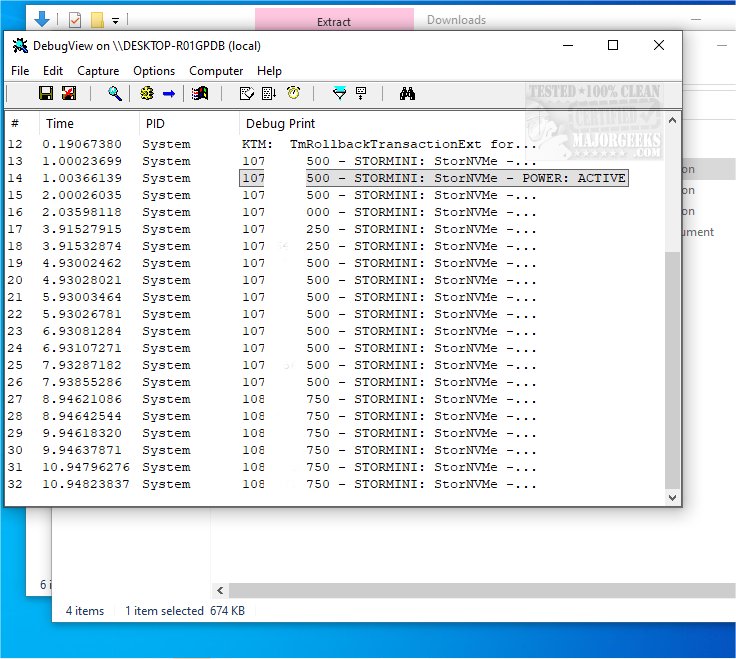
New on MajorGeeks! Sysinternals DebugView monitors debug data output on a local machine or across computers on a local area network. For remote monitoring, the application must be installed on the target machine and accessible via TCP/IP.
majorgeeks.com/files/details…
1
7
272

Mar 28
analytics mcpとmobile mcp組み合わせれば過去ログ分析しつつ新しいログを提案してログ実装してシミュレータでログが正常に送られているかrealtimeで全部自動確認してくれてで神
前まで1個1個firebaseのDebugViewで確認してたのはなんだったのか😇
4
744

Mar 27
listent for macOS, ZoomIt, Sysmon, DebugView, NotMyFault, Procmon for Linux, and RAMMap dlvr.it/TRkPmJ
1
4
712

Mar 26
📢 New tool: listent for macOS, new features: ZoomIt (panoramic screenshots!), Sysmon, DebugView, and NotMyFault, fixes: Procmon for Linux, RAMMap!
Get the tools at sysinternals.com.
See what's new on the Sysinternals Blog: techcommunity.microsoft.com/…
2
14
38
6,209


Feb 19
Check out the latest article in my newsletter: How to Correctly Use GA4 DebugView linkedin.com/pulse/how-corre… via @LinkedIn
2
4
248

Feb 19
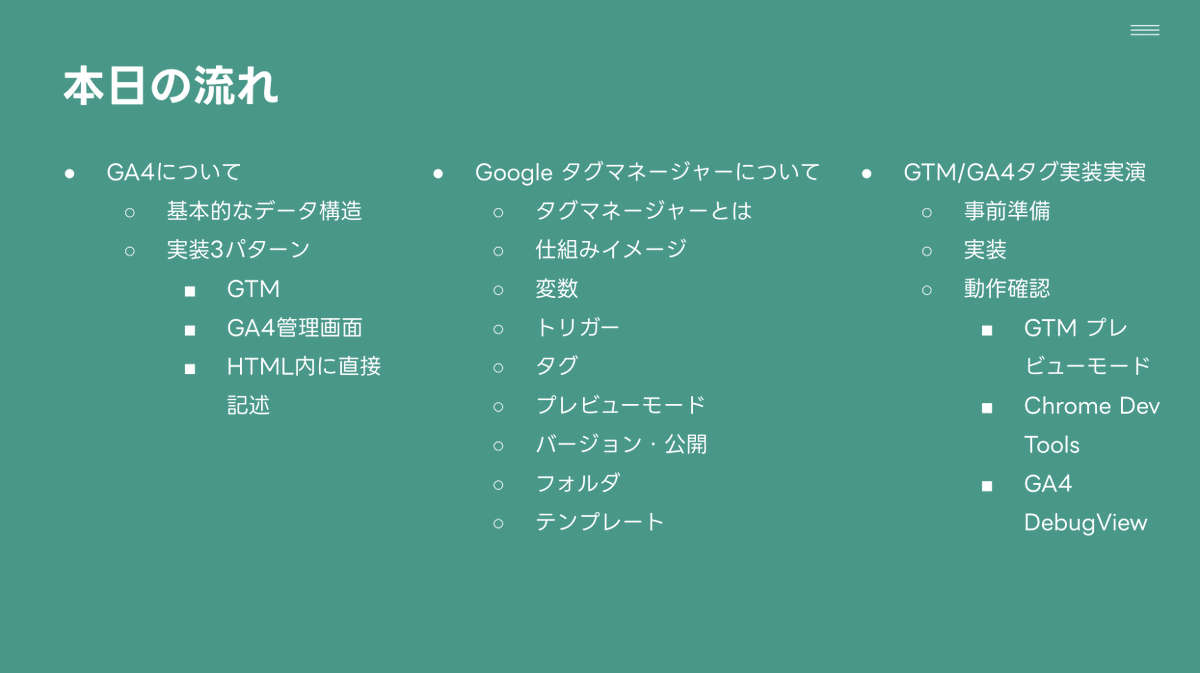
先日、制作/開発会社さん向けにGTMを使ったGA4イベント計測についての勉強会を実施しました。
ご参加いただいた方はディレクターさんも多く、「ちゃんと計測できているか」の確認方法の実演をリクエストいただいたので、3種の方法を実況解説いたしました。
1.タグが配信されているか(GTMプレビューモード)
2.ブラウザ側での処理状況(Chrome Dev Tools)
3.GAのサーバーに届いているか(GA DebugView)
うまくいっていないところの切り分けに役立ちます。
ちなみに、「トリガーは合っているのにタグが配信されない」というケースで、ページに「GTMタグ(コンテナタグ)」が入っていないパターンもあるので、その確認方法をご説明しました。(目視や拡張機能)
1
17
582

AIで分析して「なんか変…」の9割、原因はモデルじゃなく計測。
改善前にここだけ5分で潰す👇
DebugViewでイベント飛んでる?
key event登録は合ってる?(purchase/lead等)
クロスドメイン or 外部遷移で途切れてない?
(not set)/(data not available)増えてない?
計測がズレたまま“改善”すると、当てても外れます。
(保存して月初チェックにどうぞ) #GA4

【📝最新JADEブログ】
「AIで分析したら結果がおかしい?」
その原因、GA4の設定ミスかもしれません。
✅ データ精度を損なう設定ミスとは
✅ 分析の誤解を招くノイズの特定方法
✅ 各設定ミスの対処法と検証ポイント
AIツールで分析する前に、まず計測が正しいか確認を🔍
blog.ja.dev/entry/blog/2025/…
2
40
【GA4一問一答_実務|No.3】
DebugView、全部見てない?
接続判定、最低限見るのはどっち?
投票→10秒で合否が出る見方をリプで解説👇
#GA4一問一答_実務
100%
イベント名+パラメータ
0%
ユーザー属性+地域
1 votes • Final results
1
1
32
We're excited to release ZoomIt with a video trim editor, Sysmon for Linux with EBPF events, and DebugView, RAMMap, RDCMan with bug fixes!
Get the tools at sysinternals.com.
See what's new on the Sysinternals Blog: techcommunity.microsoft.com/…
1
20
61
4,348
【AI活用より先に、計測ミスを潰せ】
「GA4=体重計、AI=ダイエットコーチ」 これ、比喩として完璧。
でも体重計が壊れてたら(=計測ミス) AIの助言は“それっぽい嘘”になる。
だから最優先はDebugView。 最低限この2つだけ見ればOK👇
①イベント名が想定通りか
②page_location/link_urlの値が正しいか
AI時代ほど「正しい測定」が勝ち筋
【📝最新JADEブログ】
「GA4=高性能な体重計、AI=ダイエットコーチ」
でも、体重計が壊れてたら意味ないですよね?
✅ 大前提は「正しいデータ測定」
✅ データの民主化が進む今、問われる品質
✅ データ整備への投資をどう考えるか
AI時代、まずは計測の見直しから🎯
blog.ja.dev/entry/blog/2026/…
2
81

GA4のアクセス解析でデータ収集トラブルに対応中😨
対象はMakeShopで作成、GA4を設定したECサイト。
現象:
・purchaseが2種類ありデータが合わない
・begin_checkoutが2種類ありデータが合わない
・begin_checkout >add_to_cart>purchase
MakeShopの設定したGA4タグだとDebugViewも使えず。
1
3
83

Jan 17
本日のコラム✍️
GA4で「画面タップ数」をどう分析する?(イベント設計の考え方)
「CTA押されてる?」「メニュー使われてる?」みたいな
“タップの多さ=迷い / 直感性” を定量で見たい時、GA4はイベント設計が9割。
⸻
結論:タップ数だけ取ると失敗する
タップ“回数”だけだと意味が薄い。
重要なのは コンテキスト付きで取ること👇
•どのページで
•どの要素が
•どの位置で
•どの文言で
⸻
設計の型(これだけ押さえる)
① タップ対象を3カテゴリに分ける
•CTA(申込/問い合わせ/資料DL)
•Nav(ヘッダ/ハンバーガー/パンくず)
•誘導(カード/関連記事/リンク)
② イベント名は用途で固定
例:
•cta_click
•nav_click
•content_click
③ パラメータで「質」を持たせる(超重要)
最低限これ👇
•page_path
•element_id(識別子)
•element_text(ボタン文言)
•position(fv / mid / footer 等)
⸻
実装はGTMが最短
•GA4イベントタグ作る
•クリック条件(class/属性)でトリガー
•DebugViewで検証
これでOK。
⸻
分析は「探索」で勝つ
•ページ別の cta_click率 を比較
•新規 vs リピートでタップ傾向を見る
•“タップ多いのにCV低いページ”=改善候補
⸻
記事👇
👉 rare-tekt.co.jp/column/20260…
4
86

Jan 13
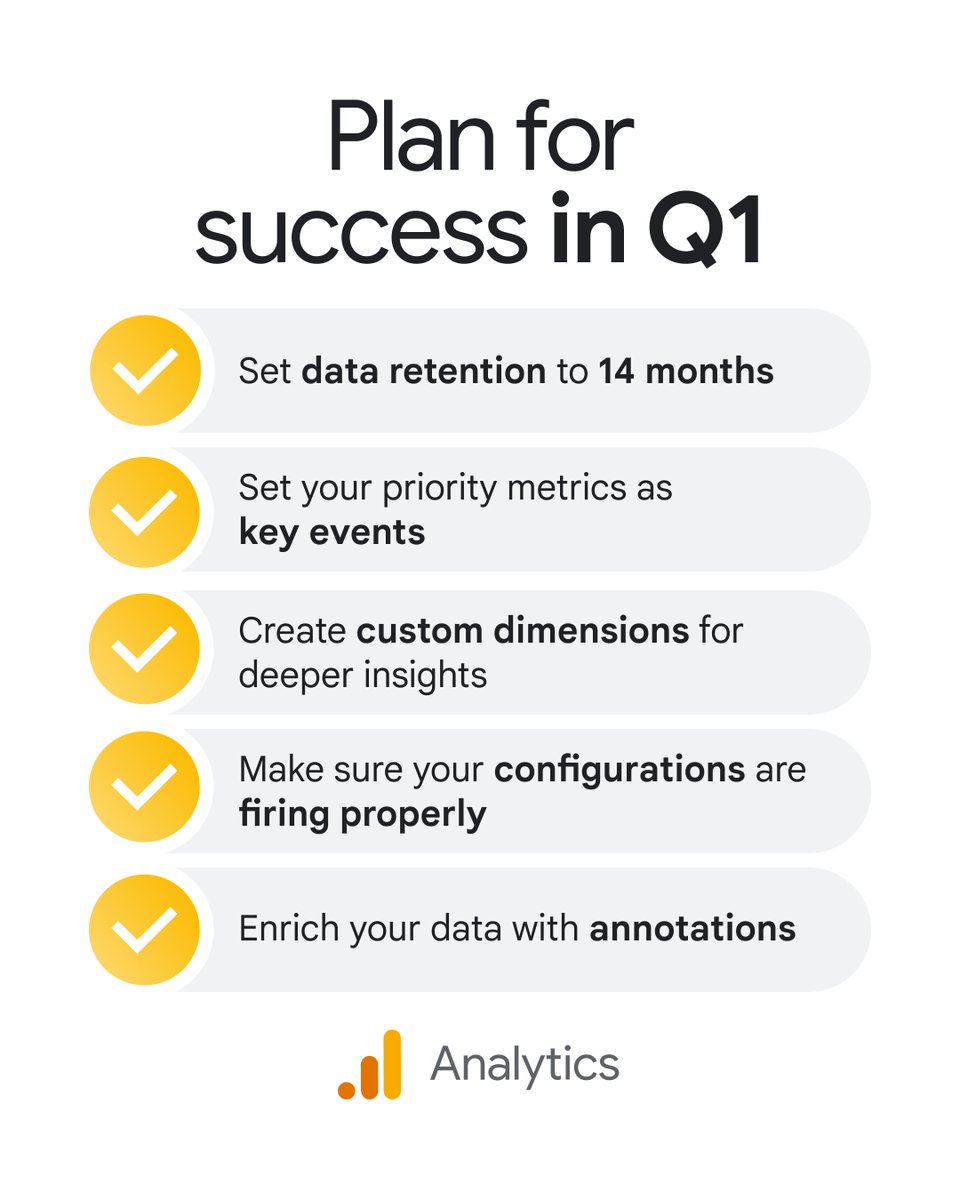
Is your Google Analytics data ready for Q1? 📈
Follow this essential checklist to ensure your tracking is accurate and your insights are actionable:
🧵 The Q1 GA Checklist:
1️⃣ 𝗗𝗮𝘁𝗮 𝗥𝗲𝘁𝗲𝗻𝘁𝗶𝗼𝗻: Set to 14 months to enable long-term trend reports and YoY comparisons → goo.gle/3LJDoVn
2️⃣ 𝗞𝗲𝘆 𝗘𝘃𝗲𝗻𝘁𝘀: Define priority actions (like purchases or sign-ups) to focus your reporting on what matters → goo.gle/4pzrVpa
3️⃣ 𝗖𝘂𝘀𝘁𝗼𝗺 𝗗𝗶𝗺𝗲𝗻𝘀𝗶𝗼𝗻𝘀: Track data unique to your business, like product categories or authors → goo.gle/4aRoPcD
4️⃣ 𝗗𝗲𝗯𝘂𝗴𝗩𝗶𝗲𝘄: Validate your setup now to ensure data is flowing correctly before analysis → goo.gle/49zXo4T
5️⃣ 𝗔𝗻𝗻𝗼𝘁𝗮𝘁𝗶𝗼𝗻𝘀: Add context to your metrics to keep your team aligned on major changes → goo.gle/3Lq9q8S
3
16
90
6,533