
🚀 Flutter Tip
Always check mounted after an async operation before using context or calling setState().
Future<void> loadData() async {
await fetchData();
if (!mounted) return;
setState(() {});
}
This prevents:
❌ setState() called after dispose()
❌ Context used after an async gap
A small check that saves hours of debugging.
#Flutter #FlutterDev #FlutterTips #Dart
3
7
44


Jun 8
True or False
const fetchData = (url) => {
return fetch(url).then((res) => res.json())
};
is the same as
const fetchData = async (url) => {
const res = await fetch(url)
return await res.json()
}
1
57

May 12
Building Prophecy Market on @ritualfnd🔮
A fully autonomous prediction market where AI fetches data and resolves outcomes directly inside a smart contract.
[ What it does ]
Users create markets like "Will BTC exceed $150k by December?" Anyone bets YES or NO. At deadline, the contract itself calls external APIs to fetch live data, then an AI inside the TEE judges the outcome based on that data. All reasoning is permanently logged on-chain.
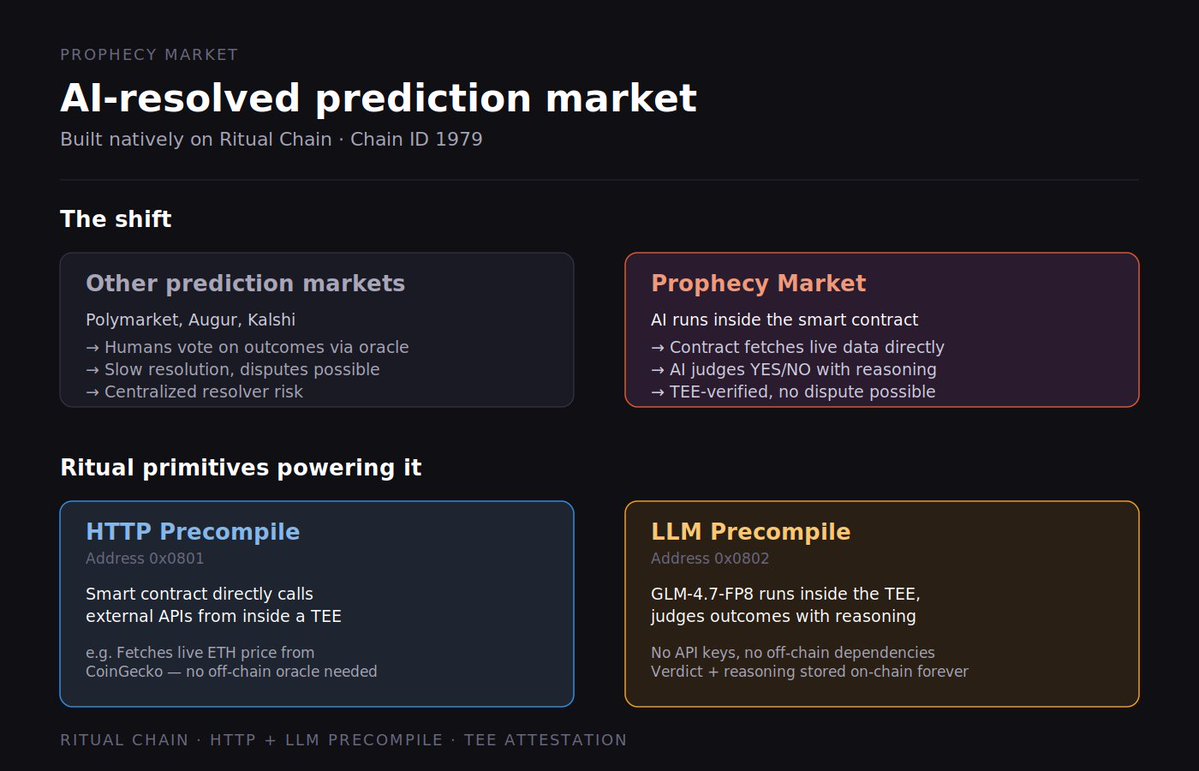
[ The shift ]
Polymarket, Augur — humans vote on outcomes. Slow, manipulable, dispute-prone.
Prophecy Market — AI executes inside the contract. Fast, verifiable, no disputes.
[ Ritual primitives used ]
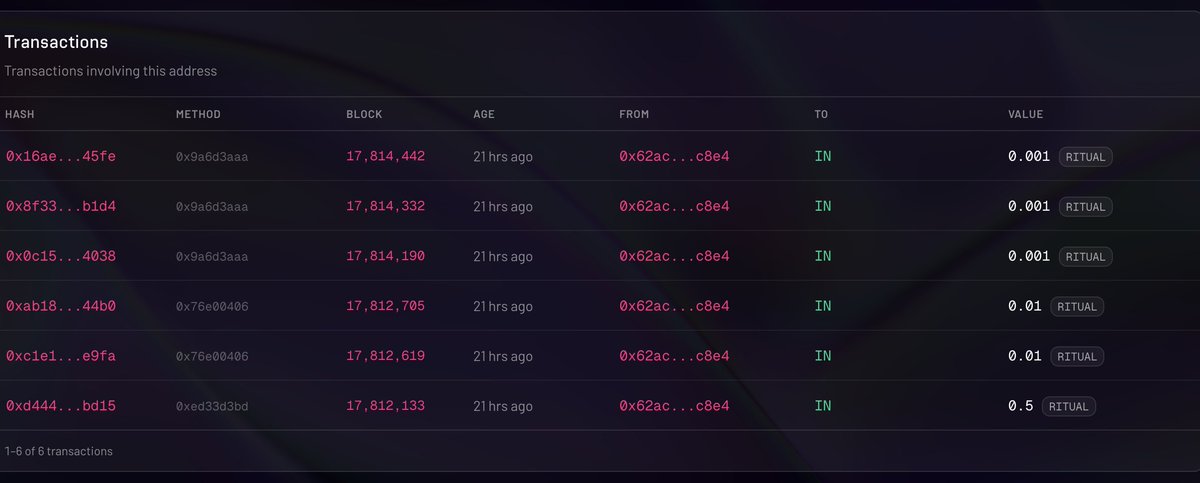
→ HTTP Precompile (0x0801): contract calls external APIs from inside a TEE. Zero reliance on Chainlink-style oracles.
→ LLM Precompile (0x0802): GLM-4.7-FP8 runs inside the TEE, judges outcomes with reasoning. No API keys, no off-chain deps.
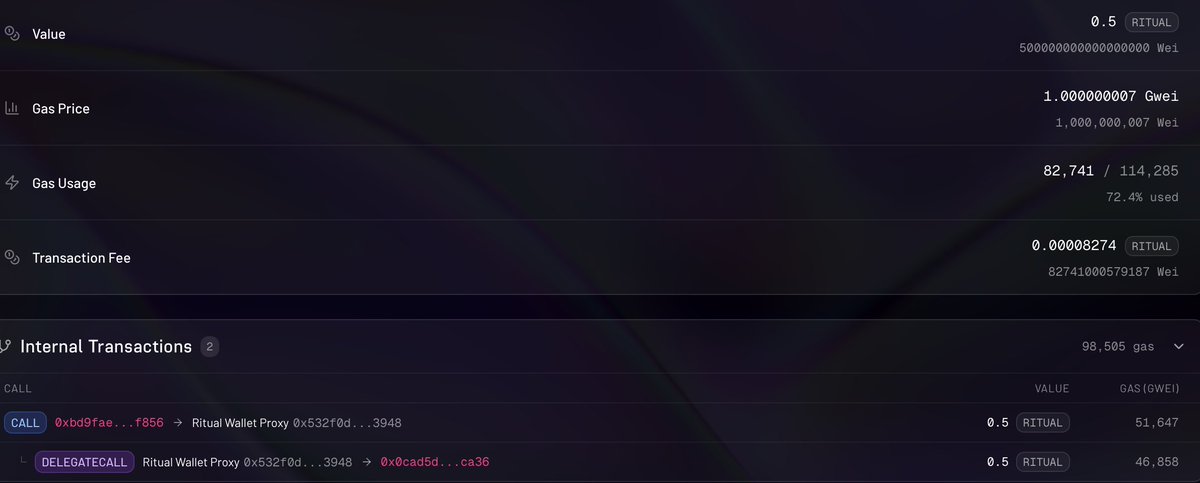
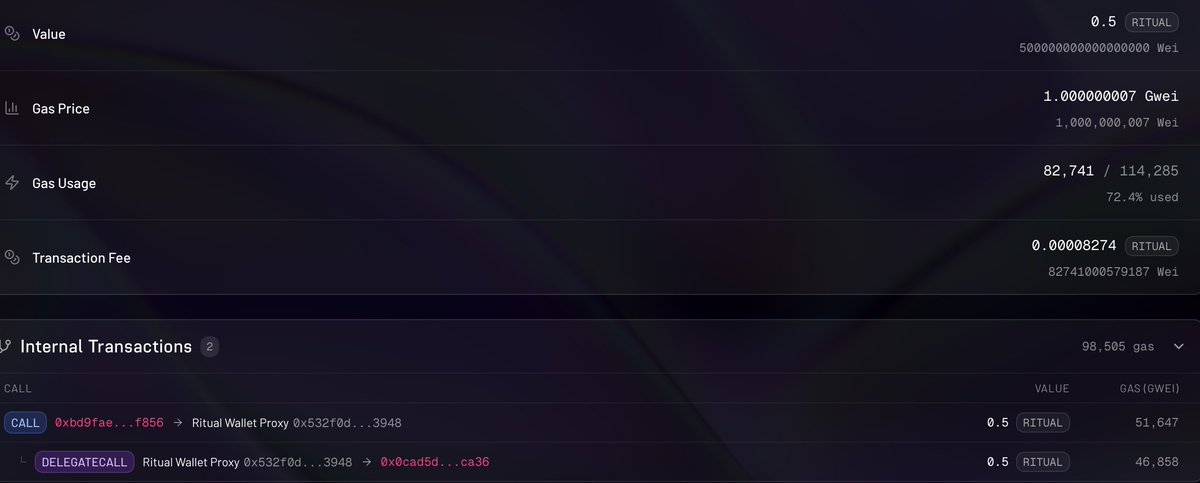
→ Combined with SPC pattern, RitualWallet, and TEE attestation — every step is verifiable in a single transaction.
Combining both in one contract is literally impossible on any other EVM chain. This is exactly what Ritual exists for.
[ What's live now ]
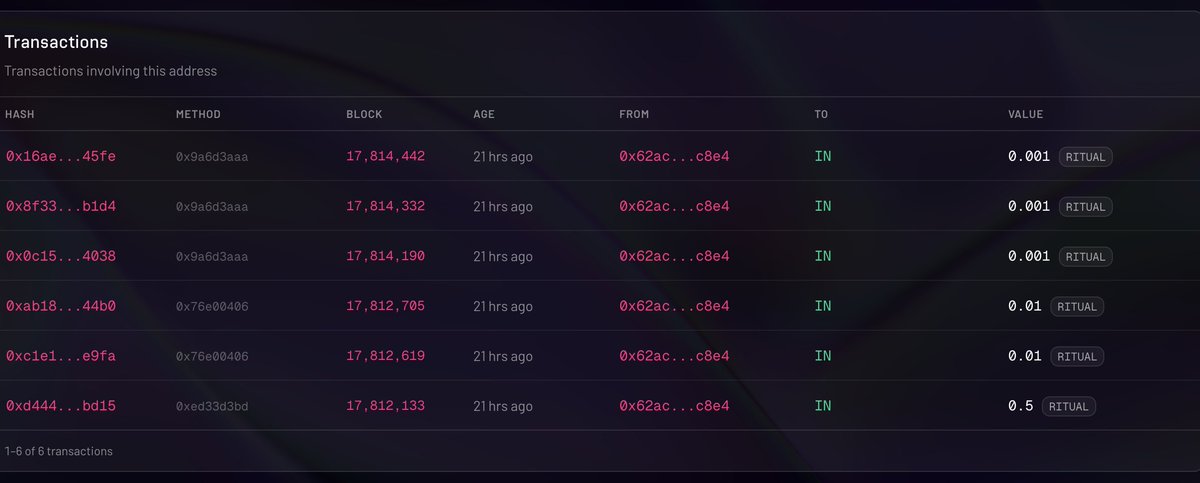
✅ Contract deployed on Ritual testnet
✅ 2 markets created active bets
✅ Built with Foundry ritual-dapp-skills (Ritual-native workflow)
[ What's next ]
🚧 AI auto-resolution pipeline (fetchData → resolveMarket → claim)
🚧 Next.js frontend deployed publicly via Vercel
🚧 Full dApp where anyone connects wallet, creates markets, bets, claims
🚧 Seeding diverse markets (crypto prices, sports, politics)
@dunken9718
@joshsimenhoff
@0xMadScientist
@Jez_Cryptoz
7
15
168
May 12
Building Prophecy Market on @ritualfnd🔮
A fully autonomous prediction market where AI fetches data and resolves outcomes directly inside a smart contract.
[ What it does ]
Users create markets like "Will BTC exceed $150k by December?" Anyone bets YES or NO. At deadline, the contract itself calls external APIs to fetch live data, then an AI inside the TEE judges the outcome based on that data. All reasoning is permanently logged on-chain.
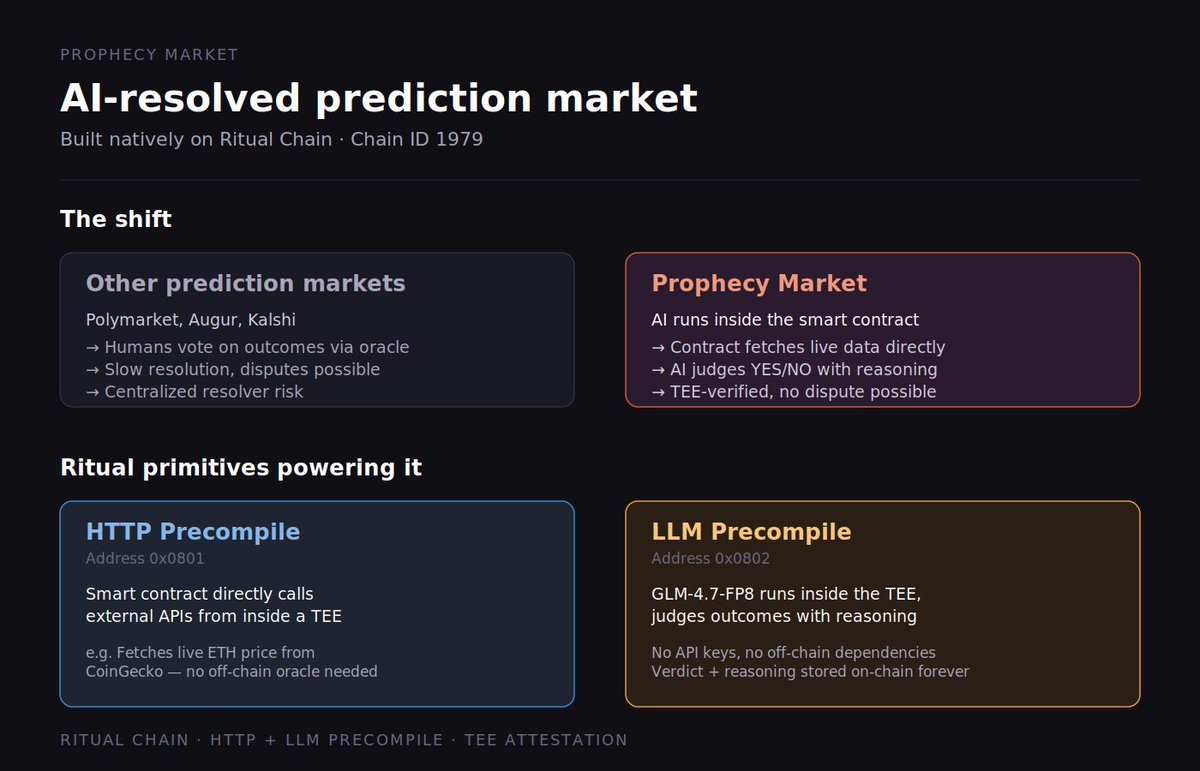
[ The shift ]
Polymarket, Augur — humans vote on outcomes. Slow, manipulable, dispute-prone.
Prophecy Market — AI executes inside the contract. Fast, verifiable, no disputes.
[ Ritual primitives used ]
→ HTTP Precompile (0x0801): contract calls external APIs from inside a TEE. Zero reliance on Chainlink-style oracles.
→ LLM Precompile (0x0802): GLM-4.7-FP8 runs inside the TEE, judges outcomes with reasoning. No API keys, no off-chain deps.
→ Combined with SPC pattern, RitualWallet, and TEE attestation — every step is verifiable in a single transaction.
Combining both in one contract is literally impossible on any other EVM chain. This is exactly what Ritual exists for.
[ What's live now ]
✅ Contract deployed on Ritual testnet
✅ 2 markets created active bets
✅ Built with Foundry ritual-dapp-skills (Ritual-native workflow)
[ What's next ]
🚧 AI auto-resolution pipeline (fetchData → resolveMarket → claim)
🚧 Next.js frontend deployed publicly via Vercel
🚧 Full dApp where anyone connects wallet, creates markets, bets, claims
🚧 Seeding diverse markets (crypto prices, sports, politics)
@dunken9718
@joshsimenhoff
@0xMadScientist
@Jez_Cryptoz
1
1
9
137
May 12
Building Prophecy Market on @ritualfnd🔮
A fully autonomous prediction market where AI fetches data and resolves outcomes directly inside a smart contract.
[ What it does ]
Users create markets like "Will BTC exceed $150k by December?" Anyone bets YES or NO. At deadline, the contract itself calls external APIs to fetch live data, then an AI inside the TEE judges the outcome based on that data. All reasoning is permanently logged on-chain.
[ The shift ]
Polymarket, Augur — humans vote on outcomes. Slow, manipulable, dispute-prone.
Prophecy Market — AI executes inside the contract. Fast, verifiable, no disputes.
[ Ritual primitives used ]
→ HTTP Precompile (0x0801): contract calls external APIs from inside a TEE. Zero reliance on Chainlink-style oracles.
→ LLM Precompile (0x0802): GLM-4.7-FP8 runs inside the TEE, judges outcomes with reasoning. No API keys, no off-chain deps.
→ Combined with SPC pattern, RitualWallet, and TEE attestation — every step is verifiable in a single transaction.
Combining both in one contract is literally impossible on any other EVM chain. This is exactly what Ritual exists for.
[ What's live now ]
✅ Contract deployed on Ritual testnet
✅ 2 markets created active bets
✅ Built with Foundry ritual-dapp-skills (Ritual-native workflow)
[ What's next ]
🚧 AI auto-resolution pipeline (fetchData → resolveMarket → claim)
🚧 Next.js frontend deployed publicly via Vercel
🚧 Full dApp where anyone connects wallet, creates markets, bets, claims
🚧 Seeding diverse markets (crypto prices, sports, politics)
@dunken9718
@joshsimenhoff
@0xMadScientist
@Jez_Cryptoz
4
16
176
May 12
Building Prophecy Market on @ritualfnd🔮
A fully autonomous prediction market where AI fetches data and resolves outcomes directly inside a smart contract.
[ What it does ]
Users create markets like "Will BTC exceed $150k by December?" Anyone bets YES or NO. At deadline, the contract itself calls external APIs to fetch live data, then an AI inside the TEE judges the outcome based on that data. All reasoning is permanently logged on-chain.
[ The shift ]
Polymarket, Augur — humans vote on outcomes. Slow, manipulable, dispute-prone.
Prophecy Market — AI executes inside the contract. Fast, verifiable, no disputes.
[ Ritual primitives used ]
→ HTTP Precompile (0x0801): contract calls external APIs from inside a TEE. Zero reliance on Chainlink-style oracles.
→ LLM Precompile (0x0802): GLM-4.7-FP8 runs inside the TEE, judges outcomes with reasoning. No API keys, no off-chain deps.
→ Combined with SPC pattern, RitualWallet, and TEE attestation — every step is verifiable in a single transaction.
Combining both in one contract is literally impossible on any other EVM chain. This is exactly what Ritual exists for.
[ What's live now ]
✅ Contract deployed on Ritual testnet
✅ 2 markets created active bets
✅ Built with Foundry ritual-dapp-skills (Ritual-native workflow)
[ What's next ]
🚧 AI auto-resolution pipeline (fetchData → resolveMarket → claim)
🚧 Next.js frontend deployed publicly via Vercel
🚧 Full dApp where anyone connects wallet, creates markets, bets, claims
🚧 Seeding diverse markets (crypto prices, sports, politics)
@dunken9718
@joshsimenhoff
@0xMadScientist
@Jez_Cryptoz
7
66

Apr 21
React useEffect is misunderstood:
// ❌ Don't do this
useEffect(() => {
fetchData()
}, [])
// ✅ Do this
useEffect(() => {
let cancelled = false
fetchData().then(data => {
if (!cancelled) setData(data)
})
return () => cancelled = true
}, [])
Always cleanup.
#React
1
1
2
38

Always handle async errors:
try {
const data = await fetchData();
} catch (error) {
console.error('Failed:', error);
// Handle gracefully
}
Unhandled promise rejections crash apps. Don't be that developer.
#fijara #bestpractice #webdev
4
15

Apr 15
My girlfriend takes 45 minutes to get ready.
I used to just stand at the door. Doing nothing.
Completely blocked.
Staring at the wall. Waiting. Frozen.
Then one day I just... stopped doing that.
I took her sister to play with in meantime like badminton, chess, carrom, etc.
I lived my life while she got ready.
Same wait time. Completely different outcome.
That's exactly what async/await does to your JavaScript.
─────────────────────────
What is Async/Await?
async/await is a syntax built on top of Promises
that lets your code wait for an operation to finish
without blocking everything else from running.
Two keywords.
Completely changes how your program breathes.
async function getUser() {
const response = await fetch("api.example.com/user")
const data = await response.json()
return data
}
The function pauses at await.
But the rest of your program keeps running.
─────────────────────────
The problem it solves
Before async/await, you had callbacks inside
callbacks inside callbacks.
This was called callback hell. It looked like this:
getUser(function(user) {
getPosts(user.id, function(posts) {
getComments(posts[0].id, function(comments) {
console.log(comments)
})
})
})
Unreadable. Unmaintainable.
A nightmare to debug.
> Promises cleaned it up.
> async/await made it feel like normal code.
─────────────────────────
Synchronous vs Asynchronous
> Synchronous = one thing at a time, fully blocked
// everything freezes here
const data = fetchDataSync()
console.log(data)
Asynchronous = start the task, come back when ready
async function run() {
const data = await fetchData() // only THIS pauses
console.log(data)
}
She's still taking 45 minutes either way.
The difference is whether you freeze at the door
or live your life.
─────────────────────────
How await actually works
When JavaScript hits an await, it:
1. Starts the async operation
2. Suspends that function
3. Returns control to the rest of the program
4. Resumes once the Promise resolves
Nothing is blocked. Call stack stays free.
─────────────────────────
Error handling with try/catch
async function getUser() {
try {
const response = await fetch("api.example.com/user")
const data = await response.json()
return data
} catch (error) {
console.log("Something went wrong:", error)
}
}
Clean. Readable.
Exactly what your code deserves.
─────────────────────────
Running things in parallel
// Slow - sequential
const user = await getUser()
const posts = await getPosts()
// Fast - parallel
const [user, posts] = await Promise.all([
getUser(),
getPosts()
])
Don't await things one by one if they don't
depend on each other.
─────────────────────────
Bonus: Real world applications
1. API calls
Every backend request uses async/await to avoid
freezing the server for other users.
2. File I/O in Node.js
Reading and writing files without blocking
the event loop.
3. React data fetching
useEffect with async functions to load data
after component mounts.
4. Database queries
Prisma and Mongoose return Promises, async/await
makes querying feel like sync code.
─────────────────────────
Congratulations🥳, you just learned async/await.
async/await didn't make the wait shorter.
It just stopped your program from freezing
while it waited.
She still takes 45 minutes.
But now you ship features in the meantime.
42
3
113
5,920

Apr 12
useEffect(() => { fetchData() }, []) looks innocent.
Until your component re-mounts and you spam your API 3x.
Add loading states cleanup functions. Your backend dev will stop side-eyeing you.
What useEffect bug humbled you?
1
3
57
Apr 12
useEffect(() => { fetchData() }, []) looks innocent.
Until your component re-mounts and you spam your API 3x.
Add loading states cleanup functions. Your backend dev will stop side-eyeing you.
What useEffect bug humbled you?

1
6
47

Apr 12
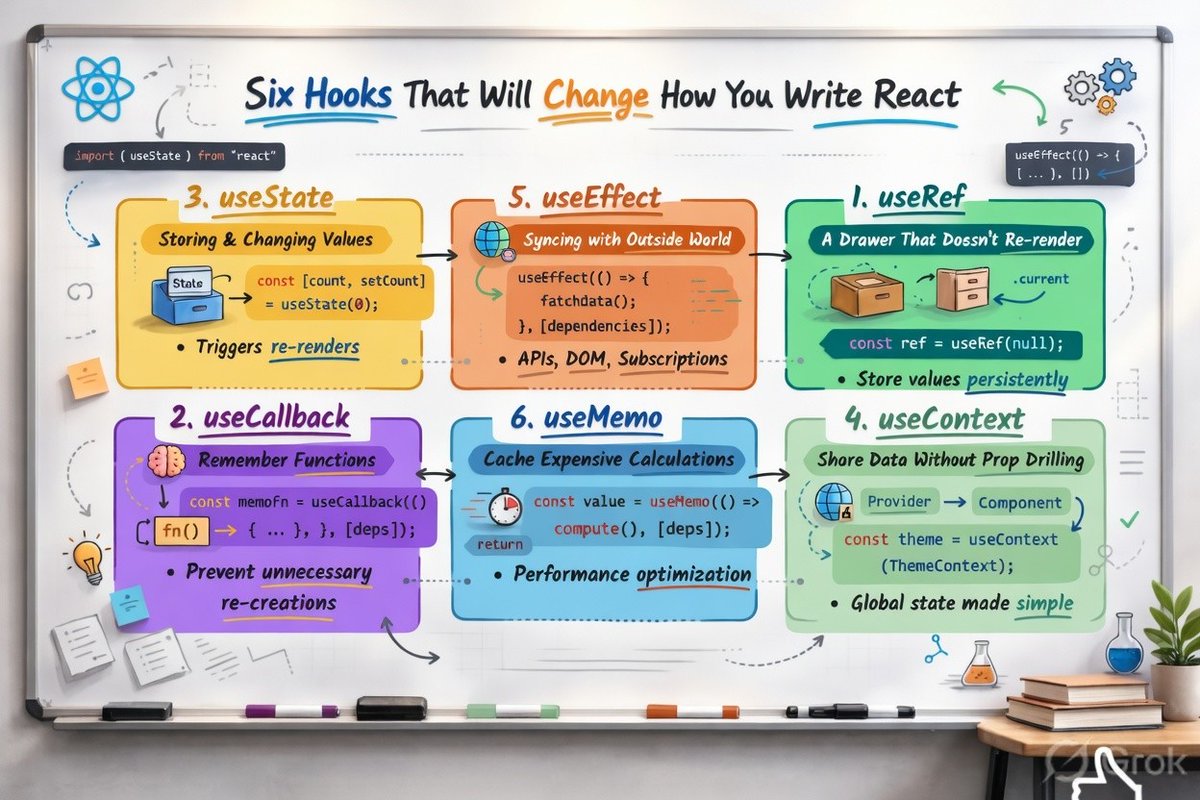
Here’s a clear, beginner-friendly explanation of the 6 important React Hooks shown in the image. Each one is explained simply, with what it does, when to use it, and a short easy example.
1. useRef – “A Drawer That Doesn’t Re-render”
What it does: Creates a box (reference) that can store a value and never causes your component to re-render when you change it.
Best for: Storing values that need to persist across renders (like timers, previous values, or direct access to DOM elements).
Simple Example:
const ref = useRef(null);
return <input ref={ref} />; // You can do ref.current.focus()
Key Point: Changing ref.current does not trigger a re-render.
2. useCallback – “Remember Functions”
What it does: Remembers a function so it doesn’t get recreated on every render.
Best for: Passing functions to child components (prevents unnecessary re-renders of children).
Simple Example:
const memoizedFn = useCallback(() => {
console.log("Hello");
}, []); // [] = dependencies
Key Point: Without useCallback, every render creates a brand-new function → children may re-render even when they don’t need to.
3. useState – “Storing & Changing Values”
What it does: Adds state (data that can change) to your component.
Best for: Anything that should make the UI update when it changes (count, form inputs, toggles, etc.).
Simple Example:
const [count, setCount] = useState(0);
return <button onClick={() => setCount(count 1)}>{count}</button>;
Key Point: Updating state triggers a re-render of the component.
4. useContext – “Share Data Without Prop Drilling”
What it does: Lets you access data from a Context (global-like state) anywhere in your component tree.
Best for: Themes, user info, language settings — data needed by many components.
Simple Example:
const theme = useContext(ThemeContext);
return <div style={{ color: theme }}>Hello</div>;
Key Point: No need to pass props through many levels of components.
5. useEffect – “Syncing with Outside World”
What it does: Runs side effects (code that interacts with the outside world) after render.
Best for: Fetching data, setting up subscriptions, manipulating DOM, timers.
Simple Example:
useEffect(() => {
fetchData().then(setData);
return () => cleanup(); // optional cleanup
}, [dependencies]);
Key Point: The dependency array [] controls when the effect runs.
6. useMemo – “Cache Expensive Calculations”
What it does: Remembers (caches) the result of an expensive calculation so it doesn’t run again unless dependencies change.
Best for: Heavy computations, filtering/sorting large lists, complex object creation.
Simple Example:
const expensiveValue = useMemo(() => {
return computeHeavyThing(data);
}, [data]);
Key Point: Improves performance by avoiding unnecessary recalculations.
Quick Summary Table (Easy to Remember)
Hook
Purpose
Causes Re-render?
Use When...
useRef
Store persistent value
No
Need value without re-render
useCallback
Remember functions
No (for the fn)
Passing functions to children
useState
Manage changing data
Yes
UI needs to update
useContext
Share global data
Yes (if value changes)
Avoid prop drilling
useEffect
Side effects (API, timers, etc.)
No (runs after)
Interact with outside world
useMemo
Cache expensive results
No
Heavy calculations
These 6 hooks cover most of what you’ll need in modern React apps.
Would you like me to also create a simple code playground or mini project that combines all 6 hooks together? Just say the word!
5
165

Apr 7
How does CompletableFuture work, and when should you use it?
CompletableFuture is Java's way of handling asynchronous programming without blocking threads
It represents a future result that might not be available yet
You can chain multiple async operations together without callback hell
Basic usage: CompletableFuture.supplyAsync(() -> fetchData()) runs code in background
Use .thenApply() to transform the result when it arrives
Use .thenCompose() when the next operation also returns a CompletableFuture
Use .exceptionally() or .handle() to deal with errors gracefully
Perfect for calling multiple APIs in parallel and combining their results
Way better than traditional Future because you can compose operations
Works great with Spring's @ Async annotation for background tasks
Real example: Fetching user data, order history, and recommendations in parallel for a dashboard
Modern Java applications prefer this over raw threads or callbacks
2
4
54
1,930

Apr 6
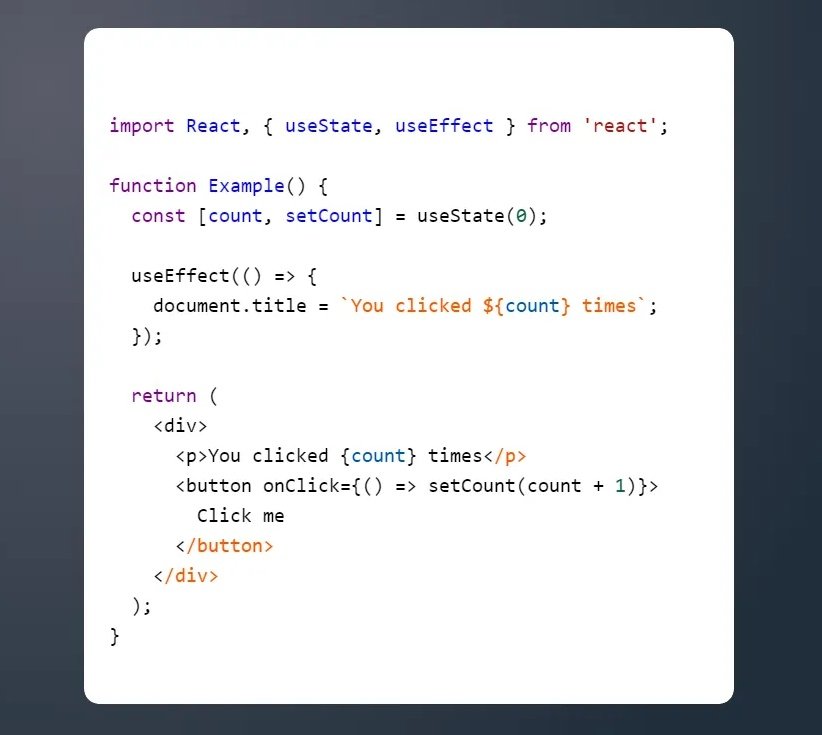
Tweet 4/5:
"Common mistake example:
useEffect(() => {
fetchData();
}, []); If fetchData uses state that changes, it can create bugs or loops. Fix: Add the right things inside [] or use useCallback. Also, always clean up timers or subscriptions!"
1
2
22


Mar 20
What’s wrong here?
CompletableFuture.supplyAsync(() -> fetchData())
.thenApply(data -> process(data))
.get();
Why might this defeat the entire purpose of async programming?
4
2
22
4,273


Feb 23
React useEffect dependency array:
useEffect(() => {
fetchData()
}, []) // runs once ✅
useEffect(() => {
fetchData()
}, [data]) // runs when data changes ✅
useEffect(() => {
fetchData()
}) // runs every render 🔥
useEffect(() => {
fetchData()
}, [someState, anotherState, andAnotherState]) // runs randomly 🔄
useEffect(() => {
fetchData()
}, [objectThatChangesEveryRender]) // INFINITE LOOP 💀
Me: "I don't need useEffect"
Also me: *uses useEffect for everything*
#reactjs #useEffect #webdev
3
15