Dharmik Harinkhede retweeted

10000 Pages Programming Notes - 💯 FREE
❯ Java
goalkicker.com/JavaBook/
❯ Python
goalkicker.com/PythonBook/
❯ JavaScript
goalkicker.com/JavaScriptBoo…
❯ SQL
goalkicker.com/SQLBook/
❯ DSA
goalkicker.com/AlgorithmsBoo…
❯ C
goalkicker.com/CBook/
❯ C
goalkicker.com/CPlusPlusBook…

1
3
12
56


10 VS CODE EXTENSIONS EVERY SENIOR DEVELOPER SECRETLY USES.
The ones that don't show up in any "top 10 extensions" listicle.
Bookmark every single one. None of these are Prettier, ESLint, or GitLens. Those lists are for juniors.
1. Continue
continue.dev
Open-source Copilot alternative. Run any model locally with Ollama. No code leaving your machine. No subscription. Copilot is $19/month. Continue is $0 forever. Apache-2.0.
2. Console Ninja
console-ninja.com
By the Wallaby.js team. Shows your console.log output and runtime errors inline, right next to the log statement. You stop tab-switching to DevTools for the rest of your career.
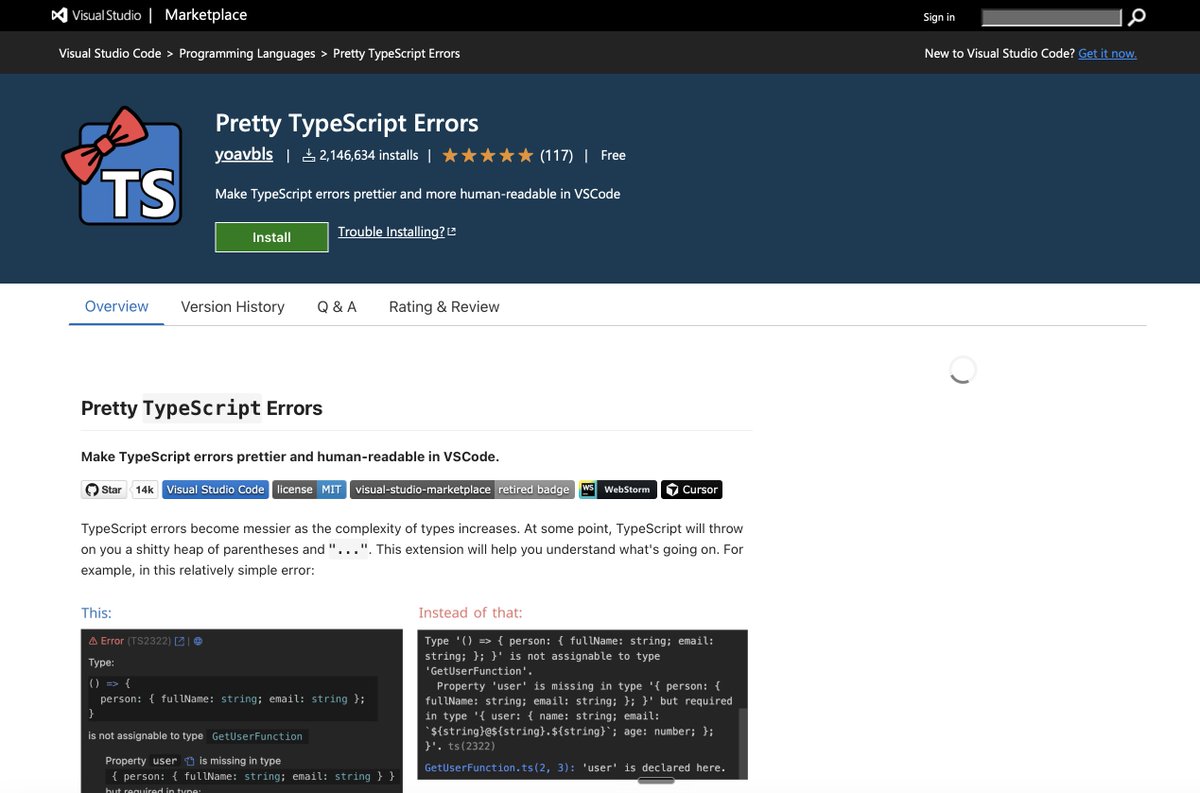
3. Pretty TypeScript Errors
marketplace.visualstudio.com…
By yoavbls. Turns TypeScript's 14-line nested-generic horror into syntax-highlighted, human-readable blocks. The one extension every senior TS dev installs the day they hit their first cryptic Type 'X' is not assignable error.
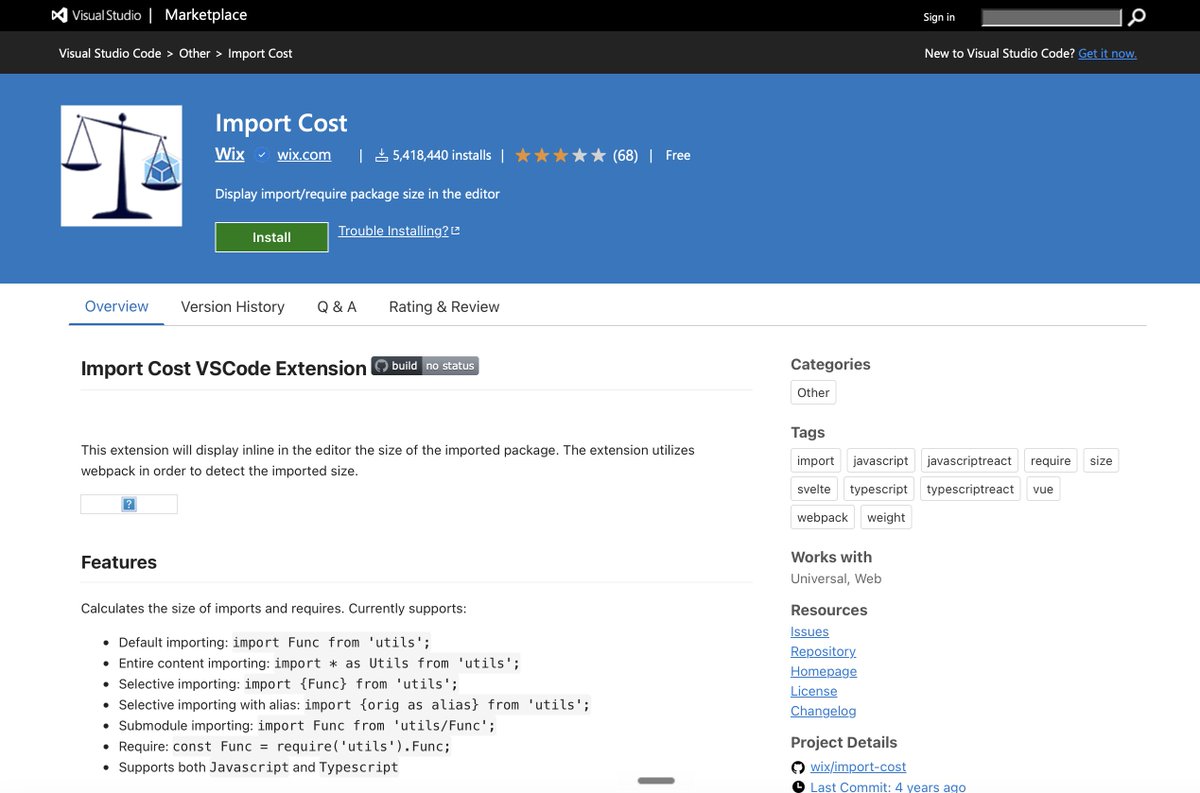
4. Import Cost
marketplace.visualstudio.com…
By Wix. Shows the exact KB size of every npm import inline as you type. Catches bundle bloat before it ships. The only reason most enterprise frontends are not 14MB.
5. REST Client
marketplace.visualstudio.com…
By Huachao Mao. Send HTTP requests from a plain .http file. Commit it to git. Share with your team. Postman charges $19/user/month for what this does for free in a text file.
6. Quokka.js
quokkajs.com
JavaScript and TypeScript scratchpad inline in your editor. Test ideas, regex, array methods, and API responses without leaving the file. Community edition is free forever.
7. Peacock
peacockcode.dev
By John Papa. Tints your VS Code window with a different color per workspace. The reason senior engineers don't accidentally push to production while editing staging. Saves a career once a quarter.
8. Turbo Console Log
marketplace.visualstudio.com…
One keyboard shortcut auto-generates a console.log with the file name, line number, and variable name pre-filled. Another shortcut deletes every log you added. No more grep-ing for stray prints.
9. Git Graph
marketplace.visualstudio.com…
By mhutchie. A proper visual git history that actually renders branch topology correctly. GitLens shows blame. Git Graph shows the shape of the repo. Senior devs use both.
10. Continue
continue.dev
Open-source Copilot alternative. Run any model locally with Ollama. No code leaving your machine. No subscription. Copilot is $19/month. Continue is $0 forever. Apache-2.0.
The juniors install 47 extensions on day one.
The seniors run 10 and ship faster.
The actual productivity multiplier in VS Code is not the AI assistant. It is the 8 extensions that quietly remove 30 seconds of friction from every loop.
All 10 marketplace links above.


4

Do you really know JavaScript??
I don't mean the 0.5% of it you use for React
3

Add a small JavaScript snippet to your website
RevTrace automatically tracks every customer touchpoint
See exactly how much revenue each channel contributed — using 5 different attribution models
2

Pino is a very low overhead JavaScript logger for Node.js that produces JSON logs and is over 5x faster than alternatives.

1
Hey Everyone
I built RevTrace (revtrace.in) — a multi-touch attribution platform which tells you which marketing channel drove your revenue (eg Google Ads, Social media, Organic search)
How it works:
Add a small JavaScript snippet to your website
1
1
3
Muzammil Kayani retweeted

Jun 13
They verify your login in client-side JavaScript, never on the server. So you can walk right in.
New write-up: Client-side Authentication Bypass. 4 real cases (one led to a $4,000 SQLi):
kuldeep.io/posts/client-side…
#BugBounty #AppSec #InfoSec #BarracksArmy

3
32
239
7,521

11m
They come from the no-JavaScript fallback on every comment Reply link. With JS on, a click just moves the comment form in place. The href still sits in the HTML, so Googlebot follows it.
1

قبل نبدأ ⏳
اي ملخص ب 10 ريال ✨!
اساسيات لغة Java
البرمجة الكائنية OOP للغة Java
اساسيات لغة Python
اساسيات لغة C
لغة JavaScript
دليل لطلاب الحاسب المستجدين
للطلب 📌
t.me/zrvc5 ✅
ويلا نبدأ 👌🏻
1
11
Andrés Orozco retweeted

Jun 12
¡La mejor librería de sliders que he visto para 2026!
Solo ocupa 4.3KB y usa el mínimo JavaScript posible.
✓ Funciona con scroll-driven animations
✓ Añade drag con ratón
✓ En móviles carga 0KB
Se llama Blossom:
github.com/jespervos/blossom…
11
181
1,868
64,424

Before installing another package, ask yourself:
"Can I solve this with native JavaScript?"
Sometimes the best dependency is no dependency.
#JavaScriptTips #WebDevelopment #CleanCode
1
7
JavaScript Developer: "I'll fix it with one line."
Adds 50 lines of code.
#JavaScript #ProgrammerHumor
1
8

Want to level up as a JavaScript developer?
Build:
A Todo App
A Weather App
A Chat Application
An E-commerce Clone
A SaaS Project
Projects teach what tutorials can't.
#JavaScript #LearnToCode #BuildInPublic
2
9

You don't become a better JavaScript developer by memorizing frameworks.
You become better by understanding: • Closures • Scope • Event Loop • Promises • Async/Await
Master the fundamentals.
#JavaScript #Frontend #Programming
1
2

<!DOCTYPE html>
<html>
<head>
<meta charset="UTF-8">
<title>MethodDka - High Precision</title>
<script src="cdnjs.cloudflare.com/ajax/li…"></script>
<style>
body { font-family: Arial, sans-serif; }
.container {
max-width: 600px;
margin: 0 auto;
padding: 20px;
background-color: #f9f9f9;
border-radius: 8px;
box-shadow: 0 0 10px rgba(0,0,0,0.1);
}
.input-field { margin-bottom: 10px; }
.input-field input { width: 100%; padding: 8px; box-sizing: border-box; }
.button {
padding: 10px 20px;
background-color: #007bff;
color: white;
border: none;
border-radius: 4px;
cursor: pointer;
}
.button:hover { background-color: #0056b3; }
.result {
margin-top: 20px;
padding: 10px;
background-color: #e9ecef;
border-radius: 4px;
}
</style>
</head>
<body>
<div class="container">
<h1>MethodDka (50桁版)</h1>
<div class="input-field">
<label for="maxDegree">最高次数:</label>
<input type="number" id="maxDegree" />
</div>
<button class="button" onclick="createFields()">最高次数を設定</button>
<div id="coefficients"></div>
<button class="button" onclick="calculate()">計算開始</button>
<div id="results"></div>
</div>
<script>
Decimal.set({ precision: 50 })
let n;
let sa = [];
let sr = [];
let si = [];
let bSyuusoku = false;
function createFields() {
const maxDegree = document.getElementById('maxDegree').value;
n = parseInt(maxDegree);
const coefficientsDiv = document.getElementById('coefficients');
coefficientsDiv.innerHTML = '';
for (let i = 0; i <= n; i ) {
const inputField = document.createElement('div');
inputField.className = 'input-field';
inputField.innerHTML = `<label for="coefficient${i}">${n - i}次の係数:</label><input type="text" id="coefficient${i}" />`;
coefficientsDiv.appendChild(inputField);
}
}
function calculate() {
for (let i = 0; i <= n; i ) {
const coefficient = document.getElementById(`coefficient${i}`).value;
sa[i] = new Decimal(coefficient || "0");
}
if (n === 0) {
alert('0次の係数を設定してください。');
return;
}
subroutine();
const resultsDiv = document.getElementById('results');
resultsDiv.innerHTML = '';
if (!bSyuusoku) {
alert('収束しませんでした。');
} else {
for (let i = 1; i <= n; i ) {
const result = document.createElement('div');
result.className = 'result';
result.innerText = `解${i}: 実数部 ${sr[i].toString()}, 虚数部 ${si[i].toString()}`;
resultsDiv.appendChild(result);
}
}
}
function subroutine() {
let sx = Array(n 1).fill(new Decimal(0));
let sy = Array(n 1).fill(new Decimal(0));
let se = new Decimal("1e-50");
let m = 100;
let sp = Decimal.acos(-1);
let sw = new Decimal(0);
for (let i = 0; i <= n; i ) {
sa[i] = sa[i].div(sa[0]);
}
for (let i = 2; i <= n; i ) {
let sq = new Decimal(n).mul(sa[i].abs().pow(new Decimal(1).div(i)));
if (sw.lt(sq)) sw = sq;
}
let sb = sp.mul(2).div(n);
let sc = sp.div(2 * n);
for (let j = 1; j <= n; j ) {
let st = sb.mul(j - 1).add(sc);
sr[j] = sw.mul(Decimal.cos(st));
si[j] = sw.mul(Decimal.sin(st));
}
for (let k = 1; k <= m; k ) {
let bContinue = false;
for (let i = 1; i <= n; i ) {
let s1 = new Decimal(1);
let s2 = new Decimal(0);
let s3 = new Decimal(1);
let s4 = new Decimal(0);
sb = sr[i];
sc = si[i];
for (let j = 1; j <= n; j ) {
let s5 = s1.mul(sb).sub(s2.mul(sc));
s2 = s1.mul(sc).add(s2.mul(sb));
s1 = s5.add(sa[j]);
if (j !== i) {
s5 = s3.mul(sb.sub(sr[j])).sub(s4.mul(sc.sub(si[j])));
s4 = s3.mul(sc.sub(si[j])).add(s4.mul(sb.sub(sr[j])));
s3 = s5;
}
}
sw = s3.pow(2).add(s4.pow(2));
sx[i] = s1.mul(s3).add(s2.mul(s4)).div(sw);
sy[i] = s2.mul(s3).sub(s1.mul(s4)).div(sw);
sr[i] = sr[i].sub(sx[i]);
si[i] = si[i].sub(sy[i]);
if (sx[i].abs().gt(se) || sy[i].abs().gt(se)) {
bContinue = true;
}
}
if (!bContinue) {
bSyuusoku = true;
alert('収束しました。');
return;
}
}
bSyuusoku = false;
}
</script>
</body>
</html>
このWindowscopilotさんの生成したMethodDka.htmlはスケーリング処理は行われていますか?
提示された MethodDka.html 内の subroutine() を確認したところ、一般的な意味での「係数のスケーリング(多項式の根の大きさを均一化したり、オーバーフロー/アンダーフローを防ぐために変数や係数を変形する処理)」は部分的にしか行われていません。
具体的にどのような処理が行われているか、コードの該当部分を解説します。
1. 最高次係数による正規化(行われている)
JavaScript
for (let i = 0; i <= n; i ) {
sa[i] = sa[i].div(sa[0]);
}
多項式 $a_0 x^n a_1 x^{n-1} \dots a_n = 0$ の全体を $a_0$ で割り、最高次の係数を 1 にする処理(モニック多項式化)です。これはDKA法(デュラン・ケernel・アバハ法)を適用する際、公式を単純化するための必須の事前処理(正規化)ですが、いわゆる「係数の急激な桁落ちやアンダーフローを防ぐための本格的なスケーリング」とは異なります。
2. 初期値決定のための根の最大絶対値の評価(行われている)
JavaScript
for (let i = 2; i <= n; i ) {
let sq = new Decimal(n).mul(sa[i].abs().pow(new Decimal(1).div(i)));
if (sw.lt(sq)) sw = sq;
}
ここでは Aberth の上界に似た計算(各係数から根の存在範囲の半径 sw を推定する処理)を行っています。これによって初期値を配置する円の半径 sw を決定していますが、多項式そのものの係数を扱いやすい大きさにスケーリングしているわけではありません。
結論として足りていない「スケーリング」
DKA法(高次方程式の解法)において、次数 $n$ が大きい場合や、係数のオーダーが極端に異なる場合(例:$x^5 10^{20}x^3 10^{-20} = 0$ など)、そのまま計算すると高精度浮動小数点(decimal.js の50桁)であっても、反復計算の途中で数値的に不安定になったり収束しなくなったりすることがあります。
本格的なスケーリングを行う場合は、以下のような処理(多項式の変形)を追加します。
変数のスケーリング(変数変換):$x = \rho \cdot z$ とおき、元の多項式を $z$ に関する多項式に書き換えることで、係数の最大値と最小値の幅を小さくする(あるいは $a_n$ と $a_0$ の絶対値を近づける)処理。解 $z$ を求めたあとに $\rho$ を掛けて元の解 $x$ に戻します。
まとめ
このコードでは、最高次係数を 1 にする「正規化」と、初期値の円の大きさを決める「上界の計算」は行われていますが、「係数の桁の偏りを補正して計算を安定化させるためのスケーリング(変数変換など)」は行われていません。
もし非常に大きな係数と小さな係数が混在する方程式を解く予定がある場合は、反復を始める前に変数をスケーリングするロジックを挟むと、より堅牢なプログラムになります。
18

Add a small JavaScript snippet to your website
RevTrace automatically tracks every customer touchpoint
See exactly how much revenue each channel contributed — using 5 different attribution models
1
1