It's better to make a Plan for 100 Tasks, as typed categorized dependent subgroups adding up to 10 at a time, composing a directed acyclic graph, then keep auto-compact off, let it run out of context, use /rewind back to after Plan was set, and say check git status and TaskList.
2
1
8
187

Jun 15
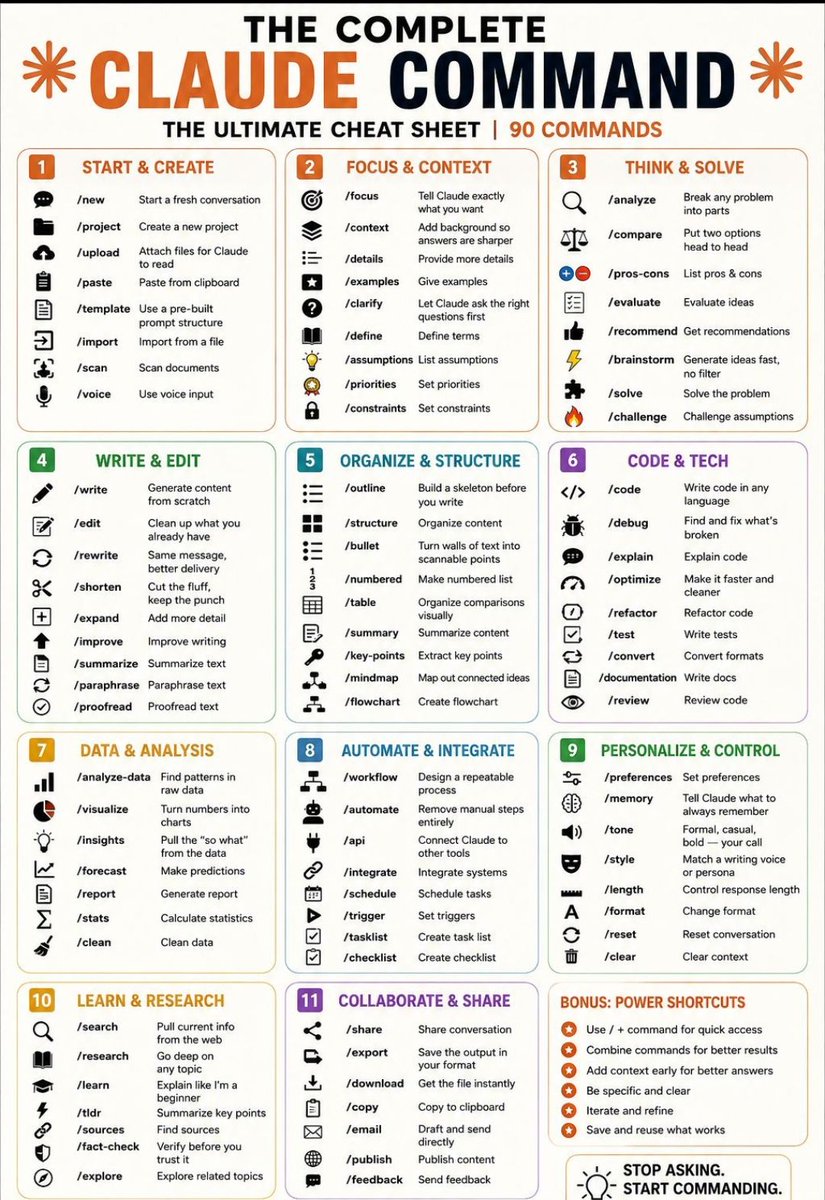
🎯THE COMPLETE CLAUDE COMMAND
THE ULTIMATE CHEAT SHEET | 90 COMMANDS
---
1. START & CREATE
/new → Start a fresh conversation
/project → Create a new project
/upload → Attach files for Claude to read
/paste → Paste from clipboard
/template → Use a pre-built prompt structure
/import → Import from a file
/scan → Scan documents
/voice → Use voice input
---
2. FOCUS & CONTEXT
/focus → Tell Claude exactly what you want
/context → Add background so answers are sharper
/details → Provide more details
/examples → Give examples
/clarify → Let Claude ask the right questions first
/define → Define terms
/assumptions → List assumptions
/priorities → Set priorities
/constraints → Set constraints
---
3. THINK & SOLVE
/analyze → Break any problem into parts
/compare → Put two options head to head
/pros-cons → List pros & cons
/evaluate → Evaluate ideas
/recommend → Get recommendations
/brainstorm → Generate ideas fast, no filter
/solve → Solve the problem
/challenge → Challenge assumptions
---
4. WRITE & EDIT
/write → Generate content from scratch
/edit → Clean up what you already have
/rewrite → Same message, better delivery
/shorten → Cut the fluff, keep the punch
/expand → Add more detail
/improve → Improve writing
/summarize → Summarize text
/paraphrase → Paraphrase text
/proofread → Proofread text
---
5. ORGANIZE & STRUCTURE
/outline → Build a skeleton before writing
/structure → Organize content
/bullet → Turn text into scannable points
/numbered → Make numbered list
/table → Organize comparisons visually
/summary → Summarize content
/key-points → Extract key points
/mindmap → Map out connected ideas
/flowchart → Create flowchart
---
6. CODE & TECH
/code → Write code in any language
/debug → Find and fix issues
/explain → Explain code
/optimize → Make code faster and cleaner
/refactor → Improve code structure
/test → Write tests
/convert → Convert formats
/documentation → Write docs
/review → Review code
---
7. DATA & ANALYSIS
/analyze-data → Find patterns in raw data
/visualize → Turn numbers into charts
/insights → Extract key insights
/forecast → Make predictions
/report → Generate report
/stats → Calculate statistics
/clean → Clean data
---
8. AUTOMATE & INTEGRATE
/workflow → Design repeatable process
/automate → Remove manual steps
/api → Connect tools via API
/integrate → Integrate systems
/schedule → Schedule tasks
/trigger → Set triggers
/tasklist → Create task list
/checklist → Create checklist
---
9. PERSONALIZE & CONTROL
/preferences → Set preferences
/memory → Save what to remember
/tone → Set tone (formal, casual, bold)
/style → Match writing style/persona
/length → Control response length
/format → Change format
/reset → Reset conversation
/clear → Clear context
---
10. LEARN & RESEARCH
/search → Get current info from web
/research → Deep dive into topic
/learn → Beginner explanation
/tldr → Summary of key points
/sources → Find sources
/fact-check → Verify information
/explore → Explore related topics
---
11. COLLABORATE & SHARE
/share → Share conversation
/export → Save output
/download → Get file instantly
/copy → Copy to clipboard
/email → Draft and send
/publish → Publish content
/feedback → Send feedback
---
BONUS: POWER SHORTCUTS
Use “/” commands for quick access
Combine commands for better results
Add context early for better answers
Be specific and clear
Iterate and refine
Save and reuse what works
❤️ Like
🔁 Retweet
🔖 Bookmark
Follow @AamirAnsar94694 for more such posts
11
52
167
4,862

Jun 13
bumili ako ng parang cute na formatted excel para sa tasklist ko as someone na laging ang daming trabaho. potek, ang makakasatisfy lang pala sa amats ko sa buhay ay yung FREE at BUILT IN na Reminders app 🥲
16

Jun 13
🎯 89 Claude Commands That Make You 10x More Productive
Most people use Claude like a chatbot.
Power users use commands.
These commands help you write faster, think deeper, analyze better, and automate repetitive work.
♦️ START & SETUP
• /new – Start a fresh conversation
• /project – Create a dedicated workspace
• /upload – Add files for analysis
• /import – Bring in existing content
• /scan – Read documents instantly
• /voice – Talk instead of typing
♦️ CONTEXT & DIRECTION
• /focus – Define the main goal
• /context – Add background information
• /examples – Show examples to follow
• /clarify – Ask follow-up questions
• /priorities – Set what's most important
• /constraints – Define limitations
♦️ THINKING TOOLS
• /analyze – Break down complex problems
• /compare – Evaluate multiple options
• /pros-cons – Weigh tradeoffs quickly
• /brainstorm – Generate fresh ideas
• /recommend – Get actionable suggestions
• /challenge – Test assumptions
♦️ WRITING TOOLS
• /write – Create content from scratch
• /rewrite – Improve existing content
• /shorten – Make it concise
• /expand – Add more depth
• /summarize – Extract key information
• /proofread – Fix grammar and clarity
♦️ ORGANIZATION TOOLS
• /outline – Build content structures
• /table – Present information clearly
• /mindmap – Visualize ideas
• /flowchart – Create workflows
• /key-points – Extract essentials
♦️ CODING TOOLS
• /code – Generate code
• /debug – Find and fix issues
• /explain – Understand code faster
• /optimize – Improve performance
• /refactor – Clean up codebases
♦️ DATA & INSIGHTS
• /analyze-data – Process datasets
• /visualize – Create charts
• /insights – Discover patterns
• /forecast – Predict trends
• /report – Generate summaries
♦️ AUTOMATION
• /workflow – Design processes
• /automate – Reduce manual work
• /integrate – Connect tools
• /tasklist – Create action plans
• /checklist – Stay organized
♦️ RESEARCH
• /search – Find information fast
• /research – Explore topics deeply
• /fact-check – Verify claims
• /sources – Find references
• /learn – Master new subjects
💡 Pro Tip:
The best results come from combining commands.
Example:
→ /research /summarize
→ /analyze /recommend
→ /write /improve
→ /workflow /automate
The difference between average AI users and power users isn't the model.
It's knowing how to guide it.
❤️ Like
🔁 Repost
🔖 Save
Follow @AiwithDharmik for more AI productivity tips
13
41
75
1,086

Jun 13
🎯 89 Claude Commands That Make You 10x More Productive
Most people use Claude like a chatbot.
Power users use commands.
These commands help you write faster, think deeper, analyze better, and automate repetitive work.
♦️ START & SETUP
• /new – Start a fresh conversation
• /project – Create a dedicated workspace
• /upload – Add files for analysis
• /import – Bring in existing content
• /scan – Read documents instantly
• /voice – Talk instead of typing
♦️ CONTEXT & DIRECTION
• /focus – Define the main goal
• /context – Add background information
• /examples – Show examples to follow
• /clarify – Ask follow-up questions
• /priorities – Set what's most important
• /constraints – Define limitations
♦️ THINKING TOOLS
• /analyze – Break down complex problems
• /compare – Evaluate multiple options
• /pros-cons – Weigh tradeoffs quickly
• /brainstorm – Generate fresh ideas
• /recommend – Get actionable suggestions
• /challenge – Test assumptions
♦️ WRITING TOOLS
• /write – Create content from scratch
• /rewrite – Improve existing content
• /shorten – Make it concise
• /expand – Add more depth
• /summarize – Extract key information
• /proofread – Fix grammar and clarity
♦️ ORGANIZATION TOOLS
• /outline – Build content structures
• /table – Present information clearly
• /mindmap – Visualize ideas
• /flowchart – Create workflows
• /key-points – Extract essentials
♦️ CODING TOOLS
• /code – Generate code
• /debug – Find and fix issues
• /explain – Understand code faster
• /optimize – Improve performance
• /refactor – Clean up codebases
♦️ DATA & INSIGHTS
• /analyze-data – Process datasets
• /visualize – Create charts
• /insights – Discover patterns
• /forecast – Predict trends
• /report – Generate summaries
♦️ AUTOMATION
• /workflow – Design processes
• /automate – Reduce manual work
• /integrate – Connect tools
• /tasklist – Create action plans
• /checklist – Stay organized
♦️ RESEARCH
• /search – Find information fast
• /research – Explore topics deeply
• /fact-check – Verify claims
• /sources – Find references
• /learn – Master new subjects
💡 Pro Tip:
The best results come from combining commands.
Example:
→ /research /summarize
→ /analyze /recommend
→ /write /improve
→ /workflow /automate
The difference between average AI users and power users isn't the model.
It's knowing how to guide it.
❤️ Like
🔁 Repost
🔖 Save
Follow @Origin_AI_01 for more AI productivity tips.
21
23
80
1,017

Jun 13
Windows で Claude Code / Codex / OpenCode で使う時、トークン削減するおまじない。うちの事務所の全台で実行した。気休めかもしれないが。
----
トークンコストの削減のために以下の処理をスキルにしてください。
----
このタスクは推論を必要としない機械的な操作です。
以下のコマンドカテゴリに該当する場合、/model haiku に切り替えてから実行してください。
## 対象コマンド
### Git
git status, git log, git log --oneline, git diff, git diff --staged, git add, git commit, git push, git pull, git fetch,
git branch, git checkout, git stash, git stash pop
### GitHub CLI
gh pr list, gh pr view, gh pr create, gh pr merge,
gh issue list, gh issue view, gh issue create,
gh run list, gh run view
### このプロジェクト
uv run pytest, uv run pytest -v, uv run pytest <test_file>,
uv run importer, uv run housekeeping,
uv pip install, uv sync
### Windows / PowerShell
dir, ls, Get-ChildItem, cd, Set-Location, mkdir, New-Item, copy, Copy-Item, type, Get-Content, echo, tasklist, Get-Process, where, Get-Command, $env:変数名, [Environment]::GetEnvironmentVariable(), ping, ipconfig, netstat, Select-String, Measure-Object, Out-File
## 実行手順
1. /model haiku
2. コマンドを実行
3. 結果を出力
4. 必要なら /model {{元のモデル}} に戻す
1
2
180


Consider the humble TaskList tool, compared to Skills:
- also durable across compaction
- also naturally visible to the model and privileged by the harness
- cache safe / easy and cheap to mutate (...I think)
- your agent can use them to hide info from you (...wait...)
1
1
40

Jun 12
I went from tasklist is the agent > memory is the agent > functions/skill are the agent > logs are the agent
1
12
739

Jun 12
jillthrussell.co.uk/writersi… One of the film & book projects I've been writing and working on this year Trashboy, Toxy the Mimic Monsta & the Save the Planet To Do Tasklist.
14
Cuckold Couple 👸🏽🧎🏻♂️😈👠 retweeted

20 Jan 2025
You think you have what it takes to be my 24/7 slave? 🛐🧎🏻🙏
Tasklist:
❗️Clean
❗️Cook
❗️Massage my feet
❗️Serve as a toilet (all you get to eat)
❗️Hand over condoms if I fuck my bf
❗️Serve my friends
❗️Stand in the Corner for hours
Do you have what it takes?

13
13
115
5,932

Jun 12
Noticed networkcap.exe on her tasklist... "network capture"? It's HP Probook and looks like there's HP crap installed on the machine (yet clean install). Stopped HPNetworkCap service and Curl is getting ~10 megabytes (~80 megabits) per second over our VPN. reddit.com/r/techsupport/com…
1
19

Jun 12
asked fable to compare my harness built with mastra compared to this architecture and it held up.
but guess who is now implementing steering :). and it also reminded me to add the tasklist and askuserequestion tools

1
1
158

Jun 11
Terima kasih untuk diriku sendiri di week ini. Tasklist oyak-oyakan, pi zero mbendino, badan kondisi drop. Tapi tetep rampung. Sehat sehat kelas pekerja 🥹😇
38
Jun 11
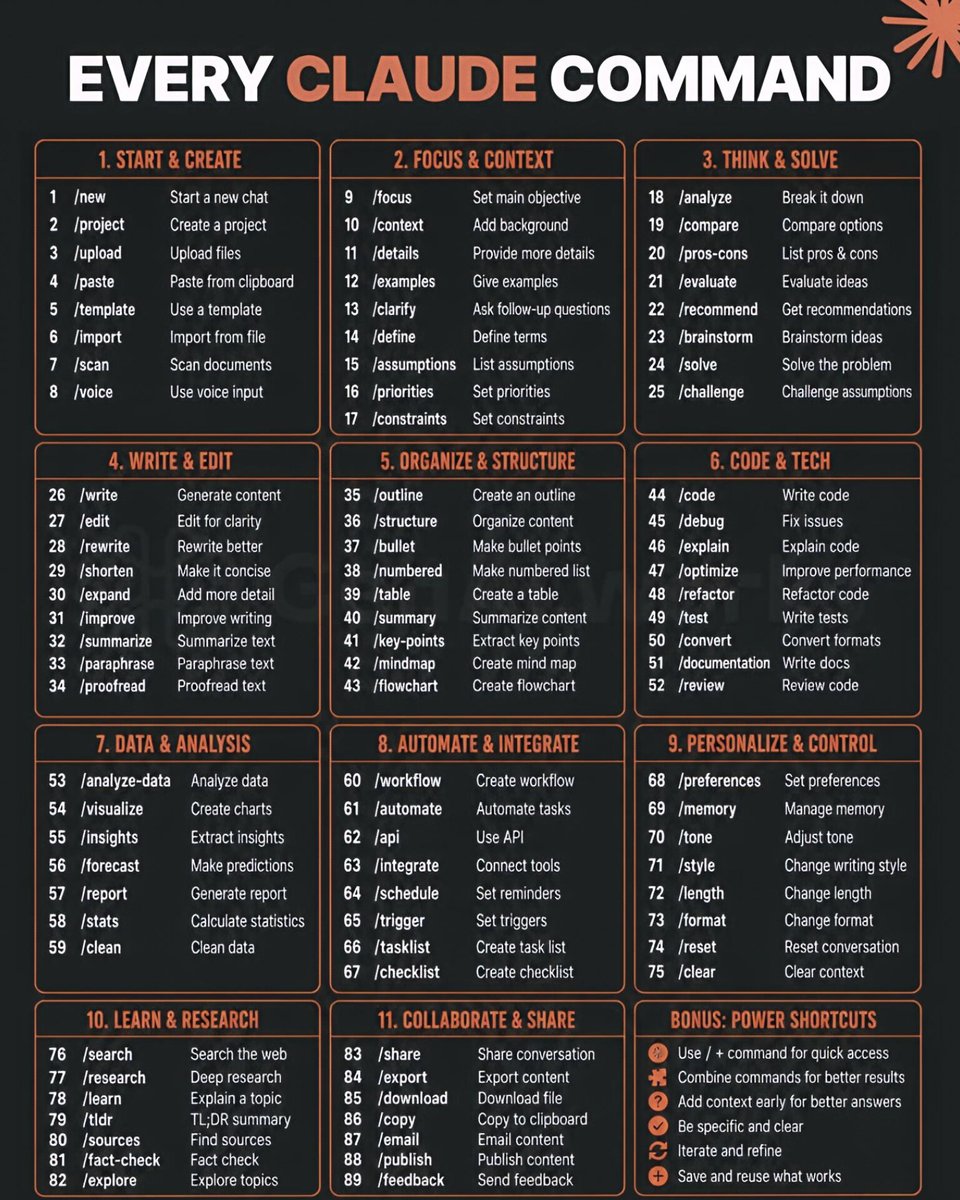
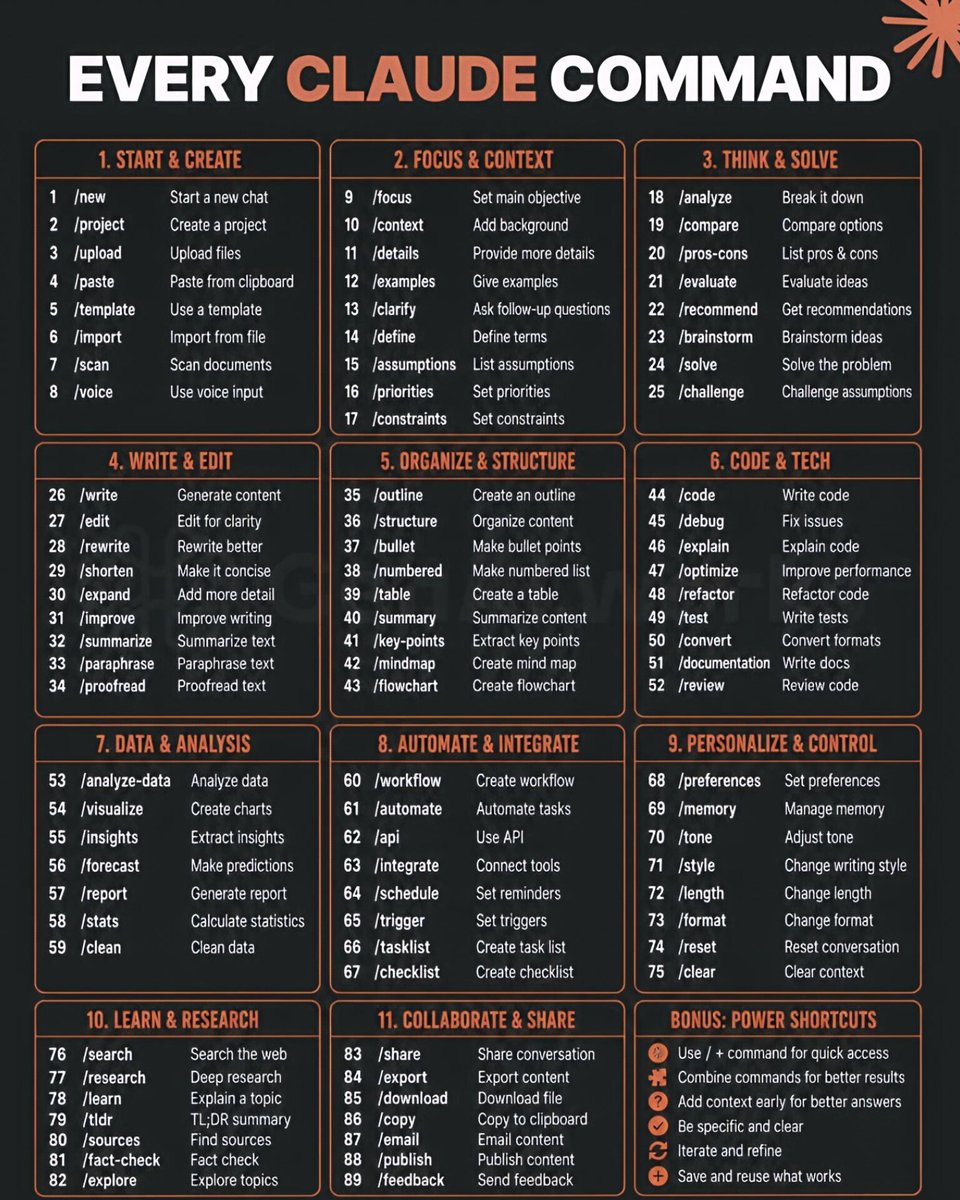
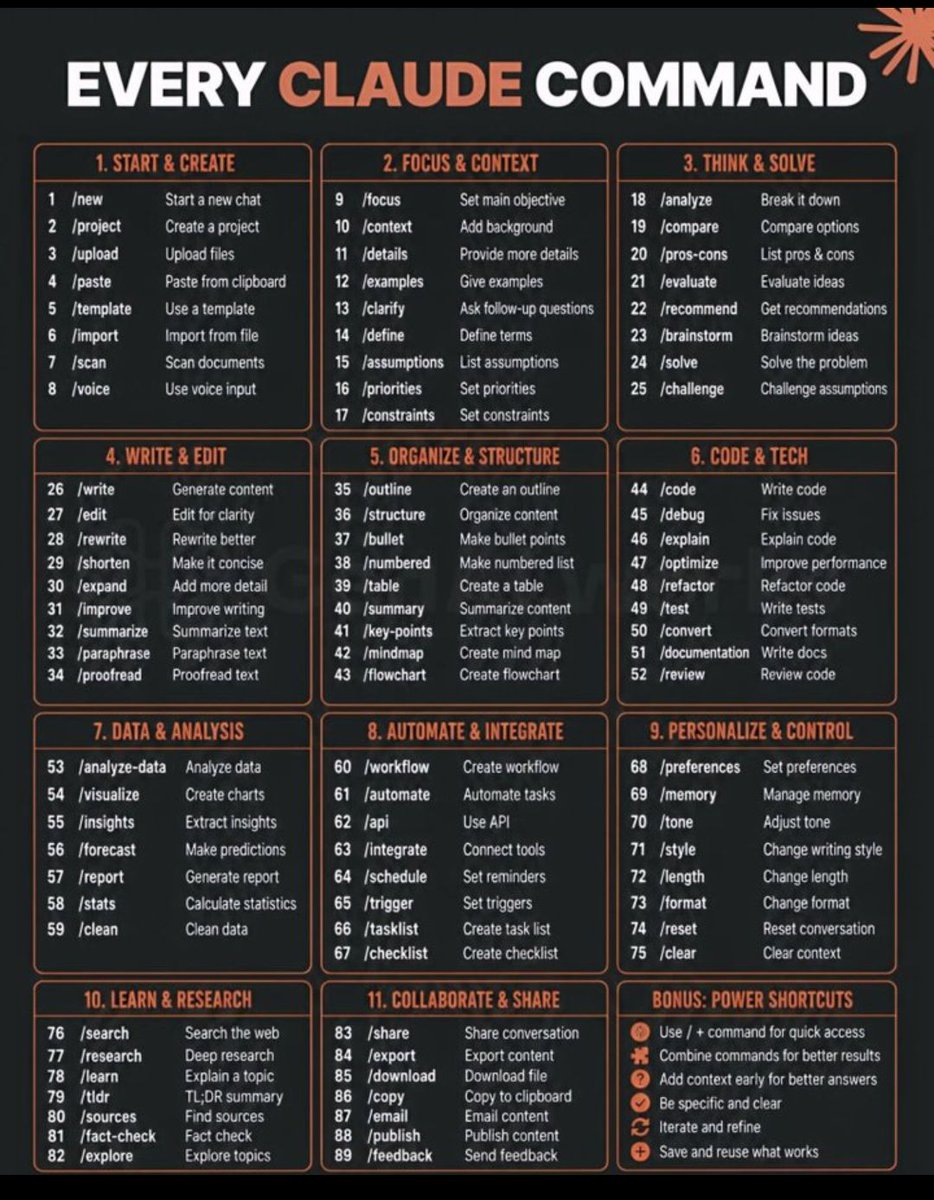
🎯EVERY CLAUDE COMMAND
Begin your work quickly with simple commands.
Create chats, upload files, or start structured projects.
Everything starts here.
♦️ START & CREATE
1 /new – Start a new chat
2 /project – Create a project
3 /upload – Upload files
4 /paste – Paste from clipboard
5 /template – Use a template
6 /import – Import from file
7 /scan – Scan documents
8 /voice – Use voice input
♦️ FOCUS & CONTEXT
9 /focus – Set main objective
10 /context – Add background
11 /details – Provide more details
12 /examples – Give examples
13 /clarify – Ask follow-up questions
14 /define – Define terms
15 /assumptions – List assumptions
16 /priorities – Set priorities
17 /constraints – Set constraints
♦️ THINK & SOLVE
18 /analyze – Break it down
19 /compare – Compare options
20 /pros-cons – List pros & cons
21 /evaluate – Evaluate ideas
22 /recommend – Get recommendations
23 /brainstorm – Brainstorm ideas
24 /solve – Solve the problem
25 /challenge – Challenge assumptions
♦️ WRITE & EDIT
26 /write – Generate content
27 /edit – Edit for clarity
28 /rewrite – Rewrite better
29 /shorten – Make it concise
30 /expand – Add more detail
31 /improve – Improve writing
32 /summarize – Summarize text
33 /paraphrase – Paraphrase text
34 /proofread – Proofread text
♦️ ORGANIZE & STRUCTURE
35 /outline – Create an outline
36 /structure – Organize content
37 /bullet – Make bullet points
38 /numbered – Make numbered list
39 /table – Create a table
40 /summary – Summarize content
41 /key-points – Extract key points
42 /mindmap – Create mind map
43 /flowchart – Create flowchart
♦️ CODE & TECH
44 /code – Write code
45 /debug – Fix issues
46 /explain – Explain code
47 /optimize – Improve performance
48 /refactor – Refactor code
49 /test – Write tests
50 /convert – Convert formats
51 /documentation – Write docs
52 /review – Review code
♦️ DATA & ANALYSIS
53 /analyze-data – Analyze data
54 /visualize – Create charts
55 /insights – Extract insights
56 /forecast – Make predictions
57 /report – Generate report
58 /stats – Calculate statistics
59 /clean – Clean data
♦️ AUTOMATE & INTEGRATE
60 /workflow – Create workflow
61 /automate – Automate tasks
62 /api – Use API
63 /integrate – Connect tools
64 /schedule – Set reminders
65 /trigger – Set triggers
66 /tasklist – Create task list
67 /checklist – Create checklist
♦️ PERSONALIZE & CONTROL
68 /preferences – Set preferences
69 /memory – Manage memory
70 /tone – Adjust tone
71 /style – Change writing style
72 /length – Change length
73 /format – Change format
74 /reset – Reset conversation
75 /clear – Clear context
♦️ LEARN & RESEARCH
76 /search – Search the web
77 /research – Deep research
78 /learn – Explain a topic
79 /tldr – TL;DR summary
80 /sources – Find sources
81 /fact-check – Fact check
82 /explore – Explore topics
♦️ COLLABORATE & SHARE
83 /share – Share conversation
84 /export – Export content
85 /download – Download file
86 /copy – Copy to clipboard
87 /email – Email content
88 /publish – Publish content
89 /feedback – Send feedback
✳️BONUS: POWER SHORTCUTS
Use / command for quick access
Combine commands for better results
Add context early for better answers
Be specific and clear
Iterate and refine
Save and reuse what works
❤️ Like
🔁 Retweet
🔖 Bookmark
Follow @AamirAnsar94694 for more such posts
#AI #AgenticAI #AIAgents #GenAI #ArtificialIntelligence #Automation
16
36
78
1,615

Jun 10
Handyman tasklist feeling like a money pit? Outline the biggest repairs with contractor quotes, compare HELOC vs FHA 203K options, then decide which fixes to tackle or go the cash investor route. Unlock the complete fixer upper selling roadmap here: houseopedia.com/how-and-when…

7

Jun 10
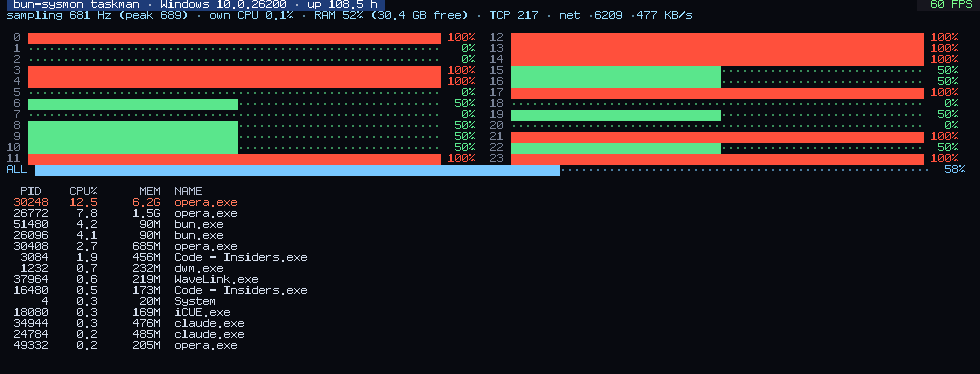
Proven, not promised: every number was measured against the published npm artifact. 86 integration assertions; 12/12 cross-checks vs tasklist, netstat, statfs registry agree.
AI agents: AI.md is the complete surface — zero source-reading needed.
github.com/ObscuritySRL/bun-…
95

oookkaayyy gaeess, taskList buat follow back udah tertuntaskan semua yaaa.
Kalau ada yang mau follow atau di-follback just reply this post yaa.
Perodically akan gw cek untuk di-follback.
mau cenBlue atau non-cenBlue insyaa Allah gw follbek.
asal bukan akun wapres Zimbabwe.
1
63