
Mar 18
We have the answer. Valorant Settings are stored in ➡️ C:\Users\[Your Name]\AppData\Local\VALORANT\Saved\Config\[Unique ID]\WindowsClient
1
11
13,478


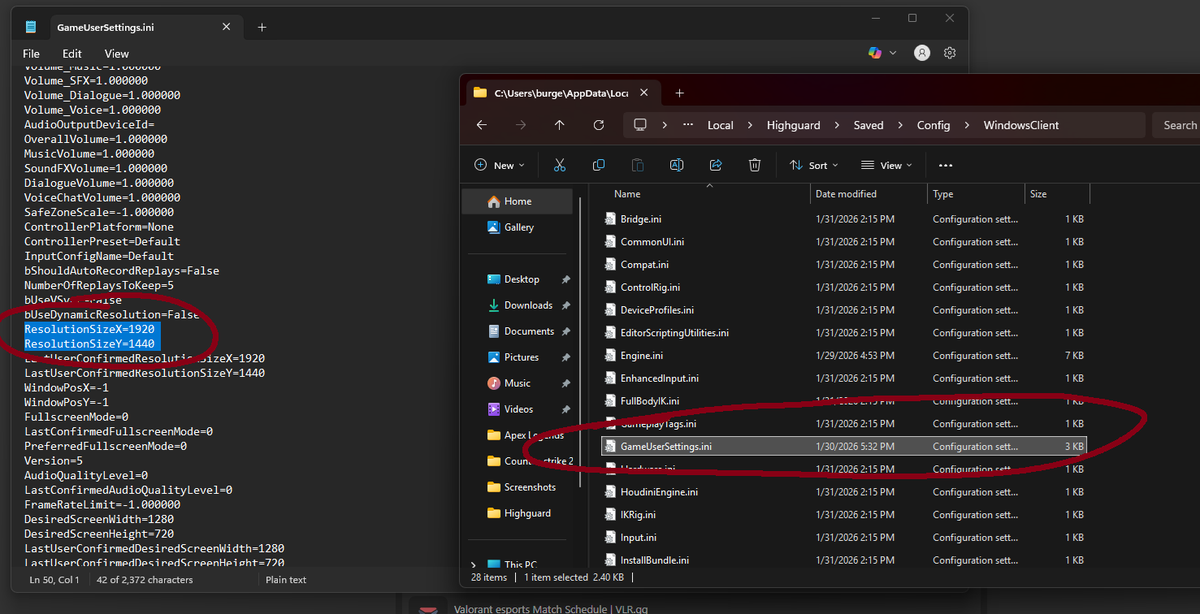
Go to this folder: "C:\Users\[YOUR PC NAME]\AppData\Local\Highguard\Saved\Config\WindowsClient"
Change the Resolution Size X and Y to your desired resolution in GameUserSettings.ini and set the file to Read-Only after saving.
You can change your FOV past 110 in this file too.
1
6
1,109

For people having trouble finding the file location just use this.
%localappdata%\Highguard\Saved\Config\WindowsClient
and putting
[Script.Engine.InputSettings]
bEnableMouseSmoothing=False
bDisableMouseAcceleration=True
bViewAccelerationEnabled=False
bEnableFOVScaling=False
into gameusersettings.ini might remove mouse accel /smoothing. but idk.
Jan 30

They updated Highguard, here's what's changed with the configs:
If you have read-only on gameusersettings.ini you must reset it, if not then you will most likely face crashes, additionally with the new option of global illumination quality in game, when using the config you must have it set to low if you want the dome to show (on the performance scalability.ini config it will crash your game if you do this)
I have also made a newer config that has better quality as some people did not like the "clay" look of the game. (Engine.ini)
Through my testing, I find the TSR setting to provide me more fps then the DLSS counterpart.
I also found that the dome causes the most fps drops as when it's forced disabled I get around 50fps more.
Link to the new configs:
drive.google.com/drive/folde…
pastebin links for those who want it
Engine.ini pastebin.com/8NM879nb
Scalability.ini pastebin.com/WKM2RBV9
How to use the configs : C:\Users\
[YOURNAME]\AppData\Local\Highguard\Saved\Config\WindowsClient
Replace [YOURNAME], and then make sure the file is set to read only.
2
9
1,207
Jan 30
What's the most universally hated option in gaming? Yep, Motion Blur. Highguard doesn't have an option to turn it off in-game 😔 but in the config we can do it ourselves.
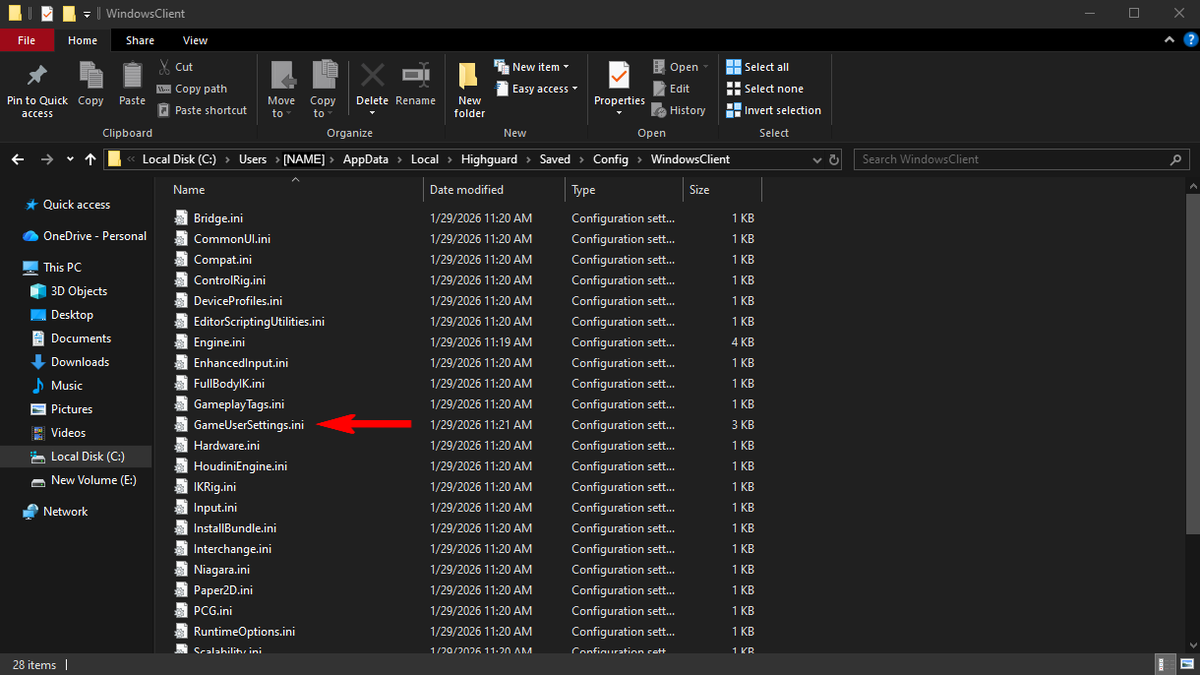
Head to your config using the following file path
C:\Users\[NAME]\AppData\Local\Highguard\Saved\Config\WindowsClient
Replace [NAME] with your name, then head to "GameUserSettings.ini"
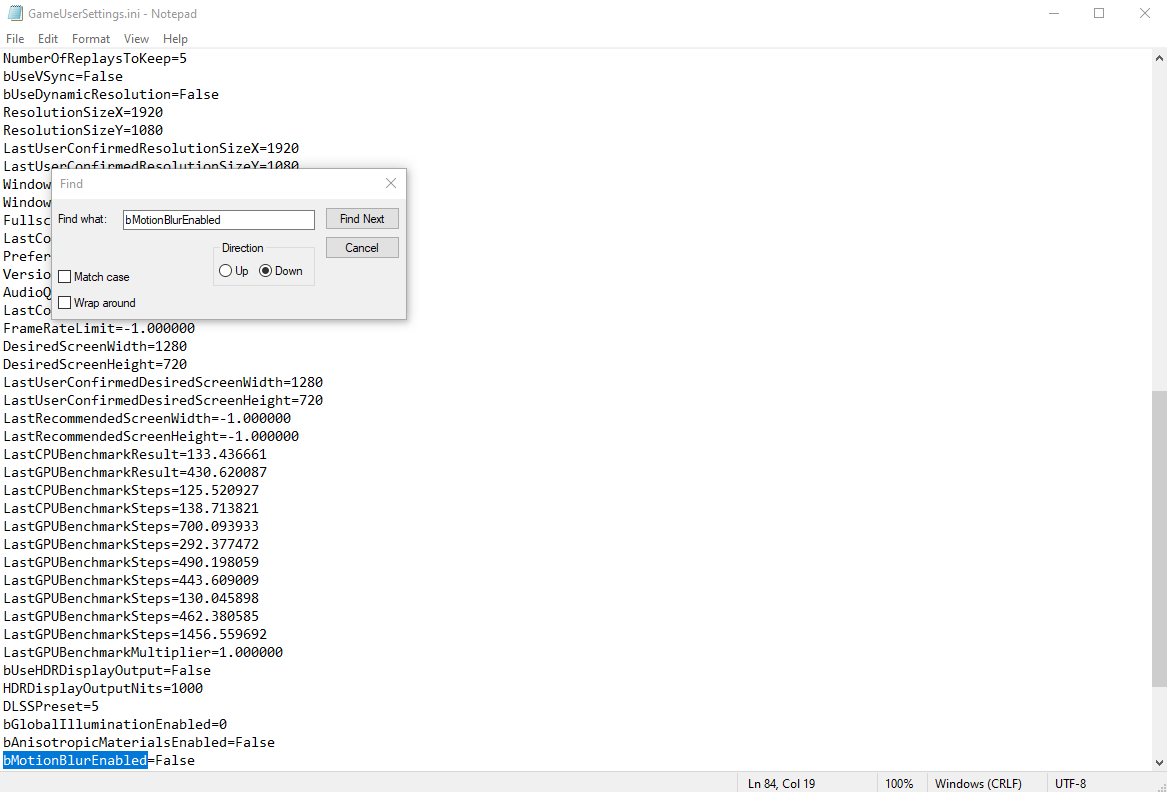
From there, CTRL F and search for "bMotionBlurEnabled" and change the setting from "True" to "False"
Now enjoy your game completely Motion Blur free. 🙌
3
13
3,978

Jan 30
They updated Highguard, here's what's changed with the configs:
If you have read-only on gameusersettings.ini you must reset it, if not then you will most likely face crashes, additionally with the new option of global illumination quality in game, when using the config you must have it set to low if you want the dome to show (on the performance scalability.ini config it will crash your game if you do this)
I have also made a newer config that has better quality as some people did not like the "clay" look of the game. (Engine.ini)
Through my testing, I find the TSR setting to provide me more fps then the DLSS counterpart.
I also found that the dome causes the most fps drops as when it's forced disabled I get around 50fps more.
Link to the new configs:
drive.google.com/drive/folde…
pastebin links for those who want it
Engine.ini pastebin.com/8NM879nb
Scalability.ini pastebin.com/WKM2RBV9
How to use the configs : C:\Users\
[YOURNAME]\AppData\Local\Highguard\Saved\Config\WindowsClient
Replace [YOURNAME], and then make sure the file is set to read only.
16
10
265
23,587
Jan 27
I made better scalibility file(s) One for performance, One for better quality, heres how to use them
C:\Users\
[YOURNAME]\AppData\Local\Highguard\Saved\Config\WindowsClient
Replace [YOURNAME], and then make sure the file is set to read only.
Files:
drive.google.com/drive/folde…
20
3
140
56,031


HIGHGUARD 200 FPS AND DISABLE MOUSE ACCEL/SMOOTHING CONFIG !
We made a Config file for Highguard to fix it's lackluster optimization, same thing as marvel rivals at launch. Should help in reducing the "vaseline" smear quality and bring back classic no AA edges.
Drop the engine.ini and the Scalibility.ini file in
C:\Users\[YOURNAME]\AppData\Local\Highguard\Saved\Config\WindowsClient
Replace [YOURNAME], and then make sure the files are set to read only.
You can then launch your game without any issues and enjoy a nice fps boost.
We recommend always using DLSS in the game settings.
Also test setting the render resolution to 70% if you have a slightly older gpu, otherwise run 100% render resolution.
Config made together with @zombiefishpins , follow him for updates, he will keep optimizing the config.
Files:
drive.google.com/drive/folde…
74
74
1,474
241,336


Jan 12
試したことメモ
DDUでNvidiaのドライバを削除
AMDシェーダーキャッシュ削除
BIOSを設定から初期化
ドライバを1つダウングレード
FORTNITEキャッシュ系削除
FORTNITE再インストール
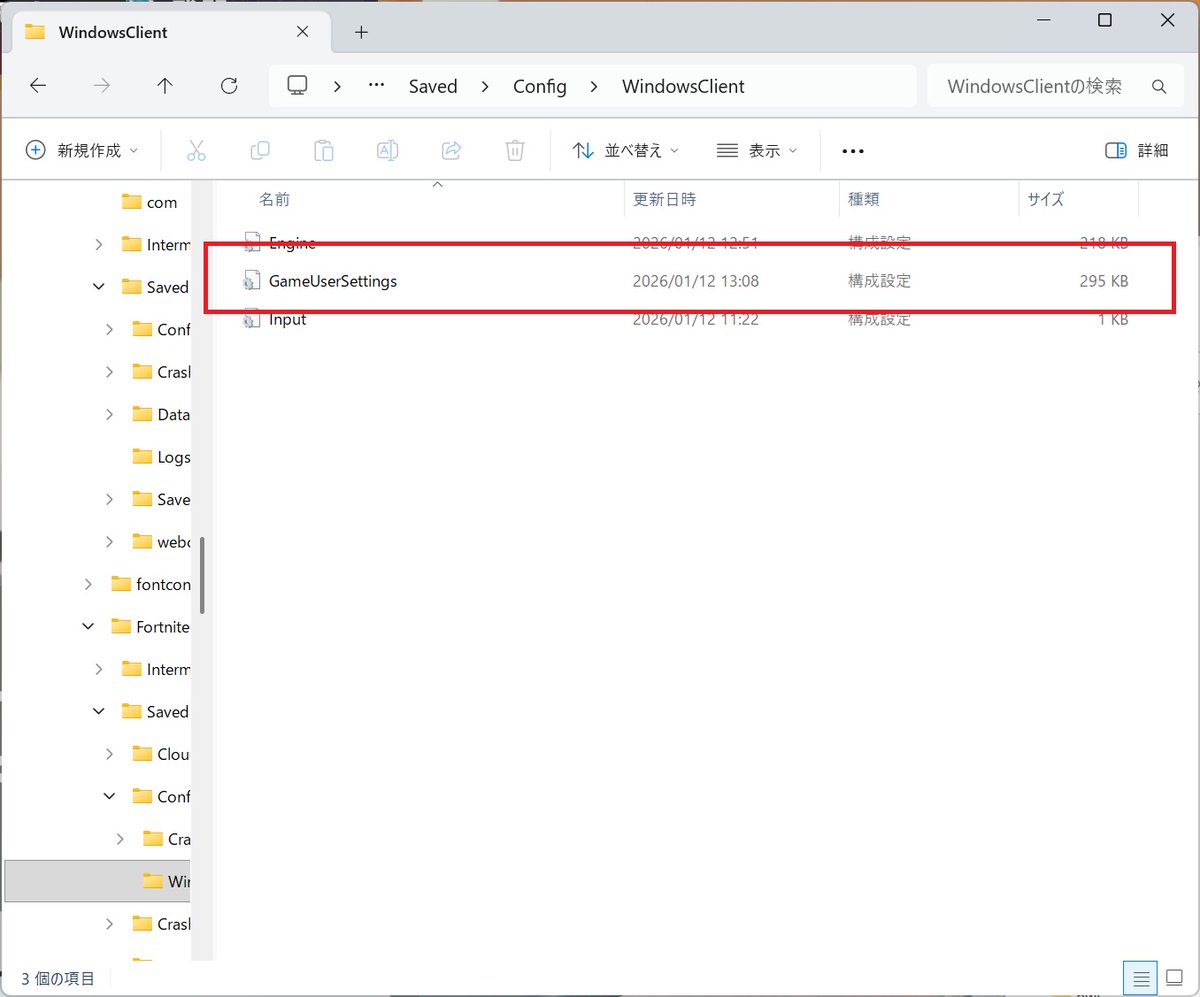
WindowsClient削除
1
2
1,829

_(:3 」∠)_フォトナのクラッシュが深刻化してますねぇ
まずは自分たちで試せることから始めてみましょ
っと言っても下記①ー③は公式ホームページに載っています🥳
①PCのアップデート後のクラッシュを修正
②PCでLauncherのキャッシュを削除
③フォートナイトのゲームファイル確認
①PCのアップデート後に発生するフォートナイトのクラッシュを修正
たまにFPSの固定とかで読み込み専用にしている人がいるかもしれませんが、アップデートごとに必要になるファイル書き換えが出来なくなるため、ファイル読み込みが出来ずクラッシュするパターンの対処方法となりますねー
競技の人とか読み込み専用にしている場合が多いかもしれませんねー🤔
・Windowsキー Rを押して、「ファイル名を指定して実行」ウィンドウを開く
・「%localappdata%」と入力してEnterキーを押すと、エクスプローラーが開く
・「FortniteGame」→「Saved」→「Config」→「WindowsClient」を開く
・GameUserSettings.iniファイルを削除する。
※このファイルはフォトナの設定情報となる為、画面サイズやDX12、影等が初期化されます。
最初に自分の画面設定をスクリーンショットやスマホ等で取っておくとよいですねー🥳
(キー設定の変更はありません)
②PCでLauncherのキャッシュを削除
読み込みデータを少なく(早く)する為、キャッシュファイルとしてデータを格納していますが、そのファイルが壊れている場合の対処方法となります。
・まずはEPIC Gamesを終了させます。
>右下EPIC Gamesのアプリを終了させる。
・Windowsキー Rを押して、「ファイル名を指定して実行」ウィンドウを開く
・「%localappdata%」と入力してEnterキーを押すと、エクスプローラーが開く
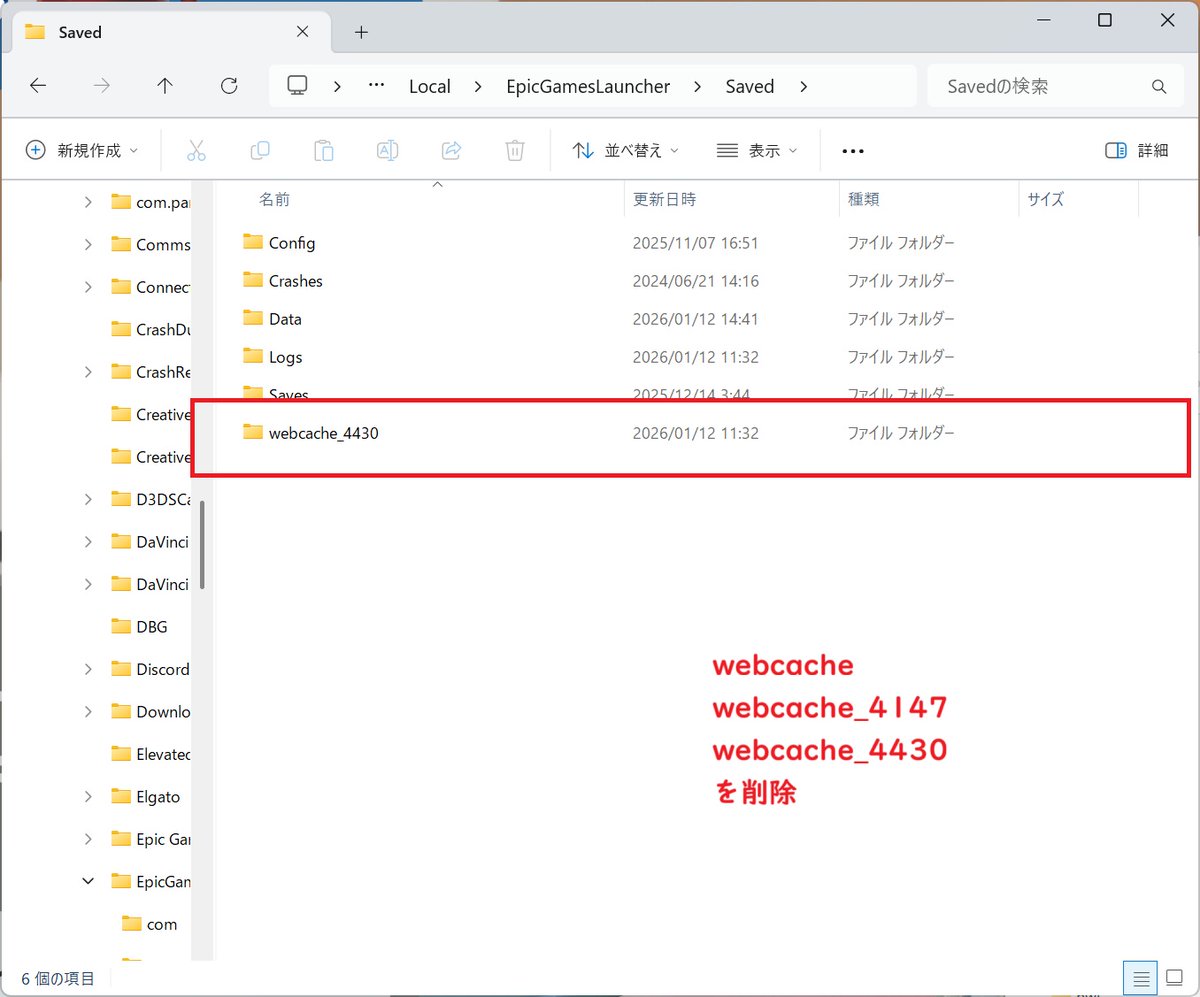
・EpicGamesLauncher→Savedフォルダを開く
・以下に示すフォルダが存在する場合は、削除してください。
webcache
webcache_4147
webcache_4430
③フォートナイトのゲームファイル確認
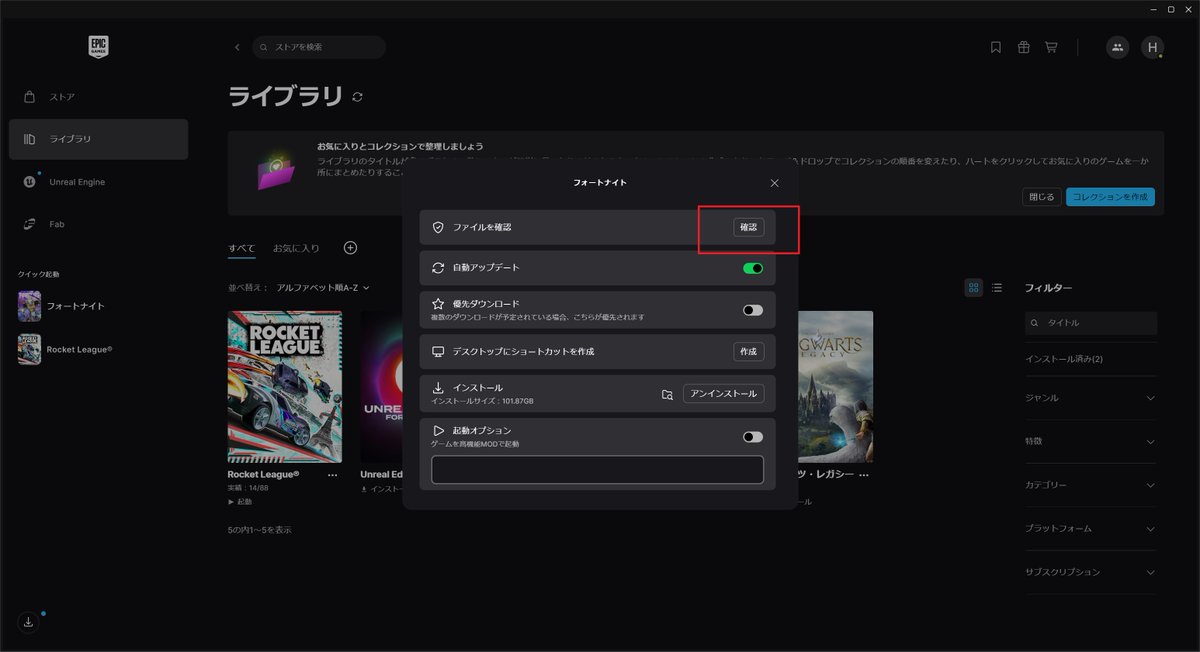
・Epic Games Launcher→ライブラリでゲームの右側「…」を選択→管理
・確認を押す
ゲームが立ち上がらなかったりとかする場合は、大体このファイル確認で直ったりしますねー🥳
上記内容でまだクラッシュが出るようであればフォトナの再インストールが良いかもしれませんねー🤔
実際PC側の設定や、BIOS設定、グラフィックボードのドライバ等、確認するところはまだまだありますが、まずはゲーム自体のファイルが直らない限り、PC側を弄っていても変わりませんからねー(。-`ω-)
④(おまけ)
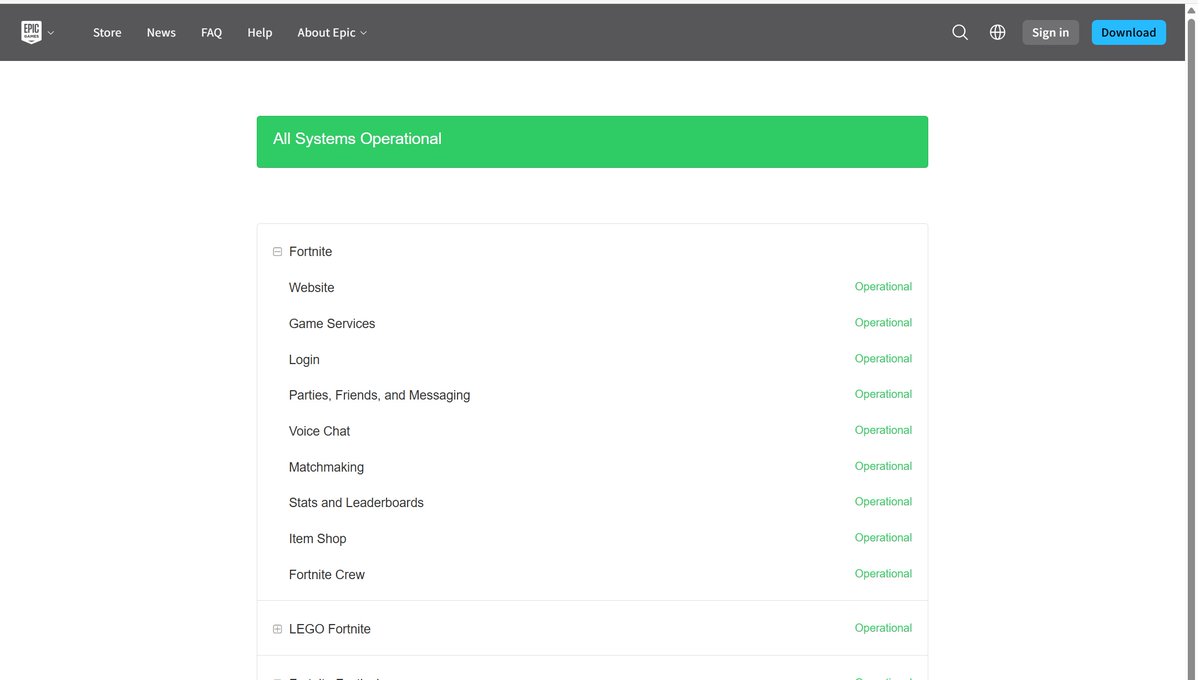
後、ゲームできない!っという場合はEpic側のサーバ状況を見てみると良いですよ🥳
ここでログインサーバやゲームサーバ等の状況が分かりますので、サーバが落ちている場合は30分くらいのんびり違うことをやると良いかもしれませんねー🥳
各参考URL
①
epicgames.com/help/ja/fortni…
②
epicgames.com/help/ja/epic-g…
③
epicgames.com/help/ja/epic-g…
④
status.epicgames.com
1
13
124
11,654


Jan 9
These might be able to be added to the GameUserSettings.ini (At least Grok believes so). Then you can make the settings file Read Only so they don't get reset.
AppData\Local\PioneerGame\Saved\Config\WindowsClient
I'm not interested in using these if someone wants to test.
2
11
8,675

26 Dec 2025
Da scrape ich komplett den Windowsclient mit KI.
Der hat kein ratelimit :)
Damit umgehe ich das API-Endpoint als Brücke .
Coole Idee, oder?
1
3
34

21 Dec 2025
Recien lo solucione, ve a C:\Users\usuario\AppData\Local\FortniteGame\Saved\Config\WindowsClient
Borra el archivo game user settings, luego ve a la carpeta de fornite y busca
C:\Epic Games\Fortnite\FortniteGame\Binaries\Win64\EasyAntiCheat
y dale clic al .exe, reinicia
1
2
851

21 Nov 2025
‼️‼️‼️ FORTNITE CRASH FIX ‼️‼️‼️
If your Fortnite is crashing after the new update, delete your "GameUserSettings.ini" file, then launch your game and it will now be fixed.
File Path: %localappdata%/FortniteGame/Saved/Config/WindowsClient
1
11
1,751

7 Oct 2025
si tienes alguna opciones activadas de OC bajalas,otra cosa que puedes hacer es ir a la carpeta appdata y borrar la carpeta windowsclient que esta en appdata>local>deadbydaylight>saved>config (esas configuraciones pueden quedar aunque desistales)
1
2
33

12 Aug 2025
Hi there! Your post caught our attention and we'd like to help with your engine settings not being saved properly in the WindowsClient. Please send us a DM to maximize character usage and assist you more effectively.
Looking forward to your response. -Rome x.com/messages/compose?recip…
21
