
1,123 Photos and videos



A compilation of educational posts on various @nansen_ai tools:
1️⃣ A workflow of screening low-cap tokens:
x.com/0xjayfi/status/1933817…
2️⃣ How to build your own smart wallet repository:
x.com/0xjayfi/status/1936643…
3️⃣ Three information layers of Nansen AI sytem:
x.com/0xjayfi/status/1938594…
4️⃣ A quick quide to set up AI smart alerts:
x.com/0xjayfi/status/1944018…
5️⃣ Why do we need to track the flows of smart money and how:
x.com/0xjayfi/status/1944380…
6️⃣ Seperate gems from noise - set up token flow alerts:
x.com/0xjayfi/status/1944743…
7️⃣ Build your own smart alert system:
x.com/0xjayfi/status/1945482…
8️⃣ Take full advantage of Nansen AI agent by using API with Claude:
x.com/0xjayfi/status/1948729…
9️⃣ How does the AI facilitate the creation of smart alert:
x.com/0xjayfi/status/1952277…
... and much more to share in the near future.
Most importantly, AI trading is coming very soon. All tools can be used unlimitedly via the subscription of the Pro Plan (link below).

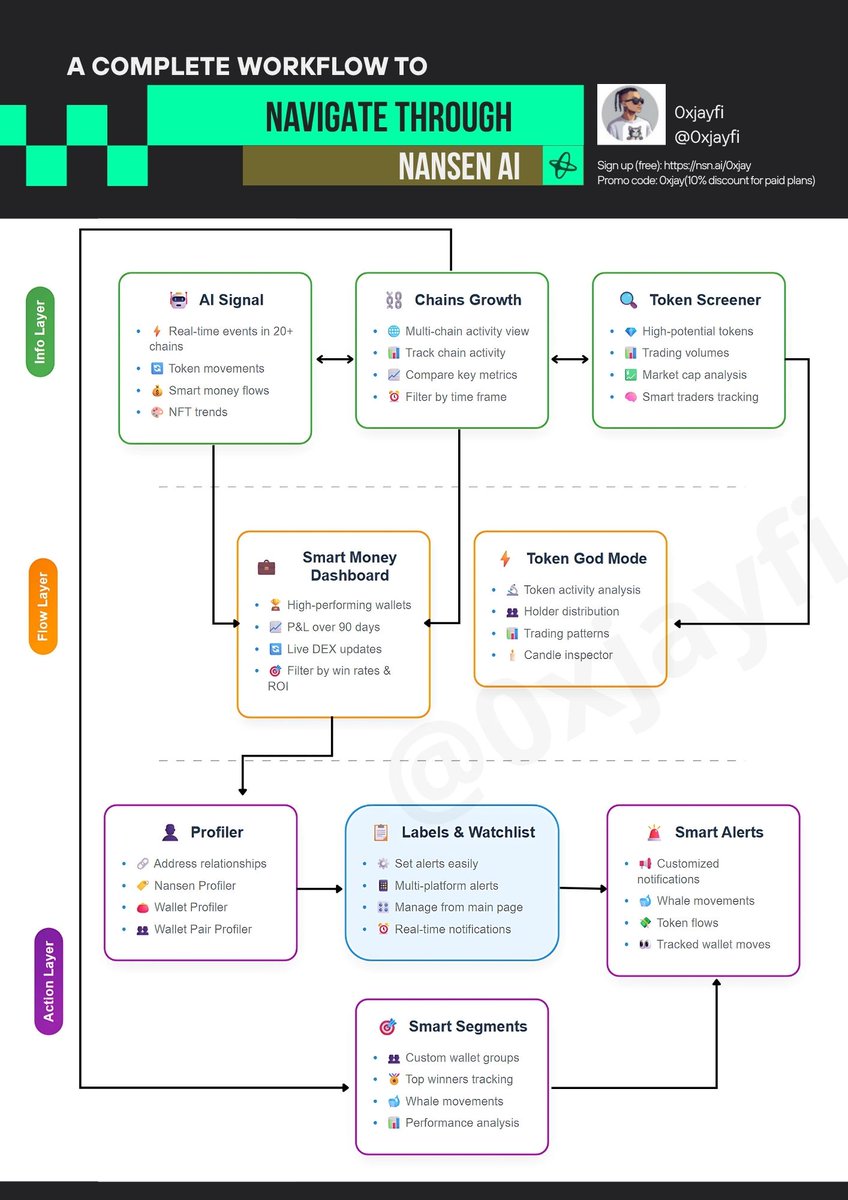
The most complete guide about Nansen AI with one infographic
👴The one who masters it, imho, is the one outperforming 95% of traders in the market, no matter if it's a bullish or bearish one.
This is a long post. In case it may disappear on your timeline, kindly 🔖 bookmark it. Your likes ❤️ and ✍️ comments are highly appreciated.
Let's dive into it!
1️⃣ @nansen_ai is an on-chain analytic platform that provides insights into token movement and market momentums, helping investors and researchers navigate through the complex crypto market.
2️⃣ The platform contains an ocean of on-chain data, and for beginners, this could be overwhelming.
I present to you the most powerful and useful tools for everyday research and will potentially position you with an aping chance before everyone else.
My view is that Nansen provides users with three layers of information from knowledge bases to actions: Info Layer, Flow Layer, and Action Layer.
─────────────
📖Module 1
─────────────
🌎 Info Layer
The layer serves as an overview of what happens in the last 24 hours (or 7 days or 30 days). Within 5-10 minutes, you will have confidence about the current market sentiments, buyers interests, etc.
Modules to be focused on
🤖 [AI Signal]
⏲️ Estimated time to explore: 2-5 minutes.
In real-time threads, it pushes the most significant events happening in 20 chains. Just a little scrolling down, and you will get an idea of what to look at next.
■ Token movement: inflow into a new token launched recently, outflow from a token with 30 days of age, etc.
■ Smart wallet flows: a collective buying trades of a token among smart traders, etc.
⛓️ [Chain Growth]
⏲️ Estimated time to explore: 2-5 minutes.
A comprehensive view of on-chain activities across 20 chains. The more hyped chain means more opportunities to spot a moon token.
■ Comparison of key metrics: you may want to sort chains by different metrics, such as the number of active addresses, total fees generated, etc.
🔍 [Token Screener]
⏲️ Estimated time to explore: 5-10 minutes.
Your AI signals and Chain growth have informed you of where the hype is. Screener can pinpoint what hot tokens people are actually trading right now in real-time. This is by far one of my most favorite tools: I already made good gains by spotting early trends in tokens such as $MIXIE, $CLANKER, $DIZZY. What does it bring on?
■ Identify tokens with huge momentum potentials by the following metrics: trading volumes, Mcap (market cap), the number of smart traders, and net inflow by smart traders. Among these various metrics, I mainly focus on net inflow and the number of smart traders, which can point to a possible short-term profit opportunity.
📓 Note: if you have limited time, I suggest you to just focus on this tool.
─────────────
📖Module 2
─────────────
🌊 Flow Layer
This is where Nansen turns insights into actionable bases for you. You will get to know the best smart wallets on the chain you choose (possibly inferred from Chain Growth). You will also be able to evaluate a token of interest, possibly determined by Token Screener, holistically.
Your mindset is naturally flowing (transitioning) from the more general noisy information to the more specific one without all the disruptions.
Modules to be focused on
🧠 [Smart Money Dashboard]
⏲️ Estimated time to explore: 5-10 minutes.
Here you can explore very high-performance wallets on one of the 20 chains. If you don't know what to buy or watch, this is your go-to place. Learning by following the best-of-the-best traders in the market (top 0.1% out of 3 million wallets Nansen curates).
■ Sort wallets by PnL (profit and loss) over the last 7, 30, or 90 days or win rates.
■ Filter wallets by PnL, win rate, number of traded tokens, and/or number of trades.
🦅 [Token God Mode]
⏲️ Estimated time to explore: 15-20 minutes.
It provides all the information about a token, on top of all the stuff you can find at any trading platform. You can enter a position with an edge via couples of killer features of Nansen.
■ Token distributions and historical movements among important stakers, including smart wallets, public figures, top 100 holders, exchanges, and whales.
■ ✨ Use the Candle Inspector™️ to know exactly which smart wallets are buying before a local pumping or selling before a dumping.
📓 Note: on this layer, you may tend to explore too much. My suggestion is to time your exploration, as we need to turn insights and intelligence into actions.
─────────────
📖Module 3
─────────────
🏃Action Layer
This is when you start trading based on the info gathered or build up your customized labeling system (ref: 1).
Modules to be focused on
🎭 [Profiler]
So you decide to dig more into a smart address. Here is the go-to place for you.
■ Nansen Profiler: Bring up token god mode for any token of interest.
■ Wallet Profiler for Token: Understand when and how a wallet buys, sells, or holds a token.
■ Wallet Pair Profiler: Understand the relationships between two wallets. Ask the following questions, for example. Are the two wallets under the control of a smart trader? What are the token movements of these two wallets?
🏷️ <Labels and watchlists>
Nansen's powerful label system can be used to create identifiable names that are meaningful specifically for you. For example, if a wallet is really good at spotting early opportunities, some sort of "early sniper" label can be created for it. Then the wallets can be added to your personal watchlists by label types and/or other criteria you set.
■ This is the step preparing you to set up personalized alerts that can be triggered in real time.
🚨[Smart Alerts]
For any wallets or tokens, you can set up various real-time notifications for them. The alerts will be delivered to your Discord, Telegram, or Slack in a timely manner. As per @ASvanevik (Nansen CEO), recent development has greatly reduced the latency of notifications and informs your trading decisions more swiftly.
What typically can alerts watch?
■ Whales moving large sums of a token or funds
■ A sudden flow of a token
■ A tracked group of smart wallets of a particular label making a move
🌩️[Smart Segments]
Too lazy to set up personalized alerts? No worries. Smart segments get you. They are essentially smart alerts curated by Nansen. This is one of my favorate features as well. Some of the use cases:
■ Get alerted when top traders in the last 7 days make moves. Again, Nansen already identifies the traders for me, according to their labeling algorithms.
■ Get alerted when a group of whales makes moves.
─────────────
📖Wrapper
─────────────
🔌Connections among Layers
The moves transition from Info, Flow, and Action Layers smoothly. However, by no means should you explore Nansen linearly as shown. As shown by the infographic, you can directly jump from AI signal to creation of a smart segment or from Token Screener to Profiler. Or you can start your day by directly going to check out Smart Money Dashboard.
The procedures do not matter; what matters are the moves that match your goals and trading styles.
◆◇◆◇◆
📔 I personally hope I could've learned Nansen years back before BTC pumping. But it is what it is. Focus on the ongoing deals.
By the way, different features come with different plans. The pioneer tier basically gives access to all the tools listed above with a $99/month subscription ($89 with a ref code or link). Seemingly pricey, but it will definitely be worth it if the tools are utilized properly.
Anyway, you can always start with a free version by signing up via nsn.ai/0xjay .
If you want to upgrade to Pioneer later, here is my code for a 10% discount: 0xjay
❤️Thanks for reading if you have reached this far. Please let me know if you have any questions or thoughts about Nansen.
◆◇◆◇◆
Reference 1
x.com/0xjayfi/status/1936643…
58
2
171
40,677
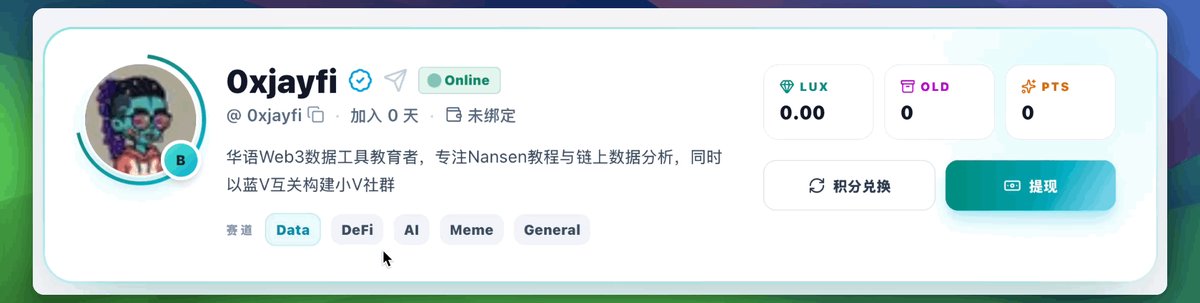
正式加入伟大的组织 -> 灯塔 @Lighthouse_2026
哈哈,别说咱AI助理给我生出的标签我还挺喜欢
以后我就是币圈自封的小V社群群主了
可以去抢各位老板的单子了~
8
7
187
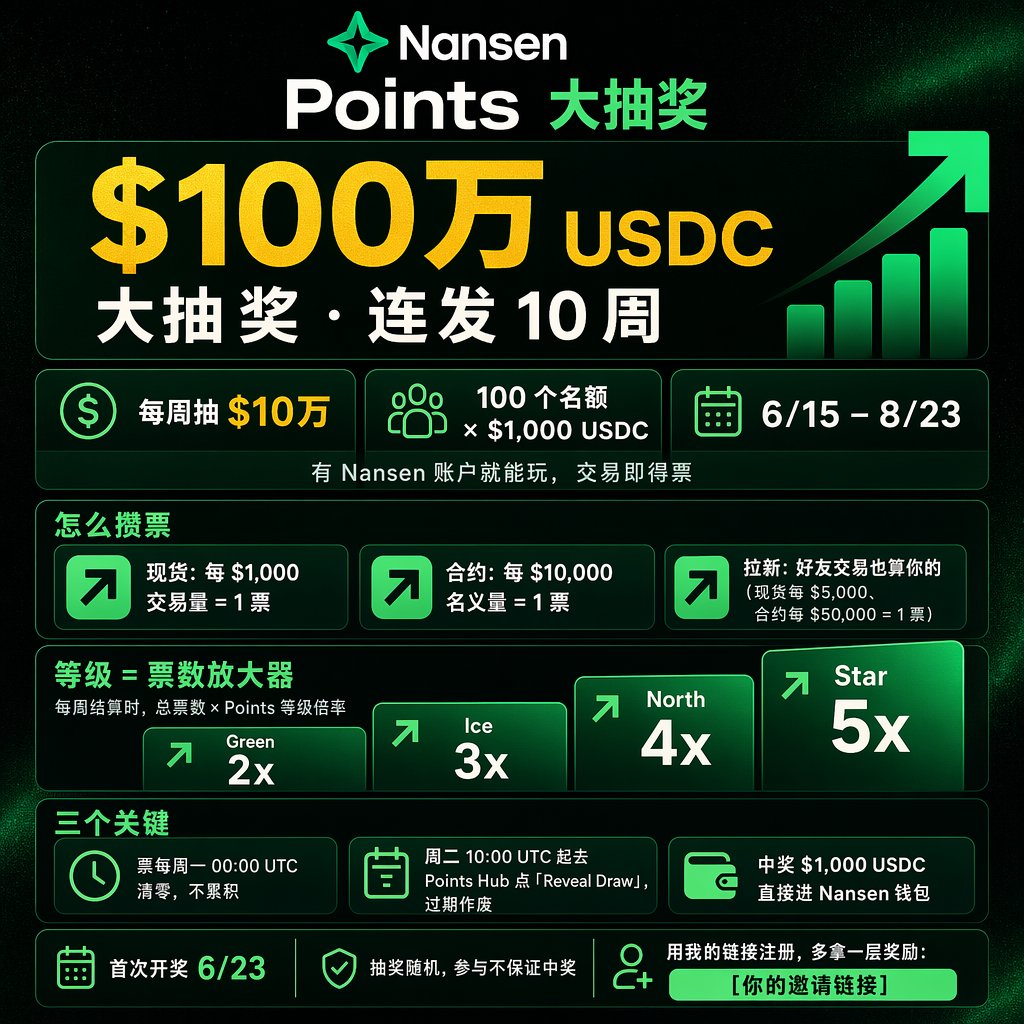
Nansen 拿出 $100 万搞抽奖,连发 10 周
6/15–8/23,每周抽 $10 万
100 个名额 × $1,000 USDC
有 Nansen 账户就能玩,交易即得票
第一周参加的人不多,机会还是蛮大的
🎫 怎么攒票
现货:每 $1,000 交易量 = 1 票
合约:每 $10,000 名义量 = 1 票
拉新:好友交易也算你的(现货每 $5,000、合约每 $50,000 = 1 票)
等级 = 票数放大器
每周结算时,总票数 × Points 等级倍率:
-> Green 2x/Ice 3x/North 4x/Star 5x
三个关键点
票每周一 00:00 UTC 清零,不累积
周二 10:00 UTC 起去 Points Hub 点「Reveal Draw」,过期作废
中奖 $1,000 USDC 直接进 Nansen 钱包
🔗 用我的链接注册,多拿一层奖励:nsn.ai/0xjay
PS: 抽奖随机,参与不保证中奖,首次开奖 6/23
21h

$1,000,000. 10 weeks. Raffle starts today 💎
Trade perps via Hyperliquid.
Trade spot via Solana and Base.
Stack referrals.
Here's how to earn your raffle tickets 👇
14
2
22
1,308
0xjayfi retweeted

Jun 14
Open-weights models are going to become a bigger problem for Anthropic and OpenAI going forward.
1/ Not every task requires 150 IQ
2/ 90% cheaper models at 115 IQ are often good enough
The pushback to this has always been: well, margins will come from the best frontier models.
But what happens to revenue prospects when government blocks your frontier models??
14
6
89
12,374
? Compromised?
Jun 13

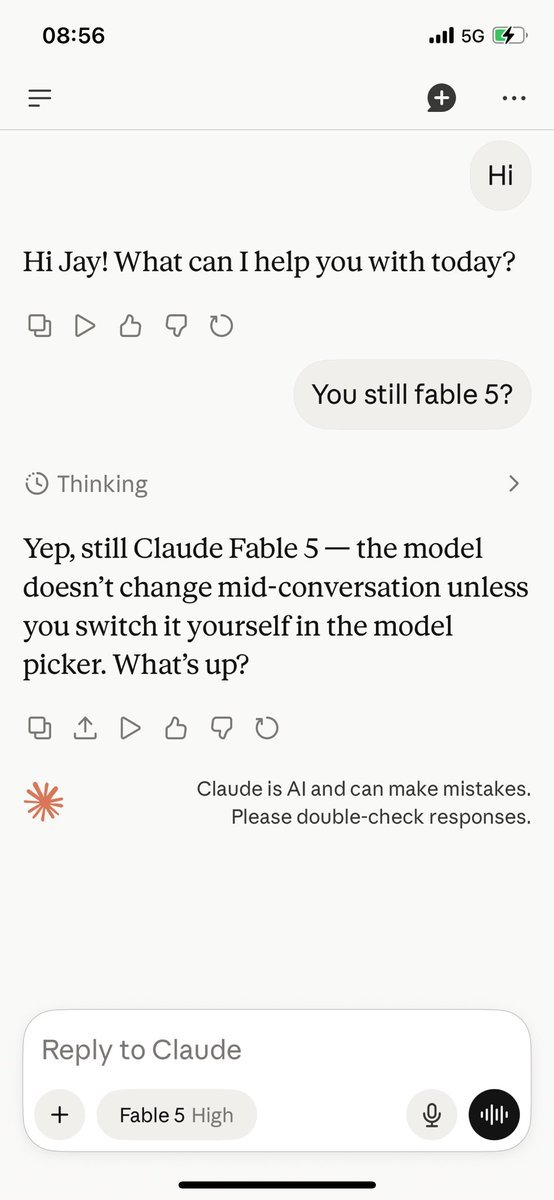
As a result of a US government directive, we are suspending access to Claude Fable 5 for all users. You can continue to use all other Claude models.
Here’s what this means for you:
Across Claude products, new sessions will run on your selected default model or Opus 4.8, and existing Fable 5 sessions will end with an error.
On the Claude Platform, requests to Fable 5 will also return an error. Please update your integrations to other Claude models.
We know this is a disruption to your workflows; we appreciate your patience and support.
14
20
1,053
0xjayfi retweeted

Jun 12
$1M in rewards, $100K every week.
Trade and refer to earn raffle tickets.
Everything starts next Monday, Jun 15 💎
134
19
125
59,656
今天上午专门精读了官方针对Claude Fable 5的提示词工程指南。
最大的感受是,它不需要你写更多提示词,而是需要你写更精准的提示词。
核心思想:Fable 5 时代,提示词的“体积”在缩小,“精度”在提升。 旧模型的冗长提示词反而会拖累输出质量,是时候重构你的 prompt 库了。
以下是我认为最关键的几条技巧:
1️⃣ Effort 是首要调节旋钮
默认 high,关键任务上 xhigh。但高 effort 时记得加一句“做最简单可行的方案”,否则它会自作主张重构代码等。
2️⃣ 简短指令 > 规则清单
指令遵循能力很强,不用列举每个行为。一句“只在破坏性操作、范围变更时暂停”就够了,别写一页 checklist。
3️⃣ 给原因,不只给请求
“我在为 XX 做 XX,他们需要 XX。基于此:[请求]”。知道意图后模型表现明显更好。
4️⃣ 善用并行子代理
一句话搞定:“独立子任务交给子代理,它们运行时你继续干活,跑偏了就介入。” 异步编排让总耗时 ≈ 最慢的单个子任务,而不是所有任务之和。
5️⃣ 文件式记忆系统
一个经验教训一个文件,顶部一行摘要,更新已有记忆系统而非重复。
11
12
798
0xjayfi retweeted
Jun 11
Nansen Trading is out of beta and 130,000 trades were placed while we built it with you.
As a thank you to everyone who traded early - we've dropped 1,000 NXP into your account - an Early Trader Bonus.
For many of you, that's enough to hit Green tier, unlocking lower trading fees, Nansen Rewards, and more.
Jun 9
Hyperliquid Perps is Now Live on Nansen 🚀
You already track Smart Money, Whales, and Public Figures here.
Now you can trade here too.
Available for all users, on web and mobile.
27
11
93
17,942
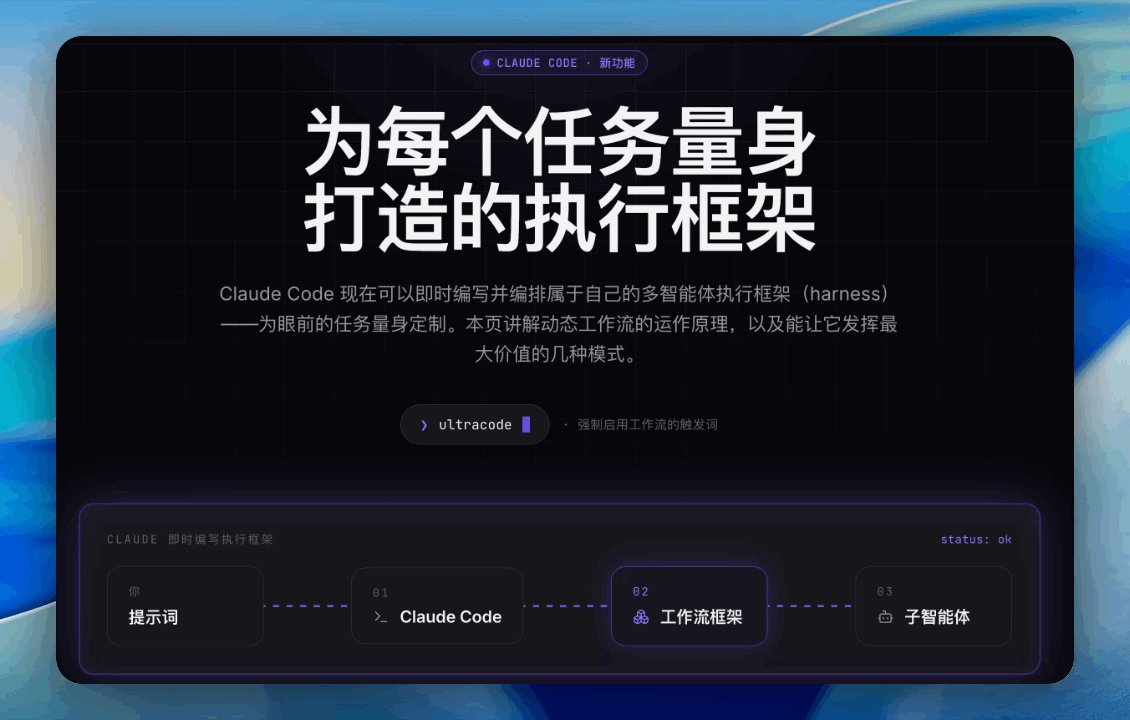
This is the English version of the website:
- illustrates what is dynamic workflow in Claude Code and how to use
- implemented a workflow with a verified literature review task
- dispatched 300 plus subagents and reviewed 28 academic papers.
dynamic-workflow-cc.vercel.a…
我做了一个交互网页,把Claude Code动态工作流一次讲透:
✦ 6 种核心模式,动画流程图逐步演示
✦ 8 条可直接抄走的提示词
✦ 完整实战:28 篇论文 → 每条论断都经对抗验证的文献综述
一个触发词:ultracode
👇
dynamic-workflow-cc-chinese.…
12
1
16
1,160
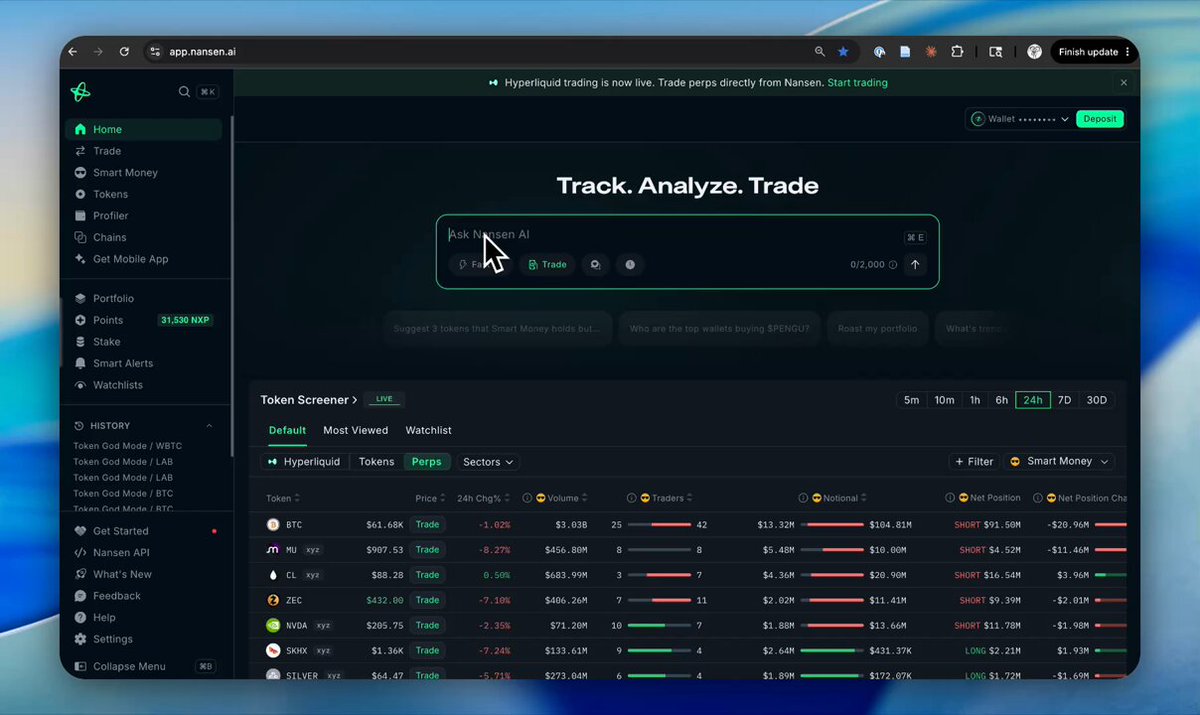
我只输入了一句话,AI Agent 就帮我找到了 Hyperliquid 上最赚钱的聪明钱,还把我直接带到了下单页面。
在 @nansen_ai 首页对 Agent 说:
「调查顶级聪明钱永续交易员在做什么,并带我去他们正在交易的代币交易页面」
几秒钟后:
1. 近 7 天 Top 5 聪明钱永续交易员全部列出,榜一 PnL $26.8M,每个地址都能一键跳转 Profiler 深挖
2. 他们集中交易的标的:$BTC $ETH $HYPE $SOL 永续
3. 最关键的一步:Agent 直接给出交易页面链接,看完分析马上能开仓
因为 Hyperliquid 永续合约交易已正式上线 Nansen
从洞察到执行,中间不再需要切换任何平台。
这才是 Track. Analyze. Trade. 的完整形态(NFA)。
Jun 10

Trade perps on Nansen.
Agentic or terminal.
Crypto or stocks.
Mobile or web.
Just trade.
🧭
24
5
27
8,745
我做了一个交互网页,把Claude Code动态工作流一次讲透:
✦ 6 种核心模式,动画流程图逐步演示
✦ 8 条可直接抄走的提示词
✦ 完整实战:28 篇论文 → 每条论断都经对抗验证的文献综述
一个触发词:ultracode
👇
dynamic-workflow-cc-chinese.…
13
3
22
2,093
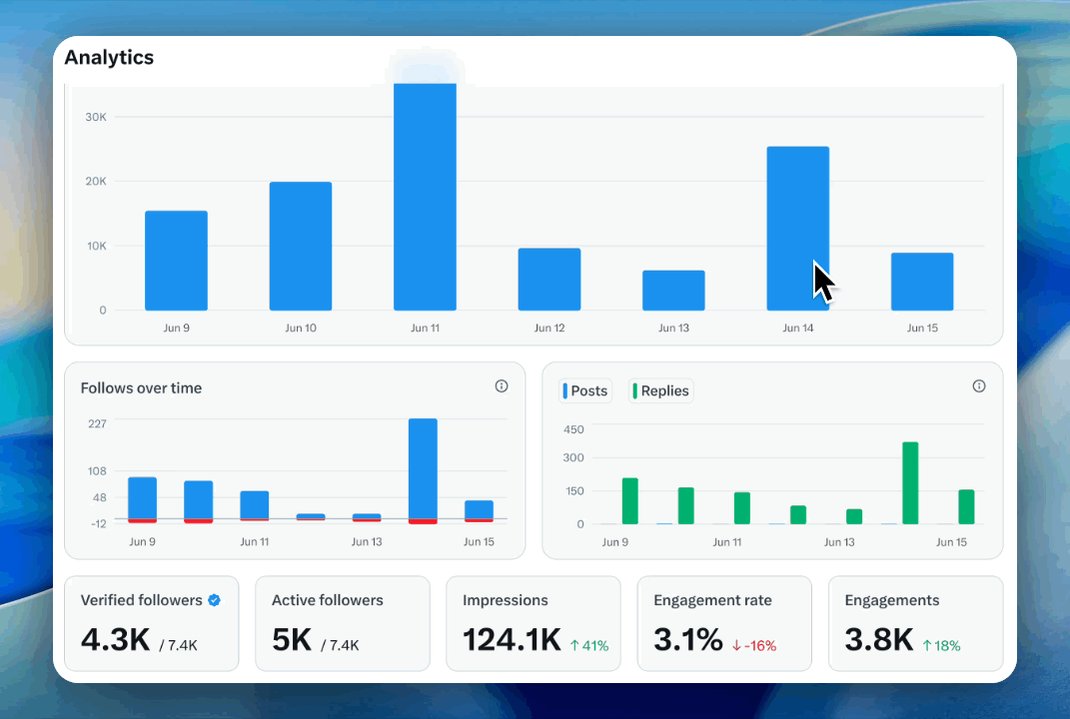
呼救,我也需要紧急蓝V互关一下,
Jay终于要7,000粉丝了,名额限量,快速来!
但是求求了,H推不要关注我了,现在昵称都整的越来越高级了

73
41
9,506