
717 Photos and videos















⚽ Predict the World Cup winner and win a prize 🏆
The 2026 World Cup is underway. Who will lift the trophy in July? Drop your prediction in the comments — and your pick just might be the right one.
🥇 The first 3 correct guesses win a 4-year AdGuard super bundle: Ad Blocker VPN DNS Mail subscriptions (that'll last you until the next World Cup!)
🎲 5 more correct guessers, chosen at random, win a 1-year bundle of the same products
Rules:
→ One comment per account
→ Predictions accepted through July 18
On July 21 we'll tally up the results and reach out to the winners.
Your prediction? (The future winner is…) 👇
11
1
9
950
Custom profiles in AdGuard VPN Browser Extension v2.10
Morning — public Wi-Fi, where security comes first.
Afternoon — work: you need a specific VPN location and exclusions.
Evening — streaming your favorite show: a different server.
You used to change settings every single time. Not anymore.
In AdGuard VPN Browser Extension v2.10, we’ve added custom profiles. Create up to 10 of them — each with its own location, DNS settings, and exclusion list. And switch between them in one click ✨
Learn more 👇
adguard-vpn.com/en/blog/adgu…
1
11
1,041
💚 17 years, 17 killer AdGuard features: Part three
Big milestones aren't just about the flashy, headline-grabbing features. They're also a great time to appreciate the unsung heroes — the tools that have been quietly doing the heavy lifting in the background all this time. Data privacy, encryption, and silent security mechanisms: today’s lineup is all about what’s happening under the hood.
🥷TrustTunnel
Let’s start with a tool our CTO runs every single day. TrustTunnel is our open-source client for custom connections. When a standard VPN just won't cut it, when you don't want to just pick a server from a dropdown, but want to map out your entire routing path yourself — TrustTunnel gives you total autonomy
"I find myself using it almost more than a regular VPN," our CTO notes.
That’s no exaggeration, for anyone who deeply values online independence, this tool quickly becomes an essential part of their stack.
🥷 Connection Journal in TrustTunnel
With ultimate freedom comes the need for total clarity: where is your traffic actually going? That's where the Connection Journal comes in. Our Mobile Dev Team Lead explains: "This option is incredibly helpful for analyzing traffic destinations so you can quickly add specific IPs to your exclusions." Essentially, it gives you an instant X-ray view of your connection
📬 AdGuard Mail & Temp Mail integration
While your traffic is being smartly routed below the surface, up on the web your personal email is likely a magnet for spam. Every one-off account registration or sketchy online checkout form feels like an open invitation for junk mail. To solve this, we created AdGuard Mail with Temp Mail integration.
Our CTO shares his go-to scenario: "I love setting up email relays that point directly to my disposable temporary inbox." By routing the clutter through a temporary address, the junk never touches your primary mailbox, keeping your real inbox squeaky clean
💚 Tracking protection in AdGuard Ad Blocker
An absolute favorite among privacy advocates. This feature doesn’t just block annoying ads; it strips tracking parameters (like UTM tags) from URLs, masks your search queries, hides your IP address, and stops data brokers and websites from piecing together your digital profile
💚 Browsing security in AdGuard Ad Blocker
Finally, the ultimate safety net for those unexpected moments. You click an innocent-looking link, and in a fraction of a second, AdGuard checks the destination against our database. If the site is a malicious clone spoofing a bank or an online shop to steal your credentials, you’ll instantly get a warning screen. Browsing security is the kind of feature you never think about — until it saves you from a scam
Which of these background heroes is already watching your back, and which one are you excited to try out? Let us know in the comments!
2
2
32
1,718
17 years. 17 000 000 downloads on the Chrome Web Store
Data nerds might call that a perfect coincidence. We just call it a massive thank you. 17 million users on just one browser is a wild number of people who are officially done with invasive banners, creepy trackers, and endless digital surveillance.
A milestone this clean is the ultimate excuse to celebrate with some huge anniversary deals:
💚 All AdGuard Ad Blocker licenses 45% off: agrd.io/bday_promo_ag?utm_so…
☁️ Personal AdGuard DNS subscription 60% off: agrd.io/bday_promo_dns?utm_s…
🥷 AdGuard VPN two-year subscription 83% off: agrd.io/bday_promo_vpn?utm_s…
The offer is valid through June 7
2
3
41
1,927
💚 17 years, 17 killer AdGuard features: Part two
We’re keeping our birthday countdown going! While the first four features were all about managing traffic, today’s lineup is all about bringing flawless order right to your screen.
💚 The allowlist in AdGuard Ad Blocker
Kicking off today’s list is a feature our Extension Team Lead calls simple yet incredibly impactful. The Allowlist solves a dilemma we’ve all faced: you love a specific website, you want to support the creators by letting their ads run, but turning off your protection entirely feels like walking into a rainstorm without an umbrella. With the Allowlist, you just add that specific site to your exceptions. One click, and filtering is paused for them while the rest of the web stays completely protected
💚 Custom filtering rules
For those who want to build their own bespoke defense system, our second feature is a game-changer. Our CTO describes it philosophically: "Writing custom rules is complex, but it gives you ultimate flexibility." Essentially, you take complete control of your content. You write the rules that dictate exactly which elements are allowed to load and which ones get intercepted before they even hit your screen. This is the ultimate tool for power users who want to fine-tune their web experience down to the millimeter
💚 The element blocker
If writing hardcore scripts isn't your vibe, but you still want to vaporize that annoying pop-up or clunky sidebar widget, enter our third hero. The Element Blocker is an absolute fan-favorite across tech forums. You just click "Block element," select the eyesore on your screen, and boom — it's gone. Design minimalists call this their absolute favorite tool, and we get it: it makes webpages look as clean as a premium magazine cover, all without writing a single line of code.
💚 Userscripts
For the true geeks out there who feel like out-of-the-box browser capabilities are never quite enough, our fourth feature is for you. AdGuard on Android, iOS, and desktop doubles as a fully-fledged userscript manager. This means you can use your ad blocker to inject custom functionality into websites, add new buttons, overhaul clumsy user interfaces, and feel like a bit of a web wizard. This topic regularly blows up in Reddit threads, and for good reason
Take control of the web on your own terms while our birthday deals are still live!
2
1
21
1,473
📬 AdGuard Mail v1.5: Fresh looks, zero friction
We don’t usually shout from the rooftops about point releases, but v1.5 is packed with too many quality-of-life tweaks to stay quiet. From updated visuals to simpler interactions and smarter updates, this release is focused on making the app look and feel better in everyday use.
Here is what you’ll notice right after you update:
📬 A cleaner, accident-proof UI
We’ve refreshed the color palette and completely overhauled the navigation. Say goodbye to swipe gestures that made you accidentally trash emails — everything is now mapped to clear, visible action buttons
📬 Temp mail takes center stage
We’re gradually shifting more focus toward temporary email addresses, and the app’s main screen now reflects that. Don't worry, your trusty email aliases didn't go anywhere — they just took a backseat
📬 Seamless in-app updates
No more jumping through hoops to stay current. The second a new build drops, AdGuard Mail will ping you. One tap, and you’re running the latest version
We want to hear from you! We’re actively gathering feedback to keep making the app better. Update today, test-drive the new layout, and let us know your thoughts through our feedback form — and yes, we really do read every single message: surveys.adguard.com/en/adgua…
full article: adguard.com/en/blog/adguard-…
22
1,459
💚 17 years, 17 killer AdGuard features: Part one
To celebrate our 17th birthday, we’ve put together an honest, definitive list of our absolute best tools. These are the features our developers love the most, and the ones that get the biggest shoutouts from our community on socials and forums.
Today, we’re kicking things off with the first four. They all have one thing in common: smart routing for your traffic.
🥷 Exclusions in AdGuard VPN
When we polled our team about their favorite feature, several people — from our CTO to our dev leads — instantly pointed to this one. Exclusions let you easily decide which apps and websites should connect directly to the internet and which ones should route through the VPN. Your traffic splits itself automatically in the background, no micromanagement required
🥷 Exclusions in the AdGuard VPN Browser extension
On a desktop, you don’t always need a system-wide VPN. The AdGuard VPN extension lets you set up exclusions for specific websites in just a couple of clicks. Choose a few sites that require a secure or alternative connection, and the protection kicks in only for them, leaving the rest of your browsing completely untouched
🥷 Saved locations in AdGuard VPN
Our Head of Product admits that at first, Saved Locations felt like a minor "nice-to-have" feature. Back then, we didn’t have that many servers, and who switches countries every single day anyway? But over time, the real-world use cases piled up: streaming a local sports game or managing international subscriptions
"At some point, I realized I was constantly connecting to the exact same locations," he says. "Now, I just open the tray menu, and everything I need is a single click away."
It’s a small quality-of-life feature that saves serious time.
💚 Inverted Whitelist in the AdGuard Ad blocker
This one was born directly from user feedback (and we absolutely consider our community a core part of our team). The Inverted Whitelist is a mode where AdGuard takes a backseat and stays inactive across the entire web — except for the specific sites you add to the list.
Let's say you frequently visit a couple of otherwise great sites that are unfortunately buried in spammy ads; add them to the list, and AdGuard will surgically clean them up without touching the rest of your web experience. It’s a lifesaver for anyone who doesn't want total ad-blocking across the board but is tired of screaming banners on a few specific platforms.
Which of these features is already a must-have in your daily routine?
1
4
33
1,397
⚠️ Tech giants HATE him!!! Click here to see how one local guy deletes all online ads using this one weird trick…
Okay, we admit it — that masterpiece of cringey, late-2000s clickbait wasn’t our finest work. So instead of trying to be marketing gurus, we’ll just give it to you straight: It’s our birthday, and the discounts are real 👇
3
23
1,549
☁️ Personal AdGuard DNS subscription 60% off
The offer is valid through June 7
agrd.io/bday_promo_dns?utm_s…
1
1
8
760
🥷 AdGuard VPN two-year subscription 83% off
The offer is valid through June 7
agrd.io/bday_promo_vpn?utm_s…
3
441
“How long have you been seventeen?”
“A while.”
No, we haven’t lost our minds, and we didn’t just randomly decide to binge-watch Twilight right as summer is kicking off.
It’s much simpler than that — today, AdGuard is celebrating another milestone.
And yes, you guessed it, we’re turning 17.
We still remember when the internet shrieked through dial-up modems and lived inside the tiny screens of chunky CRT monitors. We’ve watched the birth of the very first social networks and seen websites evolve from clunky, DIY garage projects into massive, intricate digital machines. Through all these years, we’ve been quietly and fiercely doing our thing: protecting you from ad clutter, invasive trackers, and the rest of the online noise.
To celebrate, we’re hosting a week of pure, wholesome nostalgia. Get ready for fond memories, fun surprises, interactive activities, and, of course, some massive birthday discounts.
25
993
🍏 Big news, Mac users: AdGuard VPN is coming to the mac App Store (and we need your help!)
For years, getting AdGuard VPN on your Mac meant visiting our website, downloading the standalone .dmg installer, and setting it up manually. It works great, it’s highly flexible, and many of you love it.
But we know that for a lot of Mac lovers, nothing beats the convenience of the official Apple ecosystem. You want apps that are native and ready to install in just two clicks directly from the Mac App Store.
We’ve been listening. AdGuard VPN is officially landing on the Mac App Store very soon! 🎉
But before we open the floodgates to the public, we want to make sure the experience is absolutely flawless. That’s where our amazing community comes in.
🛠️ Join the AdGuard VPN Mac App Store Beta
We are looking for external beta testers to help us put this brand-new distribution format through its paces. Because of Apple’s unique environment and sandboxing rules, this isn't just the same app in a different store — it's a fresh setup, and we need real-world feedback to ensure it meets the AdGuard standard.
What we need you to test:
🥷 Core VPN performance, stability, and connection speeds
🥷 Any unexpected UI quirks or bugs
Ready to jump in and get early access? Here is how you can participate:
🥷 Get the Beta Build: agrd.io/adguard_vpn_for_mac_…
🥷 Use AdGuard VPN as you normally would on your Mac
🥷 Found a bug? Have thoughts on the performance? Submit your feedback directly
Thank you for always helping us make AdGuard better!
1
3
40
5,588
The screech, the static, and then finally that classic sequence of beeps and chimes. Sound familiar? Welcome to the dial-up era.
Back then, loading a single webpage took a solid minute. Images rendered line by line, like a Polaroid slowly coming into focus. A photo hosted on a server halfway across the world would gradually bleed color right onto your bulky monitor. In those few seconds, you had enough time to grab a cup of coffee or look out the window — and nobody got frustrated. That’s just how things were.
The internet back then felt like a massive passion project built by hobbyists. And the ads..? They just sat quietly in the margins. They were goofy, flashing banners promising easy millions, yet they were completely harmless provided you didn't click on them. Those early ads knew nothing about you — and frankly, they didn’t care. They didn’t track whether your eyes lingered or if you just scrolled past.
Since then, connection speeds have skyrocketed. But along the way, the very fabric of the web quietly shifted.
Today, the internet has become a massive, data-crunching machine — fast and powerful, but entirely soulless. Yes, it’s lightning-fast, but at what cost? Nearly half of a modern webpage's total weight consists of clunky ad scripts and invisible trackers. While you’re simply trying to read the news, dozens of background algorithms are meticulously piecing together your digital profile.
But here’s the good news: you can bring back that original lightness and privacy without sacrificing speed. We’ll show you exactly how very soon.
1
23
1,807
☁️ DNS v2.22: Making your DNS way harder to fool!
Imagine: someone sends you a link to a website you use every single day — say, google.com or amazon.com. But instead of a standard English letter, the URL secretly swaps in a lookalike character from a completely foreign alphabet (like using a Greek or Cyrillic character that looks exactly like an English one). To the naked eye, there is absolutely no difference on your screen, but that link will hijack your connection and take you straight to a malicious phishing website.
This is known as a homoglyph attack, and even the most tech-savvy users can easily fall for it.
Standard blocklists often struggle to keep up with these lookalike domains, and built-in browser protections only cover a fraction of your network traffic. That’s why in our latest AdGuard DNS v2.22 release, we’ve trained our system to intercept this exact threat at the earliest possible stage — right at the network level.
⚠️ Quick heads-up: This feature is turned off by default. To activate it, simply head over to your settings and toggle it on under Security → IDN homograph attacks protection.
And that’s just a glimpse of what’s packed into this update. Want to see what else rolled out in this version? Check out our latest blog post for the full breakdown: adguard-dns.io/en/blog/adgua…
1
1
21
1,384
Everywhere you look online today, there’s a new AI chatbot, a "summary" box, or a flashy helper button. While some find them useful, many users simply want a clean, distraction-free browsing experience without the AI bloat.
This is exactly where the power of the open-source community shines.
We want to give a massive shoutout to community member Stevoisiak for creating and maintaining Stevos-GenAl-Blocklist — a dedicated filter list compatible with AdGuard that strips out generative AI features across more than 300 websites.
Thank you, Stevoisiak, for the incredible effort and dedication it takes to maintain a project of this scale!
Check out the repository, show the creator some love, and star the project:
👉 Stevos-GenAl-Blocklist on GitHub: github.com/Stevoisiak/Stevos…
2
5
27
1,421
Think your late-night ChatGPT brainstorming sessions are completely confidential? A historic new U.S. court ruling just proved that your AI chat history can (and will) be used against you in a lawsuit
The Delaware Court of Chancery just sent shockwaves through the tech and business worlds by using a CEO’s ChatGPT logs as the ultimate smoking gun in a massive $250 million acquisition dispute. The case revealed that the executive had actively used the AI to map out a step-by-step playbook on how to bypass a stock buyout agreement and push out the company's founders under false pretexts. Even though the CEO tried to delete his chat history to cover his tracks, it didn't save him — the court used the recovered AI strategy as concrete, undeniable proof of bad faith.
This isn't just a wild corporate scandal; it marks a massive shift in digital privacy. U.S. courts are increasingly requesting AI chat histories as standard evidence during the pre-trial "discovery" phase. Because your daily conversations with cloud-based chatbots are saved indefinitely on tech company servers, they enjoy zero legal immunity. If a lawyer subpoenas the developer, your entire prompt history is fair game.
We’ve always hammered home one golden rule: if your data lives on someone else's server, it is never truly private. Treating a cloud-based AI like a confidential diary or a secret business co-pilot is a dangerous trap. If you wouldn’t want a judge, a competitor, or a data broker reading your prompts, you shouldn't be typing them into a chatbot in the first place.
Will knowing your AI history can be legally dragged into a courtroom change how you use chatbots for work or personal projects?
3
4
24
1,694
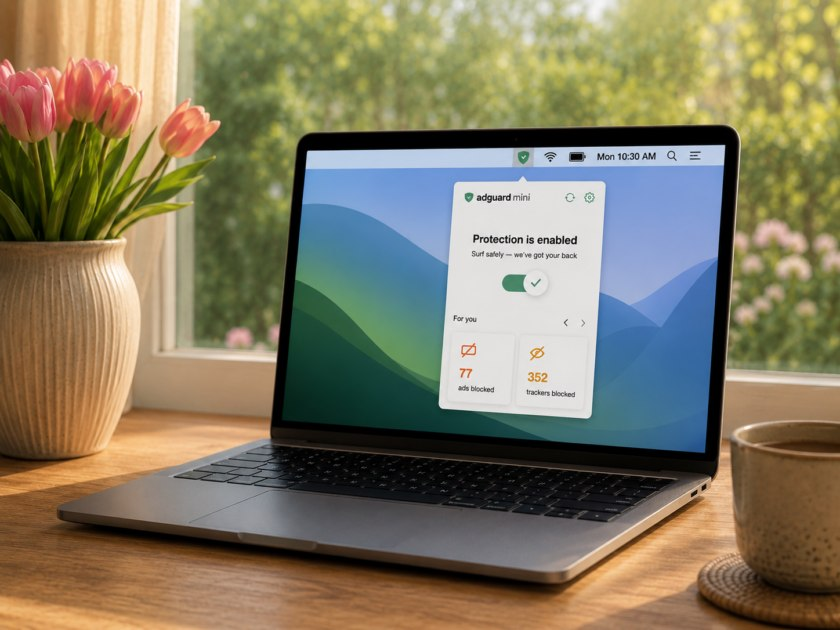
💚 AdGuard Mini for Mac v2.2: 137 ads blocked. 43 trackers stopped. And all you did was skim the morning news
AdGuard Mini is designed to work quietly in the background. But with the new update, we figured it was time to pull back the curtain on all that invisible work. Say hello to our new visual stats reports!
Now you can see exactly what’s happening behind the scenes in two easy places:
Your menu bar: Click the app icon to see your lifetime scoreboard — every single ad and tracker AdGuard Mini has blocked since the day you installed it
The Safari toolbar: The AdGuard Mini icon now displays a live counter of blocked elements for the page you’re currently on. Click it to get the exact breakdown
⚙️ Make it your own:
The Safari counter automatically resets every time you open a new page. If you prefer a cleaner look without the numbers, hiding it is easy: Click the AdGuard Mini icon → hit the gear icon → Settings and toggle off Indicate the number of blocked ads on the AdGuard Mini icon in Safari
Update your app today and see how much digital noise you’re actually skipping: adguard.com/en/blog/adguard-…
2
3
39
2,157
The US is officially cracking down on explicit AI deepfakes with a strict new law called the “Take It Down Act” — but it’s triggering a massive debate over the future of internet censorship
The newly enforced law legally mandates that tech and social media platforms deploy robust complaint systems and permanently remove non-consensual explicit content within a strict 48-hour window. If they miss the deadline, they face crushing financial penalties from the FTC. While digital safety advocates are celebrating this as a vital step to protect victims, free speech defenders are sounding the alarm. They warn that platforms, terrified of multi-million dollar fines, will resort to aggressive “carpet-bomb” censorship — blindly deleting perfectly legal art, news, and educational content just to stay safe.
Protecting people from malicious AI-generated content is absolutely non-negotiable. However, we have to ensure that Big Tech doesn't use fear of regulation as an excuse to break the open web with lazy, over-reactive automated filters.
Where do you stand on this? Can tech platforms actually find the perfect balance between digital safety and free speech, or are we heading toward a heavily censored internet? Drop your thoughts below and let’s discuss! 💬
2
4
16
1,686