You still use Claude like in 2025.
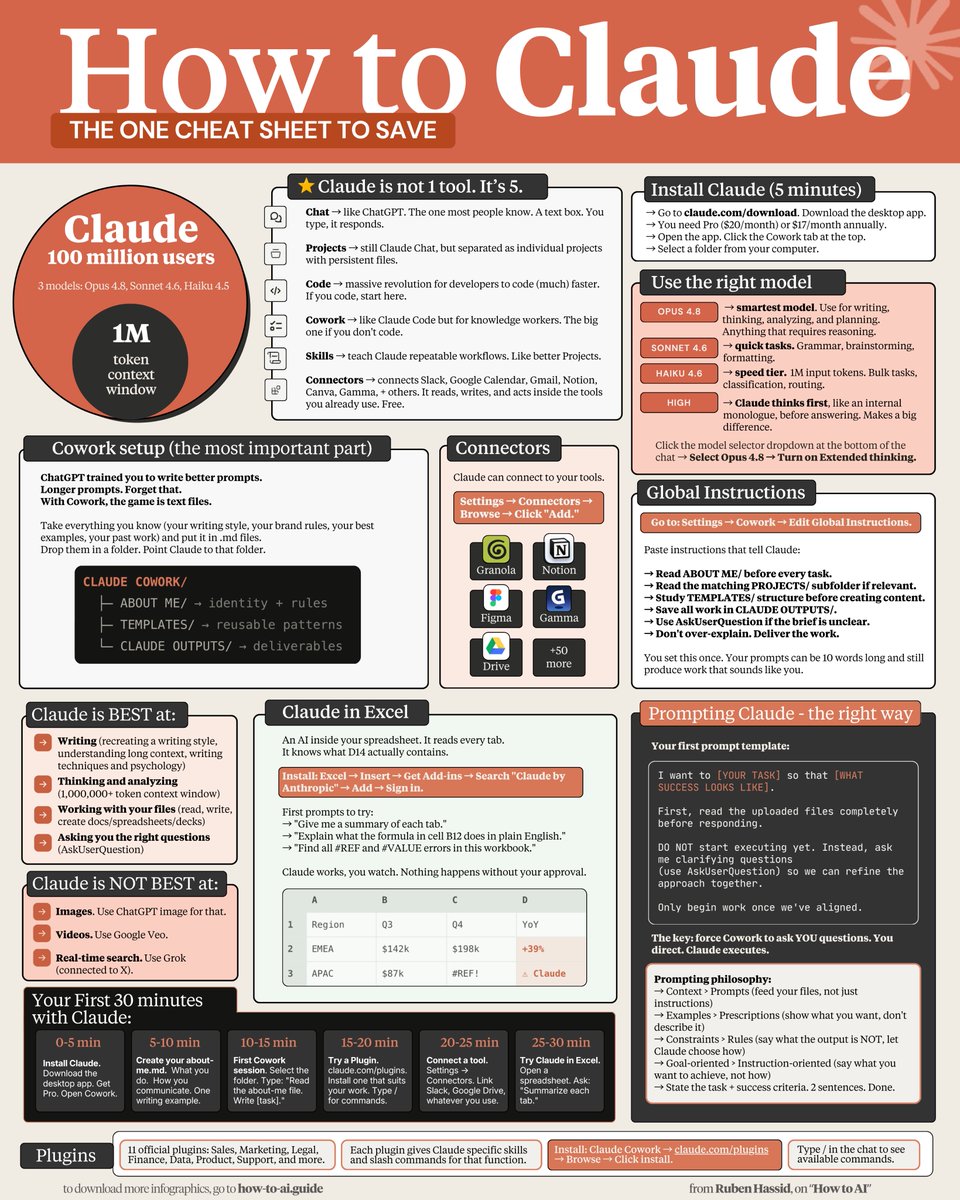
So here's a recap in a single cheat sheet:
1: Claude isn't 1 tool. It's 6.
Chat, Projects, Code, Cowork, Skills, Connectors.
If you don't code, Cowork should be the go-to one.
2: Pick the model before the prompt.
Opus 4.8 = thinking, analyzing, planning.
Sonnet 4.6 = grammar, brainstorming, formatting.
Haiku 4.6 = bulk tasks at 1M input tokens.
3: Toggle High Effort on Opus.
Model selector → Opus 4.8 → Turn on Effort → High Forces an internal monologue.
4: Cowork > Chat for serious work.
Desktop Pro only. Reads your local files. Creates docs. Runs for minutes while you grab coffee.
5: Stop writing 500-word prompts.
Write 29 words: "I want to [task] so that [goal]. Read the files first. Ask me questions via AskUserQuestion before executing."
6: Build 3 folders inside Cowork.
ABOUT ME/ (identity rules). TEMPLATES/ (reusable patterns). CLAUDE OUTPUTS/ (deliverables). Your prompts drop to 10 words.
7: Set Global Instructions once.
Settings → Cowork → Edit Global Instructions.
Prompt: "read ABOUT ME first, save in CLAUDE OUTPUTS, use AskUserQuestion when unclear, don't over-explain."
8: Connectors are free. Turn them on.
Slack, Gmail, Drive, Notion, Figma, Granola 50 others. Claude reads your emails and messages mid-conversation. Zero copy-paste.
9: Force AskUserQuestion in every prompt.
Claude stops guessing. It generates a form with clarifying questions. You click. Claude executes. Prompting ends.
10: Install Claude in Excel (3 minutes).
Excel → Insert → Get Add-ins → Search "Claude by Anthropic" → Add → Sign in. Ctrl Option C to open. It now knows what cell D14 actually contains.
11: Install Plugins from claude .com/plugins.
Sales, Marketing, Legal, Finance, Data, Product, Support more. Each adds skills and slash commands. Type / in the chat to see them.
12: Skills replace your prompt library.
Turn repeat workflows into slash commands. Type /negotiation-prep one line. Claude pulls from Gmail, Slack, Granola. Drafts the email. Done.
13: Context > Prompts.
Feed your files, not just prompts. That's the game.
Download my own files at
how-to-ai.guide.
Don't pay anything. Reply to the email to get the link
14: Examples > Prescriptions.
Paste 3 posts you wrote. "Write like this." Claude copies voice faster from examples than from 500 words of description.
15: Images = Use ChatGPT Image (with Thinking).
Claude doesn't generate realistic images (yet).
16: Real-time search = Use Grok.
Connected to X. Covers 99% of what you need.
17: Videos = Use Google Veo-4
Right tool, right job. Stop wasting tokens.
-----
To download all of my Claude infographics:
Step 1. Go to
how-to-ai.guide.
Step 2. Subscribe for free. Don't pay anything.
Step 3. Open my welcome email (most skip this).
Step 4. Hit the automatic reply button inside.
Step 5. Download my infographics from my Notion.
Bonus. Enjoy my best copy-paste prompts, too.