hack things together ‘til they’re cute @clarko@mastodon.social
Joined November 2006
- Tweets 26,681
- Following 116
- Followers 3,106
- Likes 15,364
974 Photos and videos
Pinned Tweet

2 Jun 2022
In time for #WWDC22 I’m launching a personal project!
Go get it from gdayworld.app
I’ve been the “designer who messes with code” for so long it’s past time I actually shipped something of my own.
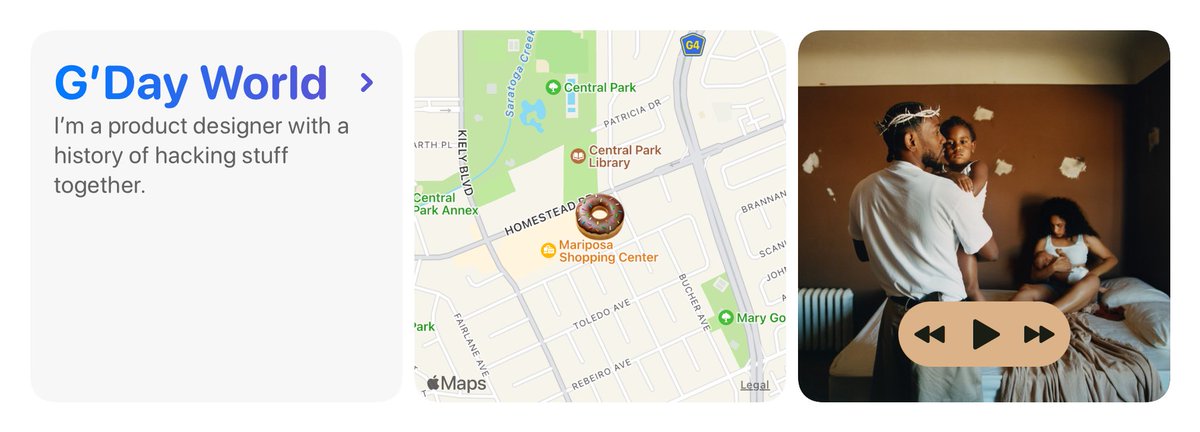
ALT Three round rectangular tiles: a welcome message saying “G’Day World”, a map with an emoji in its center, and an album cover with play/shuttle controls.
36
32
381
9 May 2023
I have a new app!
Say hello to Symbolsaurus: a thesaurus of SF Symbols, for app developers and UI designers alike.
Now in beta for macOS, iPadOS, and iOS!
testflight.apple.com/join/37…
2
3
17
5,165
23 Nov 2022
Our turkey is dry brining with Five Spice and Chippy Salt, and tomorrow we smoke it.
This is the most fusion we’ve ever attempted in one meal.
1
clarko@mastodon.social retweeted

On macOS, a screenshot sits in a little floating window for a while before it shows up in its destination folder.
Is there a keyboard command or other way to make it go to its destination folder immediately?
I often want to drag and drop the screenshot and have to wait.
11
2
25
18 Nov 2022
I think about this tweet probably once a month. I miss early weird twitter.
30 Oct 2011

Ah, water. Giver of life. Destroyer of witches. Improver of tee shirt contests.
7
17 Nov 2022
I don’t care much for the progressive blur effect Apple uses in App Library and Dynamic Island. But at least it’s reasonably well executed.
THIS is rough. Woof. From the Satellite SOS demo.
ALT Text with a low-radius blur that terminates at an obvious horizon vs smoothly disappearing. Looks more like JPEG artifacts than blur.
1
1
clarko@mastodon.social retweeted
27 Feb 2012
Meryl Streep's tears are the only known cure to basilisk venom.
3
30
26
15 Nov 2022
Podcast theme music is wild. People just picking music they like, regardless how it works with the rest of their brand.
4
13 Nov 2022
Anybody have recommendations for a timer app with good Shortcuts support?
Wanna start a timer through personal automations: tapping an NFC sticker, unplugging from CarPlay, ending a workout, etc.
4
4
11 Nov 2022
This is where I remember, too late, how important captions are on TikTok
1
1
9 Nov 2022
Confession:
I thought the UB40/Chrissie Hynde version of “I Got You Babe” was the canon.
Still do. Sonny and Cher and their oboe can suck it.
1
1
9 Nov 2022
Feel like I’m gonna get canceled by @Roryography for disrespecting Cher.
1