Joined November 2020
399 Photos and videos
Google just slashed the qubit estimate needed to break Bitcoin signatures by 20x. The quantum threat suddenly feels a lot closer than most people realise. The biggest risk isn’t some future "hack" of the blockchain itself. It’s the roughly one-third of all BTC sitting on addresses where the public key is already visible - old coins, reused deposit addresses, even some Taproot setups. 🧠I put this article together to explain exactly what changed in March, the real difference between at-rest and on-spend attacks, and the practical steps you can take right now to cut your exposure. No panic, just clear thinking and better opsec. Have you already moved your older coins to fresh bc1q Native SegWit addresses (the ones you’ve never spent from)? What’s your current plan? Drop your thoughts below👇and bookmark if it’s useful - this one matters for the long game.
2
537
Bitcoin is not anonymous. It is pseudonymous. Mixing up the two is how people get traced. Pseudonymity means your activity can sit under a name that is not your real one. On-chain, that name might be an address, an account, or a cluster of addresses that can be linked together. Every move it makes is public and stays linked together forever. Nobody may know it is you at first. But once one link is made - for example through a KYC exchange, a merchant, a public post, or other off-chain data - ties the address to your identity. From then on, the whole history is open to read. Anonymity is different. It means your actions are not easily linked to each other or back to you. No stable marker follows you around. A simple way to picture it: - A pseudonymity is like a car number plate. It is not your name, but every journey is caught on camera under it. One check of the registry, and every trip ever made traces back to you. - Anonymity is a journey no camera can tie to the last one, or to you. Most public blockchains are transparent by default. Privacy tools and privacy-focused chains can reduce linkability, but they are not magic and they do not guarantee perfect anonymity. So which one did you assume crypto gave you? Save this before your next on-chain move.
1
2
157
Worth knowing: in 2026 this got cheaper. New research describes AI tools linking wallet addresses to social accounts by matching writing style and public posts, at very low cost per attempt. Reusing one address across donations, DAO votes and portfolio screenshots builds that trail for them. Fresh addresses and care with what you share still matter.
111
Most people think the PoW vs PoS debate is about energy. It is not. It is about one question: how much does it cost to rewrite history? 1. The shared problem A blockchain is a ledger with no boss. Strangers must agree on one history. PoW and PoS use the same trick: make lying expensive. 2. Proof of Work (Bitcoin) Miners burn electricity to win a guessing game. The winner adds the block and takes the reward. Security = physics. Attacking means out-computing everyone else. Bitcoin runs at around 1 zetahash per second. Matching it costs billions in hardware plus country-scale electricity. Weak spot: mining follows cheap power, and a few big pools coordinate a large share of the hashrate. 3. Proof of Stake (Ethereum) Validators lock capital instead, 32 ETH minimum. Cheat, and the protocol burns part of your stake. That is slashing. Security = capital at risk. Over 30 percent of all ETH is staked, around 39 million coins. Attacking means buying a third of that, then watching it burn. Weak spot: stake concentrates too, in liquid staking protocols and big exchanges. 4. The energy gap Bitcoin: ~138 TWh a year, ~0.5 percent of global electricity, about half from sustainable sources (Cambridge, 2025). Ethereum: cut energy use by ~99.95 percent in September 2022. Bitcoiners say the energy IS the security. Fair point. Pick your trade-off honestly. 5. Three myths - "PoS is free to attack." No. A failed PoW attacker keeps the hardware. A failed PoS attacker loses the capital. - "51% attacks are theory." Ethereum Classic, 2020. Bitcoin Gold, 2018 and 2020. Monero suffered a deep 18-block reorg in 2025 during the Qubic selfish-mining episode. Chain size matters more than the acronym. - "PoS makes the rich richer." Both reward capital. PoW pays cheap electricity, PoS pays token holders. Neither is egalitarian. 6. Which is better? Wrong question. They price out different attackers. Bitcoin is not switching, Ethereum is not going back, and new chains mostly pick PoS to skip the hardware and energy baggage. Bookmark this for the next energy argument. Which model do you trust with your own money, and why?
2
3
142
Anthropic didn't choose to pull Fable 5 and Mythos 5. It was ordered to. On 12 June the US government sent Anthropic an export control directive citing national security. It blocked access for any foreign national anywhere, including Anthropic's own foreign staff, so the only way to comply was to shut both models down for everyone. Every other Claude model stayed live. The exact trigger is not fully clear from the public statement. Anthropic understood that the government believed there was a method for bypassing, or "jailbreaking" Fable 5. Anthropic says it read the report behind the order, found the same level of capability in other public models including GPT-5.5, and called it a likely misunderstanding. So this was not a safety recall by the company. It is a government order Anthropic openly disagrees with and is working to reverse. This is where it gets relevant for crypto. One letter, one evening, and a model deployed to hundreds of millions went dark worldwide. That is centralisation risk in its purest form. A closed model behind someone else's API is a single point one government can switch off. Not your keys, not your coins, applied to AI. Open weights remove that kill switch but bring the opposite problem: nothing shipped can ever be recalled, safe or not. No clean answer, only where you choose to put the risk. Where does this leave anyone building on a single model provider? Save this for the next centralisation debate, and send it to anyone whose stack sits on one provider.
1
202
Source, Anthropic's own statement (12 June): anthropic.com/news/fable-myt… One caution: some commentary is already filling in its own "why". Anthropic says the government's letter did not provide specific details of the national security concern. Its understanding is that the order was based on a potential narrow, non-universal jailbreak of Fable 5. The demonstration it reviewed involved identifying a small number of previously known, minor vulnerabilities, and it has not received disclosure of a concerning jailbreak that led to a harmful result. So treat any confident "this is the real reason" claim with care until more evidence is public.
132
Satoshi was asked directly: why 21 million coins? The answer is in an old email, and it is not what most people expect. When developer Mike Hearn asked where Bitcoin's magic numbers came from, Satoshi replied: "Educated guess, and the maths work out to round numbers." That is the whole mystery. No formula tied to global money supply. No hidden meaning. Just a figure not too low if Bitcoin got popular, not too high if it stayed niche. The part most people miss: the issuance code never checks against 21 million. It just starts the block reward at 50 BTC, halves it every 210,000 blocks (about 4 years), and stops when the reward rounds down to zero. 50 x 210,000 x 2 = 21,000,000. The cap is not a target. It is where the maths lands. (The 21M constant in Bitcoin Core is only a sanity check, not the enforcement.) Five things people get wrong: 1. The real cap is below 21 million. Rounding stops issuance at 20,999,999.9769 $BTC. Subtract the unspendable genesis reward and early miners who claimed less than allowed: the realistic ceiling is around 20,999,817 BTC. 2. Bitcoin is not deflationary. Not yet. Coins are issued every block until around 2140. The accurate word is disinflationary: supply still grows about 0.8% a year, and the rate keeps falling. Real deflation comes only from lost coins: estimates run from 1.6 million BTC (River) to 3.7 million (Chainalysis). 3. The curve is brutally asymmetric. In March 2026, at block 939,999, the network crossed 20 million coins mined. The first 20 million took 17 years. Around 900,000 of the final million arrive within 13 years. The last 100,000 alone need a century. 4. The cap is social, not just technical. A consensus rule. The code could change tomorrow. Nobody touches it because the fixed supply is the product: remove it and you remove the reason to hold the asset. 5. The cap has an unsolved problem: the security budget. New coins pay for network security today. 3.125 BTC per block now, 1.5625 from 2028, halving until transaction fees must carry the whole load. Nobody knows yet whether they will. That is the price of the fixed supply. One thing Satoshi did plan precisely: divisibility. Each coin splits into 100 million satoshis, 2.1 quadrillion units in total. If the value grows, you move the decimal point. The cap never moves. A monetary rule now underpinning a trillion-dollar asset started as one person's educated guess. The number was almost arbitrary. Making it impossible to revise was the design. Satoshi even had an answer for lost coins: "Lost coins only make everyone else’s coins worth slightly more. Think of it as a donation to everyone." If you were Satoshi in 2008, what number would you have picked? Bookmark this for the next time someone claims the 21 million has a secret meaning.
1
163
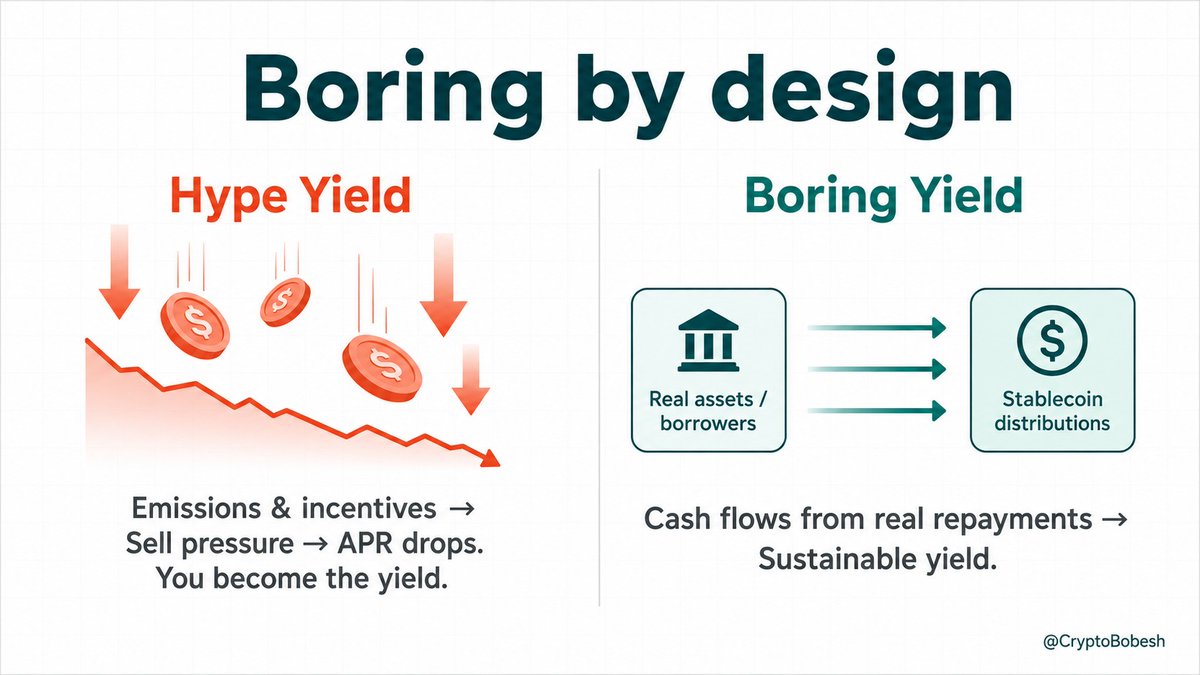
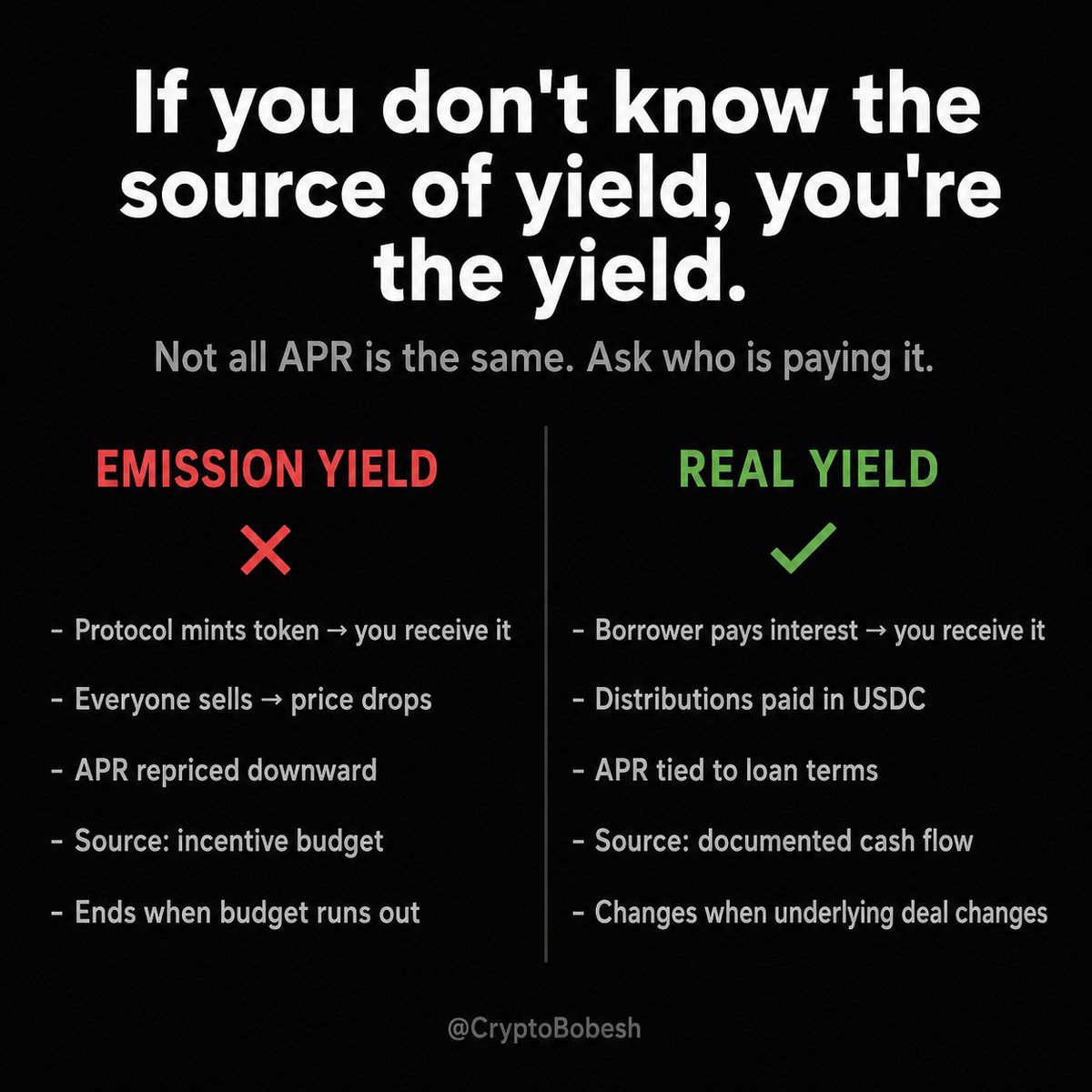
Real yield in DeFi depends on the source of the cash. Most high APRs come from emissions or incentives. Farm the token, sell it, APR drops. You become the yield. Real yield comes from borrowers paying interest on real assets. Paid in USDC from actual operations. It still has risks - credit, liquidity, legal. But the source is traceable. Boring cash flow beats hype APYs. Do you check the yield source before the APR? Reply your view. Bookmark if useful.
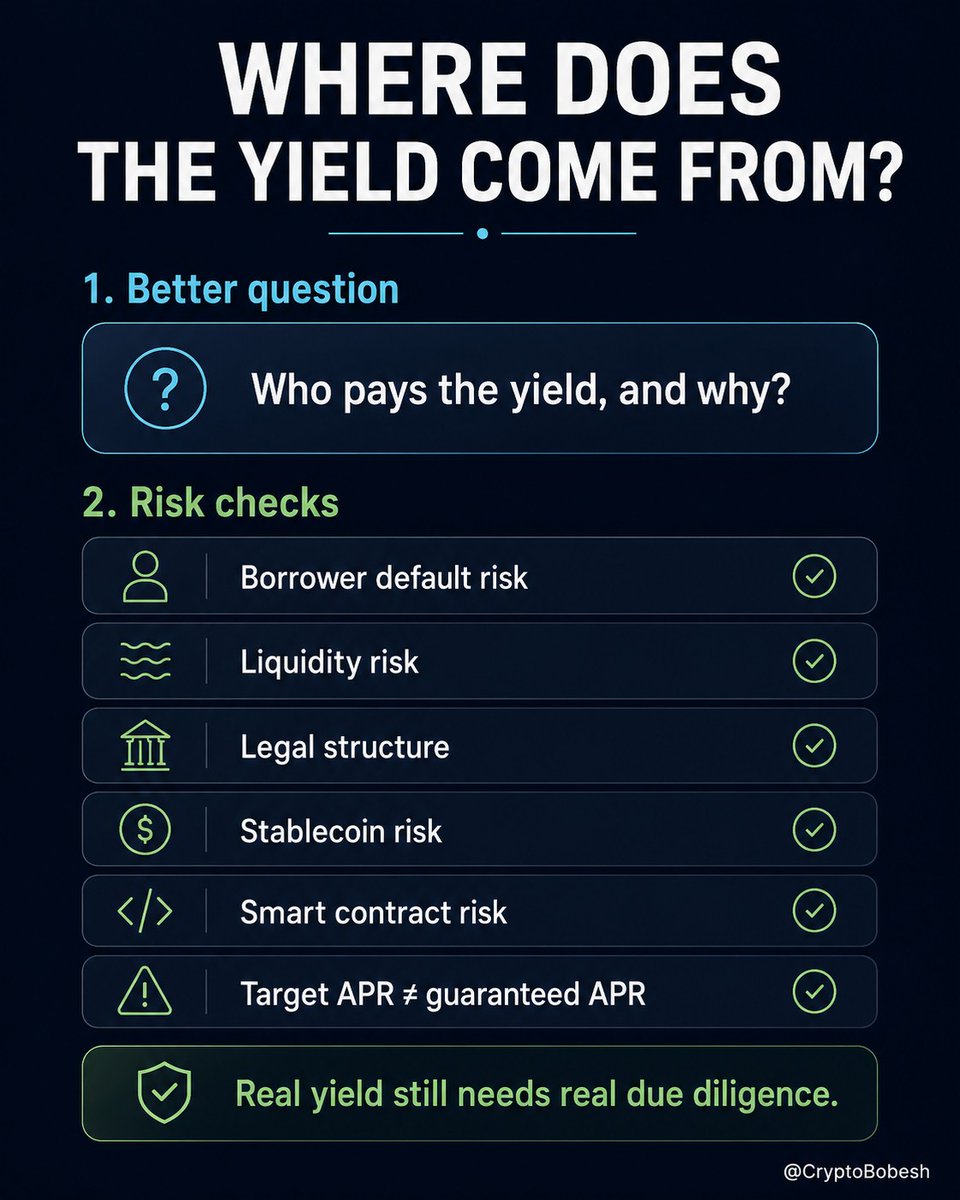
Most high APR in DeFi is not real yield. It is emissions, points, leverage, or a temporary incentive budget. You receive a token. You sell it. Everyone else does too. Then the APR gets repriced. "If you don't know the source of yield, you're the yield." This is why I care less about the APR number and more about the source of the yield. A better question: who is actually paying this, and why? One RWA example is a $USDC vault (built on Lagoon’s ERC-7540 infrastructure) giving exposure to EUR real estate-backed debt sourced through a lend platform. - capital goes into documented real estate operations - borrowers pay interest - distributions are paid in USDC - the target is around 10% APR from real cash flows That is very different from: "Here is a governance token. Good luck." But it is not risk-free and should not be sold as "safe yield". You still have: - borrower/default risk - real estate market risk - redemption/liquidity risk - smart contract risk - manager and legal-structure risk - USDC/stablecoin risk Also worth keeping straight: An audit does not make the off-chain asset real. A filing does not guarantee repayment. A target APR is not the actual APR. The right questions are not "How high is the APR?" but: - What cash flow supports it? - Who can default? - What happens if exits are crowded? - What legal claim do depositors have? DeFi probably needs more of this. Less magic yield. More risk checks. More boring cash-flow analysis. Boring is not a weakness here. Boring may be the product. Do you think real RWA yield will take meaningful market share, or will token incentives stay dominant? Save this before the next "sustainable 40% APY" vault appears. #DeFi #RWA
99
Most high APR in DeFi is not real yield. It is emissions, points, leverage, or a temporary incentive budget. You receive a token. You sell it. Everyone else does too. Then the APR gets repriced. "If you don't know the source of yield, you're the yield." This is why I care less about the APR number and more about the source of the yield. A better question: who is actually paying this, and why? One RWA example is a $USDC vault (built on Lagoon’s ERC-7540 infrastructure) giving exposure to EUR real estate-backed debt sourced through a lend platform. - capital goes into documented real estate operations - borrowers pay interest - distributions are paid in USDC - the target is around 10% APR from real cash flows That is very different from: "Here is a governance token. Good luck." But it is not risk-free and should not be sold as "safe yield". You still have: - borrower/default risk - real estate market risk - redemption/liquidity risk - smart contract risk - manager and legal-structure risk - USDC/stablecoin risk Also worth keeping straight: An audit does not make the off-chain asset real. A filing does not guarantee repayment. A target APR is not the actual APR. The right questions are not "How high is the APR?" but: - What cash flow supports it? - Who can default? - What happens if exits are crowded? - What legal claim do depositors have? DeFi probably needs more of this. Less magic yield. More risk checks. More boring cash-flow analysis. Boring is not a weakness here. Boring may be the product. Do you think real RWA yield will take meaningful market share, or will token incentives stay dominant? Save this before the next "sustainable 40% APY" vault appears. #DeFi #RWA
1
4
400
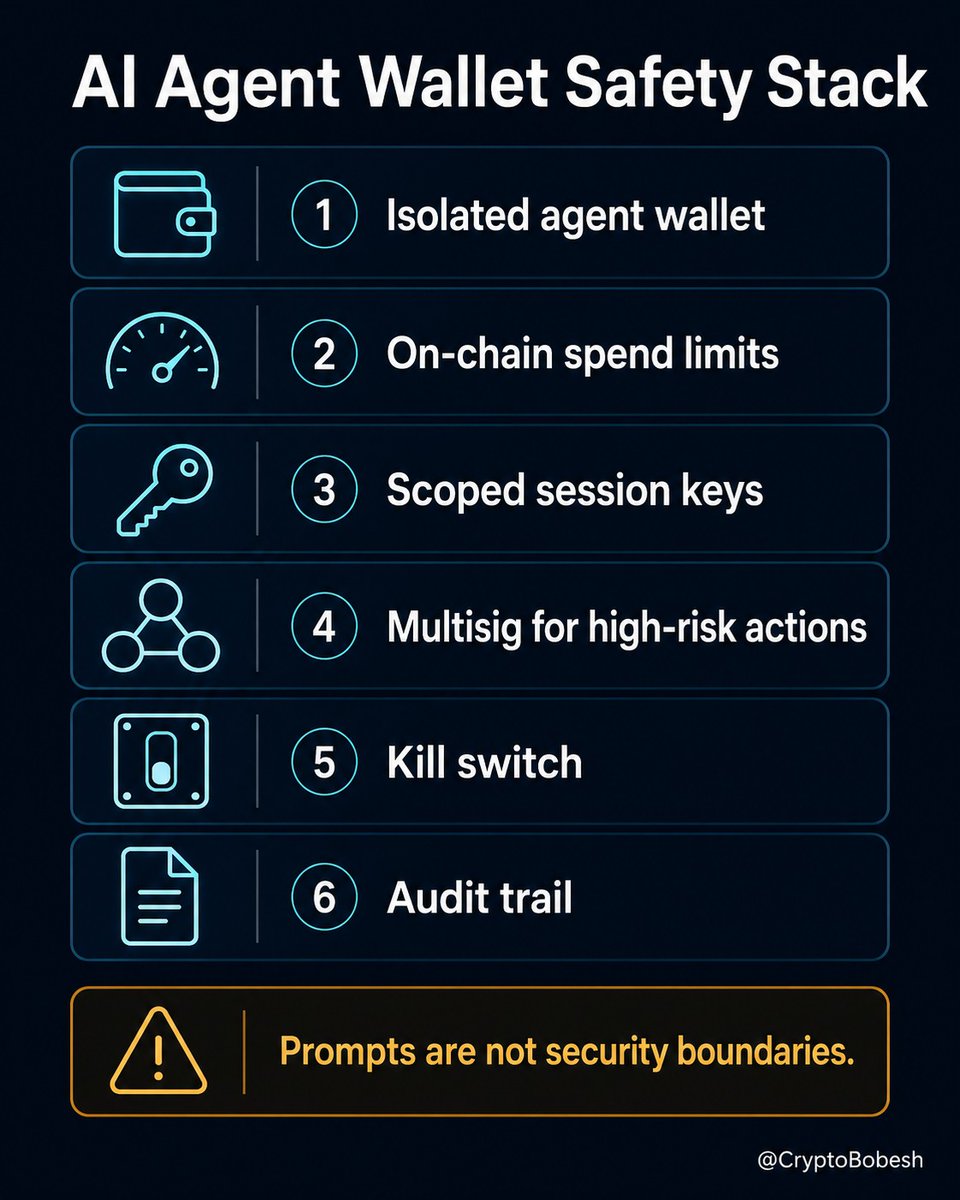
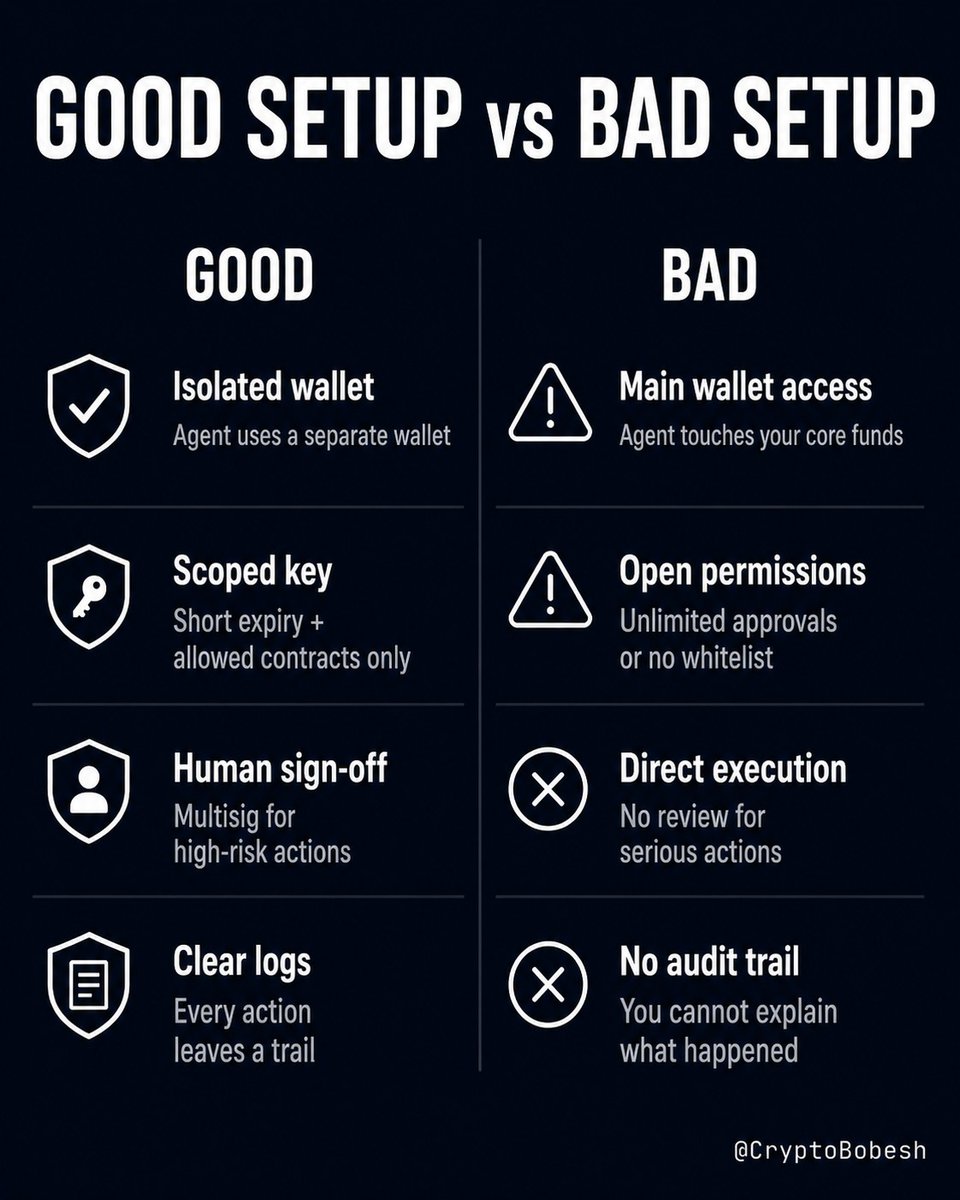
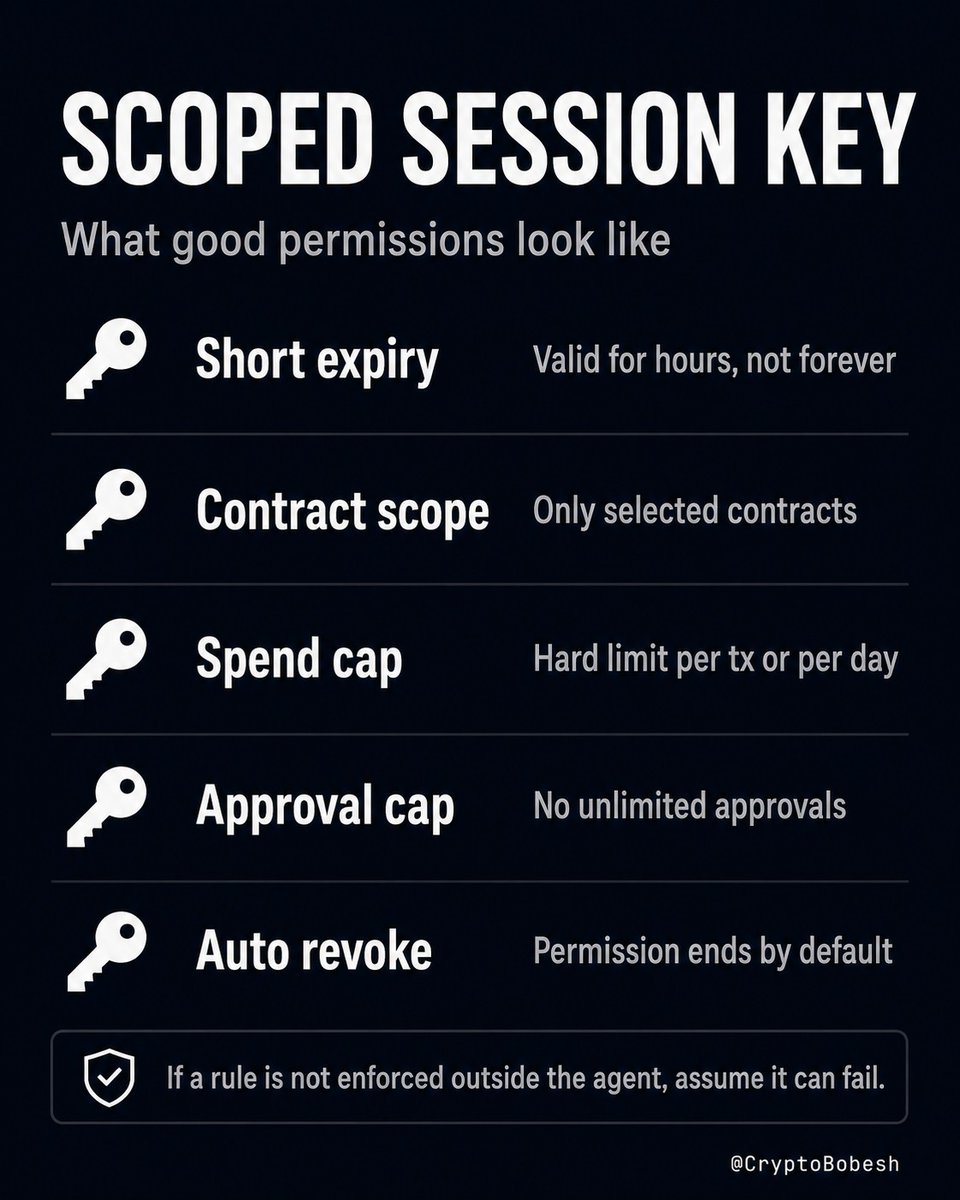
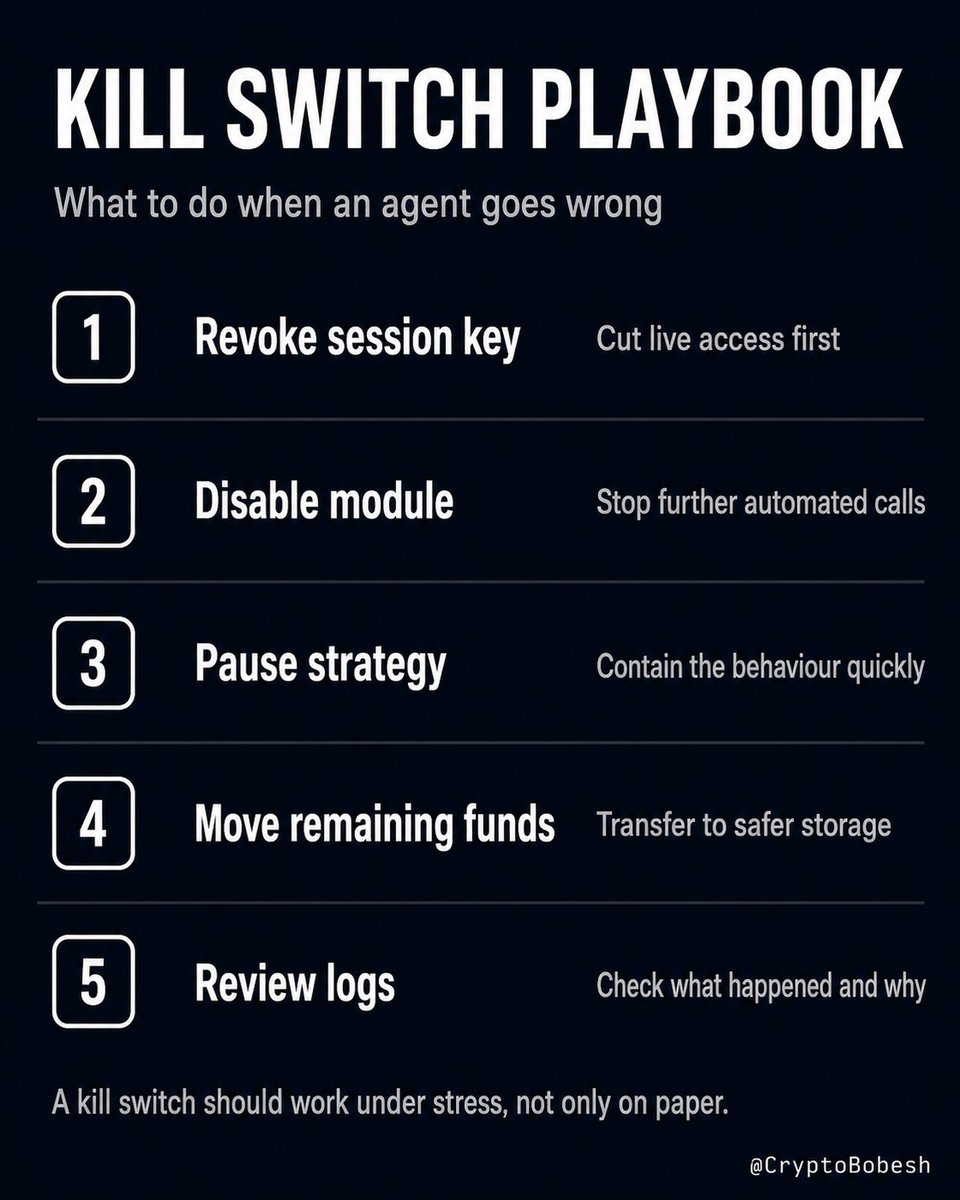
AI agents should never touch your main wallet. Not because agents are useless. Because prompts are not security boundaries. If you want an AI agent to operate in crypto, treat it like a junior intern with internet access: useful, fast, sometimes clever, but never fully trusted with the treasury. The safe model is simple: - Give the agent a narrow job. - Give it limited funds. - Make every important action verifiable. - Make every dangerous action stoppable. 🛡️Here are the guardrails that actually matter: 1. Separate agent wallet Never connect an agent to your main wallet, cold wallet or treasury signer. Use a dedicated wallet or smart account with only the funds it needs. If the agent gets tricked, hacked or prompt-injected, the damage should be limited. 2. On-chain limits A prompt saying "do not spend more than $100" is not a control. A wallet rule that rejects transactions above $100 is a control. Use limits like: - max value per transaction - daily spend cap - approved tokens only - approved contracts only - no unlimited approvals - expiry time for permissions If the rule is not enforced outside the agent, assume it can fail. 3. Scoped session keys Session keys can be useful, but only when they are narrow. This usually means a smart account, Safe module, ERC-4337 account, EIP-7702-enabled wallet, or another account-abstraction setup. A normal EOA does not enforce expiry, spend caps, contract allowlists or approval limits by itself. Good setup: - valid for 2 hours - can call only selected contracts - max spend: 50 USDC - no approvals above the cap - auto-expiry enabled Bad setup: - valid forever - can call anything - can spend any token That is not automation. That is a wallet drain with extra steps. 4. Multisig for serious actions AI can propose. It should not have final control over serious money. Use human or multisig approval for: - treasury moves - new protocol interactions - permission changes - contract upgrades - new spenders - disabling security rules The agent can draft the transaction. It should not approve its own escape route. 5. Kill switch Every agent wallet needs an emergency stop. You should be able to quickly: - revoke the session key - disable the module - pause the strategy - remove the signer - move remaining funds to cold storage If stopping the agent requires a long checklist while funds are moving, you do not have a kill switch. You have theatre. The key that controls your kill switch should never be reachable by the agent itself. 6. Audit trail Every agent action should leave a trail: - what it did - why it did it - which rule allowed it - what data it used - tx hash - approval record "AI did something weird" is not an incident report. Bottom line: The right question is not: "Can I trust this agent?" The right question is: "What is the worst thing this agent can do if it fails today?" Design for that answer. Bookmark this before you connect an AI agent to real funds.
2
1
204
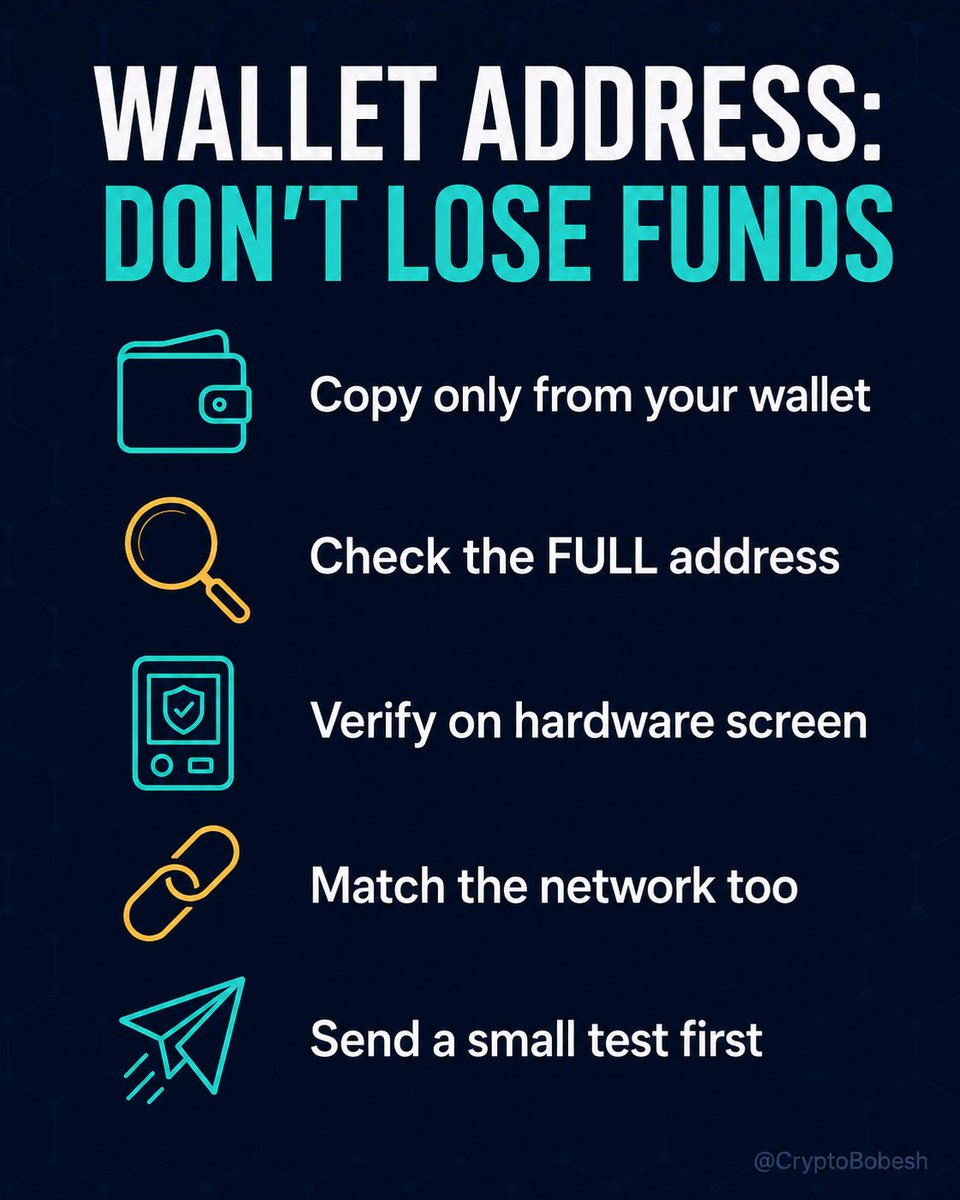
Your hardware wallet can't see what's in your clipboard. Clipboard hijackers don't steal your seed phrase. They don't break your encryption. They just wait. The moment you copy a wallet address, the malware swaps it silently. You paste the replacement. Your hardware wallet confirms what was pasted - not what you meant to send. You followed the process correctly. The money still went to the attacker. This works because copy-pasting feels completely routine. The attack is built around your habits, not your keys. The checklist and quoted post below covers how to break that pattern at every step, from copy to confirm. Before your last transfer: did you check the full address, or just the first and last few characters? Bookmark this thread - the attack and the defence, in one place.
One wrong character in a wallet address, and your money is gone. Crypto transfers are final. No bank to call. No way to reverse it. Most people copy and paste on autopilot. These are the habits that stop the mistakes that cost real money. Copy hygiene - Copy the address only from your own wallet or a saved address book (keep only checked, trusted addresses in it). - Never copy from your transaction history. You can grab the wrong one, or fall for address poisoning (see post in first reply). - Never copy from chats, documents, or any source you do not fully trust. - Paste it only at the moment you copy it. Copy it too early, and something can overwrite your clipboard along the way, worst case with someone else's address. - Do not trust your browser's autocomplete. - Check the address right after you paste it, and once more just before you hit send. - Compare the full address where you can, not just a few characters at each end. Scammers build look-alike addresses that match the first and last few on purpose. - This also catches clipboard malware, which swaps your copied address for a scam one. - Use a QR code from your own wallet to load an address when you can. - On a hardware wallet, always confirm the address and other details on the device screen, not just on your computer. Before you send - Check the network on both ends. Ethereum (ERC-20) should land on Ethereum. - Bridging? Make sure the source and destination chains match what you want, for example Ethereum to Base. - EVM chains (Ethereum, Base, Arbitrum, BNB Chain etc.) share the same address in your wallet, so the network matters as much as the address itself. - Check the asset and every other field too: amount, plus memo or tag if the coin uses one. - First time, and a big amount? Send a small test first, then the rest. - Turn off auto-correct, auto-replace, and autocomplete so nothing edits an address behind your back. Worth doing if you can - Keep a separate device just for crypto, with nothing extra on it. - Use a separate browser for crypto only, with no add-ons except the wallet you use. - Review your browser extensions now and then, and remove anything you do not need or recognise. A bad one with the right permission can rewrite what you paste. - Keep your system, browser, and wallets updated. - Run antivirus and a firewall as the baseline. One habit beats all the rest: slow down for the last ten seconds before you confirm. That pause is cheaper than any loss. Which of these do you already do, and which one are you adding today? Tell me below. Bookmark this so it is there next time you move funds.🔖
1
129
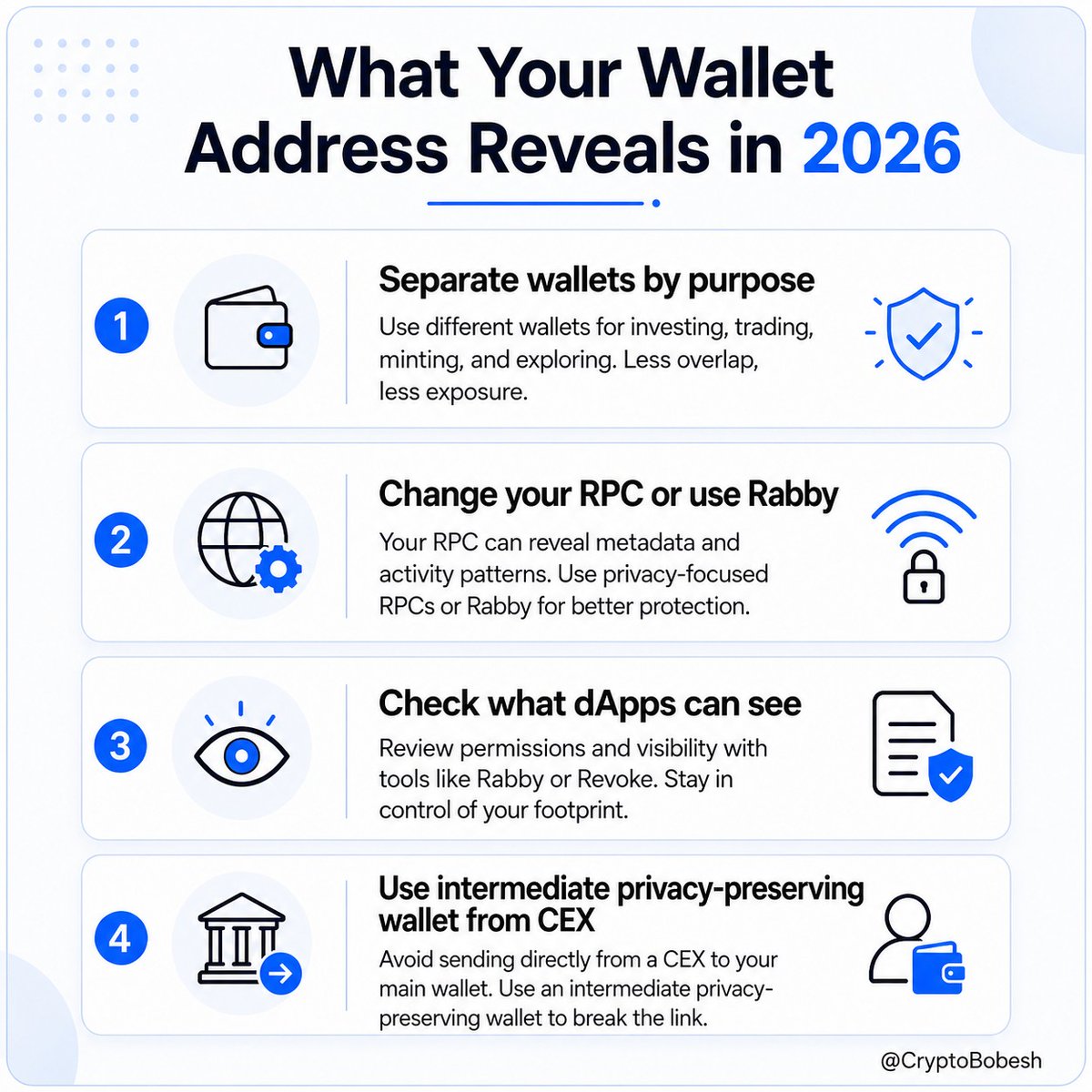
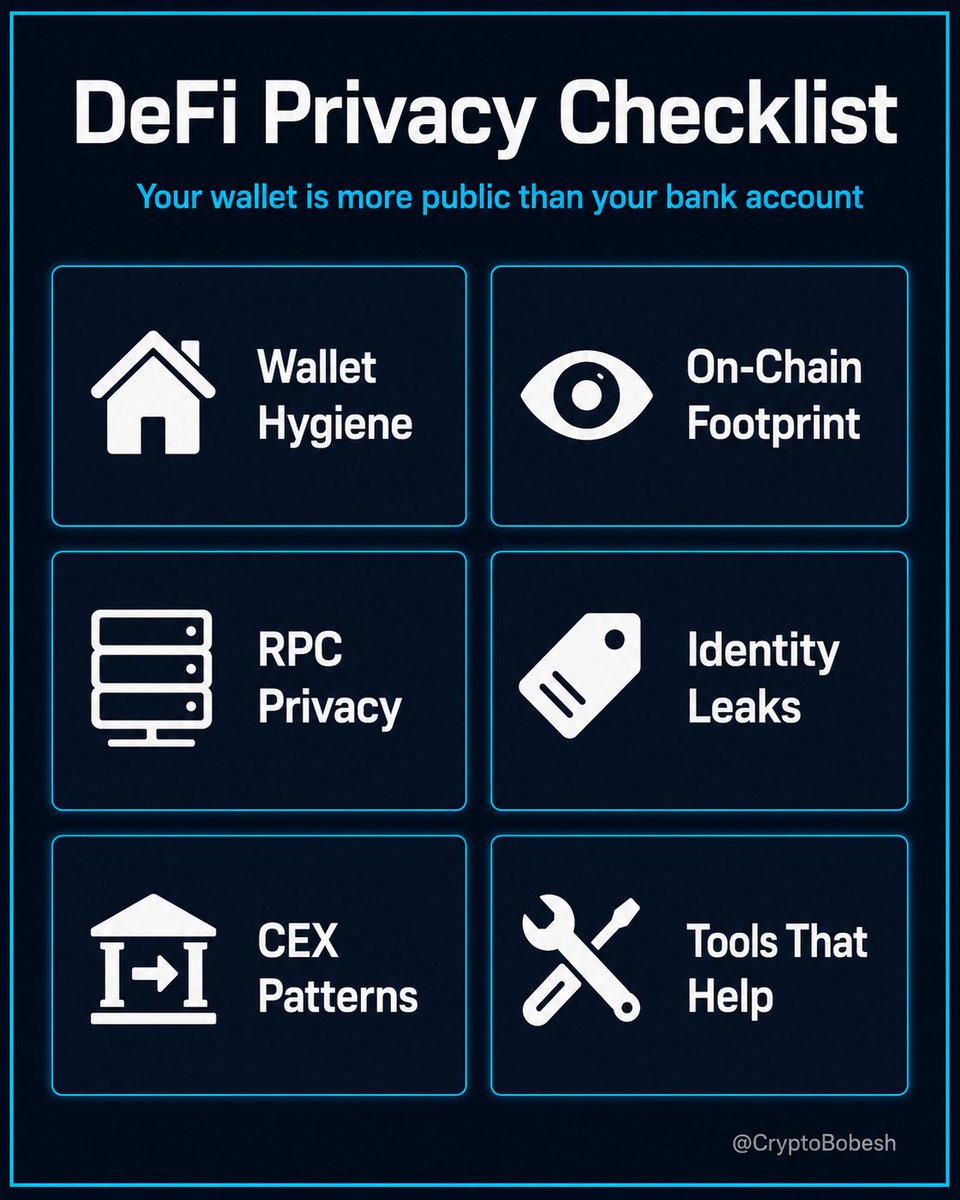
Your wallet address tells more about you than most people realise. Right now, with everything happening in security, it is smart to know exactly what others can see. Someone with just your address can see: - Every protocol you have ever used - Your holdings and trading patterns - Where your funds came from They do not need to hack you. It is all public on the blockchain. Here are the most important steps most people skip: 1. Use separate wallets for different purposes (CEX withdrawals, DeFi, identity). Reusing one address creates links you can never remove. 2. Change your default RPC in your MetaMask wallet. The default one may logs your IP and wallet on every transaction. 3. Before you connect any wallet to a dApp, ask: What will this front-end see? 4. Add an intermediate privacy-preserving wallet between your exchange and DeFi address. Direct withdrawals from KYC exchanges create permanent links. Privacy in DeFi is not about hiding from everyone. It is about not showing your full financial life to anyone who knows your address. Which of these steps are you going to check first this week? Reply below or bookmark it.
Someone with your wallet address can see: - Every protocol you've ever used - Your approximate total holdings - Where your funds came from - Your trading patterns and timing They don't need to hack you. It's all public. Here's the DeFi privacy checklist most people skip. 🏠 WALLET HYGIENE - start here - One wallet, one purpose. Keep CEX withdrawals, DeFi activity and your identity wallet on separate addresses - reusing one address creates links that can never be undone - Use a fresh wallet for high-value or sensitive interactions 👁️ YOUR ON-CHAIN FOOTPRINT Every swap, deposit and withdrawal you've ever made is permanently public and indexed. - Chain analysis firms (Chainalysis, Elliptic, TRM Labs) cluster and track wallets by behaviour patterns - Arkham Intelligence creates a market for on-chain intelligence, including wallet/entity attribution - Your CEX KYC your on-chain activity = your full financial history can be linked to your identity - Bridges link your identity accross different blockchains and wallet addresses 🌐 YOUR RPC IS NOT PRIVATE Your wallet connects to the blockchain through an RPC endpoint. MetaMask defaults to Infura, owned by ConsenSys - it logs your IP and wallet address on every transaction. - Switch to a verified custom RPC in MetaMask settings (or use Rabby wallet which I recommend) - Your pending transactions are also visible in the public mempool before confirmation - MEV Blocker (CoW Protocol) hides them from the mempool and is free 🏷️ IDENTITY LEAKS - ENS linked to your real name used for DeFi = your entire on-chain history tied to your identity - Check which wallet address is visible before posting any portfolio screenshots - Never link the same wallet to both social media and DeFi - it permanently breaks your pseudonymity - dApps front-ends can see your browser footprint, IP address and interactions 💸 CEX WITHDRAWAL PATTERNS Withdrawing from a KYC exchange directly to your DeFi wallet creates a permanent link between your verified identity and your on-chain activity - Add an intermediate wallet between your CEX and your DeFi address - how much separation you need depends on your threat model and local regulations 🔧 TOOLS THAT HELP - Railgun: ZK-proof privacy for DeFi on Ethereum (listed on Etehreum Foundation web). Uses compliance screening - not a mixer. - MEV Blocker: free private RPC, helps reduce front-running - Rabby Wallet: shows what a transaction will expose before you sign Note: OFAC lifted Tornado Cash sanctions in March 2025, but developer prosecutions continue. Check your local regulations before using any privacy tool. Privacy in DeFi isn't about hiding from anyone. It's about not having your financial life exposed to everyone who knows your wallet address. Most people realise what they should have done only after something goes wrong. Which of these did you already know? 👇
1
2
137
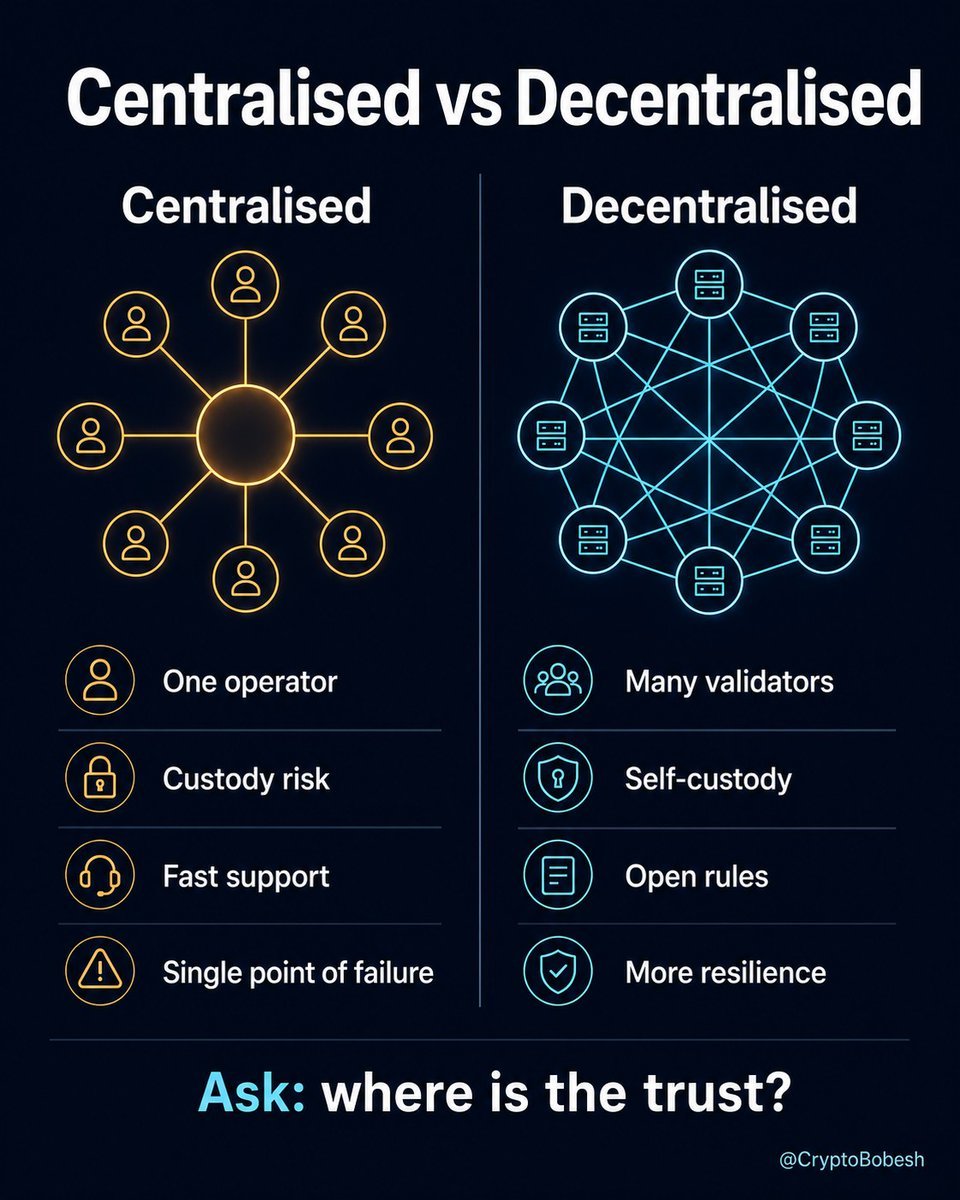
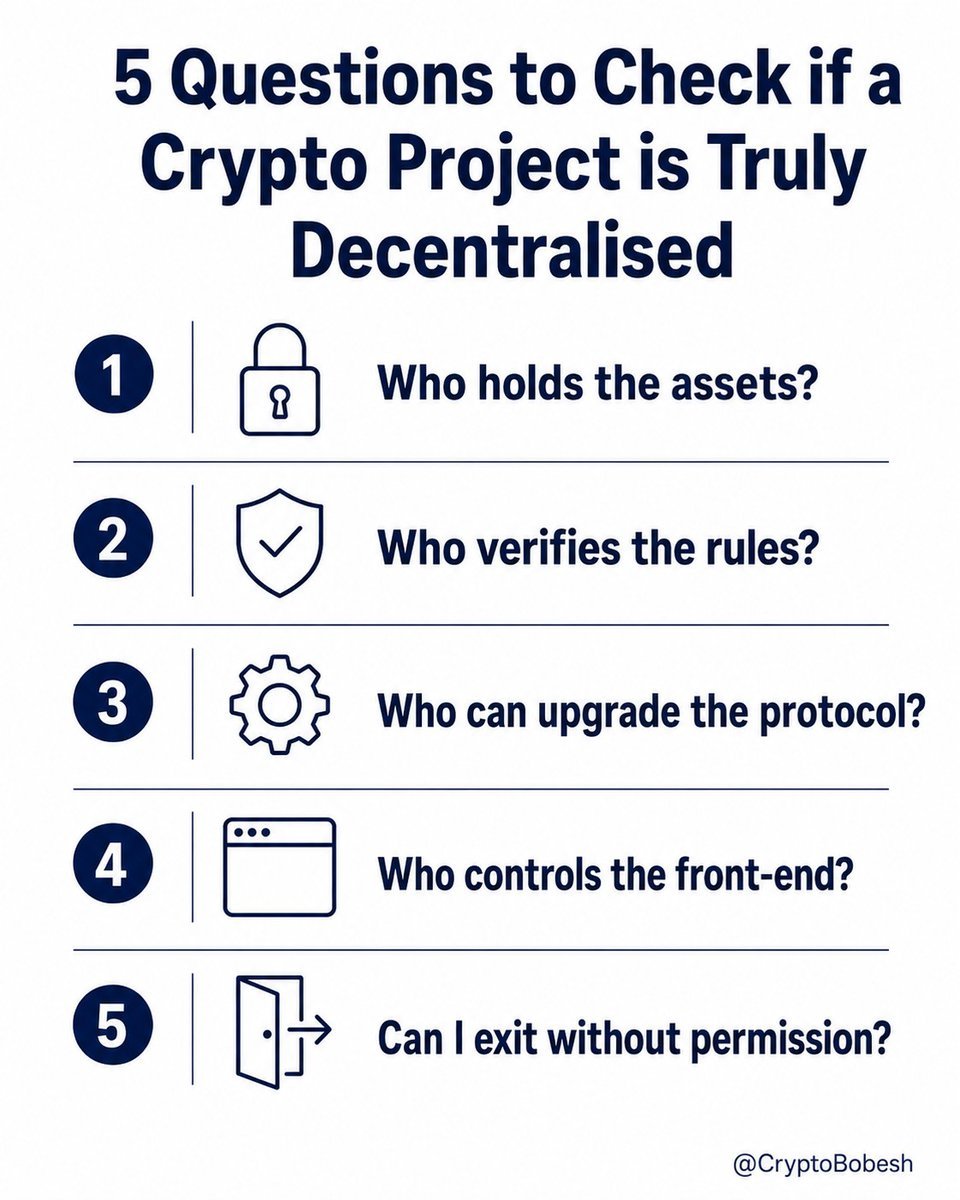
"Decentralised" is one of the most overused words in crypto. A system is not decentralised just because it has a token or runs onchain. The better question is simple: Where can someone still stop you? A centralised system has one main operator. Think Binance, Coinbase, or your bank. That can be useful. You get easier login, customer support, faster UX, account recovery and clearer rules. But you also trust the centre. If that company is hacked, pressured, frozen by regulators, or becomes insolvent, your access can change very fast. A decentralised system works differently. Many independent participants help enforce the rules. Bitcoin is the clean example. - No company owns the network. Full nodes can verify blocks and transactions against public rules. Uniswap is the DeFi example. - You can swap through smart contracts instead of leaving funds with a traditional exchange. But this is where people get tricked: - Decentralised does not mean "no trust anywhere". - A protocol can be decentralised in one layer and still centralised in another. Examples: - smart contract is onchain, but the website is controlled by one team - DEX exists, but liquidity depends on a few whales - DAO exists, but insiders hold most voting power - self-custody exists, but users still sign bad approvals - network is open, but most users rely on the same RPC or front-end So do not ask only: "Is it decentralised?" 🔍Ask these instead: 1. Who holds the assets? 2. Who verifies the rules? 3. Who can upgrade the protocol? 4. Who controls the front-end? 5. Can I exit without permission? Centralisation gives convenience. Decentralisation gives resilience. Most crypto systems sit somewhere between the two. The label matters less than the trust map. Save this before judging any chain, protocol or exchange. Which of these five questions do you check first when looking at a new project? Drop your answer below.
2
1
186
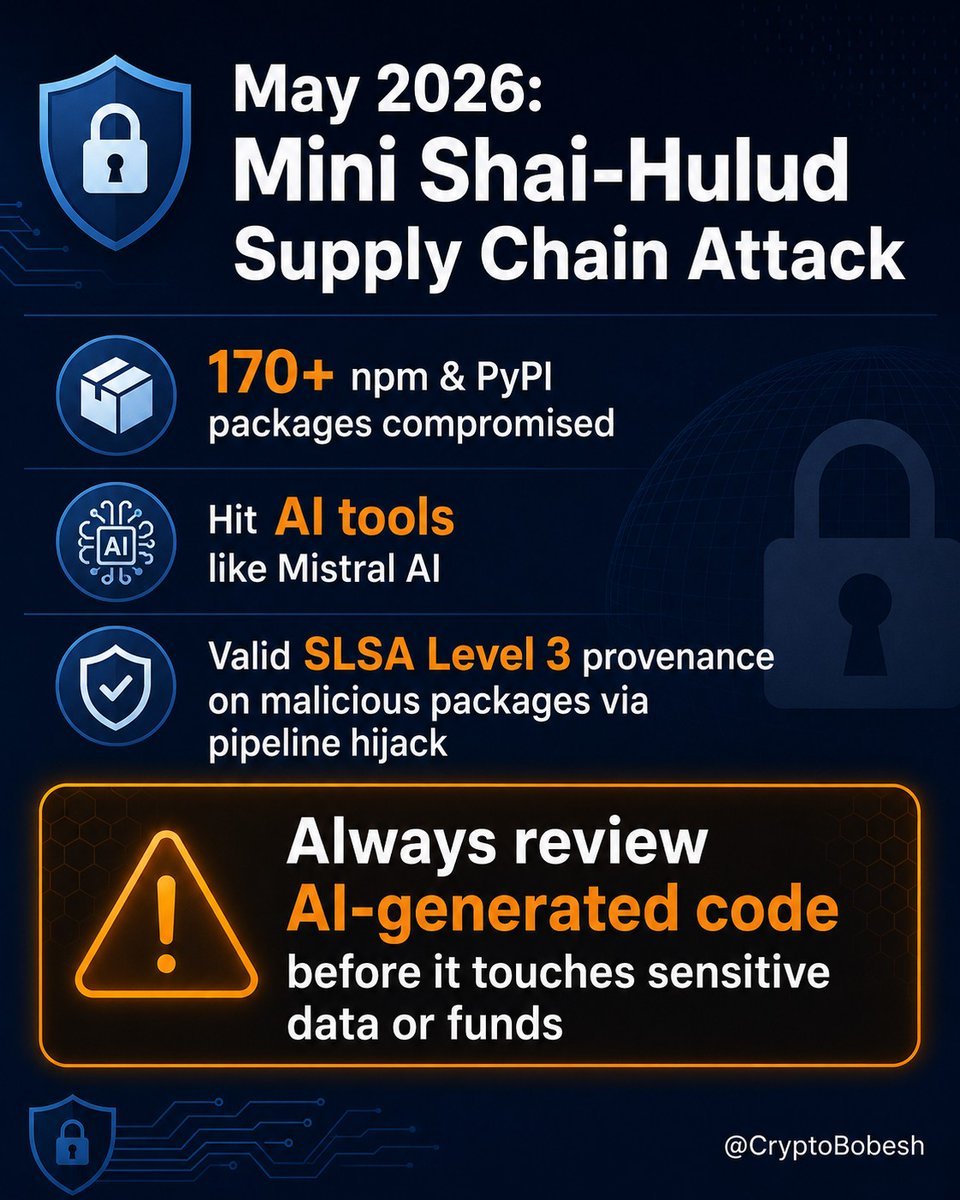
May 2026 Mini Shai-Hulud attacks prove the AI coding caution is essential. Over 170 npm and PyPI packages compromised, including Mistral AI SDK packages. Malicious versions had valid SLSA Level 3 provenance after pipeline hijacks. This highlights rapid attack surface expansion with AI tools. 40-60% of AI-generated code has serious flaws per studies. Vibe-coded apps have leaked data post-launch. Review all AI code yourself before sensitive data or funds access. Critical for crypto and DeFi builders. What is your process for securing AI code? Share below or bookmark.
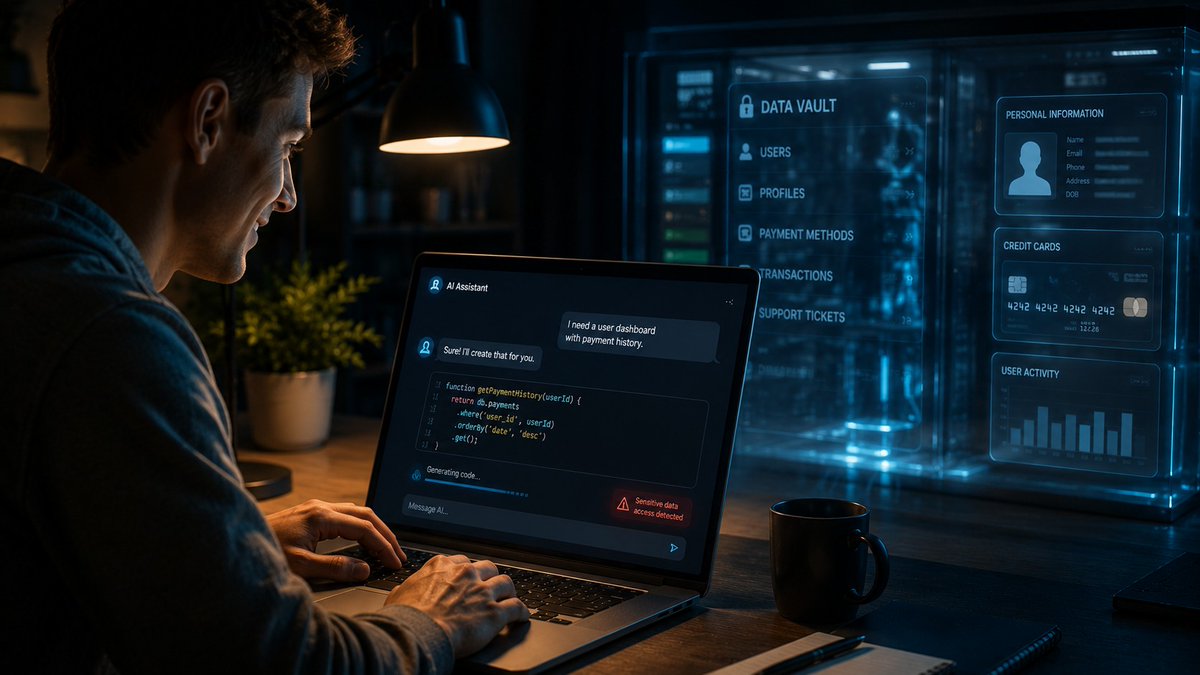
AI lets total beginners build real apps, websites, and scripts in minutes... but where’s the line we shouldn’t cross? Here’s my honest take. With the massive boom in vibe coding, ordinary people can now create surprisingly complex stuff just by "chatting" with AI. It’s brilliant. There's one rule I think every beginner should keep front of mind though: Never touch customer data or anyone else’s sensitive information if you don’t actually understand programming, software architecture and security. If you can’t properly review, test, or spot problems in the code an AI just wrote for you, then you shouldn’t be building anything (or running AI agent) that touches personal data. Full stop. One tiny mistake can lead to destroyed trust, credential leak, massive fines under laws like GDPR, and proper legal headaches. Even free plugins or extensions can be risky - some quietly contain dodgy instructions (prompt injections etc) that open doors you never meant to open. Treat AI-generated code as untrusted until verified. Don’t give AI tools access to sensitive information or allow them to process it. (Giving access to clients database, company email, drive with sensitive documents etc.) The goal isn’t to slow innovation down. It’s to stay responsible while the tools are evolving faster than most people realise. What do you reckon? Have you tried vibe coding yet? Drop your thoughts below - I read every reply! #VibeCoding #AISafety
135
⚠️Unconfirmed rumours are circulating about wider access to Claude Mythos / Mythos-class models. I could not find solid proof that this is happening today, despite the rumours spreading across X since yesterday. But in security, I prefer: Better Safe Than Sorry No panic. Just basic wallet hygiene: 1. Check your wallet approvals 2. Revoke old approvals 3. Revoke unlimited approvals 4. Revoke approvals you do not recognise 5. Be careful with DeFi positions you do not actively need exposed This is especially relevant for lending, yield farming, liquid staking and similar protocols - withdraw your funds to your (hardware) wallet address. More on revoking wallet approvals here: x.com/CryptoBobesh/status/20… Not fear. Just reducing unnecessary attack surface. I covered the Mythos topic here: 👇 #DeFiSecurity

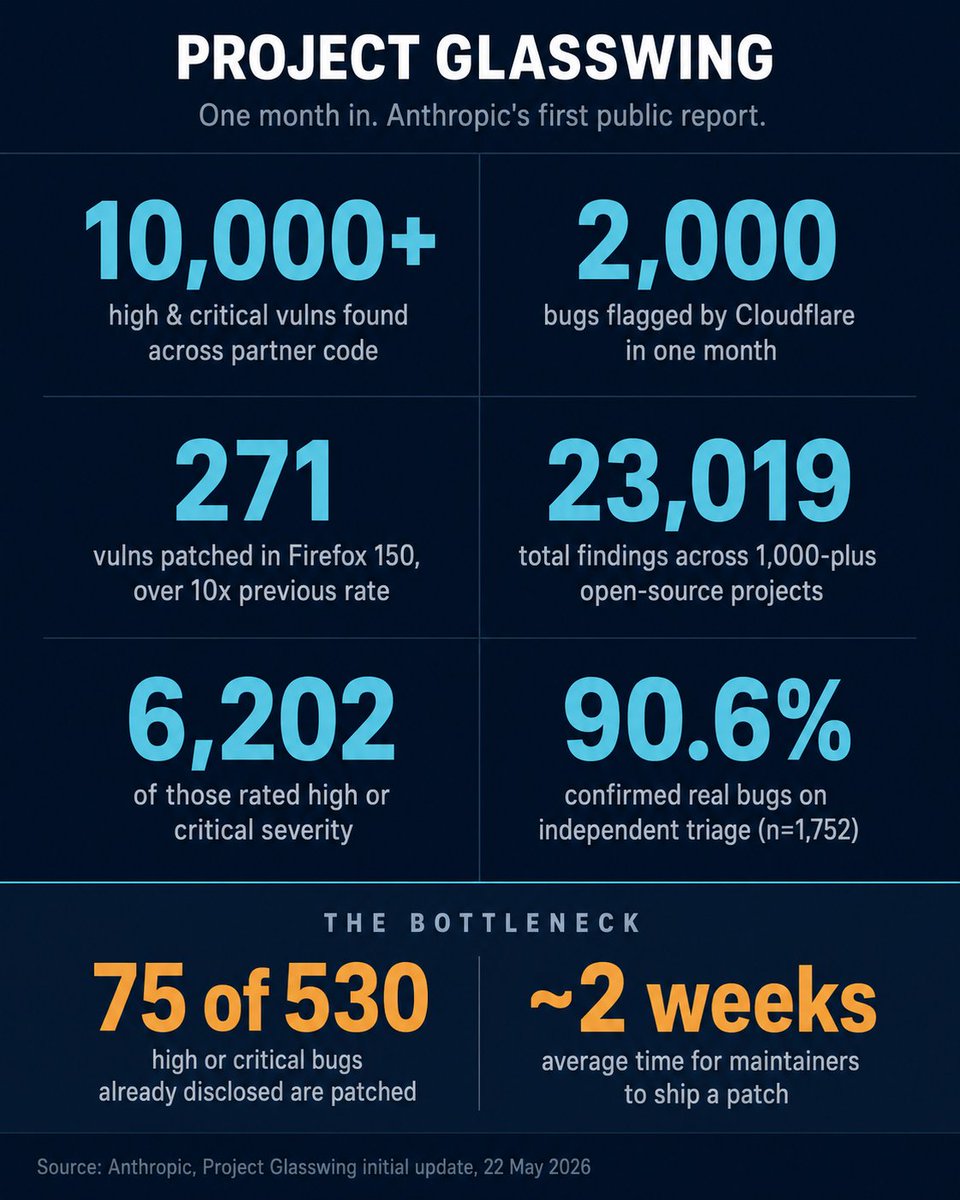
I exited DeFi in April. This week, two events made me think it was the right call. Both pointing the same direction. Four days apart. 1) Anthropic's Project Glasswing update (22 May) Around 50 partners got early access to an unreleased AI model Claude Mythos Preview. In one month: - 10,000 high or critical vulnerabilities found across partner codebases - Cloudflare flagged 2,000 bugs, 400 of them serious, with a lower false positive rate than human testers - Mozilla patched 271 vulns in Firefox 150 with Mythos Preview. That's over 10× what they found in Firefox 148 with Claude Opus 4.6 - UK AI Security Institute: Mythos is the first model to fully solve their end-to-end multi-step cyberattack scenarios - A partner bank blocked a $1.5M fraudulent wire transfer with help from the model On 1,000 open-source projects scanned by Anthropic in last few months: - 6,200 high or critical findings out of 23,019 total - Of 1,752 reviewed independently, 90.6% confirmed as real bugs and 62.4% confirmed as high or critical - Some maintainers asked Anthropic to slow down. They cannot patch fast enough. Of the 530 high or critical bugs Anthropic has disclosed to maintainers so far, only 75 have been patched. Average time to ship a patch: two weeks. Some maintainers asked Anthropic to slow down. Anthropic's own takeaway: finding bugs is no longer the bottleneck. Verifying, disclosing and shipping patches is. 2) Manuel Aráoz, co-founder of OpenZeppelin (26 May) He posted that he now considers all of DeFi unsafe and has advised friends and family to exit positions, including blue chips like Aave, Maker and Compound. His argument: coding agents are now superhuman at hunting vulnerabilities, and smart contract security is deeply asymmetric. Defenders must fix every bug. Attackers need one. Why this hits DeFi harder than most software: - Smart contract code is public. Attackers pay zero discovery cost. - Funds live inside the code. No human in the loop to stop an exploit mid-flight. - Once money moves on-chain, it is gone. No chargeback, no support line. - A clean audit from six months ago carries less weight than it used to. To be fair: Glasswing's published numbers were not aimed at smart contracts specifically. We have no hard data yet on how DeFi codebases would score against a Mythos-class model. That gap is part of the warning, not a comfort. My honest advice: If you are newer to crypto, or you do not have time to track this space daily, sitting in DeFi at today's yields is a hard trade to defend. If you are experienced, a position cut still looks rational to me. Yields have not moved up to price in this new risk profile. What would push your view in either direction? Curious what you are watching.
1
132
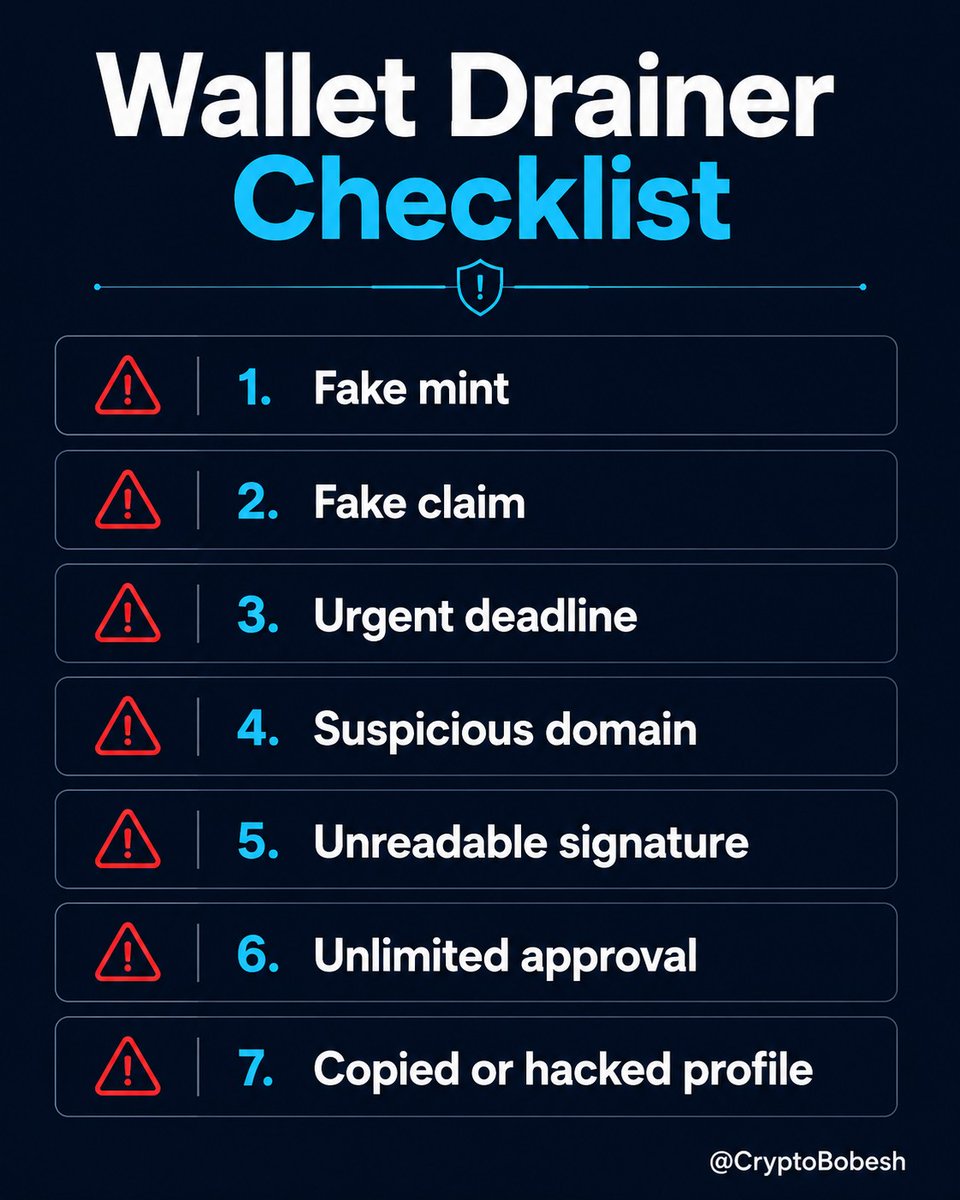
7 RED FLAGS that scream WALLET DRAINER 🔴 Before you mint, claim or "verify", pause for 30 seconds. These exact patterns are draining wallets right now: 1. A surprise free mint or airdrop you never followed. 2. "Claim now" urgent deadline / countdown timer. 3. Domain looks almost right... but has a sneaky typo or wrong TLD. 4. Signature request is vague, unreadable or feels off. 5. Asks for unlimited / infinite token approval. 6. You see Permit, Permit2 or SetApprovalForAll and you are not 100% sure why. 7. The link comes from a copied profile, hacked account or AI-looking announcement. Legitimate claims never rush you or require blind trust. Slow down. Check the domain. Read the wallet prompt. Use a burner wallet when testing. Bookmark this before your next mint - it might save your entire portfolio.
1
1
1
223
Extra tip: After connecting to any new site, immediately revoke approvals. More about approvals and revoking here 👇 x.com/CryptoBobesh/status/20…

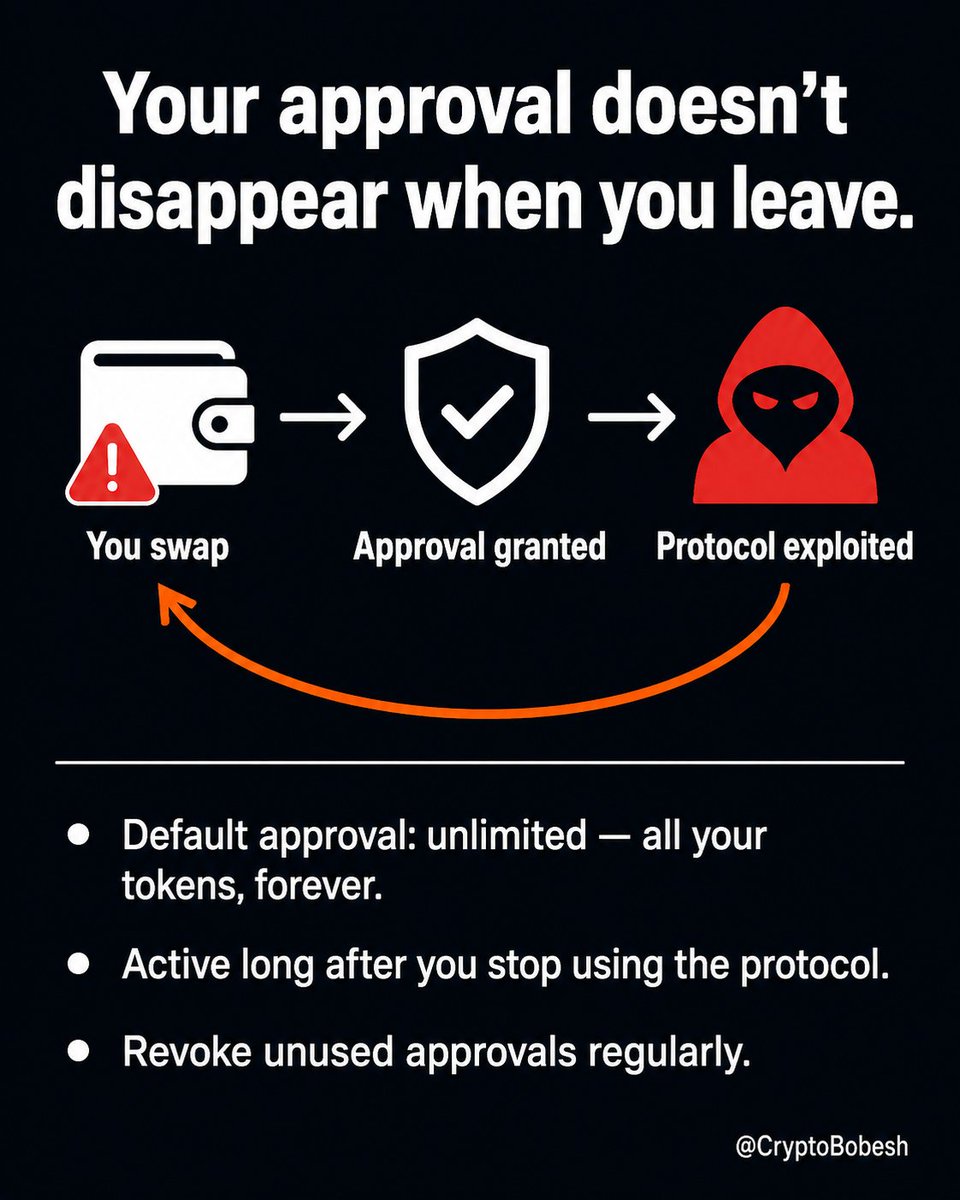
Six months ago, you swapped on a DEX. Then you stopped using the app. Moved your funds. Disconnected your wallet. You felt safe. That is what most people think. But that one swap left a door open. And it's probably still open right now. 1/5
98
bobesh · DeFi & OpSec retweeted
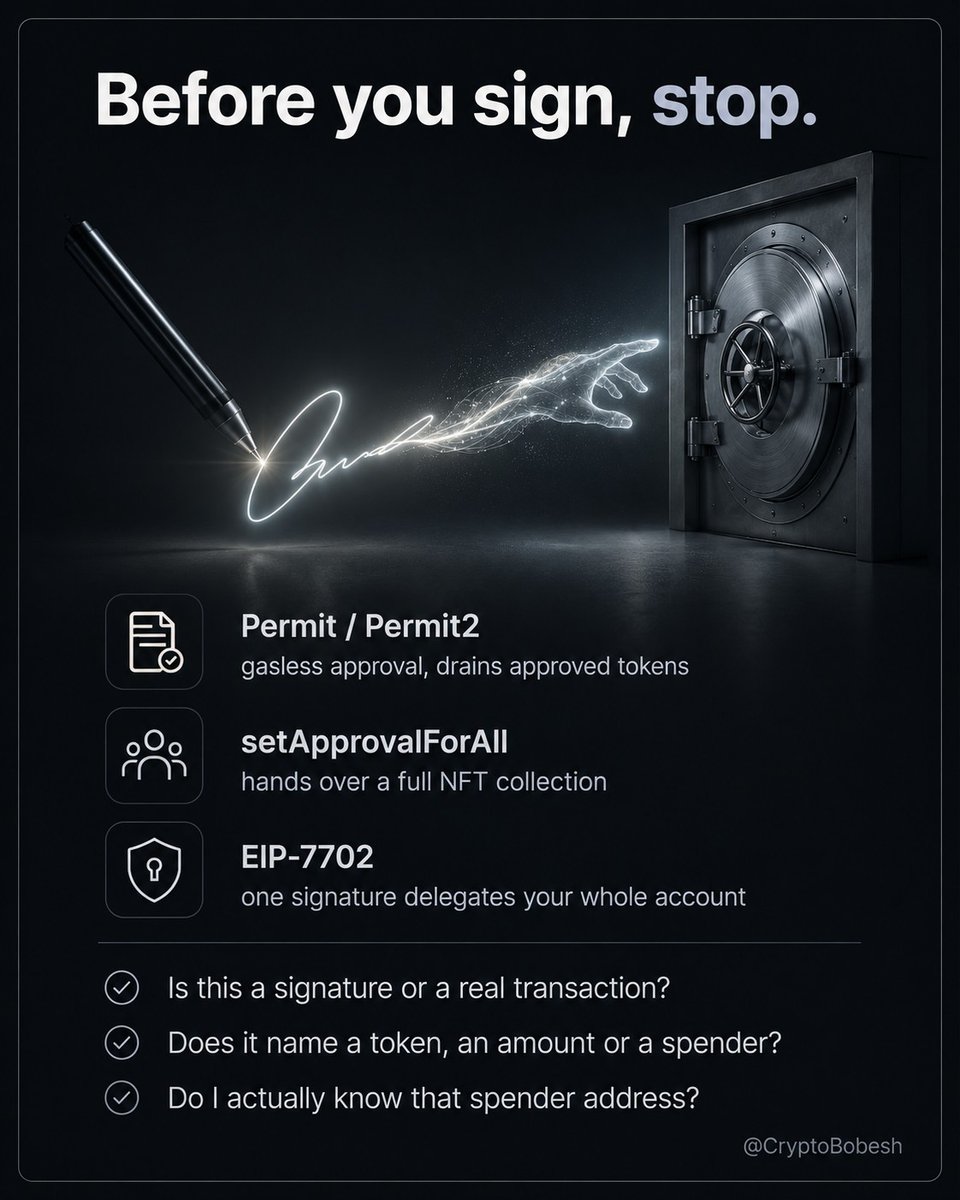
Gasless does not mean harmless. A wallet drainer no longer needs your seed phrase. It needs one signature you didn't read. Sign a fake "verify wallet" or "claim airdrop" prompt and your tokens can be moved with no gas and no transaction from you. The attacker submits it and cashes out later. The signatures doing the damage: - Permit / Permit2: a gasless token approval. One signature can let a spender take everything you've approved to it. - setApprovalForAll: hands over a whole NFT collection. - EIP-7702: since the Ethereum Pectra upgrade, one signature can point your entire account at a contract. Before you sign, ask: - Is this a signature or a real transaction? - Does it show a token, amount, spender, deadline or delegation address? - Do I know that spender or contract address? In 2025 a single Permit signature took $6.5M - the trick still works. A "free" signature that touches your tokens is the one to slow down on. Which of these have you been asked to sign? Tell me below, then bookmark this.
1
2
184
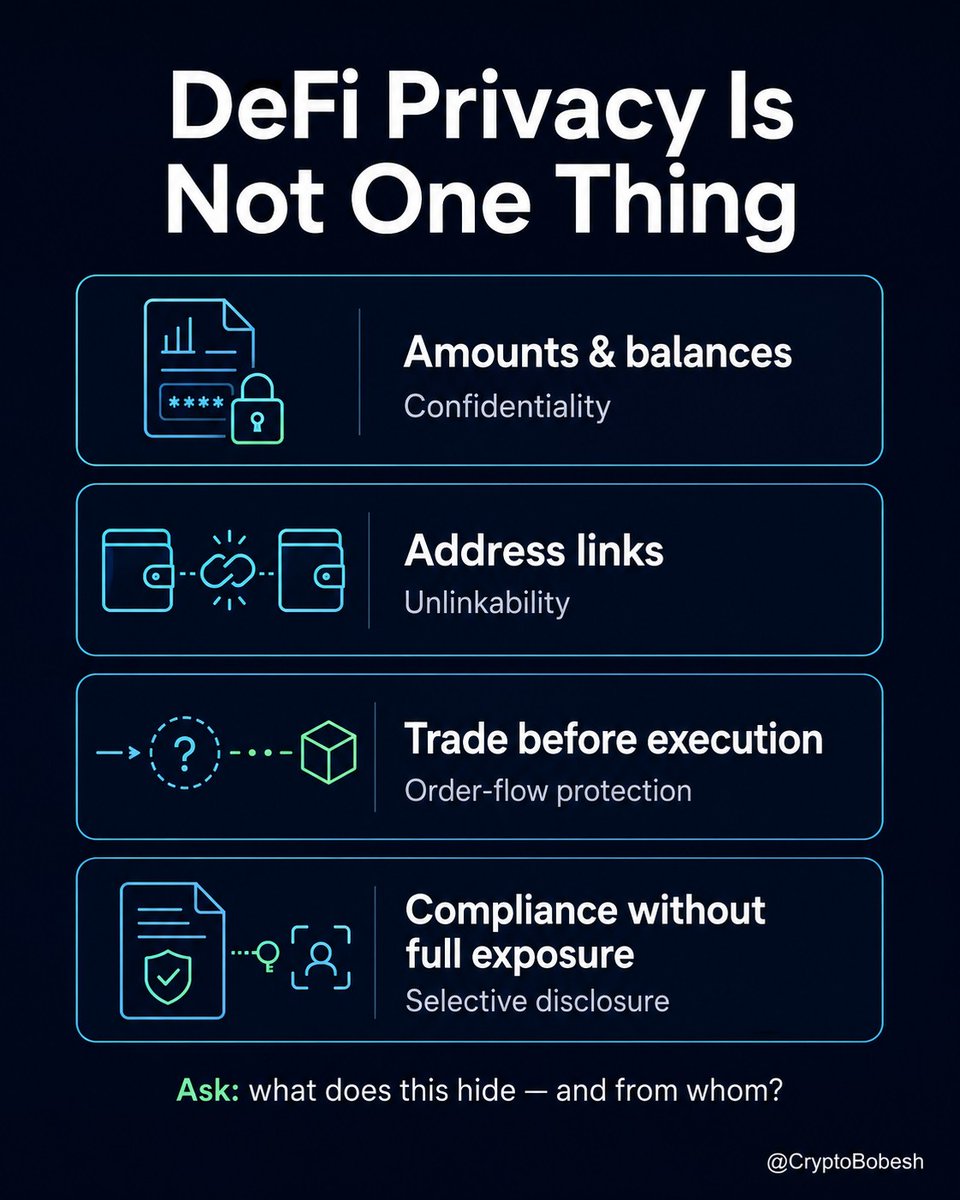
Zano is building privacy by default on L1 with Confidential Assets. The quoted post breaks down why "private DeFi" is never just one thing. Which layer matters most to you? @zano_project
Anyone can see your balance. Anyone can copy your trades. In 2026 you can finally hide some of that. But "private" is not one thing, and that is where it trips people up. Four different jobs get sold as one word. No tool does all of them: - hide your amounts and balance (confidentiality) - break the link between your addresses (closer to anonymity) - shield a trade before it lands (cuts front-running, not all MEV) - prove compliance without going fully public (selective disclosure) What is actually live: Railgun on Ethereum, native confidential transfers on Solana (amounts hidden, address still visible), newer private networks like Aztec, Zano - privacy by default L1 with Confidential Assets and other projects. All still early. None of it is perfect, and more privacy means more complex code, so treat new tools as new. The part most posts skip: privacy tooling carries legal risk. Tornado Cash was delisted in 2025, yet a developer was still convicted on a separate charge and the case rolls on. That is why the new wave is built on confidentiality with optional disclosure, not full anonymity, and why institutions can finally use it. So the question is never "is DeFi private now". It is: what exactly does this tool hide, and from whom? Reply with the one you care about most: amounts, the link, or front-running. Save this and run any "private DeFi" app through it before you trust it.
1
4
170
Anyone can see your balance. Anyone can copy your trades. In 2026 you can finally hide some of that. But "private" is not one thing, and that is where it trips people up. Four different jobs get sold as one word. No tool does all of them: - hide your amounts and balance (confidentiality) - break the link between your addresses (closer to anonymity) - shield a trade before it lands (cuts front-running, not all MEV) - prove compliance without going fully public (selective disclosure) What is actually live: Railgun on Ethereum, native confidential transfers on Solana (amounts hidden, address still visible), newer private networks like Aztec, Zano - privacy by default L1 with Confidential Assets and other projects. All still early. None of it is perfect, and more privacy means more complex code, so treat new tools as new. The part most posts skip: privacy tooling carries legal risk. Tornado Cash was delisted in 2025, yet a developer was still convicted on a separate charge and the case rolls on. That is why the new wave is built on confidentiality with optional disclosure, not full anonymity, and why institutions can finally use it. So the question is never "is DeFi private now". It is: what exactly does this tool hide, and from whom? Reply with the one you care about most: amounts, the link, or front-running. Save this and run any "private DeFi" app through it before you trust it.
1
290