
73 Photos and videos











🚀Welcome to DevCasta
The platform revolutionizing how devs grow and thrive in Web2 & Web3
📢Join our waitlist today and be part of the future of developer education
🔗devcasta.xyz/waitlist
#DevCasta #CodingLife #Web3Developers #BlockchainEducation #LearnToCode #GitHubChallenge
2
18
794
Devcasta retweeted

28 Aug 2025
We understand switching industries is a bold decision and that's why LEARNWAY guides you playfully into Blockchain, Cryptocurrencies, DeFi, NFTs, and more.
Comment ‘NEXT’ to get our free Web3 career map.

4
8
18
1,663
Devcasta retweeted

15 Jun 2025
A father to many, a leader, mentor, and friend. They say not all heroes wear capes, and if you’ve ever crossed paths with our founder, @Ebunayo08, you’ll know that’s true.
Today, we celebrate the incredible man behind Web3Bridge.
Happy Father’s Day to the one we proudly call our daddy. We love and appreciate you! 🤩❤️🚀
Retweet/Quote this post if you’ve ever been inspired, supported, or challenged (in a good way 😉) by him!
#FathersDay #Web3Bridge #Leadership #Mentor

7
12
193
2,902
DevCasta CEO @sam_osiyomeoh delivering a powerful message at Bringing Web3 to the Grassroot --empowering the next generation of developers and blockchain innovators across Africa.

7
87
Devcasta retweeted
7 Jun 2025
📣 Happening Today!
Web3 is coming to McPherson University!
Join us for “Bringing Web3 to the Grassroots” — powered by @DevCasta x @QuidStation x @LearnwayApp
🗓 Date: June 7
⏰ Time: 11:00 AM
📍 Venue: McPherson University
Expect insightful talks, hands-on workshops, free merch, and that unstoppable LearnWay Quiz Contest 🚀
Don’t miss out — the future of tech starts here! ❗

3
7
24
847
📣 It’s happening TOMORROW ❗️
Web3 is coming to McPherson!
Join us for “Bringing Web3 to the Grassroot” by @DevCastaHQ x @quidstation x @LearnwayApp
🗓 June 7 | ⏰ 11AM | 📍 McPherson Uni
Talks, workshops, merch & Web3 magic 🚀
Don’t miss out ❗
3
8
204

1
5
9
225
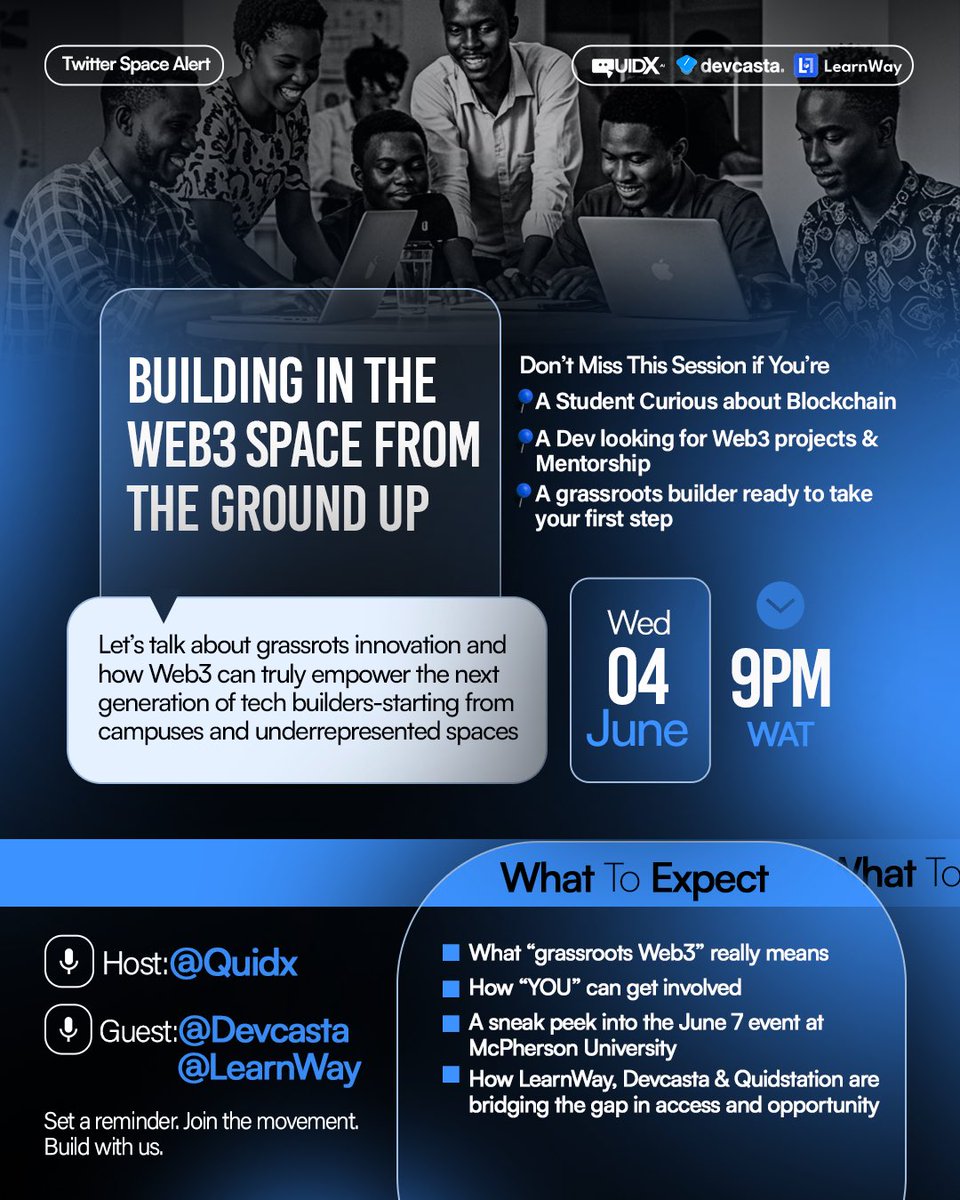
🚀 Web3 isn’t just for tech bros in hoodies — it’s for the campus, the curious, and the culture.
Tomorrow, we’re pulling up on X Space to talk:
“Building in the Web3 Space from the Ground Up”
🎯 This is the warm-up before the BIG day — June 7 @ McPherson University.
🔗 Tap to set reminder: twitter.com/i/spaces/1eaJbWV…
1
6
371
Devcasta retweeted
3 Jun 2025
So what at all are "crypto" assets, just like the ones you can buy/sell on @iExchangeP2P ?
🎯Daily Learning Tip - Level Up Your Knowledge with LearnWay

5
21
264
Devcasta retweeted
26 May 2025
Exciting News!
We’re thrilled to launch a 2-day quiz contest from today, May 26th to May 28th on the @LearnwayApp , in partnership with @Web3Bridge !
Join us to test your knowledge about LearnWay, @Web3Bridge and @LiskHQ , and stand a chance to win $USDT and exclusive invitations to the grand opening of the Web3 Garage.
Contest Rules & Rewards
1. Rewards:
The Top 10 participants will receive $USDT rewards.
5 lucky participants from @Web3Bridge will win exclusive invitations to the Web3 Garage grand opening.
2. Contest Structure:
The contest features 15 multiple-choice questions.
3. Scoring System:
Correct Answer: 5 points
Wrong Answer: -2 points
Bonus Points:
3 points for answering correctly within 3 seconds
1 point for answering correctly within 5 seconds
4. Leaderboard & Ranking:
A dedicated leaderboard will track all participants.
Rankings are based on total score.
In case of a tie, the participant who joined earlier will rank higher.
You’ve learned—now it’s time to earn!
Log in to the LearnWay app and click on the contest banner to join.
Good luck!

5
14
36
1,736
The first of many to come, introducing McPherson University Web3 Hub!
✅Web3 Development
✅Forex Trading
✅Crypto Trading
✅Airdrop Hunting
✅Content Writing
Clicking the link to start your money making journey in the Web3 Space
chat.whatsapp.com/HLXEOn53Cf…
#trending #web3news

3
11
177
You're not just learning, you're building a portfolio that speaks for itself.
The Web3 space is growing fast. With the right guidance and hands-on experience, landing a role isn’t just possible-it’s within reach.
✨Join DevCasta and start building your way into the Web3 future.
2
33
Here’s to fresh starts, bold builds, and new opportunities to grow in Web3 this May.
Keep learning, keep building - the future is being written in code.
✨ P.S. We’ve got something exciting cooking…
Stay tuned for big news from DevCasta! 🔥
#HappyNewMonth #DevCasta #Web3Community #CryptoEducation #SomethingBigIsComing
5
37
It’s easy to get distracted online, but real progress comes from learning by doing.
DevCasta offers practical Web3 education, hands-on development, and a supportive dev community.
🚀 Stop scrolling. Start building.
#Web3 #DevCasta #LearnToEarn #CryptoEducation
3
24
Debugging is all about tracking down and resolving issues in your code.
It's a vital skill for building stable, high-performing JavaScript applications.
💠Common Errors:-
Syntax Errors: These happen when the structure of your code is incorrect—like forgetting a bracket or misplacing a semicolon.
Logical Errors: These occur when the code runs without crashing but doesn’t behave as expected due to flaws in the logic.
💠Using console.log():-
A simple yet powerful way to debug-use console.log( ) to print variable values and track your code’s flow in the console.
💠Setting Breakpoints:-
Pause code at specific lines using your browser’s dev tools.
Great for tracking down bugs efficiently.
💠“debugger” Keyword:-
Place debugger in your code where you want to pause execution. It helps you inspect variables and the program state in real time.
Perfect for tracking down tricky bugs.
💠Async Code Debugging:-
Requires a good grasp of Promises and the event loop.
Use .catch( ) to properly handle errors in Promises, and leverage async/await with try-catch blocks for cleaner, more readable debugging.
💠Browser DevS Tools:-
Your browser’s developer tools are powerful allies when it comes to debugging.
Using Network tab to track API calls, view real-time responses, and pinpoint issues in communication between your frontend and backend.
💠Debugging Best Practices:-
Use clear, descriptive variable names
Keep functions short and purposeful
Add unit tests to catch issues early
3
40