
Denver Digital Marketing Agency
Joined March 2019
- Tweets 509
- Following 1,864
- Followers 307
- Likes 969
19 Photos and videos











Empathy First Media retweeted

5 Mar 2024
(7/7) Insert Code Snippet & Execute
Step 8: Define Parameters for the Code to Execute
Language: Node.js 16 x
Secrets: HubSpot Access Key from Private App
Secret Constant defined as "secretName"
Property to include in code: Define the constant as “phone,” which is equal to the “phone number” property in the contact object
HubSpot Client: v3
Step 9: Copy & Paste This Code Snippet, Then Test the Workflow
Code Snippet:
const DEDUPE_PROPERTY = 'phone';
const hubspot = require('@hubspot/api-client');
exports.main = async (event, callback) => {
try {
const hubspotClient = new hubspot.Client({
accessToken: process.env.secretName
});
const contactResult = await hubspotClient.crm.contacts.basicApi.getById(event.object.objectId, [DEDUPE_PROPERTY]);
let dedupePropValue = contactResult.body.propertie…[DEDUPE_PROPERTY];
console.log(`Looking for duplicates based on ${DEDUPE_PROPERTY} = ${dedupePropValue}`);
const searchResults = await hubspotClient.crm.contacts.searchApi.doSearch({
filterGroups: [{
filters: [{
propertyName: DEDUPE_PROPERTY,
operator: 'EQ',
value: dedupePropValue
}]
}]
});
let idsToMerge = searchResults.body.results
.map(contact => contact.id)
.filter(vid => Number(vid) !== Number(event.object.objectId));
if (idsToMerge.length > 0) {
console.log(`Found multiple potential contact IDs to merge: ${idsToMerge.join(', ')}`);
// Merge all contacts into the first one found
for (let i = 1; i < idsToMerge.length; i ) {
await hubspotClient.apiRequest({
method: 'POST',
path: `/contacts/v1/contact/merge-vids/${idsToMerge[0]}`,
body: {
vidToMerge: idsToMerge[i]
}
});
console.log(`Merged contact id=${idsToMerge[i]} into contact id=${idsToMerge[0]}`);
}
} else {
console.log('No matching contact, nothing to merge');
}
} catch (error) {
console.error('An error occurred:', error);
}
};
1
1
98
Empathy First Media retweeted
5 Mar 2024
(6/7) Private App In HubSpot
Step 7: HubSpot Workflows
Action: Returning to HubSpot Workflows now, add a delay of 5 minutes to low Zapier and HubSpot sync, and update the phone number value.
Note: Depending on your Zapier plan, this value could be higher; I am on the top-tier plan, so it happens almost instantly for me and my development team.
Step 8: Create a Private App & Secret Key
Go to the developer console, create a private app, and copy the private key that will be used to authenticate the CRM Database.
1
1
70
Empathy First Media retweeted
5 Mar 2024
(5/7) Zapier Workflow To Standardize Phone Number
Step 3: Zapier
Action: Send a post webhook to Zapier to catch the rawhook.
Step 4: Zapier
Action: Catch hook using functionality by Zapier.
Step 5: Zapier
Action: The number is formatted by Zapier to standardize the number to the format of 1 555-800-1212 (International)
Step 6: Zapier
Action: Using Zapier, update contact in HubSpot with update phone number value.
1
1
64
Empathy First Media retweeted
5 Mar 2024
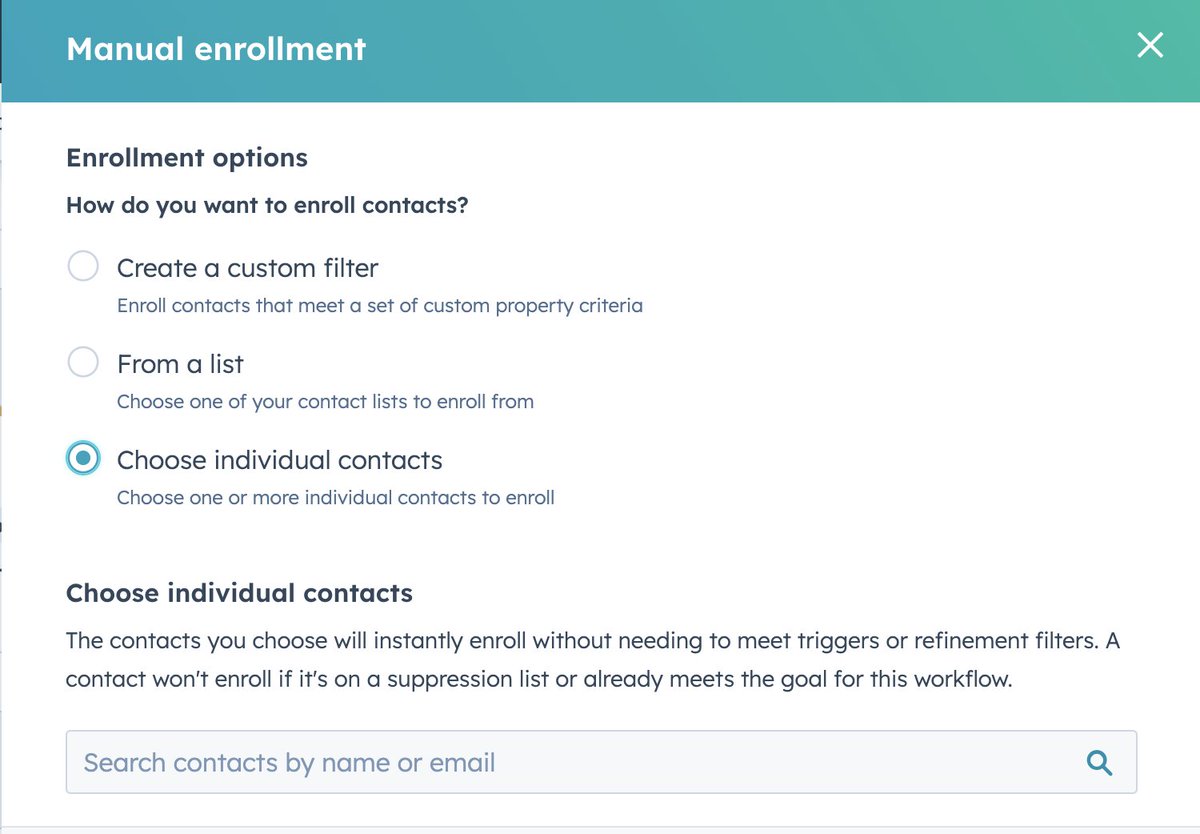
(4/7) Validation & Test Contact
Using the HubSpot test contact functionality, use a test contact to verify that you understand how the Data OPS module works and have a control variable as we move forward.
1
1
59
Empathy First Media retweeted
5 Mar 2024
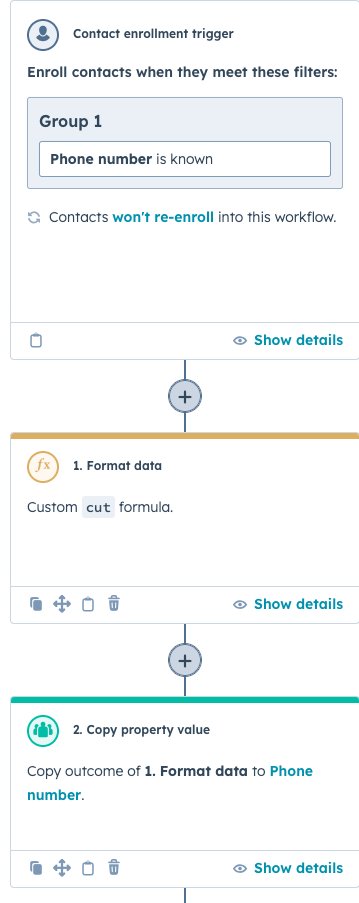
(3/7) Workflow Trigger & Formatting
Trigger: Phone Number is known
Step 1: HubSpot Workflows
Action:
Format Data using Ops Hub with the following snippet.
cut(cut(cut(cut(cut(cut([phone], "-"), "("), ")"), "*"), "&"), "#")
Step 2: HubSpot Workflows
Action: Copy outcome of Format Data to phone number and update number values with no characters in the phone number for a raw numerical value in the string.
1
1
48
Empathy First Media retweeted
5 Mar 2024
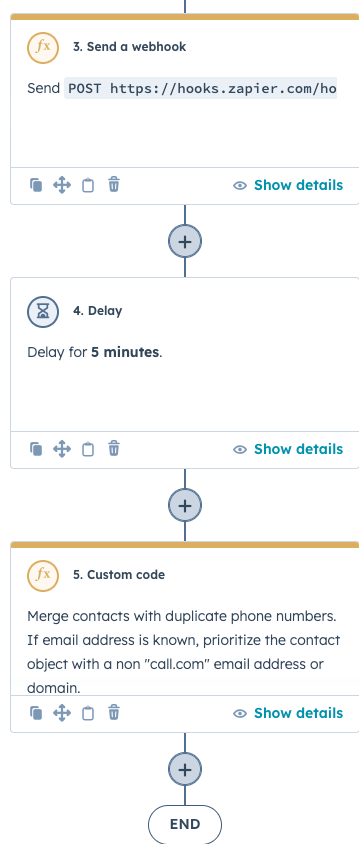
(2/7) Solution:
Using HubSpot workflows, I created a code snippet that executes in the HubSpot workflows utilizing the custom code functionality of Operations Hub to automatically run every phone number added to the HubSpot CRM to identify duplicates.
I have also attached 2 screenshots for a high-level overview of the workflow.
1
1
70
Empathy First Media retweeted
5 Mar 2024
(1/7) Define The Problem:
When a lead calls in via a CallRail phone number, the contact in the HubSpot CRM will be created as number@callrail.com or with no email address at all, depending on the settings configured in the HubSpot integration settings of CallRail.
1
1
68

13 Jan 2024
Enhancing Visibility: Community Health Center Public Relations
empathy.social/3HiYGmR
20
13 Jan 2024
Premier Legal Consulting PR Experts | High-Value Legal Consulting Public Relations
empathy.social/41VMgee
1
56
12 Jan 2024
Optimize Your Image with a Clinical Research Organizations Public Relations Firm
empathy.social/48uB2Qd
28