Dart on the frontend. Dart on the backend. Dart everywhere. ๐ฏ
With Dart support now in @Firebase Cloud Functions and the Admin SDK, the dream of a unified Dart stack is officially here.
Time to go full-stack, #FlutterDevs! ๐
Cloud Functions and Admin SDK for Firebase now supports Dart as an experimental feature ๐ฏ
This means Flutter developers can use the same programming language throughout their whole stack and share logic between the frontend and backend.
ALT The Dart logo and the word "Dart" are positioned on the left, separated by a vertical line from an orange circle icon containing curly braces and dots followed by the text "Cloud Functions" on the right. This graphic represents the integration or support of the Dart programming language within Google Cloud Functions.
My last Flutter & AI newsletter of the year is out!
๐ฑ Flutter GenUI SDK
โก๏ธ Build Runner Speedups
๐๏ธ 2025 LLM Year in Review
๐ MCP Becomes an Open Standard
๐ Running AI Agents safely inside a DevContainer
You can read it here:
codewithandrea.com/newsletteโฆ
After a few headaches, I'm now able to run both Claude Code and Flutter within a sandboxed dev container.
This is great for both safety ๐ก๏ธ and speed ๐
Here's a detailed guide with my complete setup (source code included) ๐
codewithandrea.com/articles/โฆ
I'm working on a new video about essential folders I use for agentic AI coding.
I'll cover my workflow for:
1๏ธโฃ staying organized
2๏ธโฃ getting consistently good results
3๏ธโฃ reducing friction when coding with AI
Should be out next week! ๐๏ธ
ALT Top 3 Folders for Agentic AI coding in Flutter
ai_???
ai_specs
ai_docs
To all of our AMAZING VS & VS Code users...
THANK YOU!
Our official celebration may be coming to an end, but we as Visual Studio and VS Code developers are just getting started. Don't forget to request your official t-shirt. Reply with โค๏ธ #VS50M#sweepstakes for your chance to win.
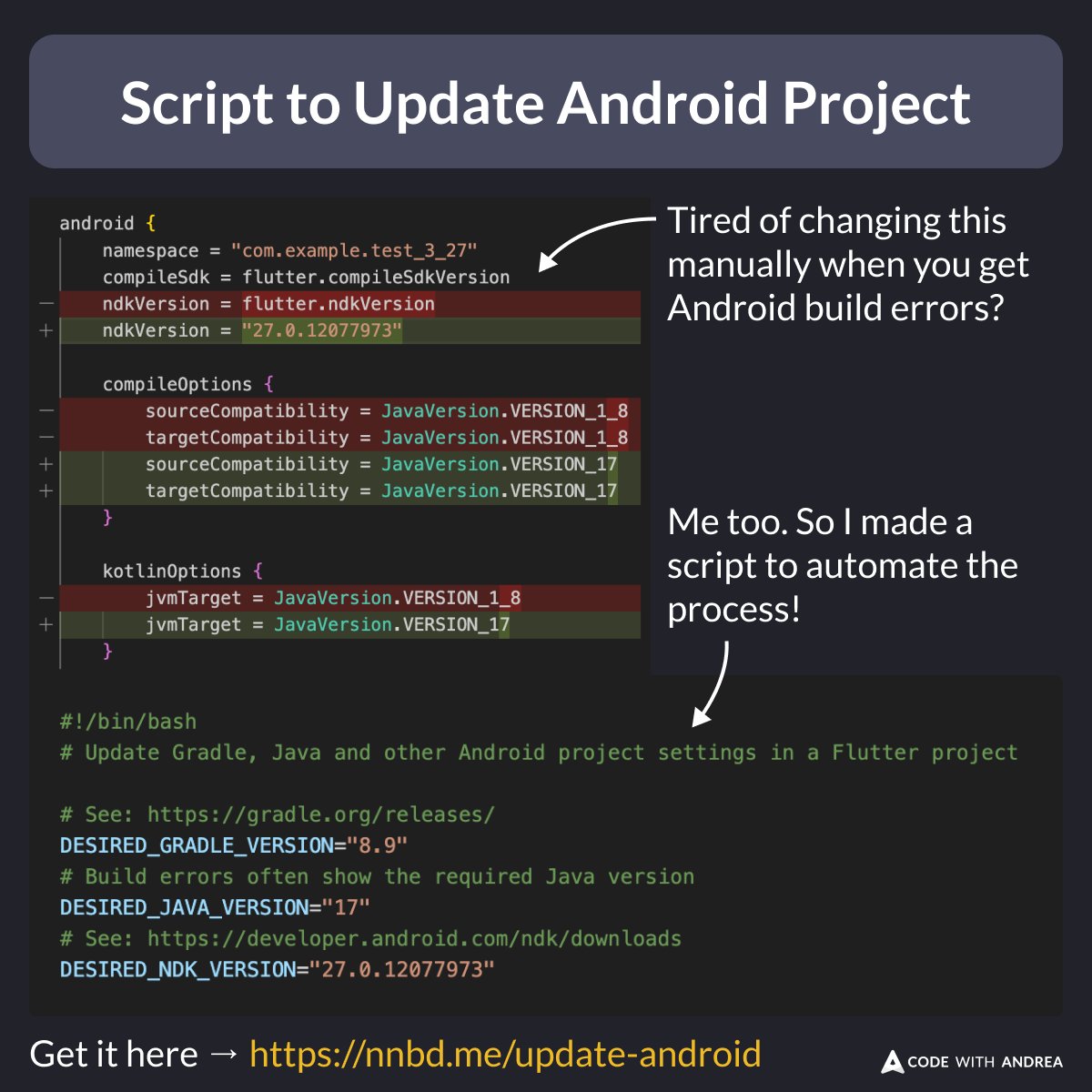
Tired of dealing with Gradle and other build errors on Android? ๐คฎ
Me too! So, I built a script to fix it all at once:
- Gradle version
- Java version
- NDK version
- Min SDK
- Target SDK
The result? Faster updates and fewer headaches. ๐
ALT Tired of doing this manually?
android {
namespace = "com.example.test_3_27"
compileSdk = flutter.compileSdkVersion
- ndkVersion = flutter.ndkVersion
ndkVersion = "27.0.12077973"
compileOptions {
- sourceCompatibility = JavaVersion.VERSION_1_8
sourceCompatibility = JavaVersion.VERSION_17
- targetCompatibility = JavaVersion.VERSION_1_8
targetCompatibility = JavaVersion.VERSION_17
}
kotlinOptions {
- jvmTarget = JavaVersion.VERSION_1_8
jvmTarget = JavaVersion.VERSION_17
}
...
}
# Script to update Gradle, Java and other Android project settings in a Flutter project
# See: https://gradle.org/releases/
DESIRED_GRADLE_VERSION="8.9"
# Build errors often show the required Java version
DESIRED_JAVA_VERSION="17"
# See: https://developer.android.com/ndk/downloads
DESIRED_NDK_VERSION="27.0.12077973"
Optimize your Flutter apps with DevTools ๐ฏ
This suite of tools provides:
๐ฉโโ๏ธ Precise UI performance insights
๐ต Detailed memory debugging
๐จโ๐ฌ In-depth code and app size analysis
Learn how DevTools can enhance your development workflow โ goo.gle/3PbC5xn
ALT GIF looping through different screenshots of Dart DevTools.
I recently presented a talk about lessons learned from launching my Flutter Tips app, covering:
โ Working with Markdown in Flutter
โ Using GitHub as a data source
โ Error monitoring, analytics, force updates...
โ Marketing & ASO
Check it out here ๐
youtu.be/neZ6bKbjE30?si=woaEโฆ
Quick "dev checklist" for checking memory leaks by missing disposal!
[ ]Are all controllers & subscriptions disposed?
[ ]Are added listeners removed?
[ ]Are you disposing resources where they were created?
[ ]Are you calling super.dispose() at the end?
โก๏ธdcm.dev/blog/2025/03/24/fiftโฆ
Did you know?
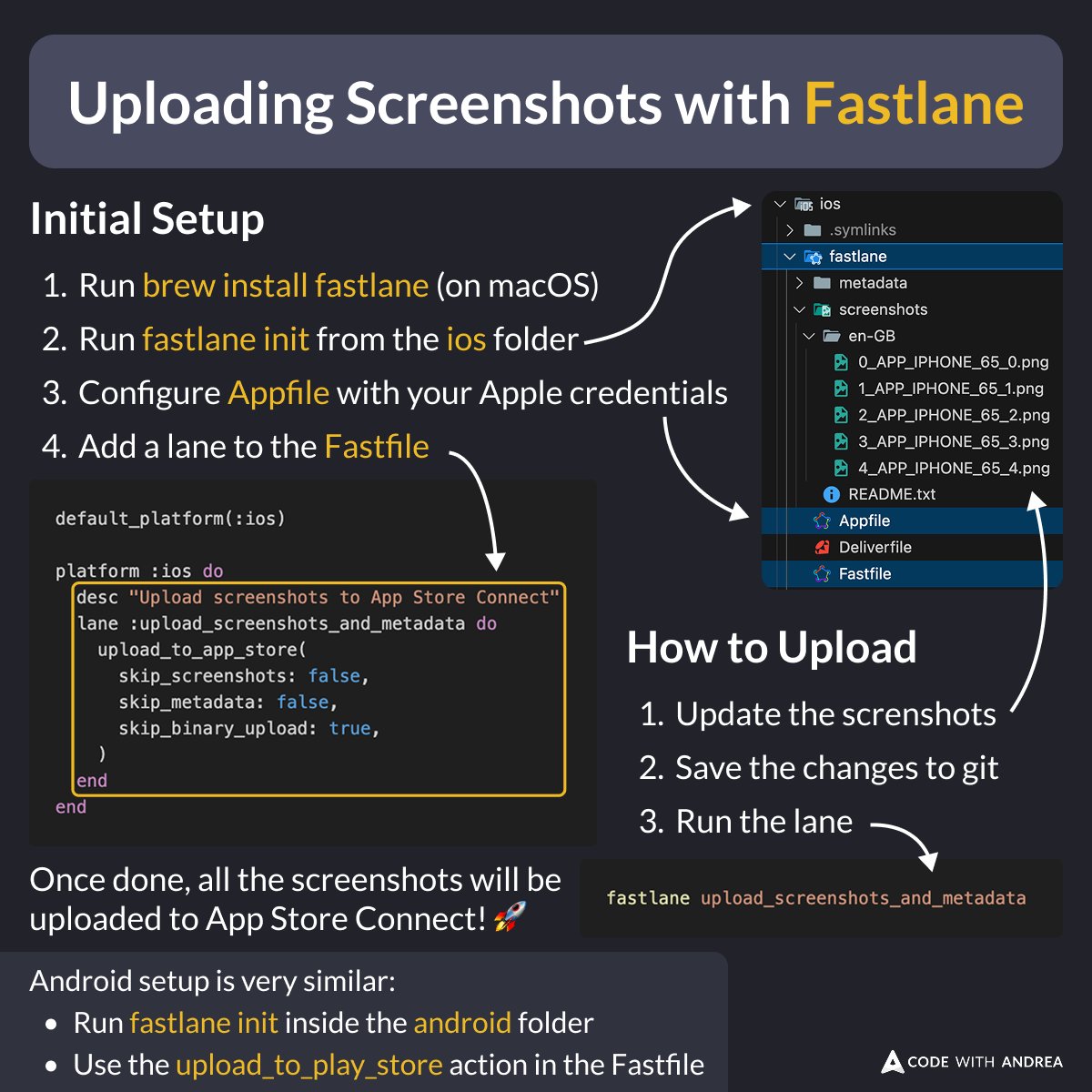
Rather than uploading your app store screenshots manually, you can automate the process with Fastlane!
Here's how ๐
ALT Initial Setup:
1. Run `brew install fastlane` (on macOS)
2. Run `fastlane init` from the ios folder
3. Configure `Appfile` with your Apple credentials
4. Add a lane to the `Fastfile`
default_platform(:ios)
platform :ios do
desc "Upload screenshots to App Store Connect"
lane :upload_screenshots_and_metadata do
upload_to_app_store(
skip_screenshots: false,
skip_metadata: false,
skip_binary_upload: true,
)
end
end
How to Upload:
1. Update the screenshots
2. Save the changes to git
3. Run the lane
fastlane upload_screenshots_and_metadata
Once done, all the screenshots will be uploaded to App Store Connect! ๐
Android setup is very similar:
- Run fastlane init inside the android folder
- Use the upload_to_play_store action in the Fastfile
All the new lessons are part of my Flutter in Production course, which is currently 25% off.
You can learn more about it here and grab your copy before the price goes up on Thursday:
codewithandrea.com/courses/fโฆ
Just published a new guide about automated screenshot generation in Flutter! ๐ธ
It's the most up-to-date resource on this topic, covering:
โ Capturing screenshots with Maestro
โ Editing them with Figma
โ Uploading to the stores with Fastlane (locally & on CI)
Preview ๐
Check out new documentation on dart.dev!
We added a new, highly-requested section on using records with typedefs: goo.gle/41qvghu
And another section describing our new and improved type system algorithm, inference using bounds: goo.gle/41uFGgo
The latest version of my Flutter Tips app was released with Shorebird!
It's pretty stable by now, but let me know if you find a bug... it should be pretty quick to patch. ๐
fluttertips.dev/
Dart 3.7 is here! Weโve got wildcard variables, new formatter style, cool updates to pub.dev, plus all the ways weโre continuing to make Dart the best it can be. Read all about 3.7 in our blog post: goo.gle/dart37
Want to level up your scrolling game in Flutter?
Here's a new UI challenge, where you have to sync the selected page between a PageView and ListView (and viceversa).
Link below ๐
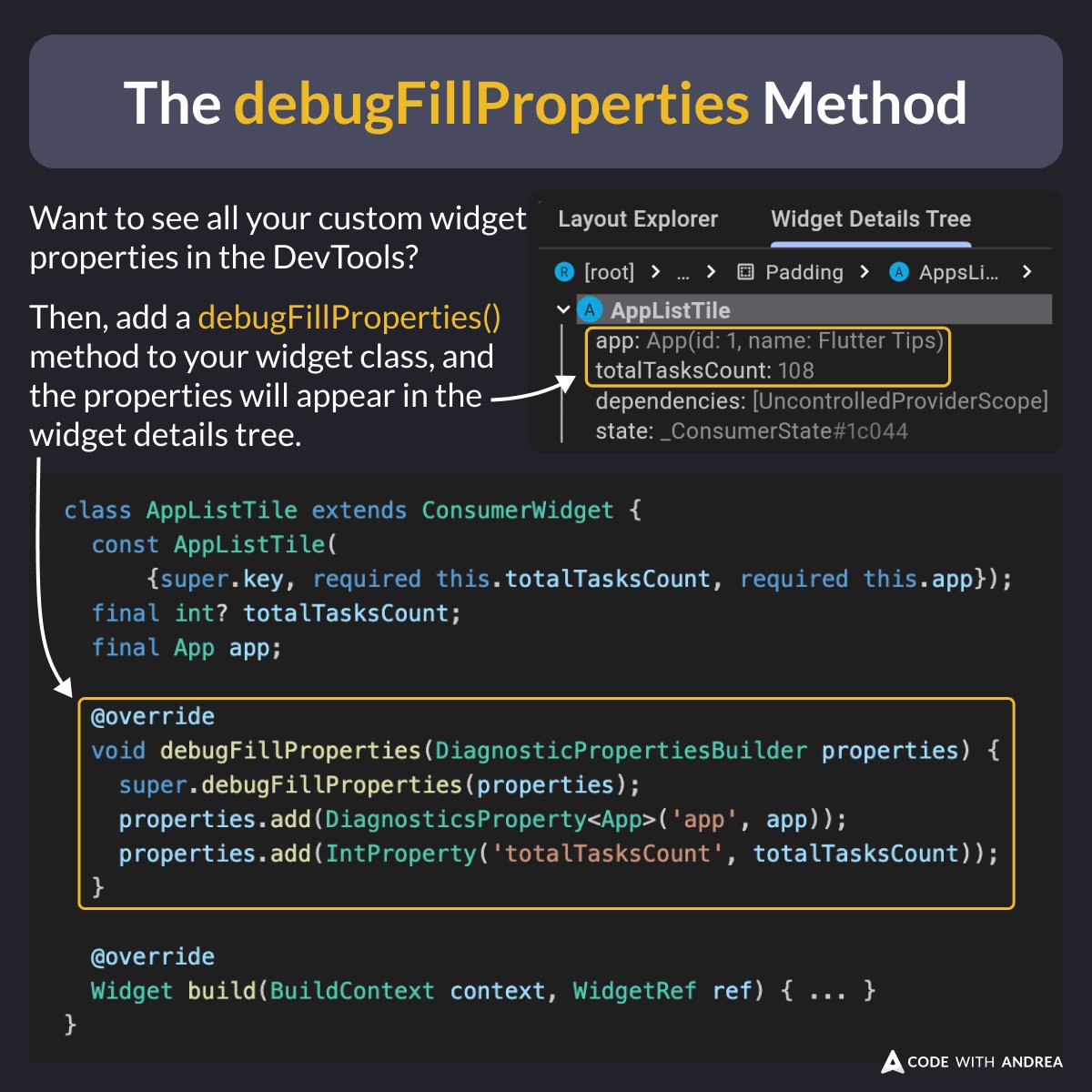
Did you know?
If you add a debugFillProperties() method to your widget classes, all your custom properties will show in the DevTools.
This information is useful for debugging purposes, and has no performance impact on release builds (where it is stripped).
ALT class AppListTile extends ConsumerWidget {
const AppListTile(
{super.key, required this.totalTasksCount, required this.app});
final int? totalTasksCount;
final App app;
@override
void debugFillProperties(DiagnosticPropertiesBuilder properties) {
super.debugFillProperties(properties);
properties.add(DiagnosticsProperty<App>('app', app));
properties.add(IntProperty('totalTasksCount', totalTasksCount));
}
@override
Widget build(BuildContext context, WidgetRef ref) { ... }
}
Just launched a new version of my Flutter Tips app. ๐
It's built with the 3.27.1 release so it should be quite smooth on Android (where Impeller is now enabled by default). โจ
Take a look and get 200 Flutter tips in your pocket. ๐ฏ
fluttertips.dev/
Did you know?
If you want to render fixed width (monospaced) digits, set FontFeature.tabularFigures() inside your TextStyle. ๐ฏ
This works great when showing numbers and dates that should align vertically or update in realtime! ๐ฅ
ALT Text(
currentTimeFormatted,
style: const TextStyle(
// Set this font feature to ensure all digits are rendered with a fixed width (monospace)
// Useful when showing numbers or dates that update in realtime
fontFeatures: [FontFeature.tabularFigures()],
fontFamily: "Roboto",
fontSize: 48,
fontWeight: FontWeight.w700,
),
)