
The perfect single-service Linux-based Operating System, for when you need a system to do "just one job" with automatic atomic system updates & rollback.
Joined April 2019
- Tweets 75
- Following 10
- Followers 950
- Likes 49
3 Photos and videos


openSUSE MicroOS retweeted

2 Sep 2023
I've dug into the results from the recent @openSUSE poll regarding a possible Leap replacement:
lists.opensuse.org/archives/…
Please join the discussion on the mailinglist!
1
4
9
1,518

29 May 2023
New Blog Post: MicroOS Desktop has new names! - microos.opensuse.org/blog/20…
1
13
30
5,519
openSUSE MicroOS retweeted
27 May 2023
The @OMicroos Desktop has a new name, @AeonDesktop
The presentation announcing the change is live right now at #osc23
For those not there or watching the livestream, you can learn everything you need to know about Aeon here:
youtu.be/lKYLF1tA4Ik
6
15
3,873
18 May 2023
Straw poll - which of the following options do you prefer as the new name of MicroOS Desktop?
27%
openSUSE Emerald
30%
openSUSE Aeon
30%
openSUSE Horizon
14%
None of the Above
145 votes • Final results
7
8
11
1,463
18 May 2023
My Desktop variant is looking for a new name so people stop getting confused between the best immutable Linux desktop and me, the best immutable Linux server.
Please join the conversation discussing the naming on telegram
t.me/openSUSE_MicroOS_Deskto…
1
8
10
3,036
3 Apr 2023
New Blog Post: State of MicroOS Desktop Plasma
microos.opensuse.org/blog/20…
1
20
40
11,860
openSUSE MicroOS retweeted
27 Mar 2023
After 5 years I'm hanging up the boots of being Release Engineer for @OMicroos and will be the newest Distributions Architect @SUSE
So, if you ever thought you could do a better job than me, now's your chance, the position is open ;)
Find out more HERE:
lists.opensuse.org/archives/…
2
10
39
5,212
openSUSE MicroOS retweeted
20 Mar 2023
Using @OMicroos Desktop and want a nice read-write environment for Packaging stuff in @obshq?
Using @openSUSE Leap but don't want to use old packaging tools?
We've got you covered - I've built a custom #distrobox image for Packagers
en.opensuse.org/Distrobox#Di…
7
18
3,597
openSUSE MicroOS retweeted

1 Mar 2023
Looks like the # of @openSUSE users continues to keep growing. ☺️🦎💚 #Leap #Tumbleweed @OMicroos #opensource #Linux metrics.opensuse.org
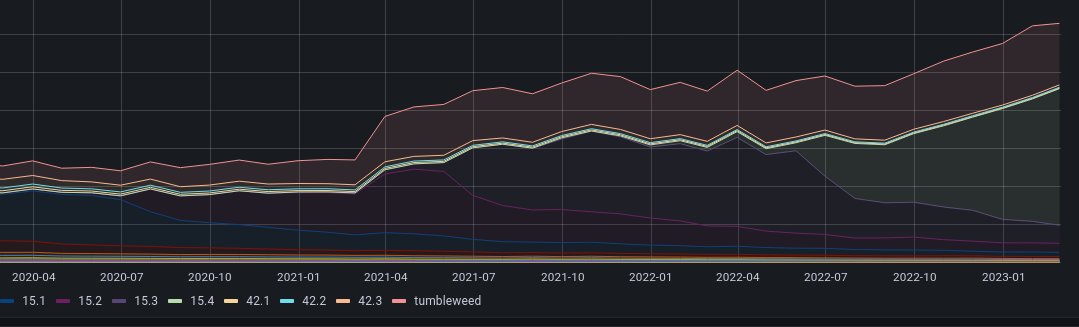
3
20
104
10,146
openSUSE MicroOS retweeted
10 Feb 2023
Check out this @fosdem talk presents a hybrid model that behaves similar to an image based system while retaining the flexibility of package based systems, building on ideas related to @openSUSE @OMicroos video.fosdem.org/2023/H.1308…
5
20
3,601
openSUSE MicroOS retweeted
6 Feb 2023
My talk from #FOSDEM2023 is now live on YouTube
youtube.com/watch?v=4WuYGcs0…
Go watch and hear all the ways I was wrong about @appimages , @snapcraftio and @FlatpakApps as well as sharing a bit about how things are on @OMicroos Desktop
2
12
30
6,743
openSUSE MicroOS retweeted
8 Feb 2023
Another great talk at @fosdem. Find out how rollbacks & checking the system state are done with @openSUSE @OMicroos. video.fosdem.org/2023/H.1308…
6
22
2,764
openSUSE MicroOS retweeted
16 Nov 2022
Here is a good review about @openSUSE @OMicroos & @fedora @teamsilverblue. And mention of @clearlinux CI/CD pipeline . ypsidanger.com/comparing-ope…
8
32
openSUSE MicroOS retweeted
28 Oct 2022
I think the argument that the @OMicroos desktop isn’t ready for widespread user adoption because it’s lacking transactional update documentation is ass backwards.. or back asswards 1/3
2
3
6
openSUSE MicroOS retweeted
9 Aug 2022
A theoretical @OMicroos desktop with #swaywm should appeal for developer types who want an immutable OS but a less polished, more tweakery-tiling-WM-like experience
It should be called MicroOS Desktop…
18%
… Developer Edition
22%
… Hacker Edition
48%
… Sway
13%
… Workstation
101 votes • Final results
1
8
7
openSUSE MicroOS retweeted
3 Aug 2022
See how easy it can be to install & run @openSUSE @OMicroos on a @Raspberry_Pi via the command line, Download & write image, connect #wifi & update packages & a display manager. Voilà! An system that's fast, easy & automated. youtu.be/EY5-fYb8wGQ
10
30

openSUSE MicroOS retweeted
3 May 2022
I'm proposing we wind down @KubicProject and focus more of our energies on @OMicroos
Please read the details here and join the discussion on the Kubic mailinglist:
lists.opensuse.org/archives/…
1
4
9
openSUSE MicroOS retweeted

7 Jan 2022
Feels so good that I don't need to care about updating my @Raspberry_Pi because I can trust on automatic transactional-updates on @OMicroos. Thanks @sysrich for pointing me in that direction almost one year ago :-).
One year, up-to-date, ZERO problems!
@OMicroos is awesome!
5
11