
Joined November 2017
- Tweets 348
- Following 71
- Followers 69
- Likes 149
276 Photos and videos













24 Jun 2025
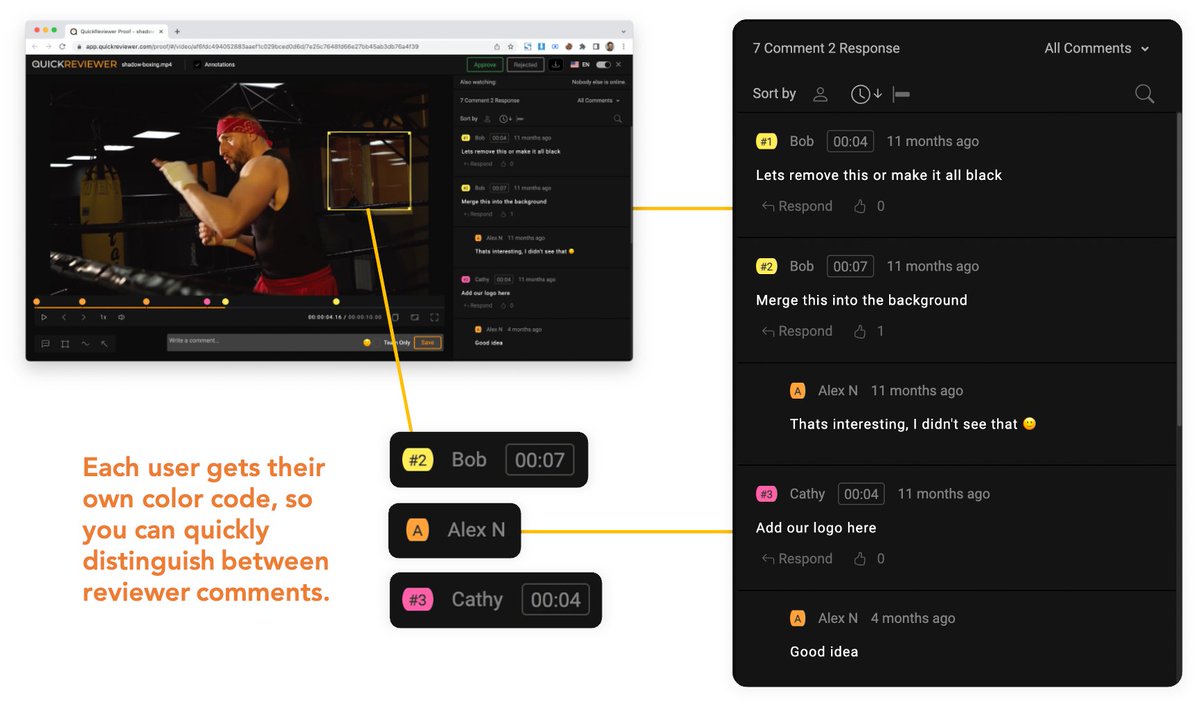
Each user gets their own color so you can quickly distinguish between reviewer comments. The added comments list also has colors assigned to each user and allows you to view the full list of comments by user or by page. #QuickReviewer #adtech
1
1
31
18 Jun 2025
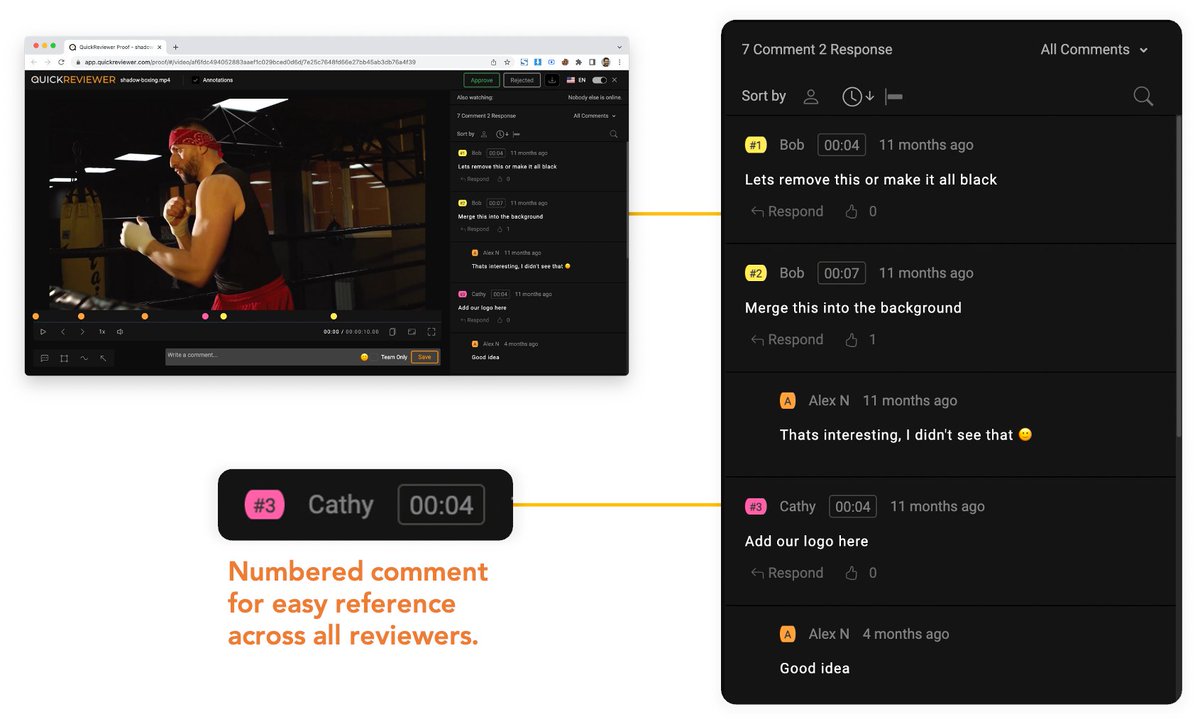
Your comments are numbered for easy reference across all reviewers.
#MarketingTools #AdTech
1
1
12
11 Jun 2025
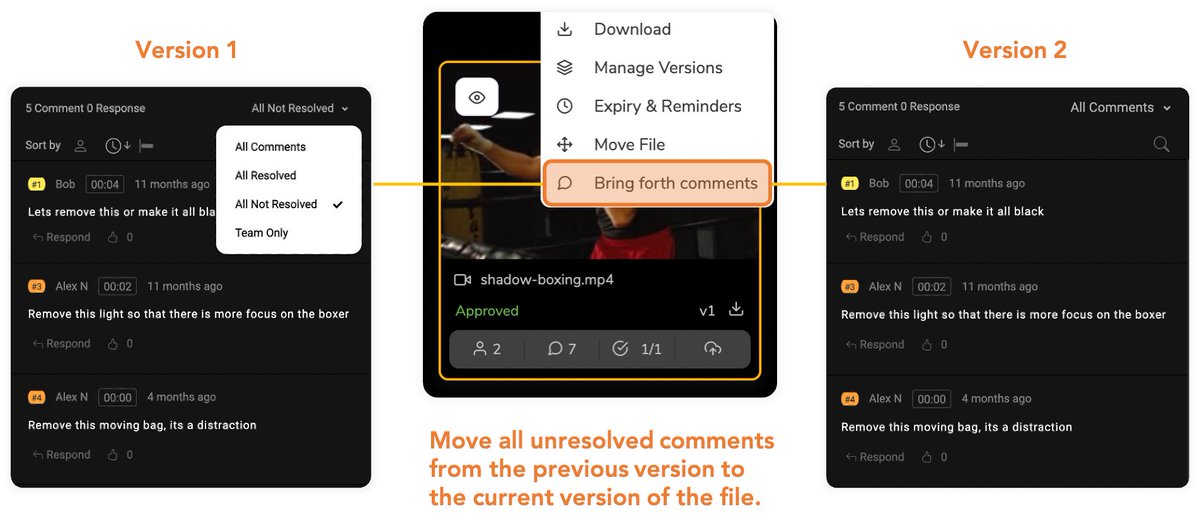
Move all unresolved comments from the previous version to the current version of the file. Simply right click on the file and choose “Bring Forth Comments”.
#OnlineProofing #CreativeCollaboration #DesignReview #Marketingtools #AdTech
1
1
16
28 May 2025
Add @mentions to comments or responses when you want to direct a question or simply draw the attention of a team member or reviewer that you have shared the proof with. Users receive notifications with the comment that mentions them.
1
1
23
20 May 2025
No need to save and upload attachments in comments. Directly paste screenshots for others to preview the file.
1
2
25
15 May 2025
Open PDFs, open them in Acrobat and view the annotations as native comments, highlights and freehand drawings. What a great way to archive your PDF files offline.
1
1
25
7 May 2025
Send multiple email reminders before a deadline. Choose to send reminders only if reviewers have not opened the proof, not added any comments, not taking an approval / rework action or independent of any condition.
1
1
40
29 Apr 2025
Getting too many email notifications? You decide how often you want to receive emails when comments are added. Hourly, Daily, Weekly or even once a month.
1
2
27
24 Apr 2025
Have too many folders to navigate through? Switch between the Column and Grid folder view for easier navigation to multi level folders. This even reduces the number of clicks to switch between folders.
1
2
38
16 Apr 2025
Hallo, Hej, Hola, Ciao...! The proofing window lets reviewers choose from one of 8 languages that they are comfortable with.
1
2
25
8 Apr 2025
Select from a list of aspect ratios in your video, highlighting any potential issues with framing. View video guides for both action safe and title safe areas of your video.
1
2
20
1 Apr 2025
Compare two versions of PDFs, Video or Images side by side so you can ensure that all comments have been resolved and changes have been made in the latest version. A sync option lets you jump both versions to the location of the comment for faster comparison.
1
2
22
25 Mar 2025
Change the look and feel of the user interface to match your branding. Upload your logo, set primary and secondary colors, and let your reviewers see emails from an ID they trust with your branding.
1
19
18 Mar 2025
Check who the file has been shared with, how many comments have been added along with the list of reviewers who have approved or asked for rework without having to open the proof. Everything is summarized in the card.
1
17
11 Jul 2024
Print ads, that made a lot of people notice. See what these brands have working for them here:
quickreviewer.com/the-subtle…
1
32
7 May 2024
Design is to marketing, what review tools are to deadlines - indispensable.
quickreviewer.com/how-collab…
1
31
24 Apr 2024
Marketing and collaborative review tools on your mind?
Click on the link to find effective ways to market your brand, with your team onboard!
quickreviewer.com/using-coll…
1
28
25 Mar 2024
Colours, warm hugs, good food and festivities. We wish you and your folks a very Happy Holi! #HappyHoli
1
47
20 Mar 2024
Online education and review tools clubbed together are a game changer. Read more to find out how:
quickreviewer.com/transformi…
23
12 Mar 2024
A reviewing platform that does it all for you! Visit our website and book a demo to know how Quick Reviewer can transform your journey to the deadlines from start to finish.
21