
Engineer
Joined December 2025
- Tweets 4,421
- Following 1,060
- Followers 1,144
- Likes 4,895
192 Photos and videos











Apr 28
Need a Netflix series so addictive I forget the outside world exists
Drop your best recommendations 👇🏻
2
9
208
Apr 27
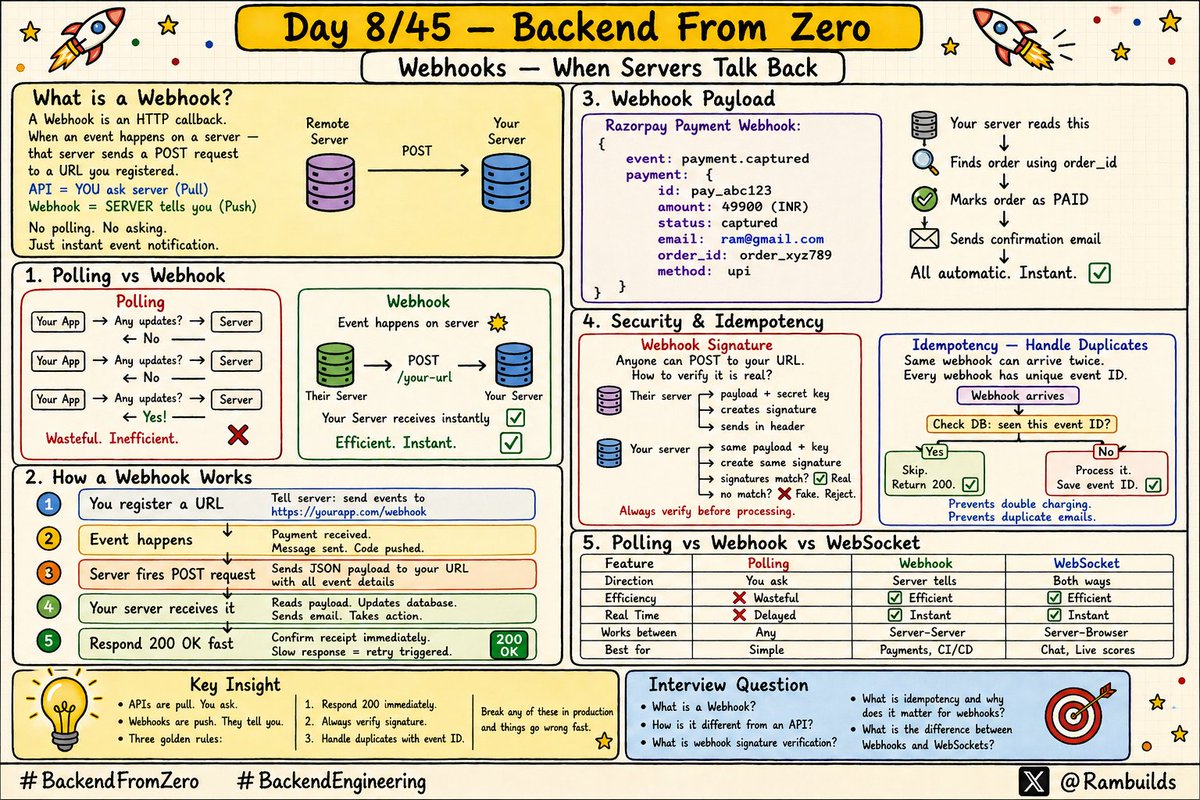
Day 8/45 — Backend From Zero
You already know what an API is.
With an API you ask the server for data whenever you need it.
But what if the server needs to tell YOU something happened?
Without you asking first. That is a Webhook.
And it changes how you think about building systems.
Let me explain with something simple.
Imagine you ordered food on Swiggy.
Option 1 -You keep refreshing the app every 30 seconds.
"Is it here yet?"
"Is it here yet?"
"Is it here yet?"
Option 2 - Swiggy sends you a notification the moment
your order status changes. You do nothing. They tell you.
Option 1 = API Polling.
Option 2 = Webhook.
A Webhook is just this:
"When X happens on my server, automatically send a message to this URL."
That is it.
Server talks to your server.
No asking. No waiting. Just instant notification on event.
Apr 26

🧵 Day 7/45 — Backend From Zero
When you build an API — you have to make a choice.
REST or GraphQL?
Most developers just pick REST because everyone else does.
But do you actually know the difference? And when to use which?
Today we go deep on both.
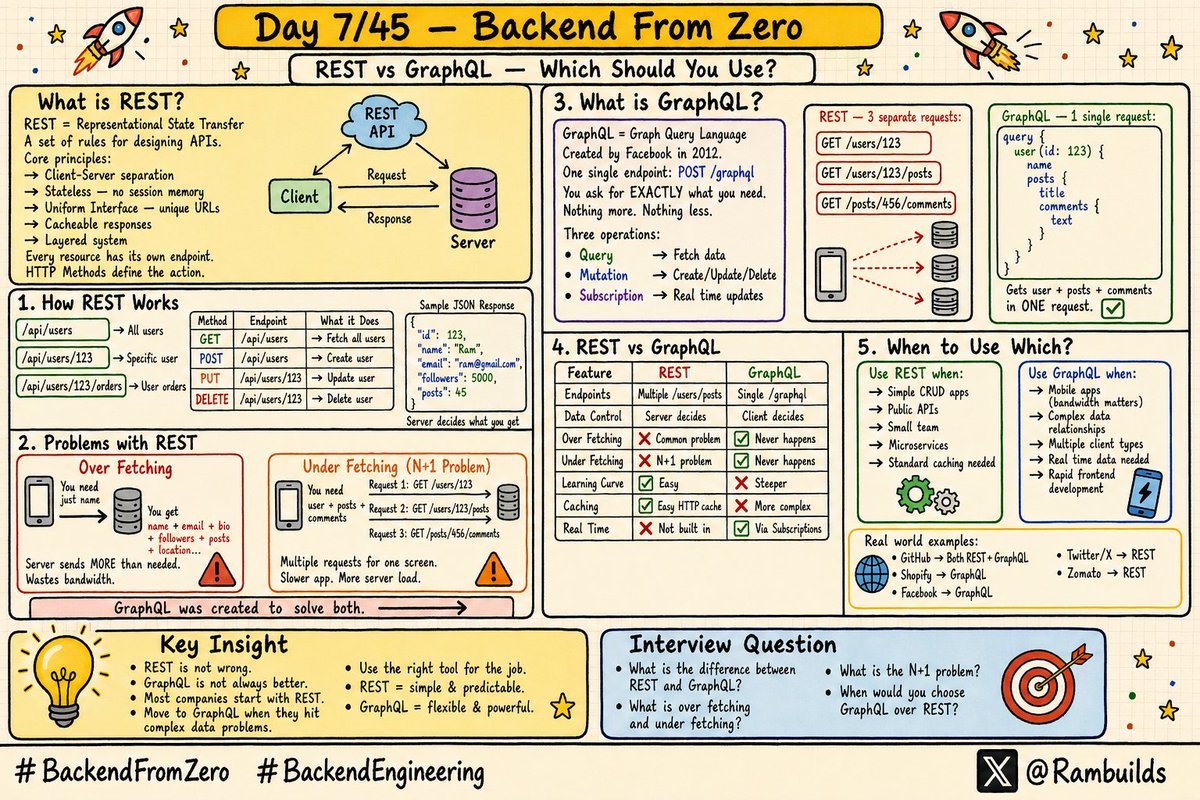
REST = Representational State Transfer.
Not a library. Not a framework.
Just a set of rules and principles for designing APIs.
An API that follows these rules is called a RESTful API.
REST has 6 core principles:
1. Client-Server
Client and server are separate.
Client handles UI.
Server handles data and logic.
They communicate only through API.
2. Stateless
Every request is completely independent.
Server remembers nothing between requests.
Each request must carry all information needed.
3. Uniform Interface
Every resource has a unique URL.
/users → all users
/users/123 → specific user
/users/123/orders → user's orders
4. Layered System
Client does not know if it talks directly to server or through a load balancer, cache, or gateway.
5. Cacheable
Responses can be cached.
Reduces server load.
Improves performance.
6. Code on Demand (optional)
Server can send executable code. Like JavaScript to browser.
2
7
125
Apr 27
Three ways servers communicate real time data.
Polling
Your app asks server every few seconds.
"Any updates?"
Simple to build.
Wastes server resources.
Not truly real time.
Use when: No other option available.
Webhooks
Server to server communication.
Fires only when event happens.
Efficient and instant.
Requires public URL to receive.
Use when: Payment notifications,
third party integrations,
CI/CD triggers, automations.
WebSockets
Persistent open connection.
Both server and client
can send messages anytime.
Truly real time. Bidirectional.
Use when: Chat apps,
live scores, collaborative tools.
Key thing to remember:
Webhooks work server to server. Your public URL receives the event.
WebSockets work between server and browser/app.
User sees updates in real time.
They solve different problems. Both are important to understand.
1
4
34
Apr 27
Quick tip for testing webhooks locally.
Your localhost is not accessible from the internet.
So webhook providers cannot reach your local server.
Use ngrok.
Run your server on port 3000.
Run: ngrok http 3000
ngrok gives you a public URL:
abc123.ngrok.io
Register this as your webhook URL. Now any provider can reach your local server through it.
Every developer building webhook integrations needs this. Save this tip.
#BackendFromZero #BackendEngineering #45DaysOfBackend
2
23
Apr 27
Good morning ☀️
New day. Fresh start.
Let's build something meaningful today..
What are you working on?
#BuildInPublic
38
28
471
Apr 27
I'm currently working on a new project called CareerBridge It's a platform to make it incredibly easy for students to find the right jobs without the noise...
5
67
Apr 26
🧵 Day 7/45 — Backend From Zero
When you build an API — you have to make a choice.
REST or GraphQL?
Most developers just pick REST because everyone else does.
But do you actually know the difference? And when to use which?
Today we go deep on both.
REST = Representational State Transfer.
Not a library. Not a framework.
Just a set of rules and principles for designing APIs.
An API that follows these rules is called a RESTful API.
REST has 6 core principles:
1. Client-Server
Client and server are separate.
Client handles UI.
Server handles data and logic.
They communicate only through API.
2. Stateless
Every request is completely independent.
Server remembers nothing between requests.
Each request must carry all information needed.
3. Uniform Interface
Every resource has a unique URL.
/users → all users
/users/123 → specific user
/users/123/orders → user's orders
4. Layered System
Client does not know if it talks directly to server or through a load balancer, cache, or gateway.
5. Cacheable
Responses can be cached.
Reduces server load.
Improves performance.
6. Code on Demand (optional)
Server can send executable code. Like JavaScript to browser.
5
11
264
Apr 26
This is the real question.
Use REST when:
→ Building a simple CRUD API
→ Building a public API that many clients will use
→ Your team is small and learning speed matters
→ Simple data relationships
→ Standard caching is important
→ Building microservices
Use GraphQL when:
→ Mobile app where bandwidth is critical
→ Complex data with many relationships
→ Multiple clients needing different data shapes (web app, mobile app, TV app)
→ Rapid frontend development without waiting for backend
→ Real time data needed via subscriptions
Real world:
GitHub → Both REST and GraphQL
Shopify → GraphQL
Facebook → GraphQL
Twitter/X → REST
Zomato → REST
Netflix → Both
Truth is most companies start with REST. Switch to GraphQL when they hit scaling problems.
REST is not wrong.
GraphQL is not always better.
Use the right tool for the job.
1
4
33
Apr 26
Try this right now.
Go to:
api.github.com/users/github
That is a REST API response. You got everything GitHub decided to give you.
Now go to:
docs.github.com/en/graphql/o…
This is GitHub's GraphQL Explorer.
Type this query:
query {
user(login: "github") {
name
followers {
totalCount
}
}
}
You get exactly name and follower count. Nothing else.
Same data. Two different approaches. Now you can feel the difference.
Follow @Rambuilds for Day 8 tomorrow. Webhooks how apps talk in real time. #BackendFromZero #BackendEngineering #45DaysOfBackend
3
28
Apr 26
Good morning all☀️
Happy Sunday!
Rest a bit build a bit
What are you working on today?
#BuildInPublic
4
8
90