
Boost your FPS, lower internet latency, & increase stream quality at 🎮Sensequality.com 💻 Max FPS PC Builds: @TunedPC
Joined May 2019
- Tweets 5,619
- Following 204
- Followers 26,474
- Likes 9,880
384 Photos and videos

Pinned Tweet

17 Sep 2022
You are probably wondering what do we even do? Let me explain with this video ▶
Boost your FPS✅
Enhance your Audio✅
Build your @TunedPC ✅
Optimize your Gaming and Content Creation experience at SenseQuality.com
You have fun, let us take care of the rest🚀
19
9
135

This is the only place where a PC gamer can Overclock their CPU, GPU, Memory, Controller, optimize your games, and optimize windows for MAX FPS in under 3 clicks.
Oh, and it works 99% of the time.

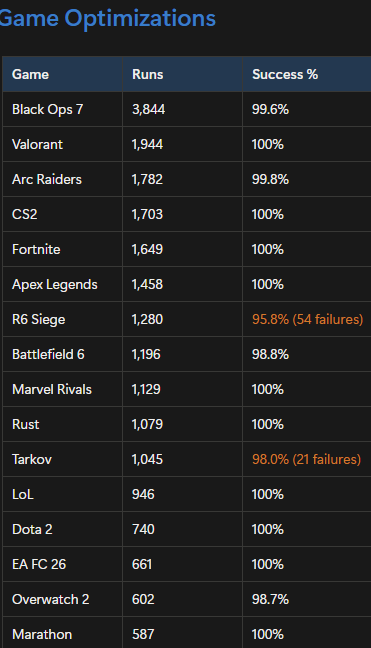
There has been 130,000 FPS Optimizations ran on the TunedPC app in under a month.
Here is the success rate of each game:
Average: 99% success rate
Our goal is to make this app as safe as possible while providing you with the FPS you deserve
8
4
97
34,593
Even after you disable User Experience and Telemetry, Windows 11 still collects your data through a different system
Diagnostic Data tracks your app usage, device activity, and typing patterns which takes up CPU cycles while you game.
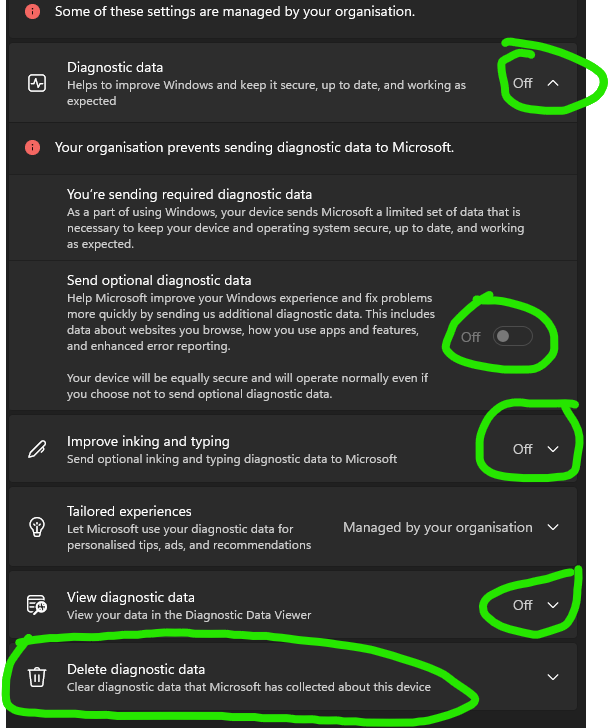
Disable it by doing this:
- Go to settings -> Privacy & Security -> Diagnostics & feedback
- Set Diagnostic data to OFF
- Turn off "Send Optional Diagnostic Data"
- Turn OFF "Improve inking and typing"
- Turn OFF "Tailored experiences"
- Click Delete Diagnostic data
5
19
354
36,270
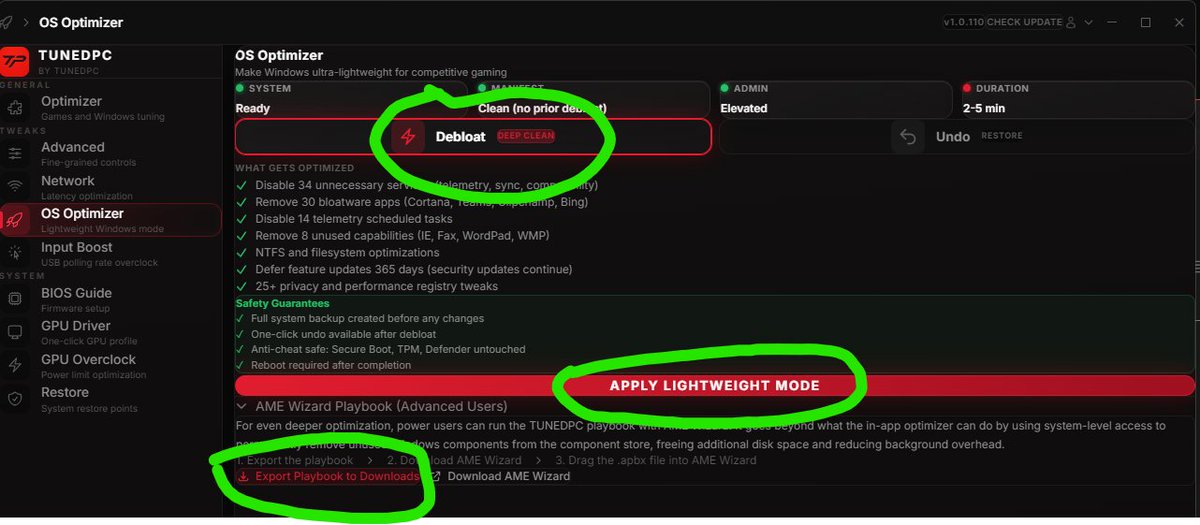
How to get a Custom Windows OS in less than 3 clicks
for MAX FPS in ANY game.
1. Get TUNEDPC app
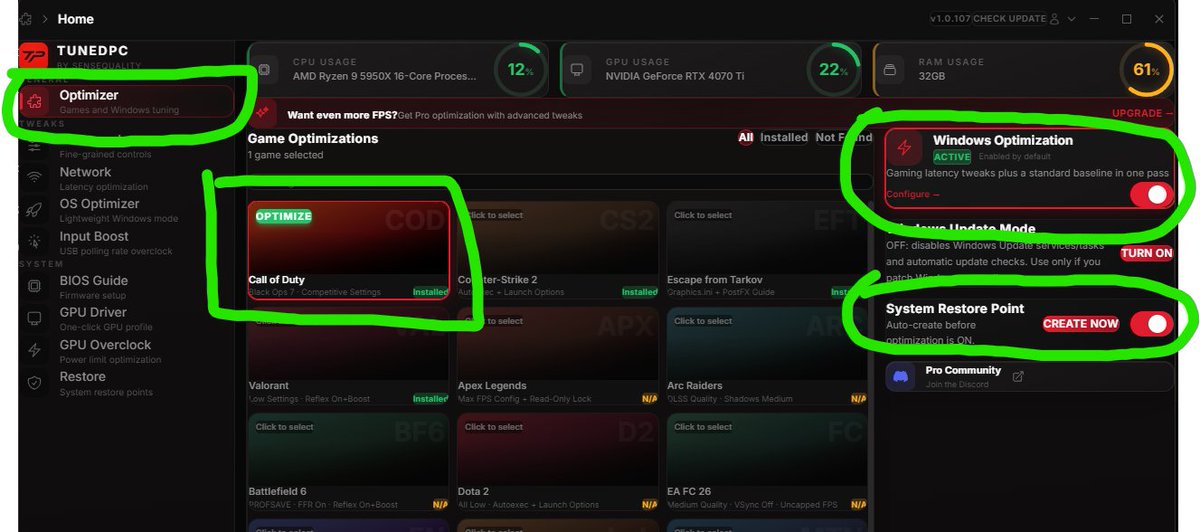
2. Click OS Optimizer -> Debloat -> Apply Lightweight Mode
3. If you are an expert, Export our playbook -> Run it through AME Beta
There is 0 risk in doing this.
3
3
78
12,699
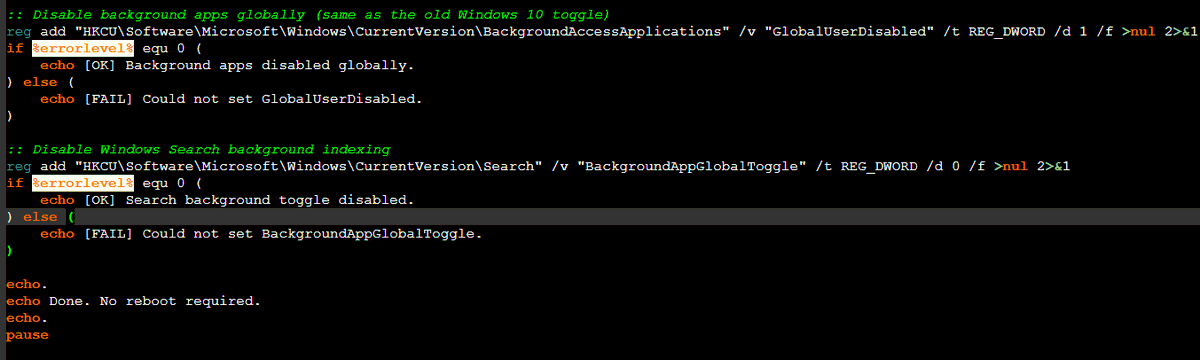
I made a script for you guys to automatically disable background apps in Windows 11 since it doesn't have a option lol
This will instantly save you A LOT of FPS.
Will post it below.
1. copy and paste it into notepad
2. Save as background.bat
3. Run it as a administrator
5
9
344
39,273
AMD GPU Users!
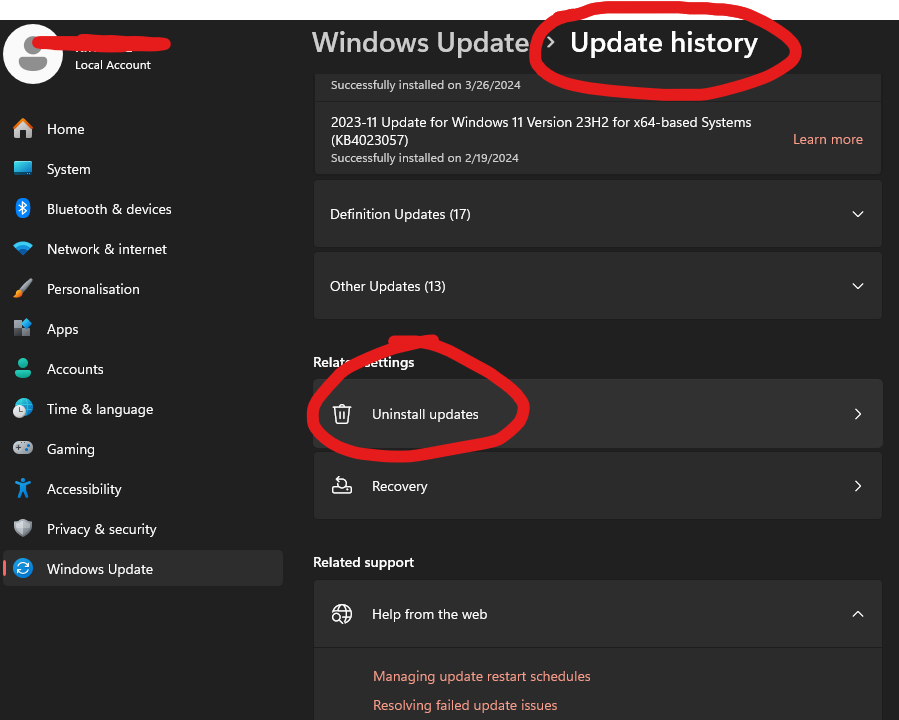
If you updated to Windows Version 25H2 and your FPS dropped, then roll back to 24H2!
Multiple people on microsoft Q&A are reporting 60-80 FPS drops in game!
FIX:
🔹Settings → Windows Update → Update History → Uninstall the 25H2 feature update
🔹Or: Roll back within 10 days at Settings → Recovery → Go Back
8
16
321
51,081
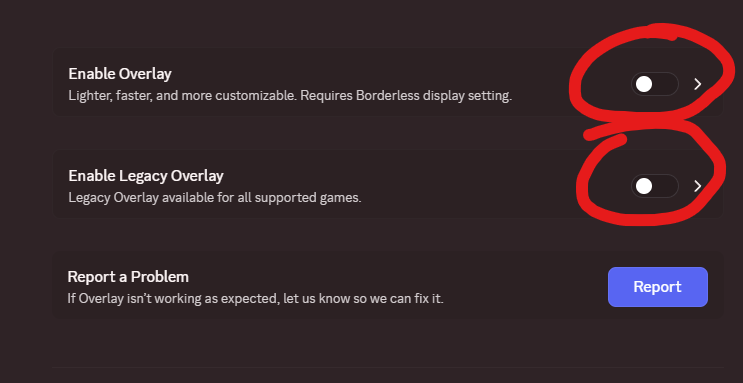
If you use Discord, please, I beg you to disable the Discord Overlay if you game.
It takes away performance from your games and causes issues like input delay, stuttering, etc.
Go to Settings -> Game Overlay -> Disable Overlay and Legacy Overlay
You will not regret it
17
98
1,967
115,526
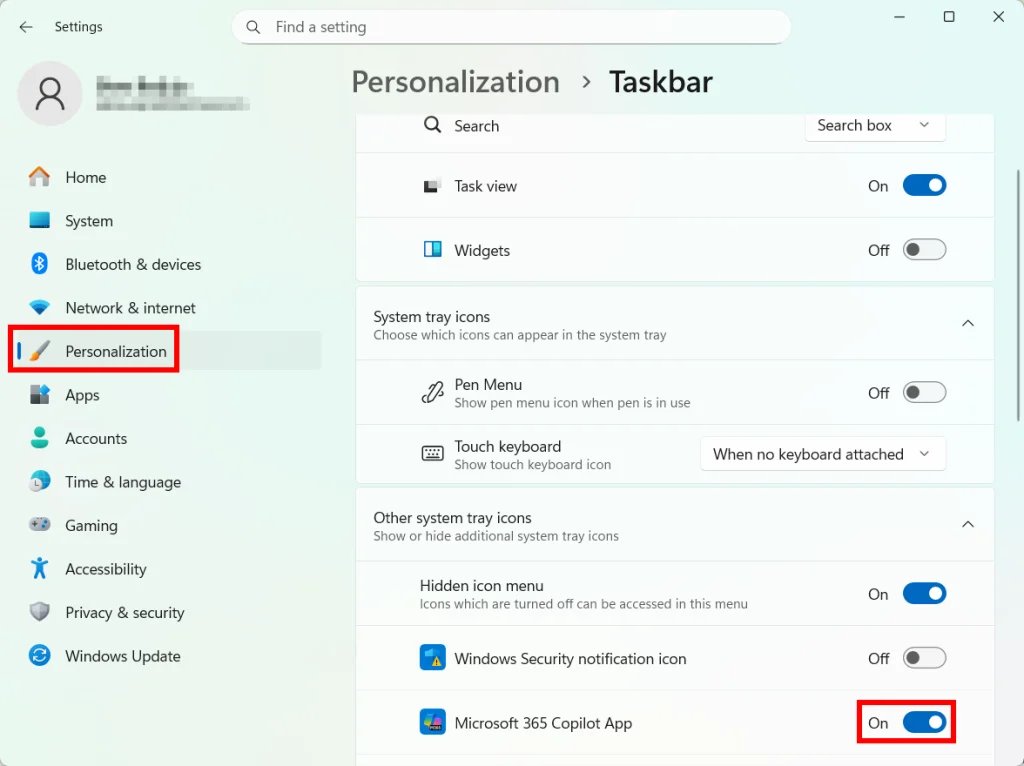
Windows 11 Copilot can use memory in the background while you game taking away FPS. If you never use it, turn it off and free up system resources.
Settings → Personalization → Taskbar → Copilot → OFF
Or permanently: Group Policy Editor → User Configuration → Administrative Templates → Windows Components → Windows Copilot → "Turn off Windows Copilot" → Enabled
3
58
822
64,754
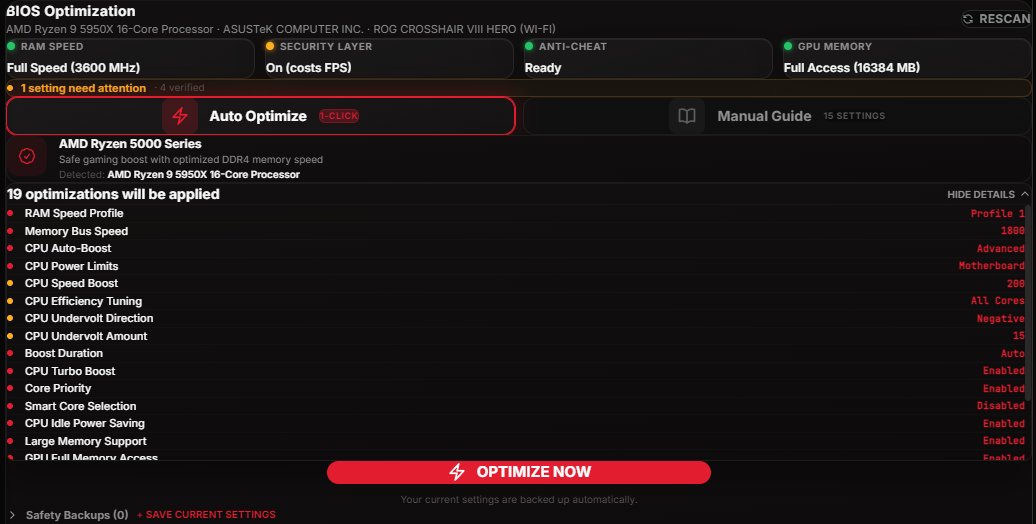
Overclocking used to mean 2 hours in your BIOS watching YouTube tutorials and praying you don't brick your PC.
Now it's 1 click.
Just added the BIOS Optimizer to @TunedPC which auto-overclocks your CPU and RAM for max FPS.
No guides. No risk. Just frames.
21
20
447
66,368

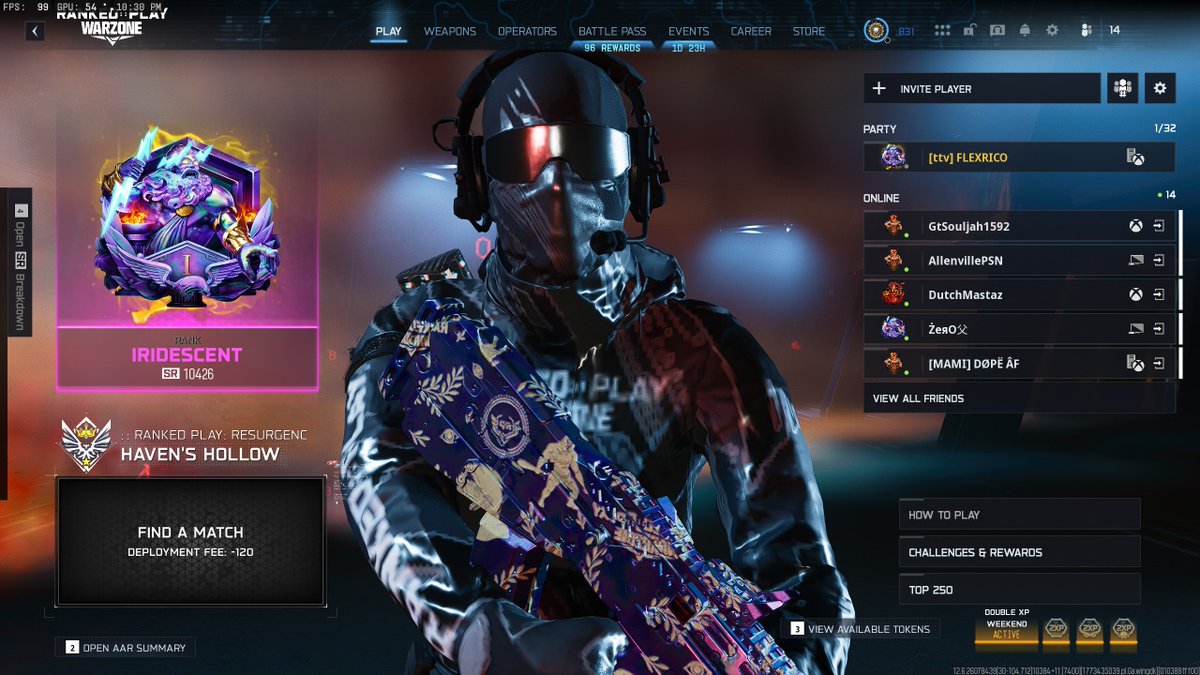
After a long ass grind finally got that IRI. @art_is_war @SenseQuality @KIRNEILL Yall are the goats fr for the shit yall do. Unc still got it at 32. 💪@callofduty
1
2
12
6,073
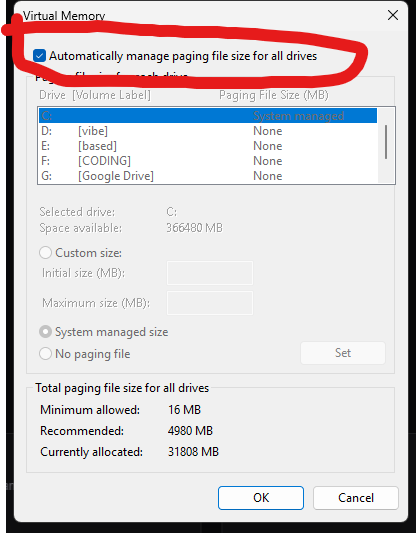
If you constantly crash in games, please make sure to check this:
🔹Open View advanced system settings.
🔹Go to the Advanced tab.
🔹Under Performance, click Settings.
🔹Open the Advanced tab again.
🔹Under Virtual memory, click Change.
🔹Make sure Automatically manage paging file size for all drives is enabled.
🔹Restart
1
23
262
32,362
Most of you guys should download the Vesktop instead of the Discord app because it uses less RAM and CPU resources which provides you more performance in game.
Oh, and it also blocks telemetry/tracking that the official discord app sends.
More FPS, same Discord functionality.

124
281
7,019
539,090
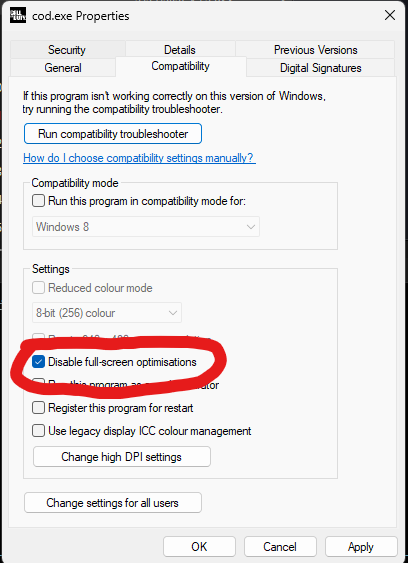
Windows update KB5077181 may be causing stutters in your games.
It's may be caused by Fullscreen optimization.
Fix: Right-click your game .exe → Properties → Compatibility → check "Disable fullscreen optimizations"
If you updated recently & your games feel off, try this.
37
251
2,760
206,818

Windows 11 has a setting called Memory Integrity that's ON by default
It runs a hypervisor-level check on EVERY driver call your GPU makes
This costs you 5-15% FPS in every game
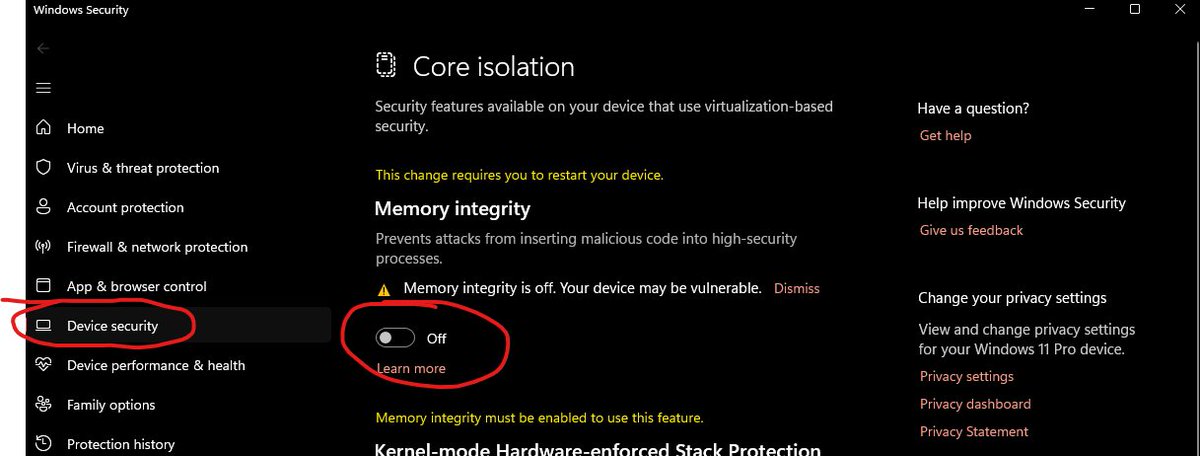
Fix: Windows Security → Device Security → Core Isolation → turn Memory Integrity OFF -> Restart
Community note
Turning this feature off can put your PC at risk. Memory integrity, also known as Hypervisor-protected Code Integrity (HVCI) is a Windows security feature that makes it difficult for malicious programs to use low-level drivers to hijack your PC.
support.microsoft.com/en-us/windows/…
124
185
3,280
1,237,049