
Joined March 2026
- Tweets 806
- Following 312
- Followers 28,051
- Likes 606
247 Photos and videos





Pinned Tweet

Jun 12
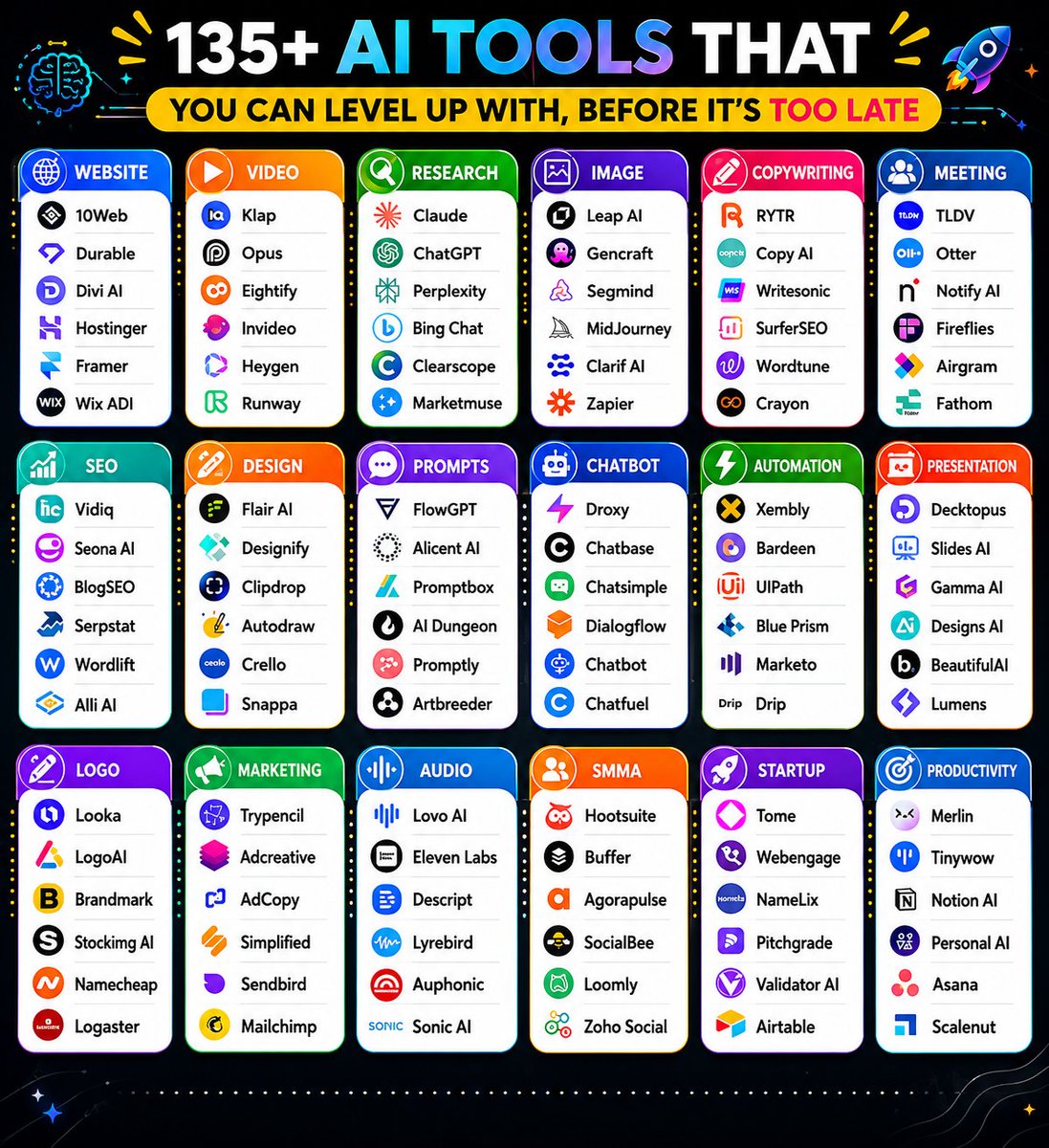
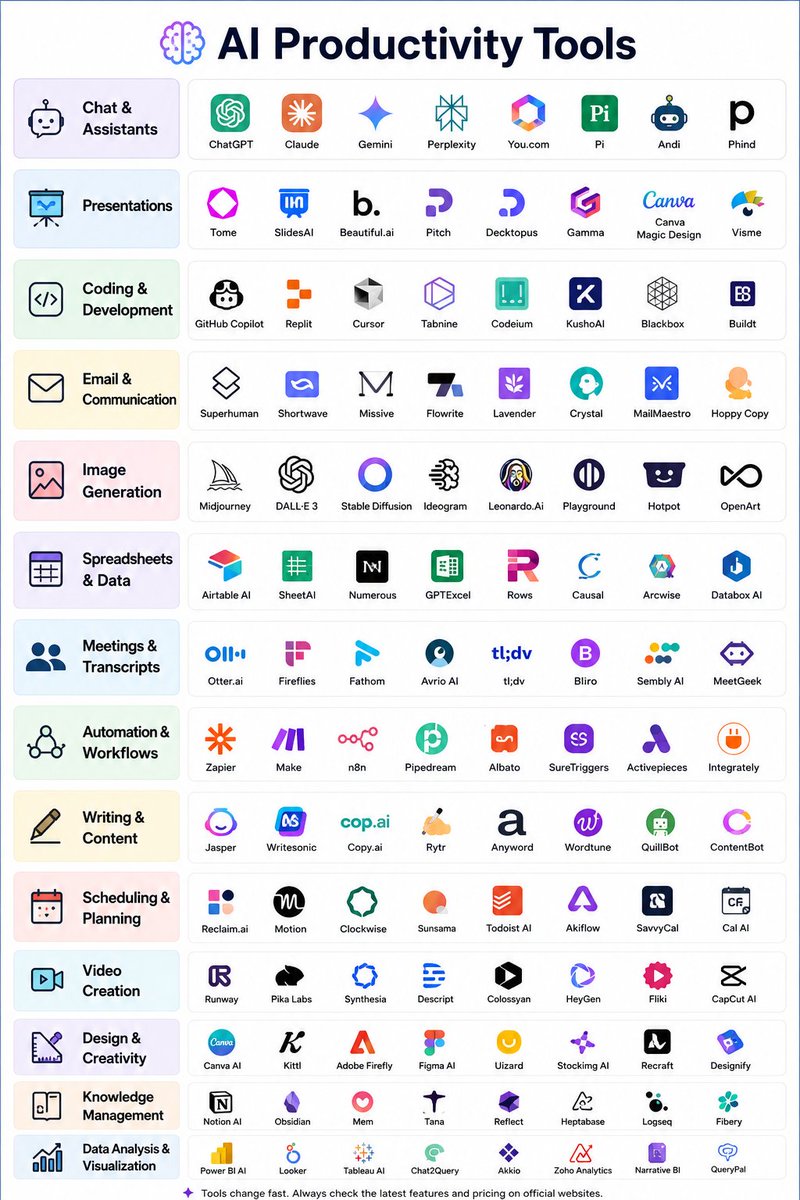
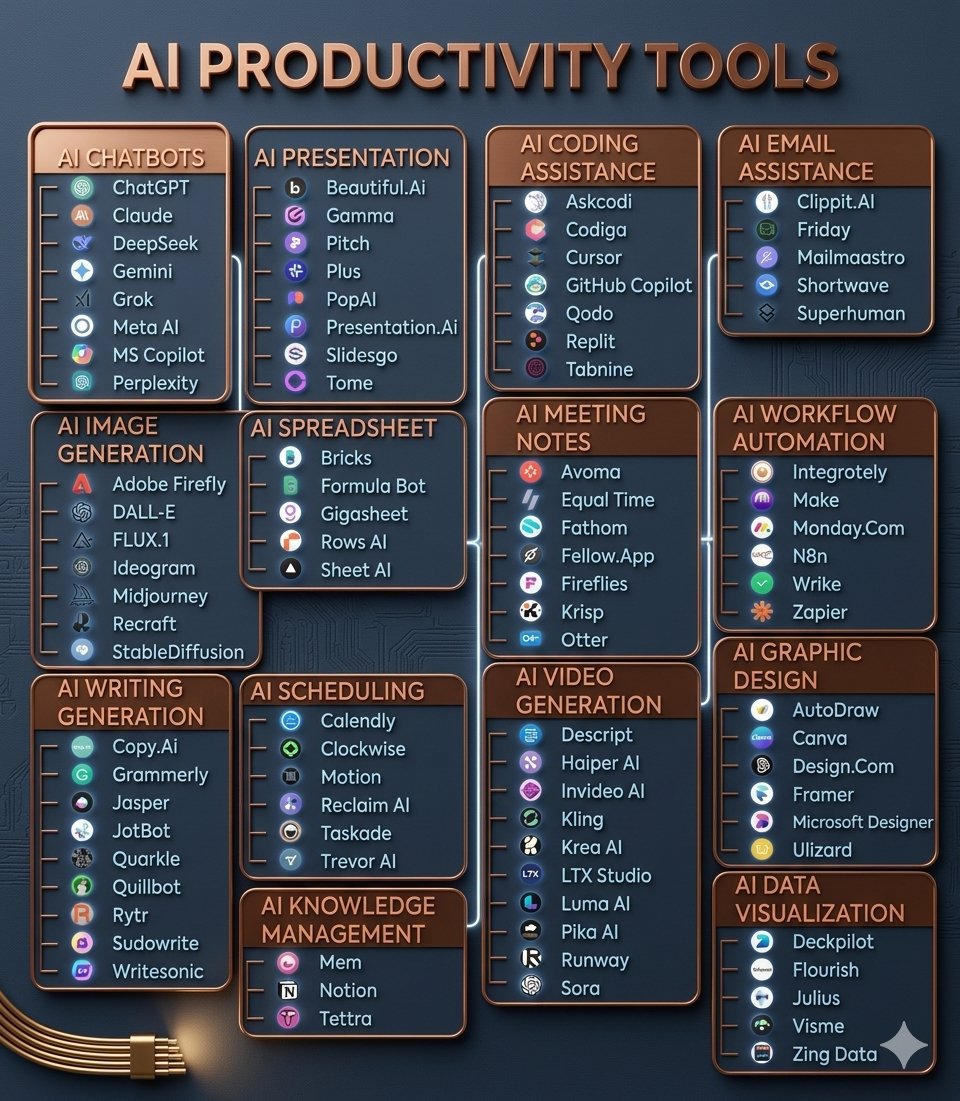
🚀 85 AI Tools for Work, Creativity & Productivity (2026 Edition)
Design Concept
Dark gradient background (navy → purple)
Rounded cards instead of rows
18 colorful category blocks arranged in a grid
Minimal icons for each category
4–6 tools per card
Clean typography (Montserrat / Poppins)
Neon accent colors
🧠 Research & Search
ChatGPT • Gemini • Copilot • Perplexity • Abacus
🎨 Image Generation
Midjourney • DALL·E 3 • Stability AI • Fotor • Microsoft Designer
✍️ Copywriting
Copy.ai • Rytr • Writesonic • AdCreative.ai
📝 Writing Assistant
Jasper • HIX AI • Jenny AI • Text Blaze • QuillBot
🌐 Website Builder
10Web • Durable • Framer • Style AI
🎬 Video Creation
Runway • HeyGen • InVideo • Opus Clip • Klap • Morph Studio
🎤 Meeting Assistant
Otter • Fireflies • tl;dv • Noty AI
📈 SEO Tools
VidIQ • Seona AI • BlogSEO • Keywrds AI
🤖 AI Chatbots
Chatbase • Droxy • Chatsimple • Mutual Info
📊 Presentations
Gamma • Decktopus • SlidesAI • Beautiful.ai • Designs.ai
⚡ Automation
Zapier • Make • Bardeen • Xembly
💡 Prompt Libraries
FlowGPT • PromptBase • PromptBox • Snack Prompt • Alicent AI
🎯 UI/UX Design
Figma • Uizard • UiMagic • Photoshop AI
🎨 Design Tools
Canva • Clipdrop • Designify • AutoDraw • Flair AI
🏷️ Logo Creation
Looka • Brandmark • Stockimg AI • Namecheap Logo Maker
🔊 Audio & Voice
ElevenLabs • LOVO AI • Adobe Podcast • Songburst AI
🚀 Productivity
Notion AI • Merlin • TinyWow • Personal AI • Adobe Sensei
📱 Social Media
Taplio • Typefully • Hypefury • TweetHunter
2
19
32
1,675
Shohan retweeted
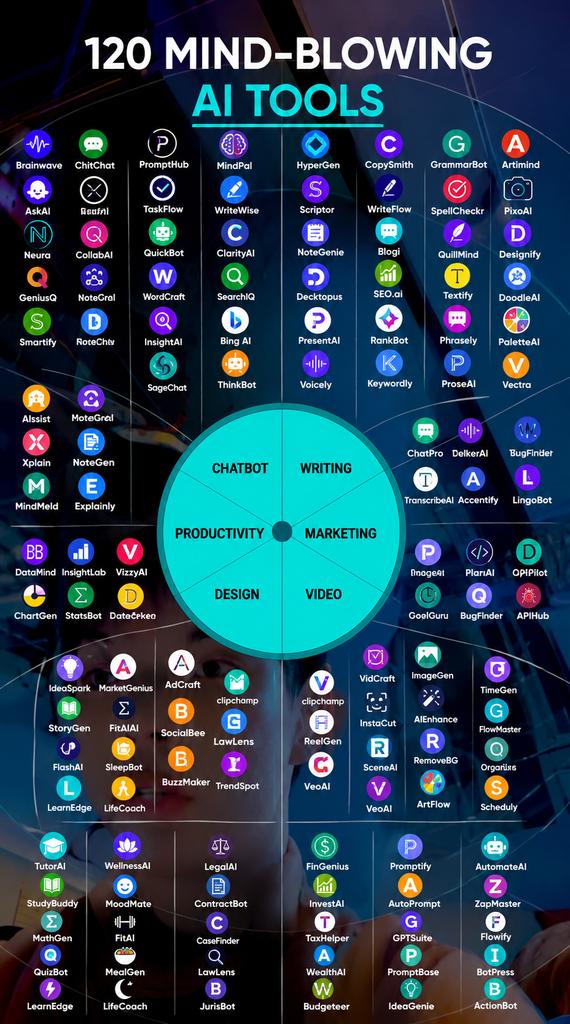
120 AI Tools That Turn Months of Work Into Minutes
1. Research
- ChatGPT
- Copilot
- Gemini
- Abacus
- Perplexity
2. Image
- Fotor
- Dalle 3
- Stability AI
- Midjourney
- Microsoft Designer
3. CopyWriting
- Rytr
- Copy AI
- Writesonic
- Adcreative AI
4. Writing
- Jasper
- HIX AI
- Jenny AI
- Textblaze
- Quillbot
5. Website
- 10Web
- Durable
- Framer
- Style AI
6. Video
- Klap
- Opus
- Eightify
- InVideo
- HeyGen
- Runway
- ImgCreator AI
- Morphstudio .xyz
7. Meeting
- Tldv
- Otter
- Noty AI
- Fireflies
8. SEO
- VidIQ
- Seona AI
- BlogSEO
- Keywrds ai
9. Chatbot
- Droxy
- Chatbase
- Mutual info
- Chatsimple
10. Presentation
- Decktopus
- Slides AI
- Gamma AI
- Designs AI
- Beautiful AI
11. Automation
- Make
- Zapier
- Xembly
- Bardeen
12. Prompts
- FlowGPT
- Alicent AI
- PromptBox
- Promptbase
- Snack Prompt
13. UI/UX
- Figma
- Uizard
- UiMagic
- Photoshop
14. Design
- Canva
- Flair AI
- Designify
- Clipdrop
- Autodraw
- Magician design
15. Logo Generator
- Looka
- Designs AI
- Brandmark
- Stockimg AI
- Namecheap
16. Audio
- Lovo ai
- Eleven labs
- Songburst AI
- Adobe Podcast
17. Productivity
- Merlin
- Tinywow
- Notion AI
- Adobe Sensei
- Personal AI
18. Social media management
- Tapilo
- Typefully
- Hypefury
- TweetHunter
Follow me for more.
3
5
13
447
At a company, the CEO was known for being extremely serious.
HR was terrified of him, and employees treated every email like it might be a warning or a termination notice.
One Monday morning, HR decided to modernize communication and sent a company-wide email:
Please update your emergency contact details.
Simple enough. Normal HR stuff.
But the CEO misread it while rushing through emails before coffee. He only saw:
Emergency… contact… details…
So he immediately replied:
Is everything okay? Who is in danger?
That email went to everyone.
Within 5 minutes, the entire company went into panic mode.
One employee whispered, Did someone get fired?
Another said, Is the company collapsing?
Someone in accounting started backing up their laptop just in case.
HR rushed to clarify:
No emergency. Just updating forms.
But then the CEO, still confused, walked into HR office and said:
Why are we collecting emergency contacts if there’s no emergency?
Silence.
Finally, the HR manager replied:
.....because in case of emergency.
The CEO nodded slowly.
Then said:
Good. So there is an emergency?
And HR had to explain company policies for the next 45 minutes while everyone else refreshed their inbox like it was breaking news 😭
5
7
18
486
Shohan retweeted
120 Insane AI Tools That Will Blow Your Mind 🤯
1. Ideas
- Claude
- ChatGPT
- Bing Chat
- Perplexity
- Copilot
2. Website
- Dora
- 10Web
- Framer
- Unicorn
- Style AI
3. Writing
- Jasper
- HIX AI
- Longshot
- Textblaze
- Jenny AI
4. Meeting
- Tldv
- Krisp
- Otter
- Fathom
- Sembly AI
5. Chatbot
- Droxy
- Chatbase
- Chatsimple
- CustomGPT
- Mutual info
6. Automation
- Make
- Zapier
- Xembly
- Bardeen
- Levity
7. UI/UX
- Figma
- UiMagic
- Uizard
- InstantAI
- Penpot
8. Image
- Dreamina AI
- Leap AI
- Midjourney
- Stability AI
- Fotor
9. Video
- Dreamina AI
- HeyGen
- InVideo
- Eightify
- Morphstudio xyz
12. Audio
- Lovo ai
- Eleven labs
- Songburst AI
- Adobe Podcast
- Resemble AI
13. Presentation
- Decktopus
- Slides AI
- Pitch
- Designs AI
- Beautiful AI
14. SEO
- VidIQ
- Seona AI
- BlogSEO
- Keywrds ai
- Semrush
15. Design
- Canva
- Flair AI
- Designify
- Clipdrop
- Magician design
16. Logo Generator
- Looka
- Designs AI
- Brandmark
- Stockimg AI
- Namecheap
17. Prompts
- FlowGPT
- Alicent AI
- PromptBox
- Promptbase
- Snack Prompt
18. Productivity
- Merlin
- Tinywow
- Notion AI
- Adobe Sensei
- Personal AI
19. Marketing
- Pencil
- Ai-Ads
- AdCopy
- Simplified
- AdCreative
20. Twitter
- Typefully
- Tweetlify
- Tapilo
- Hypefury
- TweetHunter
Follow Me @Mdkhurshed76417 for more useful content ...

"Do you dare to see this dreadful form lurking in the depths of darkness?
This shocking video from ImagineArt Ad Studio will take away your night's sleep!"
@ImagineArt_X @imagineart_creo
10
17
22
1,828
Shohan retweeted
"Do you dare to see this dreadful form lurking in the depths of darkness?
This shocking video from ImagineArt Ad Studio will take away your night's sleep!"
@ImagineArt_X @imagineart_creo
13
23
27
4,304
Shohan retweeted
Jun 13
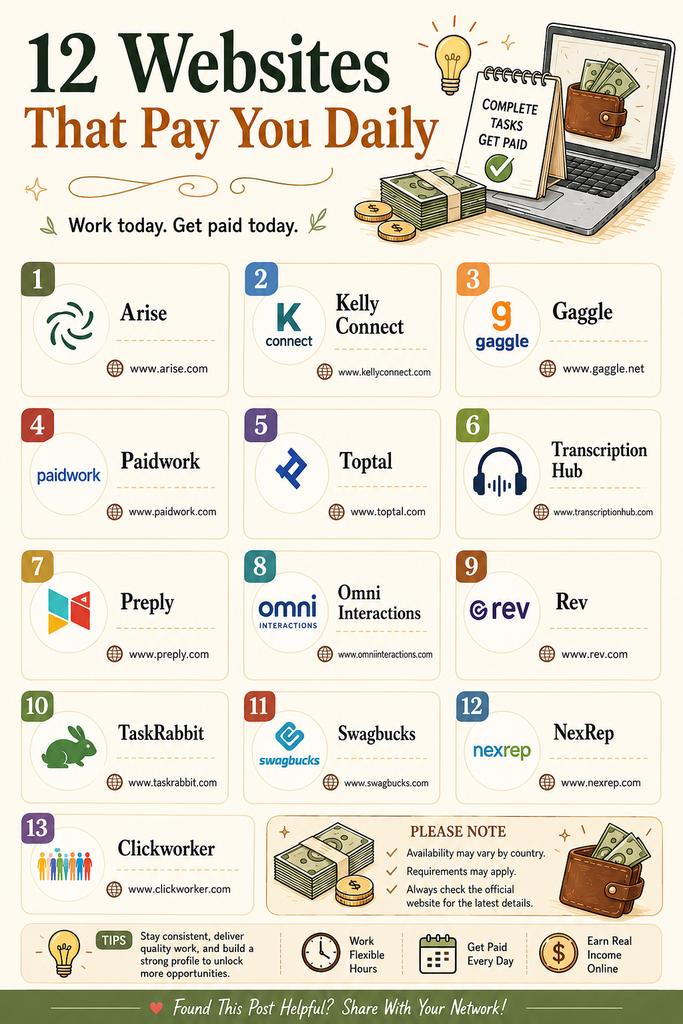
12 Legit Websites That Can Pay You Every Day
1. arise.com
2. kellyconnect.com
3. gaggle.net
4. paidwork.com
5. toptal.com
6. transcriptionhub.com
7. preply.com
8. omniinteractions.com
9. rev.com
10. taskrabbit.com
11. swagbucks.com
12. nexrep.com
13. clickworker.com
Follow me @shohan_tech_ai for more AI IDEA.
Like , Comment and repost so that others can also take benefits !!
1
6
15
415
Shohan retweeted
Jun 13
🤫 SECRET AI TOOLS THAT 99% OF PEOPLE DON'T KNOW
🚀 Hidden AI Gems You Should Start Using Today
✍️ Writing & Content
QuillBot — AI paraphrasing and rewriting
StealthWriter — Humanize AI-generated content
MyBib — Automatic citations and references
🎓 Learning & Research
Socratic — AI homework assistant
Elicit — Research paper analysis
Wolfram Alpha — Advanced STEM problem solver
🤖 AI Search & Answers
Perplexity AI — AI-powered search engine
Kuse AI — Instant webpage summaries
📚 Documents & PDFs
ChatPDF — Chat with PDF files
🎤 Productivity
Otter AI — Meeting and lecture notes
📊 Presentations
Gamma AI — Create stunning presentations in seconds
━━━━━━━━━━━━━━━━━━
💡 Why These Tools Matter
✓ Save hours of work every week
✓ Learn faster and smarter
✓ Improve writing quality
✓ Create presentations instantly
✓ Get accurate research insights
━━━━━━━━━━━━━━━━━━
🔖 SAVE THIS POST
Most people only use ChatGPT.
The smartest users combine multiple AI tools to get 10x better results.
Follow for more AI discoveries, productivity hacks, and future tech updates.
1
5
18
533
Shohan retweeted

Jun 13
I am just 30
I make $40k/month
using the world's most boring strategy:
Here’s what I do (& how you can too):
14
19
32
3,085
Jun 13
🤫 SECRET AI TOOLS THAT 99% OF PEOPLE DON'T KNOW
🚀 Hidden AI Gems You Should Start Using Today
✍️ Writing & Content
QuillBot — AI paraphrasing and rewriting
StealthWriter — Humanize AI-generated content
MyBib — Automatic citations and references
🎓 Learning & Research
Socratic — AI homework assistant
Elicit — Research paper analysis
Wolfram Alpha — Advanced STEM problem solver
🤖 AI Search & Answers
Perplexity AI — AI-powered search engine
Kuse AI — Instant webpage summaries
📚 Documents & PDFs
ChatPDF — Chat with PDF files
🎤 Productivity
Otter AI — Meeting and lecture notes
📊 Presentations
Gamma AI — Create stunning presentations in seconds
━━━━━━━━━━━━━━━━━━
💡 Why These Tools Matter
✓ Save hours of work every week
✓ Learn faster and smarter
✓ Improve writing quality
✓ Create presentations instantly
✓ Get accurate research insights
━━━━━━━━━━━━━━━━━━
🔖 SAVE THIS POST
Most people only use ChatGPT.
The smartest users combine multiple AI tools to get 10x better results.
Follow for more AI discoveries, productivity hacks, and future tech updates.
1
5
18
533
Shohan retweeted
Jun 12
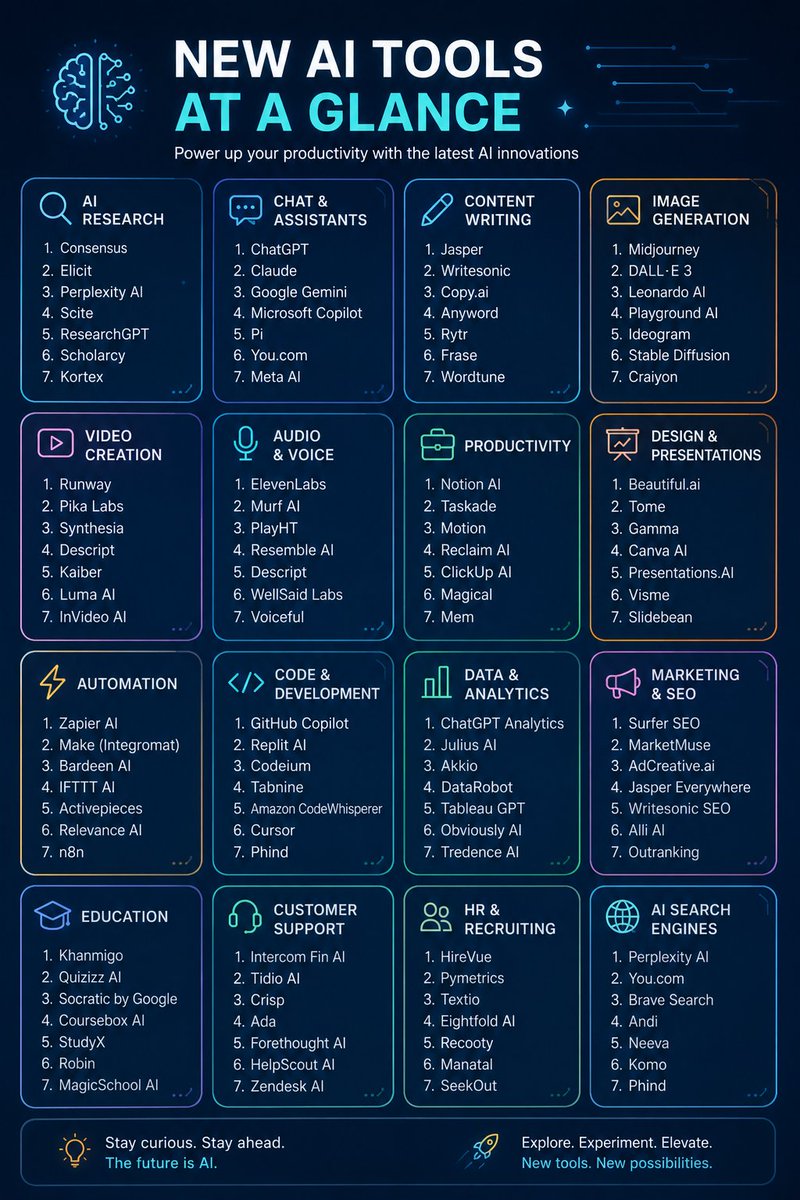
🚀 100 AI Tools You Should Know in 2026
🔹 Data Generation
🔹 Customer Support
🔹 Avatar Dubbing
🔹 Summarization & Insights
🔹 Text-to-Speech
🔹 Music Generation
🔹 Video Creation
🔹 Image Editing
🔹 Image Enhancement
🔹 Video Editing
🔹 CRM & Sales
🔹 Presentations
🔹 Research
🔹 Job Search
🔹 Resume Building
🔹 Code Generation
Some standout tools:
🤖 Synthesia
🎨 DALL·E 3
🎬 Runway ML
🗣️ Speechify
🎵 AIVA
📊 HubSpot CRM
📑 Tome
🔍 Elicit
💼 Jobscan
💻 Replit
AI is no longer a future trend—it's today's productivity engine.
Which AI tool do you use most? 👇
#AI #ArtificialIntelligence #AITools #GenerativeAI #Productivity #MachineLearning #ChatGPT #Innovation #FutureOfWork #Tech
For more @Shohan_Tech_AI
2
8
20
288
Shohan retweeted
Jun 12
🚀 85 AI Tools for Work, Creativity & Productivity (2026 Edition)
Design Concept
Dark gradient background (navy → purple)
Rounded cards instead of rows
18 colorful category blocks arranged in a grid
Minimal icons for each category
4–6 tools per card
Clean typography (Montserrat / Poppins)
Neon accent colors
🧠 Research & Search
ChatGPT • Gemini • Copilot • Perplexity • Abacus
🎨 Image Generation
Midjourney • DALL·E 3 • Stability AI • Fotor • Microsoft Designer
✍️ Copywriting
Copy.ai • Rytr • Writesonic • AdCreative.ai
📝 Writing Assistant
Jasper • HIX AI • Jenny AI • Text Blaze • QuillBot
🌐 Website Builder
10Web • Durable • Framer • Style AI
🎬 Video Creation
Runway • HeyGen • InVideo • Opus Clip • Klap • Morph Studio
🎤 Meeting Assistant
Otter • Fireflies • tl;dv • Noty AI
📈 SEO Tools
VidIQ • Seona AI • BlogSEO • Keywrds AI
🤖 AI Chatbots
Chatbase • Droxy • Chatsimple • Mutual Info
📊 Presentations
Gamma • Decktopus • SlidesAI • Beautiful.ai • Designs.ai
⚡ Automation
Zapier • Make • Bardeen • Xembly
💡 Prompt Libraries
FlowGPT • PromptBase • PromptBox • Snack Prompt • Alicent AI
🎯 UI/UX Design
Figma • Uizard • UiMagic • Photoshop AI
🎨 Design Tools
Canva • Clipdrop • Designify • AutoDraw • Flair AI
🏷️ Logo Creation
Looka • Brandmark • Stockimg AI • Namecheap Logo Maker
🔊 Audio & Voice
ElevenLabs • LOVO AI • Adobe Podcast • Songburst AI
🚀 Productivity
Notion AI • Merlin • TinyWow • Personal AI • Adobe Sensei
📱 Social Media
Taplio • Typefully • Hypefury • TweetHunter
2
19
32
1,675
Jun 12
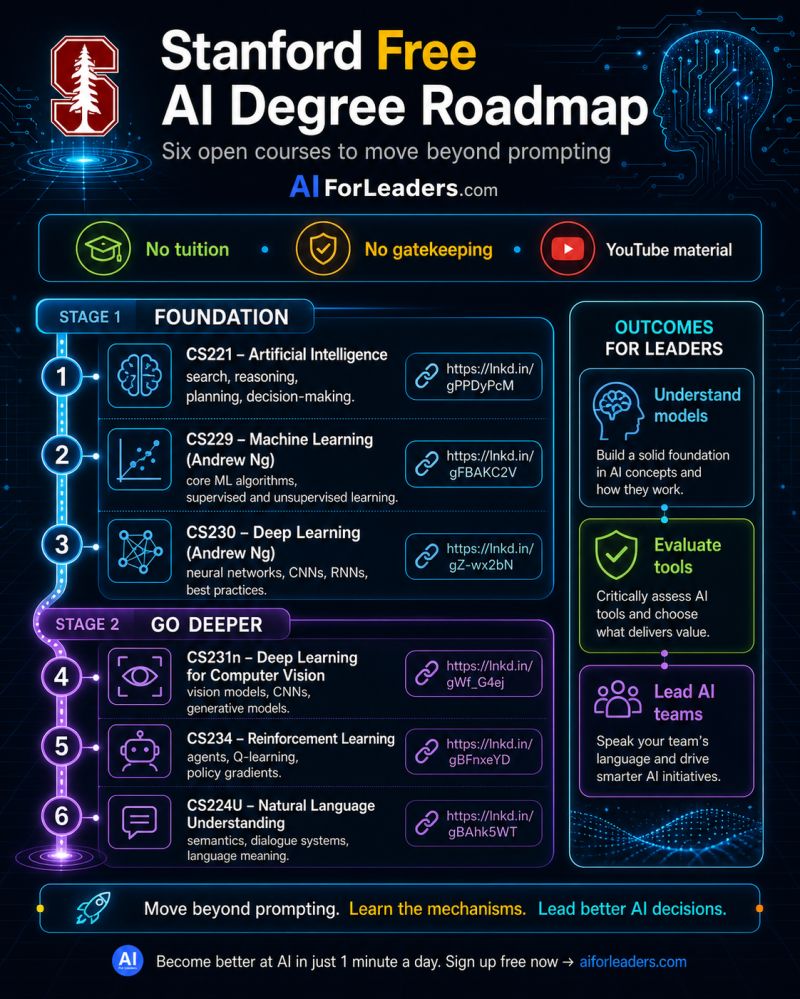
🧵 Stanford's Free AI Degree Roadmap (6 Courses, $0 Cost)
1/ Want to move beyond prompt engineering and actually understand how AI works?
This roadmap combines 6 free Stanford-level AI courses covering everything from machine learning to NLP and reinforcement learning.
👇
2/ Stage 1: Foundation
📘 CS221 – Artificial Intelligence
Search algorithms
Reasoning
Planning
Decision-making
This course teaches the core principles behind intelligent systems.
3/ 📘 CS229 – Machine Learning (Andrew Ng)
Learn:
Supervised learning
Unsupervised learning
Core ML algorithms
Model evaluation
This is one of the most influential ML courses ever created.
4/ 📘 CS230 – Deep Learning (Andrew Ng)
Topics include:
Neural networks
CNNs
RNNs
Deep learning best practices
You'll understand how modern AI models are built and trained.
5/ Stage 2: Go Deeper
📘 CS231n – Deep Learning for Computer Vision
Learn how machines understand images through:
CNNs
Object detection
Image classification
Generative vision models
6/ 📘 CS234 – Reinforcement Learning
Study:
Agents & environments
Q-learning
Policy gradients
Sequential decision making
The technology behind game-playing and autonomous systems.
7/ 📘 CS224U – Natural Language Understanding
Explore:
Semantics
Dialogue systems
Language meaning
NLP foundations
Critical for understanding ChatGPT-like systems.
8/ What you'll gain
✅ Understand AI models instead of just using them
✅ Evaluate AI tools intelligently
✅ Communicate effectively with technical teams
✅ Lead AI initiatives with confidence
9/ Suggested learning order
CS221 → CS229 → CS230 → CS231n → CS234 → CS224U
Spend 4–8 weeks on each course depending on your schedule.
10/ AI literacy is becoming as important as digital literacy.
You don't need a computer science degree to start.
You need curiosity, consistency, and a structured roadmap.
🚀 Start with the foundations and build upward.
#AI #MachineLearning #DeepLearning #Stanford #ArtificialIntelligence #DataScience #GenerativeAI #LearningInPublic
264
Shohan retweeted
Jun 11
Thread:
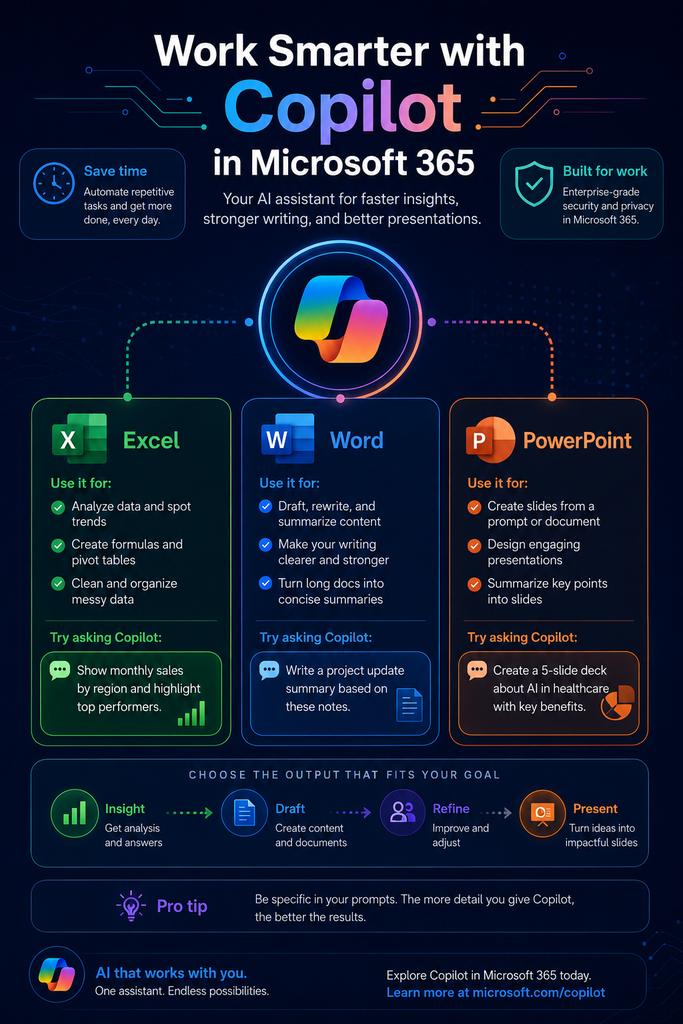
How to Use Copilot in Microsoft 365 to Work Faster
1/ Microsoft Copilot helps turn everyday work into structured outputs faster. Instead of starting from scratch, you can use natural-language prompts to analyze data, write documents, and build presentations.
2/ Excel 📊
Use Copilot to:
Identify trends and anomalies
Create formulas and pivot tables
Clean and organize datasets
Generate summaries from large spreadsheets
Example Prompt:
"Analyze sales performance by region, identify the top 5 growth drivers, and create a summary table."
3/ Word 📝
Use Copilot to:
Draft reports and proposals
Rewrite content for clarity
Summarize long documents
Generate action items from meeting notes
Example Prompt:
"Create a one-page project brief with objectives, timeline, risks, and key deliverables."
4/ PowerPoint 🎯
Use Copilot to:
Build presentations from prompts
Convert Word documents into slides
Generate speaker notes
Create structured storylines
Example Prompt:
"Create a 12-slide digital transformation presentation with objectives, roadmap, benefits, and next steps."
5/ Choose the right tool based on your desired output:
📈 Data Insights → Excel
📄 Document Drafts → Word
📊 Slide Decks → PowerPoint
6/ Best Practices:
Be specific with prompts
Provide context and objectives
Mention the desired format
Ask for revisions and improvements
7/ Sample Workflow:
Analyze data in Excel
Draft findings in Word
Present results in PowerPoint
One prompt-driven workflow can save hours of manual work.
8/ Key Takeaway:
Copilot delivers the most value when your data, documents, and presentations already live inside Microsoft 365. It helps transform information into insights, documents, and presentations with significantly less effort.
#Microsoft365 #Copilot #AI #Productivity #Excel #Word #PowerPoint #DigitalTransformation
2
2
323