
AI Explorer. Engineering better software, asking deep questions. Founder, Silverleaf Solutions LLC
Joined June 2025
- Tweets 249
- Following 115
- Followers 35
- Likes 1,359
13 Photos and videos









Pinned Tweet

Codex usage limits are back to 5x/20x vs Plus. Here are some tips to stretch your quota:
-Always use plan mode before allowing Codex to do work
-Disable Codex memories in Personalization settings
-Turn off noisy build warnings
-Keep AGENTS.md small
-Disable unused MCPs
-Use smallest model/low reasoning for routine edits
17
9
194
25,601
A point of advice, if I may be so bold: rest.
I know: it's tempting to keep AI agents running at all times. I am often the blocker. But this leads to constant distraction. Not good. Be present with your family and friends. AI agents can wait!
1
If I see Codex use the term "smoke test" one more time.....
11
Can't get your Azure Function App to build via the normal GitHub action due to "Error: Repository access blocked"? I ran into this tonight. Use this yml template to build it via zip instead. Use AI to customize it for your software.
```
name: Build and deploy Azure Function App via zip
on:
workflow_dispatch:
env:
AZURE_FUNCTIONAPP_NAME: 'FUNCTION_APP_NAME_HERE'
AZURE_FUNCTIONAPP_PACKAGE_PATH: 'PACKAGE_PATH_HERE'
AZURE_FUNCTIONAPP_RESOURCE_GROUP: 'RESOURCE_GROUP_NAME_HERE'
DOTNET_VERSION: '10.0.x'
jobs:
build-and-deploy:
runs-on: windows-latest
permissions:
id-token: write
contents: read
steps:
- name: Checkout GitHub Action
uses: actions/checkout@v4
with:
submodules: true
token: ${{ secrets.GH_PAT }}
- name: Setup DotNet ${{ env.DOTNET_VERSION }} Environment
uses: actions/setup-dotnet@v4
with:
dotnet-version: ${{ env.DOTNET_VERSION }}
- name: Publish Function App
shell: pwsh
run: |
dotnet publish "./${{ env.AZURE_FUNCTIONAPP_PACKAGE_PATH }}" --configuration Release --output "./publish"
- name: Package Function App
shell: pwsh
run: |
Compress-Archive -Path "./publish/*" -DestinationPath "./functionapp.zip" -Force
- name: Login to Azure
uses: azure/login@v3
with:
client-id: ${{ secrets.AZUREAPPSERVICE_CLIENTID }}
tenant-id: ${{ secrets.AZUREAPPSERVICE_TENANTID }}
subscription-id: ${{ secrets.AZUREAPPSERVICE_SUBSCRIPTIONID }}
- name: Deploy Function App Zip
shell: pwsh
run: |
az functionapp deployment source config-zip `
--resource-group "${{ env.AZURE_FUNCTIONAPP_RESOURCE_GROUP }}" `
--name "${{ env.AZURE_FUNCTIONAPP_NAME }}" `
--src "./functionapp.zip
```

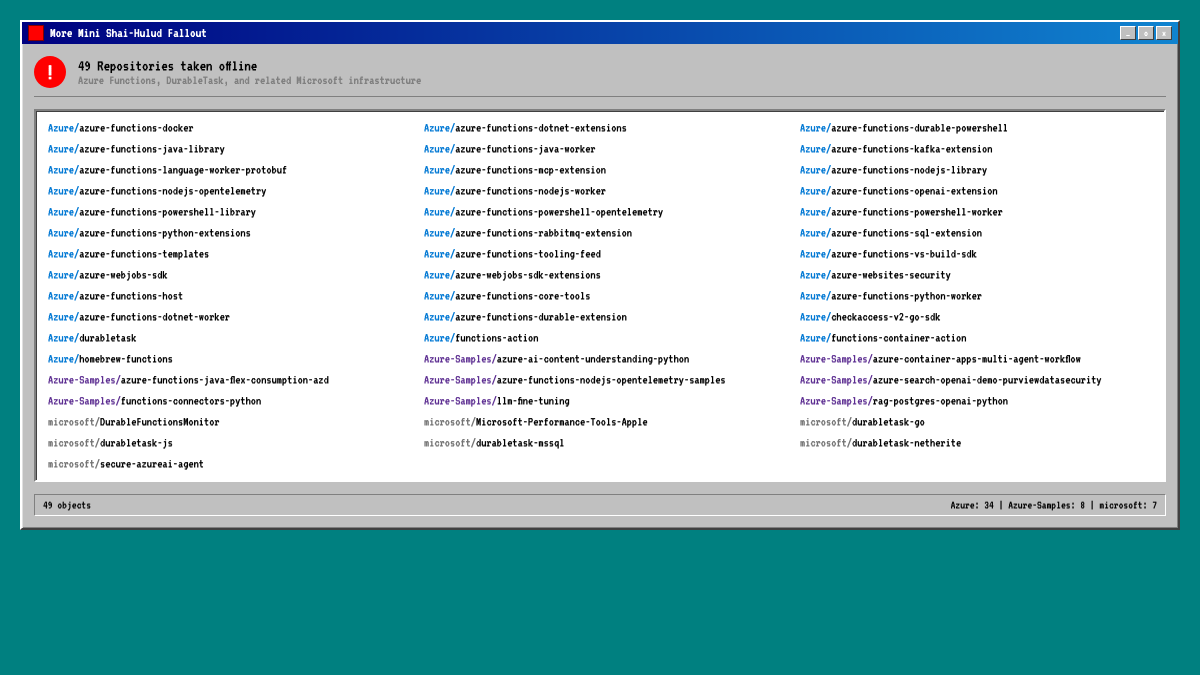
🚒More fallout from the Mini Shai-Hulud campaign
49 Microsoft, Azure, and Azure-Samples GitHub repos were removed at 16:00 UTC for Terms of Service violations
This is linked to news this morning that attackers had regained access, after the previous durabletask compromise
100
AI is moving from "help me write code" to "help me turn an idea into something usable."
Codex Sites turns plans and rough concepts into interactive apps your team can actually explore, share, and refine. That points to a much faster loop between thinking, building, and testing.

Building apps has never been easier.
With Sites, Codex can turn your work, ideas, and plans into an interactive website or app your team can explore, use, and share with a URL.
Rolling out to Business and Enterprise plans, before expanding more broadly.
39
CODEX cheatsheet to reduce quota usage:
1. Scope the task tightly.
Tell Codex exactly what to change, what not to touch, and how to verify it. Vague tasks burn tokens.
2. Use plan mode for unclear or multi-file work.
Skip it for tiny edits. Use it when architecture, scope, or file impact is uncertain. Helps reduce quota usage by not burning expensive output tokens on unnecessary edits.
3. Keep AGENTS.md short and precise.
Give Codex the repo map, commands, conventions, and hard rules. If it gets long, keep the main file minimal and link to task-specific docs.
4. Clean up dead code and old projects.
Deprecated folders, abandoned prototypes, and unused projects create false trails. Codex may inspect them unless your repo clearly says they are irrelevant.
5. Ignore the right things.
Use .gitignore/ignore rules for bin, obj, node_modules, generated clients, coverage output, logs, minified bundles, etc.
6. Disable unused MCPs.
Every extra tool can add context and decision overhead. Keep only the tools that actively help your workflow.
7. Reduce noisy build/test output.
Fix real warnings. Suppress or isolate known irrelevant noise so Codex does not chase unrelated issues.
8. Use the smallest model/reasoning that fits.
Low/medium for routine edits. High/xhigh for hard debugging, refactors, architecture, or messy unknowns.
9. Be careful with saved context
If Codex memories or long-running thread context are adding stale/cross-project noise, start a fresh task or turn them off. Put durable repo rules in AGENTS.md instead.
10. Prefer clean signal over less context.
The goal is not starving Codex to save tokens. The goal is giving it the fewest high-quality clues needed to do the job right.
What would you add? Reply with anything I missed.
3
4
60
8,990
We're all frustrated that Codex retired the 2x quota limits today. But use this as an opportunity to become a master of Codex! Figure out how it works. Understand how your prompts change its behavior. Ask it how to reduce token usage too! And don't forget to have fun. 🙂
1
1
392
Codex usage limits are back to 5x/20x vs Plus. Here are some tips to stretch your quota:
-Always use plan mode before allowing Codex to do work
-Disable Codex memories in Personalization settings
-Turn off noisy build warnings
-Keep AGENTS.md small
-Disable unused MCPs
-Use smallest model/low reasoning for routine edits
17
9
194
25,601
Since many seem to find this post helpful, I wrote an even longer cheatsheet with the top 10 ways to reduce Codex quota usage. x.com/SilverleafTech/status/…

CODEX cheatsheet to reduce quota usage:
1. Scope the task tightly.
Tell Codex exactly what to change, what not to touch, and how to verify it. Vague tasks burn tokens.
2. Use plan mode for unclear or multi-file work.
Skip it for tiny edits. Use it when architecture, scope, or file impact is uncertain. Helps reduce quota usage by not burning expensive output tokens on unnecessary edits.
3. Keep AGENTS.md short and precise.
Give Codex the repo map, commands, conventions, and hard rules. If it gets long, keep the main file minimal and link to task-specific docs.
4. Clean up dead code and old projects.
Deprecated folders, abandoned prototypes, and unused projects create false trails. Codex may inspect them unless your repo clearly says they are irrelevant.
5. Ignore the right things.
Use .gitignore/ignore rules for bin, obj, node_modules, generated clients, coverage output, logs, minified bundles, etc.
6. Disable unused MCPs.
Every extra tool can add context and decision overhead. Keep only the tools that actively help your workflow.
7. Reduce noisy build/test output.
Fix real warnings. Suppress or isolate known irrelevant noise so Codex does not chase unrelated issues.
8. Use the smallest model/reasoning that fits.
Low/medium for routine edits. High/xhigh for hard debugging, refactors, architecture, or messy unknowns.
9. Be careful with saved context
If Codex memories or long-running thread context are adding stale/cross-project noise, start a fresh task or turn them off. Put durable repo rules in AGENTS.md instead.
10. Prefer clean signal over less context.
The goal is not starving Codex to save tokens. The goal is giving it the fewest high-quality clues needed to do the job right.
What would you add? Reply with anything I missed.
1,339
Some are correctly noting that saying "always use plan mode" is overkill. A more accurate statement would be "always use plan mode when the task is complex, ambiguous, or hard to describe.
4
1,513
More detail on why these help:
Plan mode first: lets Codex inspect, ask questions, and propose the smallest safe change before burning quota on edits that aren't even right/best.
Disable memories: useful, but they can add extra context. If you do not need cross-thread recall, turn them off.
Turn off noisy build warnings: every warning pasted back into the thread is output Codex may read, summarize, and reason over. Keep builds focused on real errors.
Keep AGENTS.md small: Codex reads it before work. Put only durable rules there; move rare/task-specific notes elsewhere.
Disable unused MCPs: each server can add tools/instructions/context. Only enable what the task needs.
Use the smallest model low reasoning for routine edits: save higher reasoning for debugging, architecture, or multi-file changes.
1
4
2,863
Codex Users: STOP.
If Codex went offline right now, could you continue working on your software?
17
Codex giving some love to Windows users! Exciting!
May 29

Codex now supports more of the Windows developer loop.
With Computer use on Windows, Codex can test apps, debug flows, and review work where your project context lives. Codex in the ChatGPT mobile app lets you connect to Windows machines and keep steering from your phone.
29
Codex is magic. 9 months ago, I could not have imagined that my job would change this massively. Now, I get to dream, plan, and architect, then shepherd AI as it helps me build software. I could have done it by hand (done it my whole career), but now I don't have to. 🤯
23
I've never written Java code before.
I asked @OpenAI's Codex to make me a Minecraft mod that added a new block to the game. It asked for approval to install some dependencies and told me to install Fabric. 10 minutes later, I had a working Minecraft mod.
No. Coding. 🤯
1
2
50
I was wrong.
I thought AI wouldn't take over software engineering for years.
Using @OpenAI's Codex on Windows feels like magic. What it is able to do was unthinkable to me even 9 months ago.
Yesterday, it accomplished two tasks for me that would have taken me DAYS to complete on my own. Actually, some tasks Codex completed recently would have been so complex, I probably wouldn't have done them myself at all.
One of the tasks involved setting up the Chrome plugin in Codex, along with Chrome Devtools MCP, which allowed Codex to control a browser and scan a website to figure out how it works. It did it in under 10 minutes. Sniffed network requests/responses, explored HTML, ran JS. By itself.
My message to the world:
Build new things. Explore. Research. Create.
It's a new world filled with endless opportunities. Take advantage!
1
28
This future is not assured. We have to protect human flourishing at every junction in order for this to be the outcome. Humans > AI

There will be universal high income (not merely basic income).
Everyone will have the best medical care, food, home, transport and everything else.
Sustainable abundance.
1
29
This! Well said. AI leaders must be held accountable for keeping human flourishing at the forefront of everything. We are designed by God; special and unique in the cosmos!

He's not just defending AI energy use. He is smuggling in a whole anthropology where humans are basically inefficient meat computers that you have to pour food and years into before they become useful. And once you accept that, the next move is obvious. If people are just costly biological training runs, then burning mountains of electricity to build synthetic intelligence starts to feel not only equal, but superior, even if it negatively impacts actual humans.
That is the dystopian. It makes human development sound like a bug in the system, and it makes sacrificing human and creational flourishing for more computational power sound logical. To him, the grid gets strained, prices go up, ecosystems get hit, but hey, humans eat too, so what's the difference?
The difference is that humans aren't an inefficient line item. They're the point. If your worldview can look at a child growing into an adult and describe it as energy spent to train intelligence, you haven't said something profound. You've revealed a horrifically rotten worldview.
26
Can AI think for itself?
(1/3) This is a hot topic, and the question comes down to one's preexisting worldview.
What is consciousness? If everything is just molecules in motion, then what collection of molecules makes up consciousness? Consciousness doesn't seem to make sense outside of a religious worldview.
If consciousness isn't a feat of human engineering but is innate and unique to humans, then we needn't worry about AI ever having it.
A quick thought experiment.
Tesla's Full Self-Driving is now so smooth, you'd swear a skilled human is driving.
If an FSD car, running fully autonomously, struck and killed a pedestrian, would we put the car on trial for manslaughter?
Of course not.
Same logic for AI chat models:
OpenAI's models are so convincing, you'd think a real person wrote the response.
Suppose someone prompted one, and it output detailed instructions for murder, then another person followed them and killed someone.
Would we put the AI model on trial for murder? Send it to prison?
No. Essentially no one (whatever they say about "emergent consciousness") actually believes we should.
How about AI robots?
Imagine a household robot instructed to protect the home. A delivery person enters using a code from the owner, but the robot misjudges and kills them.
Who is responsible? The robot? Or the human and/or manufacturer?
We all intuitively grasp that the AI is a tool: extraordinarily sophisticated code and data, built and directed by humans. But it has no independent moral agency.
From a Christian worldview, this is clear: machines have no soul, no God-given conscience. Only humans bear God's moral image.
That's why, no matter how human-like AI outputs become, we hold the creators, deployers, and users accountable. Not the AI itself.
AI simply isn't the kind of thing that can be morally blamed or punished in the way humans are. Lacking a soul, it remains a powerful tool that we, as moral agents, must choose to wield responsibly, for genuine good and the betterment of society.
1
22
(2/3) This topic is only going to get more complex, not less, as humans continue to expand the capabilities of AI. What happens when autonomous, recursive AI like OpenClaw goes mainstream, and suddenly, there are thousands of autonomous agents with complex tools that can suddenly do a lot of undirected work on behalf of its human? Who is responsible for what the agents do?
We still innately know the AI cannot be charged with a crime, but if humans give it tools that it then uses for harm, what do we do?
I can't help but think this would be like giving a trained animal a toolbox, with some tools being potentially lethal, and just hoping a non-moral agent doesn't do anything evil.
Should we allow that?
1
25
(3/3) The answer seems clear to me:
AI should be designed to be human-in-the-loop.
Humans are moral agents. We make choices for good or for evil. We are accountable for moral actions in the world.
AI must remain accountable to humans.
15