Joined November 2025
- Tweets 2,306
- Following 1,468
- Followers 1,406
- Likes 3,400
171 Photos and videos









Pinned Tweet

Apr 9
Basics of Docker Architecture
------------------------------------
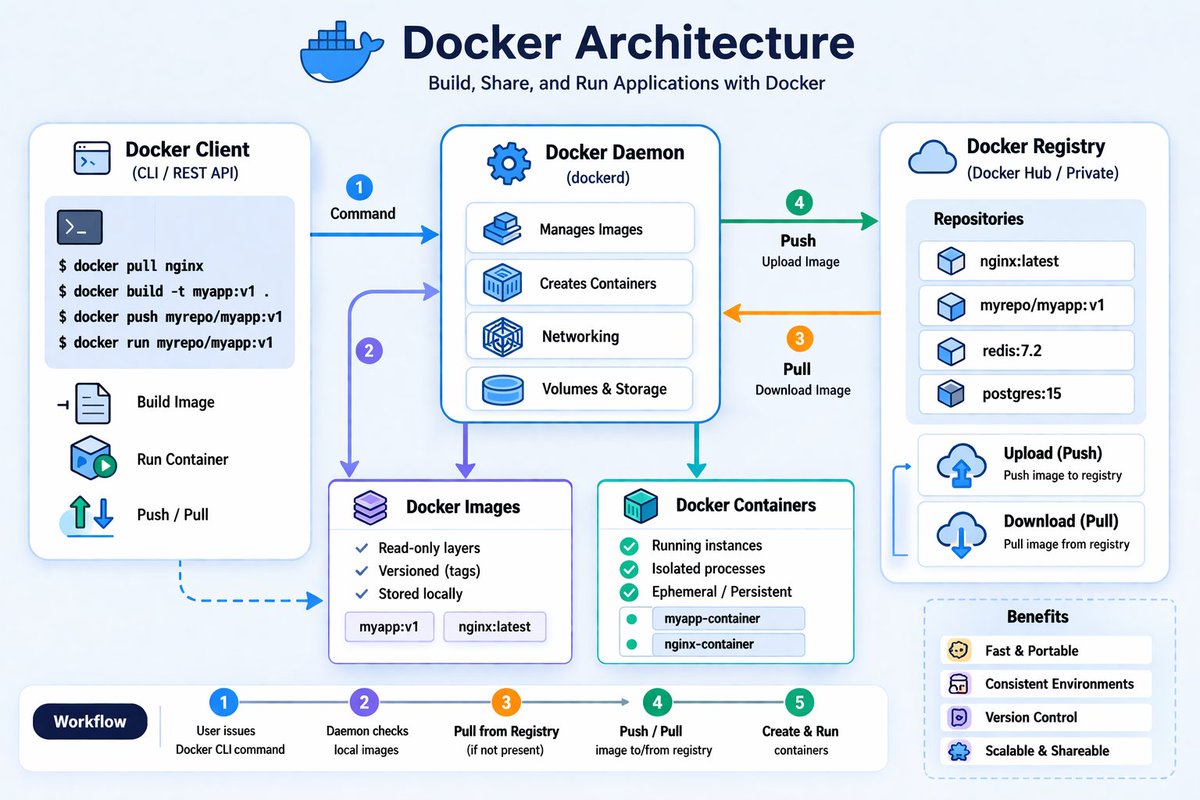
The below are the important components of Architecture.
Docker Client -->
This is where we run commands like docker build, docker pull, docker push, docker run etc.
When we run commands, the client sends a REST API call to Docker daemon.
Docker Daemon (dockerd or containerd) -->
This is the engine which builds images, creates containers, push&pull images and manages networking & storage etc.
It Accepts REST API calls from clients and perform the required function.
Docker Images -->
Read-only templates used to create containers. The Applications along with it's libraries and other required components would be packaged as Docker image which will be used to create containers.
Docker Containers -->
Running instances of images that execute applications.
Docker Registry -->
A remote repository (like ARtifactory registry/Nexus Riegistry/ Docker Hub etc) which stores docker images.
The flow is explained in the diagram as below.
1. docker command is executed in the client.
docker build --> For building docker images by using Dockerfile and Application code and libraries etc.
docker pull --> For getting docker image from Docker Registry
docker push--> For pushing docker image to Docker registry
docker run --> To create and run the container.
docker stop/start --> To stop and start the docker container respectively
2. Client sends REST API request to daemon.
3. Daemon pulls image from registry if not present.
4. Daemon push the image(if we execute docker push command) to registry.
5. Container is created and started(if we execute docker run command)
7
11
53
8,607
Jun 8
Watched #peddi for the second time... Liked very much especially second half... highly emotional movie 💖💖 like #BajarangiBhaijaan...
Hats off to Ramcharan Garu,AR Rahman Garu, Buchibabu Garu, Ratnavelu Garu, Jagapati babu garu and all the team members....
1
44
Jun 4
Watched #peddi .. inspiring and good movie... wonderful acting by #ramcharan and great BGM by Rehaman...
29
Apr 13
Git fundamental objects: Blobs, Trees, and Commits
----------------------------------------------------------
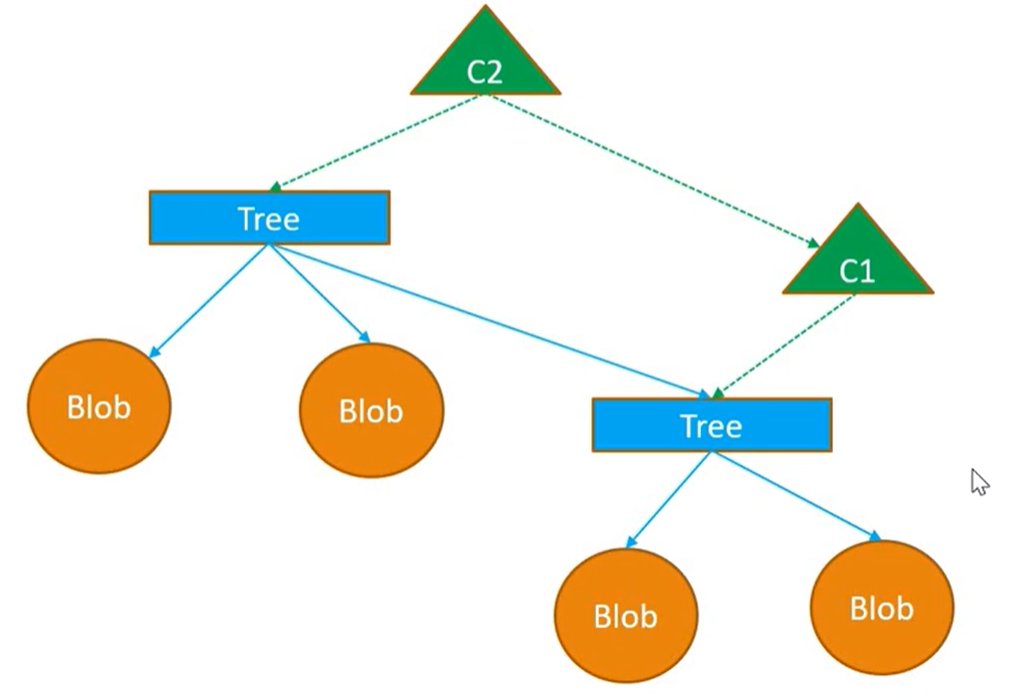
Git stores data using three fundamental types of objects: Blobs, Trees, and Commits.
1. Blob Objects (Binary Large Objects) -->
Git is a content-addressable file system that stores file contents as Blob objects.
These objects contain a checksum (hash) of the file content.
If the content of two files is identical, Git saves space by referencing the same existing blob object rather than creating a new one.
2. Tree Objects -->
Since blobs do not store file names or directory structures, Tree objects are used to map these blobs to their respective filenames and manage subdirectories
Tree objects essentially act as a directory listing, referencing blob entries or other sub-tree objects.
3. Commit Objects -->
Commit objects are created when changes are saved to the repository.
They contain metadata, including references to the top-level Tree object, the parent commit (to maintain history), and details about the author and committer.
These objects allow Git to track the history of files over different points in time. These objects are stored in the .git/objects directory.
All these objects (blobs, trees, and commits) are identified by a unique 40-character checksum (hash), which serves as the object's name.
Some useful commands:
git cat-file -p [hash] --> Prints the content of a specific Git object identified by its checksum.
git cat-file -t [hash]: Displays the type of the object (blob, tree, or commit) associated with a specific hash.
git commit -m "message": Creates a new commit object, saving the current state of the index to the repository history.
git log: Displays the commit history of the repository, showing the sequence of changes made
Example:-
HP@LAPTOP-5GCK8CJK MINGW64 /e/linux/git_examples/repo1/.git/objects (GIT_DIR!)
$ ls
14/ 41/ 71/ ce/ info/ pack/
HP@LAPTOP-5GCK8CJK MINGW64 /e/linux/git_examples/repo1/.git/objects (GIT_DIR!)
$ cd 14;ls
be0d41c639d701e0fe23e835b5fe9524b4459d
HP@LAPTOP-5GCK8CJK MINGW64 /e/linux/git_examples/repo1/.git/objects/14 (GIT_DIR!)
$ git cat-file -t 14be0d
blob
HP@LAPTOP-5GCK8CJK MINGW64 /e/linux/git_examples/repo1/.git/objects/14 (GIT_DIR!)
$ git cat-file -p 14be0d
hello2
To know more about these objects, please go through the video youtu.be/h_5CBFPR6f8?si=mzKX…
1
1
7
206
Apr 13
Bare Repository in Git
---------------------------
A bare repository is a Git repository designed for collaboration among multiple developers.
Unlike a standard repository, it does not contain a working directory or the standard .git folder structure that allows for local file editing, adding, or committing.
Creating a bare repository --> The below commands are used to create a bare reposiotry.
git init --bare <reponame>
git clone --bare <repo-url>
Example:-
HP@LAPTOP-5GCK8CJK MINGW64 /e/linux/git_examples
$ git init --bare repo1.git
Initialized empty Git repository in E:/linux/git_examples/repo1.git/
HP@LAPTOP-5GCK8CJK MINGW64 /e/linux/git_examples
$ ls
repo1.git/
HP@LAPTOP-5GCK8CJK MINGW64 /e/linux/git_examples
$ cd repo1.git/
HP@LAPTOP-5GCK8CJK MINGW64 /e/linux/git_examples/repo1.git (BARE:master)
$ ls -lart
total 11
-rw-r--r-- 1 HP 197121 73 Apr 13 16:56 description
drwxr-xr-x 1 HP 197121 0 Apr 13 16:56 ../
drwxr-xr-x 1 HP 197121 0 Apr 13 16:56 info/
drwxr-xr-x 1 HP 197121 0 Apr 13 16:56 hooks/
drwxr-xr-x 1 HP 197121 0 Apr 13 16:56 refs/
drwxr-xr-x 1 HP 197121 0 Apr 13 16:56 objects/
-rw-r--r-- 1 HP 197121 104 Apr 13 16:56 config
-rw-r--r-- 1 HP 197121 23 Apr 13 16:56 HEAD
drwxr-xr-x 1 HP 197121 0 Apr 13 16:56 ./
Here we can see there is no .git directory and it lacks a working tree. If we attempt to run commands like "git add" directly within it will result in an error.
HP@LAPTOP-5GCK8CJK MINGW64 /e/linux/git_examples/repo1.git (BARE:master)
$ echo "hello" > a.txt
HP@LAPTOP-5GCK8CJK MINGW64 /e/linux/git_examples/repo1.git (BARE:master)
$ git add a.txt
fatal: this operation must be run in a work tree
Usage of a Bare Reposiotry -->
Developers use these repositories as a central, shared hub.
A developer clones the bare repository to their local machine, performs their work (like adding and committing files locally), and then uses git push to upload their changes to the shared bare repository.
Real-world application --> Bare repositories are used in everyday workflows. Services like GitHub, GitLab, and Bitbucket host our projects as bare repositories, acting as the remote shared point for the teams to collaborate effectively.
You may check the video youtu.be/z1KJSVbqoYM?si=X_fV… for more info on this.
1
9
231
Apr 13
Linux Process States and Signals
---------------------------------------
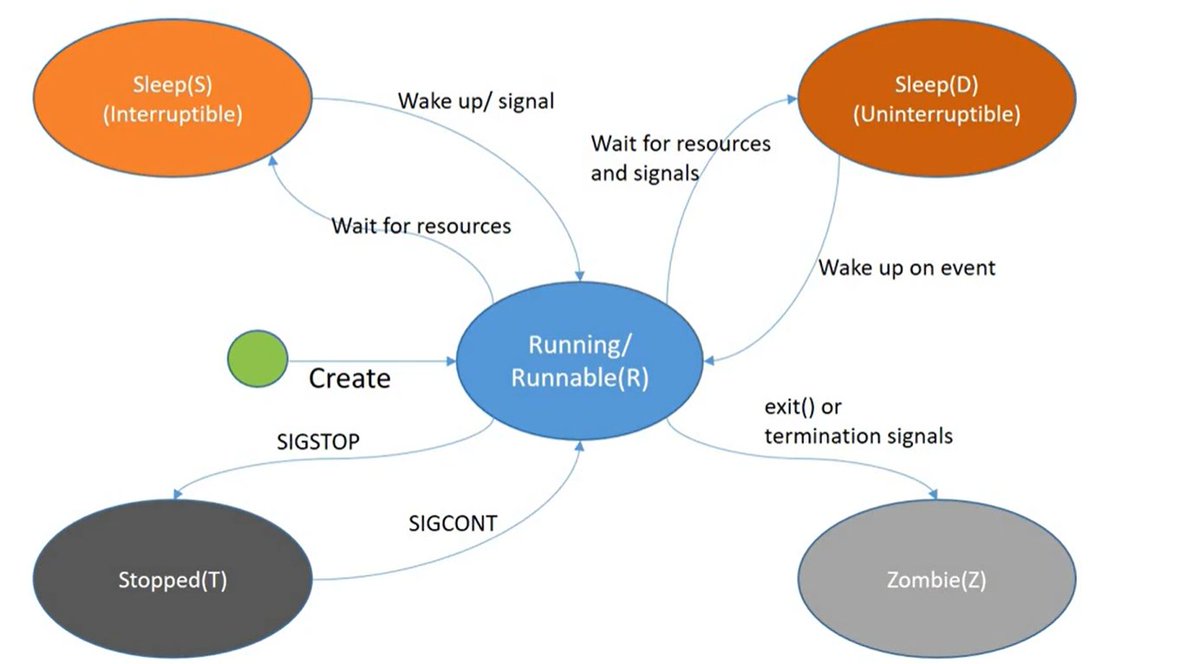
Linux Process States --> Once the process is created in Linux, it can be in one of below states.
Running/Runnable (R): The process is currently executing on the CPU or is in the queue waiting for a CPU cycle.
Interruptible Sleep (S): The process is waiting for a resource, such as a file or input, and can be awakened by a signal.
Uninterruptible Sleep (D): Typically triggered by hardware I/O (like an NFS mount), these processes cannot be awakened by signals until the required resource becomes available.
Stopped (T): The process is paused.
Zombie (Z): A process that has completed but remains in the process table because the parent hasn't collected its exit status.
Signals -->
The processes are controlled using various signals.
we can send signals by using kill command.
kill -<signalnum> <pid>
kill -<signalname> <pid>
example:- kill -9 1234 or kill -SIGKILL 1234
Some important signals are as below.
SIGINT (2): Sent via Ctrl C to interrupt a process.
SIGTERM (15): The default signal sent by the kill command to request a graceful termination.
example:- kill -15 1234 or kill 1234 --> stop the process with pid 1234 gracefully(Allows process to clean up before exiting).
SIGKILL (9): Used for the forceful termination of a process when a graceful shutdown isn't possible.
example:- kill -9 1234 --> Immediately stops process as SIGKILL cannot be caught or ignored.
Used to stop Hung or unresponsive process.
SIGHUP (1): Often sent to child processes when a terminal session is closed or used to reload configuration of a server process.
to reload that server process
example:- kill -1 1234 (Reload the configuration of server with process id 1234..we use this to reload that server process when the server configurations are changed)
SIGQUIT (3): Used to terminate a process and generate a core dump (memory snapshot) for debugging.
SIGSTOP & SIGCONT: Used to pause a process and resume it, respectively.
--> While most signals can be caught or ignored using custom handlers in our code (such as the trap command), SIGKILL and SIGSTOP cannot be trapped by a process, ensuring they always perform their default action.
For more details with examples, you may go through the video youtu.be/20fgO4oeZJY?si=OGKp…
3
2
24
549
Apr 13
Docker Layers - Copy On Write(COW) strategy
------------------------------------------------------
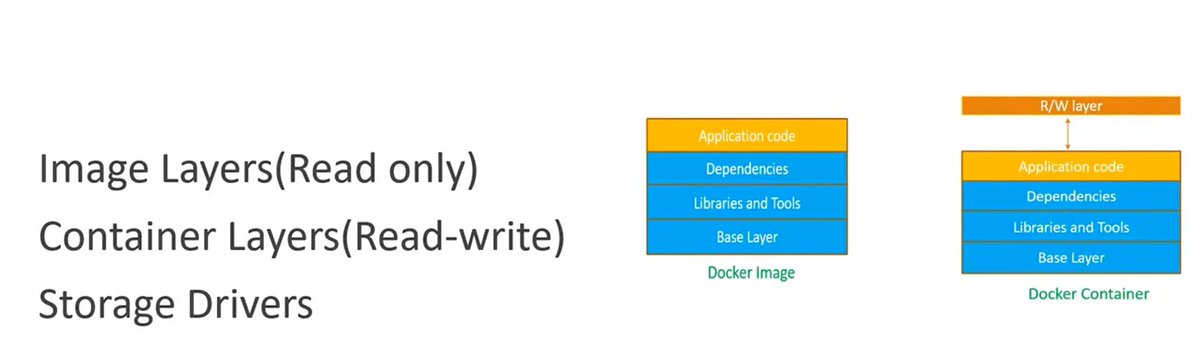
COW(Copy On Write) Strategy --> Enables efficient storage and management of image and container layers.
Image Layers --> Docker Image consist of multiple read-only layers.
Example: Python application Docker image contains below layers.
Base Image (Ubuntu) --> Layer 1 (Install Python) --> Layer 2 (Add App Code)
Container Layers --> When Containers are created, they add a single read-write layer on top of read only layer for temporary modifications.
COW(Copy On Write) Strategy -->
When a container needs to modify a file, it searches for it from the top layer downwards. If found in a lower read-only layer, the file is copied to the top read write layer to be edited, preventing changes to the base image. This is the reason, it is called as Copy On Write strategy.
Example: let's say, we have a file /app/config.txt exists in image.
For read operation on this file:
Container reads → directly from image layer (no copy).
For Write operation or modification of this file
Docker copies file from image layer to container layer and modifies it there. This is Copy On Write process.
Implementation --> To implement this COW, Docker uses storage drivers.
Examples of storage drivers : overlay2,devicemapper,autofs,btrfs,zfs etc.
Advantages of COW -->
1. Efficient Disk Usage and Layer reusability
Multiple containers share the same image layers. No duplicate storage for unchanged files.
2. Optimized for Read Operations
Reads happen directly from lower (image) layers. Very fast for read-heavy workloads.
3. Lightweight Containers
Containers only store changes (diffs).
Disadvantages -->
Slower Write Performance:
Since for write operations, it needs to Copy from lower layer to writable layer, this adds latency for write heavy apps.
Databases do frequent writes and it is not Ideal for Databases.
So for write heavy apps, we use volumes instead of container layer.
So we use combination of COW(great for saving space and fast startup) and volumes for write heavy workloads.
For more info on this, you may watch video youtu.be/hZvFXU6-qlc?si=BEsp…
2
3
24
655
Apr 12
Basics of a Linux process?
-----------------------------------------
Linux process --> A program in execution. While programs are stored on the disk, processes are loaded into memory and executed by the CPU.
Process Creation --> New processes are created through a two step mechanism managed by the kernel:
The Fork System Call: When we execute a command in a shell (like bash), the parent process issues a fork system call. This creates a child process that is an almost exact copy of the parent, inheriting its environment, file descriptors, and memory state.
The Exec System Call: Once the child process is created, it issues an exec system call. This replaces the current process image with the specific program we intend to run (e.g., python3 example.py), updating the process memory, registers, and file descriptors to reflect the new task.
When a shell executes a command, it typically uses a fork system call to create a child process, followed by an exec call to load the new program.
Every process we run runs with a process ID(PID) and it's parent process has an id which is PPID.
Note:-
Not every command we execute creates a new process.
Commands like pwd or cd are shell built-ins; they execute directly within the existing shell process rather than spawning a new one. we can verify if a command is a built-in by using the type command.
Types of Processes -->
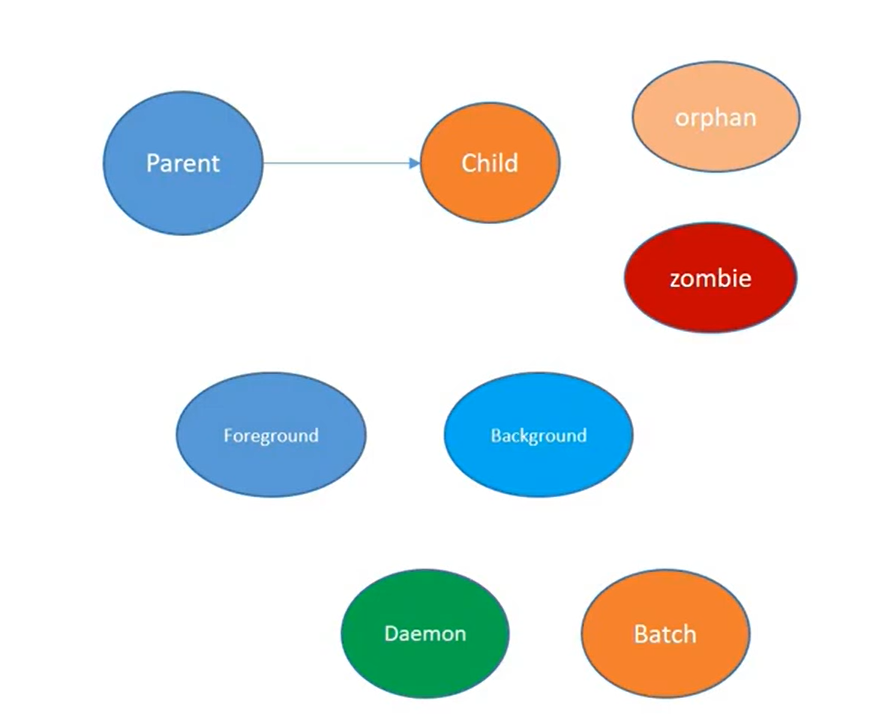
Foreground process: Process requiring user interaction.
Background process: Process which run independently in the background.
Batch & Daemon Processes: Scheduled tasks (using cron) and system-level services (like systemd) that run continuously.
Orphan Processes: When a parent process terminates before a child process, child process continues to execute which is called as an orphan process.
Zombie Processes: When a child process terminates without a proper exit signal being caught by the parent, child process will become a zombie process. A zombie is a terminated process that still has an entry in the system process table.
Kernel Role --> The Linux kernel maintains a process table (a collection of task_struct data structures) to track metadata like the Process ID (PID) and Parent Process ID (PPID) for every running process.
For more details about Linux processes, you may watch the video youtu.be/wPZEEqe0UbA?si=MAxb…
I will post the important commands used while working with processes are in comment section.
2
1
7
196
Apr 12
Important commands related to Linux processes
-----------------------------------------------------
Process Status & Monitoring -->
ps(process status):
ps -ef : for a full-format listing of all processes.
-e → Show all processes (system-wide)
-f → Show full format listing (detailed view)
Example:- To find processes with their details corresponding to java, we can use below command.
ps -ef | grep java
ps aux : to view detailed memory and CPU utilization,user,PID etc..
example:- ps aux | grep java (Processes with their details like CPU, memory, user, PID etc )corresponding to java.
top --> Used for real-time, live monitoring of processes running on the system.
we can also use command htop which has better UI, but we need to install it separately.
We can some live details like Load Average, %CPU usage, %MEM usage using top command.
pstree --> A command used to visualize the hierarchy and relationship between parent and child processes in a tree structure.
pgrep --> Find PID by name (Example:- pgrep nginx --> to get the PID of nginx process).
Process Identification & Control:
type -> Useful for determining if a command is a shell built-in (which runs within the existing shell process) or an external program that spawns a new child process.
kill -> Used to send signals to terminate specific processes.
nohup --> Used to run a process in the background while ignoring the SIGHUP signal, ensuring the process survives even if the parent terminal session is closed.
Scheduling & Utility:
crontab --> Specifically crontab -e, used to edit and manage scheduled background tasks.
I would post about process states and signals used to control those states in next post.
56
Apr 12
Docker cgroups Basics
--------------------------------------------
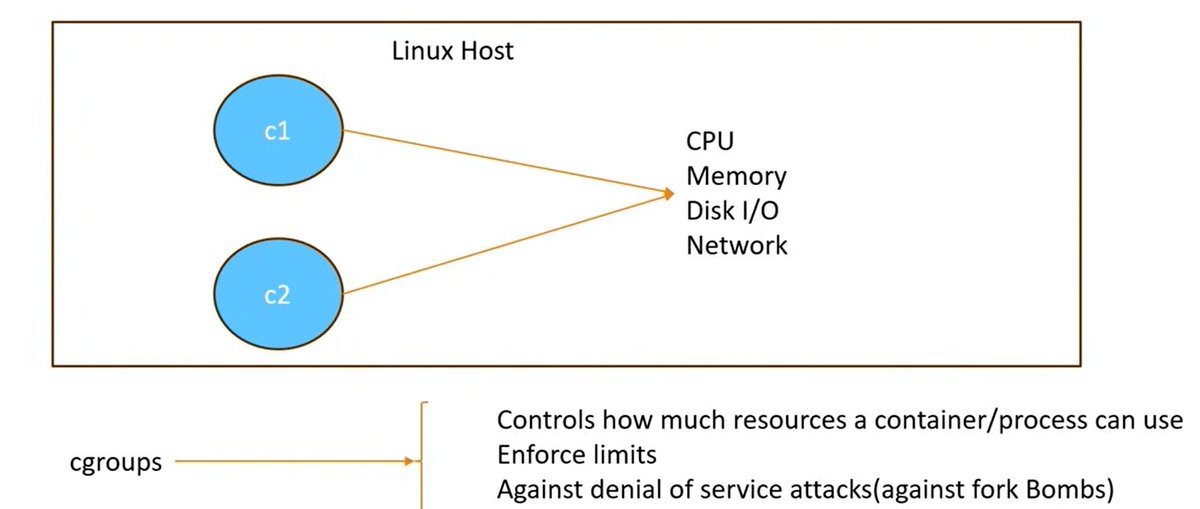
cgroups --> Control Groups which is a Linux kernel feature used in Docker that is used to manage and limit resource consumption for containerized processes.
cgroups control how much resources a container or process can use like CPU, memory, PIDs, Disk I/O, Network etc.
cgroups help to maintain system stability and prevent resource exhaustion, including protection against Denial of Service (DoS) attacks like fork bombs.
When the container is created, it would be allocated the resources like CPU, memory, and PIDs etc based on the values we set through cgroups.
On Linux systems, cgroups (control groups) are managed within the virtual file system located at /sys/fs/cgroup/.
Some useful commands:
To check the container resource utilization without continuous streaming using below command.
docker stats --no-stream
To view detailed configuration and resource allocations for a container, we can use below command.
docker inspect <container-name/id>
To set hard memory limits for containers using the --memory flag to prevent out-of-memory errors.
docker run -d --name --memory="500m" <container-name/id>
which creates a container with a hard memory limit of 500MB.
To set hard and soft limits on CPU, we can use below example commands.
Soft Limits (CPU Shares):
docker run -d --name --cpu-shares=768 <container>
By setting it to 768, we are telling the host to give this container roughly 75% of the typical priority (768 is 75% of 1024(default value)).
Hard Limits (Period/Quota):
docker run -d --name --cpu-period=100000 --cpu-quota=50000 <container>
This limits the container to exactly 0.5 (half) of a CPU core.
To set limits on pids, we can use an option --pids-limit. This will avoid the security issues like fork bombs.
These are some example commands. To know more about how cgroups work in docker, you may go through the video youtu.be/x9dXwTHmhl4?si=bFN1…
6
46
1,454

Apr 11
Linux systemd Basics
---------------------------------------------
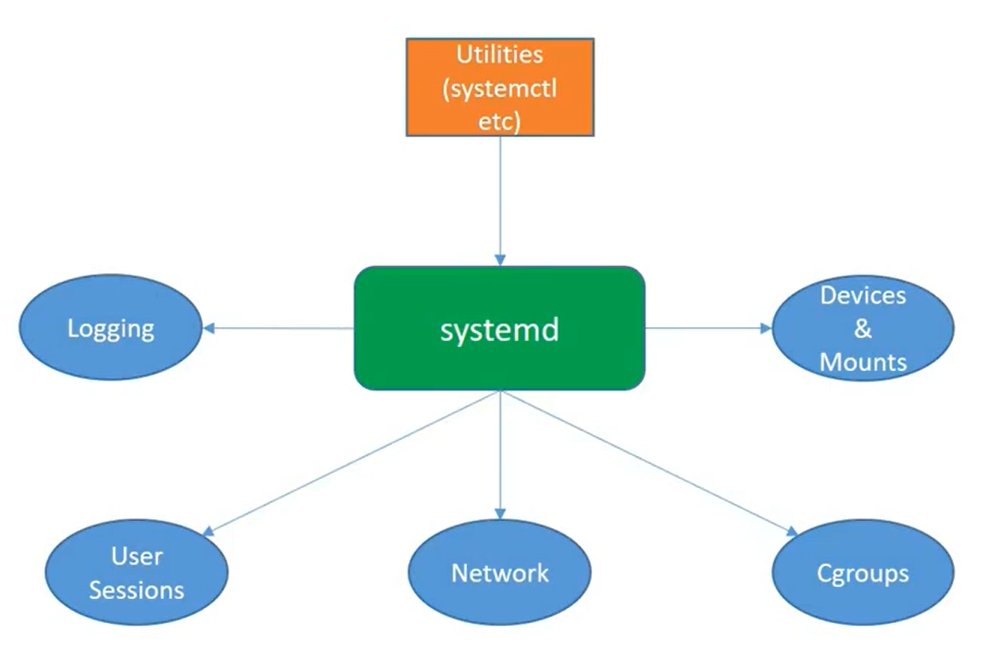
Systemd --> The essential initialization system and service manager in modern Linux distributions. It runs as process ID 1.
Systemd takes care of
--> system boot process once kernel invokes it.
--> starts and Manage various services in Linux
--> Manages hardware and devices
--> Manages various background daemons like journald(logging),networking(networkd),dns(resolved) etc
--> Manages user login sessions
--> Manages cgroups for resource control etc.
systemd configuration --> Units: The fundamental configuration objects in Systemd.
Types of Units -->
services: Manage long-running background processes (daemons)
targets: Groups of units used to bring the system to specific states, such as multi-user.target or graphical.target
sockets: Enable on-demand service activation to save resources.
slices: Used for resource management via control groups (cgroups).
mounts: Manage file system mount points with dependency control.
These units will be represented in terms of file unit files --> .service, .target, .socket etc.
Interaction with systemd --> through systemctl
systemctl command -->
Example commands:
systemctl start <service> --> starts a service
systemctl stop <service> --> stops a service
systemctl restart <service> --> restarts a service
systemctl daemon-reload --> reloads a service after updating a service file.
To know more details about systemd, you may g through the video youtu.be/-n54KUPJs1E?si=_Qy-…
2
15
98
3,705
Apr 11
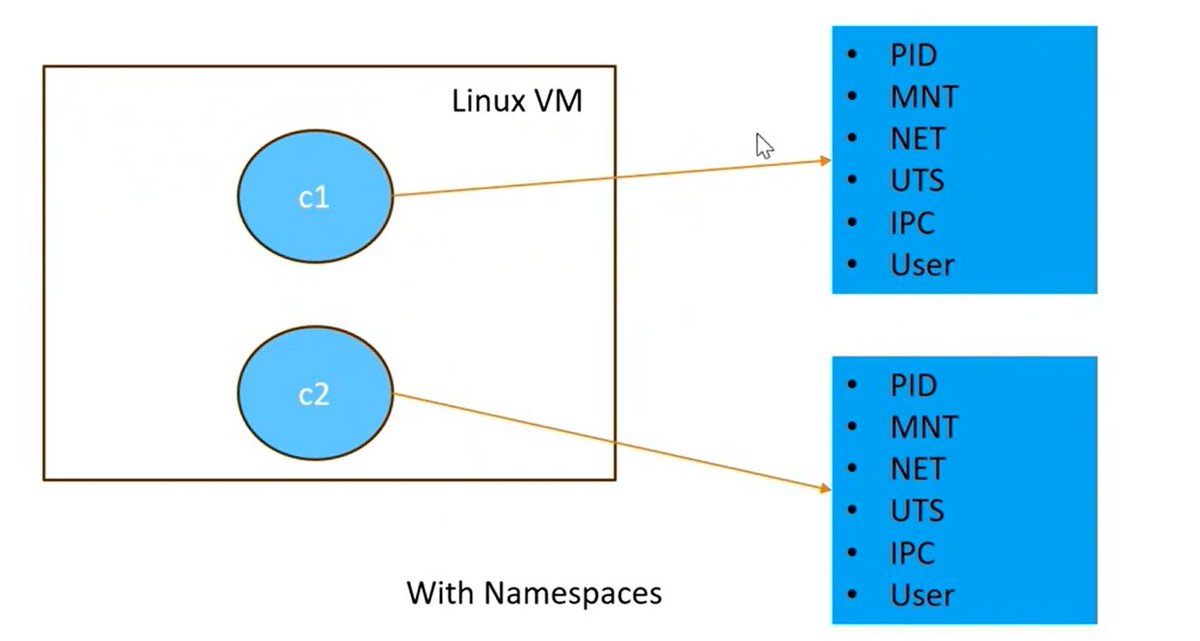
Basics of Docker Namespaces
-----------------------------------------------
Docker namespaces --> A fundamental Linux kernel feature that allows Docker to run containers in complete isolation.
By creating independent workspaces, namespaces ensure that containers do not interfere with each other or the host system's resources.
Containers use namespaces to maintain separate views of the system, preventing security vulnerabilities and resource conflicts.
By utilizing namespaces, Docker ensures that containers run with their own independent views of the system such as
--> process IDs
--> mount points
--> network interfaces
--> hostnames etc.
Key Docker Namespaces:
PID Namespace --> Isolates process IDs. A container only sees its own processes starting from PID 1.
NET Namespace --> Provides a separate network stack (IP, ports, routing tables) for each container.
MNT Namespace --> Gives containers their own filesystem mount points. Isolates file systems so that one container cannot access or modify the files of another.
UTS Namespace --> Allows containers to have their own hostname and domain name.
IPC Namespace --> Isolates inter-process communication (shared memory, semaphores).
USER Namespace --> Maps container users to different host users for better security.
For more details, you may go through the video youtu.be/9qj-S7yrDNM?si=3SJd…
1
4
113