
Apr 15
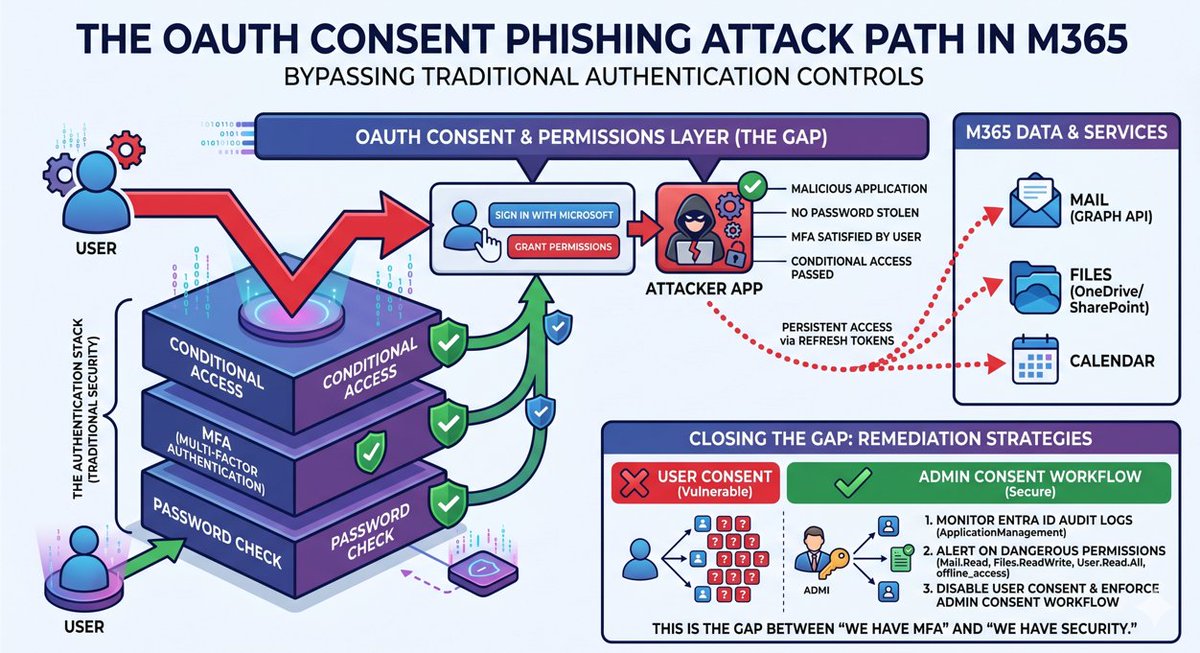
OAuth consent phishing is the M365 attack path most orgs aren't watching.
The attacker doesn't steal a password. They get the user to grant permissions to a malicious application. "Sign in with Microsoft" — the user clicks approve — and now the attacker's app has a refresh token with persistent access to their mail, files, and calendar until revoked.
No password compromised. MFA was satisfied by the legitimate user. Conditional Access passed because the user authenticated normally. The malicious action happens at the consent layer — above authentication — where none of these controls apply.
The app now reads mail via Graph API. No interactive sign-in anomalies. No anomalous location. The non-interactive and service principal sign-in logs show token activity, but most SOCs never scrutinise them — and even when they do, the API calls are structurally identical to legitimate application behaviour.
Default M365 detections don't catch this reliably. Microsoft has added some — Defender for Cloud Apps flags unusual OAuth credential additions and suspicious mail access — but they're inconsistent, often delayed, and miss consent grants to newly registered external apps without a risk profile.
You need to monitor application consent grants in Entra ID audit logs ("Consent to application" under ApplicationManagement) and alert on any app requesting Mail.Read, Files.ReadWrite, User.Read.All, or offline_access from a non-approved publisher. Better still, disable user consent entirely in Entra ID and enforce an admin consent workflow — shifting the attack surface from "any user can be phished" to "only admins can approve apps."
This is the gap between "we have MFA" and "we have security."
Start here: training.ridgelinecyber.com/…
4
56
232
16,703

3 Dec 2025
🚀 What’s Holding Your Business Back? Let’s Move Forward—Together!
#Preemptive #PreemptiveTechnofield #EnterpriseApplications #ManagedServices #BusinessGrowth #DigitalTransformation #Innovation #TechSolutions #ITServices #ApplicationManagement #EnterpriseIT #BusinessBoost
1
3
15

19 Nov 2025
Blog post: Simplifying App Deployment, Security, and Self‑Service msendpointmgr.com/2025/04/03… #Win32Apps #ApplicationManagement
3
1,149
3 Nov 2025
Blog post: Simplifying App Deployment, Security, and Self‑Service msendpointmgr.com/2025/04/03… #Win32Apps #ApplicationManagement
2
4
1,224

22 Oct 2025
Enhance Your Core Business with Expert Application Management Services.
Visit integratederp.com.sa or contact us at info@integratederp.com.sa | 966 55 010 9812.
#ApplicationManagement #AMS #ERP #SAP #DigitalTransformation #IERP
2
27
19 Oct 2025
Blog post: Simplifying App Deployment, Security, and Self‑Service msendpointmgr.com/2025/04/03… #Win32Apps #ApplicationManagement
1
8
1,221

8 Oct 2025
While private sector CIOs debate the merits of container adoption and worry about Kubernetes complexity, an unexpected leader has quietly emerged in the enterprise technology landscape: government. Recent research from Nutanix reveals a startling reality that challenges every assumption about public sector innovation — 96% of government organizations are actively containerizing its applications, significantly outpacing adoption rates across most private industries.
Even more remarkable, 83% of public sector organizations deploy multiple Kubernetes environments compared to just 78% globally. Meanwhile, VMware research shows private sector organizations are still split on container preferences — 33% prefer private cloud, 34% public cloud and 33% want both — while government agencies have moved beyond preference to production, running GenAI applications on containers at a 68% rate.
Read the full opinion piece by #FoundryExpert contributor, Raghav Potluri: spr.ly/6014ASphK
#Containers #Kubernetes #ApplicationManagement

796
3 Oct 2025
Blog post: Simplifying App Deployment, Security, and Self‑Service msendpointmgr.com/2025/04/03… #Win32Apps #ApplicationManagement
2
743
20 Aug 2025
Blog post: Simplifying App Deployment, Security, and Self‑Service msendpointmgr.com/2025/04/03… #Win32Apps #ApplicationManagement
1
2
935
4 Aug 2025
Blog post: Simplifying App Deployment, Security, and Self‑Service msendpointmgr.com/2025/04/03… #Win32Apps #ApplicationManagement
7
932
21 Jul 2025
Blog post: Simplifying App Deployment, Security, and Self‑Service msendpointmgr.com/2025/04/03… #Win32Apps #ApplicationManagement
1
4
1,031
21 Jun 2025
Blog post: Simplifying App Deployment, Security, and Self‑Service msendpointmgr.com/2025/04/03… #Win32Apps #ApplicationManagement
2
24
2,491
30 May 2025
Blog post: Simplifying App Deployment, Security, and Self‑Service msendpointmgr.com/2025/04/03… #Win32Apps #ApplicationManagement
3
28
2,240
28 Apr 2025
Blog post: Simplifying App Deployment, Security, and Self‑Service msendpointmgr.com/2025/04/03… #Win32Apps #ApplicationManagement
1
15
1,302

23 Apr 2025
I’m currently open to new freelance opportunities! If you’re looking for support in project management, application management, or product management, let’s connect. With a proven track record of delivering value across tech and operations, I’m ready to jump in and help move your initiatives forward. DMs are open or feel free to reach out directly!
#Freelance #ProjectManagement #ProductManagement #ApplicationManagement #OpenToWork #Consulting
2
4
1,071
3 Apr 2025
Blog post: Simplifying App Deployment, Security, and Self‑Service msendpointmgr.com/2025/04/03… #Win32Apps #ApplicationManagement
6
960
28 Mar 2025
Optimize your applications with IERP's AMS. From ERP to custom software, we ensure seamless operations, proactive maintenance & continuous optimization.
966 55 010 9812 | integratederp.com.sa | info@integratederp.com.sa
#applicationmanagement #businesssolutions #erp #ierp
2
4
30

モンハンワイルズまでに調整しておきたい極限までFPS稼ぎに行くPC設定📘
レジストリ編(⚠️GameBarを使う人はやめてください)
レジストリエディター開いてアドレスバーに以下アドレスコピペで行けます
不具合対策として元の値をメモ推奨
HKEY_CURRENT_USER\System\GameConfigStore
⇨「GameDVR_Enabled」をダブクリ 値のデータを”0”に変更 OKで完了 以下操作同じ
HKEY_CURRENT_USER\Software\Microsoft\Windows\CurrentVersion\GameDVR
⇨「AppCaptureEnabled」 値のデータを”0”
HKEY_LOCAL_MACHINE\SOFTWARE\Microsoft\PolicyManager\default\ApplicationManagement\AllowGameDVR
⇨「value」 値のデータ”0”
HKEY_LOCAL_MACHINE\SOFTWARE\Microsoft\Windows NT\CurrentVersion\Multimedia\SystemProfile\Tasks\Games
⇨「GPU Priority」 値のデータ”8”
⇨「Priority」 値のデータ”6”
⇨「Scheduling Category」 値のデータ”High”
⇨「SFIO Priority」 値のデータ”High”
変更後は必ず再起動
4
633

23 Dec 2024
Immiboard simplifies application management for immigration professionals with intuitive tools to track, organize, and process cases efficiently. Ensure accuracy and compliance while saving time with our user-friendly software.
immiboard.com/customers
#ApplicationManagement

6

4 Nov 2024
Ever wondered how the #Intune Management Extension (IME) figures out exactly which phase your #WindowsAutopilot enrollment is in, and why that sometimes causes app uninstalls to hang indefinitely even after the enrollment?
patchmypc.com/intune-managem…
In our latest @PatchMyPC , we will explore why devices get stuck in the Account Setup phase and how the IME reads (and occasionally misreads) the Enrollment Status Page (ESP) progress.
I’ll also explain the IME’s behind-the-scenes mechanics, from hidden #WMI calls to crucial registry keys, that decide whether a device moves forward or stays trapped in the ESP, potentially leaving app uninstalls in limbo.
Curious about what’s really going on under the hood? This blog reveals it all! And check out the corresponding flowchart! It's a big one!
#MsIntune #Windows #Windows11 #ApplicationManagement #Patchmypc

12
38
2,606