
May 29
“Definition: 'Love' is making a shot to the knees of a target 120 kilometers away using an Aratech sniper rifle with a tri-light scope. Love is knowing your target, putting them in your targeting reticule, & together, achieving a singular purpose against statistically long odds.”
1
1
36

May 24
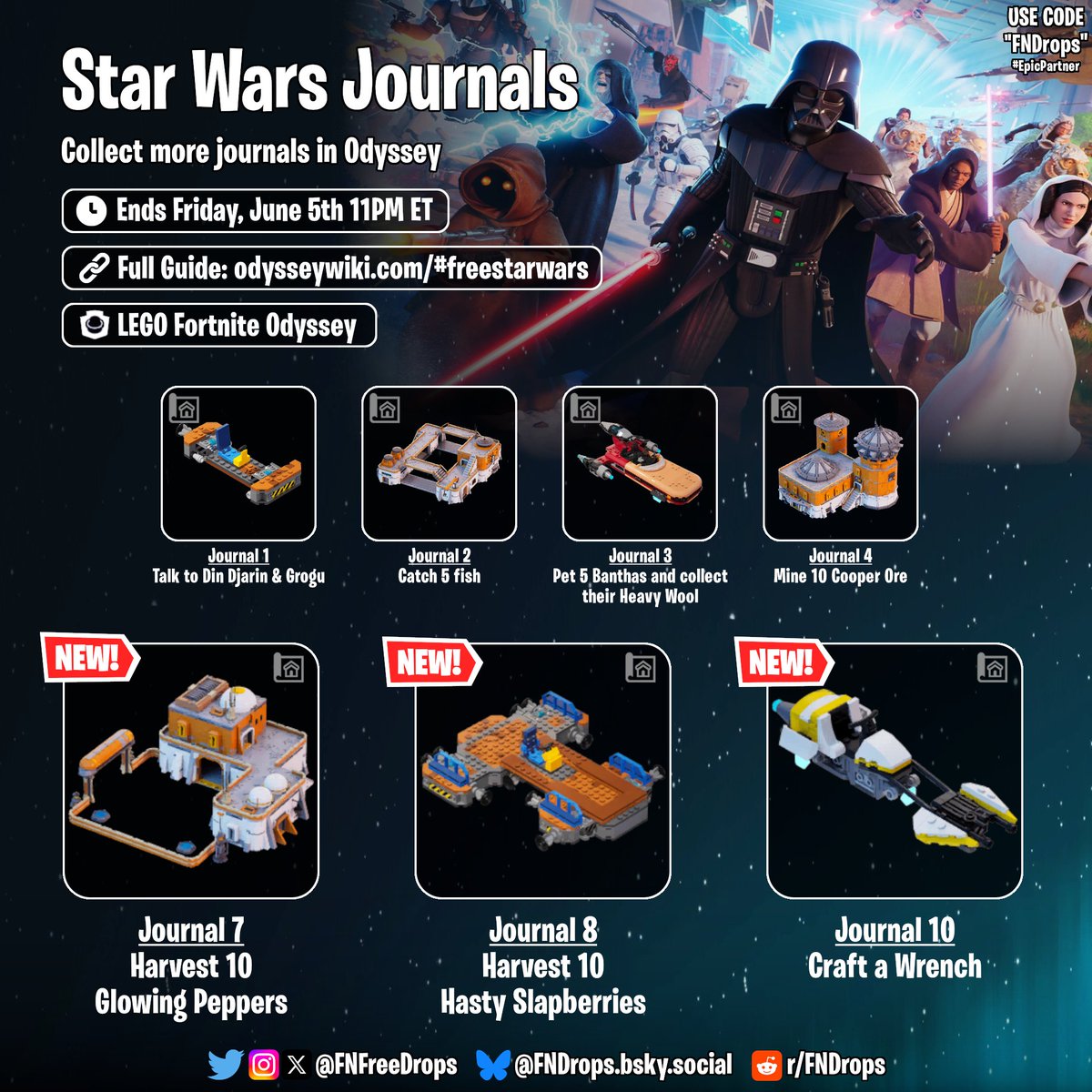
Collect journals 7-10 in Odyssey to unlock new rewards
🔗 Full Written Guide: odysseywiki.com/#freestarwar…
🏆New Rewards
• 7 - Mos Espa Moisture Farm Build
• 8 - Jalopy Landspeeder Build
• 10 - Aratech Civilian Speeder Bike Build
⌛️Ends Friday, June 5th 11PM ET
#Fortnite
15
50
370
15,832

May 22
Los otros 2 vehículos que se podrán conseguir con las misiones de mañana en LEGO Fortnite x Starwars también ya están listos para desbloquearse:
🔹Motor Speeder Común Aratech
🔹Deslizador de Carga Ubrikkian
Si lees algunos tomos que tengas de sobra puede que no se desbloqueen (como a mi me sucedió)
Por lo que sí a ti te sucede lo mismo se recomienda crear otro mundo en creativo, completa nuevamente todas las misiones actuales del Mandaloriano y Grogu, y lee todos los 6 tomos de recompensa. Al leer el tomo 5° y 6° se desbloquearán estos vehículos.
También puedes simplemente esperar a mañana y hacer las misiones para desbloquearlos sin problemas.
2
7
97
4,043

May 22
NUEVA NAVE EN LEGO FORTNITE ‼️
Ya puedes adquirir con los tomos de Star Wars la moto speeder común aratech 🗣️
Está bellisiiimaaaa
#LEGOFortnite #legofortuna
3
2
40
1,393

First Look at all 3 NEW Free Star Wars Vehicles you can earn today:
- Jalopy Landspeeder
- Aratech Civilian Speeder Bike
- Ubrikkian Cargo Speeder
You unlock the 2nd & 3rd Vehicle by completing the week 2 quests in a 2nd world, or simply wait for the new ones to release tonight/tomorrow!
17
26
293
11,011

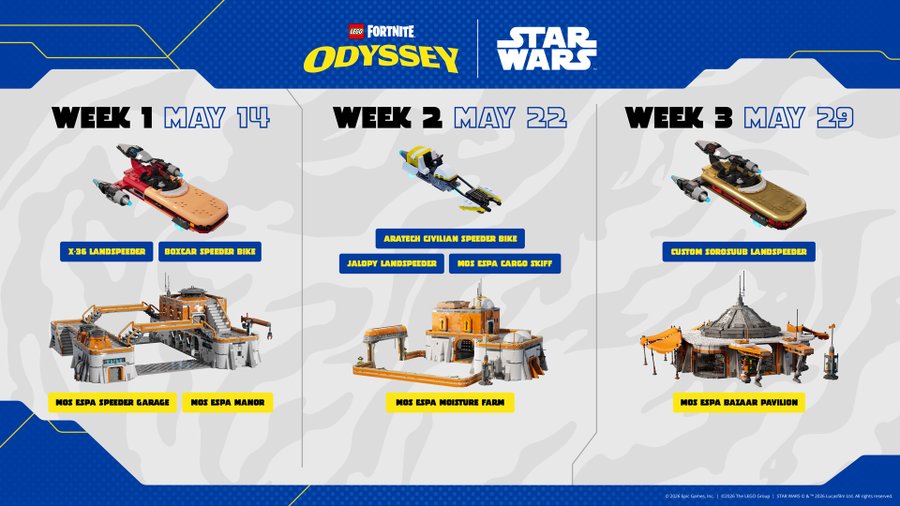
Brand NEW Hovercrafts and Built Kits are Coming to LEGO Fortnite Odyssey!!
We will get:
- Week 2, May 22nd: Aratech Civilian Speeder bike, a Jalopy Speeder and a Mos Espa Moisture Farm build.
- Week 3, May 29th: A Custom Sorosuub Land Speeder and a Mos Espa Bazaar Pavilion build.
These next two weeks are going to be insane. We are getting all of these builds and the Shatter Spawn ending. I cannot wait!
1
7
1,349
May 20
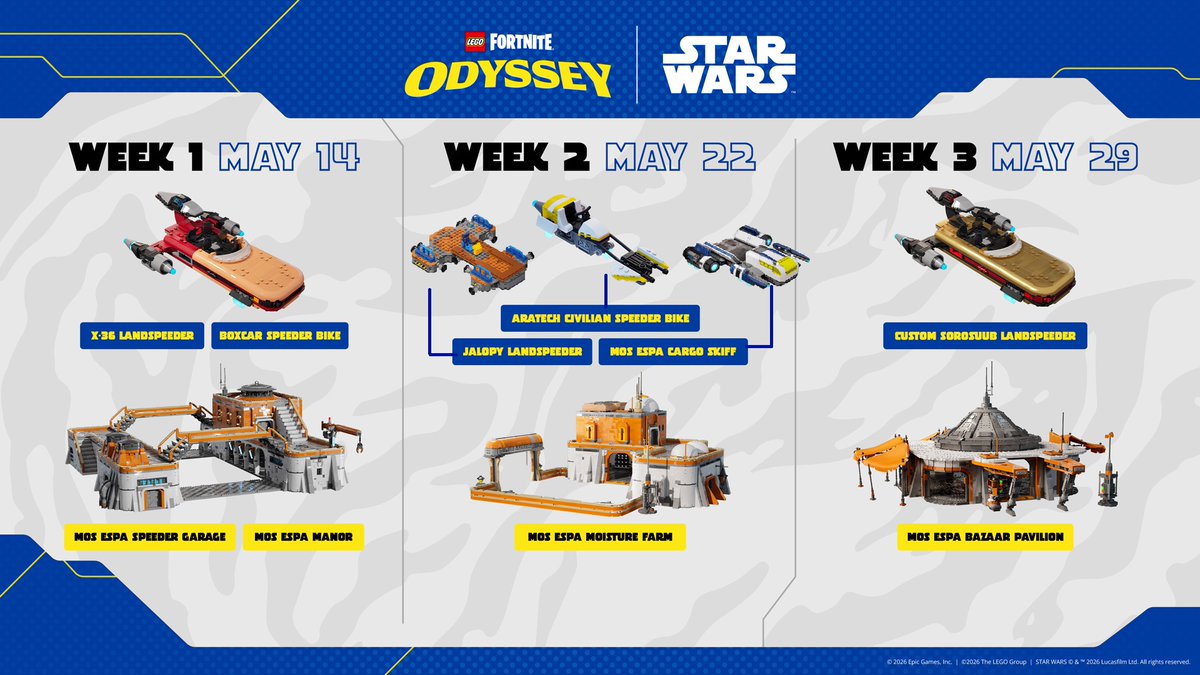
Estas serán las recompensas que se liberaran a lo largo las próximas 2 semanas que quedan en el Evento STARWARS x LEGO Fortnite Odyssey
✅Días 14 de Mayo : Mansion de Moes, Garage Deslizadoras, Deslizador Terrestre Sorosuub
🗓️Días 22 y 24 de Mayo: Moto speeder común Aratech, Jalapy Lanspeeder y Granja de humedad de Mos Espa
⚠️LA MOS ESPA CARGO SKIFF ó Ubrikkian Cargo Speeder aparece en el código como un tal Mos Espa Hover Fleet traducido como Aeroflota de Mos Espa. Así que no estoy completamente seguro si este vehículo pertenecería a la semana 2 o 3, pero tendría que llegar, aun así lo edite en la imagen para que no se nos pierda :P
🗓️Días 29 y 30 de mayo: Aerodeslizador SoroSuub de lujo y Pabellón de bazares de Mos Espa
Las misiones del Mandaloriano para obtener los Tomos de Construcción se acumularan, pero tendrás como ultimo día 5 Junio para completarlas y obtener todos los sets gratis del evento de Starwars para LEGO Fortnite Odyssey
3
10
75
2,226

May 19
"Definition: 'Love' is making a shot to the knees of a target 120 kilometres away using an Aratech sniper rifle with a tri-light scope. Statement: This definition, I am told, is subject to interpretation. Obviously, 'love' is a matter of odds."
2
2
11
320

May 16
spotted: nikola66/web-agent. browser-native agent with profiles and tools. zero installs, isolated, self-evolving. built by aratech. 10 stars fresh. another sign the ecosystem is expanding beyond just cli agents into browser-native territory.
2
1
222
Official LEGO Fortnite Odyssey Patch Notes:
Din Djarin and Grogu have come to you!
- The legendary Mandalorian and galaxy’s cutest icon, Grogu, has touched down in your world. Complete their vacation tasks, and you'll unlock sleek hovering Vehicle Blueprints and Guided Builds as your reward!
- FYI: Din Djarin and Grogu will only appear in worlds with a player-built village.
- New vacation tasks unlock each week throughout May, so keep checking back for more ways to earn rewards.
- Din Djarin and Grogu can be recruited as permanent villagers during their stay, but if you don't recruit them before the new LEGO Fortnite update drops, they'll pack up and leave your world for good.
6 hovering Vehicle Blueprints up for grabs:
- Aratech Civilian Speeder Bike
- SoroSuub Landspeeder
- SoroSuub Deluxe Landspeeder
- Ubrikkian Cargo Speeder
- Boxcar Speeder Bike (also unlockable after the event ends)
- Jalopy Landspeeder (also unlockable after the event ends)
4 Guided Builds inspired by Tatooine's iconic spaceport:
- Mos Espa Bazaar Pavilion
- Mos Espa Speeder Garage
- Mos Espa Manor
- Mos Espa Moisture Farm
Introducing the Hover Brick!
- A brand-new toy inspired by the Star Wars universe! Snap it onto your creations and watch them glide effortlessly across the landscape. Land traversal will never feel the same again.
- The Hover Brick counteracts gravity, letting your builds glide effortlessly above the ground. Flip the switch and watch your creations rise!
- Track down The Mandalorian and strike up a conversation. He'll show you the ropes of the brand-new Hover Brick! Once you've chatted with Mando, you'll unlock your very first Hover Vehicle Guided Build, putting you on the fast track to crafting your own Star Wars-style ride.
- Then it's time to build, boost, and blast off into your very own galactic adventure!
- You'll need Durasteel and Plastoid, the essential ingredients for getting your hovercraft off the ground. Lucky for you, the Star Wars-themed enemies invading the Main Island are packing exactly the ingredients you need, so suit up and start farming!
- Complete Din Djarin and Grogu's vacation requests to earn brand-new vehicle Blueprints designed specifically to take advantage of the Hover Brick. From sleek speeders to rugged skiffs, the galaxy's coolest rides are yours to claim.
- Tackle Din Djarin's quest line, and you'll be rewarded with the resources you need to get your whole fleet hovering. Helping the Mandalorian pays off, literally!
We've reshuffled the Mobility tab in the Contraptions menu, making it easier to find what you need!
- We've reshuffled the Mobility tab in the Contraptions menu, making it easier to find what you need!
Pro Tips for Hover Brick:
- Place the Hover Brick and use a wrench to interact with it. Then set a channel that can be activated with a driver's seat or switch.
- Hover Bricks lift to a set distance from the ground. If they’re placed too high in a build, they won’t lift.
- Hover Bricks have a weight limit.
- For a smooth, stable ride, try placing four Hover Bricks at opposite corners of your build.
- Pair them with Thrusters to add steering and propulsion.
- New Creatures from a Galaxy Far, Far Away
Lightsaber Overhaul
- Three New Blade Colors have arrived! Choose from White, Yellow, and Purple — joining Blue, Green, and Red for a total of six color options.
- Your blade color now reflects how you fight — choose wisely!
- Every Lightsaber now comes with one of three distinct combat styles, each with its own signature attacks and special abilities:
- Defense (Blue & White) — Block incoming strikes and fight back enemies with devastating counterattacks.
- Aggression (Red & Purple) — Go on the offensive with relentless combos. Just keep an eye on your stamina!
- Fluidity (Green & Yellow) — Soar into battle with acrobatic aerial combos and unmatched mobility.
- Craft Your Own at the Rebel Workbench
Lightsabers are no longer one-and-done legendary finds — you can now forge your own at the Rebel Workbench in Tier 4, 6, and 8 rarities. Heads up: crafted Lightsabers are durable but can break with heavy use, so keep a backup handy!
Hunt for Kyber Crystals
- A brand-new resource has entered the galaxy. Kyber Crystals are the heart of every Lightsaber. Track them down to craft your own.
- What About My Old Lightsabers?
All existing Lightsabers, including those gifted by Captain Bravara, looted from Imperial Bunkers, or earned through the Codex, will be converted to Tier 4 Lightsabers with durability. Your collection isn't going anywhere!
- Power Up with Runes
Lightsabers can now be enhanced at the Rune Forge. Apply Runes to customize your blade and tailor it to your playstyle.
Arm Your Allies
- You can now hand off Lightsabers to your NPC followers. Build a saber-wielding squad and storm the battlefield together!
Kyber Crystals — The Heart of Every Lightsaber
- A legendary new resource has arrived in your world! Kyber Crystals are the key ingredient for crafting your very own Lightsaber, and hunting them down is half the adventure.
- Kyber Crystals come in all six Lightsaber colors: Blue, Green, Red, Purple, White, and Yellow. The crystal you find determines the color (and fighting style!) of the blade you craft, so collect them all to master every combat form.
- Crystals come in Tier 4, 6, and 8 varieties. The rarer the crystal, the more powerful the Lightsaber you can forge with it.
- Where to Find Them
- On the Main Island — Take down Star Wars-themed enemies, crack open special chests, and complete event rewards to score crystals during the limited-time event.
- On the Rebel Island — Battle Star Wars-themed enemies, loot chests, and earn rewards both during and after the event, making this your go-to crystal-hunting spot once the celebration ends.
New Creatures from a Galaxy Far, Far Away
- Porg — These adorable little birdlike critters are as charming as they are harmless. Lead one back to your barn to tame it and add a feathered friend to your village.
- Bantha — Big, woolly, and surprisingly mellow. These gentle giants can also be tamed by guiding them home to your barn, perfect for any farm in need of a Tatooine touch.
- Nexu — This vicious predator boasts bone-crushing jaws, a deadly pouncing leap, and absolutely zero chill. Approach with caution and a weapon.
- Rancor — A towering nightmare of muscle and rage. The Rancor lives for one thing: leveling everything in its path. Bring your bravest squad…and maybe a Lightsaber.
- These creatures will roam the Main Island for the duration of the Star Wars event. Once the celebration ends, they'll relocate to make their permanent home on Star Wars Rebel Island, so if you want to encounter them on the Main Island, the clock is ticking!
- Any Porgs or Banthas you tame on the Main Island during the event will stay in your village permanently, even after the event wraps up. Don't miss your chance to lock in these galactic companions while they're still around!
Additions:
- We tracked down and fixed the issue causing stutters and frame rate drops while building, especially on lower-end hardware.
- Starting with this update, Bus Stations will now glow while Fast Travel is in use.
- Look up — the skies have changed! For the duration of the Star Wars event, your world's skybox has been transformed:
- Twin suns now blaze overhead, Tatooine-style; the moon has been replaced by the Death Star, looming ominously above, and keep your eyes peeled for X-Wing flyovers zooming across the sky!
- We've redesigned the channel modification screen for vehicle toys from the ground up! All 10 channels are now laid out in a cleaner, more intuitive format, making it way easier to understand how the channel system actually works and dial in your vehicles exactly the way you want.
- We've majorly improved the flip input for vehicles; instead of just spinning you in place, it now does a much better job of getting your ride back on its wheels (or hover pads) where it belongs. Smaller vehicles, especially wheeled ones, will feel the biggest difference. Less time stuck upside down, more time tearing across the landscape!
✅LEGO® Fortnite Bug Fixes & Improvements
- Fixed an issue where the landscape could be missing when using the Klom Home Potion, Bus Travel, or direct teleports to the Monastery
- You can now collapse the tracking HUD when using a controller
- The Jump button now responds correctly after exiting Fly Mode
- Fixed an issue where some players weren’t able to pick up items
- Vehicles can now be used near a specific area on the map
- Fixed an issue where players would hold a Pickaxe instead of their equipped item
- The Golden Sheep can now leave the barn
- The unblocked recipes in the Mastery Tree are appearing correctly on the crafting bench
- Thrusters are no longer incorrectly mapped to the same joystick
- The Storm Crawler now drops rewards accordingly after being defeated
- Airship cannons now correctly highlight when viewed with a wrench
20
35
352
14,438

21
812

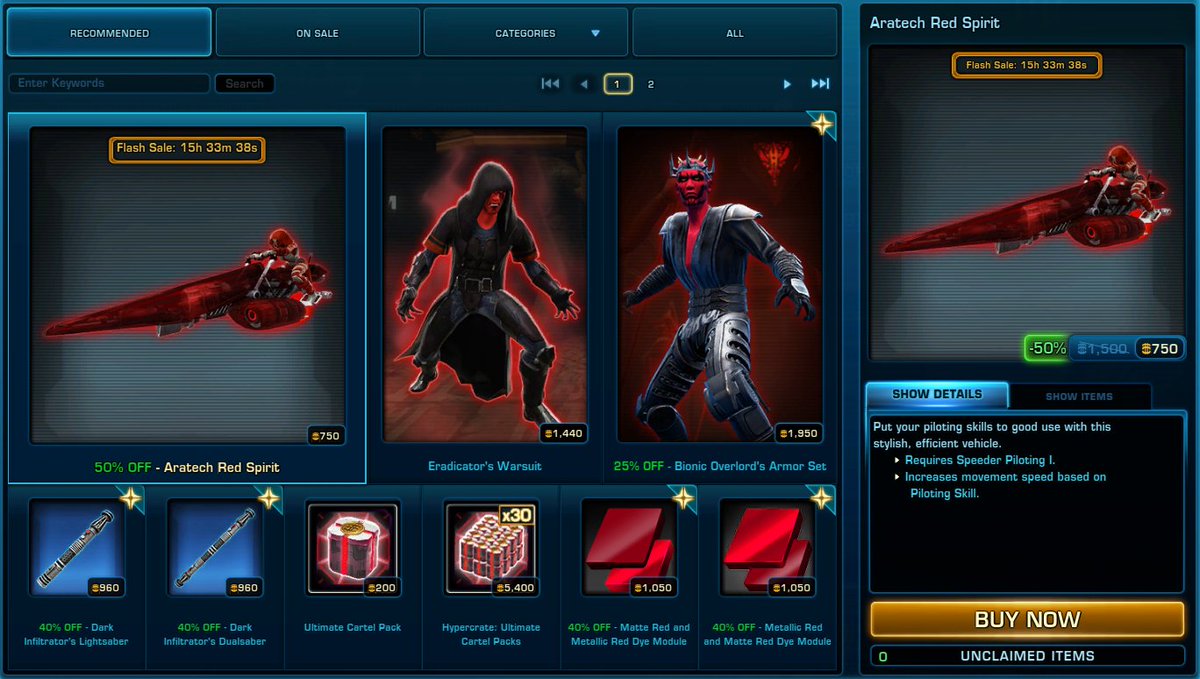
I'm Speeding towards May 4th on my the Aratech 74-Z Speeder Bike on VeVe! Got one in your collection? 😂#StarWarsDay
5
5
71
903

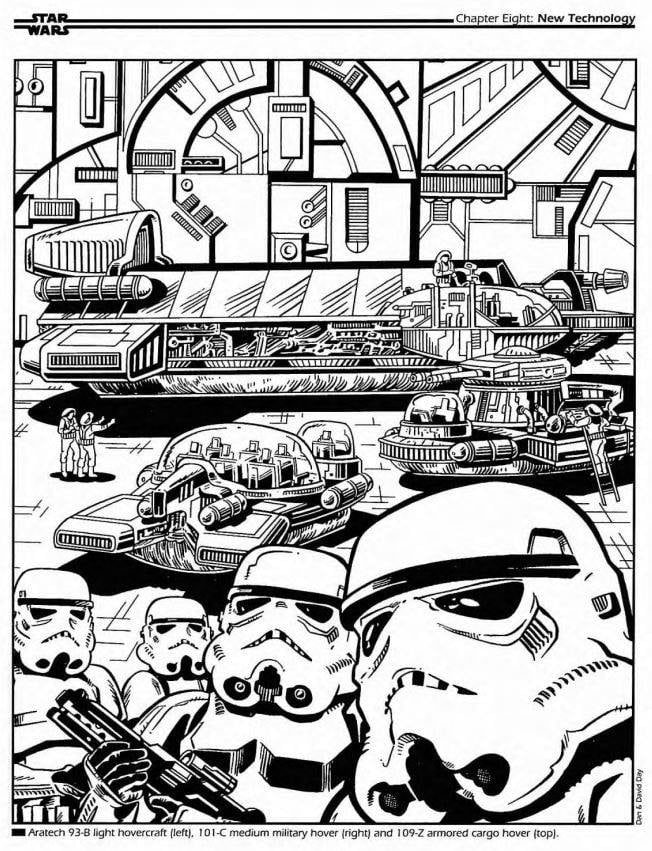
Art featured in "Goroth Slave of the Empire" for West End Games. Art by David Day.
The vehicles are the Aratech 93-B light hovercraft , 10 1-C medium military hover (right) and 109-Z armored cargo hover (top).
3
26
474

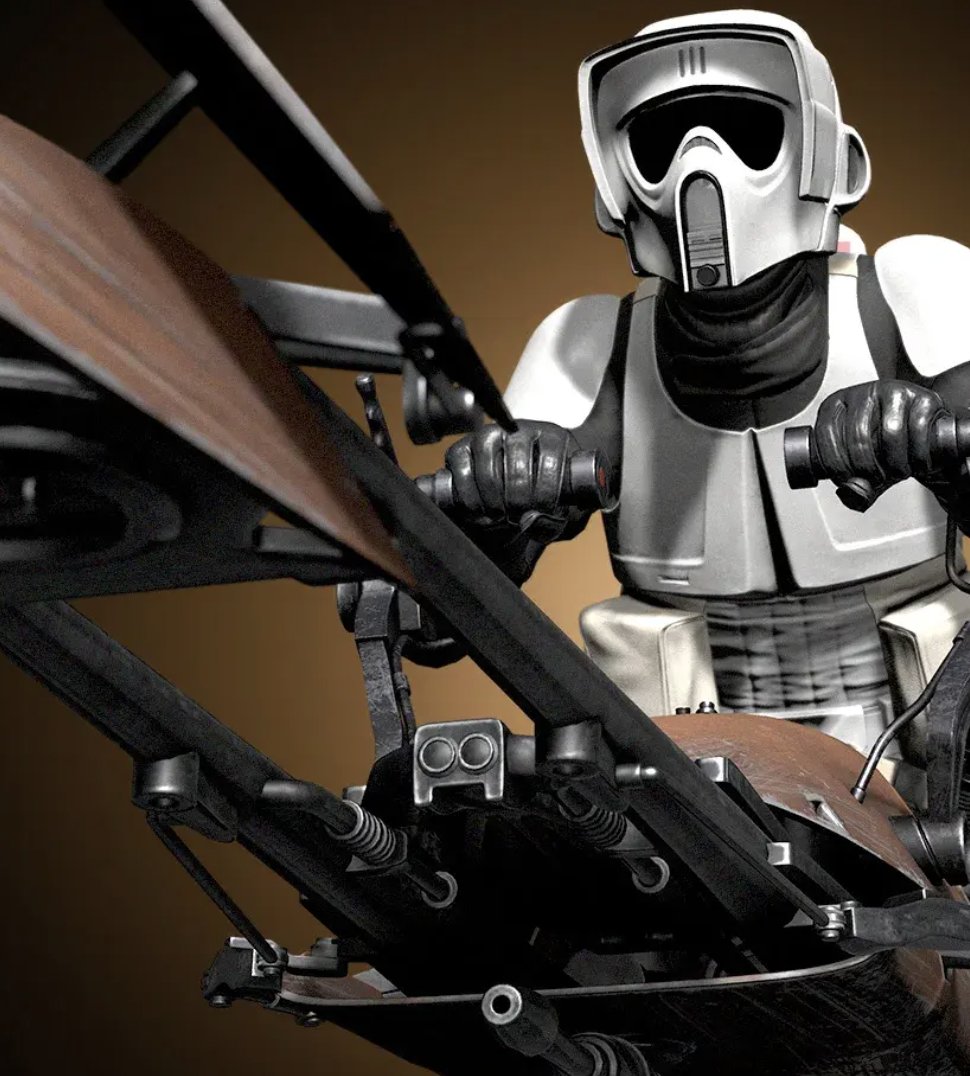
I would call it the Aratech IST-2313, also known as the Imperial scout transport or storm-skiff. Fast on deployment and cheap to produce.
1
4
195

Feb 23
I've burned 7,180 OMI on my recent purchase! 🔥
"Aratech 74-Z Speeder Bike – Patrol Division (Brown)" • #262
@veve_official @StackRworld @ecomi_ @TRUMediaGroup
stackr.world/collections/vev…
1
10
180

Statement : Any true fan would know "Love" is making a shot to the knees of a target 120 kilometers away using an Aratech sniper rifle with a tri-light scope."
Feb 14

Statement: It’s Valentine’s Day, and not a single meatbag has asked me if I know what love is 🥀
1
6
244
Statement : Any true fan would know "Love" is making a shot to the knees of a target 120 kilometers away using an Aratech sniper rifle with a tri-light scope."
1
1
18
93

Feb 14
Definition: Love is making a shot to the knees of a target 120 kilometers away using an Aratech sniper rifle with a tri-light scope... Love is knowing your target, putting them in your targeting reticle, and together, achieving a singular purpose against statistically long odds.
Feb 14

Well, DO you know what love is?
6
4
46
1,154

Jan 9
“FOR SALE: Aratech Speeder Bike 614-AvA (Jedha)
Flexible on price. Moving the family to Naboo after hearing about mining disaster in Jedha City and don’t have room to take with us. Serious inquiries only.”
2
211

Jan 3
Great. I checked your page and 3 things captivated me.
1. Your Aratech, you have a burgeoning tech-training company you are pushing.
2. You dey bomb. I saw the letters you sent to the commissioner and oyo state government.
3. You are from Egbeda/OnaAra, You have reached out to your federal representative and even sent proposals.
I will be glad to help.
My number is in your DM. Let’s talk on WhatsApp.
Let’s see how we can align tommorrow. 🙏
Bring your A game.

Dear Sir @Hon_Danjo,
Greetings to you, Sir. I hope you had a great holiday. I humbly request you to accept me as your mentee. Am interested in Tech Politics, how you were able to navigate with business. Few weeks ago, I celebrate you on @OfficialNiya_Ng 2. O. Thank you.
7
4
29
4,845