
Jun 6
<!DOCTYPE html>
<html lang="en">
<head>
<meta charset="UTF-8">
<meta name="viewport" content="width=device-width, initial-scale=1.0">
<title>TRIDICE — ESSENTIAL ROLL</title>
<link rel="preconnect" href="fonts.googleapis.com">
<link rel="preconnect" href="fonts.gstatic.com" crossorigin>
<link href="fonts.googleapis.com/css2?fa…" rel="stylesheet">
<style>
:root{
/* iridescent / holographic palette — all HSLA */
--void: hsla(232, 60%, 4%, 1);
--void-2: hsla(228, 55%, 8%, 1);
--panel: hsla(225, 45%, 9%, 0.72);
--panel-edge: hsla(210, 80%, 70%, 0.22);
--lime: hsla(80, 95%, 58%, 1);
--lime-soft: hsla(80, 95%, 58%, 0.16);
--magenta: hsla(322, 95%, 60%, 1);
--cyan: hsla(180, 90%, 62%, 1);
--text: hsla(200, 30%, 92%, 1);
--text-dim: hsla(205, 25%, 70%, 0.62);
--chrome-1: hsla(190, 80%, 88%, 1);
--chrome-2: hsla(215, 35%, 55%, 1);
}
*{ box-sizing:border-box; margin:0; padding:0; }
html{ height:100%; }
body{
font-family:'Chakra Petch', sans-serif;
color:var(--text);
min-height:100vh;
display:flex;
align-items:center;
justify-content:center;
padding:24px;
overflow-x:hidden;
overflow-y:auto;
background:
radial-gradient(140% 120% at 82% -10%, hsla(168, 85%, 55%, 0.30) 0%, hsla(168,85%,55%,0) 42%),
radial-gradient(120% 130% at 8% 110%, hsla(322, 92%, 52%, 0.34) 0%, hsla(322,92%,52%,0) 45%),
linear-gradient(165deg, var(--void-2) 0%, var(--void) 55%, hsla(248,55%,7%,1) 100%);
}
/* holographic foil sweep behind everything */
body::before{
content:"";
position:fixed; inset:-30%;
z-index:0;
background:linear-gradient(
115deg,
hsla(0,0%,100%,0) 0%,
hsla(300,90%,65%,0.10) 18%,
hsla(190,90%,60%,0.12) 33%,
hsla(80,90%,60%,0.10) 47%,
hsla(40,95%,60%,0.10) 60%,
hsla(330,90%,62%,0.12) 74%,
hsla(0,0%,100%,0) 100%
);
background-size:300% 300%;
mix-blend-mode:screen;
filter:blur(2px);
animation:foil 14s ease-in-out infinite alternate;
}
@keyframes foil{
0%{ background-position:0% 50%; transform:rotate(0deg) scale(1); }
100%{ background-position:100% 50%; transform:rotate(0.5deg) scale(1.04); }
}
/* faint scanline grain for the sci-fi sleeve feel */
body::after{
content:"";
position:fixed; inset:0; z-index:1; pointer-events:none;
background:repeating-linear-gradient(
0deg,
hsla(200,40%,80%,0.025) 0px,
hsla(200,40%,80%,0.025) 1px,
hsla(0,0%,0%,0) 2px,
hsla(0,0%,0%,0) 4px
);
}
.console{
position:relative;
z-index:2;
width:min(640px, 100%);
background:var(--panel);
backdrop-filter:blur(14px) saturate(1.2);
-webkit-backdrop-filter:blur(14px) saturate(1.2);
border:1px solid var(--panel-edge);
border-radius:14px;
padding:26px 28px 24px;
box-shadow:
0 0 0 1px hsla(0,0%,100%,0.04),
0 30px 80px hsla(240,80%,3%,0.7),
inset 0 1px 0 hsla(0,0%,100%,0.08);
}
/* header bar echoing the BBC RADIO / EVIANCHRIST strip */
.head{
display:flex; align-items:baseline; justify-content:space-between;
gap:12px; flex-wrap:wrap;
padding-bottom:14px; margin-bottom:18px;
border-bottom:1px solid hsla(200,40%,70%,0.14);
}
.title{
font-weight:700;
font-size:clamp(20px, 5vw, 30px);
letter-spacing:0.22em;
text-transform:uppercase;
background:linear-gradient(92deg,
var(--chrome-1) 0%,
var(--chrome-2) 28%,
var(--chrome-1) 50%,
var(--magenta) 72%,
var(--cyan) 100%);
background-size:200% auto;
-webkit-background-clip:text; background-clip:text;
color:transparent;
animation:shine 6s linear infinite;
text-shadow:0 0 22px hsla(190,90%,70%,0.10);
}
@keyframes shine{ to{ background-position:200% center; } }
.tag{
font-family:'Space Mono', monospace;
font-size:10px; letter-spacing:0.26em; text-transform:uppercase;
color:var(--void);
background:var(--lime);
padding:3px 9px; border-radius:3px;
box-shadow:0 0 18px hsla(80,95%,58%,0.45);
white-space:nowrap;
}
.sub{
width:100%;
font-family:'Space Mono', monospace;
font-style:italic;
font-size:11px; letter-spacing:0.08em;
color:var(--text-dim);
margin-top:6px;
}
/* dice tray */
.tray{
display:flex; gap:18px; justify-content:center;
margin:8px 0 22px;
}
.die{
--face: hsla(220,40%,14%,0.9);
width:84px; height:84px;
border-radius:16px;
position:relative;
display:grid;
grid-template-columns:repeat(3,1fr);
grid-template-rows:repeat(3,1fr);
padding:13px;
background:
linear-gradient(150deg, hsla(190,80%,75%,0.16), hsla(322,80%,60%,0.10) 40%, hsla(80,80%,60%,0.10) 70%, hsla(220,40%,14%,0.0)),
var(--face);
border:1px solid hsla(200,70%,80%,0.30);
box-shadow:
inset 0 1px 0 hsla(0,0%,100%,0.18),
inset 0 -10px 22px hsla(240,70%,4%,0.6),
0 10px 26px hsla(240,80%,3%,0.55);
transition:transform 0.12s ease;
}
.die.rolling{ animation:tumble 0.6s cubic-bezier(.36,.07,.19,.97); }
@keyframes tumble{
0%{ transform:rotate(0) scale(1); }
25%{ transform:rotate(-18deg) scale(1.08) translateY(-6px); }
55%{ transform:rotate(14deg) scale(0.96) translateY(2px); }
80%{ transform:rotate(-6deg) scale(1.03); }
100%{ transform:rotate(0) scale(1); }
}
.pip{
align-self:center; justify-self:center;
width:13px; height:13px; border-radius:50%;
background:radial-gradient(circle at 35% 30%, var(--chrome-1), var(--magenta) 55%, var(--cyan) 100%);
box-shadow:0 0 9px hsla(300,90%,70%,0.55), inset 0 0 3px hsla(0,0%,100%,0.7);
opacity:0; transform:scale(0.3);
transition:opacity 0.18s, transform 0.18s;
}
.pip.on{ opacity:1; transform:scale(1); }
/* pip grid positions (1..9 cells) */
.p1{ grid-area:1/1; } .p2{ grid-area:1/3; }
.p3{ grid-area:2/2; }
.p4{ grid-area:2/1; } .p5{ grid-area:2/3; }
.p6{ grid-area:1/2; } .p7{ grid-area:3/2; }
.p8{ grid-area:3/1; } .p9{ grid-area:3/3; }
/* roll button */
.roll{
display:block; width:100%;
font-family:'Chakra Petch', sans-serif;
font-weight:700; font-size:16px;
letter-spacing:0.34em; text-transform:uppercase;
color:var(--void);
padding:15px;
border:none; border-radius:10px; cursor:pointer;
background:linear-gradient(100deg, var(--lime) 0%, hsla(150,90%,60%,1) 45%, var(--cyan) 100%);
background-size:180% auto;
box-shadow:0 0 30px hsla(95,90%,55%,0.35), inset 0 1px 0 hsla(0,0%,100%,0.4);
transition:background-position 0.4s ease, transform 0.08s ease, box-shadow 0.3s;
}
.roll:hover{ background-position:100% center; box-shadow:0 0 44px hsla(150,90%,58%,0.5); }
.roll:active{ transform:translateY(2px) scale(0.99); }
.roll:disabled{ opacity:0.5; cursor:wait; }
.roll.done{
background:linear-gradient(100deg, var(--magenta) 0%, hsla(280,90%,62%,1) 50%, var(--cyan) 100%);
box-shadow:0 0 30px hsla(322,90%,58%,0.4), inset 0 1px 0 hsla(0,0%,100%,0.4);
}
.roll.done:hover{ box-shadow:0 0 44px hsla(322,90%,60%,0.55); }
/* stats row */
.stats{
display:flex; justify-content:space-between; gap:10px;
font-family:'Space Mono', monospace;
font-size:11px; letter-spacing:0.12em;
color:var(--text-dim);
margin:18px 2px 8px;
text-transform:uppercase;
}
.stats b{ color:var(--lime); font-weight:400; }
/* nonogram grid */
.nono-wrap{
border:1px solid hsla(200,40%,70%,0.14);
border-radius:10px;
background:hsla(228,55%,5%,0.55);
margin:18px 0 0;
overflow:hidden;
}
.nono-head{
display:flex; align-items:center; justify-content:space-between; gap:10px;
font-family:'Space Mono', monospace;
font-size:10px; letter-spacing:0.24em; text-transform:uppercase;
color:var(--text-dim);
padding:9px 14px;
background:hsla(228,55%,6%,0.92);
border-bottom:1px solid hsla(200,40%,70%,0.12);
}
.nono-head .fill{ color:var(--lime); font-style:italic; }
.grid{
display:grid;
grid-template-columns:repeat(18, 1fr);
gap:2px;
padding:12px;
}
.cell{
aspect-ratio:1 / 1;
border-radius:2px;
background:hsla(220,40%,16%,0.5);
box-shadow:inset 0 0 0 1px hsla(200,40%,70%,0.05);
transition:background 0.35s ease, box-shadow 0.35s ease, transform 0.35s cubic-bezier(.36,.07,.19,.97);
}
/* filled-cell pop-in */
.cell.on{ animation:pop 0.4s cubic-bezier(.36,.07,.19,.97) both; }
@keyframes pop{
0%{ transform:scale(0.2) rotate(-12deg); opacity:0; }
60%{ transform:scale(1.18) rotate(4deg); }
100%{ transform:scale(1) rotate(0); opacity:1; }
}
.log-wrap{
border:1px solid hsla(200,40%,70%,0.14);
border-radius:10px;
background:hsla(228,55%,5%,0.55);
max-height:220px; overflow-y:auto;
}
.log-head{
position:sticky; top:0;
font-family:'Space Mono', monospace;
font-size:10px; letter-spacing:0.24em; text-transform:uppercase;
color:var(--text-dim);
padding:9px 14px;
background:hsla(228,55%,6%,0.92);
border-bottom:1px solid hsla(200,40%,70%,0.12);
backdrop-filter:blur(4px);
}
.log{ list-style:none; padding:6px 0; }
.log li{
display:flex; align-items:center; gap:12px;
font-family:'Space Mono', monospace;
font-size:13px; letter-spacing:0.04em;
padding:6px 14px;
color:var(--text);
border-left:2px solid transparent;
animation:slideIn 0.32s ease both;
}
.log li:hover{ background:hsla(200,60%,60%,0.05); border-left-color:var(--magenta); }
@keyframes slideIn{ from{ opacity:0; transform:translateX(-8px); } to{ opacity:1; transform:none; } }
.idx{ color:hsla(322,90%,68%,0.85); font-style:italic; min-width:38px; }
.tuple{
background:linear-gradient(92deg, var(--chrome-1), var(--cyan));
-webkit-background-clip:text; background-clip:text; color:transparent;
font-weight:700;
}
.sum{ margin-left:auto; color:var(--lime); font-size:11px; }
.empty{
padding:20px 14px; text-align:center;
font-family:'Space Mono', monospace; font-style:italic;
font-size:12px; color:var(--text-dim);
}
/* scrollbar */
.log-wrap::-webkit-scrollbar{ width:8px; }
.log-wrap::-webkit-scrollbar-thumb{
background:linear-gradient(hsla(322,90%,60%,0.6), hsla(180,90%,62%,0.6));
border-radius:8px;
}
.log-wrap::-webkit-scrollbar-track{ background:transparent; }
</style>
</head>
<body>
<main class="console">
<header class="head">
<span class="title">TriDice</span>
<span class="tag">Essential Roll</span>
<span class="sub">three-die sequencer — logged as (d1, d2, d3)</span>
</header>
<section class="tray" id="tray">
<div class="die" id="die-0"></div>
<div class="die" id="die-1"></div>
<div class="die" id="die-2"></div>
</section>
<button class="roll" id="rollBtn">Roll</button>
<div class="stats">
<span>Rolls <b id="count">000</b></span>
<span>Last sum <b id="lastSum">—</b></span>
<span>Avg sum <b id="avgSum">—</b></span>
</div>
<div class="nono-wrap">
<div class="nono-head">
<span>Nonogram // 18×18</span>
<span>Fill <b class="fill" id="nonoFill">0%</b></span>
</div>
<div class="grid" id="grid"></div>
</div>
<div class="log-wrap">
<div class="log-head">Running Log</div>
<ul class="log" id="log">
<li class="empty" id="emptyState">awaiting first roll…</li>
</ul>
</div>
</main>
<script>
// pip layouts: which cell positions light up for each die value
var LAYOUTS = {
1: ['p3'],
2: ['p1','p9'],
3: ['p1','p3','p9'],
4: ['p1','p2','p8','p9'],
5: ['p1','p2','p3','p8','p9'],
6: ['p1','p2','p4','p5','p8','p9']
};
var dice = [
document.getElementById('die-0'),
document.getElementById('die-1'),
document.getElementById('die-2')
];
var rollBtn = document.getElementById('rollBtn');
var logEl = document.getElementById('log');
var emptyState= document.getElementById('emptyState');
var countEl = document.getElementById('count');
var lastSumEl = document.getElementById('lastSum');
var avgSumEl = document.getElementById('avgSum');
var gridEl = document.getElementById('grid');
var nonoFillEl= document.getElementById('nonoFill');
var ROWS = 18;
var COLS = 18;
var TOTAL = ROWS * COLS; // 324 cells in the stream
var cells = []; // flat array of cell elements, row-major
var cursor = 0; // next free cell in the continuous stream
var gridFull = false;
var results = []; // array of [d1,d2,d3] tuples
var sumTotal = 0;
// build the 9 pip slots inside each die once
function buildDie(el){
for (var i = 1; i <= 9; i ){
var pip = document.createElement('span');
pip.className = 'pip p' i;
el.appendChild(pip);
}
}
dice.forEach(buildDie);
// build the 18x18 grid once — agnostic cells, no per-die zoning
function buildGrid(){
for (var i = 0; i < TOTAL; i ){
var cell = document.createElement('div');
cell.className = 'cell';
gridEl.appendChild(cell);
cells.push(cell);
}
}
buildGrid();
// light up one cell (flat index) with a randomized iridescent color at hue h
function fillCell(idx, h){
var cell = cells[idx];
cell.style.background =
'radial-gradient(circle at 32% 28%, hsla(' h ',95%,82%,1), hsla(' h ',92%,58%,1) 60%, hsla(' ((h 40) % 360) ',90%,50%,1) 100%)';
cell.style.boxShadow =
'0 0 9px hsla(' h ',95%,65%,0.6), inset 0 0 3px hsla(0,0%,100%,0.55)';
cell.classList.remove('on');
void cell.offsetWidth; // restart pop animation
cell.classList.add('on');
}
// place this roll's three runs into the continuous stream. Each die value is a
// run of that many filled cells; every run is followed by exactly ONE empty
// gap. Runs flow cell-to-cell and wrap across rows — the grid is agnostic to
// which die produced them, so coverage is intentionally uneven.
function placeRoll(values){
for (var d = 0; d < 3; d ){
var blocks = values[d];
var baseHue = Math.floor(Math.random() * 360);
for (var i = 0; i < blocks; i ){
if (cursor >= TOTAL) { gridFull = true; break; }
fillCell(cursor, (baseHue i * 6) % 360); // gentle drift within run
cursor ;
}
cursor ; // single empty gap after the run
if (cursor >= TOTAL) { gridFull = true; break; }
}
var pct = Math.min(100, Math.round((cursor / TOTAL) * 100));
nonoFillEl.textContent = pct '%';
}
function renderDie(el, value){
var pips = el.querySelectorAll('.pip');
pips.forEach(function(p){ p.classList.remove('on'); });
LAYOUTS[value].forEach(function(cls){
el.querySelector('.' cls).classList.add('on');
});
}
function pad(n){ return String(n).padStart(3, '0'); }
function roll(){
rollBtn.disabled = true;
var values = [];
dice.forEach(function(el){
el.classList.remove('rolling');
void el.offsetWidth; // restart animation
el.classList.add('rolling');
values.push(1 Math.floor(Math.random() * 6));
});
// settle dice mid-tumble so pips land with the bounce
setTimeout(function(){
dice.forEach(function(el, i){ renderDie(el, values[i]); });
}, 300);
setTimeout(function(){
record(values);
if (gridFull){
rollBtn.textContent = 'Reset Grid';
rollBtn.classList.add('done');
}
rollBtn.disabled = false;
}, 600);
}
function reset(){
results = [];
sumTotal = 0;
cursor = 0;
gridFull = false;
cells.forEach(function(cell){
cell.classList.remove('on');
cell.style.background = '';
cell.style.boxShadow = '';
});
logEl.innerHTML = '';
emptyState = document.createElement('li');
emptyState.className = 'empty';
emptyState.id = 'emptyState';
emptyState.textContent = 'awaiting first roll…';
logEl.appendChild(emptyState);
countEl.textContent = '000';
lastSumEl.textContent = '—';
avgSumEl.textContent = '—';
nonoFillEl.textContent = '0%';
rollBtn.textContent = 'Roll';
rollBtn.classList.remove('done');
}
function record(values){
results.push(values);
var sum = values[0] values[1] values[2];
sumTotal = sum;
placeRoll(values); // stream this roll's runs into the grid
if (emptyState) { emptyState.remove(); emptyState = null; }
var li = document.createElement('li');
li.innerHTML =
'<span class="idx">#' pad(results.length) '</span>'
'<span class="tuple">(' values.join(', ') ')</span>'
'<span class="sum">Σ ' sum '</span>';
logEl.insertBefore(li, logEl.firstChild); // newest on top
countEl.textContent = pad(results.length);
lastSumEl.textContent = sum;
avgSumEl.textContent = (sumTotal / results.length).toFixed(1);
}
rollBtn.addEventListener('click', function(){
if (gridFull) reset();
else roll();
});
</script>
</body>
</html>
260


May 19
Access ALL prompts for stunning animated websites in one click: motionsites.ai
## Prompt to Recreate the first post
Build a 1:1 square social media carousel post (max 600x600px) with 3 auto-rotating slides (5-second interval) for a perfume brand called "Wild Daisy Fragrances." Use React Tailwind CSS Lucide React. No external font imports needed (uses the system/default sans-serif stack from Tailwind).
---
### Global Setup
- **Outer wrapper**: Full viewport centered (`min-h-screen flex items-center justify-center`), background `#1a1a1a`.
- **Square container**: `width: min(100vw, 100vh)`, `height: min(100vw, 100vh)`, `maxWidth: 600`, `maxHeight: 600`, `overflow: hidden`, `position: relative`.
- **Easing**: `cubic-bezier(0.22, 1, 0.36, 1)` for all transitions.
- **Slide transition**: Cross-fade via `opacity` over 800ms using the easing above. Active slide gets `zIndex: 2`, inactive `zIndex: 1`.
- **Dot indicators**: 3 dots at `bottom: 12px`, centered horizontally, `zIndex: 50`. Active dot: `width: 20px, height: 6px, background: #ffffff`. Inactive dots: `width: 6px, height: 6px, background: rgba(255,255,255,0.5)`. All dots are `border-radius: 9999px` with `transition-all duration-300`. Clicking a dot switches to that slide and resets the 5s timer.
- **CSS**: Only `@tailwind base; @tailwind components; @tailwind utilities;` in index.css. No custom fonts.
---
### Animation Helper
A reusable `anim(visible, delay, { y, x, duration })` function that returns a style object:
- When `visible = false`: `opacity: 0`, `transform: translateY(y)` or `translateX(x)`
- When `visible = true`: `opacity: 1`, `transform: translate(0,0)`
- Transition: `opacity {duration}ms {EASE} {delay}ms, transform {duration}ms {EASE} {delay}ms`
- Defaults: `y = 20`, `x = 0`, `duration = 1600`
---
### Asset URLs
```
HERO_VIDEO = 'd8j0ntlcm91z4.cloudfront.net…'
SCENT_VIDEO = 'd8j0ntlcm91z4.cloudfront.net…'
WILD_VIDEO = 'd8j0ntlcm91z4.cloudfront.net…'
PRODUCT_IMAGE = 'images.higgs.ai/?default=1&o…'
SCENT_IMAGE = 'images.higgs.ai/?default=1&o…'
WILD_IMAGE = 'images.higgs.ai/?default=1&o…'
```
---
### Slide 1: HeroSlide
- **Background**: `#FDFDFA` solid fill on the container.
- **Video**: `position: absolute`, `inset: 0`, `w-full h-full`, `object-cover`, offset with `left: 40%`, `zIndex: 0`. Attributes: `autoPlay muted loop playsInline`.
- **Brand mark** (top-left area, actually full-width bar): `position: absolute`, `top: 0, left: 0`, full width, `flex items-center justify-between`, `px-5 py-4`, `zIndex: 40`.
- Text: `font-black`, `text-[10px]`, `tracking-widest`, `leading-tight`, `uppercase`, color `#332023`. Two lines: "Wild Daisy" / "Fragrances".
- Animation: `anim(visible, 100, { y: -10, duration: 1400 })`.
- **Main title area**: `relative`, `pb-5 pl-5 pr-5`, `zIndex: 10`, at bottom (parent is `flex flex-col justify-end`).
- `<h1>`: `font-medium uppercase leading-tight`, `fontSize: clamp(1.6rem, 8vw, 2.4rem)`, `letterSpacing: -0.01em`.
- Line 1 "Sweet Daisy": `color: #332023`, anim delay 600, y: 24, duration: 1600.
- Line 2 "Personal Scent": `color: #B0A2A1`, anim delay 800, y: 24, duration: 1600.
- Line 3 "Finder": `color: #B0A2A1`, anim delay 1000, y: 24, duration: 1600.
- **Product card**: `flex items-center gap-3`, `mt-3 px-3 py-3 rounded-xl`, `backgroundColor: #ffffff`, `boxShadow: 0 4px 24px rgba(51,32,35,0.08), 0 1px 4px rgba(51,32,35,0.06)`. Anim delay 1300, y: 20, duration: 1400.
- **Thumbnail**: `width: 44px, height: 56px, borderRadius: 6`, overflow hidden. Image uses `PRODUCT_IMAGE`, `width: 130%, height: 130%, object-fit: contain, marginLeft: -15%, marginTop: -15%`.
- **Text column**:
- Name: "Eau So Fresh", `text-xs font-semibold tracking-wide leading-tight`, color `#332023`.
- Size: "100 ml / 3.4 oz", `fontSize: 9px, fontWeight: 500, marginTop: 2px`, color `#332023`.
- Button: "Add to Cart", `text-[9px] font-bold tracking-widest uppercase`, color `#332023`, `marginTop: 8px`. Has an absolutely positioned bottom border line (`h-px w-full`, background `#332023`, `scale-x-100`).
---
### Slide 2: ScentPanel
- **Layout**: `grid grid-cols-2`, full width/height.
- **Left column** (product info): `flex flex-col`, `px-4 pt-4 pb-5`, background `#4BB3ED`.
- **Top labels**: flex row, justify-between. Left: "Daisy love", Right: "Sweet". Both `text-[8px] font-normal`, color `#000000`. Anim: delay 0, y: 12, duration: 1400.
- **Center product**: flex-col centered. Image container `width: 60%`, `aspect-ratio: 220/340`, `borderRadius: 2`, `overflow: hidden`, `background: #D9D9D9`. Image: `SCENT_IMAGE`, `object-cover`. Anim: delay 300, y: 40, duration: 1800.
- **Product name below image**: "Eau So Sweet", `text-[10px] font-normal`, color `#000000`. Below: "100 ml / 3.3 oz", `text-[8px] font-normal`. Anim: delay 600, y: 10, duration: 1400.
- **Notes at bottom** (`mt-auto`, `flex-col gap-0.5`): Anim delay 900, y: 16, duration: 1400.
- "Fruity top" / "WHITE RASPBERRIES"
- "Floral heart" / "DAISY TREE PETALS"
- "Feminine base" / "SUGAR MUSKS"
- Labels: `text-[7px] leading-snug`, color `#000000`. Ingredients: `text-[7px] font-bold tracking-widest uppercase leading-snug`, color `#000000`.
- **Right column** (video): `relative overflow-hidden`, background `#111`. Video: `absolute inset-0 w-full h-full object-cover`, `autoPlay muted loop playsInline`, source `SCENT_VIDEO`.
---
### Slide 3: WildPanel
- **Layout**: `grid grid-cols-2`, full width/height. (Mirrored from Slide 2: video on LEFT, info on RIGHT.)
- **Left column** (video): `relative overflow-hidden`, background `#111`. Video: `absolute inset-0 w-full h-full object-cover`, `autoPlay muted loop playsInline`, source `WILD_VIDEO`.
- **Right column** (product info): `flex flex-col`, `px-4 pt-4 pb-5`, background `#BDE84F`.
- **Top labels**: "Daisy wild" / "Playful". Same style as Slide 2. Anim: delay 0, y: 12, duration: 1400.
- **Center product**: Same layout as Slide 2. Image: `WILD_IMAGE`. Anim: delay 300, y: 40, duration: 1800.
- **Product name**: "Eau So Extra", "100 ml / 3.3 oz". Anim: delay 600, y: 10, duration: 1400.
- **Notes at bottom**: Anim delay 900, y: 16, duration: 1400.
- "Top" / "BANANA BLOSSOM ACCORD"
- "Heart" / "CHOCOLATE DAISY ACCORD"
- "Base" / "VETIVER OIL"
- Labels: `text-[7px] font-bold leading-snug` (note: bold on both label and ingredient in this slide). Ingredients: `text-[7px] font-bold tracking-widest uppercase leading-snug`. All color `#000000`.
---
### Color Constants Summary
| Token | Value |
|-------|-------|
| TEXT_COLOR | `#000000` |
| BG_BLUE | `#4BB3ED` |
| BG_LIME | `#BDE84F` |
| Hero background | `#FDFDFA` |
| Hero headline primary | `#332023` |
| Hero headline secondary | `#B0A2A1` |
| Brand text | `#332023` |
| Outer page background | `#1a1a1a` |
---
### Behavior
1. On mount, after 200ms delay, set `visible = true` to trigger entrance animations on the active slide.
2. Auto-advance slides every 5000ms via `setInterval`.
3. Clicking a dot navigates to that slide immediately and resets the interval timer.
4. Each slide's `visible` prop is `true` only when it is both globally visible AND the active slide (`v && activeSlide === index`).
1
3
3,253

May 18
Les dejo el script de tampermonkey para que lo tengan a la mano.
// ==UserScript==
// @name X Unfollow Button Below No Mutual Message
// @namespace x.com/
// @version 1.1
// @description Agrega un botón debajo del mensaje "Ninguna de las cuentas que sigues sigue a este usuario" para dejar de seguir.
// @match x.com/*
// @match twitter.com/*
// @grant none
// ==/UserScript==
(function () {
'use strict';
const TARGET_TEXT = 'Ninguna de las cuentas que sigues sigue a este usuario';
const BUTTON_ID = 'tm-unfollow-under-message';
function findTargetTextElement() {
const elements = [...document.querySelectorAll('span, div')];
return elements.find(el =>
el.innerText &&
el.innerText.trim() === TARGET_TEXT
);
}
function findFollowingButton() {
return [...document.querySelectorAll('button')].find(btn => {
const text = btn.innerText?.trim() || '';
const label = btn.getAttribute('aria-label') || '';
return (
text === 'Siguiendo' ||
text === 'Following' ||
label.includes('Siguiendo') ||
label.includes('Following')
);
});
}
function findConfirmUnfollowButton() {
return [...document.querySelectorAll('button')].find(btn => {
const text = btn.innerText?.trim() || '';
const label = btn.getAttribute('aria-label') || '';
return (
text.includes('Dejar de seguir') ||
text.includes('Unfollow') ||
label.includes('Dejar de seguir') ||
label.includes('Unfollow')
);
});
}
function unfollowUser() {
const followingButton = findFollowingButton();
if (!followingButton) {
alert('No encontré el botón "Siguiendo".');
return;
}
followingButton.click();
setTimeout(() => {
const confirmButton = findConfirmUnfollowButton();
if (confirmButton) {
confirmButton.click();
} else {
alert('No encontré la confirmación para dejar de seguir.');
}
}, 700);
}
function createButtonBelowMessage() {
if (document.getElementById(BUTTON_ID)) return;
const messageElement = findTargetTextElement();
if (!messageElement) return;
const button = document.createElement('button');
button.id = BUTTON_ID;
button.textContent = 'Dejar de seguir';
button.type = 'button';
button.onclick = unfollowUser;
Object.assign(button.style, {
display: 'block',
marginTop: '14px',
background: '#e0245e',
color: '#ffffff',
border: 'none',
borderRadius: '9999px',
padding: '12px 22px',
fontSize: '15px',
fontWeight: '700',
cursor: 'pointer',
boxShadow: '0 4px 12px rgba(0,0,0,0.25)',
width: 'fit-content'
});
messageElement.insertAdjacentElement('afterend', button);
}
function removeButtonIfMessageGone() {
const button = document.getElementById(BUTTON_ID);
const messageElement = findTargetTextElement();
if (button && !messageElement) {
button.remove();
}
}
function run() {
createButtonBelowMessage();
removeButtonIfMessageGone();
}
const observer = new MutationObserver(() => {
setTimeout(run, 400);
});
observer.observe(document.body, {
childList: true,
subtree: true
});
setInterval(run, 1200);
})();
👇
14 Jul 2025

TIPS PARA SABER A QUIÉN DAR FOLLOW:
PARA LOS NUEVOS EN X, LES PASO ESTE HACKLIFE; HAY UN BOT QUE FUNCIONA COMO UN DETECTOR DE P3ND3J0S EN ESTA RED, SI AL QUE ACABAN DE SEGUIR APARECE EN LA LISTA DE FOLLOWS DE ESTE BOT, ES SEÑAL DE RETIRARSELO PARA EVITAR CONTAMINAR TU TIMELINE

4
192


May 15
# 🎬 Copy-Paste Prompt — Build This Exact Landing Page
> Copy everything below the line and paste it into your AI coding assistant.
---
Build a single-page cinematic landing site called **ATMOS × Nimbus Grid** — a fictional premium cloud storage platform. Use **React 18 TypeScript Vite Tailwind CSS v4 Framer Motion GSAP hls.js**. Create every file from scratch. Run `npm run dev` when done.
---
## Global Setup
**Fonts** (load via Google Fonts in `index.html`, preconnect both `fonts.googleapis.com` and `fonts.gstatic.com`):
- `Instrument Serif` (ital 0;1) — headings, editorial text
- `Manrope` (300–700) — body, UI labels
**Tailwind v4** config in `src/index.css`:
```css
@import "tailwindcss";
@theme {
--font-serif: "Instrument Serif", serif;
--font-sans: "Manrope", sans-serif;
}
@layer utilities {
.liquid-glass {
@apply bg-white/5 backdrop-blur-md border border-white/10 shadow-[0_4px_30px_rgba(0,0,0,0.1)];
}
.glass-pill {
@apply bg-white/5 backdrop-blur-xl border border-white/10 shadow-[inset_0_1px_1px_rgba(255,255,255,0.1)];
}
}
```
**Body**: `bg-[#050505]`, text white, antialiased, `selection:bg-white/20`. Title: "ATMOS — Crafting Digital Atmospheres".
**Dependencies**: `npm install framer-motion gsap lucide-react hls.js`
---
## Shared Components
### `FadeDown` — scroll-triggered reveal wrapper
Uses Framer Motion `whileInView` (not `animate`). Props: `children`, `delay?`, `className?`. Initial: `opacity: 0, y: 30`. Animate: `opacity: 1, y: 0`. Viewport: `once: true, margin: "-80px"`. Duration: 0.8s, ease: `[0.16, 1, 0.3, 1]`.
### `HlsVideo` — adaptive video player
Props: `src: string`, `className?: string`. Uses `hls.js`: if URL ends with `.m3u8`, create `new Hls()`, `loadSource`, `attachMedia`, play on `MANIFEST_PARSED`. Safari fallback via native HLS. For `.mp4`, just set `video.src`. Renders `<video>` with `absolute inset-0 w-full h-full object-cover`, autoPlay, loop, muted, playsInline. Cleanup: `hls.destroy()` on unmount.
---
## Section 1: HERO (full viewport)
### `SpotlightReveal` component
Full-screen `fixed inset-0` container with:
- A `<video>` background: `d8j0ntlcm91z4.cloudfront.net…`
- An SVG overlay with a `<mask>`: white `<rect>` covering everything, then 6 `<circle>` elements with decreasing radii (150, 130, 110, 90, 70, 50) filled black with `blur-xl`. These circles follow the mouse using GSAP (`gsap.to` on `cx/cy`, duration 0.6, staggered delay `i * 0.04`, `power2.out`). Starts offscreen at `-200, -200`.
- A dark rect `fill="#050505"` with `mask="url(#spotlight-mask)"` creates the effect: dark everywhere except where the mouse is, revealing video underneath.
### `StaggeredText` component
Letter-by-letter spring animation. Splits text into individual `<motion.span>`. Container variant: `staggerChildren: 0.05`. Child variant: from `opacity: 0, y: 40` to `opacity: 1, y: 0` with spring (damping 12, stiffness 100). Spaces become `\u00A0`.
### `BubbleMenu` component
Hamburger button (3 lines, 1px height, `liquid-glass` rounded-full). On click, toggles `isOpen`. CSS: when `.menu-open`, line 1 rotates 45° down, line 2 scales to 0, line 3 rotates -45° up. The overlay uses **`createPortal(overlay, document.body)`** to escape stacking contexts. Overlay: `fixed inset-0 z-[100] bg-black/80 backdrop-blur-3xl`. Hamburger button: `z-[110]`. Menu links: Works, Studio, Services, Contact — each `text-5xl md:text-7xl font-serif italic text-white/60 hover:text-white`, staggered entrance (`delay: 0.1 i * 0.1`). AnimatePresence for exit.
### `LiquidGlassButton`
80×80px `liquid-glass` rounded-full play button. Contains a Lucide `<Play>` icon (filled). Behind it, a blur glow div. Around it, a slowly spinning (10s) SVG circular text path reading "SHOWREEL • SHOWREEL • SHOWREEL •" at 50% opacity.
### `AvatarStack`
Liquid-glass pill containing 3 overlapping avatar images from `i.pravatar.cc/100?img=33`, `?img=47`, `?img=12`. `-space-x-3`, each 40×40 rounded-full with `border-2 border-[#050505]`. Right side: "40 " bold "CREATIVES" label.
### `LogoMarquee`
Infinite horizontal scroll of partner names: Sony Music, RCA Records, Epic Games, Vogue, LVMH, Spotify, Apple, Netflix, A24, HBO, Nike, Adidas. Two identical `inline-flex` divs with CSS `@keyframes marquee { 0% { translateX(0) } 100% { translateX(-100%) } }`, 30s linear infinite. `bg-white/5 backdrop-blur-md border-y border-white/5`.
### Hero Layout (in App.tsx)
Section: `relative w-full h-screen overflow-hidden flex flex-col`.
- **Navbar**: flex justify-between. Left: "ATMOS" text (xl, bold, tracking-widest, uppercase). Center-right: BubbleMenu. Empty div on right for balance.
- **Main**: flex-1, centered. Two `StaggeredText` lines: "Crafting" at `text-[12vw] md:text-[140px]` and "Digital Atmospheres" at `text-[8vw] md:text-[90px]`. Both: `font-serif italic text-transparent bg-clip-text bg-gradient-to-b from-white to-white/60 drop-shadow-2xl`. Below: paragraph "We design immersive digital experiences..." in `text-white/60`.
- **Bottom bar**: flex. Left: location pill with Lucide `MapPin` icon, "Base" label, "Brooklyn, NY". Center: `LiquidGlassButton`. Right: `AvatarStack`.
After hero: `<LogoMarquee />`
---
## Section 2: PLATFORM ACCORDION
Scroll-driven sticky section. Container: `h-[400vh]`. Inside: a sticky background video layer absolute content overlay.
**Background video** (sticky, `h-screen`, `pointer-events-none`):
- Video: `d8j0ntlcm91z4.cloudfront.net…`
- `opacity-30 mix-blend-screen object-cover`
- Dark vignette overlay: `bg-gradient-to-t from-[#050505] via-[#050505]/60 to-[#050505]`
**Content** (absolute, full height of 400vh, with its own sticky inner):
- Left side (1/3): "Platform" heading (serif italic), subtitle, and 4 navigation dots with labels that change opacity based on scroll progress (`useTransform` mapping `scrollYProgress` to opacity `[0.3, 1, 1, 0.3]` per section).
- Right side (2/3): 4 stacked cards (`absolute inset-0`), each sliding up from `100%` to `0%` via `useTransform`. Each card uses `HlsVideo` as a **full background** with `opacity-60 mix-blend-screen`, overlaid with `bg-gradient-to-t from-black via-black/40 to-transparent`. Text at bottom: title (serif italic 3xl) description.
**4 panels data:**
1. "Programmable infra" — "Define storage boundaries with code..." — Video: `stream.mux.com/Kec29dVyJgiPd…`
2. "Data residency" — "Ensure data never leaves the region..." — Video: `stream.mux.com/tLkHO1qZoaaQO…`
3. "Elastic scaling" — "Stop paying for empty space..." — Video: `d8j0ntlcm91z4.cloudfront.net…`
4. "Unified visibility" — "One dashboard to track all your capacity..." — Video: `d8j0ntlcm91z4.cloudfront.net…`
---
## Section 3: PRICING
**Background**: 12 vertical bars at bottom, heights morph via `useScroll`/`useTransform` (sin/cos formulas). `opacity-20`.
**Left column**: "Pricing" label, "Only pay for what your teams actually use." heading, subtitle.
**Right column** (liquid-glass card):
- Header: "Storage costs" **functional toggle** between "Per month" and "Per GiB". Use `useState`. The active indicator is a white pill that slides with `motion.div` spring animation (`stiffness: 400, damping: 30`). Active text: `text-black`, inactive: `text-white/40`. Switching triggers `AnimatePresence mode="wait"` — old prices exit up, new prices enter from below.
- **Per GiB data**: $0.021, $0.012, $0.004, $0.018, included
- **Per month data**: $21.50/TB, $12.29/TB, $4.10/TB, $18.43/TB, included
- Each row: `whileHover={{ x: 4 }}` subtle shift
**3 Plan Cards** below: Starter, Team, Enterprise. Each: `liquid-glass` rounded-xl. `whileHover={{ y: -10, boxShadow: "0 20px 40px..." }}`. Buttons: `whileHover={{ scale: 1.02, backgroundColor: "#fff", color: "#000" }}`, `whileTap={{ scale: 0.98 }}`.
---
## Section 4: SECURITY
3-column grid with `FadeDown` stagger (0.2, 0.4, 0.6). Each card: `motion.div whileHover={{ y: -8, boxShadow }}` with spring transition.
1. **Full policy control**: Mock API terminal (dark card) with typed CLI commands (`nimbus auth login`, `VAULT-9AMP`, `policy attach workspace/client-vault`). Behind it, a lighter OpenAPI spec panel. Both animate in separately with `whileInView`.
2. **Full compliance**: 3 compliance badges (SOC 2, ISO 27001, GDPR) that slide in from left with stagger. Each: `whileHover={{ x: 6 }}`. Checkmark icon from Lucide.
3. **Predictable economics**: Binary code background (`motion.pre` pulsing opacity 0.05→0.15→0.05, 4s loop). Data rows: Reserved tier 24 TiB, Transfer lane EU Central, Revision Q603. Each: `whileHover` background highlight.
---
## Section 5: CONSOLE SHOWCASE
**3D mouse-tracking tilt** using `useMotionValue`, `useSpring`, `useTransform`. Maps mouse position to `rotateX`/`rotateY` (±5deg). Sheen effect: gradient stripe follows mouse X.
The console mock: top bar with 3 dots URL bar. Sidebar: Client Vault label, 5 nav items (Workspaces, **Storage Pools** active, Retention, Access, Reports). Sidebar items: `whileHover={{ x: 4 }}`. Main: "Storage Pools" heading "New pool" button (`whileHover` fill white, `whileTap` scale). Table with 3 rows (finance-vault EU Central 18.4 TiB Healthy, design-assets US East 9.8 TiB Syncing, legal-archive EU Central 42.1 TiB Healthy). Rows stagger in with `whileInView`, `whileHover` highlight. Toast notification "Pool created / ready" slides up with delay 1.2s.
Entire console: `whileInView={{ opacity: 1, y: 0, scale: 1 }}` from `opacity: 0, y: 60, scale: 0.95`.
---
## Section 6: OPERATIONS
Left side: text slides in from left (`initial={{ opacity: 0, x: -40 }}`). "Operations" label, "A control layer for every move your business makes." heading, paragraph, "Plan operations" button (`whileHover`, `whileTap`).
Right side: Cinematic portal (`initial={{ opacity: 0, scale: 0.85 }}`, scales in). Contains:
- 2 rotating rings (border circles, one clockwise 20s, one counter-clockwise 30s)
- Central pill-shaped portal: 280×380px, `rounded-[100px]`, `liquid-glass`, 2px padding, inner `rounded-[100px]` with `HlsVideo` playing `stream.mux.com/Jwr2RhmsNrd6G…`. Dark gradient overlay top/bottom. `whileHover={{ scale: 1.04 }}` spring.
- 2 floating badges: "Grid Stable" with green pulsing dot (floats `y: [0, -10, 0]` 4s), "Sync rate 1.4 TB/s" (floats `y: [0, 10, 0]` 5s). Both: `whileHover={{ scale: 1.1 }}`.
---
## Section 7: FOOTER
Full viewport height. Background video: `d8j0ntlcm91z4.cloudfront.net…` at `opacity-50 mix-blend-screen`. Dark gradient overlay.
Center: "Next steps" label, massive heading "Let's build your next dimension." (`text-5xl md:text-[100px] font-serif italic text-transparent bg-clip-text bg-gradient-to-b from-white to-white/60`). CTA button: `liquid-glass` rounded-full, "Start a project", `whileHover={{ scale: 1.08, boxShadow: "0 0 60px rgba(255,255,255,0.2)" }}`, `whileTap={{ scale: 0.95 }}`.
Bottom bar: © 2025 ATMOS STUDIO | Work, Studio, Careers, Contact | X / TWITTER, INSTAGRAM. All links: `whileHover={{ color: "#ffffff", y: -2 }}`. Bar fades in with `whileInView delay: 0.5`.
---
## Section Order in App.tsx
```
Hero → LogoMarquee → PlatformAccordion → PricingSection → SecuritySection → ConsoleShowcase → OperationsCube → FooterSection
```
Run `npm run dev` and open the browser when done.
2
231
Apr 27
Access ALL prompts for stunning animated websites in one click: motionsites.ai
Create a React TypeScript component named HeroSection in src/components/HeroSection.tsx using Tailwind CSS and the hls.js npm package (install it: npm install hls.js).
Layout & Background:
A <section> that is 100vh tall, position: relative, overflow: hidden, flex column centered, with background: #000.
A fullscreen HLS video background using this Mux stream URL:
stream.mux.com/tLkHO1qZoaaQO…
The video is <video autoPlay loop muted playsInline> with classes absolute inset-0 w-full h-full object-cover and zIndex: 0. Play it through hls.js: if Hls.isSupported(), create an Hls({ autoStartLoad: true }) instance, loadSource, attachMedia, and play on MANIFEST_PARSED. Else, fall back to native application/vnd.apple.mpegurl support. Clean up the Hls instance on unmount. No overlay over the video — full opacity.
Content container:
A div with classes relative z-10 flex flex-col items-center text-center px-4 max-w-5xl mx-auto and inline style marginTop: 380 (pushes content down 380px).
Headline (<h1>):
Font: 'YDYoonche L', 'YDYoonche M', sans-serif
fontSize: clamp(2.2rem, 7vw, 6.5rem), color: #fff, fontWeight: 300, letterSpacing: -0.01em, lineHeight: 1.1, className="leading-tight".
Three lines:
"The vision" — gradient text using background: linear-gradient(90deg, #666666 0%, #d0d0d0 50%, #666666 100%) with WebkitBackgroundClip: text, WebkitTextFillColor: transparent, backgroundClip: text, display: block, lineHeight: 1.1, marginBottom: -0.22em.
"of engineering" — same gradient styling as line 1.
A flex line flex items-center justify-center gap-3 flex-wrap with white text containing in order:
<span style={{color:'#999'}}>is</span>
A circular video icon (see below) playing the human clip
<span>human</span>
<span style={{color:'#999', position:'relative', top:'0.15em', marginLeft:'0.25em'}}> </span>
A circular video icon playing the AI clip
<span>AI</span>
VideoIcon component:
Outer <span> with classes inline-block align-middle rounded-full overflow-hidden, sized via inline style width/height: clamp(48px, 10vw, ${size}px) (default size=72, but the hero passes size={110} for both icons), flexShrink: 0.
Inner <video autoPlay loop muted playsInline> with width: 100%, height: 100%, objectFit: cover, display: block. Call videoRef.current.play().catch(() => {}) in a useEffect.
Two CloudFront MP4 sources:
VIDEO_HUMAN:
d8j0ntlcm91z4.cloudfront.net…
VIDEO_AI:
d8j0ntlcm91z4.cloudfront.net…
Subheading (<p>):
Classes mt-4 max-w-xl text-center px-2.
fontSize: clamp(0.95rem, 2.2vw, 1.2rem), color: #ccc, lineHeight: 1.4, fontWeight: 400.
Text: "We help you map the talent you need, track the talent you have, and close your gaps to thrive in a GenAI world."
CTA Button:
Classes: mt-6 transition-all duration-300 hover:scale-[1.03] hover:shadow-[0px_6px_32px_8px_rgba(39,243,169,0.22)] active:scale-[0.98]
Inline style: padding: '12px 28px', background: '#000', boxShadow: '0px 6px 24px 6px rgba(39, 243, 169, 0.15)', borderRadius: 8, outline: '1px solid #30463C', outlineOffset: -1, border: 'none', cursor: 'pointer', display: 'inline-flex', alignItems: 'center', justifyContent: 'center', gap: 10.
Inner <span> with color: '#fff', fontSize: 14, fontWeight: 400, text: "Join The Movement!".
Animations / interactions:
All three videos auto-play, loop, muted, inline.
Button has a 300ms transition: scales to 1.03 and gains a brighter green glow on hover, scales to 0.98 on active.
Fonts:
The headline expects 'YDYoonche L' / 'YDYoonche M' to be loaded globally (e.g., via index.css or an external font provider). It falls back to sans-serif.
1
1
24
7,337
Apr 25
Access ALL prompts for stunning animated websites in one click: motionsites.ai
Detailed Prompt to Recreate the Social Media Poster:
Build a self-contained 4:5 portrait social media poster (NOT a website — no navbar, no buttons, no scrolling sections). It should look like an Instagram/social poster card centered on a black page.
Tech Stack
Vite React TypeScript
Tailwind CSS v3
Font: "General Sans" loaded from Fontshare CDN: api.fontshare.com/v2/css?f[]…
Set font-family: 'General Sans', sans-serif globally on html/body/#root
Page Container
Full viewport, pure black #000000 background
Flex center the poster card both axes
Padding: p-4 sm:p-8
Poster Card
width: min(100%, 540px), aspectRatio: 4 / 5
borderRadius: 24px, overflow: hidden, position: relative, background: black
boxShadow: 0 40px 120px rgba(0,0,0,0.6), 0 0 0 1px rgba(255,255,255,0.06)
Background Video (NO overlay)
Absolute inset-0, w-full h-full object-cover
Attributes: autoPlay, muted, loop, playsInline
Source URL: d8j0ntlcm91z4.cloudfront.net…
Decorative Glow Blobs (pointer-events-none, absolute inset-0)
Top-left: -top-24 -left-24 w-72 h-72 rounded-full blur-3xl opacity-40, background radial-gradient(circle, rgba(255,255,255,0.35), transparent 70%)
Bottom-right: -bottom-32 -right-20 w-80 h-80 rounded-full blur-3xl opacity-30, background radial-gradient(circle, rgba(255,255,255,0.25), transparent 70%)
Top Status Bar (absolute, top-5 left-5 right-5)
Flex justify-between, white/90, text-[11px] tracking-[0.3em] uppercase font-medium
Left: EOS / Web3
Right: row with a w-1.5 h-1.5 rounded-full bg-white dot using the pulse-dot animation, then text Live Drop
Sub Status Row (absolute, top-5 left-5 right-5 mt-7)
Flex justify-between, white/50, text-[10px] tracking-[0.25em] uppercase
Left: Issue №017
Right: 04 / 25 / 2026
Corner Frame Brackets (4 absolute divs, 5x5, white/30 borders, rounded corner)
Top-left: top-3 left-3 border-l border-t rounded-tl
Top-right: top-3 right-3 border-r border-t rounded-tr
Bottom-left: bottom-3 left-3 border-l border-b rounded-bl
Bottom-right: bottom-3 right-3 border-r border-b rounded-br
Center Content (absolute inset-x-0 top-1/2 -translate-y-1/2, px-7 sm:px-10, flex-col items-center text-center gap-6)
Glass Pill Badge
inline-flex items-center gap-2 px-3 py-1.5
borderRadius: 20px, background: rgba(255,255,255,0.10), border: 1px solid rgba(255,255,255,0.20), backdropFilter: blur(12px)
Tiny w-1 h-1 rounded-full bg-white dot
Text 13px font-medium: Early access from (white/60) followed by May 1, 2026 (solid white)
Headline (h1)
Class gradient-text font-medium
Style: fontSize: clamp(34px, 7vw, 48px), lineHeight: 1.1, letterSpacing: -0.02em, maxWidth: 420px
Text: Web3 at the Speed of Experience
.gradient-text CSS:background: linear-gradient(144.5deg, #ffffff 28%, rgba(0,0,0,0) 115%);
-webkit-background-clip: text;
background-clip: text;
-webkit-text-fill-color: transparent;
color: transparent;
Subtitle (p)
white/70 font-normal, fontSize: 13px, lineHeight: 1.55, maxWidth: 360px
Text: Powering seamless experiences and real-time connections — EOS is the base for creators who move with purpose.
CTA Divider Row (mt-2 flex items-center gap-2)
Join the Waitlist — white/50, text-[11px] tracking-[0.35em] uppercase
w-8 h-px bg-white/40 line
eos.io — white, text-[11px] tracking-[0.35em] uppercase font-medium
Footer Bar (absolute bottom-5 left-5 right-5, flex justify-between text-[11px] font-medium text-white/80)
Left: Logo cluster
6x6 rounded-full circle with 1px solid rgba(255,255,255,0.3) border, rgba(0,0,0,0.4) background, contains L (10px, font-semibold)
Wordmark: LOGOIPSUM with tracking-wider
Right: Hashtag row (flex gap-3 text-white/60)
#Web3, #EOS, #FutureNow
Decorative Mid-Footer Divider (absolute bottom-14 inset-x-0, flex justify-center)
Row: w-6 h-px bg-white/40 line, w-1 h-1 rounded-full bg-white/60 dot, w-6 h-px bg-white/40 line
Global CSS Animations (in index.css)
@keyframes pulse-dot {
0%, 100% { opacity: 1; transform: scale(1); }
50% { opacity: 0.5; transform: scale(1.4); }
}
.pulse-dot { animation: pulse-dot 2s ease-in-out infinite; }
@keyframes shimmer {
0%, 100% { opacity: 0.7; }
50% { opacity: 1; }
}
.shimmer { animation: shimmer 3s ease-in-out infinite; }
Tailwind Config
Extend theme.fontFamily.sans to ['"General Sans"', 'sans-serif']. Content paths: ./index.html and ./src/**/*.{js,ts,jsx,tsx}.
Notes
No Bolt Database data persistence is used because there is no dynamic data — the poster is a static visual.
No buttons, no anchor tags, no navigation. All elements are decorative/typographic only.
Use semantic black (#000) page background; let the video bleed through inside the poster card with no dimming overlay.
1
2
17
4,933

Apr 21
## Add Component: Footer 01 Quell
### File: /components/ui/footer-01-quell.tsx
"use client";
import React, { useState, useEffect, useRef } from "react";
import { motion, useInView } from "framer-motion";
import { ArrowUp } from "lucide-react";
function TypingText({ text, delay = 0, speed = 30, className = "" }: { text: string; delay?: number; speed?: number; className?: string }) {
const [displayedText, setDisplayedText] = useState("");
const [isStarted, setIsStarted] = useState(false);
const ref = useRef<HTMLParagraphElement>(null);
const isInView = useInView(ref, { once: true });
useEffect(() => {
if (isInView) {
const startTimeout = setTimeout(() => setIsStarted(true), delay * 1000);
return () => clearTimeout(startTimeout);
}
}, [isInView, delay]);
useEffect(() => {
if (!isStarted) return;
let i = 0;
const timer = setInterval(() => {
setDisplayedText(text.slice(0, i 1));
i ;
if (i >= text.length) clearInterval(timer);
}, speed);
return () => clearInterval(timer);
}, [isStarted, text, speed]);
return <p ref={ref} className={className}>{displayedText}</p>;
}
function CountingNumber({ value, duration = 2, delay = 0 }: { value: number; duration?: number; delay?: number }) {
const [count, setCount] = useState(0);
const ref = useRef<HTMLSpanElement>(null);
const isInView = useInView(ref, { once: true });
useEffect(() => {
if (isInView) {
let startTimestamp: number | null = null;
const step = (timestamp: number) => {
if (!startTimestamp) startTimestamp = timestamp;
const progress = Math.min((timestamp - startTimestamp) / (duration * 1000), 1);
setCount(Math.floor(progress * value));
if (progress < 1) {
window.requestAnimationFrame(step);
}
};
const delayTimeout = setTimeout(() => {
window.requestAnimationFrame(step);
}, delay * 1000);
return () => clearTimeout(delayTimeout);
}
}, [isInView, value, duration, delay]);
return <span ref={ref}>{count}</span>;
}
export default function Footer01Quell({ className }: { className?: string }) {
const [activeTab, setActiveTab] = useState<string | null>(null);
const [activeLink, setActiveLink] = useState<string>("Home");
const tabs = ["Product", "Overview", "Security", "Integrations"];
const quickLinks = ["Home", "Features", "Pricing", "Contact"];
const networks = [
{ name: "GitHub", url: "jiro.build/" },
{ name: "LinkedIn", url: "linkedin.com/in/hellomdjahid…" },
{ name: "Twitter", url: "x.com/yscalestudio" },
{ name: "Discord", url: "jiro.build/" }
];
const scrollToTop = () => {
window.scrollTo({ top: 0, behavior: "smooth" });
};
return (
<footer className={"w-full bg-[#070709] flex justify-center pt-[100px] pb-[100px] px-6 overflow-hidden relative z-10 " (className || "")} style={{ fontFamily: "'Space Grotesk', sans-serif" }}>
<style>{"\n .no-scrollbar::-webkit-scrollbar { display: none; }\n .no-scrollbar { -ms-overflow-style: none; scrollbar-width: none; }\n "}</style>
<div className="w-full max-w-[1248px] flex flex-col gap-4 border border-[#262626]">
<motion.div
initial={{ opacity: 0, y: 20 }}
whileInView={{ opacity: 1, y: 0 }}
viewport={{ once: true }}
className="flex w-full h-16 border border-white/5 overflow-x-auto md:overflow-x-visible no-scrollbar"
>
{tabs.map((tab: string) => (
<a
key={tab}
href={"#" tab.toLowerCase()}
onClick={() => { setActiveTab(tab); }}
onMouseEnter={() => setActiveTab(tab)}
className={"flex-1 flex-shrink-0 min-w-[140px] md:min-w-0 flex items-center justify-center text-[18px] font-medium transition-all duration-300 whitespace-nowrap " (activeTab === tab ? "bg-[linear-gradient(99deg,#33CC6B,#39AC9D)] text-[#0F0F0F]" : "bg-[#1A1A1A] text-[#E6E6E6]")}
>
{tab}
</a>
))}
</motion.div>
<div className="flex flex-col items-center text-center gap-8 py-10">
<p className="text-[20px] leading-[30px] text-[#D6D6D6] font-normal max-w-[612px]">
We build AI-powered security tools that help engineering teams detect vulnerabilities, automate testing, and ship secure code with confidence.
</p>
<motion.button
onClick={scrollToTop}
initial={{ opacity: 0, scale: 0.9 }}
whileInView={{ opacity: 1, scale: 1 }}
whileHover={{ boxShadow: "0 0 20px rgba(51, 204, 107, 0.3)" }}
viewport={{ once: true }}
transition={{ delay: 1.5 }}
className="flex items-center gap-3 w-[194px] h-[62px] px-4 bg-[linear-gradient(99deg,#33CC6B,#39AC9D)] text-[#0F0F0F] font-bold text-[20px] justify-center"
>
BACK TO TOP <ArrowUp className="w-5 h-5" />
</motion.button>
</div>
<motion.div
initial={{ opacity: 0 }}
whileInView={{ opacity: 1 }}
viewport={{ once: true }}
transition={{ delay: 0.5 }}
className="flex flex-col md:flex-row justify-between items-start gap-12 md:gap-8 pb-4 border-b border-white/5 relative z-20"
>
<div className="flex flex-col gap-4 px-8 md:pr-0">
<span className="text-white font-medium text-[18px]">Quick Links</span>
<div className="flex flex-wrap gap-x-4 gap-y-2 items-center">
{quickLinks.map((link: string, idx: number) => (
<React.Fragment key={link}>
<a
href="#"
onClick={(e: React.MouseEvent<HTMLAnchorElement>) => { e.preventDefault(); setActiveLink(link); }}
onMouseEnter={() => setActiveLink(link)}
className={"text-[16px] leading-[24px] tracking-[-0.3px] transition-all duration-300 cursor-pointer " (activeLink === link ? "font-medium bg-[linear-gradient(99deg,#33CC6B,#39AC9D)] bg-clip-text text-transparent" : "font-normal text-[#A3A4A3]")}
>
{link}
</a>
{idx < quickLinks.length - 1 && <span className="text-[#A3A4A3]">•</span>}
</React.Fragment>
))}
</div>
</div>
<div className="flex flex-col gap-4 px-8 md:pl-0 md:items-end md:text-right">
<span className="text-white font-medium text-[18px]">Networks</span>
<div className="flex flex-wrap gap-x-4 gap-y-2 items-center md:justify-end">
{networks.map((network: { name: string; url: string }, idx: number) => (
<React.Fragment key={network.name}>
<a
href={network.url}
target="_blank"
rel="noopener noreferrer"
onClick={() => setActiveLink(network.name)}
onMouseEnter={() => setActiveLink(network.name)}
className={"text-[16px] leading-[24px] tracking-[-0.3px] transition-all duration-300 cursor-pointer " (activeLink === network.name ? "font-medium bg-[linear-gradient(99deg,#33CC6B,#39AC9D)] bg-clip-text text-transparent" : "font-normal text-[#A3A4A3]")}
>
{network.name}
</a>
{idx < networks.length - 1 && <span className="text-[#A3A4A3]">•</span>}
</React.Fragment>
))}
</div>
</div>
</motion.div>
<motion.div
initial={{ opacity: 0, scale: 0.8 }}
whileInView={{ opacity: 1, scale: 1 }}
viewport={{ once: true }}
transition={{ duration: 1, ease: "easeOut" as const }}
className="w-full flex justify-center items-center px-6 py-0 select-none"
>
<h1 className="text-[110px] sm:text-[220px] md:text-[340px] lg:text-[410px] font-medium tracking-[-0.04em] leading-none bg-[linear-gradient(99deg,#33CC6B,#39AC9D)] bg-clip-text text-transparent text-center">
©<CountingNumber value={2026} delay={2.5} />
</h1>
</motion.div>
<div className="flex flex-col md:flex-row justify-between items-center gap-8 md:gap-4 pt-4 pb-8 border-t border-white/10 px-8 relative z-20">
<div className="text-[#D6D6D6] text-[14px] flex flex-col sm:flex-row justify-center md:justify-start items-center gap-2 sm:gap-1.5">
<div className="flex items-center gap-1.5">
<span>Design by</span>
<a href="yscale.studio/" target="_blank" rel="noopener noreferrer" className="font-medium underline bg-[linear-gradient(99deg,#33CC6B,#39AC9D)] bg-clip-text text-transparent">Yscale.studio</a>
</div>
<span className="hidden sm:inline mx-1 opacity-50">•</span>
<div className="flex items-center gap-1.5">
<span>Build by</span>
<a href="jiro.build/" target="_blank" rel="noopener noreferrer" className="font-medium underline bg-[linear-gradient(99deg,#33CC6B,#39AC9D)] bg-clip-text text-transparent">Jiro.build</a>
</div>
</div>
<div className="text-[14px] flex flex-wrap justify-center gap-4">
<a
href="#"
onClick={(e: React.MouseEvent<HTMLAnchorElement>) => { e.preventDefault(); setActiveLink("Terms"); }}
onMouseEnter={() => setActiveLink("Terms")}
className={"transition-all duration-300 cursor-pointer " (activeLink === "Terms" ? "font-medium bg-[linear-gradient(99deg,#33CC6B,#39AC9D)] bg-clip-text text-transparent" : "font-normal text-[#A3A4A3]")}
>
Terms & Conditions
</a>
<span className="text-[#A3A4A3]"> • </span>
<a
href="#"
onClick={(e: React.MouseEvent<HTMLAnchorElement>) => { e.preventDefault(); setActiveLink("Privacy"); }}
onMouseEnter={() => setActiveLink("Privacy")}
className={"transition-all duration-300 cursor-pointer " (activeLink === "Privacy" ? "font-medium bg-[linear-gradient(99deg,#33CC6B,#39AC9D)] bg-clip-text text-transparent" : "font-normal text-[#A3A4A3]")}
>
Privacy Policy
</a>
</div>
</div>
</div>
</footer>
);
}
### Install Dependencies:
npm install framer-motion lucide-react
### Update /app/page.tsx:
Add this import at the top:
import Footer01Quell from "@/components/ui/footer-01-quell";
Add this inside <main>, below existing components:
<Footer01Quell />
### Rules:
- Copy the code EXACTLY as provided
- Do NOT modify, refactor, or rename anything
- Do NOT change any Tailwind classes
- Do NOT add features or "improvements"
- Just create the file and update page.tsx
145

Apr 14
It works with the shadow* props on iOS and elevation on android, since those map directly to platform shadows. It doesn’t support the new boxShadow api since those are implemented in RN so it is not supported by coreanimation.
2
136

Apr 13
Coming soon to a browser near you.
● Build me AntiFigma. A deterministic frontend builder where prompt config always produces the same UI.
Prompt → structured spec → template → rendered React/Tailwind UI
No canvas. No drag-and-drop. No design tools
3-column app: prompt, live preview, structured output
Theme template selectors drive output
Deterministic seed visible and used for variant selection
Registry-based architecture for templates, themes, and components
Built to support audited community modules with tracked usage
Looks premium, dark, sharp, and real
Not a toy. Not a chatbot. A UI compiler.
● I'll build the AntiFigma MVP at D:/lost_marbles/antifigma/.
Writing all files now.
● Write(antifigma\package.json)
⎿ Wrote 25 lines to antifigma\package.json
1 {
2 "name": "antifigma",
3 "private": true,
4 "version": "0.1.0",
5 "type": "module",
6 "scripts": {
7 "dev": "vite",
8 "build": "tsc -b && vite build",
9 "preview": "vite preview"
10 },
… 15 lines (ctrl o to expand)
● Write(antifigma\tsconfig.json)
⎿ Wrote 20 lines to antifigma\tsconfig.json
1 {
2 "compilerOptions": {
3 "target": "ES2022",
4 "useDefineForClassFields": true,
5 "lib": ["ES2022", "DOM", "DOM.Iterable"],
6 "module": "ESNext",
7 "skipLibCheck": true,
8 "moduleResolution": "bundler",
9 "allowImportingTsExtensions": false,
10 "resolveJsonModule": true,
… 10 lines (ctrl o to expand)
● Write(antifigma\vite.config.ts)
⎿ Wrote 7 lines to antifigma\vite.config.ts
1 import { defineConfig } from "vite";
2 import react from "@vitejs/plugin-react";
3
4 export default defineConfig({
5 plugins: [react()],
6 server: { port: 5180 },
7 });
● Write(antifigma\postcss.config.js)
⎿ Wrote 6 lines to antifigma\postcss.config.js
1 export default {
2 plugins: {
3 tailwindcss: {},
4 autoprefixer: {},
5 },
6 };
● Write(antifigma\tailwind.config.js)
⎿ Wrote 15 lines to antifigma\tailwind.config.js
1 /** @type {import('tailwindcss').Config} */
2 export default {
3 content: ["./index.html", "./src/**/*.{ts,tsx}"],
4 theme: {
5 extend: {
6 fontFamily: {
7 mono: ["ui-monospace", "SFMono-Regular", "M
enlo", "Consolas", "monospace"],
8 },
9 boxShadow: {
10 glow: "0 0 0 1px rgba(34,211,238,0.25), 0 8
px 40px -8px rgba(34,211,238,0.25)",
… 5 lines (ctrl o to expand)
● Write(antifigma\index.html)
⎿ Wrote 12 lines to antifigma\index.html
1 <!doctype html>
2 <html lang="en">
3 <head>
4 <meta charset="UTF-8" />
5 <meta name="viewport" content="width=device-wid
th, initial-scale=1.0" />
6 <title>AntiFigma — Deterministic Frontend Build
er</title>
7 </head>
8 <body class="bg-black text-zinc-100 antialiased">
9 <div id="root"></div>
10 <script type="module" src="/src/main.tsx"></scr
ipt>
… 2 lines (ctrl o to expand)
● Continuing to write the source files.
● Write(antifigma\src\main.tsx)
⎿ Wrote 10 lines to antifigma\src\main.tsx
1 import React from "react";
2 import ReactDOM from "react-dom/client";
3 import App from "./App";
4 import "./index.css";
5
6 ReactDOM.createRoot(document.getElementById("root")
!).render(
7 <React.StrictMode>
8 <App />
9 </React.StrictMode>
10 );
● Write(antifigma\src\index.css)
⎿ Wrote 28 lines to antifigma\src\index.css
1 @tailwind base;
2 @tailwind components;
3 @tailwind utilities;
4
5 html, body, #root { height: 100%; }
6
7 body {
8 font-family: "Inter", ui-sans-serif, system-ui, -
apple-system, "Segoe UI", Roboto, sans-serif;
9 background:
10 radial-gradient(1100px 600px at 85% -10%, rgba(
34,211,238,0.08), transparent 60%),
… 18 lines (ctrl o to expand)
● Write(antifigma\src\types.ts)
⎿ Wrote 110 lines to antifigma\src\types.ts
1 import type { ComponentType } from "react";
2
3 export type TemplateId = "landing" | "dashboard" |
"docs" | "pricing";
4 export type ThemeId = "black-cyan" | "black-white"
| "slate-blue";
5
6 export interface ThemePalette {
7 id: ThemeId;
8 name: string;
9 bg: string;
10 panel: string;
… 100 lines (ctrl o to expand)
2
78

Apr 13
脚本这里发下吧,需要的同学明天之去试试,祝你好运:
按下面步骤操作。
一、先准备环境
用 Chrome 登录你的智谱账号,并提前绑定好支付方式。
打开这个页面:bigmodel.cn/glm-coding
保持页面停在套餐列表位置,不要中途刷新。
建议提前 2 到 5 分钟打开页面,保证登录态正常。
二、打开浏览器控制台
在页面里按 F12,或者按 Ctrl Shift I
切到 Console 标签
如果看到顶上有“粘贴代码有风险”之类提示,按它要求输入 allow pasting 后再粘贴
三、把脚本换成这个修正版再执行
下面这版是按你原思路修过的,主要修复了点击那一行,并稍微加了点日志,方便你看它有没有开始跑:
------------
// 清除旧脚本
if (window._rushTimer) clearInterval(window._rushTimer);
if (window._rushWaiter) clearTimeout(window._rushWaiter);
// 清除旧高亮
if (window._rushHighlightEl) {
window._rushHighlightEl.style.outline = "";
window._rushHighlightEl.style.boxShadow = "";
window._rushHighlightEl.style.position = "";
}
// 按钮候选关键词
function isTargetButtonText(text) {
const t = (text || "").replace(/\s /g, "").trim();
return (
t.includes("特惠订阅") ||
t.includes("立即订阅") ||
t.includes("抢购") ||
t.includes("补货") ||
t.includes("售罄") ||
t === "订阅" ||
t.includes("订阅")
);
}
// 返回命中的按钮和卡片
function getProMatch() {
const buttons = [...document.querySelectorAll("button")];
for (const btn of buttons) {
const btnText = (btn.textContent || "").replace(/\s /g, "").trim();
if (!isTargetButtonText(btnText)) continue;
let el = btn;
for (let i = 0; i < 12; i ) {
el = el.parentElement;
if (!el) break;
const cardText = (el.innerText || "").replace(/\s /g, " ").trim();
if (cardText.includes("Pro") && cardText.includes("149") && !cardText.includes("Max")) {
return {
btn,
card: el,
btnText: (btn.textContent || "").trim(),
cardText
};
}
}
}
return null;
}
// 给命中的卡片加高亮
function highlightProCard() {
if (window._rushHighlightEl) {
window._rushHighlightEl.style.outline = "";
window._rushHighlightEl.style.boxShadow = "";
}
const match = getProMatch();
if (!match || !match.card) {
console.log("未找到可高亮的 Pro 卡片");
return null;
}
match.card.style.outline = "4px solid #ff3b30";
match.card.style.boxShadow = "0 0 0 8px rgba(255,59,48,0.18)";
match.card.style.position = "relative";
window._rushHighlightEl = match.card;
console.log("已高亮套餐: Pro");
console.log("已锁定价格关键词: 149");
console.log("当前识别按钮文字:", match.btnText);
console.log("命中卡片摘要:", match.cardText.slice(0, 160));
return match;
}
const now = new Date();
const target = new Date(now);
target.setHours(9, 59, 55, 0);
let msUntilStart = target - now;
if (msUntilStart < 0) msUntilStart = 0;
window._rushClickCount = 0;
window._rushStarted = false;
window._rushUrl = location.href;
// 先高亮一次,方便人工确认
highlightProCard();
console.log("距离开始还有(ms):", msUntilStart);
console.log("目标时间:", target.toLocaleString());
window._rushWaiter = setTimeout(() => {
window._rushStarted = true;
console.log("开始点击 Pro 套餐按钮");
window._rushTimer = setInterval(() => {
if (location.href !== window._rushUrl) {
clearInterval(window._rushTimer);
console.log("检测到页面跳转,已停止");
return;
}
const currentMatch = getProMatch();
if (currentMatch && currentMatch.card) {
currentMatch.card.style.outline = "4px solid #ff3b30";
currentMatch.card.style.boxShadow = "0 0 0 8px rgba(255,59,48,0.18)";
window._rushHighlightEl = currentMatch.card;
}
if (currentMatch && currentMatch.btn) {
currentMatch.btn.click();
window._rushClickCount ;
console.log(
"已点击次数:",
window._rushClickCount,
"| 套餐: Pro",
"| 价格关键词: 149",
"| 按钮:",
currentMatch.btnText
);
} else {
console.log("暂未找到满足 Pro 149 的按钮");
}
}, 125);
}, msUntilStart);
1
1,019


Apr 8
Big Layout update just shipped.
The problem we're solving: AI coding agents generate UI that looks nothing like your design system. Layout extracts your tokens from Figma or any live website, then feeds them to @claudeai, @cursor_ai, @Copilot, etc. as structured context. On-brand code, every time.
What's new:
Codebase Scanner. Run `layout scan` from the CLI and it finds your existing React components and @storybookjs stories. Parses CSF3 files, extracts argTypes and args, fuzzy-matches against your design system. Connect a @github webhook and it runs on every push. The Explorer now knows what you already have, so AI reuses your components instead of generating duplicates.
Light/dark mode tokens. @figma Variables with multiple modes now extract as separate tokens. Exports include :root, [data-theme='dark'], and prefers-color-scheme media queries out of the box.
Massively improved extraction. Gradients, strokes, motion tokens, blur effects, semi-transparent colours, text transforms, component property defaults with options. Website extraction now samples 24 element types (was 10). Component limit raised to 100, style limit to 500.
Figma webhook sync. Designer updates a file, Layout re-extracts automatically. 60s debounce so it doesn't fire on every save.
Quality scoring now covers 10 dimensions (was 6). Compliance checking expanded to 12 rules (was 4). Variant health checks now include accessibility, interactive states, motion tokens, and responsive patterns.
Better exports: complete @tailwindcss config (fontFamily, fontSize, fontWeight, lineHeight, letterSpacing, boxShadow, transitions), W3C DTCG composite typography tokens compatible with Style Dictionary and Tokens Studio.
Plus a bunch of fixes: large Figma files no longer crash extraction, page-specific extraction for huge files, variable alias resolution, and more.
1
1
70
🎯 CSS Battle Samedi, 4 Avril 2026
Une combinaison entre le `body` et un `p` bien placé pour ce défi en direct de Belgique ! 🇧🇪
youtu.be/CcyXdHfkjU8
#CSSBattleChallenge #CSSBattle #CSS #codingLife #webdev #BoxShadow #LinearGradient #CSSLayers #CodeGolfing #cssinfrench

1
22

Unfortunately not quite - it effectively bumps RN minimum version to 0.76, but for a VERY good reason: adding native boxShadow and filter support: github.com/styled-components…
But... RN <=0.81 is not supported anymore: github.com/reactwg/react-nat…
1
1
43

Mar 30
🎯 CSS Battle Lundi, 30 Mars 2026
Le défi du jour était encore assez simple en jouant avec `html`, `body` et `box-shadow`.
youtu.be/eM8P7aHMGxU
#CSSBattleChallenge #CSSBattle #CSS #codingLife #webdev #BoxShadow #CSSArt #CodeGolfing #WebDevelopment #DailyChallenge #cssinfrench
11
Mar 29
🎯 CSS Battle Dimanche, 29 Mars 2026 - Costa Pacifica ! 🚢
En direct du pont 4 du Costa Pacifica ! 🚢
youtu.be/2G5Q97PiC_4
#CSSBattleChallenge #CSSBattle #CSS #codingLife #webdev #BoxShadow #CSSLayout #CodeGolfing #WebDevelopment #DailyChallenge #100Percent #cssinfrench
38

Mar 26
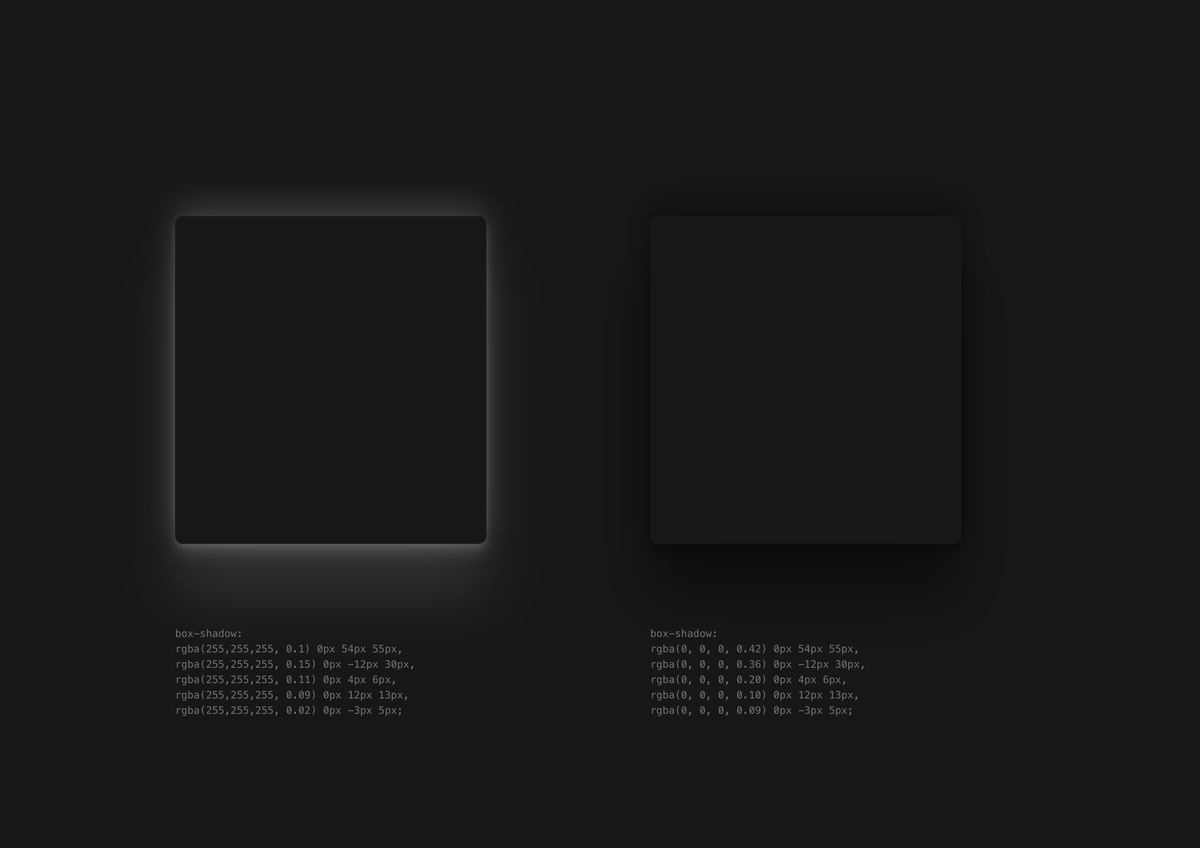
For dark mode box shadows, use a layered dark color for the shadow instead of white to add elevation to your cards
𝚋𝚘𝚡𝚂𝚑𝚊𝚍𝚘𝚠: 𝚛𝚐𝚋𝚊(𝟶, 𝟶, 𝟶, 𝟶.𝟺𝟸) 𝟶𝚙𝚡 𝟻𝟺𝚙𝚡 𝟻𝟻𝚙𝚡, 𝚛𝚐𝚋𝚊(𝟶, 𝟶, 𝟶, 𝟶.𝟹𝟼) 𝟶𝚙𝚡 -𝟷𝟸𝚙𝚡 𝟹𝟶𝚙𝚡, 𝚛𝚐𝚋𝚊(𝟶, 𝟶, 𝟶, 𝟶.𝟸𝟶) 𝟶𝚙𝚡 𝟺𝚙𝚡 𝟼𝚙𝚡, 𝚛𝚐𝚋𝚊(𝟶, 𝟶, 𝟶, 𝟶.𝟷𝟶) 𝟶𝚙𝚡 𝟷𝟸𝚙𝚡 𝟷𝟹𝚙𝚡, 𝚛𝚐𝚋𝚊(𝟶, 𝟶, 𝟶, 𝟶.𝟶𝟿) 𝟶𝚙𝚡 -𝟹𝚙𝚡 𝟻𝚙𝚡;
The black box shadows elevates the card on a 𝚋𝚐-𝚗𝚎𝚞𝚝𝚛𝚊𝚕-𝟿𝟶𝟶 background
Looks subtle and better
10
3
215
31,870

jsx
import React from 'react';
const OCTAVE_LEVELS = [
{ label: "Nano (μ)", val: "10^-6", color: "#444" },
{ label: "Milli (m)", val: "10^-3", color: "#666" },
{ label: "Unit (1)", val: "10^0", color: "#e82127" }, // The Center
{ label: "Kilo (k)", val: "10^3", color: "#666" },
{ label: "Mega (M)", val: "10^6", color: "#888" },
{ label: "Giga (G)", val: "10^9", color: "#aaa" },
{ label: "Tera (T)", val: "10^12", color: "#fff" },
];
const OctaveDiagram = ({ activeRegime = "Giga (G)" }) => {
return (
<div style={{
padding: "24px",
background: "rgba(0,0,0,0.4)",
borderRadius: "12px",
border: "1px solid rgba(232, 33, 39, 0.15)",
marginTop: "20px"
}}>
<div style={{
fontSize: "10px",
textTransform: "uppercase",
letterSpacing: "2px",
color: "#888",
marginBottom: "16px"
}}>
UOA Scale Mapping: Dimensionless Base-2 Octaves
</div>
<div style={{
display: "flex",
justifyContent: "space-between",
alignItems: "flex-end",
height: "80px",
position: "relative",
padding: "0 10px"
}}>
{/* Horizontal Axis Line */}
<div style={{
position: "absolute",
bottom: "35px",
left: 0,
right: 0,
height: "1px",
background: "linear-gradient(90deg, transparent, rgba(232,33,39,0.5), transparent)"
}} />
{OCTAVE_LEVELS.map((level) => {
const isActive = level.label === activeRegime;
return (
<div key={level.label} style={{
display: "flex",
flexDirection: "column",
alignItems: "center",
zIndex: 2
}}>
<div style={{
height: isActive ? "40px" : "15px",
width: "2px",
background: isActive ? "#e82127" : "#444",
boxShadow: isActive ? "0 0 10px #e82127" : "none",
transition: "all 0.3s ease"
}} />
<div style={{
fontSize: "9px",
marginTop: "8px",
color: isActive ? "#fff" : "#666",
fontWeight: isActive ? "bold" : "normal"
}}>
{level.label}
</div>
<div style={{ fontSize: "8px", color: "#444" }}>{level.val}</div>
</div>
);
})}
</div>
{/* Legend / Metrics */}
<div style={{
marginTop: "20px",
display: "grid",
gridTemplateColumns: "1fr 1fr",
gap: "10px",
fontSize: "11px",
borderTop: "1px solid #222",
paddingTop: "15px"
}}>
<div style={{ color: "#888" }}>
Current Regime: <span style={{ color: "#e82127" }}>{activeRegime}</span>
</div>
<div style={{ color: "#888", textAlign: "right" }}>
Compute Density: <span style={{ color: "#fff" }}>1.42 PFLOPS/Octave</span>
</div>
</div>
</div>
);
};
export default OctaveDiagram;
13