
Home Assistant OS 18.0.rc1 - first release candidate
Home Assistant OS 18.0.rc1 has been published as a pre-release.
The main change - migration to Linux kernel 6.18 for all platforms, Docker 29.5.3, containerd 2.2.4 and Buildroot 2025.02.14.
For Raspberry Pi, it is now possible to check and update bootloader firmware directly from Home Assistant OS through the CLI. In Home Assistant Core 2026.6.0, firmware should also appear as an update entity.
The new default swap size is now limited to a range from 1 to 4 GB. This should prevent swap from being too small on systems with low RAM and too large on systems with a lot of memory.
The disk image structure has also changed: the data partition is no longer created with a large amount of empty space. This should make writing the image to storage noticeably faster, while the data partition still expands on first boot as before.
For Open Virtual Appliance and aarch64 VM, images now come with a 32 GB size by default, so they no longer need to be expanded separately before use.
Another change - hassos/HassOS naming is being unified toward haos. This should not affect existing installations, but scripts and external tools that refer to old systemd unit names or helper binaries may need adjustments.
There is also an important warning for Raspberry Pi 5: bootloader version 2025-02-12 or newer is required, otherwise the image may hang during early boot.
Source: github.com/home-assistant/op…
1
37

Jun 13
Building a Tiny x86_64 Linux System with Buildroot
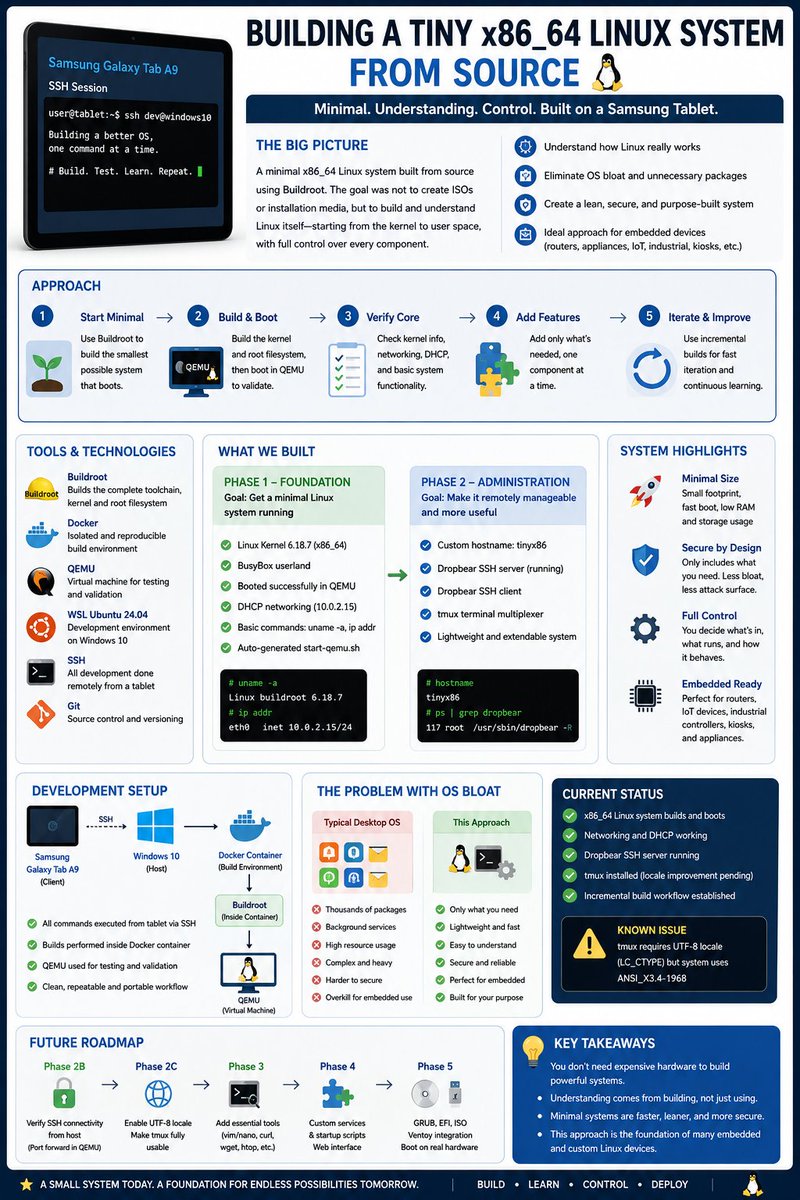
This project focused on creating a minimal x86_64 Linux system from source using Buildroot. Rather than starting with ISO images, boot loaders, or USB deployment, the effort concentrated on building and validating the Linux system itself.
What makes this project particularly interesting is that nearly all development was performed remotely from a low-cost Samsung Galaxy Tab A9 tablet using SSH. The tablet served as the primary workstation, connecting to a Windows 10 system running WSL Ubuntu and Docker. This demonstrated that modern Linux and embedded development can be performed effectively without expensive hardware or a traditional desktop development environment.
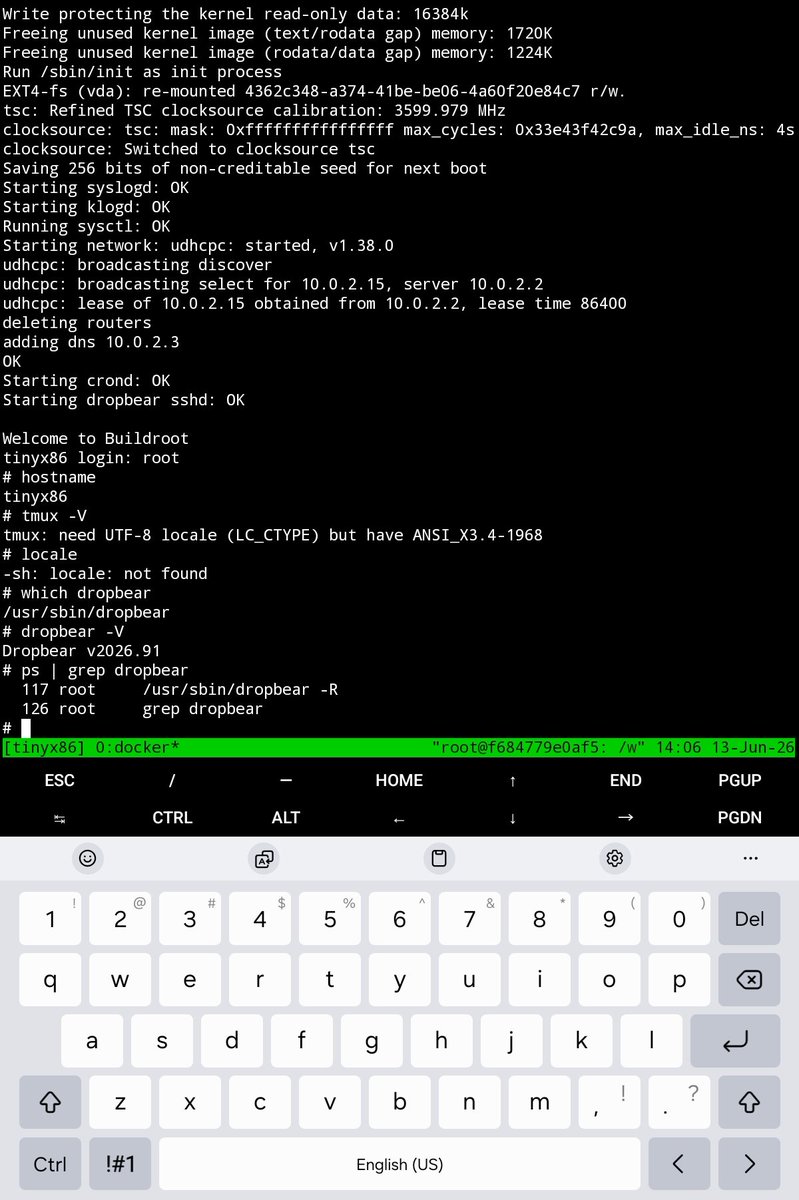
The build environment used Docker to isolate the Buildroot toolchain and dependencies. Buildroot generated a Linux kernel, a minimal BusyBox-based root filesystem, and a QEMU launch script for testing. The first milestone was a successful boot into a shell prompt. The system initialized networking automatically, acquired an IP address through DHCP, and supported basic commands such as "uname -a" and "ip addr". This verified that the kernel, root filesystem, initialization process, and virtual hardware were functioning correctly.
The second phase added practical administration capabilities. A custom hostname, tinyx86, was configured, the Dropbear SSH server was integrated and started automatically during boot, and the tmux terminal multiplexer was added. The result was a lightweight Linux system that could be managed remotely and extended incrementally.
The significance of this work extends beyond learning Buildroot. Modern desktop operating systems and Linux distributions often include thousands of packages, graphical frameworks, background services, and dependencies. While convenient, this software bloat can obscure how an operating system actually works. By starting with a minimal system and adding components one at a time, it becomes easier to understand the relationship between the kernel, user space, networking, services, and applications.
This approach is especially valuable for embedded devices. Routers, industrial controllers, kiosks, network appliances, IoT products, and custom hardware frequently require a small, predictable, and maintainable Linux environment rather than a full desktop distribution. Buildroot allows developers to include only the components required by the device, reducing complexity, storage requirements, memory consumption, and attack surface.
The project also demonstrated the value of an incremental workflow. The initial build created the complete toolchain and operating system from source. Subsequent builds completed much faster because Buildroot rebuilt only the modified components while reusing the existing toolchain, kernel, and system packages. This mirrors professional embedded Linux development practices.
Future work will focus on validating SSH connectivity from the host system, enabling UTF-8 locale support for tmux, adding selected command-line tools, and creating custom startup scripts and services. Only after the Linux system itself is fully refined will attention shift to packaging, including GRUB, EFI support, ISO generation, Ventoy integration, and eventually booting on physical hardware.
The result is a compact, reproducible x86_64 Linux platform that serves as a foundation for studying Linux internals, developing embedded systems, and exploring how modern operating systems are assembled from a small set of well-understood components.
31

Jun 13
NanoPi NEOのルートファイルシステムをBuildrootで作る(1) qiita.com/tetsu_koba/items/9…
僕の知りたい事はフォロワーさんが全て知ってる
1
2
302
Jun 11
From the Command Prompt to Virtual Machines, Emulators, and Containers
Early personal computers were simple. A machine booted into a text-based operating system and presented a command prompt on an ASCII terminal. There was no desktop environment, no browser, and often no networking. A developer wrote code, compiled it, and ran it directly on the hardware. The relationship between software and the underlying machine was clear and immediate.
Today, that same developer may be working through several layers of abstraction.
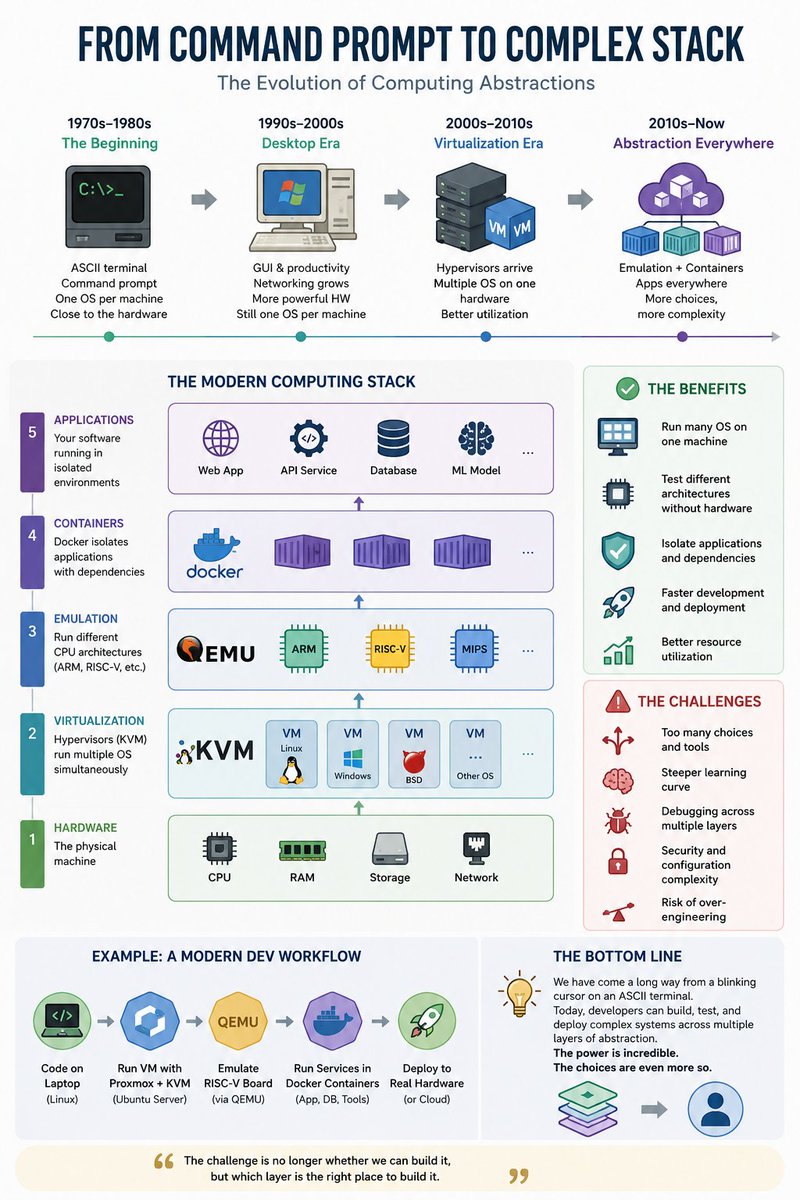
A modern workstation might run Linux as the host operating system. On top of Linux, KVM provides hardware-assisted virtualization. Management platforms such as Proxmox make it easy to create and manage virtual machines. A single physical computer can simultaneously run Windows, Linux, BSD, and specialized appliances, all sharing the same CPU, memory, storage, and network interfaces.
Inside one of those virtual machines, another layer may appear. QEMU can emulate completely different processor architectures. An x86 desktop can emulate ARM systems used in phones and routers, or RISC-V systems used in a growing number of low-cost embedded boards. A developer can build a custom Linux image with Buildroot, boot it in a virtual RISC-V machine, and test software long before physical hardware arrives.
Containers add another option. Docker isolates applications rather than entire operating systems. Instead of creating a virtual machine for every service, a developer can package a web server, database, monitoring tool, or development environment into a lightweight container. Hundreds of containers may run on hardware that could host only a handful of traditional virtual machines.
As a result, a modern development stack often looks like this:
Physical hardware → Linux host → KVM virtual machine → QEMU RISC-V emulator → Docker containers → Application.
Each layer solves a real problem. Virtual machines isolate operating systems. Emulators provide access to different processor architectures. Containers simplify application deployment. Together they create extraordinary flexibility.
The downside is complexity. A developer building a simple embedded application may have to choose between bare metal hardware, a virtual machine, a container, an emulator, a cloud instance, or some combination of all five. There are often multiple correct solutions and no universally accepted path.
This challenge is becoming more visible as inexpensive RISC-V boards enter the market. Many cost less than $100 and are designed to run lightweight Linux distributions. Developers can now build and test entire embedded Linux environments using Buildroot and QEMU before deploying them to physical hardware. What once required expensive development kits can now be done on a desktop computer—or even remotely from a tablet connected through SSH.
The evolution of computing has not been a straight line toward more powerful hardware. It has been a progression toward greater abstraction. The command prompt still exists, but it now sits beneath layers of virtualization, emulation, and containerization. Modern developers have more capability than ever before, yet they also face more architectural choices than any generation before them. The challenge is no longer whether something can be built, but deciding which layer of the stack is the right place to build it. :::
62
Jun 11
Embedded Linux Development for RISC-V Using an Emulator
Introduction
Embedded Linux is the operating system behind countless devices that people use every day, from routers and network appliances to industrial controllers, security cameras, smart sensors, and IoT gateways. Unlike desktop Linux, embedded Linux is designed to be small, efficient, and customized for a specific purpose.
This project demonstrates a complete embedded Linux development workflow for the RISC-V architecture using Buildroot and the QEMU emulator. The entire exercise was performed remotely from a low-cost Samsung Galaxy Tab A9 tablet connected by SSH to a Windows 10 development machine running WSL Ubuntu. Despite using inexpensive hardware on the client side, it was possible to build, test, and run a complete RISC-V Linux system.
Why RISC-V Matters
RISC-V is an open instruction set architecture (ISA). Unlike proprietary architectures, the specification is publicly available and can be implemented without licensing fees. This has attracted universities, startups, hardware manufacturers, and national technology programs around the world.
The situation today is similar to the early days of Linux. An open architecture encourages experimentation, innovation, and competition. As a result, a growing number of inexpensive RISC-V development boards are appearing on the market, many costing less than $100.
These boards need lightweight operating systems, and embedded Linux is often the natural choice.
Building a RISC-V Linux System
Using Buildroot, a complete software stack was generated for a virtual RISC-V machine. The build process produced:
A Linux kernel
A root filesystem
OpenSBI firmware
A RISC-V cross-compilation toolchain
A QEMU boot script
The generated system was then booted inside the QEMU RISC-V emulator.
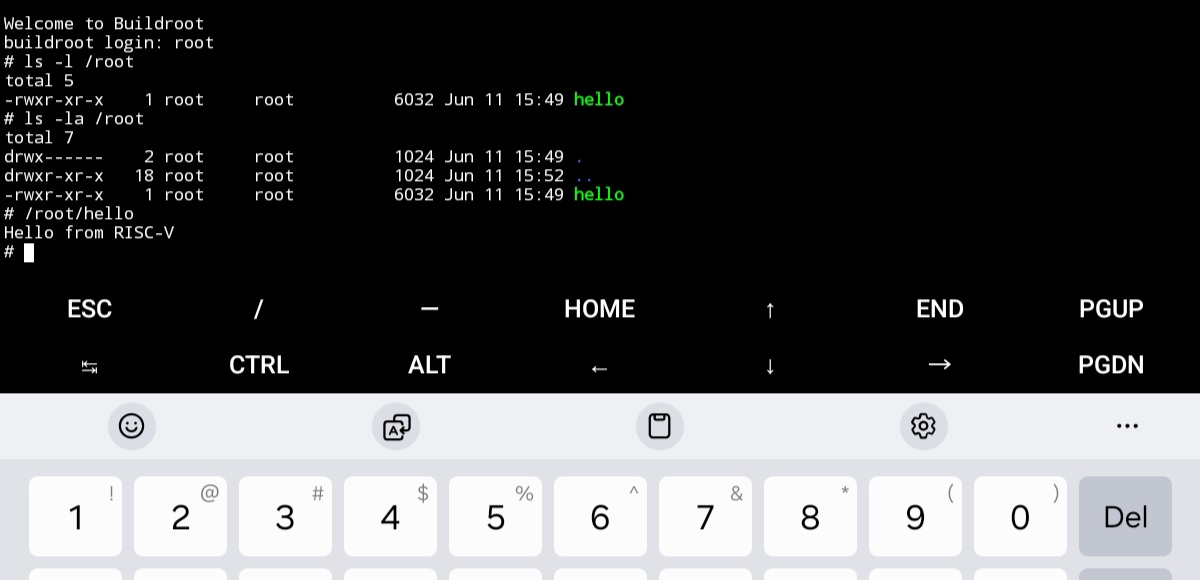
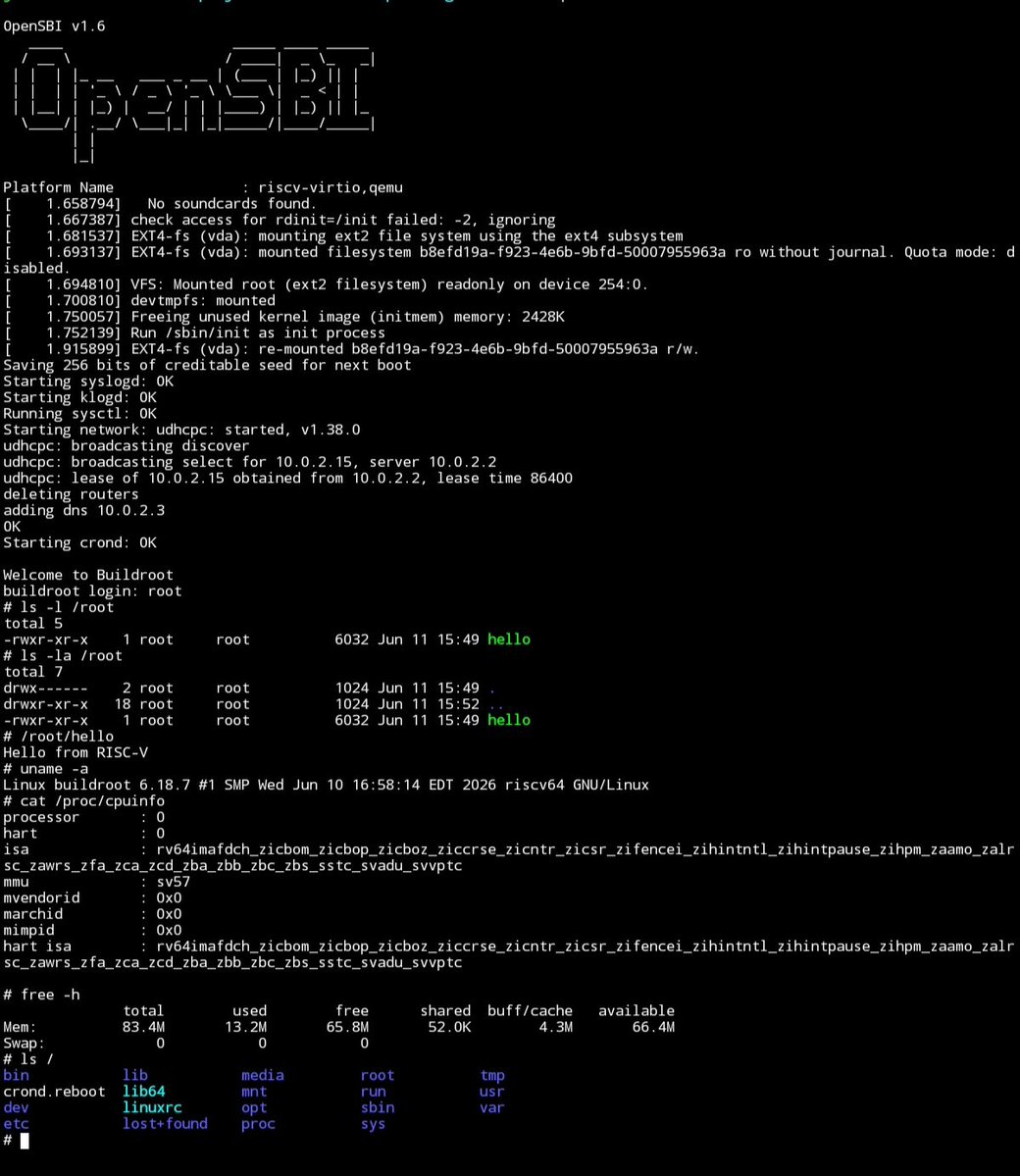
The virtual machine successfully started Linux, mounted the filesystem, obtained an IP address through DHCP, configured DNS, and reached a login prompt. The system identified itself as a 64-bit RISC-V Linux machine running a modern Linux kernel and Buildroot userspace.
One of the most striking results was its efficiency. The entire operating system required only about 13 MB of RAM after boot while still providing networking, shell utilities, logging, cron services, and a complete Linux environment.
Networking and System Verification
Once the system was running, networking was tested. DNS resolution worked correctly, and the virtual machine successfully downloaded web content using BusyBox wget. This confirmed that the embedded Linux environment had working network connectivity and could communicate with external services.
The system also reported a RISC-V 64-bit CPU architecture, demonstrating that software was running in a realistic RISC-V environment rather than on the host processor.
Cross-Compiling for RISC-V
Buildroot generated a complete RISC-V cross-compilation toolchain. A simple C program was created and compiled on the x86-64 development machine. The resulting executable was identified as a native RISC-V ELF binary.
The program was added to the Buildroot filesystem, the image was rebuilt, and the virtual machine was booted again. The custom application appeared inside the emulated RISC-V system and was ready for execution.
This completed the entire embedded development cycle:
Source Code → Cross Compilation → Firmware Image → RISC-V Emulator → Application Deployment
The same workflow is used by professional embedded Linux developers working on real hardware.
Why Emulation Is Useful
Emulation allows development to begin before physical hardware is available. Developers can build operating systems, test applications, debug software, and automate builds without purchasing a board.
Once software works in the emulator, it can often be moved to a real RISC-V board with only minor adjustments.
For students, hobbyists, and small organizations, this significantly lowers the cost of learning embedded systems.
Applications
The combination of RISC-V and embedded Linux is increasingly attractive for low-cost computing platforms. Affordable boards are now appearing for networking, robotics, industrial control, edge computing, home automation, monitoring systems, and educational projects.
Buildroot is particularly well suited for these devices because it produces compact, purpose-built Linux systems rather than full desktop distributions. A developer can include only the software needed for the application, reducing memory usage, storage requirements, boot time, and maintenance.
As more inexpensive RISC-V boards enter the market, the ability to build and customize lightweight Linux systems will become an increasingly valuable skill.
Conclusion
This project demonstrated a complete RISC-V embedded Linux workflow using Buildroot and QEMU. A Linux kernel, filesystem, firmware, and cross-compilation toolchain were built from source, booted in a virtual RISC-V machine, connected to the network, and used to deploy a custom application.
Perhaps most interesting is that the entire process was managed remotely from a budget Samsung Galaxy Tab A9 tablet. Modern open-source tools make it possible to learn operating systems, embedded Linux, cross-compilation, and computer architecture without expensive hardware. With RISC-V adoption growing and low-cost boards becoming widely available, these skills are likely to become increasingly relevant in both education and industry. :::
1
68

Jun 11
My current scope is smooth transition from splash screen to app. If I need to reduce the boot time, I probably replace current Yocto docker with minimized buildroot. Or I may run such GUI on Zephyr if it makes sense.
1
67

Going to give artix-lxqt-runit variation a try. Mostly just a stop gap to see if I can actually get a bloated Linux system installed before a more serious effort with BuildRoot. First de-windows victim computer will be an AMD powered APU.
1
1
785

Jun 10
Depends on the distribution, DE, running services etc.
There are many distros for different tasks and architectures. If you have an SBC, you could use a distro for this or you could build your own system with buildroot or yocto linux.
1
1
35

No hardware? No problem! 🛠️
Are you simulating your embedded projects yet? Simulation is a lifesaver for rapid prototyping and debugging when you don't have a physical board handy.
youtu.be/5TdH3neuvyA
#qemu #STM32 #buildroot #gdb #Embedded#Eclipse #EmbeddedCraft #Simulation
14

1am but you have a buildroot to debug......This is not life at all
2
55
FHILY👑 retweeted

Jun 8
Introducing Monako Glass
A 48g wearable Linux computer built into glasses.
Runs MonoOS (Buildroot Linux) on an Arm Cortex A7 with a 0.5 TOPS NPU, letting you run Claude Code, Codex, and terminal-based AI agents directly from your face.
Features:
- Heads-up display.
- Camera Integration
- Bone conduction mic.
- On-device hand tracking
- Up to 8 hours battery life.
Jun 8

Here is an 18-minute tutorial on how to build animated, award-winning websites with Claude Design Opus 4.7!
4
6
16
1,656


Sheeeesh took me a week to configure buildroot for my project, im slow asf
1
3
77

ATP ill just make my next system in a buildroot enviroment and see who will cry about "OHH WHAT IF I NEED TO INSTALL A PACKAGE" what package? I don't need a package manager.
Jun 7

Ofc its a bait cos , even a kid will know Debian stable than arch because of update frequency.
These posts are irritating and i wonder how these people can even do these posts.
PLEASE STOP THIS😭
2

mt7620a wm8960、とりあえずsimple-audio-cardで再生は十分なので、メモ残しておこう。
kernel 5.15.198
kernelだけ引き継いで、ユーザランドはbuildrootベースにすれば、それなりに新しいので揃えられるかな
メモリ256MB、NAND 512MBあるので、OpenWrt 23.05ベースでも足りるけどなんかもっさりしてる
2
308