
a guide to reading pytorch source code.
as ive been using torchtitan a lot more, sometimes the kernels that are invoked arent what i expected. i realized i needed to learn to profile and have atleast an intermediate understanding of how to trace an op end to end. (also this is a major signal if you can understand this very well)
pytorch is a massive library so cloning it and looking at code line by line probably doesnt work.
this is my guide to the anatomy of torch and how to start reading it.
pytorch mainly has a four-layer architecture -
- python frontend: this is the python facing API where you write things like nn.module, torch.tensor when you are building your favorite llm.
- dispatcher: when you call one matmul, it has to decide whether to use the CPU, CUDA, or MPS for computation. the dispatcher does this for you.
- C backend (ATen / c10): i think this is where all the mathematical operations and memory management happens.
- compiler stack: this is a more recent feature that came with 2.0. torch dynamo captures the computation graph while the inductor optimizes and generates code.
always remember these four main layers.
1. the python layer
start with torch/nn/modules/module.py - the base class for all models along with the hooks are defined here.
you could also pickj an op of your choice and trace the __call__ method.
for the c binding side, torch/csrc/ has the pybind11 code that converts python objects to c pointers.
2. the dispatcher
torch.matmul(a, b) doesnt directly jump to a handwritten kernel.
there is a yaml file called the native_functions.yaml at aten/src/ATen/native/native_functions.yaml. it lists every operator, the dispatch keys, and which c function implements it.
for instance look at this, the grouped_mm disptaches to _scaled_grouped_mm_cuda.
```
- func: _scaled_grouped_mm(Tensor self, Tensor mat2, Tensor scale_a, Tensor scale_b, Tensor? offs=None, Tensor? bias=None, Tensor? scale_result=None, ScalarType? out_dtype=None, bool use_fast_accum=False) -> Tensor
variants: function
dispatch:
CUDA: _scaled_grouped_mm_cuda
tags: needs_exact_strides
```
3. ATen
this is where all the math operators and functions need to be define. source is in aten/src/ATen/native/.
there is a nice README.md guide within the folder on how to add this.
4. compiler stack
torch.compile is literally free performance when you use it well.
torch dynamo reads the python bytecode and captures the computation graph. inductor compiles that graph into triton kernels.
to debug the graphs. make use of torch logs like this -
TORCH_LOGS=" dynamo, inductor" python your_model.py
the code is under torch/_dynamo/ and torch/_inductor/. its all python but its too dense. i still havent figured out whats the best way to start reading this section.
tip: you will also need to build a debug version of torch and keep the source code generated during the compilation process otherwise, it will be difficult to find the source of some functions in the function call stack.
1. pick the main branch for instance and then -
```
export DEBUG=1
python setup.py bdist_wheel
uv pip install dist/torch*.whl
```
2. you can launch the torch script you want to debug and launch using gdb, start adding breakpoints and watch the whole function stack.
the best thing to do would be to trace just a single sufficiently complex operation end to end and not try to read the entire codebase and self destruct. ill try to add more details to this as i discover more.
more resources
- pytorch advanced section is quite nice
- pytorch developer podcast hosted by edward yang. i wished they continued this but i think its stopped now
- ezyang's blog posts
happy reading!
would also be keen to hear on some tips from @difficultyang @cHHillee @marksaroufim
2
5
86
1,945
Lueul retweeted

18h
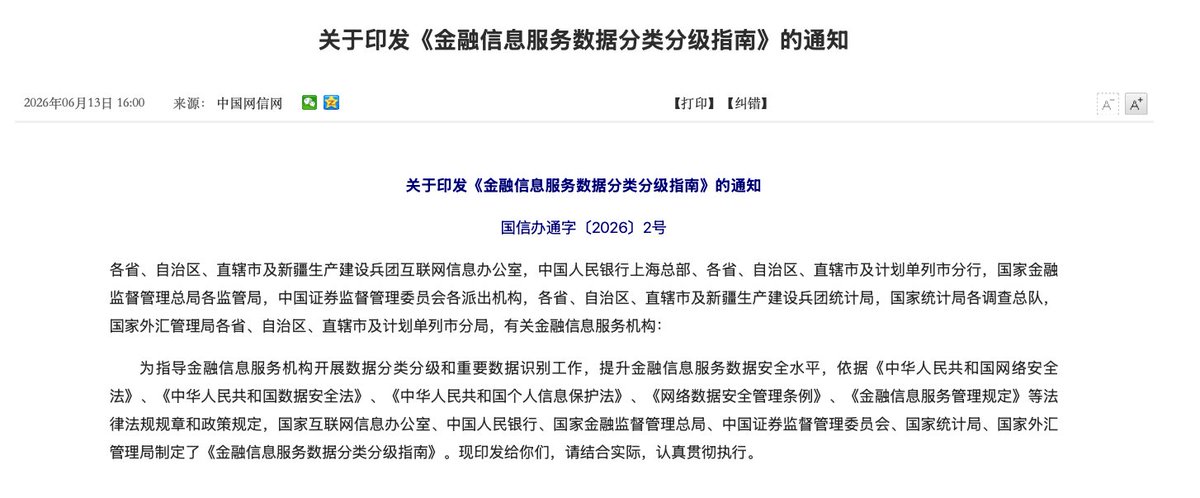
New financial data rules just dropped from Beijing (CAC, PBOC, CSRC, etc.), and they explain exactly why the Chinese market is going dark. 👇
A breakdown of the new "Financial Information Service Data Classification & Grading Guide":
1/ Political Security is King: The highest tier ("core data") is explicitly reserved for data that impacts political security. Security > Economy.
2/ The "Important Data" Trap: Almost everything is now restricted. This doesn't just cover steel or EV tech—it includes food/beverage, retail, and hospitality across provinces. If it’s broad economic data, it’s classified.
3/ The Fallout: This explains exactly why firms like Bernstein are pulling out of Chinese consumer sector coverage. You can't analyze what you can't see/say.
The Bottom Line: Analyzing the Chinese market is about to get a lot more murky. As I said long ago: from now on, all news will be good news. 🤫
5
36
155
21,962

China’s 2026 Notice No.42 & CSRC Guidelines carve out a filing-based offshore pathway for RWA tokenization of domestic assets—applying ‘same business, same rules’ via CSRC/NDRC/SAFE. Pragmatic bridge for regulated hybrid tokenization.

🇨🇳 China just dropped Notice No. 42.
Stricter rules on virtual currency trading but here’s the real signal.
They also outlined how tokenized assets and RWAs can still exist inside regulated financial frameworks.
So it’s not just “ban vs no ban” anymore… it’s separation.
Crypto trading gets tighter. Tokenized finance gets structured.
They’re not shutting it down - they’re reorganizing it.

1
18