
23 Sep 2024
I think today we should focus on when should we use Measures and calculated columns in our Power BI series. We will understand which one to use when as a data analyst.
So, let's discuss what they are and when to use which one.
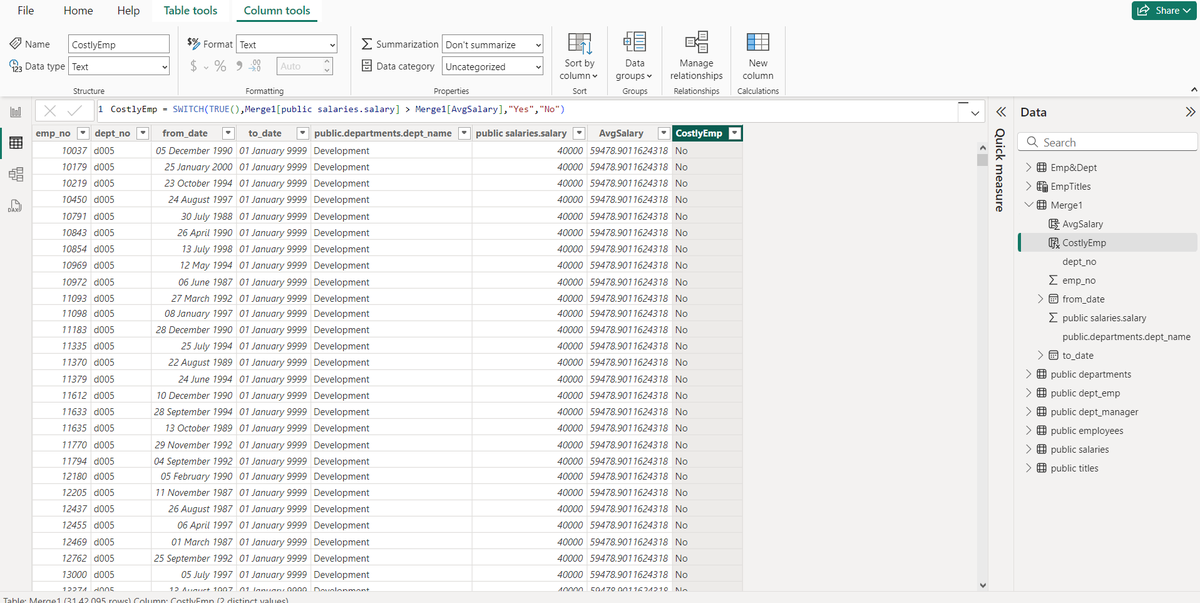
Calculated column: These are columns that you create in "Table View" using DAX formulas and it can be calculations such as "Vaccine Percentage" for each state. It creates separate column in the table.
Measures: These are the calculations that are generated using DAX formulas to return a value. It doesn't create separate columns like calculated columns.
So, let's understand which one to use when.
-- You should use calculated column when you need to perform row wise operations in future as you will need a separate column for that.
-- You should use measures when you need to perform aggregations like sum,avg etc.
-- You need to use calculated columns if you want to perform join or union between tables in future and want to include this calculated column as well, you cannot use measure in such scenario.
#PowerBI #DataAnalytics #DAX #CalculatedColumns #Measures #DataAnalysisTips #PowerBItips #BItools #BusinessIntelligence #DataAnalyst #DataModeling #DataTransformation #DataCalculation #AnalyticsSkills #TechSkills #DataOperations #UKData #USData #EuropeData #UKTech #USTech #EuropeTech #AnalyticsCommunity #BIExperts #DataStrategy #BIDevelopment #DataSolutions
1
58

13 Feb 2022
Τύποι υπολογισμού και υπολογιζόμενες στηλές. Πότε τα χρησιμοποιούμε???
#powerbi #dax #dataanalysis #calculatedcolumns #measures
linkedin.com/posts/sokratisg…
1

The #DAX learning series continues this week with an Introduction to #CalculatedColumns.
In this post, you will learn how to create a simple Calculated Column with DAX.
You will also see how to use the #IF and #SWITCH functions i…lnkd.in/dnqaKTM lnkd.in/d8tPv-K
2

27 Jun 2017
What's the difference between #CalculatedColumns & #Measures in #PowerBI? Learn more in this new blog post: bluedata.us/2sXBeaL

2
3