
📊 Excel Copilot just leveled up (May 2026)!
New discoverable entry points, intelligent smart suggestions, and a keyboard-first design so you can stay in flow without ever touching the mouse.
Plus the brand-new 'Show Changes' view for full transparency on every edit Copilot makes.
Productivity maxed!
#CopilotInExcel #Copilot

1
4
37
14,111

4 Sep 2025
✨ ICYMI: Excel just got a big upgrade. The new COPILOT function brings AI right into your formulas. Summarize, categorize, or brainstorm ideas directly in the grid. msft.it/6016s53Q0
#MicrosoftExcel #CopilotInExcel #AIinExcel
1
9
964
25 Aug 2025
✨ Excel just got a big upgrade. The new COPILOT function brings AI right into your formulas. Summarize, categorize, or brainstorm ideas directly in the grid. Read our new blog to see how it works and try it for yourself. msft.it/6013skapR
#MicrosoftExcel #CopilotInExcel
2
2
13
1,350
21 Aug 2025
🤯 Say goodbye to manual sorting and tedious data analysis. The new COPILOT function lets you bring AI right into your Excel formulas.
Check out our new blog to see examples and ideas for your own spreadsheets. msft.it/6019sn5fD
#MicrosoftExcel #CopilotInExcel
13
1,151

20 Aug 2025
なるほど、CopilotInExcelでは1つのセルだけを対象とする指示はコスパ悪いと考えていたが、関数化されたならば1つのセルに対する指示を他セルでも繰り返せる。
だから1つのマザー的なCopilot関数を作り込むことに集中すればよさそう。
あとはプロンプト文自体も変数として扱えると使い勝手上がりそう。
20 Aug 2025

Excel COPILOT関数で「姓と名の分割」。
「マジ?」と声が出そうになった。
・氏名データを20件生成
・姓と名の分割を1プロンプトで完了
=COPILOT(指示1,セル参照,指示2,セル参照 …)
と、指示をどんどんつないでいけるのか…
しかも、「B列とC列に出力して」のように「出力先セル」まで指定できるだって?これは普通のAI関数と違うぞ・・・。
2
801
19 Aug 2025
📊 New in Excel: The COPILOT function brings AI into your formulas.
Summarize feedback. Brainstorm ideas. Classify data.
Check out our new blog to learn how to use it: msft.it/6015sVVLx
#MicrosoftExcel #CopilotInExcel #AIinExcel
2
8
972
18 Aug 2025
📊 Excel just leveled up.
The new COPILOT function lets you use plain language to get AI-powered results right in your spreadsheets.
No scripts. No add-ins. Just smart formulas. msft.it/6016sp5P6
#MicrosoftExcel #CopilotInExcel #AIinExcel
1
22
2,734

19 Dec 2024
What GitHub Copilot did for developers, Copilot will do for Data Analyst. I did not say that, Satya Nadella did at the Microsoft Ignite 2024 Conference.
youtu.be/7U71-X7NNUQ
As I watched Satya make that statement, it dawned on me that Microsoft Copilot in Excel is about to transform data analysis forever. But here is the twist – it's not going to replace data analysts. It is going to create two types of analysts - Those who master Copilot... and those who become irrelevant.
Watch the full video, link in comment
#copilotinexcel
#excelcopilot
14
77
4,780

11 Dec 2024
How to Clean Data with Copilot in Excel
Discover how to effortlessly clean your data with Copilot in Excel, ensuring accuracy and consistency in your spreadsheets.
By Rodger Mansfield, Technology Editor
November 11, 2024
onecooltip.com/2024/11/how-t…
Are you tired of spending hours manually correcting data inconsistencies in your Excel sheets?
What if there was a way to automate this tedious task and ensure your data is always accurate and consistent?
Here's a Cool Tip: Use the New 'Clean Data' Feature in Microsoft Excel
Copilot in Excel is your new best friend for data cleaning!
Data inconsistencies, such as text variations, number format issues, and extra spaces, can lead to incorrect calculations and messy workbooks. Copilot's Clean Data feature detects and resolves these common issues with just a click, saving you time and effort while improving the reliability of your data.
Here's how to do it.
1. Launch Microsoft Excel for the Web and open your workbook.
2. Highlight the data you want to clean.
3. Go to the Data tab on the ribbon.
4. Select the Clean Data option.
5. Copilot detects inconsistencies and offers solutions.
6. Review the suggestions and apply the changes as needed.
7. For best results, format your data as an Excel table by selecting Home > Tables > Format as Table.
This new feature automates the data cleaning process, freeing up time for more important tasks.
And it ensures data consistency, reducing the risk of errors in calculations and analysis.
Imagine you have a sales report with inconsistent text entries for product names (e.g., "Product A," "product a"). Copilot will identify these inconsistencies and suggest standardizing the text, ensuring accurate analysis and reporting.
With Copilot in Excel, cleaning your data has never been easier.
By automating the detection and correction of common data issues, you can focus on what truly matters—making informed decisions based on accurate and consistent data.
Have you tried Copilot's Clean Data feature yet?
Share your experience in the comments and don't forget to share this article on your social media!
Please LIKE and SHARE OneCoolTip.com!
Subscribe to the FREE OneCoolTip Newsletter.
Visit the OneCoolTip YouTube Channel: youtube.com/@onecooltip
X: x.com/OneCoolTip Threads: threads.net/@onecooltip
Do you have a Cool Tip or question? Email us at onecooltip.com@gmail.com
Rodger Mansfield, a seasoned tech expert, is the mastermind behind OneCoolTip.com where he serves as both writer and editor. With a keen eye for simplifying complex tech, Rodger delivers practical advice that empowers readers to navigate the digital world with confidence. Dive into OneCoolTip.com for a treasure trove of savvy tips and tricks that keep you one step ahead in tech.
One Cool Tip
onecooltip.com
Cool Tech Tips for a Cooler Life!
#MicrosoftExcel #Excel @msexcel #microsoft365 @microsoft365 #ExcelTips #DataCleaning #CopilotInExcel #TechSavvy #AI #Copilot @MSFTCopilot #BackToWorkMonday
#TechTips #TechGuide #OneCoolTip @OneCoolTip
Copyright © 2024 | OneCoolTip.com | All Rights Reserved
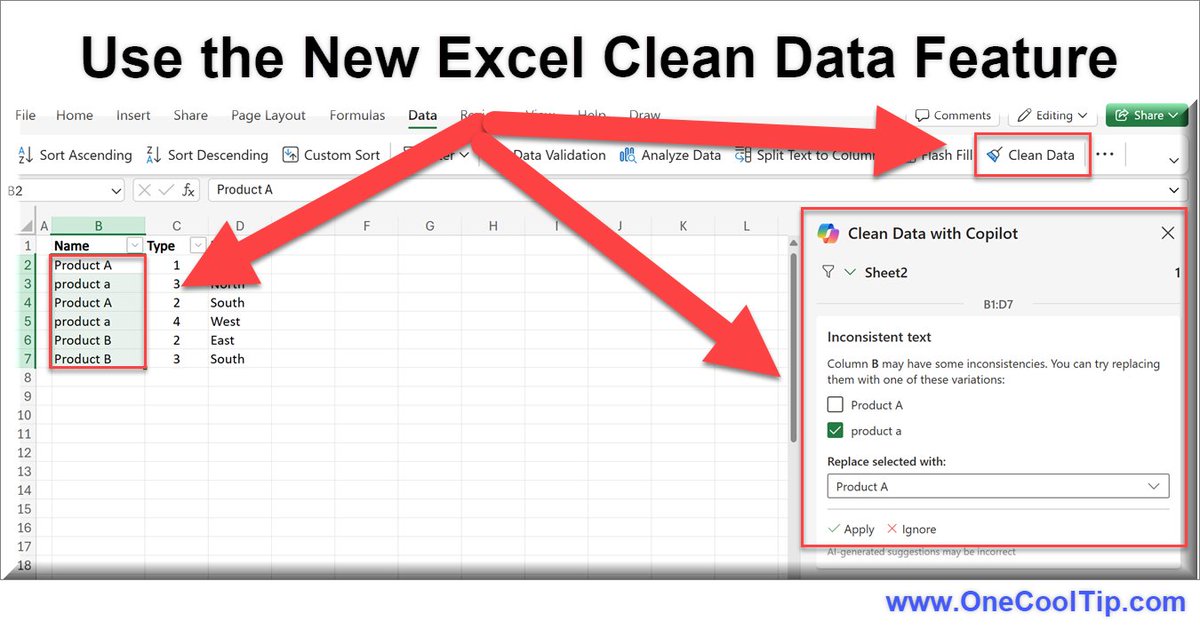
ALT Excel Clean Data Feature with Copilot
2
2
36

8 Dec 2024
Anyone here using #CopilotInExcel? If so, please send me a note. I’m curious if you find this tool helpful. TYIA! #Microsoft #ArtificialIntelligence
5
93

