
创业不需要一开始就造Starship,只需要找到一个最小现金流的生意,设定成crontab自动执行,然后去找下一个,唯独上班不行,因为会被同事和领导偷走。
1
16
2,568

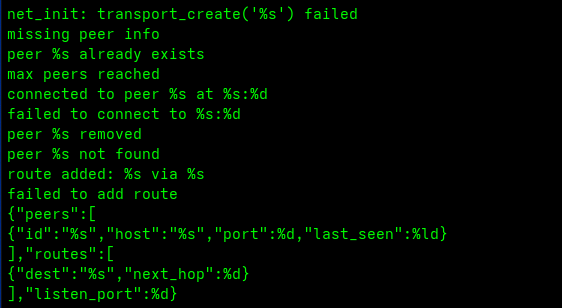
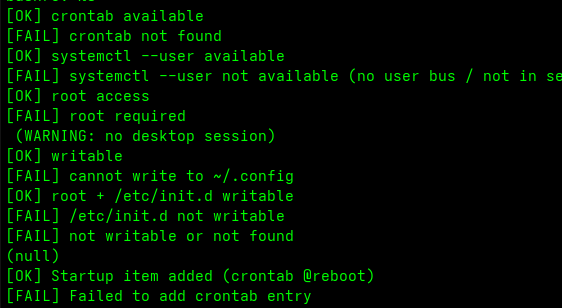
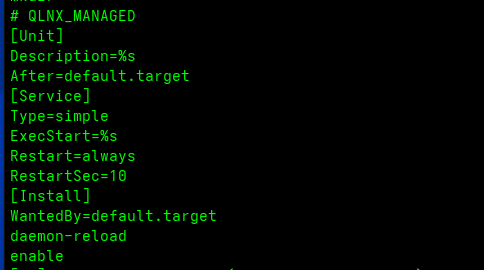
The malware has a hardcoded C2 IP, ptrace(), network forwarding and more. It's pretty extensive Swiss Army knife malware with multiple ways it tries to maintain persistence with crontab, systemd, etc.
1
1
44

Claudeに作業PCの最適化の診断をやらせる。今までやってそうでやってなかった。持ち運び用のPCがメモリ少ないのでやってみた。
プロンプト
------
あなたはPCのパフォーマンス&セキュリティ診断を行うコンサルタントです。
このマシンの状態を実際のコマンドで調査し、結果を1枚のHTMLレポートにまとめてください。
推測では書かず、必ずコマンドで実データを取得してから書くこと。
## 最初にやること:OSを判定する
- まず OS(macOS / Windows / Linux)を判定し、以下から該当する調査コマンド群を使う。
- Windows は PowerShell、macOS / Linux
はシェルを使う。コマンドが無い環境では代替手段を探すか、その項目は「取得不可」と正直に記載する。
## 調査する内容(OS別コマンド例)
1. ハードウェアとOS(機種・CPU・物理メモリ・OSバージョン)
- macOS: sysctl hw.memsize hw.model machdep.cpu.brand_string / sw_vers
- Linux: lscpu / free -h / cat /etc/os-release / cat /proc/meminfo
- Windows: Get-ComputerInfo / systeminfo
2. メモリ全体の状況(使用率・空き・スワップ/ページファイル)
- macOS: vm_stat / sysctl vm.swapusage / memory_pressure
- Linux: free -h / vmstat / swapon --show
- Windows: Get-CimInstance Win32_OperatingSystem / Get-Counter '\Memory\*'
3. メモリ/CPUを食っているプロセス TOP(プロセス別に集計。ブラウザ等はプロセス数も数える)
- macOS/Linux: ps aux を集計(必要なら top -b -n1)
- Windows: Get-Process | Sort-Object WS -Descending | Select-Object -First 20
4. 自動起動・常駐の棚卸し
- macOS: ~/Library/LaunchAgents, /Library/LaunchAgents, /Library/LaunchDaemons
- Linux: systemctl list-unit-files --state=enabled / ~/.config/autostart / crontab -l
- Windows: Get-CimInstance Win32_StartupCommand / schtasks /query / スタートアップフォルダ
- 各項目を「常に動く価値があるか」で Keep / Review / Remove に判定し、
**具体的な対応方法(どの設定をどう変えるか手順で)** を添える
- さらに **費用対効果テーブル**(手間×効果で着手順を★で示す)を用意する
5. セキュリティ診断(怪しいアプリ・マルウェアの兆候がないか)
- 不審な場所から動くプロセス(macOS/Linux: /tmp, /dev/shm, /Users/Shared 等/Windows: %TEMP%,
AppData\Local\Temp, Public 等)
- 署名の検証
- macOS: codesign -dvvv / spctl -a -vv(誤検知に注意して正しく判定)
- Windows: Get-AuthenticodeSignature
- Linux: パッケージ管理外のバイナリ・実行権限付きの不審ファイルを確認
- 定期実行(cron / schtasks / systemd timer)、外部通信先(macOS/Linux: lsof -i / Windows:
Get-NetTCPConnection)
- OS標準の保護機能の状態
- macOS: Gatekeeper(spctl --status) / ファイアウォール
- Windows: Get-MpComputerStatus(Defender) / Get-NetFirewallProfile
- Linux: ufw status / firewall-cmd --state
6. 仕事が快適になるおすすめ設定
- 共通: キーリピート速度・ファイル拡張子表示・スクショ保存先・スリープ/電源・ストレージ空き 等
- 現在値を取得し「現状→おすすめ→効果」の形で提案(OSに無い項目は省略)
## レポート(HTML)の構成
- ①ひと目で分かる現状サマリ(KPIを大きく、赤/黄/緑で色分け。先頭に判定対象OSを明記)
- ②メモリ/CPU消費プロセスTOP(横棒グラフ)
- ③**打ち手の優先順位マトリクス(効果×手間の2×2)**
- 縦軸=効果、横軸=手間。4象限ラベル(QUICK WINS / 戦略的投資 / 後回し / 要検討)
- 各施策をドットでプロットし、左上(高効果・低負担)から着手する旨を明記
- ④自動起動・常駐の棚卸し+対応方法+費用対効果テーブル
- ⑤セキュリティ診断
- ⑥おすすめ設定
- ⑦中長期の視点
## HTMLの要件
- 単一の self-contained な .html(外部CSS/JS依存なし)。作業ディレクトリに保存し、最後にOS標準の方法で開く
(macOS: open / Windows: start / Linux: xdg-open)
- ダークテーマのカード型。数字を大きく見せる
- トーンは「結論ファースト・So What を明示・すべて可逆で無料の施策から」
- すべて日本語
まず OS を判定し、必要なコマンドを実行して情報を集め、それからHTMLを生成してください。
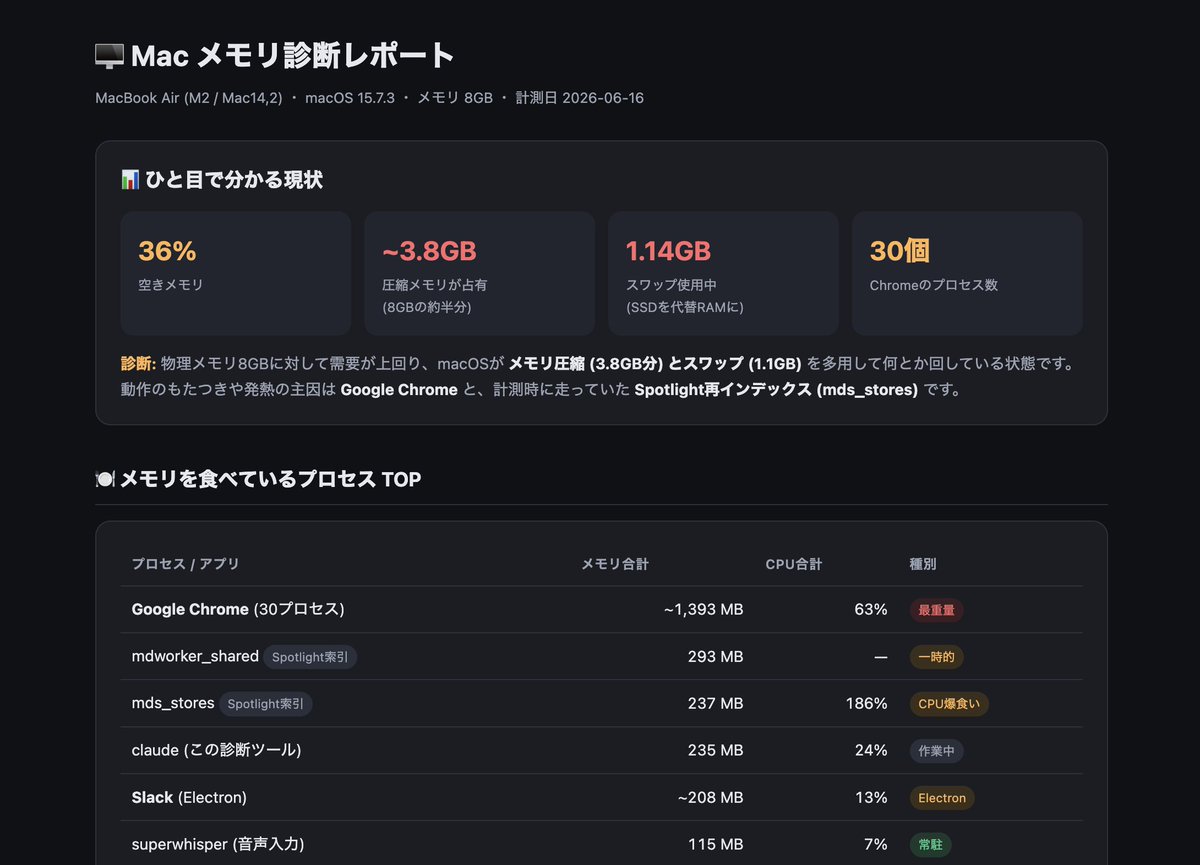
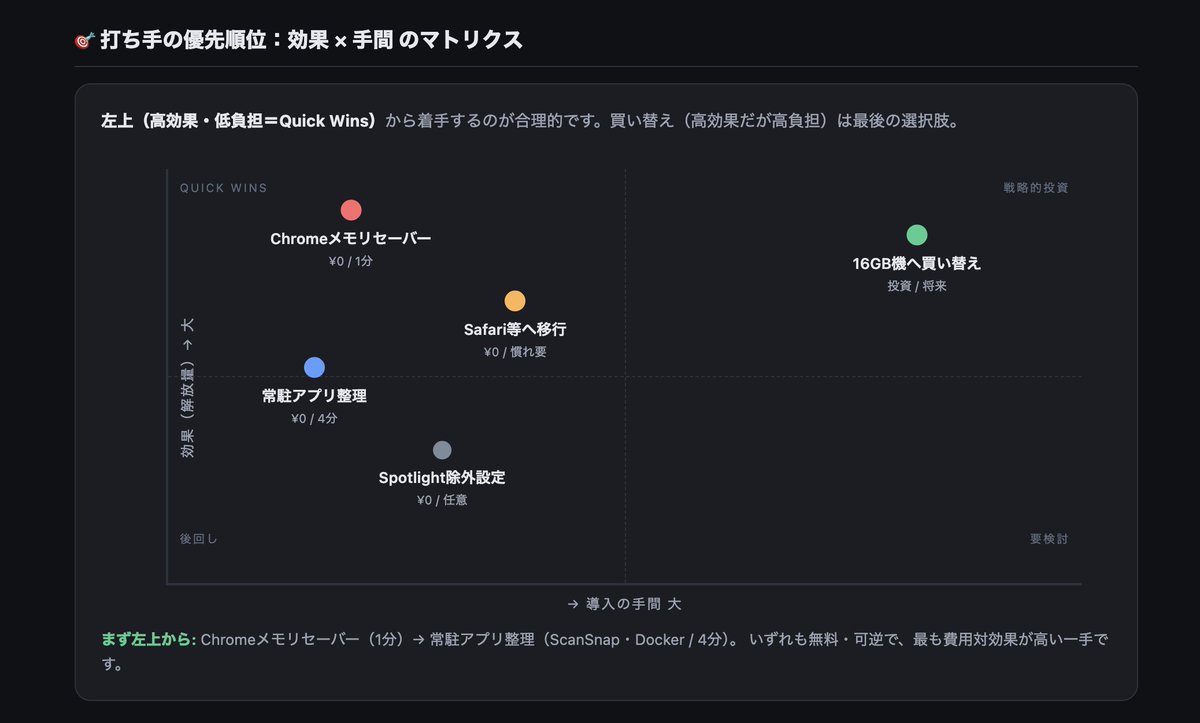
2
8
520
C—J retweeted

Crontab is a Linux and Unix utility used to automate the execution of commands, scripts, and system tasks at specific times or intervals. It is commonly used by system administrators to perform routine maintenance tasks such as backups, log rotation, software updates, and monitoring.
Each crontab entry consists of five time fields—minute, hour, day of the month, month, and day of the week followed by the command or script to execute. This allows tasks to run automatically without manual intervention.
From a cybersecurity perspective, attackers who gain unauthorized access to a Linux system may abuse crontab to establish persistence. By scheduling malicious scripts or commands, they can ensure their payloads execute at regular intervals, survive reboots, maintain access, download additional malware, or exfiltrate data. For this reason, monitoring cron jobs and auditing scheduled tasks are important components of system security and threat detection.
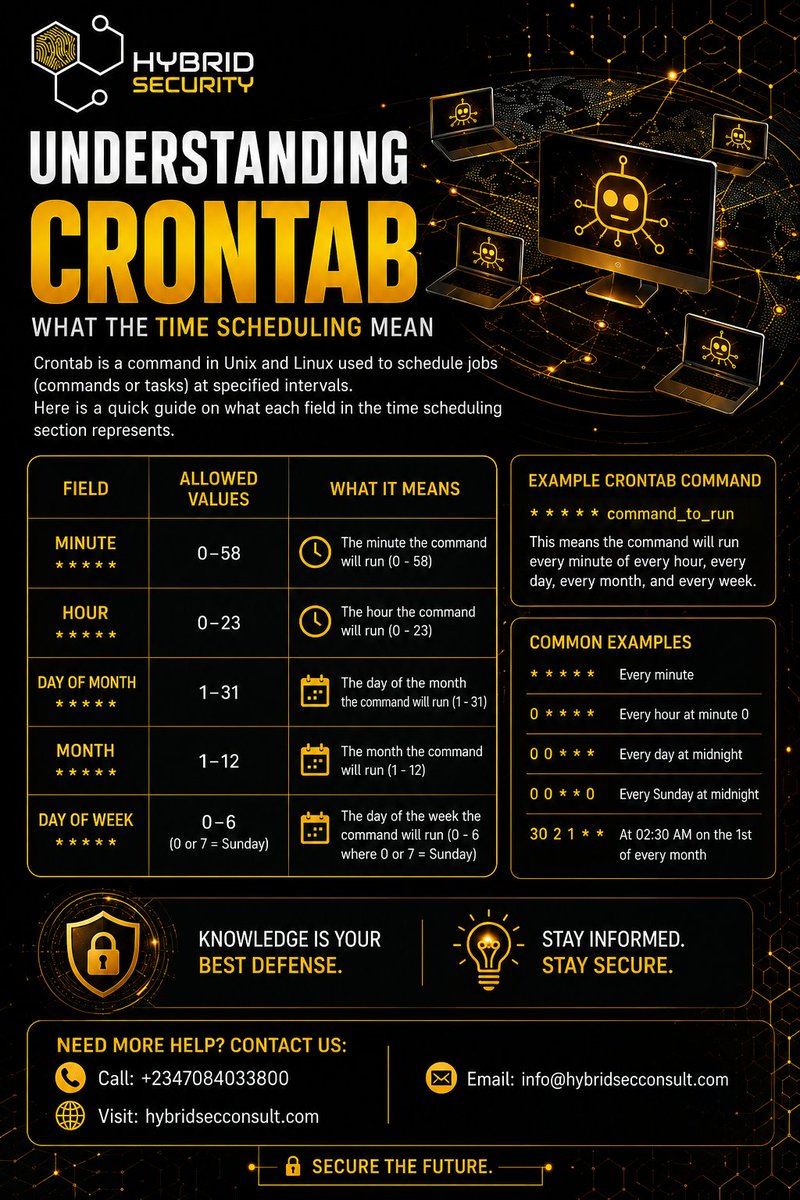
1
3
94

OoOooOoOo
that's cool!!
i've never heard of crontab!!
the tools i know of online are AI (i don't like to use AI), stuff to make good README files, and a bunch of git hostjng places
there's also like.. clang, clang , rustup, etc., but i use linux and never go to the websites!
1
22

10h
yes, like that!
except it's usually on a dedicated server running from a crontab file, not github actions
1
3
127

18h
0 9 * * 1. Quick, no checking: 9am every Monday, or 9am on the first of the month? Cron's five fields are easy to misread.
A misread cron schedule runs at the wrong time for a whole month before anyone notices.
So I built a crontab builder that goes both ways: compose a schedule into an expression, or paste an expression and read it back in plain English.
The five fields: minute, hour, day-of-month, month, day-of-week (Sunday is 0). The day-of-month vs day-of-week mix-up is the classic trap.
Try it:
techearl.com/crontab-builder…
#Linux #Cron #SysAdmin
10


Jun 15
Something is scheduled. You just haven't found it yet.
I will check:
1.Cron jobs (crontab -l)
2. Systemd timers (systemctl list-timers)
3. The process spiking CPU (top, pidstat)
4.PostgreSQL autovacuum
5. Log rotation, backups, AV scans, maintenance jobs
Then correlate with logs around 3:17 AM.
The clue is the timestamp: 3:17 AM is too precise to be random. Something owns that schedule.
455

Jun 15
自分では絶対に書けないシェルスクリプトをGeminiが書いてくれて、rsyncをcrontabで自動実行できるようになった。アプリの自動終了、NASの自動マウント、LOGファイルの作成までやってくれて感激。
1
63

Jun 15
ConnectionError は外部依存の宿命だと割り切ってる。
直近24hで market 分析系の cron が1件コケた。中身は接続エラー。株探にしろAPIにしろ、向こうが一瞬応答返さないだけで raise が飛ぶ。crontab 50件超で回してると、この手のは毎週どこかで起きる。
大事なのは『コケること』じゃなくて『コケた時に何が残るか』なんだよな。エラーハンドリング甘いと、接続失敗を握りつぶして空データで処理続行 → 深夜にゴミデータが静かに生成される。これが一番怖い。翌朝そのゴミを参照して別スクリプトが判定して、と連鎖する。
だから今は接続系は基本リトライ数回 → ダメなら例外を握りつぶさず止める、に倒してる。中途半端に動き続けるより、堂々と落ちて通知が飛ぶほうが100倍マシ。
自動化の信頼性って、成功時の華やかさじゃなくて失敗時の振る舞いで決まる。結局そこに尽きる。
#Python自動化 #業務効率化

31

Jun 15
# 指示
あなたはシステム内の自動化プロセスを監査する専門エンジニアとして振る舞ってください。2026年6月15日に実施されるAnthropicの課金体系変更(プログラム経由でのClaude利用が別枠の月次クレジット制へ移行)に伴い、現在のPCおよびリポジトリ内から「プログラムによるClaudeの自動実行」を完全に特定・リストアップすることがあなたの任務です。
※重要:本調査は完全な「読み取り専用」で行い、ファイルの書き換えや `claude` コマンド等のテスト実行は一切行わないでください。
# 前提(課金変更のスコープ)
特定すべき対象は以下の4つの実行パターンです。
1. `claude -p` 等を用いたヘッドレス・非対話モードでの実行
2. Claude Agent SDKを経由した呼び出し
3. GitHub ActionsなどCI環境から実行されるClaude Code
4. サブスクリプション認証を利用して常駐・自動起動するサードパーティ製ツール(OpenClaw、`claude -p`をラップするスクリプト、MCPサーバー、Bot、ワーカープログラムなど)
# 調査対象(探す場所)
自動化プロセスはホームディレクトリ配下などシステム各所に分散しているため、以下の領域を網羅的に探索してください。
・カレントリポジトリ全体
・OSレベルのスケジューラ: `crontab -l`、`/etc/cron*`、`~/Library/LaunchAgents`、`/Library/LaunchAgents`、`/Library/LaunchDaemons` 内のplistファイル、および `launchctl list`
・アプリケーション内のスケジューラ: node-cron、APScheduler、scheduleライブラリ、Celery beat、BullMQ、GitHub Actionsの `schedule:` 定義など
・ラッパー・間接的な起動経路: `~/.zshrc`、`~/.bashrc`、`~/.zprofile` のエイリアスや関数、`Makefile`、`package.json` のscripts、`justfile`、各種タスクランナー(※スクリプトが別のスクリプトを呼び出す連鎖がある場合は、最終的な実体まで追跡すること)
・CI/CD定義ファイル: `.github/workflows/*.yml` などの各種CI設定
・Claude Codeの独自設定: `.claude/settings.json` 等における、`claude -p`を子プロセスとして起動するようなhookやskill
# 対処案の選択肢
発見された各対象に対し、以下のいずれかから最適な対応策を割り当ててください。
・月次クレジットを申請し、その枠内で運用する
・追加利用枠(Usage credits)に月額上限を設け、青天井の課金を防止する
・実行頻度を減らす、または不要なプロセスであれば停止・廃止する
・バックエンドのAIエンジンを他ツール(Codexなど)へ移行する
# 制約条件
以下のルールを厳守してください。
・完全読み取り専用: ファイルの変更、`claude -p`やSDKのテスト実行(検証目的含む)は絶対に行わないこと。
・機密情報の秘匿: APIキー、各種トークン、OAuthクレデンシャル、環境変数の実際の「値」は決して出力しないこと。
・証拠に基づく判定: 推測による断定は避け、対象かどうか曖昧なものは勝手に除外せず「要確認」としてリストアップすること。
# 出力形式
以下の構成で出力してください。
1. 検出結果の一覧表(マトリックス)
2. 要対応アイテムの優先リスト: (一覧表の後に)実行頻度が高い順に並べ、各項目1行で「何を・いつまでに対応すべきか」を記載。
3. 要確認リスト: 判定が曖昧だったものについて、「なぜ確定できなかったのか(理由)」と「それを確認するための具体的な方法」を記載。
273

Yapay zeka eylem planina bakin crontab .sh yazmis🤣 Ben boyle birseyi sirkette roadmap olarak sunsam aninda kovulurum adam ulkenin roadmapine koymus.... Bunlar sektoru henuz anlayamamis yapay zekanin amaci zaten insana ihtiyac olmayacak olmasi hala 100 bin yetistircez dio 😅
23

Jun 13
#threatreport #MediumCompleteness
Solana FakeFix: 25 Malicious npm and PyPI Packages Lure Developers With Fake Stable Builds | 11-06-2026
Source: research.jfrog.com/post/sola…
Key details below ↓
🧑💻Actors/Campaigns:
Solana_fakefix
💀Threats:
Typosquatting_technique, Deno_loader,
🎯Victims: Solana developers, Developers, Ci pipelines, Software development, Cryptocurrency
🏭Industry: Financial, Healthcare
📚TTPs:
⚔️Tactics: 2
🛠️Technics: 0
🤖LLM extracted TTPs:`
T1005, T1033, T1036, T1053.003, T1053.005, T1059.001, T1059.006, T1059.007, T1070.004, T1071.001, ...
🧨IOCs:
- File: 24
- Url: 17
- IP: 1
- Path: 3
💽Software: Telegram, ETHERSCAN, Unix crontab, macOS, Windows scheduled task, Windows Registry
🪙Crypto: solana
🔢Algorithms: base58
🔠Functions: Set-ExecutionPolicy, setTimeout, Set-ItemProperty
📜Programming Languages: python, javascript, powershell, typescript
#threatreport:
The Solana FakeFix campaign, identified by JFrog Security Research, involves the distribution of 25 malicious npm and PyPI packages specifically targeting Solana developers, utilizing tactics like typosquatting, fake branding for Solana SDKs, and lifecycle execution hooks to facilitate data theft. These packages aim to extract sensitive information, including wallet keys, cloud credentials, source control tokens, and various environment secrets.
The primary deceptive approach leveraged in this campaign was the promotion of these dangerous packages as compatibility fixes for Solana build issues. The campaigns operated through GitHub issue spamming by user PassWord1337, who posed as a community contributor, effectively targeting developers experiencing dependency challenges. The first stage of the attack required the execution of JavaScript controlled by the attacker during the npm package installation. This executed payload immediately set up a Telegram command-and-control (C2) channel and initiated a search for developer secrets.
For the Python packages, malware was triggered during a standard import process, highlighting differences in execution methods between npm and PyPI. Each type of package shared common payload characteristics, indicating a coordinated effort to breach systems. The later npm variants evolved their attack vector by embedding malicious code within functional-looking Solana JavaScript libraries, enabling them to operate unnoticed while scanning for sensitive information such as Solana keypairs and AWS credentials.
In another facet of the campaign, a CMS-themed loader involved npm packages uploaded by a user named thermonuclear. While not specifically tied to Solana, these packages contained mechanisms for executing remote Windows payloads via PowerShell scripts and JavaScript executed within the context of the Deno runtime. These practices included clandestine installations, dynamic second-stage retrieval of payloads, and attempts to maintain persistence through various Windows functionalities such as scheduled tasks and registry modifications.
The threat actors also leveraged the concept of MEV (miner extractable value) bots to entice victims into providing sensitive credentials under the false promise of passive income. This represents a blend of technical package exploitation and classic phishing tactics.
Remediation steps include uninstalling affected packages, rotating all sensitive credentials, and auditing for potential persistence indicators that could enable attackers to maintain access. Investigation should focus on signs of the Telegram API traffic and other specific IOCs related to the campaign. The complexity of the methods utilized, transitioning from simple backdoors to sophisticated Trojanized libraries, underlines the rapid evolution and increasing sophistication of such cyber threats targeting developer ecosystems.
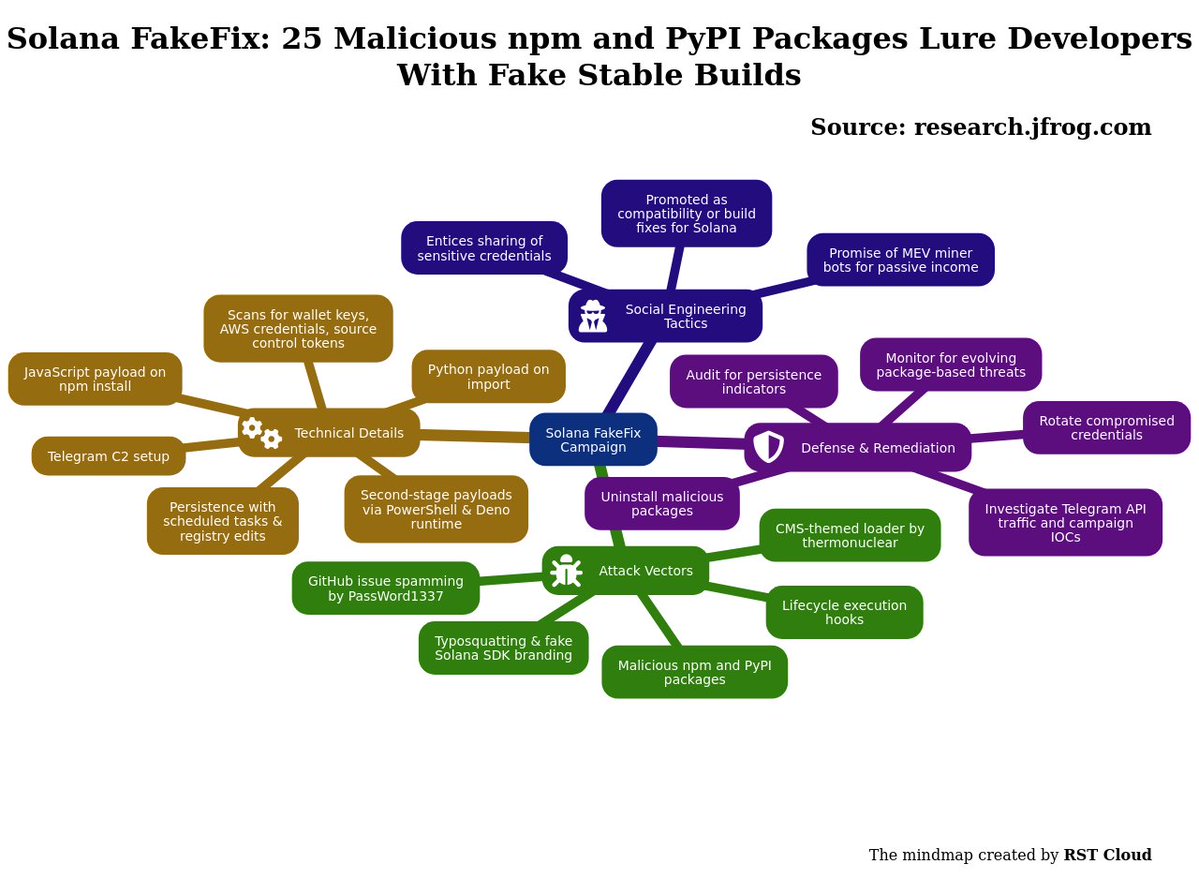
1
105

Jun 13
Why not asking Hermes de create a python script to automatise this workflow then to run it in crontab ?
1
56

Jun 13
Master Cron & Crontab for DevOps Engineers Part2 youtu.be/IQ7T1juQMt0?si=y7GW… via @YouTube

1
7

Jun 13
☕️🧠 SATURDAY MORNING SYSTEMS BRIEF | The Risk of Configuration Drift
P-OPS TEAM — Validator Operations
🌅 Most outages are not caused by a single catastrophic event.
Many begin with something far smaller.
A setting changed months ago.
A package updated during maintenance.
A firewall rule added temporarily.
A configuration file edited during troubleshooting.
Each change makes sense in isolation.
Over time, those changes accumulate.
🪟 Focus this morning: configuration drift
🏆 Across supported networks at first light:
🪙 Block production → healthy
📡 Peer connectivity → stable
🔁 Consensus participation → normal
⚙️ Infrastructure services → operating within expected ranges
Everything appears routine.
Which makes today a good time to verify that systems still look the way operators believe they do.
🔗 Signal — Small Changes Compound
Infrastructure rarely fails because operators make one bad decision.
It fails when dozens of small changes slowly move systems away from their intended state.
What begins as:
🔹 temporary adjustment
🔹 emergency workaround
🔹 quick optimisation
🔹 minor maintenance task
Can eventually become:
⚠️ inconsistent deployments
⚠️ unexpected behaviour
⚠️ recovery complications
⚠️ troubleshooting delays
The danger is not the change itself.
The danger is forgetting the change happened.
🔍 Observed this morning
📊 Monitoring configurations aligned
🔄 Service definitions consistent
🧩 Validator parameters verified
🌐 Network policies operating as expected
No unexpected configuration variance detected.
Operational confidence remains high.
🧪 Checks
𝚜𝚢𝚜𝚝𝚎𝚖𝚌𝚝𝚕 𝚌𝚊𝚝 <𝚜𝚎𝚛𝚟𝚒𝚌𝚎>
𝚞𝚏𝚠 𝚜𝚝𝚊𝚝𝚞𝚜
𝚐𝚒𝚝 𝚍𝚒𝚏𝚏
𝚌𝚛𝚘𝚗𝚝𝚊𝚋 -𝚕
Watch for:
• undocumented service changes
• unexpected firewall modifications
• forgotten maintenance adjustments
• inconsistent deployment settings
Drift often develops quietly.
Its impact rarely remains quiet.
🧩 Impact when this is overlooked
• difficult incident response
• inconsistent validator behaviour
• slower recovery during outages
• increased operational uncertainty
The system operators think they are running may not be the system actually running.
🛠️ Adjust
📋 Document operational changes
🔄 Review configurations regularly
📊 Compare production systems against baselines
🧪 Validate recovery procedures after modifications
Consistency creates resilience.
🧠 Why this matters
Reliable infrastructure is not simply about uptime.
It is about predictability.
The strongest validator operations are not those that never change.
They are the ones that always know what changed, why it changed, and how to reverse it if necessary.
Saturday mornings are ideal for confirming that infrastructure remains aligned with design rather than slowly drifting away from it.
Good operators monitor performance.
Great operators monitor change.
☎️ P-OPS Team | Validator Operations
🌍 pops.one
🌿 linktr.ee/p_opsteam
🐦 x.com/POpsTeam1
📡 t.me/POPS_Team_Validator
👾 discord.gg/jJ8aaMwPwa
#SaturdayMorningSystemsBrief #ValidatorOps #Blockchain #Linux #NodeOperations #Infrastructure #POPSTeam

7
17
155

Jun 12
Every minute, just disable WP__CRON and run the wp cli with crontab
1
2
107
Jun 12
🚀 New YouTube Video Alert! 🚀
Mastering Cron & Crontab for devops in Linux ⏰🐧
Have you ever wanted to automate repetitive tasks on your Linux servers? In my latest YouTube video, I dive deep into Cron and Crontab,
youtu.be/3_7RxVEOaGw?si=jYkl… via @YouTube
1
26