
Jun 10
Winキー R→regeditと入力してEnter→HKEY_LOCAL_MACHINE\SYSTEM\CurrentControlSet\Control\GraphicsDriversの場所に移動→何もないところを右クリック→新規→DRORD(32ビット)値→名前を「TdrDelay」→「TdrDelay」ダブルクリック→10進数にして値を8にする→再起動
1
1
117

How to solve 100% AMD, reg:
Windows Registry Editor Version 5.00
[HKEY_LOCAL_MACHINE\SYSTEM\CurrentControlSet\Control\GraphicsDrivers]
"TdrDelay"=dword:0000000a
"TdrDdiDelay"=dword:00000014
[HKEY_LOCAL_MACHINE\SOFTWARE\Microsoft\Windows\Dwm]
"OverlayTestMode"=dword:00000005
3
2
274


Aqui fiz diferente em outro local, desde o inicio
Jogo EA FC 26
1 Win R → regedit
2 Vá para SYSTEM\CurrentControlSet\Control\GraphicsDrivers
3 Clique com o botão direito > Novo > Valor DWORD (32 bits)
4 Nomeie como DisableMultiplaneOverlay→ valor 1
5 Reinicie o PC
Porem nesse mesmo caminho também da pra colocar o
OverlayTestMode > valor 5
4
736

🚨Attention Gamers! Tip #5
Get more FPS Instantly! By Disabling Transparency Effects, Hardware Accelerated GPU Scheduling, Setting Win32PrioritySeparation, System Responsiveness and Disabling Hibernation.
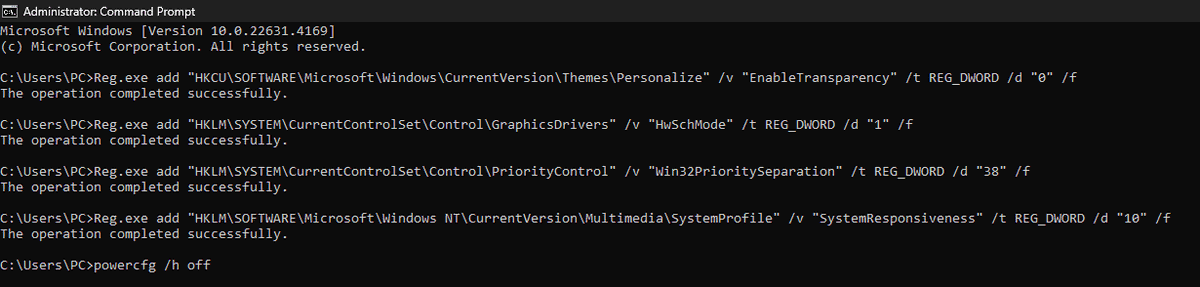
Step 1: Open CMD as Admin and paste the following (Press enter after each one of the commands):
Reg.exe add "HKCU\SOFTWARE\Microsoft\Windows\CurrentVersion\Themes\Personalize" /v "EnableTransparency" /t REG_DWORD /d "0" /f
Reg.exe add "HKLM\SYSTEM\CurrentControlSet\Control\GraphicsDrivers" /v "HwSchMode" /t REG_DWORD /d "1" /f
Reg.exe add "HKLM\SYSTEM\CurrentControlSet\Control\PriorityControl" /v "Win32PrioritySeparation" /t REG_DWORD /d "38" /f
Reg.exe add "HKLM\SOFTWARE\Microsoft\Windows NT\CurrentVersion\Multimedia\SystemProfile" /v "SystemResponsiveness" /t REG_DWORD /d "10" /f
powercfg /h off
Step 2: Restart your PC after doing all of the commands and your command prompt will look like in the picture.
Step 3: Share this tweet and comment down your results
2
2
9
2,612

3 Nov 2025
また、勝手に落ちるのでWindows再起動。今度はレジストリに
[HKEY_LOCAL_MACHINE\SYSTEM\CurrentControlSet\Control\GraphicsDrivers]
"TdrDelay"=dword:00000020
"TdrDdiDelay"=dword:00000020
このように設定してタイムアウトの時間を延長してみました。これで2秒から32秒待ちになる。#自己責任
22
2,234

10 Oct 2025
Press Win R → regedit
Navigate to HKEY_LOCAL_MACHINE\SYSTEM\CurrentControlSet\Control\GraphicsDrivers
Right-click → New → DWORD (32-bit) → name it TdrDelay
Double-click it → Decimal → 10
Create another DWORD: TdrDdiDelay → also Decimal 10
Restart Windows
4
4
863

You can extend this timeout by modifying a registry entry:
HKEY_LOCAL_MACHINE\SYSTEM\CurrentControlSet\Control\GraphicsDrivers.
Create a 32-bit DWORD named TdrDelay.
The value of the created DWORD is the previously mentioned delay in seconds. I recommend keeping it between 5-10.
1
3
57


11 Dec 2024
🇧🇷 - Esses dois AJUSTES focam na redução do input lag, com o ModeListCaching melhorando a velocidade na troca de resoluções e o LongLinkTrainingTimeout garantindo um sinal mais rápido e estável.
🇺🇸 - These two SETTINGS focus on reducing input lag, with ModeListCaching improving resolution switching speed and LongLinkTrainingTimeout ensuring faster and more stable signal handling.
------------------------------------
Windows Registry Editor Version 5.00
[HKEY_LOCAL_MACHINE\SYSTEM\CurrentControlSet\Control\GraphicsDrivers\DMM]
"ModeListCaching"=dword:00000001
"LongLinkTrainingTimeout"=dword:00000000
------------------------------------
🇧🇷 - Realizem testes com benchmarks usando OCAT e CAPFRAMEX, já que os benchmarks do CS são instáveis e não oferecem resultados confiáveis. É fácil reverter os ajustes, basta remover a chave [DMM].
🇺🇸 - Test them using benchmarks like OCAT and CAPFRAMEX, as CS benchmarks are unstable and won’t provide reliable results. You can revert these changes easily by removing the [DMM] key.
8
1,225

2 Sep 2024
for fun
[HKEY_LOCAL_MACHINE\SYSTEM\CurrentControlSet\Control\GraphicsDrivers\Power]
"DefaultD3TransitionLatencyActivelyUsed"=dword:00000001
"DefaultD3TransitionLatencyIdleLongTime"=dword:00000001
"DefaultD3TransitionLatencyIdleMonitorOff"=dword:00000001
1
2
7
704

25 Apr 2024
I forgot, also do this. A modder posted this in the modding discord.
First, do Win R and type regedit.
Navigate to HKEY_LOCAL_MACHINE\SYSTEM\CurrentControlSet\Control\GraphicsDrivers
If the keys are not there, create them.
They all are DWORD 32 Bit
---------------------------
TdrDdiDelay | Decimal | 60
TdrDelay | Decimal | 60
TdrLevel | Decimal | 3
---------------------------
Restart your PC.
Then, second thing to do.
Go to nVidia Control Panel.
Manage 3D Settings.
Make sure that
CUDA - GPUs = All (Only your dedicated video card should be selected if you also see the integrated one).
Power Management Mode = Maximum Performance
OpenGL Rendering GPU = Your dedicated video card.
VSync = Disabled
Max Framerate = 60 FPS (Optional)
1
2
2
576

9 Oct 2023
TDR issue, can be fixed in Regedit. Go to HKLM\SYSTEM\CurrentControlSet\Control\GraphicsDrivers and select New>Dword (32 bits), then name it "TdrDelay" and set it to 10, making sure to select Decimal.
Finally, reboot your pc and try to run the game, it should be fixed.
1
7
1,111

8 Oct 2023
Lo digo porque este error lo conozco bien por el apex legends, abre un bloc de notas y crea un fix.reg con esto:
Windows Registry Editor Version 5.00
[HKEY_LOCAL_MACHINE\SYSTEM\CurrentControlSet\Control\GraphicsDrivers] "TdrDelay"=hex(b):08,00,00,00,00,00,00,00
1
2
103

6 Oct 2023
Actualización:
He hecho varias cosas y se ha solucionado, no sé exactamente qué es lo que lo arregló, pero llevo todo el día sin crasheos.
Primera cosa:
regedit en inicio e ir a esta ruta:
Computer\HKEY_LOCAL_MACHINE\SYSTEM\CurrentControlSet\Control\GraphicsDrivers
Crear este valor DWORD "TdrLevel" (sin comillas) y ponerle de valor 0
Reiniciar PC
Segunda cosa:
En el panel de Nvidia: 3D Settings - Configurar Surround, PhysX: En vez de auto poned vuestra gráfica
En ajustes 3D avanzados en GPU de renderizado OpenGL, en vez de auto poned vuestra gráfica de nuevo
Tercera cosa:
CMD como admin
Escribir "ipconfig /flushdns" y presionar Enter.
Escribir "ipconfig /registerdns"y presionar Enter.
Escribir"ipconfig /release"y presionar Enter.
Escribir"ipconfig /renew"y presionar Enter.
Escribir "netsh winsock reset" y presionar Enter.
Reiniciar PC
5 Oct 2023

Recurro a los sabios del tuister para que me echéis un cable.
Valorant me está petando el PC ENTERO. Es el único juego que me crashea los drivers gráficos, hace que se me cuelgue y no pueda hacer nada salvo apagar de botón.
Una vez reiniciado, ya no me crashea más.
2
2
15
5,092

🚨 True NO SCALING is HERE!
Open RegEdit & Paste:
🟢 Computer\HKEY_LOCAL_MACHINE\SYSTEM\CurrentControlSet\Control\GraphicsDrivers
🟢 From there find SCALING (CTRL F MAKES IT EASIER)
Once you find it change from 4 to 1, once you did that CLICK F3 & Repeat! Restart PC & Enjoy!
1
2
32
5,161



29 Jan 2022
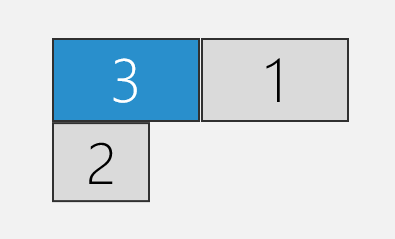
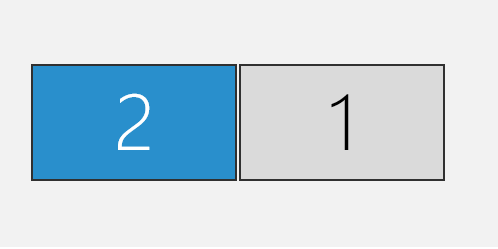
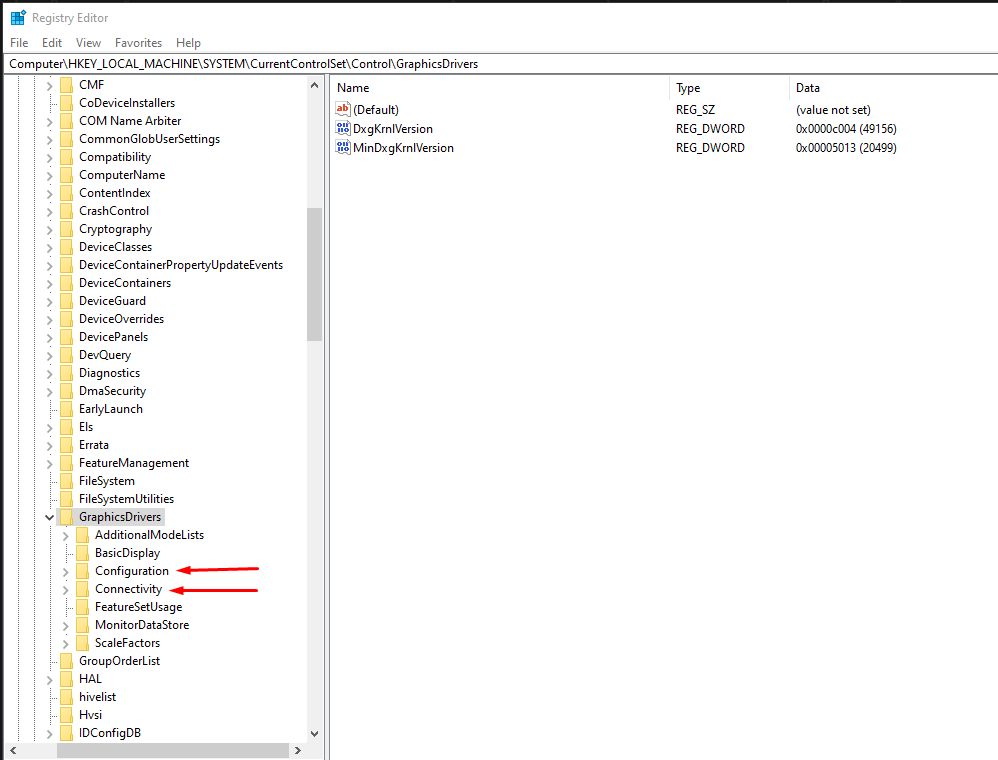
ディスプレイの配置をレジストリで設定する
HKLM\SYSTEM\CurrentControlSet\Control\GraphicsDrivers\Configuration\ディスプレイID\XX\Position.cx/cy
上記の値に座標位置を16進数で設定する
その後PCを再起動するか、ディスプレイドライバを再起動する
#airi_s_techmemo
2

Nvidia Warns Windows Gamers of High-Severity Graphics Driver Flaws dlvr.it/Rq6c8v #Vulnerabilities #graphicsdrivers #Nvidia #Windows via @threatpost

1
3