
Apr 12
Let's Zoom-In to the new start of the week... 🔍
Releasing #IDA Plugin #ZoomAllViews — Ctrl Scroll font zoom for every IDA view. 💪
Because this should work out of the box. Now it does. 🤓
• Zoom in/out in Disassembly, Pseudocode, Hex View, Strings, Imports, Functions, Structures, and every chooser 😲
• Works across Normal & Debug view widgets — Stack, Registers, Locals, Watch
• Row heights scale automatically with font size
• Graph/Proximity/Xref views excluded — IDA's native zoom untouched ☝️
• Toggle on/off via menu or Ctrl-Shift-Z
• Single file, zero dependencies 🫰
• Compatible IDA 8.x — 9.3 (PyQt5 / PySide6) 🛠️
github.com/Dump-GUY/ZoomAllV…
#IDAPro #ReverseEngineering #IDAPython #Malware #DFIR @HexRaysSA
3
28
190
14,278

Feb 17
Fixed an issue causing IDAPython scripts to timeout. Redownload v0.9.3 to get the fix (or update via homebrew) 👩🔧
github.com/blacktop/ida-mcp-…
19
1,415
Feb 15
🆕 dyld_shared_cache support (open_dsc) and IDAPython execution (run_script).
Your AI agent can now pull individual dylibs out of Apple's DSC and run arbitrary Python analysis scripts 🎉
github.com/blacktop/ida-mcp-…
5
6
110
6,386

Jan 28
Not sure who might find this useful, but since I struggled with it a bit, here’s an unoptimized IDAPython script to fully disassemble an instruction gist.github.com/enkomio/140b…
6
34
1,903

Jan 14
This blog post provides an in-depth analysis of #Turla's #Kazuar v3 loader and how it tries to slip past modern defenses:
• Sideloading via MFC satellite DLLs
• Control flow redirection trick ( POC)
• Patchless ETW and AMSI bypasses ( POC)
• Extensive COM usage for registry, file and folder operations ( partial POC)
• Strings encryption ( IDAPython decryption script)
• Including IOCs and Yara rules
r136a1.dev/2026/01/14/comman…
4
86
245
23,681


9 Oct 2025
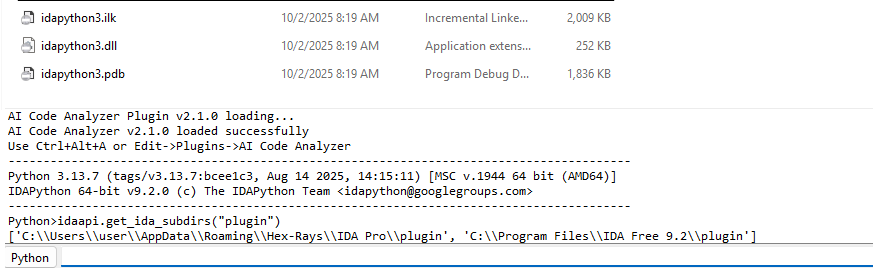
Short instruction for IDAPython compilation for IDA Free 9.2:
gist.github.com/gerhart01/27…
1
1
7
645
2 Oct 2025
IDAPython can be compiled for IDA Free 9.2, thnks for comments to @richinseattle.
1
6
563

30 Sep 2025
We're heading to Japan for @codeblue_jp in November, and we're excited to share that we will be running an in person training before the conference starts.
This course is tailored to IDA users who want to dig deeper into our renowned Decompiler and advance their programming techniques (IDAPython and C SDK).
👉 Check it out - registration closes 12 October!
eu1.hubs.ly/H0nsBzy0
1
3
11
2,206
30 Sep 2025
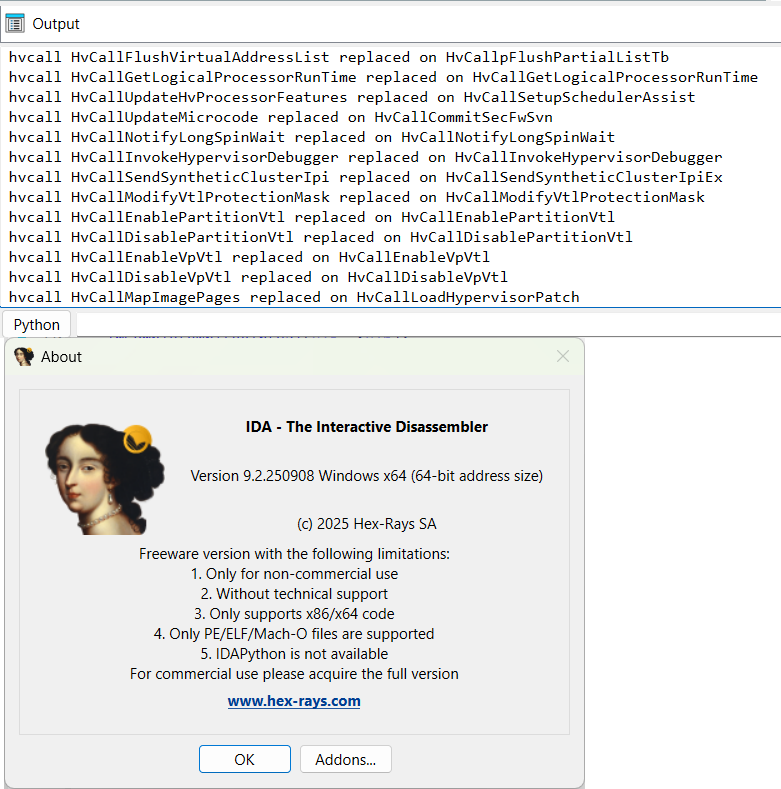
Yes, IDAPython plugin can be used with IDA Free:
29 Jul 2025

More news coming to you from the soon-to-be-released IDA 9.2: we're taking the first step toward making development on top of #IDA more accessible—by open-sourcing the C SDK and IDAPython: eu1.hubs.ly/H0m1XKc0
#ReverseEngineering #DevTools #Infosec #Cybersecurity
3
6
1,131

23 Sep 2025
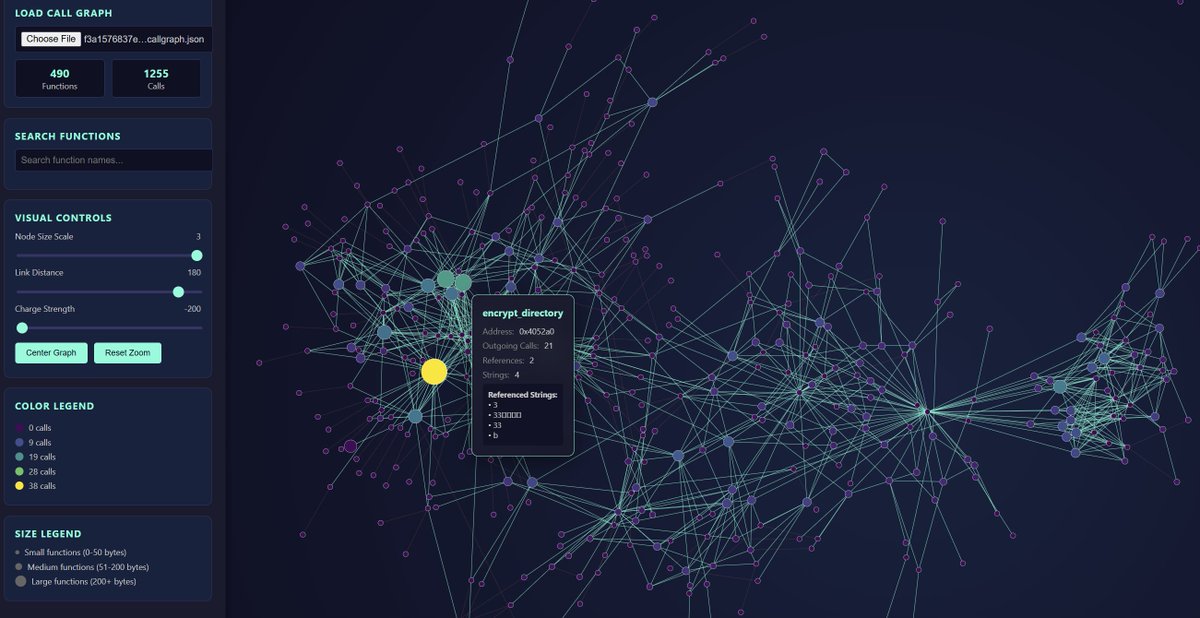
I vibecoded me a project today that I had on the backburner for a while, callgraph extraction with IDAPython and D3 force-directed graph vis. Did it work out of the box? No Claude made some hilarious mistakes. Was it faster than just me? For sure. Is it useful? Nah. Fun? Yup.
2
30
3,247

22 Sep 2025
What is malware reverse engineering (quick refresher)
Malware reverse engineering (RE) is the process of taking a compiled malicious program (or a malicious script, macro, or firmware blob) and figuring out what it does, how it does it, and how to detect or mitigate it. Instead of looking at source code (which you usually don’t have), you analyze the binary, memory images, network traces, and runtime behavior to reconstruct intent, logic, and indicators of compromise (IOCs).
Reasons people do malware RE:
Incident response: figure out what an infection did and what data was leaked.
Attribution & hunting: map samples to families and campaigns.
Malware research: understand novel techniques, evasion tricks, and TTPs.
Detection engineering: build YARA rules, IDS signatures, EDR detections, and antivirus signatures.
Patching & mitigation: identify vulnerable components, remove persistence, or create removal tools.
Academic curiosity / learning.
Types of reverse engineering (how people categorize the work)
There are different ways to slice the domain — each has pros/cons and different toolchains.
1. Static analysis
Static analysis = analysis without running the sample. You inspect the binary, file metadata, embedded resources, strings, structures (PE/ELF/Mach-O), and possibly decompilation output to reason about behavior.
What you can learn statically:
Exported/imported functions (network, cryptography, persistence APIs).
Hardcoded strings (URLs, file paths, registry keys, commands).
Embedded configuration or resources (icons, encrypted blobs).
Structure (dropper, loader, packed sections).
Control-flow and logic via decompilation/disassembly.
Pros: safe (no execution), fast initial triage, repeatable.
Cons: obfuscated or packed code hides behavior; encrypted strings; decompilers produce imperfect, sometimes misleading output.
2. Dynamic analysis
Dynamic analysis = running the sample in a controlled environment and observing what it does: spawning processes, creating files, making network connections, loading modules, modifying registry, etc.
What you can learn dynamically:
Actual runtime behavior (runtime unpacking, injected code, config fetched from network).
Network indicators: domains/IPs, protocols, exfiltration patterns.
Persistence mechanisms (services, scheduled tasks, registry autoruns).
Files dropped and their formats.
Pros: reveals actual behavior (including unpacked code).
Cons: requires safe isolation (VMs/network controls), anti-VM/anti-debug checks can hide behavior, incomplete if malware detects the sandbox.
3. Hybrid analysis
Combine static dynamic: start static to map attack surface, then dynamic to capture runtime-decrypted/in-memory behavior, then go back to static using runtime artifacts (dumps) to get a better decompilation.
This is often the gold standard for thorough analysis.
4. Memory forensics & runtime memory inspection
Sometimes the most valuable artifacts only live in memory: decrypted payloads, in-memory configuration, encryption keys, injected shellcode, process hollowing images.
Memory analysis = dumping process or system RAM and analyzing with memory forensics tools to extract strings, modules, network sockets, credentials, and more.
5. Network-level reverse engineering / protocol analysis
This is about reconstructing custom protocols or C2 schemes the malware uses. It often requires capturing traffic, replaying payloads, and inferring message formats, encryption, or obfuscation.
6. Firmware / embedded malware RE
Targeting BIOS, UEFI, IoT firmware, routers, printers, or microcontrollers. This domain requires dealing with raw binary blobs, custom file systems, and architectures (ARM, MIPS, RISC-V). Skills cross into hardware, JTAG, and chip-off.
7. Script/macros/office malware analysis
Macro-based malware in Office documents, JavaScript, or interpreted languages. Here, the emphasis is on interpreting scripts and reconstructing downloader chains, obfuscated strings, and embedded stages.
Core techniques and “ways” to reverse engineer malware
Below I list major techniques analysts use. I’ll describe what they do, where they fit, and the kind of artifacts they reveal. I’ll avoid “weaponizable, step-by-step” instructions but keep it real enough to be actionable for defensive learning.
A. File intelligence & triage
Before a full RE, analysts triage samples. That means computing hashes, checking file metadata, checking compilation timestamps, embedded certificate info, and running lightweight static checks (file type, packer signatures, entropy measurement). Triage helps prioritize whether to analyze manually or submit to an automated sandbox.
Key outcomes: family mapping, novelty assessment, whether sample is packed or likely benign.
B. Disassembly and decompilation
Disassembly turns machine code into assembly instructions. Useful for precise control-flow analysis and understanding low-level behavior (syscalls, pointer arithmetic, obfuscation patterns).
Decompilation attempts to reconstruct higher-level pseudocode. Decompilers are not perfect but accelerate understanding of algorithms, loops, and data structures.
Use disassembly when you need accuracy and decompilation when you need speed. Analysts dance between both — using decompiler output for quick logic and reverting to assembly for critical edge cases.
C. Control-flow and data-flow analysis
Mapping the control-flow graph (CFG) and tracking how data moves through the program is essential for understanding malware logic. Data-flow tracking helps find where secrets or keys are derived, how C2 URLs are built, or how encryption routines operate.
This is often semi-automated with tooling, but manual reasoning is still required when obfuscation is present.
D. String extraction & analysis
Strings are low-hanging fruit. Even obfuscated samples usually contain some strings — user agents, registry keys, log messages. Analysts check for encoded/encrypted strings and then follow the code paths that decrypt them at runtime.
E. API and import analysis
Examining imported libraries and API calls gives big clues: heavy use of networking libraries, cryptography APIs, process/driver APIs, or persistence APIs hints at capabilities (C2, encryption, privilege escalation, persistence).
F. Emulation and sandboxing
Emulation runs the binary in a controlled virtualized CPU environment that can emulate system calls; sandboxes run it in full OS but isolated VMs. Both let you observe behavior while preventing real-world harm.
Emulators are great for short-lived, explicit code path analysis; sandboxes show real OS interactions.
G. Debugging and runtime breakpoints
Debuggers let you step through executing code, set breakpoints at interesting functions, modify memory or registers on the fly, and observe unpacking logic or decryption routines in real time. This is how you catch the code when it finally reveals its true form.
Be prepared for anti-debugging and anti-hooking tricks — a whole separate topic.
H. Memory dumping and offline analysis
Dump memory of a running process or the entire VM and analyze offline to extract injected modules, decrypted payloads, or in-memory C2 strings. This is how you get the “final” version of code that was protected by runtime obfuscation.
I. Unpacking & reconstruction
Packed malware hides real code inside compressed/encrypted data. Analysts identify packers and try to recover the original binary either via static unpacking or by dumping the unpacked image from memory during execution.
This also includes fixing up imports and rebuilding headers so the dumped binary can be opened in decompilers.
J. Taint analysis & symbolic execution
Advanced techniques: taint analysis tracks how input (network, file, user) flows to critical sinks (exec, file-write) to find injection points. Symbolic execution explores path logic using symbolic inputs to force execution through multiple branches — useful for deeply branchy obfuscated code.
These are powerful but resource-intensive and often require specialist frameworks.
K. Protocol reverse engineering
For custom C2 protocols or exfil formats, analysts reconstruct message formats, crypto primitives, and session flows. This lets defenders write parsers or decode network data for detection.
L. YARA rules and signature generation
After you know what distinguishes a family, you craft YARA rules or IDS signatures referencing unique byte patterns, imports, or decryption routines. This turns analysis into detection capability.
M. Static unpacking via deobfuscation and code transformation
Some obfuscation can be reversed statically: removing junk code, reconstructing control-flow flattening, or using automated deobfuscation tools. This is a blend of algorithmic transformations and manual pattern detection.
Anti-analysis tricks you’ll commonly face (and why they matter)
Malware authors don’t play fair. Expect:
Packing / crypters — hide real code behind layers.
VM / sandbox checks — detect common VM artifacts and avoid executing malicious payload.
Anti-debug & anti-hook — detect debuggers or API hooks and alter behavior.
Timing delays / sleep loops — evade sandboxes by waiting long.
Code virtualization & obfuscation — custom VMs or control-flow flattening to make decompilation messy.
Encrypted configs fetched from remote C2 — payload only reveals config after successful network call.
Understanding these is critical so you don’t misinterpret a sample as “noisy but harmless” just because it failed to do anything inside your sandbox.
Practical analyst workflow (high-level playbook)
This is the mental checklist pro analysts follow. I’m giving structure not exploit code.
Safety first — verify environment isolation and snapshots. Never analyze on your host. Confirm network controls.
Triage — compute hashes, file type, entropy, PE/ELF headers, quick string checks, maybe a YARA scan. Decide whether to sandbox or dive deeper.
Static reconnaissance — inspect imports, resources, readable strings, and decompiler output to form hypotheses about behavior.
Dynamic execution (instrumented) — run in a controlled sandbox or VM to observe runtime behavior. Capture process, file, network, and memory artifacts.
Memory capture & unpack — dump process memory or the VM image at a point where the payload reveals itself, then analyze that dump statically.
Deep RE — disassemble/decompile suspicious functions, reconstruct algorithms (encryption/decryption), and document.
Network protocol analysis — if malware uses networking, decode protocol and identify C2 patterns.
IOCs & detection — extract hashes, domains, mutex names, file paths, registry keys, YARA signatures.
Reporting & remediation — write a technical report for SOC/IR with cleanup steps, detection rules, and recommended mitigations.
Share responsibly — publish sanitized IOCs/indicators to threat intel feeds if legal/allowed.
What a solid analysis report contains (so your work actually helps)
Executive summary (impact, brief TTPs).
Technical summary (capabilities, persistence, exfiltration vectors).
Indicators: hashes, filenames, domains, sample strings.
Reproduction notes (how the analyst reproduced behavior safely).
Detection logic (regex/YARA/EDR rules).
Remediation & IOC containment steps.
Appendix: system snapshots, memory dumps, network captures, tools used.
Legal, ethical, and safety considerations (I won’t sugarcoat this)
Reverse engineering malware is powerful and dangerous. Don’t be reckless.
Always have authorization. If you’re doing RE for work, be explicit in scope. If you’re analyzing a sample you found, consider legal implications (some jurisdictions criminalize possession of malicious code).
Work in isolated, air-gapped or properly firewalled VMs. Never connect an outlet VM to your production network.
Sanitize any public sharing. Don’t leak raw samples or operational secrets. Share hashes and sanitized indicators.
Be careful with in-browser samples, sandbox evasion, or samples that may auto-spread. Understand the propagation method before running anything.
Avoid dual-use pitfalls. Describing concepts is fine; providing “how to weaponize” is not. Use your powers for defense, research, and education only.
Common pitfalls and analyst mistakes
Misinterpreting silence: lack of activity in a sandbox ≠ benign. Could be anti-analysis.
Over-reliance on automated tools: static tools are helpful but can mislabel or miss things. Manual verification is essential.
Ignoring timestamps/metadata: compile times, certificate chains, and build artifacts can hold clues.
Not preserving chain-of-custody: in IR scenarios you may need admissible evidence. Document collection steps.
Turning RE into defensive power
Reverse engineering isn’t just an intellectual flex — it fuels better defenses:
Build YARA rules for new families.
Instrument EDR rules for the exact API calls or behavior sequences observed.
Harden systems: patch abused components, lock down registry paths, enforce least privilege to reduce impact.
Feed SIEM with extracted IOCs and behavioral heuristics.
Example mini-case (high-level, sanitized)
Imagine a sample that’s a dropper with network C2. Triage shows high entropy (likely packed). Static strings show a weird user-agent and a mutex-like name. Running in a sandbox reveals a short-lived HTTP request to a domain, and later a child process appears. Dumping the process memory after the network call reveals a decrypted binary with no imports — but a decryption routine that calls common crypto APIs. After reconstructing that routine, you can extract the C2 domain pattern and craft YARA rules to detect similar decryptors. Result: SOC can detect future variants via behavior and network patterns, then block those domains and clean infected endpoints.
Skills and mindset you need
Curiosity & patience. RE is puzzle-solving. Expect to spend hours on a single function.
Assembler & OS internals knowledge. Understand calling conventions, memory layouts, process injection techniques.
Networking basics. Know TCP/UDP/HTTP and how to identify anomalies.
Scripting & automation. Python, IDAPython, and quick tooling skills help scale analysis and extraction.
Threat intelligence context. Mapping indicators to campaigns helps prioritize.
Tools (short list — for context, not a how-to)
Common tool categories: disassemblers/decompilers, debuggers, sandboxes, memory forensics frameworks, packet captures, and static analysis helpers. Tools exist for Windows, Linux, and embedded targets. Using them ethically and safely is the responsibility of the analyst.
Closing — final real talk
Malware reverse engineering is one of the most effective ways to understand the threat landscape. It’s also one of the toughest skills to master — you’ll grind through obfuscation, anti-analysis, and messy code. But every sample you break down teaches you a new trick attackers use and gives you the ammunition to detect and stop future attacks. Be methodical, document everything, and always prioritize safety and legality.
3
15
1,371
29 Jul 2025
More news coming to you from the soon-to-be-released IDA 9.2: we're taking the first step toward making development on top of #IDA more accessible—by open-sourcing the C SDK and IDAPython: eu1.hubs.ly/H0m1XKc0
#ReverseEngineering #DevTools #Infosec #Cybersecurity
6
59
250
48,567
23 Jul 2025
Amazing work guys @layle_ctf @mrexodia 👏💪 this is the best #IDA plugin VSCode extension for #IDAPython fast script development and debugging 💙💙🙏
I am always using this one when building something bigger 👍
23 Jul 2025

Thanks to a lot of work put in by @mrexodia, IDACode has finally gotten an official update again after 3 years of inactivity!
It features stability improvements as well as IDA 9 compatibility improvements!
Thanks a lot to everyone involved <3
github.com/ioncodes/idacode
1
9
793

12 Jul 2025
【高度難読化マルウェア分析】Unit 42が2024年後半に発見したSLOW#TEMPESTキャンペーンの最新マルウェア亜種を分析。攻撃者はISOファイルとして配布し、正規バイナリDingTalk.exeを利用したDLLサイドローディングで悪意あるコードを実行する。zlibwapi.dll(ローダーDLL)とipc_core.dll(ペイロード格納)の2つの悪意あるファイルが含まれ、ペイロードを別のDLLに付加することで検知を困難にしている。
本マルウェアの最大の特徴は、高度な難読化技術の使用である。制御フローグラフ(CFG)難読化では、JMP RAXなどの動的ジャンプを使用し、実行時にジャンプ先アドレスを計算する。17,000行以上のアセンブリ命令を持つメイン関数は、Hex-Raysデコンパイラでもわずか10行の疑似コードしか生成できない。各動的ジャンプの前には「ディスパッチャー」と呼ばれる9つの命令シーケンスが存在し、ゼロフラグやキャリーフラグに基づいて分岐先を決定する。
関数呼び出しもCall RAX命令による間接呼び出しで難読化され、Windows APIの直接呼び出しは観察されなかった。Unit 42はUnicornエミュレータフレームワークとIDAPythonスクリプトを使用してこれらの難読化を解除し、6GB以上のRAMを持つシステムでのみペイロードを展開するアンチサンドボックス機能も確認した。この分析は、現代のマルウェアの理解には動的解析技術が不可欠であることを示している。
unit42.paloaltonetworks.com/…
4
350
21 Jun 2025
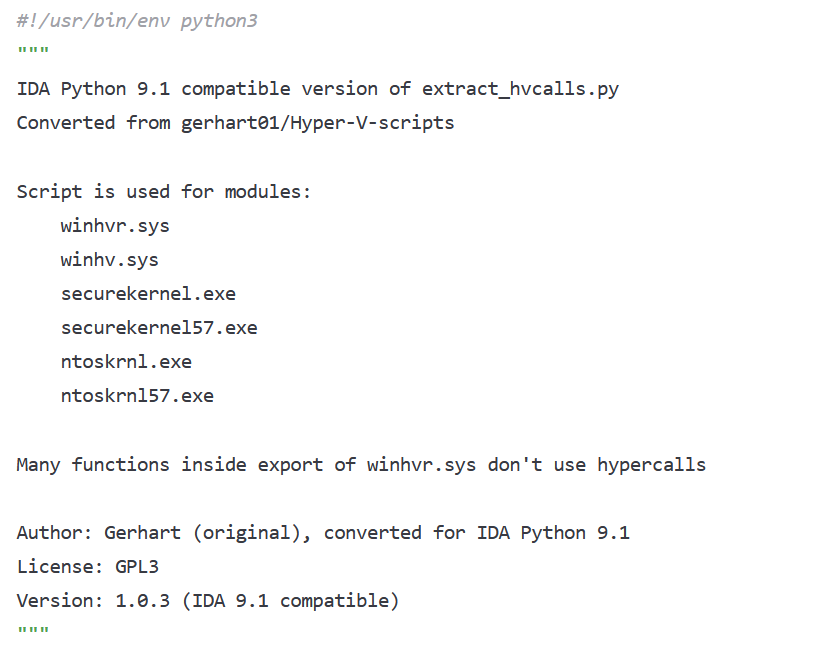
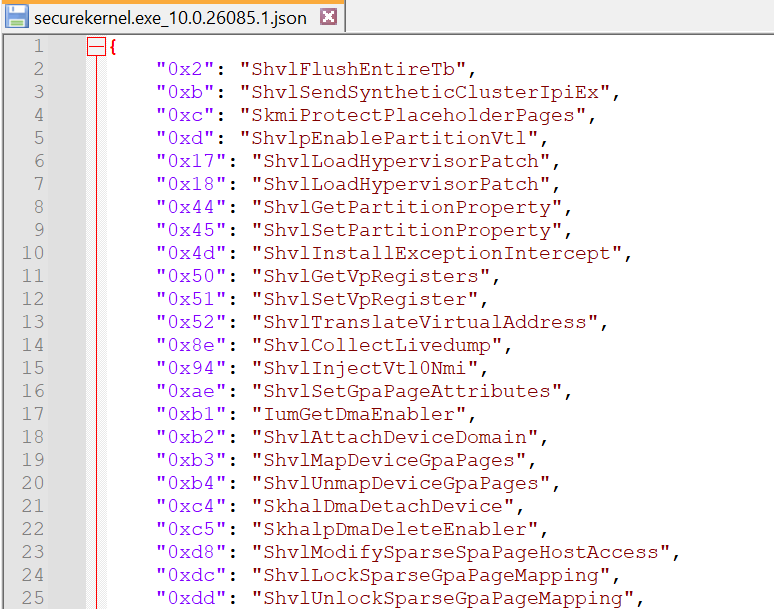
Current AI systems can convert old idapython scripts (version 7.5 and, probably, other) to format of new version (9.1), and that scripts are working without additional patches 👍
4
355

17 Jun 2025
it's gotten better with 9.X but still not great - and because of 9.X even LLMs struggle with writing IDAPython scripts that work out of the box
1
1
393
17 Jun 2025
i hate idapythoni hate idapythoni hate idapythoni hate idapythoni hate idapythoni hate idapythoni hate idapythoni hate idapythoni hate idapython WHAT ARE THEESE DOCS

1
1
15
1,100

10 Jun 2025
IDA HOME が 3万円 / 年切るならマジで買っておこうかな😍
IDAPython 以外書けない身体になってしまって、仕事以外でも使いたい機会が多すぎる。
9 Jun 2025

「IDA Proでファームウェア暗号化を解除 - Hanwha WiseNetセキュリティカメラ」
IDA Proの半額割引もある!😳 (非営利目的の個人ユーザのみ適用)
youtu.be/WP7kIfmVFpY
#IoT診断
18
2,521