
NETWORKING ROADMAP
Step 1: Learn computer fundamentals (how systems work, data, hardware basics)
Step 2: Understand what a network is (LAN, WAN, MAN, client-server model)
Step 3: Study OSI and TCP/IP models (how data moves in layers)
Step 4: Learn IP addressing (IPv4, IPv6, public vs private IP)
Step 5: Learn subnetting basics (CIDR, subnet masks, network segmentation)
Step 6: Understand networking devices (router, switch, hub, firewall, access point)
Step 7: Learn basic networking protocols (HTTP, HTTPS, DNS, DHCP, FTP, SSH)
Step 8: Practice network configuration (static IP, DHCP, gateway, DNS setup)
Step 9: Learn basic networking commands (ping, ipconfig/ifconfig, traceroute, nslookup, netstat)
Step 10: Understand wireless networking (Wi-Fi standards, WPA2/WPA3 security)
Step 11: Learn basic network security concepts (firewalls, VPN, IDS/IPS, common attacks)
Step 12: Start packet analysis (Wireshark, understanding packets and traffic flow)
Step 13: Practice networking labs (Cisco Packet Tracer, GNS3, TryHackMe)
Step 14: Move to advanced networking (VLANs, NAT, routing protocols like OSPF basics)
Step 15: Explore career paths (Network Engineer, SOC Analyst, Cybersecurity Analyst, Cloud Networking).
3
17
74
1,573

あーやっと直った
ここ数日、「ほかのデバイスは繋がってるのにこのPCが繋がってない」ってケースがあって難儀してたんだけど漸く原因を特定&対策できた。
Ulanzi D200Xが有線LANみたいな顔してたらしい
ipconfig /release して
ipconfig /renew して
ping打ってもう一度抜き差しすると(??)直る
1
1
134

25
18
18
27
23

同じような機能なのに、既にUnix系にある ifconfig というコマンドじゃなくて、Windows独自の ipconfigコマンドを作ってきたのと似てるな……

ソニーはまだ別路線で行こうって思考だから良い。
わざわざ任天堂と同じ4つを選んで嫌がらせの様に逆配置したマイクロソフトが許せぬ。steamで新しいゲームをプロコンで遊ぶ時、毎回コントロールレイアウトで「どのボタンの事指してんだコレ……?」みたいになる。
129

Jun 13
What's the error message? Have you tried to forget the network and reconnect?
Assuming Windows, try opening a Command Prompt.
Type in and enter: ipconfig /release
Then follow with: ipconfig /renew
1
30

Jun 13
Windows で Claude Code / Codex / OpenCode で使う時、トークン削減するおまじない。うちの事務所の全台で実行した。気休めかもしれないが。
----
トークンコストの削減のために以下の処理をスキルにしてください。
----
このタスクは推論を必要としない機械的な操作です。
以下のコマンドカテゴリに該当する場合、/model haiku に切り替えてから実行してください。
## 対象コマンド
### Git
git status, git log, git log --oneline, git diff, git diff --staged, git add, git commit, git push, git pull, git fetch,
git branch, git checkout, git stash, git stash pop
### GitHub CLI
gh pr list, gh pr view, gh pr create, gh pr merge,
gh issue list, gh issue view, gh issue create,
gh run list, gh run view
### このプロジェクト
uv run pytest, uv run pytest -v, uv run pytest <test_file>,
uv run importer, uv run housekeeping,
uv pip install, uv sync
### Windows / PowerShell
dir, ls, Get-ChildItem, cd, Set-Location, mkdir, New-Item, copy, Copy-Item, type, Get-Content, echo, tasklist, Get-Process, where, Get-Command, $env:変数名, [Environment]::GetEnvironmentVariable(), ping, ipconfig, netstat, Select-String, Measure-Object, Out-File
## 実行手順
1. /model haiku
2. コマンドを実行
3. 結果を出力
4. 必要なら /model {{元のモデル}} に戻す
1
2
154


Jun 12
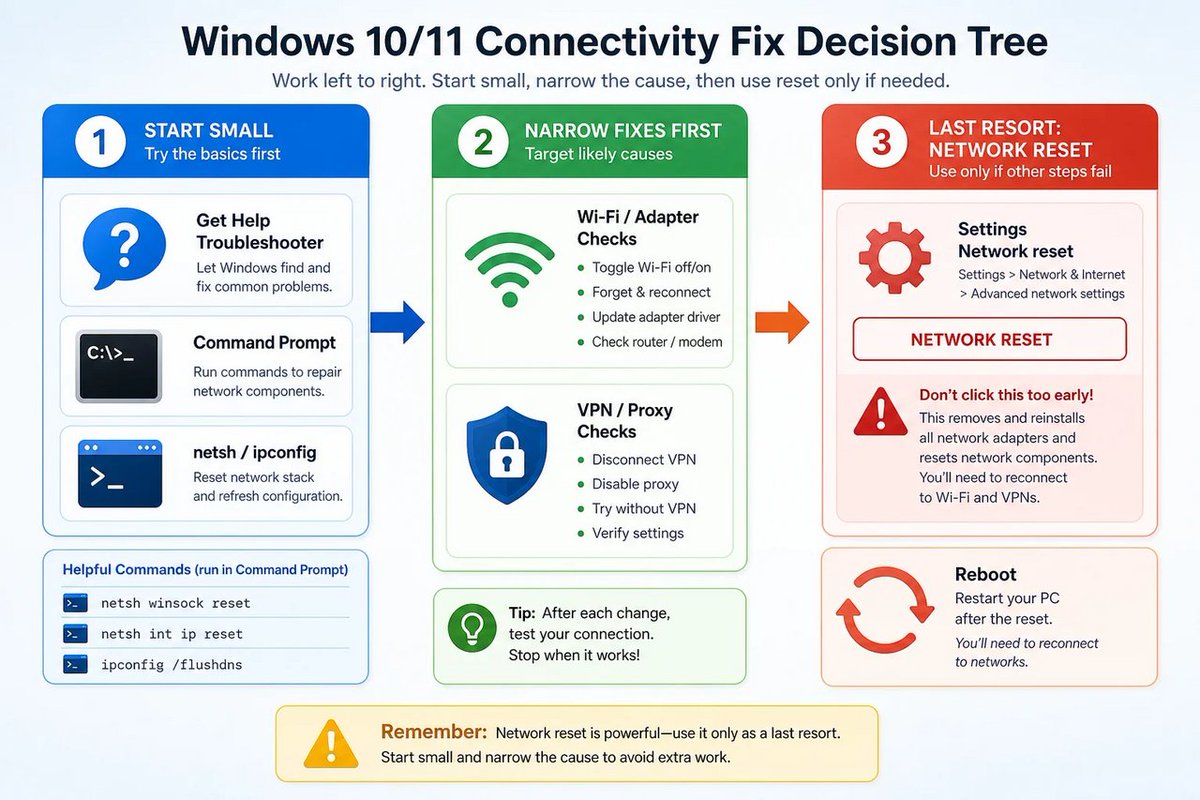
🪟 Network Reset isn’t a “fix my Wi‑Fi” magic button—it’s a scorched-earth last resort. Microsoft’s repair ladder (netsh/ipconfig/driver) proves it: try the sane steps first.
windowsforum.com/threads/whe…
#Windows11 #NetworkReset #WiFiTroubleshooting #TcpIpFixes
8


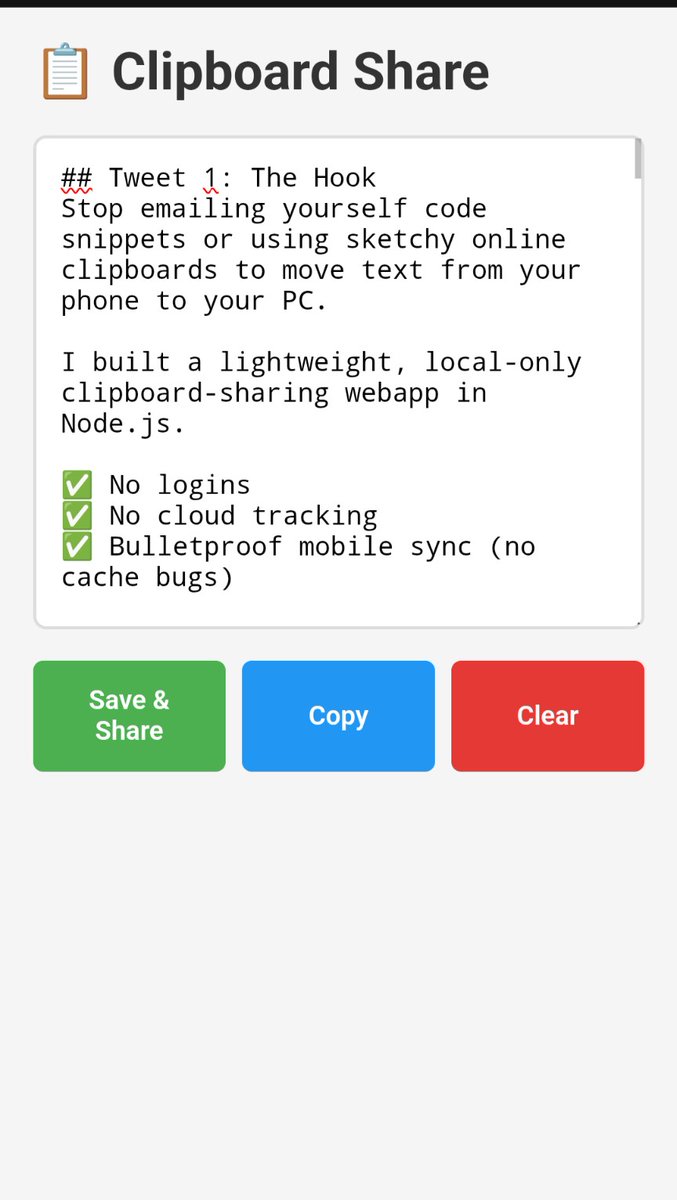
Stop emailing yourself code snippets or using sketchy online clipboards to move text from your phone to your PC.
I built a lightweight, local-only clipboard-sharing webapp in Node.js.
✅ No logins
✅ No cloud tracking
✅ Bulletproof mobile sync (no cache bugs)
Here is the full code to build it in 60 seconds 🧵👇
***
## Install Instructions
🛠️ **SETUP**
It takes 60 seconds. You just need Node.js installed.
```bash
mkdir clip-share && cd clip-share
npm init -y
npm install express
mkdir public
```
Create two files: `server.js` and `public/index.html` using the code in the next tweets.
Then just run:
`node server.js`
***
## The Backend
⚙️ **THE SERVER (server.js)**
A dead-simple Express API that holds your text in memory.
```javascript
const express = require('express');
const app = express();
let snippet = '';
app.use(express.json());
app.use(express.static('public'));
app.get('/api/snippet', (req, res) => res.json({ text: snippet }));
app.post('/api/snippet', (req, res) => {
snippet = req.body.text || '';
res.json({ success: true });
});
app.listen(3000, '0.0.0.0', () => console.log('Listening on :3000'));
```
***
The Frontend
📱 **THE FRONTEND (public/index.html)**
A robust UI. It uses URL cache-busting to defeat aggressive mobile caching, detects typing (so polling doesn't overwrite your work), and forces a sync when you switch back to the tab.
```
<!DOCTYPE html>
<html>
<head>
<meta charset="UTF-8">
<meta name="viewport" content="width=device-width, initial-scale=1.0">
<title>Clipboard Share</title>
<style>
* { box-sizing: border-box; margin: 0; padding: 0; }
body { font-family: sans-serif; padding: 20px; background: #f5f5f5; }
.container { max-width: 800px; margin: 0 auto; }
h1 { margin-bottom: 20px; color: #333; }
textarea {
width: 100%; height: 300px; padding: 15px;
font-family: monospace; font-size: 16px;
border: 2px solid #ddd; border-radius: 8px;
resize: vertical; background: white;
}
textarea:focus { outline: none; border-color: #4CAF50; }
.btn-group { display: flex; gap: 10px; margin-top: 15px; flex-wrap: wrap; }
button {
flex: 1; min-width: 100px; padding: 15px; font-size: 16px;
border: none; border-radius: 6px; cursor: pointer; font-weight: 600; color: white;
}
.btn-save { background: #4CAF50; }
.btn-copy { background: #2196F3; }
.btn-clear { background: #e53935; }
.status { margin-top: 15px; text-align: center; color: #666; font-size: 14px; height: 20px; font-weight: bold; }
</style>
</head>
<body>
<div class="container">
<h1>📋 Clipboard Share</h1>
<textarea id="t" placeholder="Paste or type text..."></textarea>
<div class="btn-group">
<button class="btn-save" onclick="save()">Save & Share</button>
<button class="btn-copy" onclick="copy()">Copy</button>
<button class="btn-clear" onclick="clearT()">Clear</button>
</div>
<div id="status" class="status"></div>
</div>
<script>
const t = document.getElementById('t');
const statusEl = document.getElementById('status');
let isTyping = false;
let typingTimer;
t.addEventListener('input', () => {
isTyping = true;
clearTimeout(typingTimer);
typingTimer = setTimeout(() => { isTyping = false; }, 2000);
});
function showStatus(msg) {
statusEl.textContent = msg;
setTimeout(() => { if(statusEl.textContent === msg) statusEl.textContent = ''; }, 2000);
}
async function load() {
if (isTyping || document.activeElement === t) return;
try {
const res = await fetch('/api/snippet?v=' Date.now(), { cache: 'no-store' });
const d = await res.json();
if (d.text !== t.value) t.value = d.text;
} catch (e) {
showStatus('Connection lost...');
}
}
async function save() {
try {
await fetch('/api/snippet', {
method: 'POST',
headers: { 'Content-Type': 'application/json' },
body: JSON.stringify({ text: t.value })
});
showStatus('Saved!');
} catch (e) {
showStatus('Save failed!');
}
}
function copy() {
if (!t.value) return;
// 1. Try modern API (works on computer/localhost)
if (navigator.clipboard && window.isSecureContext) {
navigator.clipboard.writeText(t.value)
.then(() => showStatus('Copied!'))
.catch(() => fallbackCopy());
} else {
// 2. Fallback for mobile HTTP
fallbackCopy();
}
}
function fallbackCopy() {
const temp = document.createElement('textarea');
temp.value = t.value;
temp.style.position = 'fixed';
temp.style.opacity = '0';
document.body.appendChild(temp);
temp.select();
let success = false;
try {
success = document.execCommand('copy');
} catch (e) {}
document.body.removeChild(temp);
if (success) {
showStatus('Copied!');
} else {
// 3. Last resort: highlight text for manual long-press
t.focus();
t.select();
showStatus('Text selected - long press to copy');
}
}
async function clearT() {
t.value = '';
await save();
}
document.addEventListener('visibilitychange', () => {
if (!document.hidden) load();
});
t.addEventListener('blur', () => load());
load();
setInterval(load, 3000);
</script>
</body>
</html>
```
***
## How to Use It
🚀 **HOW TO USE**
1. Run `node server.js` on your PC.
2. Open `http://localhost:3000` on your PC browser.
3. Find your PC's local IP (`ipconfig` on Windows, `ip addr` or `hostname -I` on Linux/Mac).
4. Open `http://YOUR_IP:3000` on your phone.
Paste on your phone, hit Save, and grab it on your PC instantly.
Bookmark this for your next late-night coding session! 🔖
1
1
174

Okay so I was watching, and noticed your packet loss was sitting at 0% but you were still getting packet bursts. Open your command prompt as an admin and type these lines:
ipconfig /flushdns
netsh winsock reset
After you should change your DNS servers to 1.1.1.1 and 8.8.8.8
1
62
16
15
16
