
Jun 10
Layout Builder lets editors override layouts per node.
If 50 nodes get custom layouts and you want to revert, that is a manual migration.
Restrict override permissions carefully before giving editors that access.
#drupal #layoutbuilder
1
60

May 23
Flutter’da "Gerçekten İyi" Kod Yazmak: Temiz Mimari & AI Tooling
Flutter ekibinin yeni paylaştığı dökümantasyon tadındaki videodan öne çıkanlar:
Kod Kalitesi İçin 7 Altın Kural:
Sabit boyutlar yerine LayoutBuilder ile esnek kısıtlamalar kullanın.
Tasarım hatalarını tahmin etmek yerine DevTools Inspector kullanın.
Widget'ları iş mantığından izole edin; veri constructor ile girsin, aksiyonlar callback ile çıksın.
MVVM ile katmanlı mimari kurun (UI, İş Mantığı ve Veri katmanlarını ayırın).
Veri erişimini Repository Pattern ile tek bir noktada merkezileştirin.
Platform bağımlılıklarını pub.dev paketleriyle soyutlayın.
Kodun sigortası olan testleri (Unit, Widget, Integration) yazın; yeni checks paketini deneyin.
🔥 Geliştirici Araçlarında AI Çağı (MCP & Skills):Temiz kod yazmanın ödülünü artık yapay zekâ asistanlarından fazlasıyla alıyoruz. Yeni Dart & Flutter MCP Server sayesinde AI asistanınız uygulamanızın DevTools'una ve runtime hatalarına doğrudan bağlanabiliyor, hatayı loglardan okuyup hot-reload ile kendi kendine çözebiliyor!
Ayrıca Widget Previews ve Flutter ekibinin GitHub'da paylaştığı resmi Agent Skills yönergeleri sayesinde, AI asistanınıza projeniz için otomatik preview'lar ve entegrasyon testleri yazdırabiliyorsunuz.
Özetle: Yapay zekâ kodlama sürecini uçuruyor ama en iyi sonucu almak yine "temiz mimari" kurallarına sadık kalmaktan geçiyor. AI, iyi yapılandırılmış bir kod tabanında harikalar yaratıyor.
Videonun tamamı için: youtube.com/watch?v=O0UjId1V…
2
22
2,062

May 18
To size my custom widgets and keep them within the parent's constraints. Up until now i’ve been using a ton of horrible workarounds when all i needed to do was use LayoutBuilder
1
3
174

Feb 27
Nothing kills user experience faster than a layout that breaks on different screen sizes. Today, we’re doing a complete how-to: building fully responsive UIs using MediaQuery, LayoutBuilder, breakpoints, and the best scaling tricks in 2026. Check it out👇
ALT How to Build Responsive Flutter Apps for Phones, Foldables, Tablets & Web (2026)
1
3
59

Jan 12
后端仔用Flutter踩坑实录:说好的一套代码呢
这两天在使用 Flutter 整个笔记工具,准备做 Web 和手机端。
我做为一名后端程序员,对前端和Dart一窍不通。
跟着教程和AI折腾,堆了快两万行。真到要调样式的时候,傻眼了。
想的是:改好手机端的布局,Web端应该自适应跟着好了。
实际上:手机端调舒服了,打开Web一看,排版全乱。回头修Web的样式,手机上的组件位置又不对了。两边互相拉扯,根本解不开。
我也按大家说的,用了MediaQuery区分屏幕,用LayoutBuilder搞响应式。但实际用起来,总有些细节对不上:手机上一个挺合适的列表间距,到Web大屏上就显得特别稀疏;Web上完美的按钮大小,到手机小屏上可能就点不准。
现在有点怀疑,“一套代码多端运行”是不是被过度简化了。它或许能解决基础布局和业务逻辑的复用,但到了像素级的精细适配,尤其是平台间交互习惯差异巨大的时候,好像还是得为不同平台写不少条件判断(if (Platform.isAndroid))和独立样式。
目前的感觉是,Flutter像是个很好的“最大公约数”工具,能快速出个能用的多端原型。但一旦你对任何一端的体验有较高要求,当初省下来的时间,可能最后都得在调试和适配里还回去,总不能自己搞一套组建库吧
对我这种后端思维的人来说,现在反而觉得:如果明确就是要做精品的手机App,或许一开始让AI生成两套原生代码(Kotlin Swift),逻辑虽然要写两遍,但每一端的控制和优化路径反而更清晰,心里更踏实。
不知道有没有同样从后端转过来做Flutter的朋友,你们是怎么处理这种多端细节适配的?是真的有优雅的统一方案,还是说大家到最后都默默接受了“写点平台特定代码”的现实?
18
22
9,242

22 Dec 2025
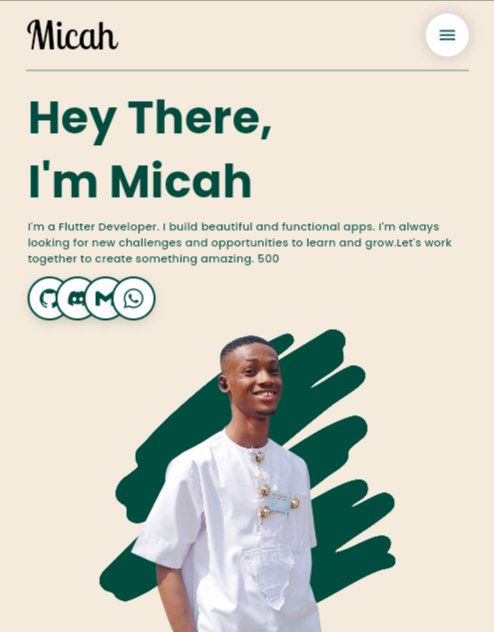
Responsiveness: Solved. ✅
My portfolio is finally starting to feel like a real site. Flutter Web can be tricky, but MediaQuery and LayoutBuilder are absolute game changers for the hero section.
How’s your Monday build going? 👇
#Code #Flutter #WebDevelopment #buildinpublic

5
4
14
427

10 Dec 2025
Flutter Tip of the Day:
Use MediaQuery.of(context).size wisely, not everywhere.
If you need the screen size often, wrap your page in a LayoutBuilder or store the size once.
It reduces rebuilds and keeps performance smooth.
Small optimization, big impact.
3
2
6
505

4 Dec 2025
shadcn_ui #212 update
Released the v0.40.3
FIX: ShadButton constraints regression when using a LayoutBuilder as child.
5
427

29 Nov 2025
@nank1ro noticed with a few controls that setting constraints doesn't always result in the control using the constraints. For example, max height on ShadTextarea doesn't seem to include borders, so if you set the min / max height of the text area to the height of the container you get overflow instead of the border being inside the container. For example, with border width of 10 you'll get this when min/maxHeight = maxHeight constraint of LayoutBuilder.

2
6
851

26 Nov 2025
x.com/enthusiastDev/status/1…
Yeah. I know that and I've made a post about it a couple of weeks ago. The current post focuses on LayoutBuilder.
1 Nov 2025

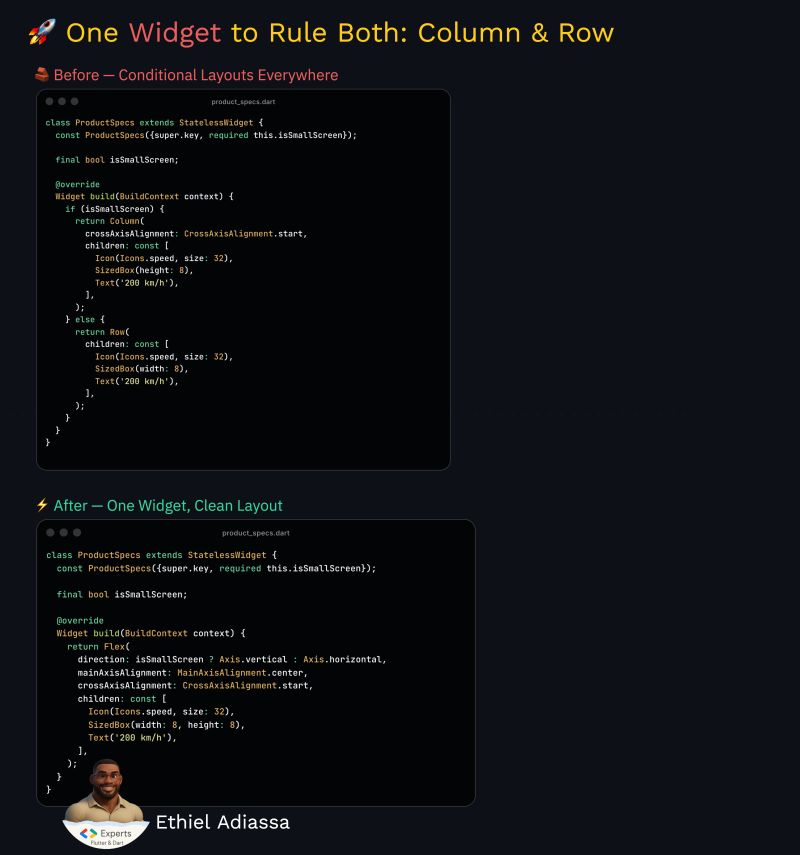
🧩 Flutter Tip: Simplifying Responsive Layouts
I used to handle responsive layouts the “old-school” way: check if it’s a small screen, then switch between a Column and a Row.
It did the job… until it didn’t.
As the app grew, so did the number of conditions, and suddenly every layout tweak turned into a small refactor.
Then I realized that Flutter already gives us a better way.
One widget, one structure, adaptive by nature.
Cleaner. Smarter. Easier to maintain.
It’s one of those small things that changes how you think about layout design forever.
#Flutter #Dart #FlutterTips #CleanCode
@FlutterDev @LeanCodePl
3
200
26 Nov 2025
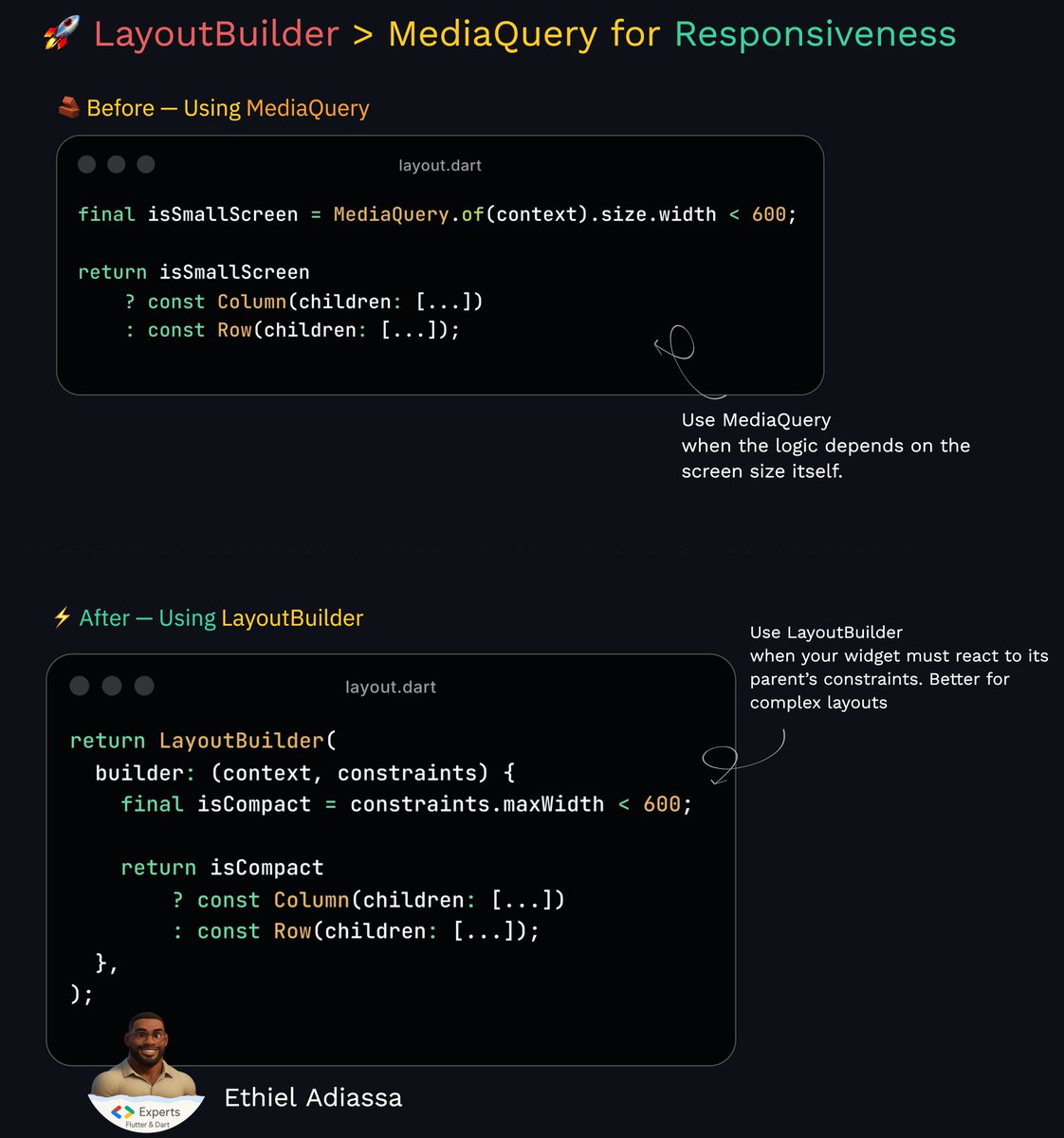
Crafting responsive UI in Flutter often feels easy… until your widget ends up inside a modal, a split view, or a container with unexpected constraints. That’s where many layouts start behaving unpredictably, especially if you rely only on MediaQuery.
A cleaner, smarter pattern is to let your widget react to its actual parent constraints using LayoutBuilder.
It’s more precise, avoids unnecessary rebuilds, and makes your components truly adaptive.
I’ve shared a before/after code example in the visual.
If you’re building reusable UI components or aiming for scalable design systems, this technique will upgrade the quality of your layouts instantly.
Continuous refinement. That’s the mindset. 🚀
@FlutterDev @dart_lang
2
5
56
2,424

25 Nov 2025
🔥 Flutter Tip of the Day
Stop hard-coding widget sizes.
Your UI should adapt, not assume.
Instead of fixed height: 200 or width: 300, use:
> LayoutBuilder → size based on parent
> FractionallySizedBox → percentage-based layouts
> MediaQuery → responsive breakpoints
> Flexible / Expanded → natural sizing
Hard-coded sizes look fine on your phone and break on everyone else’s.
2
1
12
5,730
22 Nov 2025
Flutter Tip of the Day:
Use LayoutBuilder when you need truly responsive widgets.
It gives you the exact constraints of the parent, so you can adapt layout inside the widget — no hacks, no guessing
Perfect for dashboards, grids, and adaptive UIs.
Small change → huge control.
1
4
335

20 Nov 2025
💡 In Flutter, the LayoutBuilder widget allows you to access the parent widget's size constraints (width and height) at runtime, which is essential for creating truly responsive UIs.
2
35


12 Nov 2025
Flutter devs: Stop building boring UIs.
Your app deserves motion, depth, and responsiveness.
Start with this:
AnimatedSwitcher LayoutBuilder = clean transitions adaptive layout.
Less boilerplate. More wow.
Follow for daily Flutter gems 💎
2
10

28 Oct 2025
🚀 Day 14 of #100DaysOfFlutter
Got to understand size constraints, safe areas, how to handle screen overlays, the LayoutBuilder Widget and also how to build adaptive widgets.
🚀🚀🚀
#BuildInPublic #FlutterDev #TechJourney
27 Oct 2025

🚀 Day 13 of #100DaysOfFlutter
Explored another kind of loop (for-in), adding alternative constructor functions.
Also learnt about adding chart widgets, responsiveness and also locking device orientation.
#Flutter #MobileDevelopment #Dart #LearningInPublic #Consistency
3
49

2 Oct 2025
🔥 UI & Design Essentials
Spacing Matters: Stick to SizedBox, Padding, or EdgeInsets for clean, consistent gaps.
Typography System: Define text styles (headings, body, captions) in ThemeData for readability.
Color Harmony: Use a centralized ColorScheme or constants to maintain brand identity.
Reusable Widgets: Turn recurring UI elements (buttons, cards, forms) into custom widgets.
Responsive First: Adapt with MediaQuery, LayoutBuilder, or Flexible for every screen size.
23
35
1,999
1 Oct 2025
You don’t always need a package.
Flutter already gives you gems like:
TweenAnimationBuilder → smooth animations without a single line of controller code
LayoutBuilder → responsive UI without hacks
ClipRRect → rounded corners without extra widgets
Half the time, your app can be lighter & faster just by mastering what’s built-in.
#Flutter
2
8
947