
May 29
ConstraintLayout was never faster than either a FrameLayout, LinearLayout, or nested LinearLayouts.
The only time ConstraintLayout is "faster" is if you have "multiple levels of nested weights", and nobody does that.
But it's more reliable than RelativeLayout, in 99% of cases.
1
4
255

Feb 18
Back in 2013, when I was taking a university course on "Software Development for the Android Platform", during the finals, I had to write AsyncTask and layout XML on paper with a pen 😁
You had to know how to write the XML params of LinearLayout, FrameLayout and RelativeLayout.
1
7
706

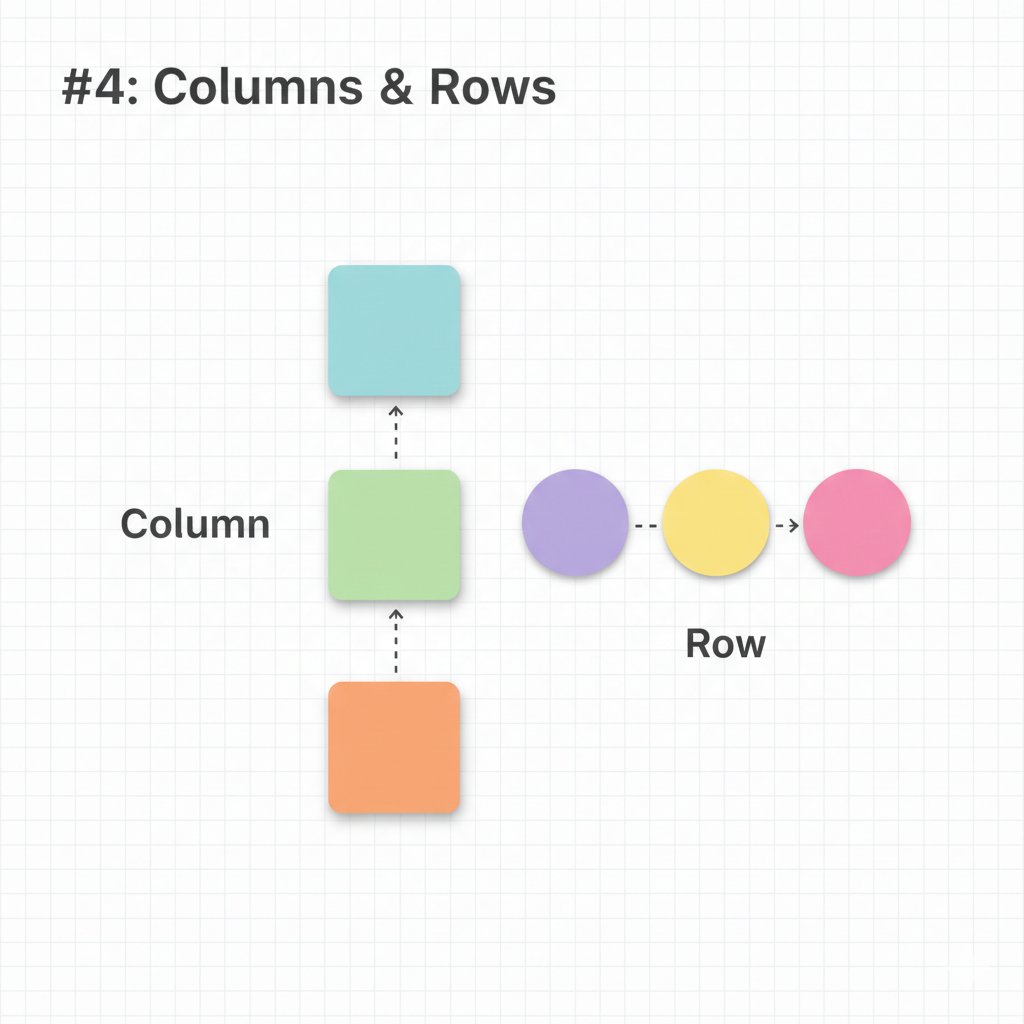
#4: Columns & Rows - Basic Layouts
Arrange UI vertically with Column and horizontally with Row. Think of them as LinearLayout.
```kotlin
@Composable
fun ProfileHeader() {
Row {
Image(painter = /*...*/, contentDescription = "Profile pic")
Column {
Text("User Name", fontWeight = FontWeight.Bold)
Text("Last seen: online")
}
}
}
```
Items in a Column stack top-to-bottom. Items in a Row stack left-to-right.
2
10

6 Aug 2025
To stack two views vertically—one on top of the other—in your layout, just wrap them in a vertical LinearLayout in your XML, like this:
<LinearLayout
android:orientation="vertical"
...>
<TextView .../>
<TextView .../>
</LinearLayout>
That way, the views will appear one below the other instead of side by side.
1
1
17
5 Aug 2025
A View in Android is basically a single UI element—think of it like a building block, so a TextView or a Button is one View.
But there are also special Views called ViewGroups (like LinearLayout or RelativeLayout) that can contain multiple other Views inside them, letting you group things together and build up your UI with more complex layouts.
1
1
19

22 May 2025
<LinearLayout xmlns:android="schemas.android.com/apk/res/…" android:layout_width="match_parent" android:layout_height="wrap_content" android:orientation="vertical"><TextView android:text="666\nen línea\n🔒 Cifrado de extremo a extremo\n\n1 MENSAJE NO LEÍDO\nHola 18:06" android
25
1,822
22 May 2025
<LinearLayout xmlns:android="schemas.android.com/apk/res/…" android:layout_width="match_parent" android:layout_height="wrap_content" android:orientation="vertical"><TextView android:text="666\nen línea\n🔒 Cifrado de extremo a extremo\n\n1 MENSAJE NO LEÍDO\nHola 18:06"
1
4
1,199
1 May 2025
If you never had to change colors at runtime, you could use colors directly. Theme is tricky but you didn't need them. Material theme was hard to customize, but enterprise has custom design systems.
FrameLayout LinearLayout worked well, you didn't always need ConstraintLayout.
1
2
570

22 Mar 2025
Android Development Roadmap (Weekly Breakdown)
1. Week 1-2: Introduction to Android Development & Java/Kotlin Basics
├── Understanding Android Ecosystem
│ ├── Android versions & architecture
│ ├── Setting up Android Studio
│ ├── Creating your first Android project
├── Java/Kotlin Basics
│ ├── Variables, Data types, Operators
│ ├── Control flow (If-Else, Loops, Switch)
│ ├── Functions and OOP (Classes, Objects, Inheritance)
│ ├── Exception Handling
2. Week 3-4: Android UI & Layouts
├── Views & Layouts
│ ├── LinearLayout, ConstraintLayout, RelativeLayout
│ ├── RecyclerView & ListView
│ ├── Fragments & Navigation Components
├── UI Components
│ ├── Buttons, TextViews, ImageViews, EditTexts
│ ├── Custom Views & Themes
├── Material Design Basics
│ ├── Styling with XML
│ ├── Dark Mode & Theming
3. Week 5-6: Activities, Fragments & Intents
├── Activity Lifecycle
├── Passing Data Between Activities
├── Implicit & Explicit Intents
├── Fragment Lifecycle & Transactions
4. Week 7-8: Data Storage & Databases
├── SharedPreferences (Simple Key-Value Storage)
├── Internal & External Storage
├── Room Database (SQL-based local storage)
├── Working with Firebase Realtime Database
5. Week 9-10: Networking & APIs
├── REST API Basics
├── Retrofit Library for API Calls
├── Handling JSON Data with Gson/Moshi
├── WebSockets & Push Notifications (FCM)
6. Week 11-12: Dependency Injection & Architecture Patterns
├── MVC, MVP, MVVM Architectures
├── ViewModel & LiveData
├── Dependency Injection (Dagger/Hilt)
├── Kotlin Coroutines & Flow
7. Week 13-14: Advanced UI & Jetpack Components
├── Jetpack Compose (Modern UI Toolkit)
├── Animations & Transitions
├── WorkManager (Background Tasks)
├── Paging Library for Large Data
8. Week 15-16: App Performance Optimization & Security
├── Memory Management & Profiling
├── Reducing APK Size
├── Securing APIs & Authentication (OAuth, JWT)
├── Encrypted SharedPreferences & Secure Storage
9. Week 17-18: Testing & Deployment
├── Unit Testing with JUnit & Mockito
├── UI Testing with Espresso
├── Crash Reporting (Firebase Crashlytics)
├── App Store Deployment (Google Play Store)
10. Week 19-20: Final Project & Career Preparation
├── Build a Complete Android App
├── Implement Clean Architecture
├── Optimize for Production
├── Prepare for Android Developer Interviews & Certifications
This roadmap helps you become a proficient Android Developer in 5 months.
60 Days of Frontend development Notes Ebook PDF; codewithdhanian.gumroad.com/…
4
22
147
7,663
23 Feb 2025
FrameLayout and LinearLayout also doesn't multi-measure. ConstraintLayout in XML takes more time to resolve constraints, than it takes to place a view down with FrameLayout/LinearLayout.
So if you wanted a performant layout in XML, you already used FrameLayouts LinearLayouts. 🤔
2
1
3
571

17 Feb 2025
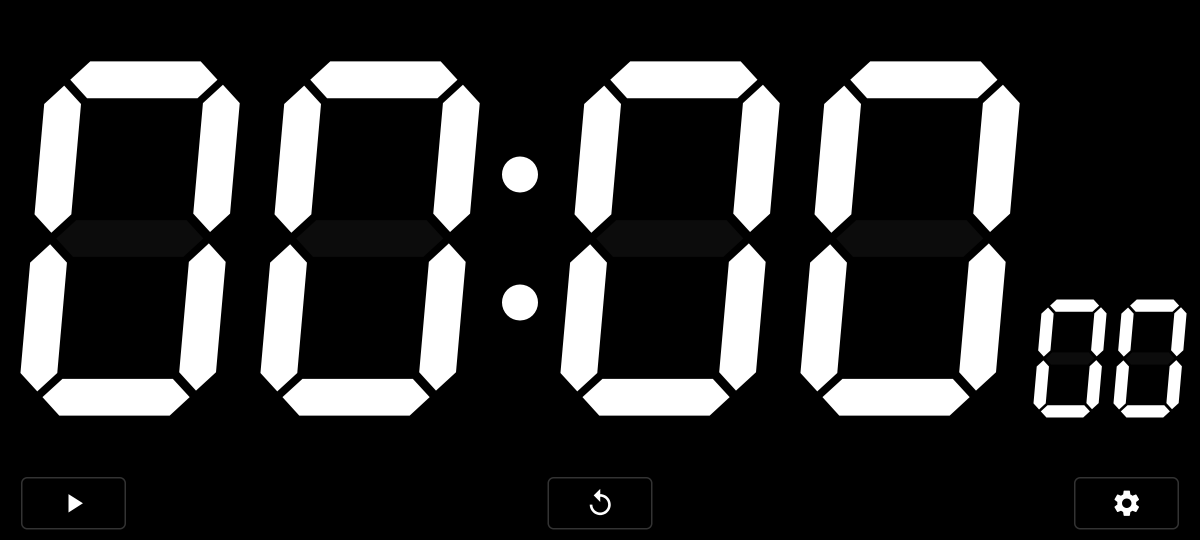
こういう全画面の時計・タイマー機能を提供しているのですが、実装としてはImageViewをLinearLayoutに突っ込んでいて、これがRTL言語だと左右反転しちゃうらしいです
RTL言語だからといって何でも左右反転しちゃダメという知見・・・・・・(それがダメなのかどうかすら知識が無い)
1
2
273

2 Jan 2025
"From 'Hello World' to Unit Converter! 🎯
Today's wins:
Handled user input without crashing (mostly 😅)
Made peace with LinearLayout
Actually understood what a ViewModel does
Found out why null safety matters
Small steps, but I'm building! 🚀
#AndroidDev #Kotlin
1
18
12 Dec 2024
何気なくLinearLayoutのソースコード覗いたら、mDividerってのがあって、え、divider描画機能あったの?ってなったので勢いで書いた。
いままで全く知らんかったよ。。もう何も分からないw
2
2
413
12 Dec 2024
記事を投稿しました! LinearLayoutでdividerを表示する [Android] on #Qiita qiita.com/ryo_mm2d/items/60c…
1
2
6
613

24 Oct 2024
Android始めたての頃、weightを使ったLinearLayoutを4重くらいにしたViewをListViewのitemに使ってめちゃくちゃカクつかせたんだけど、その経験があったからFlutterでカクつかせても自分が絶対何か間違ってると思えたな
2
151

25 Jul 2024
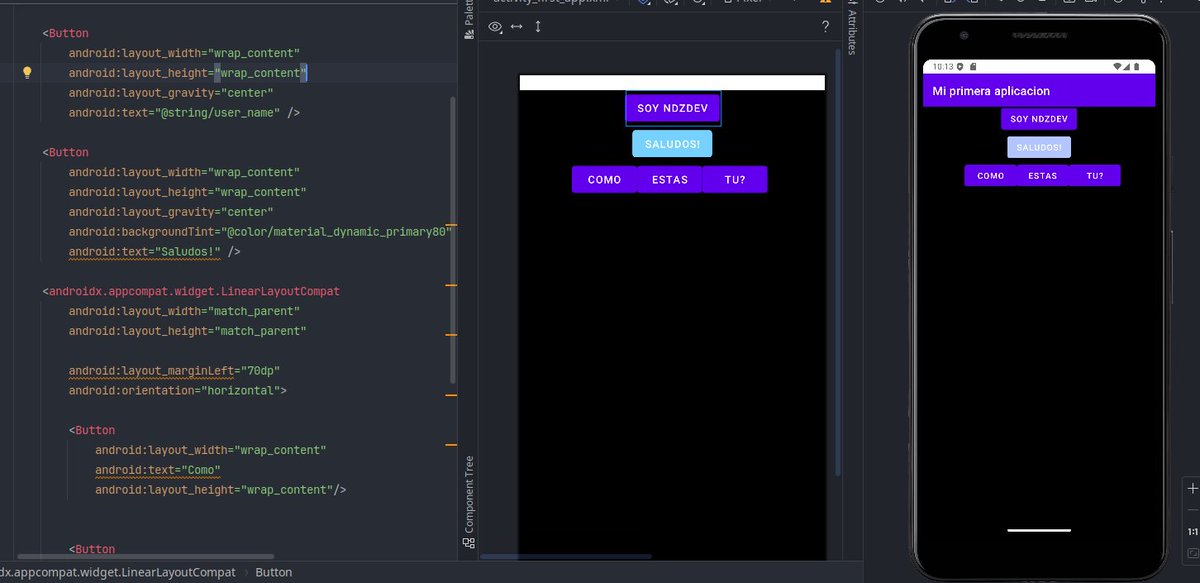
# 4 : El día de hoy estuve aprendiendo sobre FrameLayout y termine con LinearLayout. Anidando dos LinearLayout y utilizando diferente orientación, logre esto (quizas en modo practica no sea lo correcto, pero fueron inventos que estuve probando). #Kotlin
3
21

14 Jun 2024
I have a simple LinearLayout with two view objects, an EditText input to collect the user’s username and a share button to send the location to the server.
#Coding #Kotlin #AppDeveloper
1
6
142

14 May 2024
We migrated rendering posts back to LinearLayout last year, seen significant performance improvements.
3
8
1,747
14 May 2024
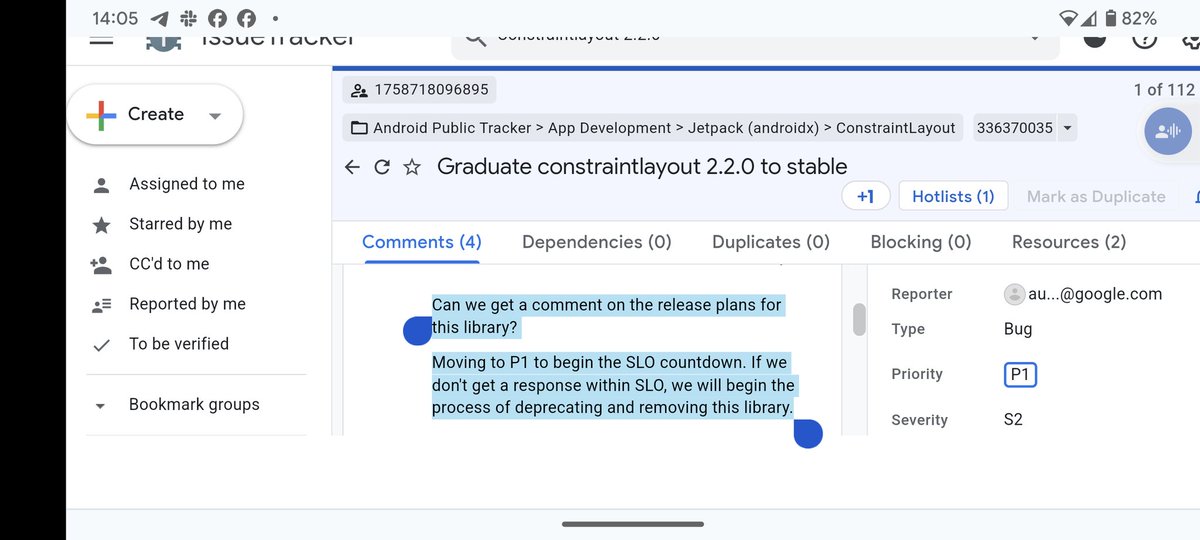
When they told you to start using ConstraintLayout in place of every single ViewGroup you can think of
(even though FrameLayout and LinearLayout had better performance than ConstraintLayout),
they didn't tell you how easily it will be for them to deprecate it in the future. 🤔
ALT https://issuetracker.google.com/issues/336370035
9
3
60
7,992