
11 Jan 2023
Are you new to #MicroStation? Watch this tutorial to get you up and running with the leading CAD software!
bit.ly/3MjYqnL
#3DCAD #MicroStationLearning #MicroStationTraining

2
8
940
18 Oct 2022
#TipTuesday 💡: Did you know that you can watch the #MicroStation Productivity Webinars on-demand? These are free learning opportunities you don't want to miss out on. Watch here: bit.ly/3CpiDVW
#MicroStationLearning #MicroStationTraining #CAD #CADVisualization

18 Oct 2022
#TipTuesday 💡: Did you know that you can watch the #MicroStation Productivity Webinars on-demand? These are free learning opportunities you don't want to miss out on. Watch here: bit.ly/3CpiDVW
#MicroStationLearning #MicroStationTraining #CAD #CADVisualization
1
1
1 Sep 2022
Looking for ways to get the most out of #MicroStation? Check out some of these OnDemand #webinars to learn about industry hot topics, best practices, and more! Click here: bit.ly/3zkAnBW
#MicroStationLearning #MicroStationTraining
1
1

17 Aug 2022
Yes, that's the look! Check out how easy it is to control different views and apply display styles to your designs in #MicroStation. Watch 🎞️: bit.ly/3Aqkevg
#engineering #civildesign #visualization #microstationlearning #tutorial #youtube
2
3
6 Jun 2022
During the design process, you often need to review a coordinate for an element in your design. #MicroStation makes this simple by allowing you to enable the display of Running Coordinates on the status bar. Watch this video: bit.ly/3mgaoEu
#MicroStationLearning
1
1
24 May 2022
#TipTuesday 💡: Do you feel your eyes becoming strained after hours in front of the computer? #MicroStation allows you to work on your DGN and DWG files using a dark themed user interface! Watch this video to learn how: bit.ly/3K8fHiP
#MicroStationLearning #CAD #3DCAD
1
1
3 May 2022
#TipTuesday 💡: Do you find yourself frequently returning to the Element Selection tool to exit the active tool? Use the ESC key on the keyboard to exit the current command! Learn how to customize the function by watching this video: bit.ly/3vzTxAJ
#MicroStationLearning
1
25 Apr 2022
If your software can't handle large files and models, then you're wasting time ⌛. Take control of your valuable time with #MicroStation, the #CAD software built for high performance and handling of big data.
Learn more here: bit.ly/3qALcv4
#MicroStationLearning
2
3
21 Apr 2022
Once an iModel that contains Item Data has been generated, what can it be used for?
Watch this video to discover more about the design review process! bit.ly/3uvAyqs
#MicroStation #MicroStationLearning #MicroStationTraining #CAD
1
2
19 Apr 2022
#TipTuesday 💡: Become more productive by displaying frequently accessed tools across all ribbon tabs in #MicroStation!
Watch video: bit.ly/3DpyunR
#MicroStationLearning #MicroStationTraining #CAD #CADSoftware
1
2
18 Apr 2022
Watch the video in the link below to hear what real users of MicroStation value most in the leading 3D modeling software!
bit.ly/3NChUWr
#CAD #MicroStation #MicroStationLearning #MicroStationTraining
2
2
14 Apr 2022
#MicroStation supports point cloud streaming of any scale, and in native format.
Read More: bit.ly/2NXQP5R
#CAD #MicroStationLearning #MicroStationTraining #CADforManufacturing
1
2
10 Mar 2022
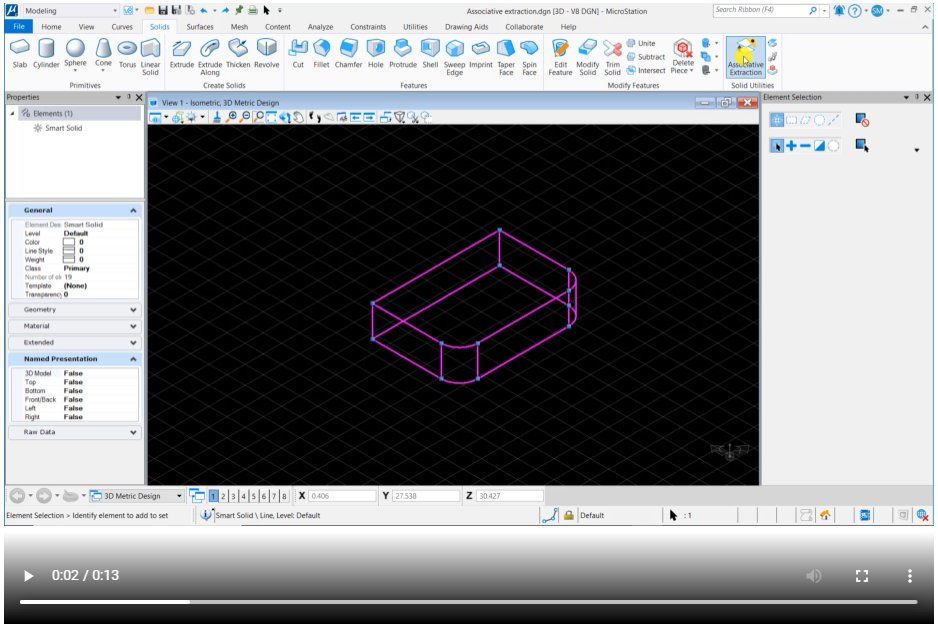
#DidYouKnow: In #MicroStation you can treat a Smart solid as a Parametric solid before extracting an associative edge or face with Associative Extraction.
Learn more watch video: bit.ly/33nwxu9
#microstationlearning #3DCAD #3DCADDesign #2DCAD #MicroStationTraining
2
2
8 Mar 2022
#TipTuesday: Working with large projects is significantly increasing the complexity of project designs. Check out our webinar to learn how to ensure documentation, data, and designs are in sync throughout the project lifecycle. bit.ly/3CpiDVW #microstationlearning #CAD
2
24 Feb 2022
Wanting to learn more about Visualization and Point Clouds in MicroStation? Join us on March 3 at 12:30 PM AEST for our upcoming webinar! Register now! bit.ly/3t8eZvB #microstationlearning #visualization #CAD #3DCAD #2DCAD #CADDesignSoftware #MicroStationTraining
3
1
31 Jan 2022
#MicroStationTips: Would you like to access many of the most commonly used tools from an easy-to-read text menu?
See How: youtu.be/D9W88OSvxsc
#microstationlearning #visualization #civilsoftware #CAD #3DCAD #3DCADDesign #2DCAD #CADDesignSoftware #MicroStationTraining
2
25 Jan 2022
#MicroStationTips: Would you like to access many of the most commonly used tools from an easy-to-read text menu?
See How: youtu.be/D9W88OSvxsc
#microstationlearning #visualization #civilsoftware #CAD #3DCAD #3DCADDesign #2DCAD #CADDesignSoftware #MicroStationTraining
1
2
18 Jan 2022
#MicroStationTips: Would you like to access many of the most commonly used tools from an easy-to-read text menu?
See How: youtu.be/D9W88OSvxsc
#microstationlearning #visualization #civilsoftware #CAD #3DCAD #3DCADDesign #2DCAD #CADDesignSoftware #MicroStationTraining
1
2
15 Dec 2021
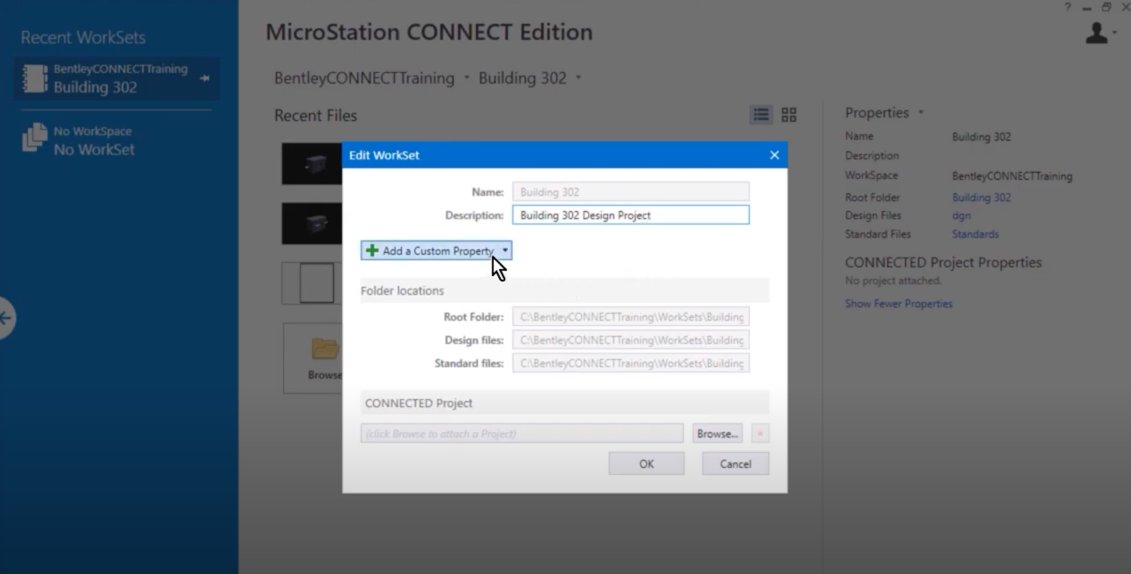
#MicroTips: In this video, you will view WorkSet Properties, view a DGN WorkSet file, and define custom WorkSet Properties
.
Watch Now: bit.ly/3s7V3K5
#microstationlearning #civilapplications #CAD #3DCAD #3DCADDesign #2DCAD #CADDesignSoftware #microstationtraining
2
2