
Jan 12
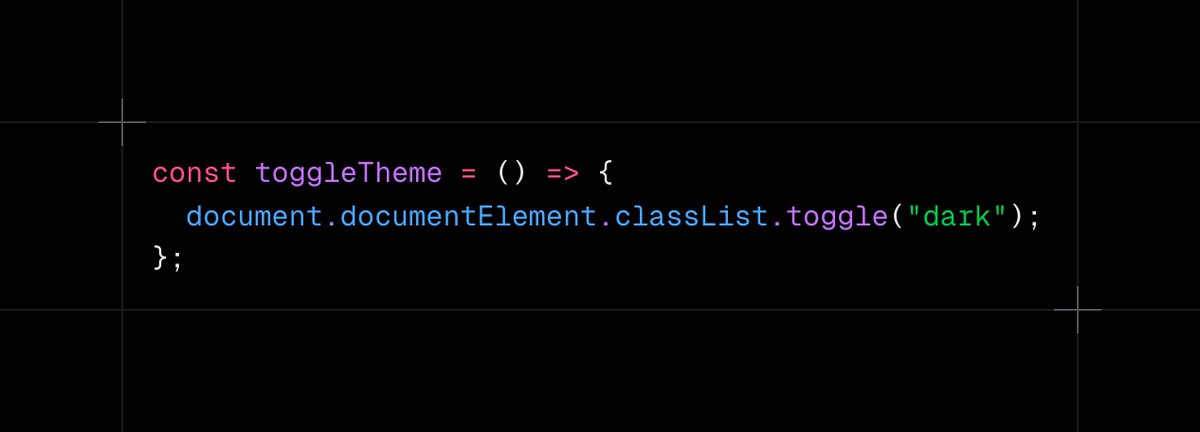
Today I learned that you can toggle dark mode using this for a Next.js TailwindCSS project, and it works. However, it might have some limitations compared to using the NextTheme package.
35


4 Jul 2025
Debug, debug, debug and debug for ever!!!!
Don't forget to test and debug your code in all the cases you can think of. and let your friends try everything before you push to the production mode.
I am using NextTheme with TailwindCss 4.
The light theme and dark theme working perfectly.
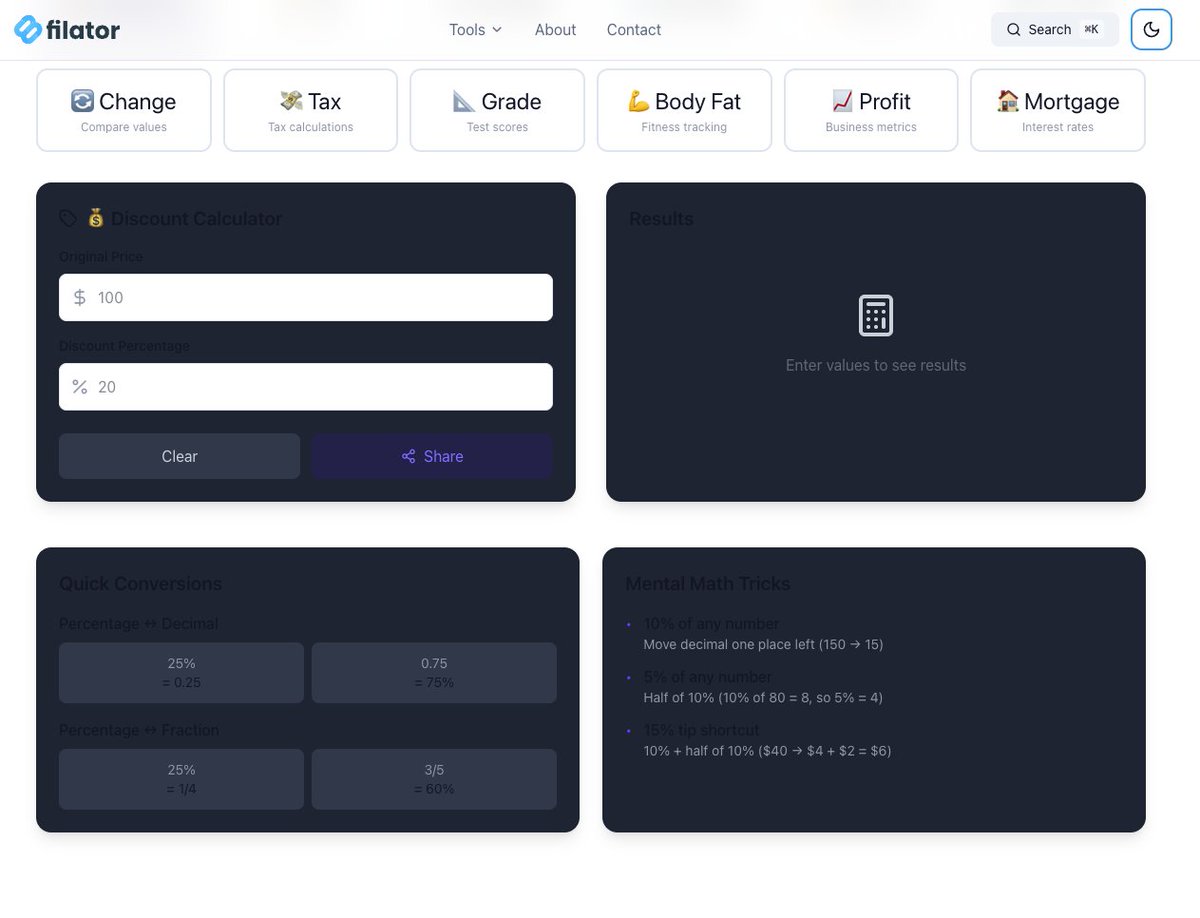
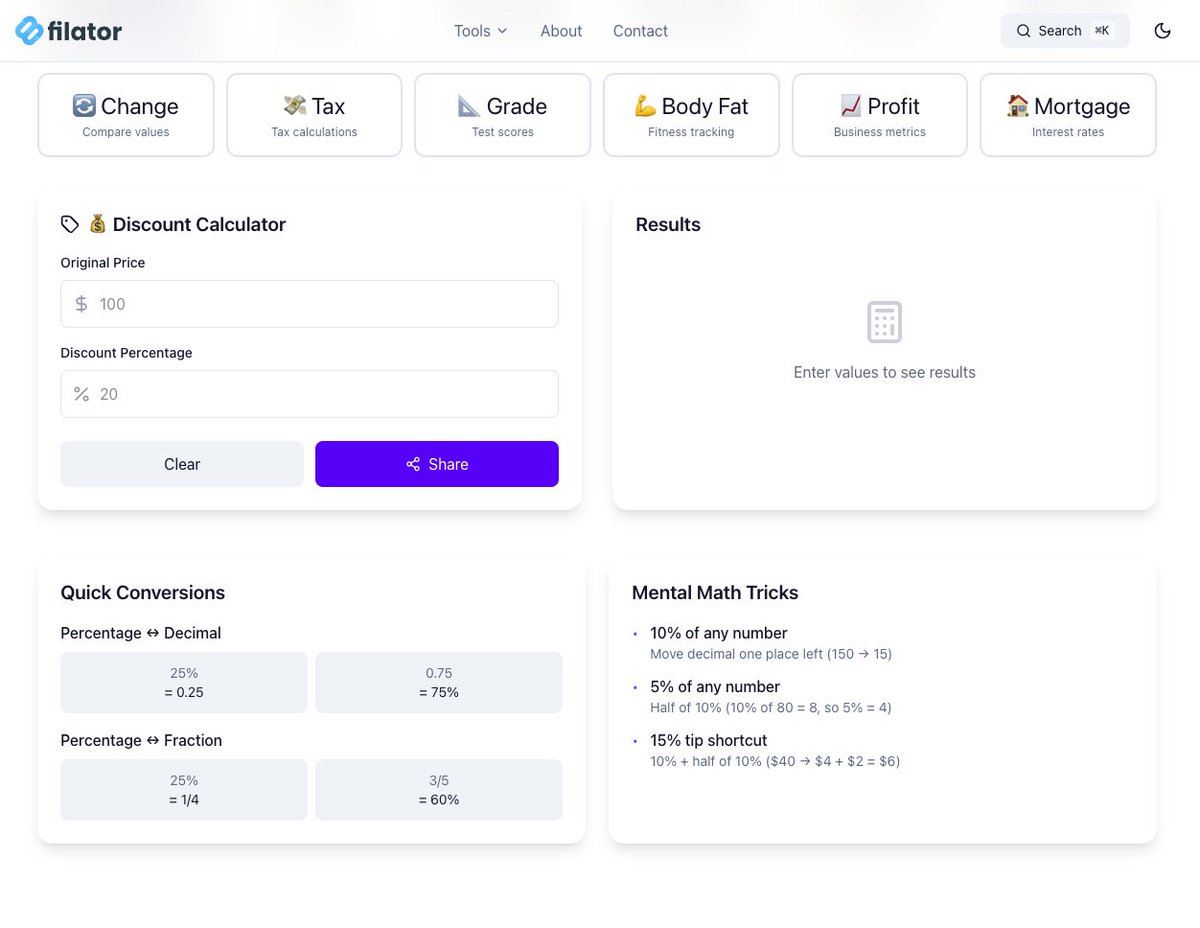
BUTTTT, if the system is in dark mode, and we open the website on the light theme we will see this stupid issue that make the visitors run away in 1 SEC.
I was some tailwind class with 'dark:' and without notice i forget i have css variables that cause for me this problem.
so i go throw all website and fix it, its take from me 2 hours.
just quick snap about it:
Before: bg-white dark:bg-gray-800
After: bg-card
2
68

15 Jun 2025
// スクリプトプロパティにWebhook URLを保存するためのキー
const WEBHOOK_URL_KEY = 'DISCORD_WEBHOOK_URL';
/**
* スプレッドシートを開いたときにカスタムメニューを追加します。
* このメニューから各種設定やテストができます。
*/
function onOpen() {
SpreadsheetApp.getUi()
.createMenu('🤖 Discord通知設定')
.addItem('1. Webhook URLを設定', 'setWebhookUrl')
.addItem('2. 接続をテスト', 'testDiscordConnection')
.addSeparator()
.addItem('3. 通知トリガーを有効化', 'createFormSubmitTrigger')
.addItem('4. 最終行をテスト送信', 'sendLastRowToDiscord')
.addSeparator()
.addItem('通知トリガーを無効化', 'deleteTrigger')
.addToUi();
}
/**
* UIプロンプトを表示して、DiscordのWebhook URLを設定・保存します。
*/
function setWebhookUrl() {
const ui = SpreadsheetApp.getUi();
const currentUrl = PropertiesService.getScriptProperties().getProperty(WEBHOOK_URL_KEY) || '';
const result = ui.prompt(
'Discord Webhook URL設定',
`現在のURL: ${currentUrl}\n新しいWebhook URLを入力してください:`,
ui.ButtonSet.OK_CANCEL
);
const button = result.getSelectedButton();
const newUrl = result.getResponseText().trim();
if (button === ui.Button.OK) {
if (newUrl.startsWith('discord.com/api/webhooks/')) {
PropertiesService.getScriptProperties().setProperty(WEBHOOK_URL_KEY, newUrl);
ui.alert('✅ Webhook URLを保存しました。');
} else {
ui.alert('❌ 無効なWebhook URLです。正しいURLを入力してください。');
}
}
}
/**
* 設定されたWebhook URLにテストメッセージを送信します。
*/
function testDiscordConnection() {
const ui = SpreadsheetApp.getUi();
const webhookUrl = PropertiesService.getScriptProperties().getProperty(WEBHOOK_URL_KEY);
if (!webhookUrl) {
ui.alert('Webhook URLが未設定です。「1. Webhook URLを設定」から設定してください。');
return;
}
const message = {
embeds: [{
title: "接続テスト",
description: "✅ Google Apps Scriptからの接続に成功しました!",
color: 0x00FF00 // Green
}]
};
try {
sendToDiscord(webhookUrl, message);
ui.alert('✅ 接続テストに成功しました!Discordにメッセージが送信されました。');
} catch (error) {
Logger.log(`Discordへの接続テストに失敗しました: ${error.toString()}`);
ui.alert(`❌ 接続テストに失敗しました。\nエラー: ${error.message}\nWebhook URLやネットワーク設定を確認してください。`);
}
}
/**
* スプレッドシートの最終行のデータを取得し、Discordに送信します。
*/
function sendLastRowToDiscord() {
const ui = SpreadsheetApp.getUi();
const webhookUrl = PropertiesService.getScriptProperties().getProperty(WEBHOOK_URL_KEY);
if (!webhookUrl) {
ui.alert('Webhook URLが未設定です。「1. Webhook URLを設定」から設定してください。');
return;
}
const sheet = SpreadsheetApp.getActiveSpreadsheet().getActiveSheet();
const lastRow = sheet.getLastRow();
if (lastRow <= 1) {
ui.alert('送信できるデータがありません(ヘッダー行のみ)。');
return;
}
// A列からK列までのデータを取得
const values = sheet.getRange(lastRow, 1, 1, 11).getValues()[0];
const payload = createDiscordEmbedMessage(values);
try {
sendToDiscord(webhookUrl, payload);
ui.alert(`✅ 最終行(${lastRow}行目)のデータをDiscordに送信しました。`);
} catch (error) {
Logger.log(`最終行データの送信に失敗しました: ${error.toString()}`);
ui.alert(`❌ 最終行データの送信に失敗しました。\nエラー: ${error.message}`);
}
}
/**
* フォーム送信時に実行されるトリガーを作成します。
*/
function createFormSubmitTrigger() {
const ui = SpreadsheetApp.getUi();
const webhookUrl = PropertiesService.getScriptProperties().getProperty(WEBHOOK_URL_KEY);
if (!webhookUrl) {
ui.alert('Webhook URLが未設定です。トリガーを設定する前にURLを設定してください。');
return;
}
const allTriggers = ScriptApp.getProjectTriggers();
const triggerExists = allTriggers.some(t => t.getEventHandlerFunction() === 'handleFormSubmit');
if (triggerExists) {
ui.alert('通知トリガーは既に設定されています。');
return;
}
const sheet = SpreadsheetApp.getActiveSpreadsheet();
ScriptApp.newTrigger('handleFormSubmit')
.forSpreadsheet(sheet)
.onFormSubmit()
.create();
ui.alert('✅ フォーム送信時の通知トリガーを有効化しました。');
}
/**
* プロジェクトに設定されているフォーム送信トリガーを削除します。
*/
function deleteTrigger() {
const ui = SpreadsheetApp.getUi();
const allTriggers = ScriptApp.getProjectTriggers();
let deleted = false;
allTriggers.forEach(trigger => {
if (trigger.getEventHandlerFunction() === 'handleFormSubmit') {
ScriptApp.deleteTrigger(trigger);
deleted = true;
}
});
if (deleted) {
ui.alert('✅ 通知トリガーを無効化しました。');
} else {
ui.alert('設定されている通知トリガーはありません。');
}
}
/**
* フォーム送信イベントを処理し、Discordに通知します。
* @param {GoogleAppsScript.Events.SheetsOnFormSubmit} e
*/
function handleFormSubmit(e) {
if (!e || !e.values) {
Logger.log('イベントオブジェクトまたは値が存在しません。');
return;
}
const webhookUrl = PropertiesService.getScriptProperties().getProperty(WEBHOOK_URL_KEY);
if (!webhookUrl) {
Logger.log('DiscordのWebhook URLが設定されていません。');
return;
}
const payload = createDiscordEmbedMessage(e.values);
try {
sendToDiscord(webhookUrl, payload);
Logger.log('Discordへの通知を送信しました。');
} catch (error) {
Logger.log(`Discordへの通知送信に失敗しました: ${error.toString()}`);
}
}
/**
* フォームの回答データからDiscordの埋め込みメッセージを作成します。
* @param {Array<string>} values - フォームの回答データ(1行分)
* @return {object} Discordに送信するペイロードオブジェクト
*/
function createDiscordEmbedMessage(values) {
const [
timestamp, email1, name, xAccount, email2, courseName,
satisfaction, understanding, pace, feedback, nextTheme
] = values;
const embed = {
title: "新しいアンケート回答",
description: `**${courseName || '(講座名なし)'}** に新しい回答が届きました。`,
color: 0x58A6FF, // Blue
fields: [
{ name: "名前", value: name || '未記入', inline: true },
{ name: "Xアカウント", value: xAccount || '未記入', inline: true },
{ name: "メールアドレス", value: email1 || email2 || '未記入', inline: false },
{ name: "講義全体の満足度", value: String(satisfaction) || '未記入', inline: true },
{ name: "内容の理解しやすさ", value: String(understanding) || '未記入', inline: true },
{ name: "進行ペースの適切さ", value: String(pace) || '未記入', inline: true },
{ name: "役立った点・改善点", value: "```" (feedback || '未記入') "```", inline: false },
{ name: "次に扱ってほしいテーマ", value: "```" (nextTheme || '未記入') "```", inline: false }
],
footer: {
text: `受信日時: ${new Date(timestamp || Date.now()).toLocaleString('ja-JP')}`
}
};
return { embeds: [embed] };
}
/**
* 指定されたURLにペイロードをPOSTリクエストで送信します。
* @param {string} url - 送信先のURL
* @param {object} payload - 送信するJSONオブジェクト
*/
function sendToDiscord(url, payload) {
const options = {
method: "post",
contentType: "application/json",
payload: JSON.stringify(payload)
};
UrlFetchApp.fetch(url, options);
}
606

16 Dec 2024
Hey followers! 👋 Thanks for joining our awesome Sweater Sunday! 🧥👏 Energy and smiles were high, and we loved seeing those matching twin sweaters! 😍 Excited for the next themed Sunday? 💪 #SweaterSunday #Twinning #NextTheme




1
19

3 Oct 2024
Implimenting Light and dark theme with @tailwindcss @NextTheme @reactjs @nextjs.
Side note: trying to change theme using Global context state didnt work for me. On the other hand use Theme hook worked perfectly. #webdeveloper #uiuxdesign #Nextjs #tailwind
1
1
153

3 Aug 2024
The dark mode doesnt work on nextjs with nexttheme if i pass dark:true to the createCheckout in lemon.js api
13

23 May 2024
⚡源码在这里
技术栈
➜ Monorepo
➜ React
➜ Typescript
➜ ShadcnUI
➜ RadixUI
➜ TailwindCSS
➜ Prisma
➜ Supabase
➜ NextTheme
➜ Trigger.dev
➜ Resend
➜ Openpanel
托管服务
➜ Vercel
github.com/christianalares/s…
232
22 May 2024
⚡源码在这里
技术栈
➜ Monorepo
➜ React
➜ Nextjs
➜ Typescript
➜ ShadcnUI
➜ RadixUI
➜ TailwindCSS
➜ DrizzleORM
➜ Postgres
➜ NextAuth
➜ NextTheme
➜ Lmsqueezy
github.com/alifarooq9/rapidl…
1
6
693

26 Jan 2024
"🚀 Emocionado de compartir mi viaje de aprendizaje en #NextJS. Construyendo mi blog personalizado con @nextjs y @nexttheme. ¡El modo oscuro y claro está incluido! #WebDevelopment #DarkMode #LightMode"
4
411

@shadcn bro, how do you solve the hydration error with theming? Your docs on that still has the error once you try to import & use “theme” from nextTheme without checking if the current page has mounted.
I am trying to avoid useEffect (as much as possible) is there a work around?
1
86

1 Aug 2023
1
1
1,022

1 Jun 2023
We can't wait to see what you'll bring to the table!
#EssayWritingCompetition #WinnersAnnouncement #ThankYou #NextTheme #EmbraceCreativity #PowerOfWords
52

24 Apr 2023
Hey first use of @shadcn 's ui components library, fitting really well for my #Nextjs 13 application with #nexttheme.
But looks like the dark-mode don't really apply to shadcn-ui's component lib.
Any clue ? Thanks!
1
8
4,814

10 Mar 2023
Portfolio: Crunchtime Analytics - Data analysis in Weston-super-Mare #Nexttheme #Webdesign #Portfolio

43
8 Mar 2023
Portfolio: Weston-super-Mare Chamber of Commerce - CRM, CMS, website design and development #Nexttheme #Webdesign #Portfolio

31
6 Mar 2023

9