
6 Nov 2025
🥄 Mix it up with this previous #PackageOfTheWeek! With the Mix package, you can style your widgets with ease!
#ThrowbackThursday
11
183
10,027
11 Sep 2025
Add space between Flex widgets with this previous #PackageOfTheWeek!
🤏 Use the Gap package to add space between widgets without keeping track of whether its parent is a Row or Column.
7
27
276
15,653

25 Aug 2025
#PackageOfTheWeek: flutter_soloud
Watch the video at: youtu.be/2t6Bt04EyLw?si=YAj8…
#aeologictechnologies #aeodiz #flutter #developer #android #ios #programming #developercommunity #flutterdeveloper #coding #programmer #flutterdev #appdeveloper #kotlin #reactnative #java #coder
2
6
363
21 Aug 2025
Obtain better feedback from users with this previous #PackageOfTheWeek 💬🩵
The Feedback package lets users give feedback by annotating a screenshot of the current page and adding text, all directly within your app.
#ThrowbackThursday
3
31
304
12,498
24 Jul 2025
Home is where the widget is. ⚙️🩵
The HomeWidget plugin makes it easier to create HomeScreen widgets on Android and iOS.
#PackageOfTheWeek #ThrowbackThursday
3
52
444
25,756
20 Mar 2025
Add a video player to your Flutter app with the video_player package. With a few lines of code, you can play, pause, seek, and check the player's current status. ⏯
Watch this #PackageOfTheWeek → goo.gle/3QtqYjf
9
163
7,644
26 Nov 2024
#PackageOfTheWeek: video_player
With the video_player package, you can display a video from the internet or the user's device in your Flutter app in a few lines of code.
Watch the video at: youtu.be/Jxw6FaA0j3I?si=G5vW…
#aeologictechnologies #aeodiz #flutter #developer #android #ios
1
3
71
27 Sep 2024
Creating an autocomplete UI can be complicated. With the Autocomplete widget, it doesn't have to be. 😎
Watch the full #PackageOfTheWeek throwback video to discover how Autocomplete can help you and your users get things done faster ↓ goo.gle/4eRbn7t
1
14
93
8,148
18 Sep 2024
✒ Use a custom font when you want your app to pop.
In this throwback #PackageOfTheWeek, you'll learn about the google_fonts package, which provides over 1400 fonts that you can use anywhere in a Flutter app → goo.gle/3OORi5a
3
10
121
8,086
13 Sep 2024
🕹 Game developers, this one's for you. 🎮
🔥 Flame, a game engine built on top of Flutter, comes with the core building blocks needed to build games.
Explore the world of building games in Flutter with this throwback #PackageOfTheWeek → goo.gle/3WX9MEr
1
13
145
9,572
30 Aug 2024
When adding padding and size boxes becomes a bit verbose, it's time to add a Gap. 🤔
In this #PackageoftheWeek throwback, we'll show you how to add some space around your widgets without making your code harder to read → goo.gle/475PUDM
13
30
249
30,067
30 Aug 2024
If you're looking to create a HomeScreen or LockScreen widget on mobile, have we got the #PackageoftheWeek throwback demo for you! 👀
Explore how you can use home_widget to make it easier to create HomeScreen widgets on Android and iOS → goo.gle/3QYfi9y
2
21
231
14,065
27 Aug 2024
⏲ When you want to quickly add beautiful, pre-built animations to your Flutter app without animation controllers, it's time for flutter_animate → goo.gle/3GYyiPJ
This #PackageoftheWeek Rewind shows how you can add an effect to a widget.
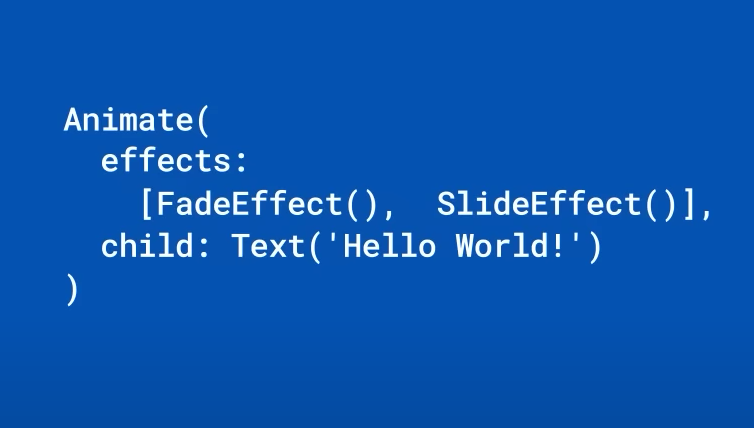
ALT Code depicting the text, "Hello World!"
30
245
11,056
23 Aug 2024
If you've ever wished for universal styling syntax when building your app, it's time to add Mix to the mix. 🥣
Learn how in this #PackageOfTheWeek → goo.gle/3SW5Fs8
1
20
139
9,574
21 Aug 2024
#PackageOfTheWeek: Mix
Watch the video at: youtu.be/sjPSx6-iCao?si=Va_M…
#aeologictechnologies #aeodiz #flutter #developer #android #ios #programming #developercommunity #flutterdeveloper #coding #programmer #flutterdev #appdeveloper #kotlin #reactnative #java #coder #daysofcode
1
6
195
6 Feb 2024
Give users a way to submit feedback on your app with both text and a screenshot. 🔤📸
The #PackageOfTheWeek helps you spend less time building a solution for collecting feedback, and more time addressing your users’ feedback!
Watch → goo.gle/3OBIscD
4
47
317
21,458

1 Nov 2023
Wow 👀 ! Gap has been featured in the #Flutter #PackageOfTheWeek video series 😁
m.youtube.com/watch?v=MqjCII…

4
3
90
8,513
1 Nov 2023
Need space between widgets? ↔️
Use Gap to add space between widgets without keeping track of whether its parent is a Row or a Column.
📺 Watch the #PackageOfTheWeek → goo.gle/3Sjy77Z
ALT Package of the Week Gap
17
52
430
54,979
25 Oct 2023
Need to get a high-level understanding of large data sets? 📂
Try fl_chart for visualizing information in a number of different graphs, including pie charts, line charts, and more.
Watch the #PackageOfTheWeek → goo.gle/3Q1WPqs
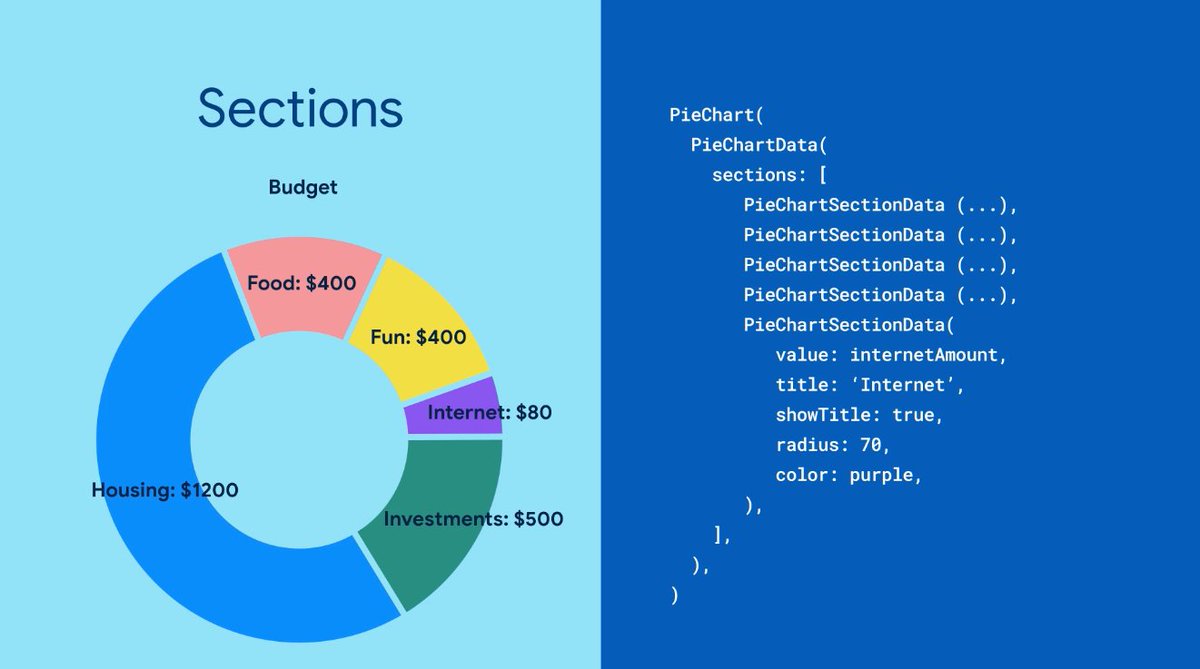
ALT Image of a pie chart on the left and code on the right.
5
16
148
21,412
30 Aug 2023
📱 With the home_widget package, you can manage the dataflow and updates to your home screen widgets right from your Flutter code.
Watch the #PackageOfTheWeek → goo.gle/3QYfi9y
42
288
28,621