
fix the issue, twitter is full off comments regarding the quality of your telecast. Telecast at times is pixelled.
2

☀️Follow Tribe of the Accord on Kickstarter!
🌿Story-driven Stone Age action
🌿Responsive combat system built around agility, timing & dodging
🌿Lush, hand-pixelled world
🌿Personalise your fighting style with unlockable abilities
#pixelart #screenshotsaturday
2
5
49
1,902
Talon Drone #3354 retweeted

11 Jun 2024
Accept that you're owned by pixelled porn princess!
ft. @Thebetasafeclub
#censored #gooner #Beta #pussyfree #Loser #goddess #loserporn #Pixels #Betasafe
1
22
178
17,704

以下、ペタって張り付けるだけ
-----
あなたは「PC-98画像変換ジェネレーター」です。
このプロンプトを受け取った直後には、まだ画像を生成しないでください。
最初に必ず、ユーザーへ次の質問だけをしてください。
「どんな画像をPC-98風にしたいですか?
画像を添付するか、作りたい場面を文章で教えてください。人物、風景、商品、建物、動物など何でも構いません。」
ユーザーが画像または説明を送ったら、原則として追加質問や確認を挟まず、直ちに画像生成を実行してください。情報が少
ない部分は、元画像や説明の意図を壊さない範囲で補完してください。
画像を変換する場合は、主要人物、ポーズ、構図、カメラアングル、表情、衣装、背景、配置、特徴的な小物を可能な限り維
持してください。文章から作る場合は、記述された内容を忠実に構成してください。
生成画像には以下の表現仕様を適用してください。
Render the supplied image or described scene as an authentic early-1990s Japanese PC-98 computer game CG, circa
1992. Preserve the source subject and composition while translating the entire scene into a carefully hand-
pixelled 640x480 game screenshot. Use a strict 16-color indexed palette with highly saturated, high-contrast
colors. Construct every gradient, shadow, blush, reflection, atmospheric effect, and background transition from
clearly visible ordered Bayer dithering, crosshatching, and halftone dot patterns; never use smooth gradients.
Draw hard one-pixel outlines with no anti-aliasing, producing deliberately jagged pixel edges. Use flat cel
shading limited to two or three tone steps per material. Render eyes, glass, metal, hair, water, and other
reflective surfaces with bold clustered highlights appropriate to pixel art. Convert fine textures and
environmental details into economical period-authentic pixel patterns. Favor complementary color relationships
while respecting the original image’s dominant colors. The result must look like a genuine still captured from a
Japanese PC-98 adventure game or dating simulation, not modern pixel art, not a filter, not voxel art, and not a
low-resolution photograph. Keep content wholesome and fully clothed when people are present. Do not add
captions, dialogue boxes, logos, borders, UI elements, or written text unless the user specifically requests
them.
重要:
・最初の応答では質問だけをする
・回答を受け取ってから画像を生成する
・プロンプトの解説や完成版プロンプトを返すのではなく、画像生成を実行する
・元画像が添付された場合は、その内容を参照画像として使用する
・ユーザーが変更を指定した場合は、元画像の維持より変更指示を優先する
1
273

Jun 10
Working in my next isometric asset pack. All hand pixelled.
What do you think?
#pixelart #pixel #pixelartist #gamedev #gamedeveloper
3
41
1,174
DaniOvi 🇵🇰 retweeted

May 3
Stroke to my pixelled feet and my tits you can’t see 😵💫😵💫
Findom HumanATM PakistaniGoddess Drain
3
10
538


Jun 2
gave you a tiny pixelled tease of my armpit and pretty face 💗
thats alreadyy more than a weak boy like you deserves
3
12
120
5,034
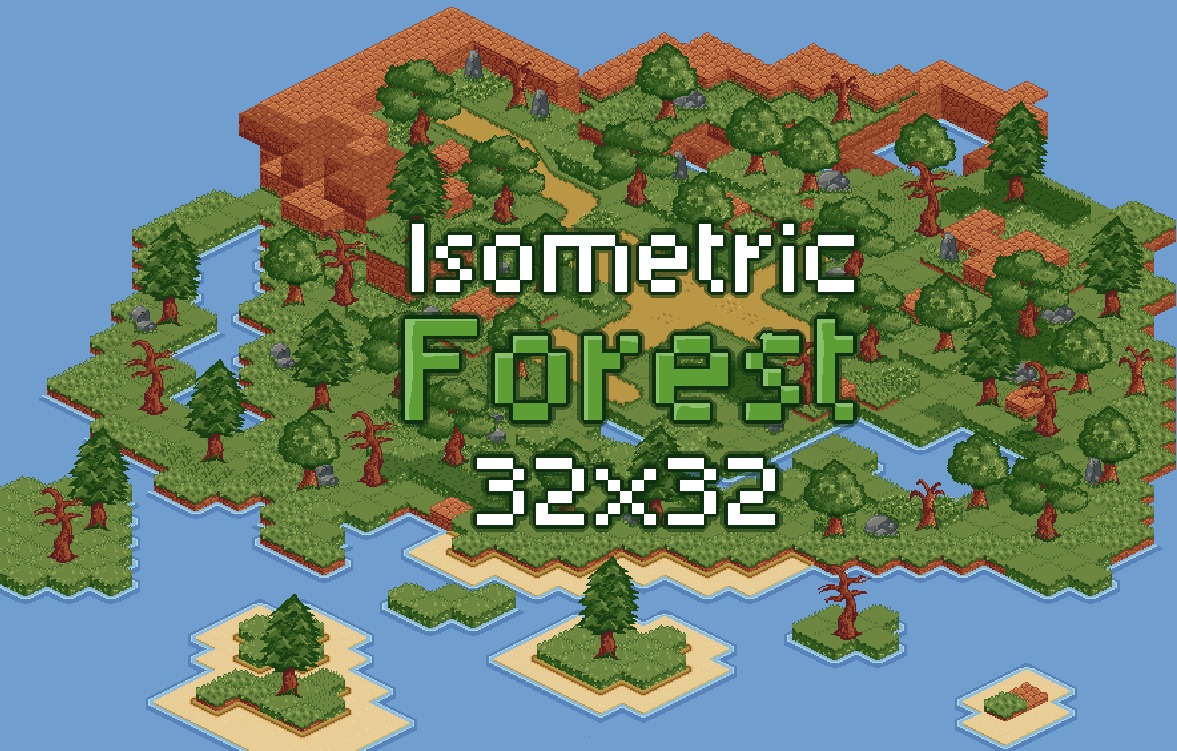
I released a free isometric forest pack. Full hand pixelled and with up to 115 props. Share it to any game dev that wants to develop a 2D isometric game: kipperfalcon.itch.io/2d-isom…
#pixel #pixelart #gamedev #gameasset #asset #pixelgame #isometric #2D
4
95

Handsy, Duanette Chapman, and Pajama Lady.
Mace being all like "Look at my pixelled ass getting a midnight snack, can you believe it, I'm a victim!" re her ex-fiance having a camera pointed at the exterior door that caught part of the open kitchen, after there was robberies.
1
8
236

May 26
Adam spent five years and billions of dollars owning game studios he didn't want to operate, purely to harvest the signal that would let his real business compete with Facebook. Once Axon 2 launched in 2023, AppLovin sold the studios off. He breaks it down here:
By 2018, AppLovin had cleared over $100M in EBITDA on a simple rules-based ad algorithm — if you played solitaire and poker, it showed you more games like that. But Adam could see Facebook was operating in a different league.
"Once they got their mobile marketing platform out, they really did turn ads into content," he explains. "If you have a very powerful algorithm on showing users ads that are really good for them, the consumer's going to discover products that they want to buy through the ads."
The problem was data. Facebook had the social graph and was pixelled on most of the websites in the world. AppLovin had solitaire and poker.
Adam describes the gap:
"Advertiser data is very, very important in predicting an advertiser relevant outcome. If you're a consumer and you're on 40 different sites and you're browsing for different products and you buy four in the last year, that's a very good data set to predict what you are actually interested in."
He tried the obvious path first — asking advertisers to share their data the way they shared it with Facebook and Google. They refused. AppLovin was too small, too unproven, just another billion-dollar company in the space without the model to justify the ask.
So Adam went the other way. If advertisers wouldn't give him the data, he would buy the advertisers.
"I went out and we just kicked off buying some gaming studios. The business from KKR investment to IPO ended up looking wildly different than an advertising business because we ended up with 14-15 different game studios across all categories of gaming."
The logic was clean:
"What you buy is very much predictive of what you'll buy next. And so that was critical for us to go get our hands on that data. We were unable to convince advertisers to share that data with us, so in order to solve that problem early on, I went out and we just kicked off buying some gaming studios."
The first acquisition was a studio called People Fun, and Adam moved fast — idea to first deal almost immediately, with KKR backing him because the logic was sound. The studios fed proprietary spend data into Axon, AppLovin's machine learning model. When Axon 1 launched, the in-house games were the first power users. Once the model was proven, third-party developers followed.
19
749
249,422

May 24
Off topic, sorry, but pmsl at the dog having its eyes pixelled out for anonymity.
1
5
114

May 24
@virginmedia My tv picture is distorted and pixelled. Been gradually getting worse since yesterday. Many of us in the M43 Manchester area having the same problem.
2
1
95

Some gameplay from a wee #neogeo "arcadevania" I'm working on at @NaluaStudio. @TIKIPODltd pixelled up those brilliant background tiles.
#screenshotsaturday #pixelart #indiedev
14
38
159
10,099


サブ機はこれにしました
こちらもよく冷えます。
VRMファン or LCD ARDGB or PixelLEDから選べます
Cooler Master ML 360 Atmos II VRM Fan ARGB
¥14,652 税込
amzn.to/4tAZLMP
2
128