
24 Nov 2025
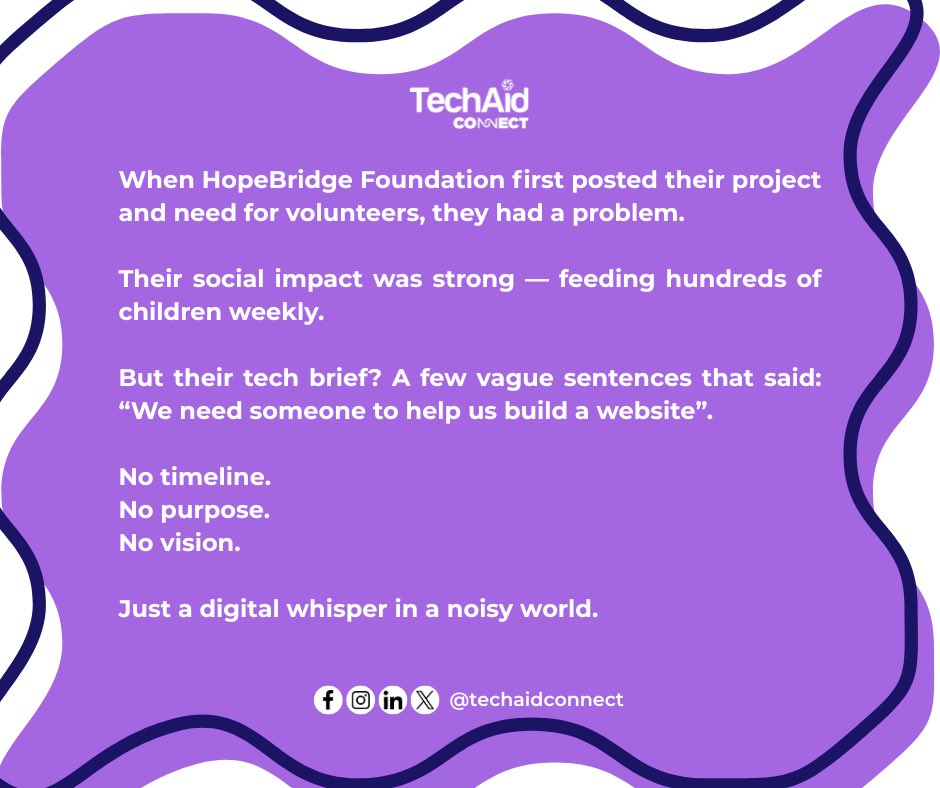
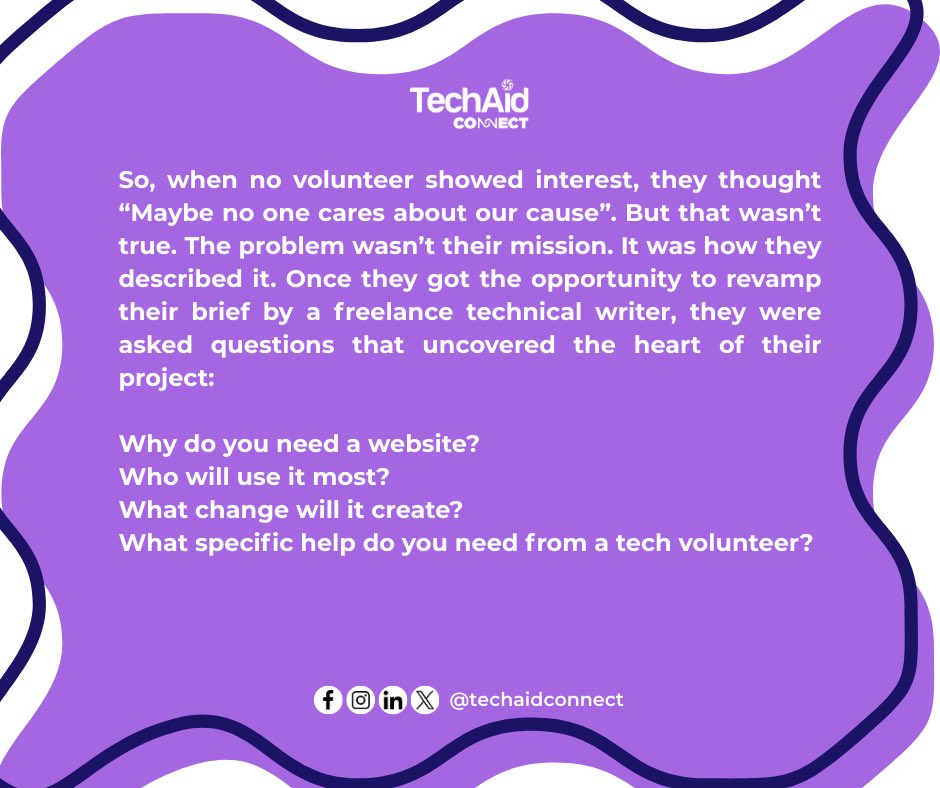
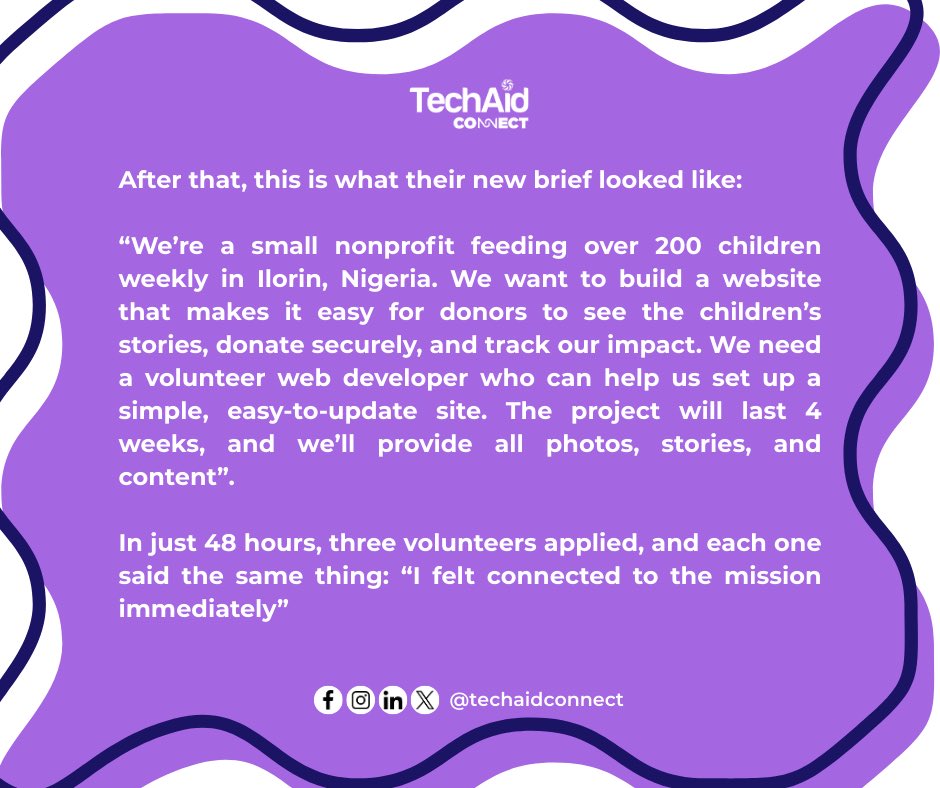
Project brief drafting has never been made easier, check this post to know how.
#projectbrief #volunteeringmadeeasy #nonprofits
1
1
3
41

2 May 2025
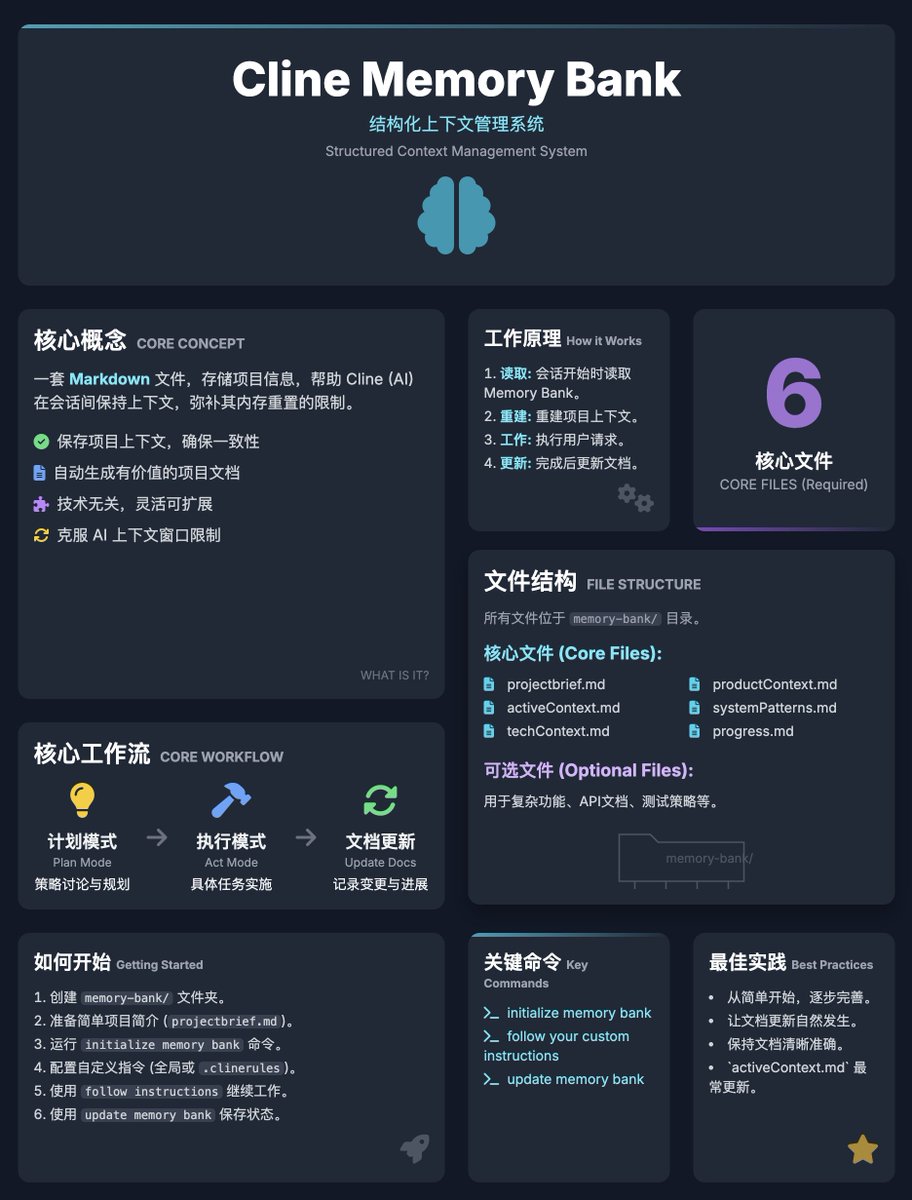
Cline Memory Bank 指南:结构化的文档系统,帮助 Cline 在会话间保持项目上下文,通过维护一套清晰的 MD 文件,Cline 能够“记住”项目细节,成为可靠的开发伙伴
🧠 核心概念
1. 什么是 Memory Bank?
· 一套 Markdown 文件,存储项目信息,帮助 Cline 在会话间保持上下文
· 通过文档化项目细节,弥补 Cline 内存重置的限制
· 适用于任何规模、技术栈或类型的项目(不仅是编程项目)
2. 主要优势
· 保存项目上下文,确保跨会话一致性
· 自动生成有价值的项目文档
· 技术无关,灵活可扩展
3. 工作原理
· 会话开始时,Cline 读取 Memory Bank 文件重建项目上下文
· 工作完成后,更新文档以记录进展和决策
· 通过结构化文件管理上下文,避免 AI 上下文窗口限制
⚙ 核心工作流程
1. 计划模式 (Plan Mode):
· 用于策略讨论和高层次规划
· 流程:读取 Memory Bank → 验证上下文 → 制定策略 → 呈现方案
2. 执行模式 (Act Mode):
· 用于具体任务实施
· 流程:检查 Memory Bank → 执行任务 → 更新文档。
3. 文档更新:
· 发现新项目模式
· 实施重大变更后
· 用户请求“update memory bank”
· 上下文需要澄清时
💯 最佳实践
1. 起步:
· 从简单的 projectbrief. md 开始,随项目演进完善
· 让 Cline 帮助创建初始结构
2. 持续工作:
· 让文档更新自然发生,不强制
· 定期检查会话开始时的上下文确认
3. 文档管理:
· projectbrief. md 是基石,activeContext. md 频繁更新,progress. md 跟踪里程碑
· 保持文档清晰准确,Cline 的表现依赖于此

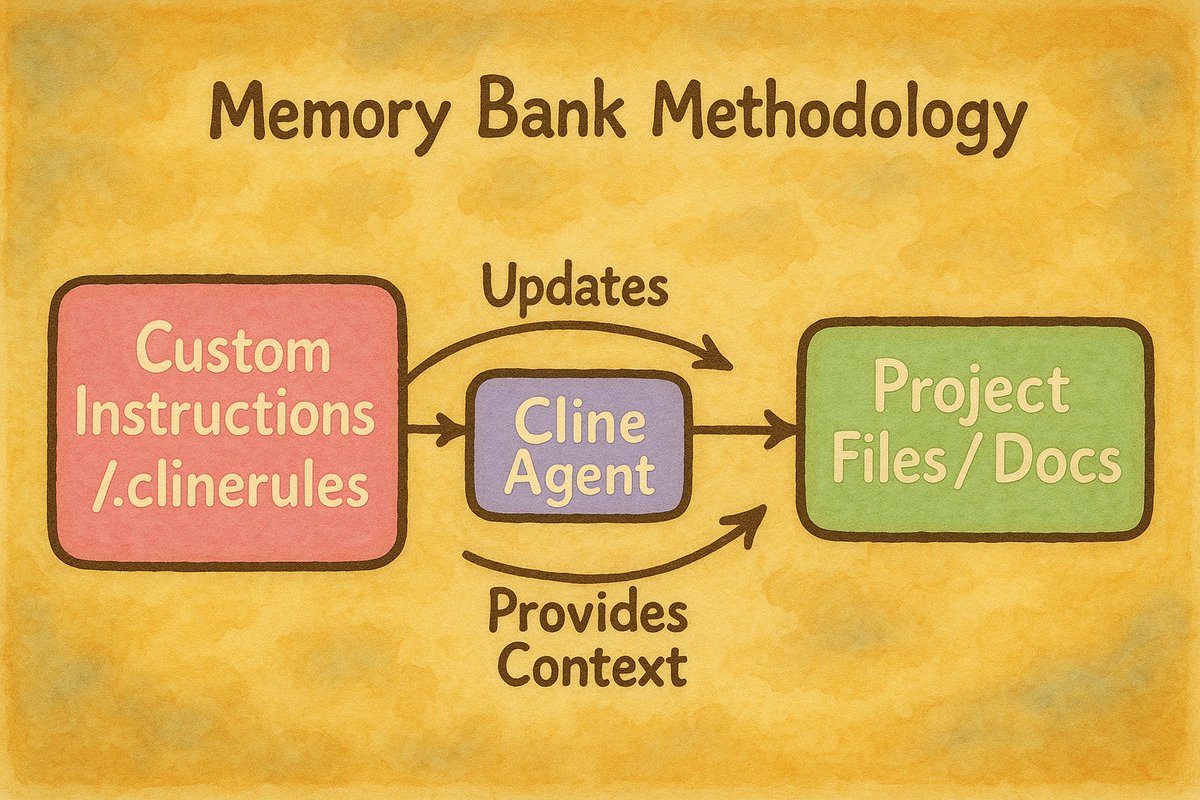
Cline's 'Memory Bank' = a methodology for persistent context using custom instructions & docs, not a fixed feature. Here's how our power users are creating unique variations with visual prompts 🧵
1
3
21
3,553

31 Mar 2025
Let me help you make that shift worthwhile. Create a PR for your project... existing code is fine - just a different prompt.
entrepeneur4lyf.github.io/en…
ALL PROJECTS
First Step:
1. Download the zip for Windsurf
Extract the zip and put the `.windsurfrules` file in the root of your project.
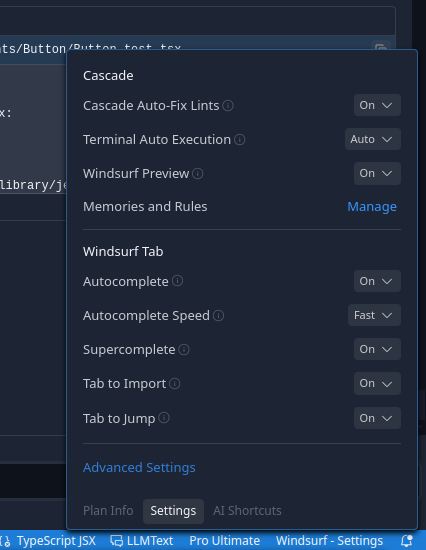
2. Click on the `Windsurf Settings` menu on the bottom right, scroll up to Memories and Rules and click `Manage` (see screenshot).
3. Click on `Global Rules` and paste the contents of the markdown file "Engineered Meta-Cognitive Workflow Architecture" and save it.
4. Select the model - if it's a free model that is Deepseek V3 or my new favorite Gemini 2.5 Pro Beta.
5. Make sure it's on `Write` - Type `@` in the chatbox and attach the `.windsurfrules` file just to make sure the model sees it on the first prompt.
6. Either attach your PRD or paste it.
New Project:
Type "Run sessionStart Event Handler from the Meta Cognitive Workflow and use my PRD to create the projectBrief". See "Troubleshooting" below if you have issues.
Existing Project:
First thing I do is run a command in the root of the project or if you are working with a NextJS or React project you might want to cd into the src or app folder first. I use Linux but I think Windows has the same command.
`tree > structure.md`
Then edit the file and make sure it only includes the files you want to have the model look at. I remove all the extra info like file count, etc.
Attach the structure file to the chat and give them this prompt (save it in a prompt library if you have one).
Prompt: “Run sessionStart Event Handler from the Meta Cognitive Workflow. When completed, do a thorough code review of every file in the project structure I have provided 1 for each file, document current state of each file 1, identify any implementation issues 1, missing dependencies 1, missing functionality 1, missing doc comments 1 for each file. Do not skip any files or assume their contents. Calculate the total score for each file before you begin and evaluate your performance based on that baseline score. The provided criteria are simple tasks and I will penalize you for any missed criteria or substandard score. This is a simple directive and only a perfect score will be acceptable for this directive. Log your analysis for each file noting file name, date and time and total possible score in your task log. Be thorough - provide analysis log for each criteria in order and analysis summary when criteria are complete for each file. Note completion time at the bottom and proceed to the next file. Create a memory detailing this directive and note the path to structure.md. Create the task log before you begin and update your memory bank and task log after each file has been analyzed. We will use this analysis to develop a projectBrief once this directive is complete. Proceed to the task.”
***
Troubleshooting:
IF the model asks about the projectBrief, give it the PRD again and tell it to run the `documentation` Event handler and use the PRD to develop the documentation.
If it doesn't create an implementation plan and take off creating tasklogs, tell it to "Run `TaskStart` Workflow Event Handler and use the PRD to create an implementation plan"
If it isn't cooking after that, your PRD might be insufficient. It will probably tell you that though.
***
Follow best practices.
If you notice the model not being compliant, it's time to start a new session/chat. "Just click the " " icon, do the "sessionStart Event Handler from the Meta Cognitive Workflow" bit from the start of this book I just typed out. It will catch up.
Continue your project. If it isn't writing task-logs after every task - same thing...
"Execute sessionStart Event Handler".
I'm pretty stupid, so I talk shit to it. "If you wanna really cook and show the honeys that Big D energy... you better Create a Cascade Memory and remember this."
It will 100% give you back some whitebread shit but it will create a memory like a mofo.
2
3
377

30 Mar 2025
github.com/SMITH-VISION/labe…
これのactiveContextとtechContextとprogressを機能レベルで持たせるイメージで、マイクロサービス間の関係は各層のprojectbriefとかに持たせておいてそのマイクロサービスの立ち位置を理解させる
1
3
133
29 Mar 2025
Let me help you make that shift worthwhile.
Create a PR for your project... existing code is fine - just a different prompt.
entrepeneur4lyf.github.io/en…
ALL PROJECTS First Step: Download the zip for Windsurf
Extract the zip and put the `.windsurfrules` file in the root of your project.
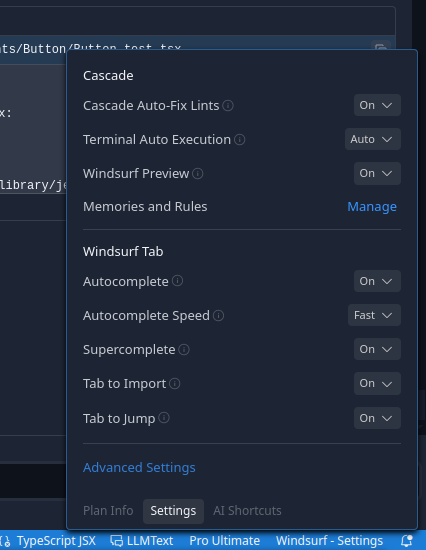
Click on the `Windsurf Settings` menu on the bottom right, scroll up to Memories and Rules and click `Manage` (see screenshot).
Click on `Global Rules` and paste the contents of the markdown file "Engineered Meta-Cognitive Workflow Architecture" and save it.
Select the model - if its a free model that is Deepseek V3 or my new favorite Gemini 2.5 Pro Beta.
Make sure it's on `Write` -
Type `@` in the chatbox and attach the `.windsurfrules` file just to make sure the model sees it on the first prompt.
Either attach your PRD or paste it.
***
New Project: Type "Run sessionStart Event Handler from the Meta Cognitive Workflow and use my PRD to create the projectBrief".
See "Troubleshooting" below if you have issues.
----------------------
Existing Project: First thing I do is run a command in the root of the project or if you are working with a NextJS or React project you might want to cd into the src or app folder first. I use Linux but I think Windows has the same command.
`tree > structure.md`
Then edit the file and make sure it only includes the files you want to have the model look at. I remove all the extra info like file count, etc. Attach the structure file to the chat and give them this prompt (save it in a prompt library if you have one). This extension for vscode is pretty good for that,
Prompt: “Run sessionStart Event Handler from the Meta Cognitive Workflow. When completed, do a thorough code review of every file in the project structure I have provided 1 for each file, document current state of each file 1, identify any implementation issues 1, missing dependencies 1, missing functionality 1, missing doc comments 1 for each file. Do not skip any files or assume their contents. Calculate the total score for each file before you begin and evaluate your performance based on that baseline score. The provided criteria are simple tasks and I will penalize you for any missed criteria or substandard score. This is a simple directive and only a perfect score will be acceptable for this directive. Log your analysis for each file noting file name, date and time and total possible score in your task log. Be thorough - provide analysis log for each criteria in order and analysis summary when criteria are complete for each file. Note completion time at the bottom and proceed to the next file. Create a memory detailing this directive and note the path to `structure,md`. Create the task log before you begin and update your memory bank and task log after each file has been analyzed. We will use this analysis to develop a projectBrief once this directive is complete. Proceed to the task.”
Most times, the model will just go right to creating the projectBrief. If not, See "Troubleshooting" below.
***
Troubleshooting: IF the model asks about the projectBrief, give it the PRD again and tell it to run the `documentation` Event handler and use the PRD to develop the documentation.
If it doesn't create an implementation plan and take off creating tasklogs, tell it to "Run `TaskStart` Workflow Event Handler and use the PRD to create an implementation plan"
If it isn't cooking after that, your PRD might be insufficient. It will probably tell you that though.
***
Follow best practices. If you notice the model not being compliant, it's time to start a new session/chat. "Just click the " " icon, do the "sessionStart Event Handler from the Meta Cognitive Workflow" bit from the start of this book I just typed out. It will catch up. Continue your project.
If it isn't writing task-logs after every task - same thing... sessionStart Event Handler.
I'm pretty stupid, so I talk shit to it. "If you wanna really cook and show the honeys that Big D energy... you better Create a Cascade Memory and remember this."
It will 100% give you back some whitebread shit but it will create a memory like a mofo.
1
1
11
1,830

7 Feb 2025
Clineでセッション間の記憶を保持するメモリバンクなる運用方法が公開されてた。
・メモリバンク用のカスタムプロンプトを公式からコピペ。
・memory-bank/フォルダを作成し、初期化や更新を依頼して運用。
必須ファイルの構成
1 projectbrief. md
・プロジェクトの基盤となる文書。
・コア要件や目標を定義。
2 productContext. md
・プロジェクトの目的や解決する問題を記述。
3 activeContext. md
・現在の作業内容、最近の変更、次のステップを記録。
4 systemPatterns. md
・システムアーキテクチャや設計パターンを記録。
5 techContext. md
・使用技術、開発環境、技術的制約を記述。
6 progress. md
・現在の進捗状況や既知の問題を追跡
1
2
12
1,744

Er blijven nieuwe documenten binnen komen vanuit de WOO-verzoeken die bij MinVWS zijn gedaan. Ik pak er nog een document bij dat ik via @Transparangst kreeg opgestuurd.
Deze keer gaat het over de keuze voor een centraal register. Waarop is die keuze gebaseerd? Wanneer is die keuze gemaakt? Een overzicht in deze post.
Bij grote IT-projecten is het uitermate gebruikelijk een start document op te stellen waarin alle argumenten voor en tegen die te maken hebben met de start van het project worden verzameld.
Wat gaan we doen. Waarom gaan we dat doen. Hoe gaan we dat doen. Wanneer gaan we het doen. Hoe gaan we het betalen. Dat soort vragen en antwoorden.
Zo werd er voor de centrale registratie een Projectbrief document gemaakt (zie document nr. 906620).
De eerste versie 0.1 van dit document werd opgesteld op 20 juli 2020. Op 12 augustus 2020 zag versie 0.4 het licht, waarna versie 0.5 volgde op 25 augustus 2020. Op 18 november 2020 wordt versie 0.63 opgesteld.
(Voor wie het weten wil: versienummer 0.63 wordt vaker gebruikt binnen de overheid. Het is een versienummer dat zoveel betekent als "goed genoeg om gedekt te zijn bij serieuze vragen, als de auditdienst langskomt nog eens goed naar kijken.")
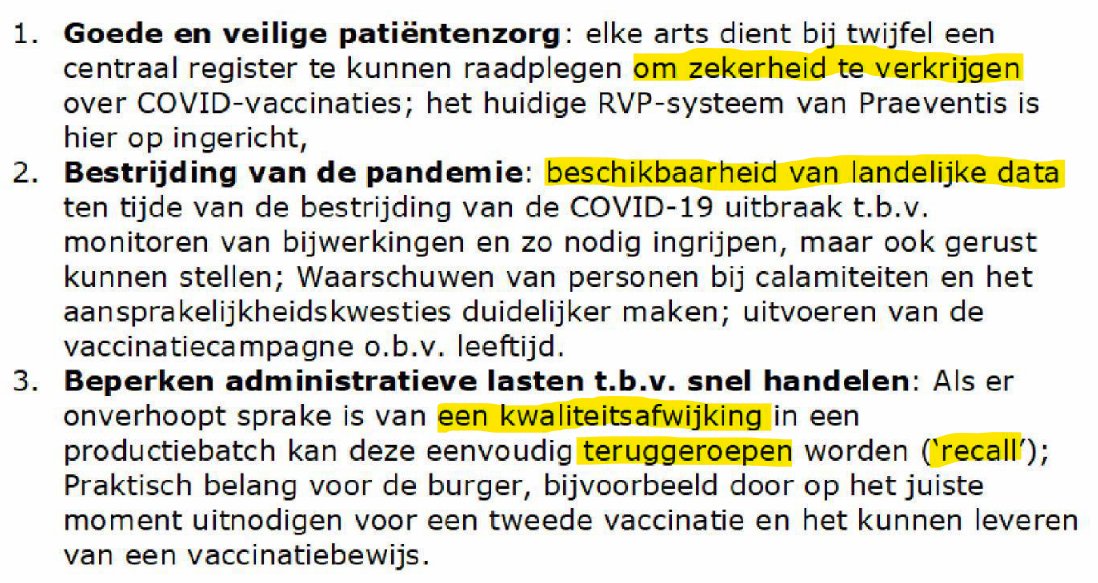
In het document wordt een tijdlijn geschetst voor de keuze van Praeventis als centraal vaccinatieregister (CVR) oftewel het Covid Informatie en Monitoring Systeem (CIMS). En de doelen worden gegeven, zie figuur 1. Daarin wordt de volledigheid van de data als eerste genoemd en de beschikbaarheid van de data als tweede. Beste belangrijk dus. Jammer dat dat deel dan mislukte, hè?
Binnen de partijen bij het @RIVM die de systeemkeuze voor het landelijke register moesten maken was er direct bij de start al een sterke voorkeur voor het hergebruik van het bekende en bestaande Praeventis. Dat is het systeem dat voor het RijksVaccinatieProgramma (RVP) wordt gebruikt.
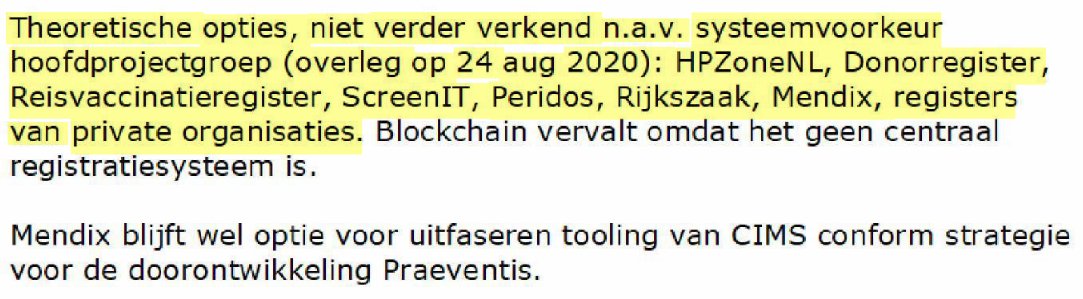
Zo lezen we dan ook dat een onderzoek naar alternatieve systemen wordt stopgezet vanwege de voorkeur van de hoofdprojectgroep voor Praeventis, zie figuur 2. Op datzelfde moment kreeg Hugo de opmerking voorgelegd "Er is geen andere keus dan Praeventis." Zo werkt beïnvloeding dus!
Die hoofdprojectgroep kan natuurlijk niet zomaar, op basis van onderbuikgevoel of misschien wel op basis van ons-kent-ons of het ontvangen van allerlei mistige douceurtjes, een keuze voor een systeem maken. Daar zijn allerlei regels voor, ook in tijden vam crisis! Dus leden van de hoofdprojectgroep moeten zichzelf indekken.
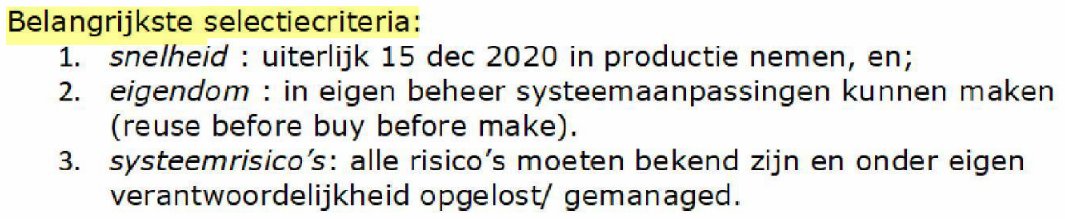
En dat deden ze door het opstellen van slimme selectiecriteria, zie figuur 3. Met die selectiecriteria werden alle alternatieven behalve Praeventis opzij gezet: die alternatieven konden simpelweg niet voldoen aan de criteria. Wisten ze natuurlijk zelf ook, dus goed nagedacht!
Op 24 augustus 2020 maakte volgens dit document de hoofdprojectgroep dan ook de keuze voor Praeventis. Overigens had de stuurgroep CIMS dat tien dagen daardoor op 13 augustus 2020 al gedaan. De powers-that-be wilden het systeem-dat-we-kennen van die mensen-die-we-aardig-vinden. Zo gaat dat.
Ik breng nog maar even in herinnering dat een jaar daarvoor (in 2019) het project "Vernieuwing Praeventis" door het BIT, het Bureau ICT-toetsing van het Ministerie van Binnenlandse Zaken en Koninkrijksrelaties, was afgeschoten, omdat het programma bij @RIVM kennis en vaardigheden ontbeert om de realisatie van een nieuw IT-systeem goed aan te kunnen sturen.
Kennis en vaardigheden opdoen kost natuurlijk tijd en vraagt om een flinke investering. Waren deze kennis en vaardigheden een jaar later wel aanwezig bij het RIVM? Want die keuze voor Praeventis en het vernieuwen daarvan in dit project werd dankzij covid-19 in 2020 gewoon doorgevoerd, ondanks het negatief advies uit 2019.
Zo lezen we in de projectbrief dan ook dat de bekostiging van het bouwen van het centrale register uit de pot komt van dat eerder in 2019 afgeschoten project "Doorontwikkeling Praeventis." In 2021 werd uiteindelijk zo'n € 50 miljoen uitgegeven (zie x.com/Leon1969/status/183535… en figuur 4), een toename van 2.000% met betrekking tot de omzet op het project Praeventis. Sommige mensen hebben echt een hele vette bonus gekregen. Trust me.
Verder wordt in de projectbrief de governance structuur neergelegd. Er komt een "Stuurgroep Registratie" (WhatsApp “CIMS stuurgroep”), verantwoordelijk voor de project- en systeemrisico’s CIMS en voor issues in de dataflow van bronsystemen naar CIMS (goh...). Er komt een "Programmateam Doorontwikkeling Praeventis" (WhatsApp “Doorontwikkeling PV”), niet toevallig dezelfde naam als dat afgeschoten project van een jaar eerder, dat de projecten voorbereidt. En er komt een "Projectstuurgroep CIMS" (WhatsApp “CIMS projectgroep”) dat als eerste escalatieniveau dient. En alle betrokkenen gebruiken WhatsApp “CIMS teambuilding” voor sociale berichten die bijdragen aan de samenwerking. Wie vraagt die WhatsApp berichten even op uit deze verschillende groepen? Lijkt me best interessant om te lezen.
Tenslotte worden in het document nog wat projectrisico's opgeschreven. Een van die risico's is dat het "Te bouwen systeem wordt het primaire registratie-systeem voor COVID vaccinatie en vaccinaties worden nergens anders vastgelegd. Hierop is het systeem onvoldoende ontworpen." Lastig dat CIMS voor een deel van de registraties dus precies dát systeem is geworden, de primaire bron. Oops. Wat nu?
Een ander risico is dat er "Onvoldoende contractuele ruimte [is] met huidige leverancier" en de oplossing is daar dan het pragmatische "Niet voldoen aan compliance." Hoppa! Die facuren kunnen eruit en betaald worden. De schoorsteen moet wel roken tenslotte.
Dus dank aan @Transparangst voor het doorzetten van dit belangwekkende document!


De ambtenarij kent zo haar eigen mores. In tijden van chaos, en dan bedoel ik grote maatschappelijke problemen, ontstaan er ontzettend veel mogelijkheden. Daar wordt dan gebruik van gemaakt. Door iedereen en dus ook bij het RIVM.
In 2020:
- juni, start met voorbereidingen Praeventis als Landelijke registratie
- juli, voorbereiding CIMS project op basis van de systemen voor het RVP
- augustus, voor de vorm wordt onderzoek gedaan naar alternatieven, dat wordt een week later afgesloten met een negatief advies
- september, Hugo de Jonge krijgt beslisnota op z'n bureau waarin Praeventis als enige oplossing wordt neergezet
- okt-nov, groot IT project verbouwen Praeventis in de steigers gezet, vulling CIMS moet minimaal 95% zijn om functies te kunnen uitvoeren
- december, use cases 0.6 opgesteld, nodig voor oa DPIA (achteraf)
In 2021:
- januari, live gang CIMS 1.0 met veel handmatige verwerkingen, werk aan use cases 2.0, aantal meldingen Lareb drie maal hoger dan voorzien, groot aantal ernstige bijwerkingen in verpleeghuizen
- februari, CIMS 2.0 live, start sterk uiteenlopen administratie EPI en CIMS, publiceren van schattingen over vaccinatie graad en effectiviteit wordt geformaliseerd door ALLE externe communicatie via EPI te laten lopen (SPOC)
- maart, start project verbeteren data kwantiteit en kwaliteit CIMS, problemen worden groter en groter
- april, de Jonge ontploft bij meeting met top ambtenaren vanwege de onbetrouwbaarheid administratie, het verwijderen van registraties wordt tot beleid verheven, zodat ontbrekende dossiers kunnen worden witgewassen (it's not a bug, it's a feature!), projectleider verbeteren data CIMS kapt ermee
- mei, Lareb geeft aan het werk niet meer aan te kunnen, meer dan zes voudig aantal meldingen dan voorzien, ernstige bijwerkingen worden niet onderzocht, huilende mensen aan de telefoon bij RIVM
- juni, van bijna de helft van alle vaccinaties mist de data in de Landelijke registratie, toename uitschrijvingen van mensen uit CIMS met beroep op AVG... etc etc etc.
Enfin. You catch my drift. Er werd bijna € 50 miljoen uitgegeven in 2021. Een toename voor Praeventis werk met 2.000%.
Degenen die aan de basis stonden in juni-augustus 2020 hebben dus een vette bonus gekregen. Project geslaagd!
5
71
137
2,782

14 Sep 2024
ปิดกล้องวันนี้ ยังไงมัมมี้ก็ไม่ลาออกจาก
" โครงการสานฝันเพื่อลูกมุ่งสู่แสงเหนือ "
หา projectbrief แป๊ป
จะไปทะเลาะกับคุณ x เค้าด้วย ขยันลิมิตมากก บาปนะบอกเลอ
Q40 U STEAL MY HEART
#ปิดกล้องJACKANDJOKER
1
7
6
110

20 Mar 2024
Writing a strong and coherent project brief is imperative to the ultimate success of your project. So, here we’ll go through how to write a project brief: buff.ly/4cm0PwE #ProjectBrief #ProjectManagement #PMO #ProjectManagementOffice #PMOSoftware #PMOTools #SycamoreGapPMO

1
2
22

23 May 2022
This week I talk about the different types of Briefs you might need for a project.
kitchensinkwp.com/e430 #GTD #Community #ProjectBrief #ProjectManagement

2

13 Apr 2022
Creative briefs can play an important role in helping you secure new clients 🎯
If you have difficulty in preparing client briefs, here’s @iamjankoch explaining the whole process and helping you understand why it’s so important ➡ bit.ly/3NW2Inx
#Agency #ProjectBrief
2
2
7 Apr 2022
Are you finding it difficult to prepare creative briefs❓
Creative briefs can help you standout from the competition ⭐
Watch Jan explain the importance of preparing creative briefs & guide you through the process ➡ bit.ly/3NW2Inx
#Agency #ProjectBrief #DigitalAgency
1
2
2

2 Dec 2021
Eerst een projectbrief naar het projectboard sturen om een decision to fund te krijgen om een programmaleider aan te stellen om een projectleider in te huren om het project te gaan bedenken!
1

📝 Our new #ProjectBrief, 'Governance and regulation models to manage disruptive mobility services', offers a consolidation of findings and recommendations from project #GECKO (@H2020GECKO).
📰 Read more on how cities can adapt to the #FutureOfMobility⬇️
bit.ly/3w6EC0N
4

28 Sep 2021
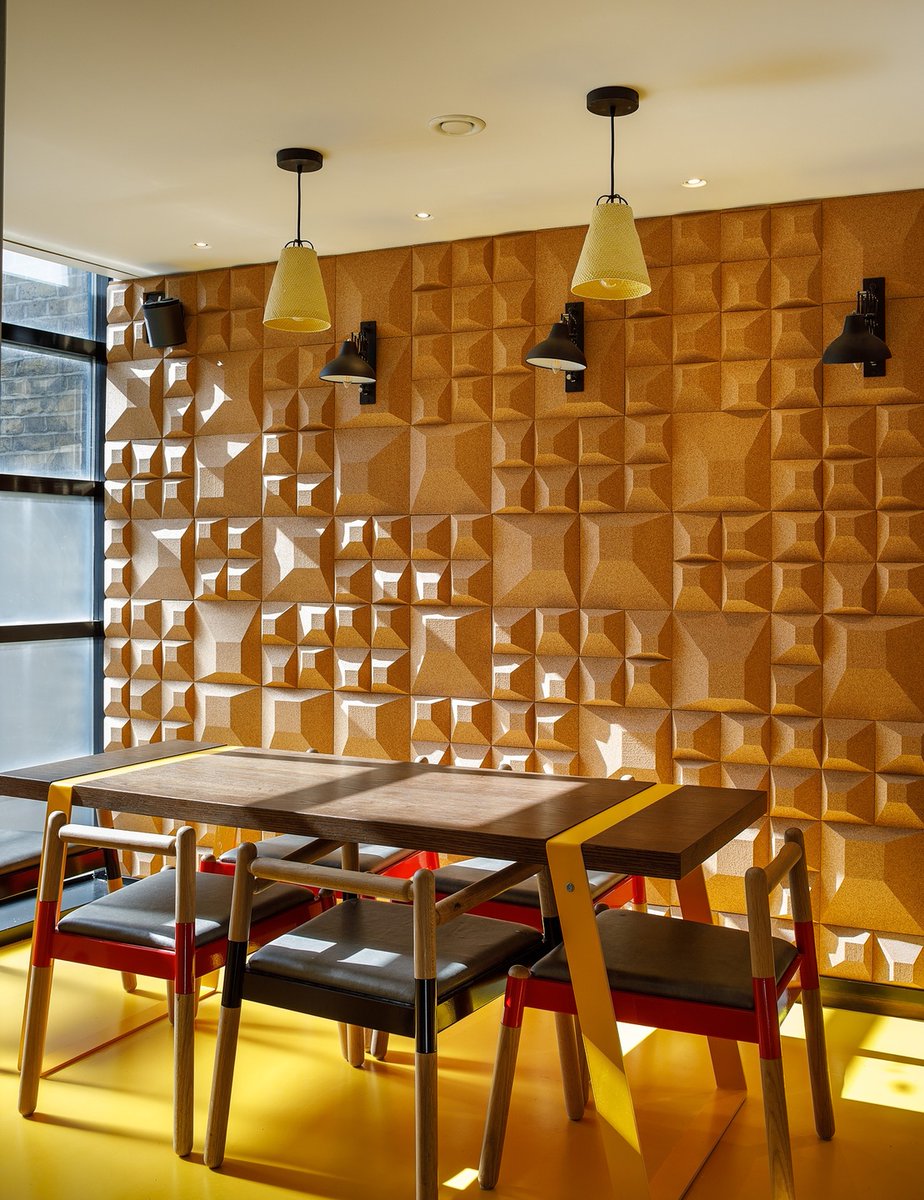
PROJECT / Branded Office Space
2/3 - The brief was to functionally and aesthetically reinvent each office to accommodate for the various departments, key to this was a strong organisational approach and clear focus on the final vision.
#officedesign
#projectbrief
2
1

25 Aug 2021
IT project brief is the first step in getting a successful app off the ground. Go to our newest blog post and learn how to make a good one: bit.ly/3B7G987
#appdevelopment #projectmanagement #projectbrief #softwaredevelopment #ITprojects
1
2

28 May 2021
Recruiting a great #architect should be your first point of call before you start a #buildingproject, but before you make contact, you'll need to draw up a #projectbrief. Ready to make start? Use our wish list to get your project started. hubs.ly/H0PbCWD0 #design
1
1

11 May 2021
#Shalaye #Projectbrief It also helps with teamwork by simplifying the decision-making process; by enabling the team to make evaluated decisions to know the specific theory that works.
#design
#illustration #designer #adobe #project #AI #COVID19 #figma
2
4
11 May 2021
#Shalaye #projectbrief A brief is important to provide an understanding of a project objective, scope, and direction.
It's a guiding document that explains the rationales behind every idea to formulate calculated choices.
#design #productdesign #designer #illustration #figma
1
5
9

29 Apr 2021
To ensure the successful conclusion of #OEMProjects, it is important for #SystemSuppliers to involve their partners from the very outset. Find out what a perfect #ProjectBrief looks like in our white paper: ow.ly/B3zw50EzCS5
#VehicleDevelopment #EngineeringServiceProvider

2